EonNAS 850-1 - NAS Infortrend - Free user manual and instructions
Find the device manual for free EonNAS 850-1 Infortrend in PDF.


User questions about EonNAS 850-1 Infortrend
0 question about this device. Answer the ones you know or ask your own.
Ask a new question about this device
Download the instructions for your NAS in PDF format for free! Find your manual EonNAS 850-1 - Infortrend and take your electronic device back in hand. On this page are published all the documents necessary for the use of your device. EonNAS 850-1 by Infortrend.
USER MANUAL EonNAS 850-1 Infortrend
Using Symantec Storage Foundation HA for Host Failover with Infortrend Subsystem
Application Note
Abstract:
This document describes how to use Symantec Storage Foundation HA for Host Failover with Infortrend Subsystem
Table of Contents
Products Covered in This Document 3
Introduction....3
About Storage Foundation and High Availability 4
About Service Groups....4
Scenario....6
System Configuration....7
System Components....7
Hardware Requirement: 7
Software Requirement: 7
System Architecture 7
Storage Configuration 8
RAID Configuration....8
SFHA Configuration 8
Veritas Cluster Server Configuration....8
Storage Foundation Configuration 12
SFHA Administration 14
CLI Commands....14
Conclusion 16
Reference....16
Products Covered in This Document
This application note applies to the following product models:
ESDS-B24F-R2852-6
ESDS-S12F-R2850
ESDS-S12F-R2851
ESDS-S16F-R2850
ESDS-S16F-R2851
ESDS-S16F-R2852-6
ESDS-S24F-R2850
ESDS-S24F-R2851
ESDS-S48F-R2852-6
ESVA-F75-2830
Further compatibility information can be found at Symantec's Hardware Compatibility List (HCL): https://sort.symantec.com/hclcentral/diskarray
For more information regarding subsystem configuration, please check the User Manual included with the storage system or visit Infortrend's official website for more product solutions: http://www.infortrend.com
Introduction
This application note provides insight into how to implement Symantec's Storage Foundation and High Availability (SFHA) with Infortrend subsystems.
The purpose of this document is to allow readers be able to understand and how to set up SFHA with Infortrend subsystems. Provided in a step-by-step fashion, readers can easily follow the steps in this application note to fulfill host failover with Infortrend subsystems.
With SFHA enabled on an Infortrend subsystem, your IT environments are kept more resilient. Therefore, SFHA and Infortrend subsystems strive to provide a solution to accomplish HA protection by cluster technology and advanced subsystem design.
Using Symantec Storage Foundation HA for Host Failover with Infortrend Subsystem
About Storage Foundation and High Availability
Symantec's Storage Foundation High Availability solutions protect data by keeping applications, data, and infrastructure resilient and available for the most critical services in your data center.
Veritas Storage Foundation by Symantec includes Veritas File System by Symantec (VxFS) and Veritas Volume Manager by Symantec (VxVM) with various feature levels.
The Veritas File System is a high-performance journaling file system that provides easy management and quick-recovery for applications. Veritas File System delivers scalable performance, continuous availability, increased I/O throughput, and structural integrity.
Veritas Volume Manager removes the physical limitations of disk storage. You can configure, share, manage, and optimize storage I/O performance online without interrupting data availability. Veritas Volume Manager also provides easy-to-use, online storage management tools to reduce downtime.
You add high availability functionality to Storage Foundation HA by installing Veritas Cluster Server software.
Veritas Cluster Server by Symantec (VCS) is a clustering solution that provides the following benefits:
■ Reduces application downtime
■ Facilitates the consolidation and the failover of servers
■ Manages a range of applications in heterogeneous environments
About Service Groups
A service group is a virtual container that contains all the hardware and software resources that are required to run the managed application.
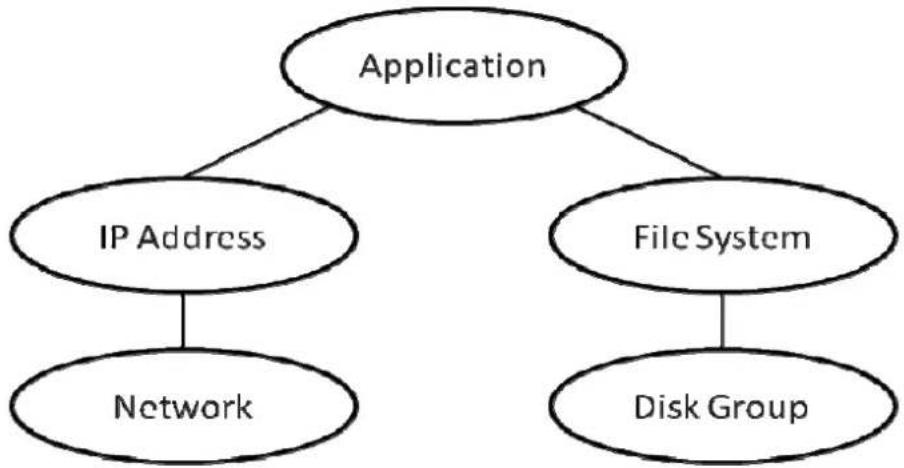
Service groups allow VCS to control all the hardware and software resources of the managed application as a single unit. When a failover occurs, resources do not fail over individually; the entire service group fails over. If more than one service group is on a system, a service group can fail over without affecting the others. Figure 1 illustrates a typical service group.
Using Symantec Storage Foundation HA for Host Failover with Infortrend Subsystem
flowchart
graph TD
    A["Application"] --> B["IP Address"]
    A --> C["File System"]
    B --> D["Network"]
    C --> E["Disk Group"]
Figure 1: Typical database service group
A single node can host any number of service groups, each providing a discrete service to networked clients. If the server crashes, all service groups on that node must be failed over elsewhere.
Using Symantec Storage Foundation HA for Host Failover with Infortrend Subsystem
Scenario
This application mainly focuses on how to protect applications from a fault in a node of a two-node Veritas Cluster Server cluster. To simulate a host failover scenario, we need two servers using the same Infortrend storage. Once one node fails, the service group will automatically failover to another node as figure 2 shows. Therefore, SFHA can provide high availability protection.

flowchart
graph TD
    A["Application"] -->|IP, DB, NIC| B["SFHA-1"]
    A -->|DG| C["SFHA-2"]
    B -->|eth2, eth3| D["Infortrend Subsystem"]
    C -->|eth2, eth3| D
    E["Cloud with two devices"] -.-> A
    E -.-> C
    style A fill:#f9f,stroke:#333
    style B fill:#ccf,stroke:#333
    style C fill:#cfc,stroke:#333
    style D fill:#fcc,stroke:#333
    linkStyle 0 stroke:#ff0,stroke-width:2px
    linkStyle 1 stroke:#ff0,stroke-width:2px
    linkStyle 2 stroke:#ff0,stroke-width:2px
    linkStyle 3 stroke:#ff0,stroke-width:2px
    linkStyle 4 stroke:#ff0,stroke-width:2px
    linkStyle 5 stroke:#ff0,stroke-width:2px
    linkStyle 6 stroke:#ff0,stroke-width:2px
    linkStyle 7 stroke:#ff0,stroke-width:2px
    linkStyle 8 stroke:#ff0,stroke-width:2px
    linkStyle 9 stroke:#ff0,stroke-width:2px
    linkStyle 10 stroke:#ff0,stroke-width:2px
    linkStyle 11 stroke:#ff0,stroke-width:2px
    linkStyle 12 stroke:#ff0,stroke-width:2px
    linkStyle 13 stroke:#ff0,stroke-width:2px
    linkStyle 14 stroke:#ff0,stroke-width:2px
    linkStyle 15 stroke:#ff0,stroke-width:2px
    linkStyle 16 stroke:#ff0,stroke-width:2px
    linkStyle 17 stroke:#ff0,stroke-width:2px
    linkStyle 18 stroke:#ff0,stroke-width:2px
    linkStyle 19 stroke:#ff0,stroke-width:2px
    linkStyle 20 stroke:#ff0,stroke-width:2px
Figure 2: Host Failover Scenario
Using Symantec Storage Foundation HA for Host Failover with Infortrend Subsystem
System Configuration
This section will list hardware and software requirement and configuration of SFHA and Infortrend RAID. In addition, it will introduce the system architecture as well.
System Components
Hardware Requirement:
● 2 (64-bit) SUSE Linux Enterprise Server v11.0 SP1 SFHA servers
● 3 NIC interfaces per server
● 4 FC/iSCSI ports per server
Software Requirement:
● Storage Foundation and High Availability Solutions (SFHA) 6.0
System Architecture
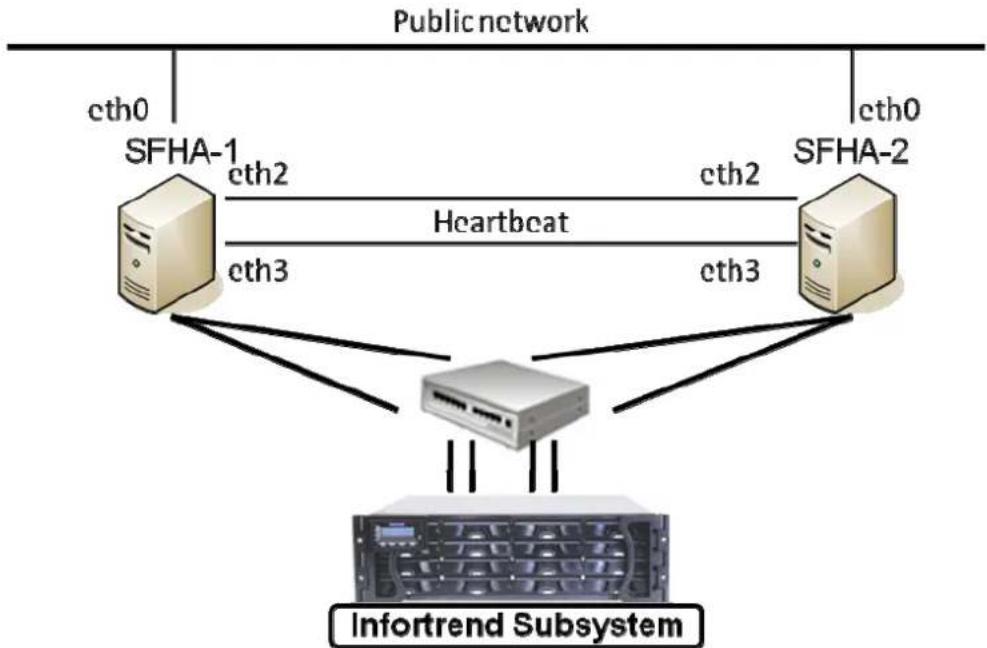
Cluster name : SFHA-Infortrend Cluster id : 7
flowchart
graph TD
    A["SFHA-1"] -->|cth2| B["Heartbeat"]
    A -->|cth3| C["Infortrend Subsystem"]
    D["SFHA-2"] -->|cth2| B
    D -->|cth3| C
    A -->|cth0| E["Public network"]
    D -->|cth0| E
Figure 3: System Topology
In order to fulfill local cluster service group failover, we create a two-node local cluster with shared Infortrend storage as figure 3 shows.
Using Symantec Storage Foundation HA for Host Failover with Infortrend Subsystem
Storage Configuration
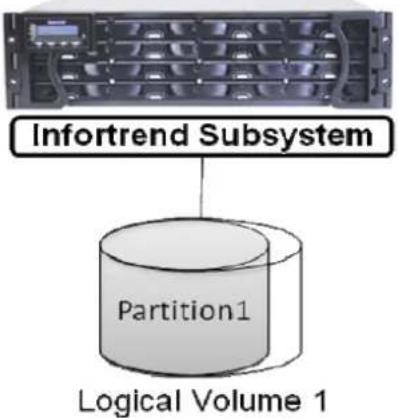
In this case, we create a RAID-5 LD first. And then, put it into a LV. Later, create a partition and share it to the two servers in the local cluster.
RAID Configuration
text_image
Infortrend Subsystem Partition1 Logical Volume 1Figure 4: RAID Configuration
Steps:
- Create a RAID-5 LD
- Create a LV
- Edit LUN mapping
SFHA Configuration
Veritas Cluster Server Configuration
To fulfill local service group failover, we must install VCS in advance. Here is the command and specific steps.
- Install VCS
SFHA-2:\~ # /opt/VRTS/install/installsfha -configure SFHA-1 SFHA-2
SFHA-2:\~ # /opt/VRTS/install/installsfha -configure SFHA-1 SFHA-2
Using Symantec Storage Foundation HA for Host Failover with Infortrend Subsystem
Veritas Storage Foundation and High Availability 6.0 RP1 Configure Program SFHA-1 SFHA-2
Logs are being written to /var/tmp/installsfha-201306051500nzw while installsfha is in progress
Verifying systems: 100%
Estimated time remaining: (mm:ss) 0:00
5 of 5
Checking system communication .... Done
Checking release compatibility .... Done
Checking installed product .... Done
Checking platform version .... Done
Performing product prechecks .... Done
System verification checks completed
Systems have difference in clock by more than 5 seconds
System clocks can be synchronized using one or more Network Time Protocol (NTP) servers
Do you want to synchronize system clocks with NTP server(s)? [y,n,q] (y) n
I/O Fencing
It needs to be determined at this time if you plan to configure I/O Fencing in enabled or disabled mode, as well as help in determining the number of network interconnects (NICS) required on your systems. If you configure I/O Fencing in enabled mode, only a single NIC is required, though at least two are recommended.
A split brain can occur if servers within the cluster become unable to communicate for any number of reasons. If I/O Fencing is not enabled, you run the risk of data corruption should a split brain occur. Therefore, to avoid data corruption due to split brain in CFS environments, I/O Fencing has to be enabled.
If you do not enable I/O Fencing, you do so at your own risk
See the Administrator's Guide for more information on I/O Fencing
Do you want to configure I/O Fencing in enabled mode? [y,n,q,?] (y) n
Installer has detected that VCS is already configured. If you re-configure VCS, you will lose all the current configurations in main.cf. And you need to offline all the resources manually before proceeding.
If you select not to re-configure, VCS configurations will not be changed and installer will start the processes with existing configuration. Make sure all the current configurations are compatible with 6.0 RP1.
Do you want to re-configure VCS? [y,n,q] (n) y
Using Symantec Storage Foundation HA for Host Failover with Infortrend Subsystem
To configure VCS, answer the set of questions on the next screen.
When [b] is presented after a question, 'b' may be entered to go back to the first question of the configuration set.
When [?] is presented after a question, '?' may be entered for help or additional information about the question.
Following each set of questions, the information you have entered will be presented for confirmation. To repeat the set of questions and correct any previous errors, enter 'n' at the confirmation prompt.
No configuration changes are made to the systems until all configuration questions are completed and confirmed.
Press [Enter] to continue:
To configure VCS for SFHA the following information is required:
A unique cluster name
Two or more NICs per system used for heartbeat links
A unique cluster ID number between 0-65535
One or more heartbeat links are configured as private links
You can configure one heartbeat link as a low-priority link
All systems are being configured to create one cluster.
Enter the unique cluster name: [q,?] SFHA-Infortrend
1) Configure heartbeat links using LLT over Ethernet
2) Configure heartbeat links using LLT over UDP
3) Automatically detect configuration for LLT over Ethernet
b) Back to previous menu
How would you like to configure heartbeat links? [1-3,b,q,?] (1) 1
Discovering NICs on SFHA-1 .... Discovered eth0 eth1 eth2 eth3 eth4 eth5
Enter the NIC for the first private heartbeat link on SFHA-1: [b,q,?] (eth0) eth2
Would you like to configure a second private heartbeat link? [y,n,q,b,?] (y)
Enter the NIC for the second private heartbeat link on SFHA-1: [b,q,?] (eth0) eth5
Would you like to configure a third private heartbeat link? [y,n,q,b,?] (n)
Do you want to configure an additional low-priority heartbeat link? [y,n,q,b,?] (n)
Are you using the same NICs for private heartbeat links on all systems? [y,n,q,b,?] (y)
Checking media speed for eth2 on SFHA-1 1000Mb/s
Checking media speed for eth5 on SFHA-1 1000Mb/s
Checking media speed for eth2 on SFHA-2 1000Mb/s
Checking media speed for eth5 on SFHA-2 1000Mb/s
Enter a unique cluster ID number between 0-65535: [b,q,?] (4593)
The cluster cannot be configured if the cluster ID 4593 is in use by another cluster.
Installer can perform a check to determine if the cluster ID is duplicate. The check will take less than a minute to complete.
Would you like to check if the cluster ID is in use by another cluster? [y,n,q] (y)
Checking cluster ID .... Done
Duplicated cluster ID detection passed. The cluster ID 4593 can be used for the cluster.
Press [Enter] to continue:
Using Symantec Storage Foundation HA for Host Failover with Infortrend Subsystem
Cluster information verification:
Cluster Name: SFHA-Infortrend
Cluster ID Number: 4593
Private Heartbeat NICs for SFHA-1:
    link1=eth2
    link2=eth5
Private Heartbeat NICs for SFHA-2:
    link1=eth2
    link2=eth5

Is this information correct? [y,n,q,?] (y)
The following data is required to configure the Virtual IP of the Cluster:
A public NIC used by each system in the cluster
A Virtual IP address and netmask

Do you want to configure the Virtual IP? [y,n,q,?] (n)
Veritas Cluster Server can be configured in secure mode
Running VCS in Secure Mode guarantees that all inter-system communication is encrypted, and users are verified with security credentials.
When running VCS in Secure Mode, NIS and system usernames and passwords are used to verify identity. VCS usernames and passwords are no longer utilized when a cluster is running in Secure Mode.
Would you like to configure the VCS cluster in secure mode? [y,n,q,?] (n)
The following information is required to add VCS users:
A user name
A password for the user
User privileges (Administrator, Operator, or Guest)
Do you wish to accept the default cluster credentials of 'admin/password'? [y,n,q] (y)
Do you want to add another user to the cluster? [y,n,q] (n)
VCS User verification:
User: admin Privilege: Administrators
Passwords are not displayed
Is this information correct? [y,n,q] (y)
The following information is required to configure SMTP notification:
The domain-based hostname of the SMTP server
The email address of each SMTP recipient
A minimum severity level of messages to send to each recipient
Do you want to configure SMTP notification? [y,n,q,?] (n)
Using Symantec Storage Foundation HA for Host Failover with Infortrend Subsystem
text_image
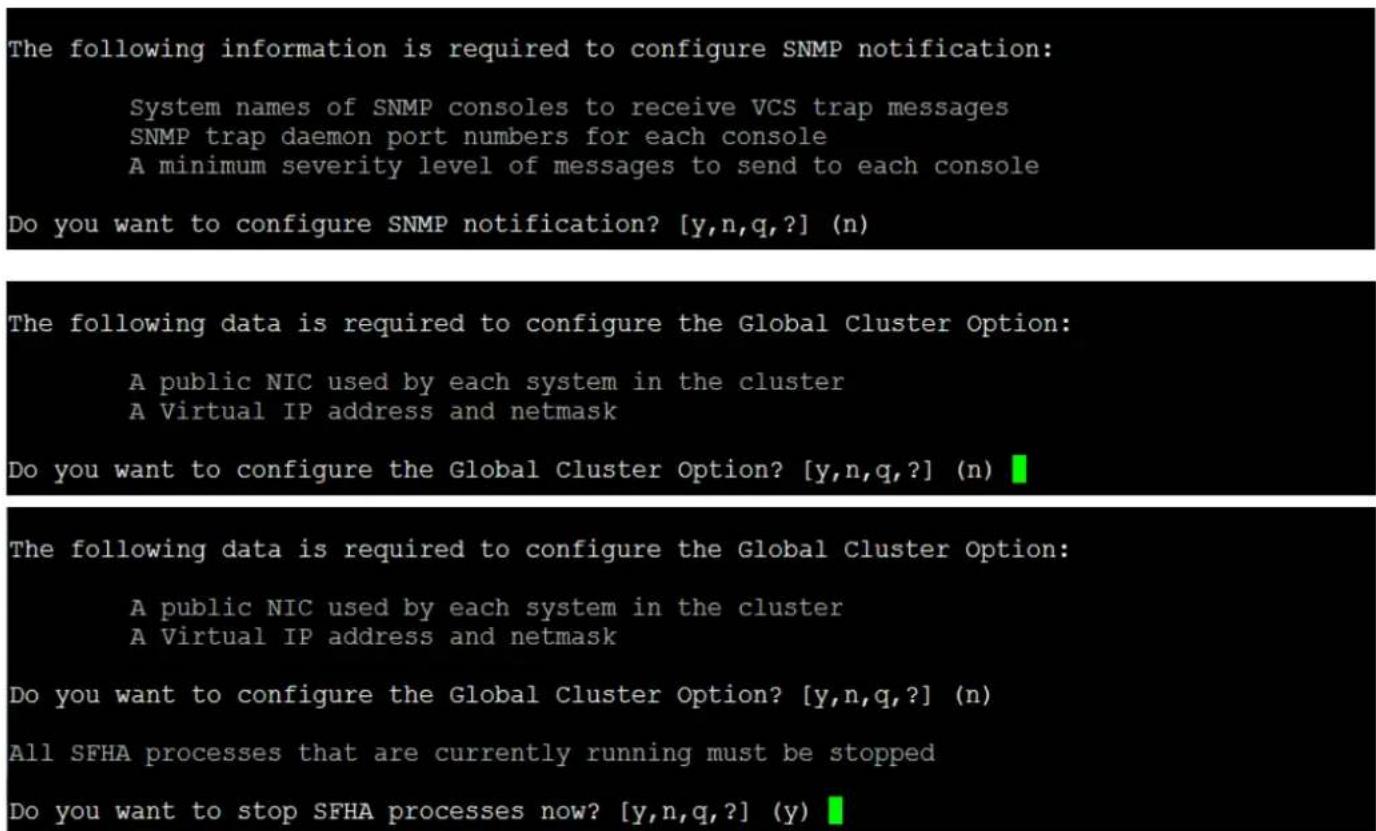
The following information is required to configure SNMP notification: System names of SNMP consoles to receive VCS trap messages SNMP trap daemon port numbers for each console A minimum severity level of messages to send to each console Do you want to configure SNMP notification? [y,n,q,?] (n) The following data is required to configure the Global Cluster Option: A public NIC used by each system in the cluster A Virtual IP address and netmask Do you want to configure the Global Cluster Option? [y,n,q,?] (n) The following data is required to configure the Global Cluster Option: A public NIC used by each system in the cluster A Virtual IP address and netmask Do you want to configure the Global Cluster Option? [y,n,q,?] (n) All SFHA processes that are currently running must be stopped Do you want to stop SFHA processes now? [y,n,q,?] (y)
flowchart
graph LR
    A["SFHA-2"] --> B["SFHA-1"]
    style A fill:#f9f,stroke:#333
    style B fill:#f9f,stroke:#333
Figure 5: System Connectivity View
After installing VCS correctly, you can see the system connectivity view by cluster explorer as figure 5 shows. Now, we have a two-node local cluster environment.
Storage Foundation Configuration
Owing to the cooperation between Infortrend and Symantec, Infortrend Fibre Channel storage can be found on Symantec's Array Support List (ASL). Once you install Storage Foundation, you are able to put the partition from Infortrend subsystem under VxVM control by the below commands.
For finding supported models, please check the link for HCL.
https://sort.symantec.com/hclcentral/diskarray
Using Symantec Storage Foundation HA for Host Failover with Infortrend Subsystem SFHA-1:\~ # vxdisk list
SFHA-1:~ # vxdisk list
DEVICE TYPE DISK GROUP STATUS
sda auto:none - - online invalid
sdb auto:none - - online invalid
SFHA-1:\~ # vxdisk scandisks
SFHA-1:\~ # vxdisk list
SFHA-1:~ # vxdisk scandisks
SFHA-1:~ # vxdisk list
DEVICE    TYPE    DISK    GROUP    STATUS
aluadisk0_1    auto:cdsdisk  -    -    online
sda    auto:none   -    -    online invalid
sdb    auto:none   -    -    online invalid
As the above screenshot shows, use the commands "vxdisk scandisks" to scan the Infortrend storage. In addition, you can use "vxdisk list" to make sure that SFHA identify Infortrend storage already. Until this step, you have finished the required installation.
Using Symantec Storage Foundation HA for Host Failover with Infortrend Subsystem
SFHA Administration
The Storage Foundation HA for host failover readiness scenario is simulated by introducing a fault that affects one node of the two-node cluster, which causes the application to failover to the other node of a two-node cluster. Hence, the section described below shows readers how to verify host failover in SFHA environment whether is applicable or not.
CLI Commands
Since we would like to verify storage foundation HA for host failover, we must create a service group first. Therefore, we create a service group called appsg. You can use hastatus –sum to check if your service group is online or not. Another way to check the service group status is by cluster manager GUI.
- Create a service group
| SFHA-1:/appdata # hastatus -sum | |||||
| -- SYSTEM STATE | |||||
| -- System | State | Frozen | |||
| A | SFHA-1 | RUNNING | 0 | ||
| A | SFHA-2 | RUNNING | 0 | ||
| -- GROUP STATE | |||||
| -- Group | System | Probed | AutoDisabled | State | |
| B | appsg | SFHA-1 | Y | N | ONLINE |
| B | appsg | SFHA-2 | Y | N | OFFLINE |
flowchart
graph TD
    A["appprocess"] --> B["appip"]
    A --> C["appmnt"]
    B --> D["appnic"]
    C --> E["appvol"]
    D --> F["appdg"]
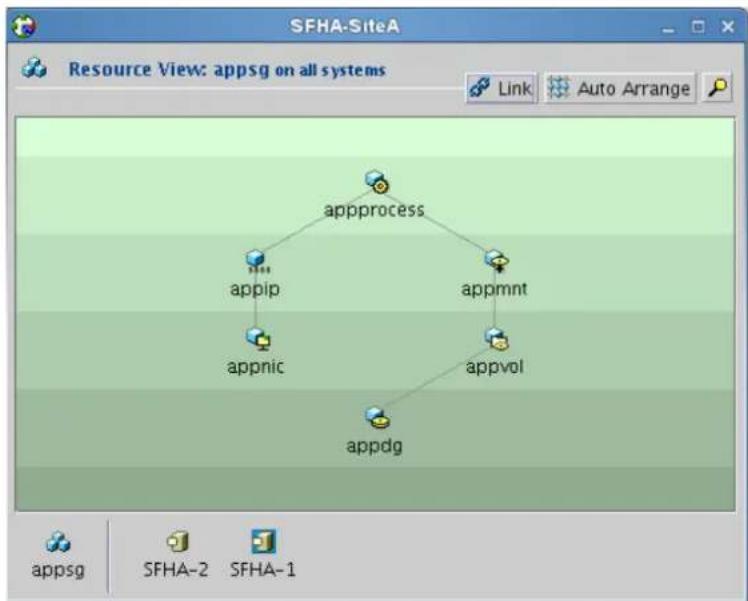
Figure 6: Service Group Resource View
After checking the service group is online, we use the command below to simulate a node shutdown and to see if it's applicable that the service group failover to the other node.
Using Symantec Storage Foundation HA for Host Failover with Infortrend Subsystem
- Switch service group
text_image
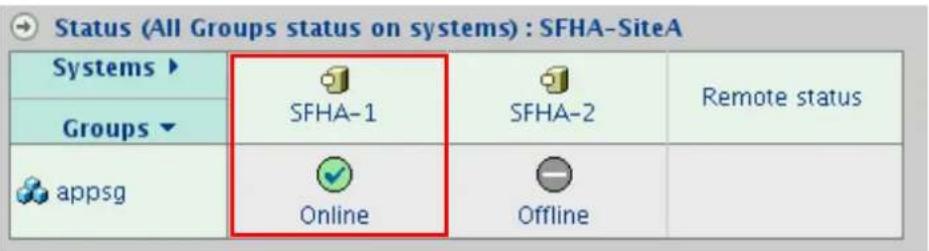
Status (All Groups status on systems) : SFHA-SiteA Systems ▶ SFHA-1 SFHA-2 Groups ▼ appsg Online Offline Remote statusFigure 7: Local Cluster Status View
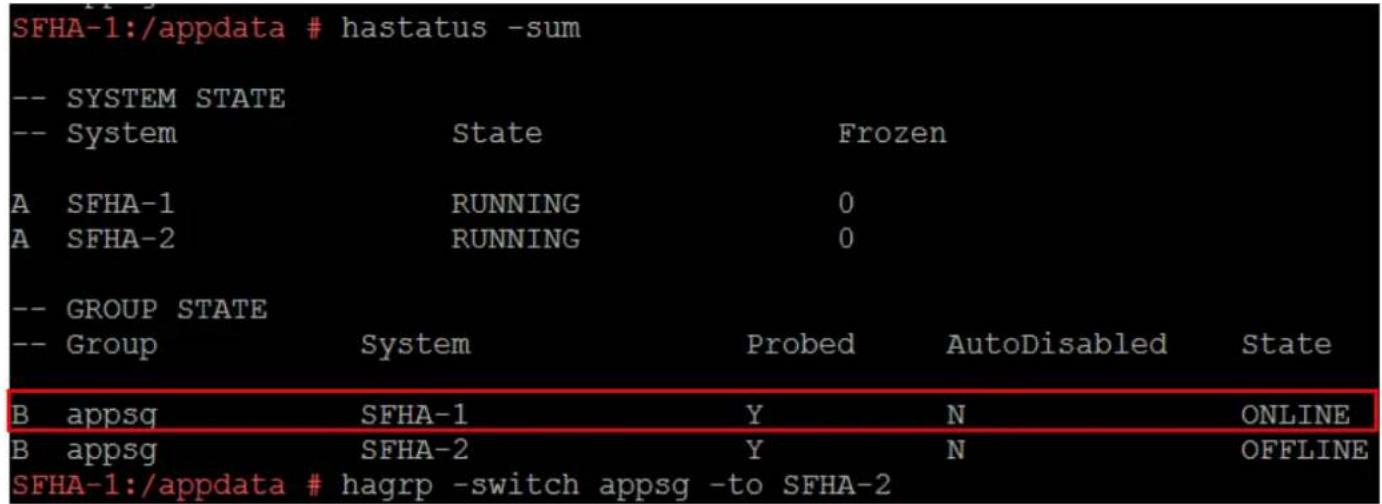
SFHA-1:\~ # hagrp -switch appsg -to SFHA-2
text_image
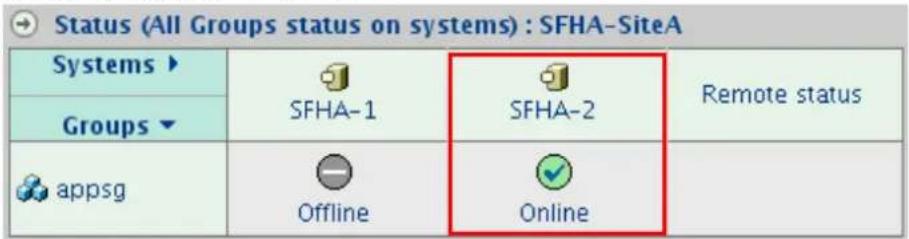
Status (All Groups status on systems) : SFHA-SiteA Systems ▶ SFHA-1 SFHA-2 Groups ▼ appsg Offline Online Remote statusFigure 8: Local Cluster Status View
| SFHA-2:~ # hastatus -sum | |||||
| -- SYSTEM STATE | |||||
| -- System State Frozen | |||||
| A SFHA-1 RUNNING 0 | |||||
| A SFHA-2 RUNNING 0 | |||||
| -- GROUP STATE | |||||
| -- Group System Probed AutoDisabled State | |||||
| B appsq SFHA-1 Y N OFFLINE | |||||
| B appsq SFHA-2 Y N ONLINE |
As the figure 7 and figure 8 show, the service group has a successful failover from SFHA-1 to SFHA-2.
Hence, if one server shutdown unexpectedly, SFHA and Infortrend subsystem can provide continuity for mission-critical applications.
Using Symantec Storage Foundation HA for Host Failover with Infortrend Subsystem
Conclusion
Storage Foundation and High Availability Solutions (SFHA) 6.0 is capable of monitoring the application over a number of servers, providing high availability protection by facilitating failover between nodes. Integrated with Infortrend storage, SFHA can build a local cluster with high availability whether in either host side or storage side.
With SFHA enabled on Infortrend storage, your IT environments are provided with flexibility in disaster recovery and business continuity for mission-critical applications.
Reference
For more information on SFHA, please check the following resources
- Veritas Storage Foundation™ and High Availability Installation Guide
- Veritas Cluster Server Installation Guide
- Veritas Cluster Server User's Guide
- Veritas™ Cluster Server Administrator's Guide