
IDS-3218W - Tracking Advantech - Free user manual and instructions
Find the device manual for free IDS-3218W Advantech in PDF.


| Product Type | 18.5" Industrial Panel Mount Monitor |
| Model Series | IDS-3218W |
| Display Size | 18.5" LED backlight |
| Resolution | 1366 x 768 (HD) |
| Brightness | 300 cd/m² |
| Contrast Ratio | 1000:1 |
| Viewing Angle | 85°/85° (H), 80°/80° (V) |
| Response Time | 5 ms |
| Backlight Life | 50,000 hours |
| Touchscreen Options | 5-wire resistive or projected capacitive |
| Inputs | VGA, DVI-D, HDMI, 12 VDC jack |
| Touch Interface | USB (resistive), USB + RS-232 (resistive), USB (capacitive) |
| Power Supply | 12 VDC, 5A (optional adapter) |
| Operating Temperature | 0 to 55 °C |
| Storage Temperature | -20 to 60 °C |
| Humidity | 90% @ 40 °C, non-condensing |
| Dimensions (W×H×D) | 466.6 × 307.5 × 56.1 mm (approx.) |
| Net Weight | 5 kg |
| Mounting Options | Rear mount, VESA 75×75 / 100×100 mm |
| OSD Controls | Menu, Up, Down, Auto, Power |
| Compliance | CE, FCC Class A, FM, CCC |
| Warranty | 2 years |
| Cleaning | Disconnect power; use damp cloth; no liquid detergents |
| Safety | Do not open; keep away from moisture; use only specified power adapter |
| Accessories Included | VGA cable, USB cable, panel mount clamps, cable clamp, power adapter (on request) |
Frequently Asked Questions - IDS-3218W Advantech
User questions about IDS-3218W Advantech
0 question about this device. Answer the ones you know or ask your own.
Ask a new question about this device
Download the instructions for your Tracking in PDF format for free! Find your manual IDS-3218W - Advantech and take your electronic device back in hand. On this page are published all the documents necessary for the use of your device. IDS-3218W by Advantech.
USER MANUAL IDS-3218W Advantech
natural_image
Illustration of four electronic circuit boards with white outlines on a purple background, no text or symbols present.IDS-3218W Series
18.5" Industrial Panel Mount Monitor
Copyright
The documentation and the software included with this product are copyrighted 2018 by Advantech Co., Ltd. All rights are reserved. Advantech Co., Ltd. reserves the right to improve the products described in this manual at any time without notice. No part of this manual may be reproduced, copied, translated, or transmitted in any form or by any means without the prior written permission of Advantech Co., Ltd. The information provided in this manual is intended to be accurate and reliable. However, Advantech Co., Ltd. assumes no responsibility for its use, nor for any infringements of the rights of third parties that may result from its use.
Acknowledgements
Intel and Pentium are trademarks of Intel Corporation.
Microsoft Windows and MS-DOS are registered trademarks of Microsoft Corp.
All other product names or trademarks are properties of their respective owners.
Product Warranty (2 years)
Advantech warrants the original purchaser that its products will be free from defects in materials and workmanship for two years from the date of purchase.
This warranty does not apply to any products that have been repaired or altered by persons other than repair personnel authorized by Advantech, or that have been subject to misuse, abuse, accident, or improper installation. Advantech assumes no liability for the consequence of such events under the terms of this warranty.
Because of Advantech's high quality-control standards and rigorous testing, most customers never need to use our repair service. If an Advantech product is defective, it will be repaired or replaced at no charge during the warranty period. For out-of-warranty repairs, customers will be billed according to the cost of replacement materials, service time, and freight. Please consult your dealer for more details.
If you suspect your product is defective, follow the steps outline below.
-
Collect all information about the problem encountered (for example, CPU speed, Advantech products used, other hardware and software used). Note anything abnormal and list any onscreen messages displayed when the problem occurs.
-
Call your dealer and describe the problem. Please have your manual, product, and any relevant information readily available.
-
If your product is diagnosed as defective, obtain a return merchandise authorization (RMA) number from your dealer. This allows us to process your return more quickly.
-
Carefully pack the defective product, a completed Repair and Replacement Order Card and a proof of purchase date (such as a photocopy of the sales receipt) in a shippable container. Products returned without a proof of purchase date are not eligible for warranty service.
-
Write the RMA number clearly on the outside of the package and ship it prepaid to your dealer.
Part Number: 2006321800 Edition 1
Printed in Taiwan September 2018
Declaration of Conformity
CE
This product has passed the CE test for environmental specifications. Test conditions for passing include the equipment being operated within an industrial enclosure. To protect the product from damage caused by electrostatic discharge or electromagnetic interference leakage, we strongly recommend using CE-compliant industrial enclosure products.
FCC Class A
This equipment has been tested and found to comply with the limits for a Class A digital device, pursuant to part 15 of the FCC Regulations. These limits are designed to provide reasonable protection against harmful interference when the equipment is operated in a commercial environment. This equipment generates, uses, and can radiate radio frequency energy and, if not installed and used in accordance with the instruction manual, may cause harmful interference to radio communications. Operation of this equipment in a residential area is likely to cause harmful interference. In such an event, users are required to correct the interference at their own expense.
FM
This equipment has passed the FM certification. According to the National Fire Protection Association, work sites are classified into different classes, divisions, and groups, based on hazard considerations. This equipment is compliant with the specifications for Class I, Division 2, Groups A, B, C, and D indoor hazards.
Technical Support and Assistance
- Visit the Advantech website at http://support.advantech.com to obtain the latest product information.
- Contact your distributor, sales representative, or Advantech's customer service center for technical support if you need additional assistance. Please have the following information ready before calling:
– Product name and serial number
– Description of your peripheral attachments
– Description of your software (operating system, version, application software, etc.)
– Comprehensive description of the problem - The exact wording of any error messages
Warnings, Cautions, and Notes
Warning! Warnings indicate conditions that if not observed can cause personal injury!

Caution! Cautions are included to help users avoid damaging the hardware or losing data.

Example:
"New batteries are at risk of exploding if incorrectly installed. Do not attempt to recharge, force open, or heat the battery. Replace the battery only with the same or equivalent type recommended by the manufacturer. Discard used batteries according to the manufacturer's instructions."
Note! Notes provide additional optional information.

Document Feedback
To facilitate improvements to this manual, we welcome comments and constructive criticism. Please send all feedback in writing to support@advantech.com
Safety Instructions
- Read these safety instructions carefully.
- Retain this user manual for future reference.
- Disconnect this equipment from all AC outlets before cleaning. Use a damp cloth to clean the equipment. Do not use liquid or spray detergents.
-
For pluggable equipment, the power outlet socket should be located near the equipment and easily accessible.
-
Protect this equipment from humidity.
-
Place this equipment on a reliable surface during installation. Dropping or letting it the equipment fall may cause damage.
-
The openings on the enclosure are for air convection. Protect the equipment from overheating. Do not cover the openings.
-
Ensure the power source voltage is correct before connecting the equipment to a power outlet.
-
Position the power cord away from high traffic areas. Do not place anything over the power cord.
-
All cautions and warnings on the equipment should be noted.
-
If the equipment is not used for a long time, disconnect it from the power source to avoid damage by transient overvoltage.
-
Never pour liquid into an opening. This may cause fire or electrical shock.
-
Never open the equipment. For safety reasons, the equipment should be opened only by qualified service personnel.
-
If one of the following occurs, have the equipment checked by service personnel:
■ The power cord or plug is damaged.
■ Liquid has penetrated into the equipment.
■ The equipment has been exposed to moisture.
The equipment is malfunctioning, or does not operate according to the user manual.
■ The equipment has been dropped and damaged.
■ The equipment shows obvious signs of breakage.
-
Do not store the equipment in an environment where the temperature fluctuates below -20 °C (-4 °F) or above 60 °C (140 °F). This may damage the equipment. The equipment should be stored in a controlled environment.
-
Batteries that are incorrectly replaced are at risk of exploding. Replace only with the same or equivalent type recommended by the manufacturer. Discard used batteries according to the manufacturer's instructions.
The sound pressure level at the operator's position, in keeping with IEC 704-1:1982, does not exceed 70 dB (A).
DISCLAIMER: These instructions are provided according to IEC 704-1. Advantech disclaims all responsibility for the accuracy of any statements contained herein.
Caution! For power adapter selection if a power adapter is not shipped with the unit, information regarding the adapter output rating (12 Vdc, 5 A min, or 18 W min) is provided in the user manual.

Chapter 1 Overview......1
1.1 Introduction ...... 2
1.2 Features 2
1.3 Applications.... 2
1.4 Product Images 2
1.5 Naming Rule 3
Chapter 2 System Setup....5
2.1 Specifications 6
2.2 Dimensions 7
Figure 2.1 IDS-3218WG/IDS-3218WR Dimensions .... 7
Figure 2.2 IDS-3218WP Dimensions....7
2.3 Rear Mount Assembly....8
2.4 Cable Clamp 9
2.5 Packing List.... 10
Chapter 3 Touchscreen....11
3.1 Onscreen Display (OSD) Functions 12
3.2 OSD Menu Details 13
3.2.1 Luminance 13
3.2.2 Image Setup.... 14
3.2.3 Color Temperature....16
3.2.4 OSD Setup.... 17
3.2.5 Extra.... 18
3.3 Touchscreen Drivers 19
3.4 Mounting Notes (for Projected Capacitive Touchscreens).... 20
3.4.1 Rear Bezel Touchscreen Mounting.... 20
3.4.2 Tail 21
Appendix A Troubleshooting 23
A.1 Introduction 24
A.2 Troubleshooting 24
Chapter 1
Overview
Introduction
Features
Applications
Product Photos
Naming Rule
1.1 Introduction
Advantech's IDS-3218W industrial panel mount monitor is designed to be quickly and easily integrated with Advantech embedded box computers, such as the ARK and DSA series products.
1.2 Features
■ 18.5" HD LED backlight panel reduces power consumption by 20 \~ 30%
0 \~ 55 °C operating temperature support
■ Specially designed 5-wire resistive touchscreen and projected capacitive touchscreen
■ All new mechanical design with integrated bracket for easy installation
■ Versatile mount options for rear mounting and VESA mounting (75 x 75 mm, 100 x 100 mm)
1.3 Applications
Kiosk/POI machine
■ Transportation machine
- Ticketing machine
Financial ATM
■ Entertainment/Gaming/Slot machine
■ HMI (human-machine interface) equipment controller monitor
■ Public communication machine
■ Public advertisement machine
1.4 Product Images
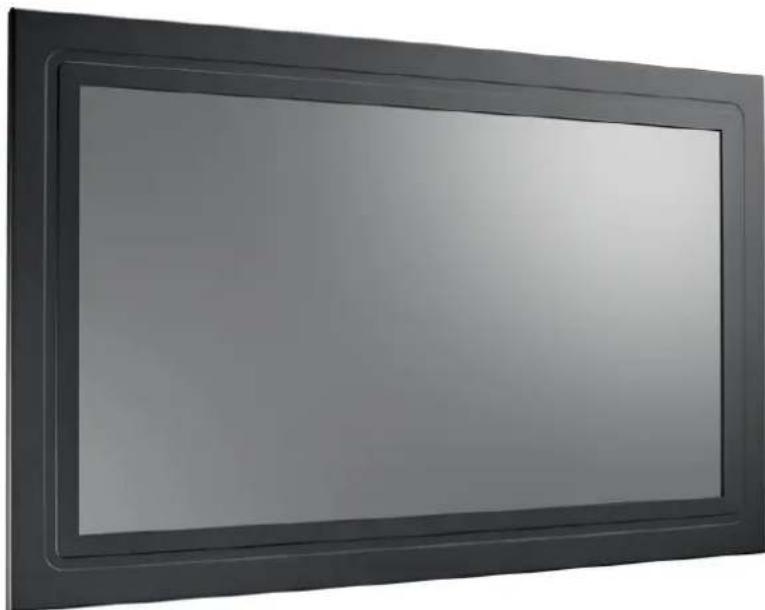
natural_image
Exterior view of a modern flat-screen monitor with black frame (no text or symbols visible)1.5 Naming Rule
IDS - 3 2 18 W P - 30 HD A1
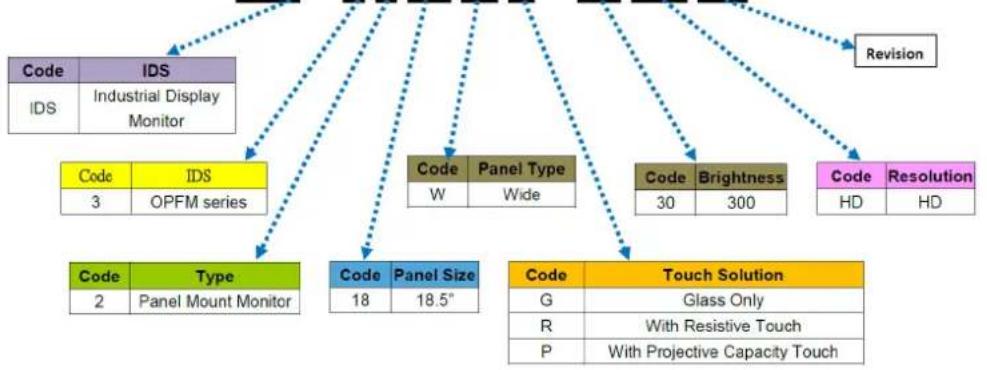
flowchart
graph TD
    A["Code"] --> B["IDS"]
    B --> C["Industrial Display Monitor"]
    C --> D["Code"]
    D --> E["IDS"]
    E --> F["OPFM series"]
    F --> G["Code"]
    G --> H["Type"]
    H --> I["2"]
    H --> J["Panel Mount Monitor"]
    K["Code"] --> L["Panel Size"]
    L --> M["18"]
    L --> N["18.5°"]
    O["Code"] --> P["Touch Solution"]
    P --> Q["G"]
    P --> R["R"]
    P --> S["P"]
    P --> T["Glass Only"]
    P --> U["With Resistive Touch"]
    P --> V["With Projective Capacity Touch"]
    W["Revision"] --> X["Code"]
    X --> Y["Brightness"]
    X --> Z["HD"]
    X --> AA["HD"]
Chapter 2
System Setup
Specifications
Dimensions
Rear Mount Assembly
Cable Clamp
■ Accessory Packing
2.1 Specifications
Note! The IDS-3218W series has the following features and satisfies precise specifications.

Unless otherwise noted, all information listed below is subject to change without prior notification.
| Model IDS-3218WG IDS-3218WR IDS-3218WP | ||||
| Display | Size 18.5" LED panel 18.5" LED panel 18.5" LED panel | |||
| Resolution 1366 x 768 (HD) 1366 x 768 (HD) 1366 x 768 (HD) | ||||
| Viewing Angle | 85°/85°/ (H), 80°/80° (V) | 85°/85°/ (H), 80°/80° (V) | 85°/85°/ (H), 80°/ 80° (V) | |
| Brightness 300 (cd/m2) 300 (cd/m2) 300 (cd/m2) | ||||
| Color Support | 16.7M | 16.7M | 16.7M | |
| Contrast Ratio | 1000:1 | 1000:1 | 1000:1 | |
| Response Time | 5 [msec] | 5 [msec] | 5 [msec] | |
| Backlight Life (hrs) | 50,000 hrs | 50,000 hrs | 50,000 hrs | |
| Touch | Touchscreen Type N/A | 5-Wire Resistive Touchscreen | Projected Capacitive Touchscreen | |
| Surface Hardness | 8H | 3H | 6H | |
| Durability | N/A | 10 million touches | 50 million touches | |
| Transparency | 90% | 80% ± 3% | 96% (min.) | |
| Environment | Operating Temperature | 0~55 °C | 0~55 °C | 0~55 °C |
| Storage Temperature | -20 ~ 60 °C | -20 ~ 60 °C -20 ~ 60 °C | ||
| Humidity | 90% @ 40 °C, non-condensing | 90% @ 40 °C, non-condensing | 90% @ 40 °C, non-condensing | |
| Package Vibration | 5-500Hz, 0.026G2/Hz, 2.16Grms, X, Y, Z,1 hour per axis | |||
| System | I/O | VGA x1; DVI-D x1; HDMIx1; 12 VDCJack x1 | VGA x1; DVI-D x1; HDMIx1; 12 VDCJack x1; USB x1; RS-232 x1(USB & RS-232 are reserved for the connection to enable touch usage only | VGA x1; DVI-D x1; HDMIx1; 12 VDCJack x1; USB x1(USB is reserved for the connection to enable touch usage only) |
| OSD | Keys: Menu, Up, Down, Auto Adjust, Monitor Power on/off Menu Functions: Color, Image Setting, OSD Menu, Signal Source, Reset | |||
| Power | 12VDC, 5A (Optional), Only Limited Power Source (LPS) type of power supply is used | |||
| EMC Compliance | CE/FCC/CCC | |||
| Net Weight | 5kg | |||
| Gross Weight | 7kg | |||
2.2 Dimensions

Figure 2.1 IDS-3218WG/IDS-3218WR Dimensions
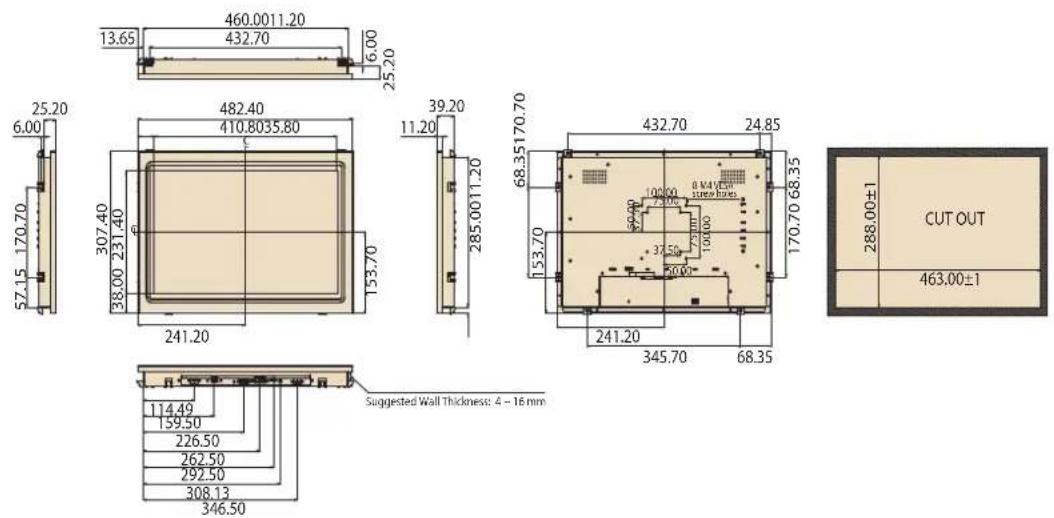
Figure 2.2 IDS-3218WP Dimensions
2.3 Rear Mount Assembly
- Use the M3 screws to attach and tighten as follows.
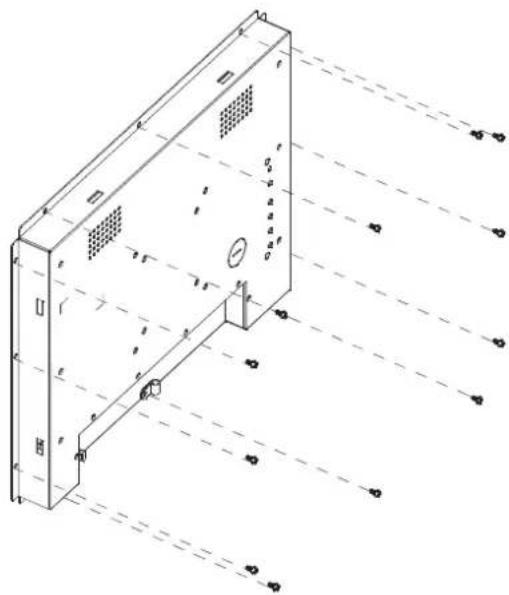
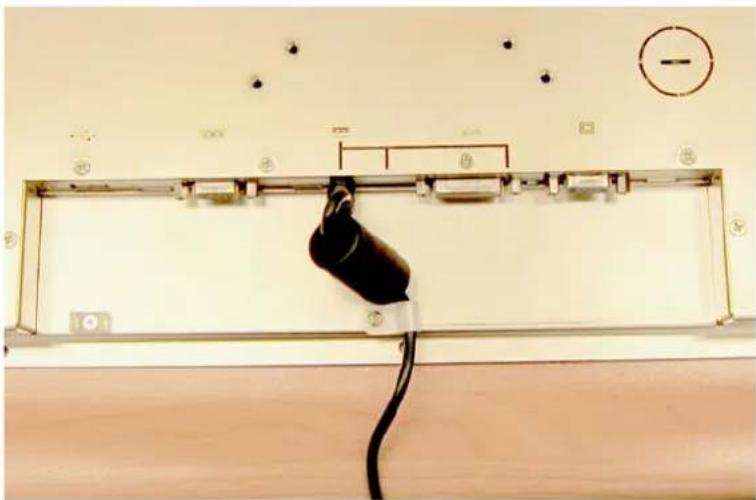
2.4 Cable Clamp
- The IDS-3218W panel mount monitor is also shipped with a cable clamp for securing the power cable, as shown below.
Cable Clamp Usage
natural_image
Close-up of a wall-mounted electrical panel with a black plug inserted, mounted on a wooden surface (no visible text or symbols)- A cable tie for the USB cable is included in the accessory box.

natural_image
Close-up of a white USB plug inserted into a metal enclosure, showing wiring and mounting holes (no text or symbols visible)2.5 Packing List
■ 1 x VGA cable 15P(M) 1.8 meter
■ 1 x USB-A(M)/USB-A(M) 1.8 meter
■ 8 x panel mount clamps
■ 8 x panel mount clamp screws: M4_25L
1 x cable clamp
■ 1 x cable clamp screw
1 x cable tie
■ 1 x 60 W DC12V power adapter (upon request)
■ 1 x power cord (upon request)
■ 1 x DVI cable 2.0 meter (upon request)
■ 1 x RS-232 9P/9P 1.8M M/F cable (upon request)
Note! The above accessory cables are subject to change with different SKUs.

Chapter 3
Touchscreen
■ Onscreen Display Functions
■ Touch Drivers
■ Mounting Notes (for Projected Capacitive Touchscreens)
3.1 Onscreen Display (OSD) Functions
The OSD of the IDS-3218W display (1366 X 768 resolution) was selected to illustrate examples below:
| Buttons | Description |
| Power Turn the monitor power ON or OFF | |
| Menu / Enter Activate the OSD menu | |
| Enter menu. | |
| Right / Up Move the selector to the upper option. | |
| Increase the gauge value of the selected option. | |
| Left / Down Move the selector to the lower option. | |
| Decrease the gauge value of the selected option. | |
| Exit / Auto | Automatically adjust the clock, phase, H-position, and V-position (VGA input only). |
| Exit menu | |
LED Function
| DPMS ON Green |
| DPMS STANDBY Orange |
| DPMS OFF Red |
3.2 OSD Menu Details
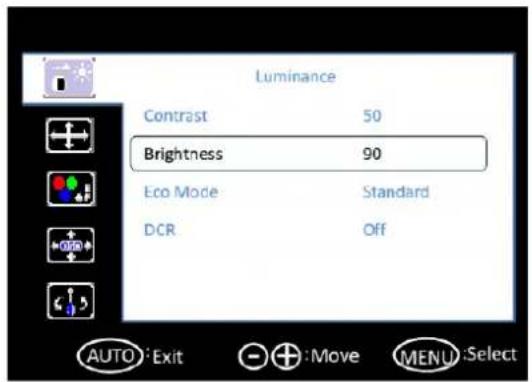
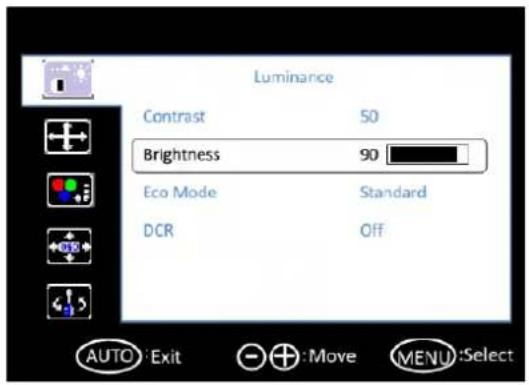
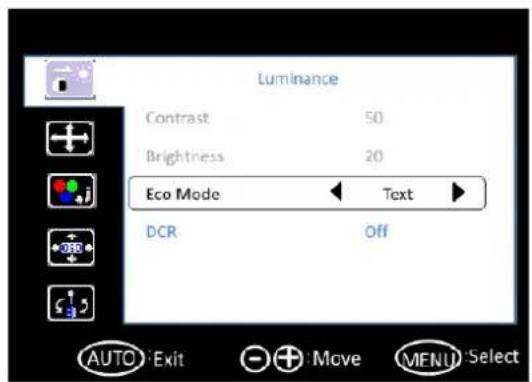
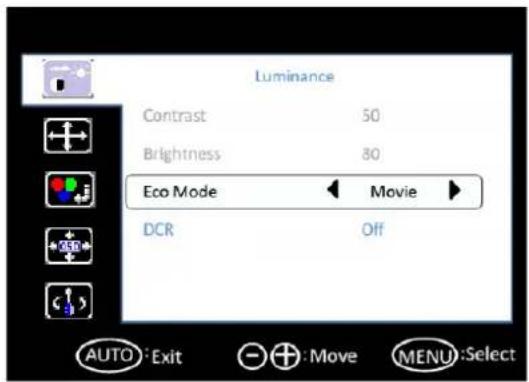
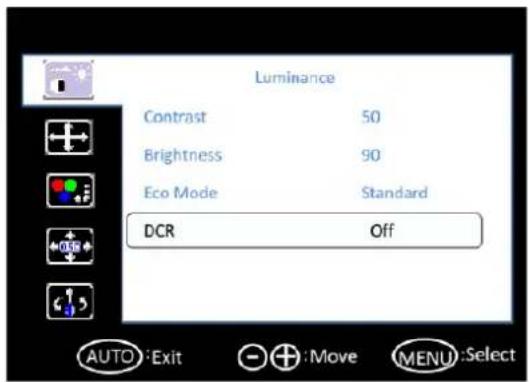
3.2.1 Luminance
Contrast
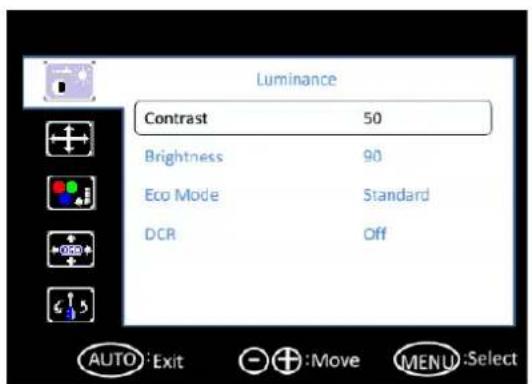
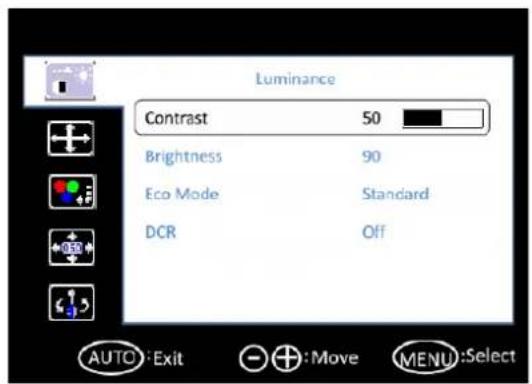
Brightness
Eco Mode




DCR

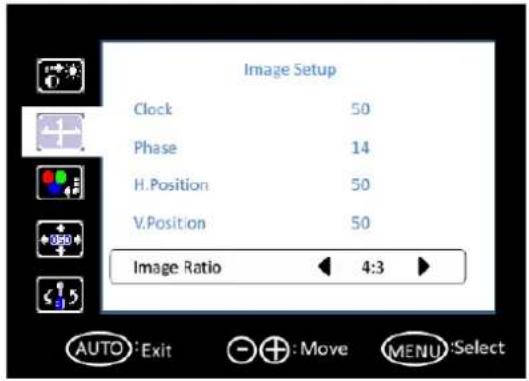
3.2.2 Image Setup
Clock
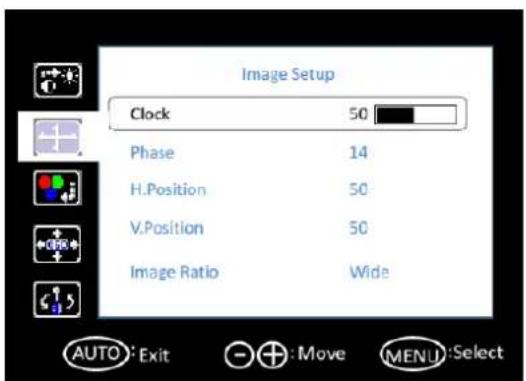
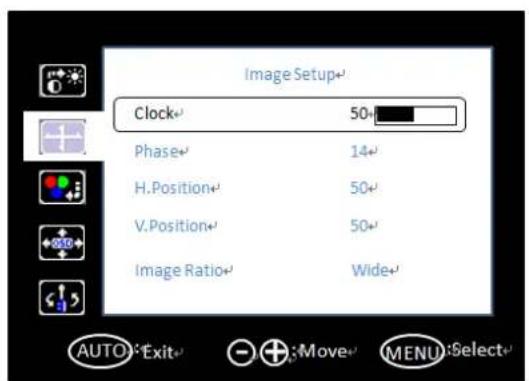
Phase


H. Position


V. Position

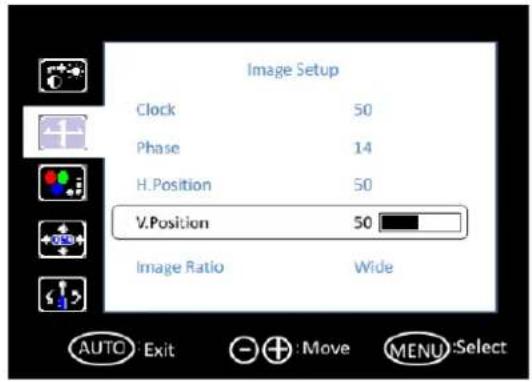
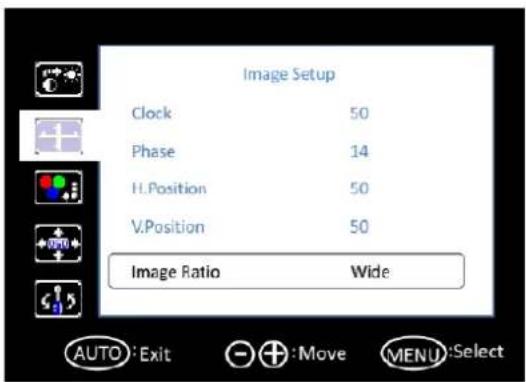
Image Ratio

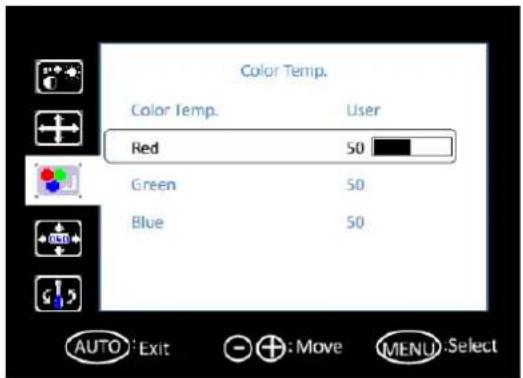
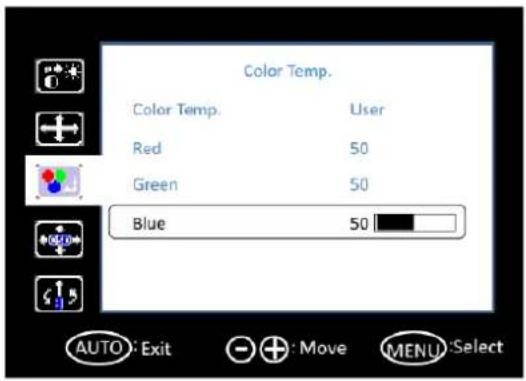
3.2.3 Color Temperature
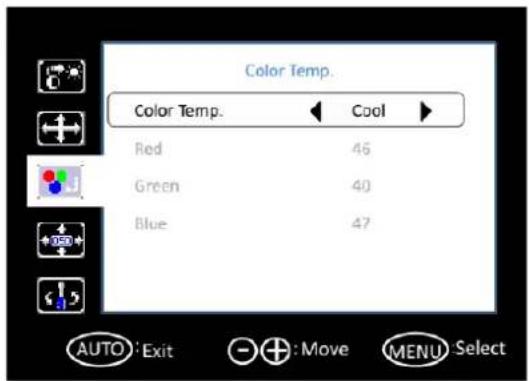
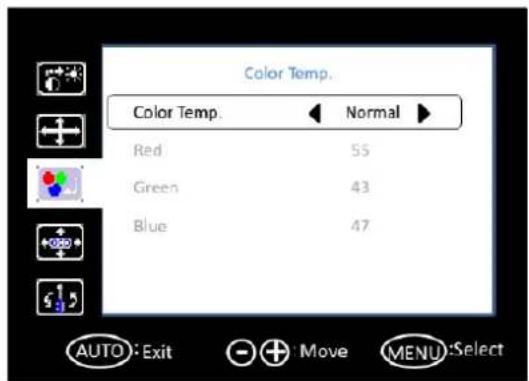
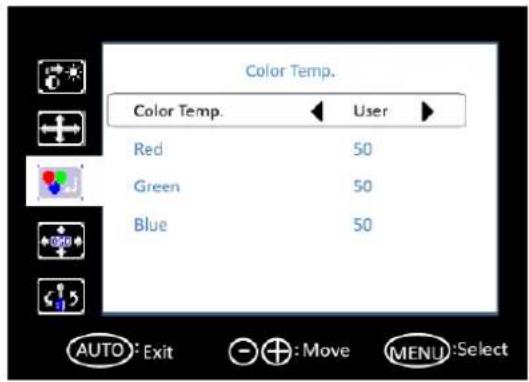
Color Temperature



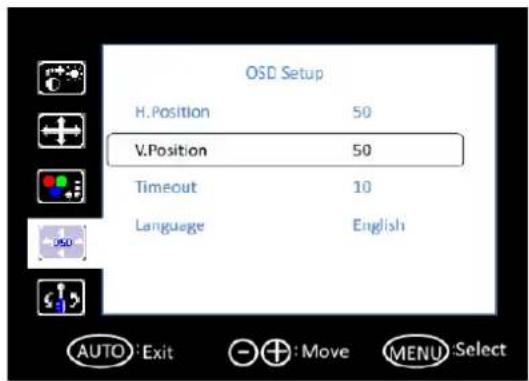
3.2.4 OSD Setup
H. Position


V. Position
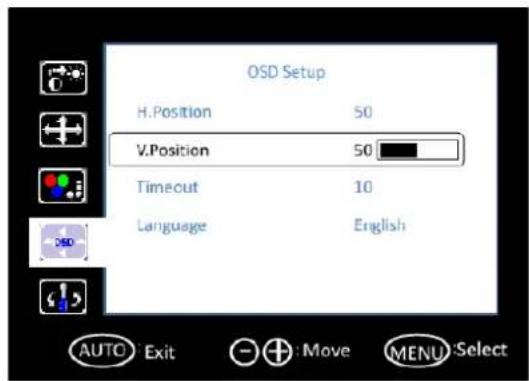
Timeout
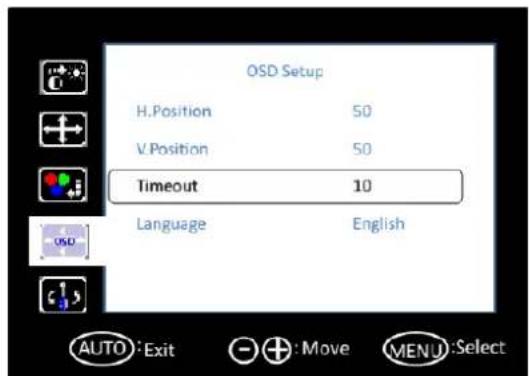
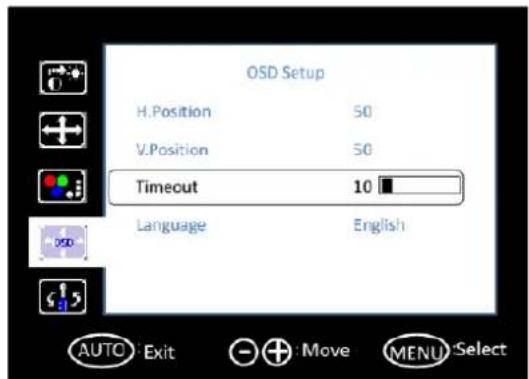
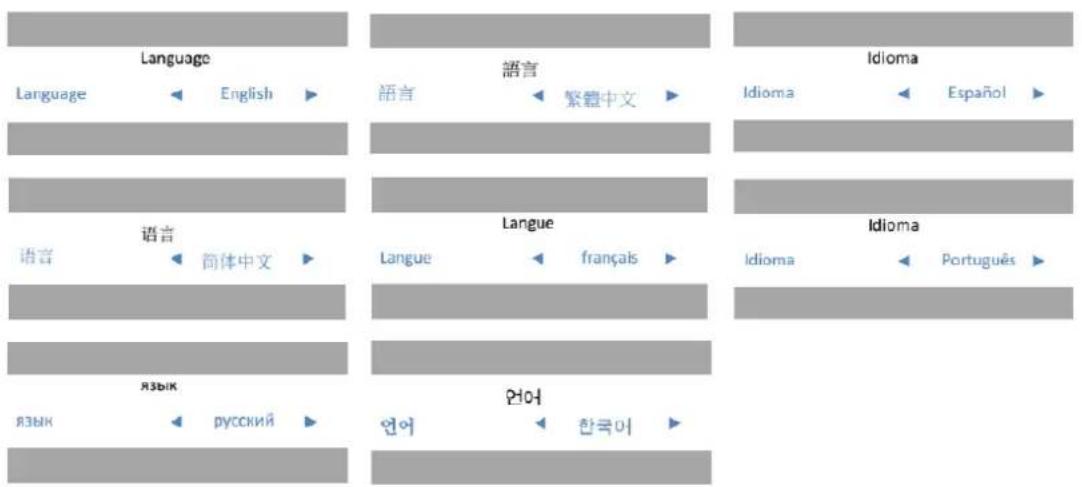
Language
3.2.5 Extra
Input Select


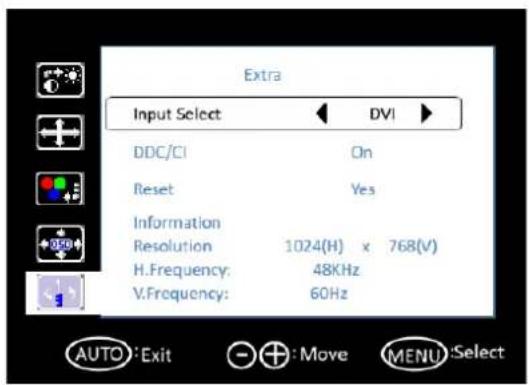
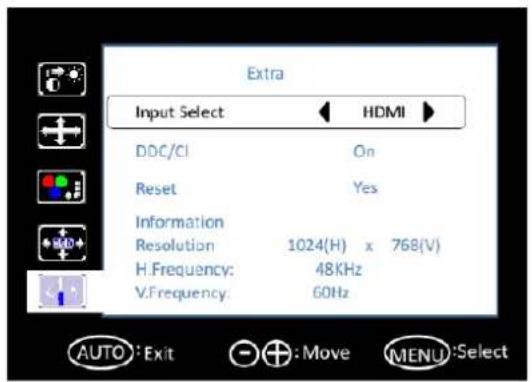
DDC/CI
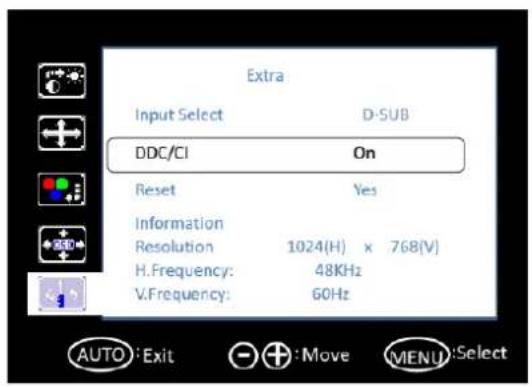
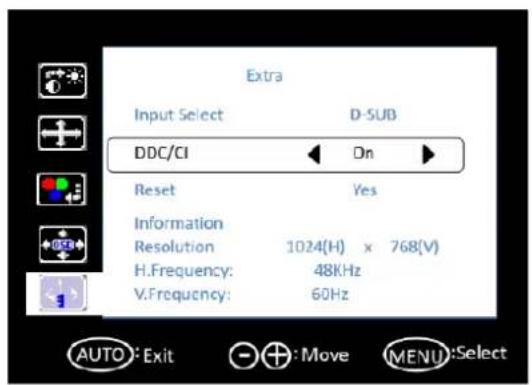
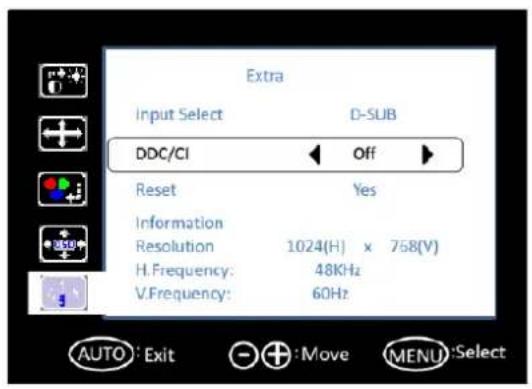
Reset


3.3 Touchscreen Drivers
The touchscreen driver is available online at the Advantech website: http://support.advantech.com/support/default.aspx
3.4 Mounting Notes (for Projected Capacitive Touchscreens)
Projected capacitive touchscreens detect the touch location by measuring the increased capacitance value between the electrodes at the input. When built into a system, capacitance couplings are continually yielded across the touchscreen. When powered on, the sensitivity level of Advantech's projected capacitive touchscreen is automatically adjusted to the surrounding environment when in standby to avoid influence from surrounding capacitance couplings. If the surrounding environment changes or the device is near materials that alter the electrical field (a large capacitor, power-supply unit, LCD panel, or materials with high dielectric constants), these external factors will adversely affect the ability of the touchscreen to detect the input positions accurately.
Please refer to the mounting notes below and ensure the gap between components is sufficient to avoid interference from external factors, as described above.
3.4.1 Rear Bezel Touchscreen Mounting
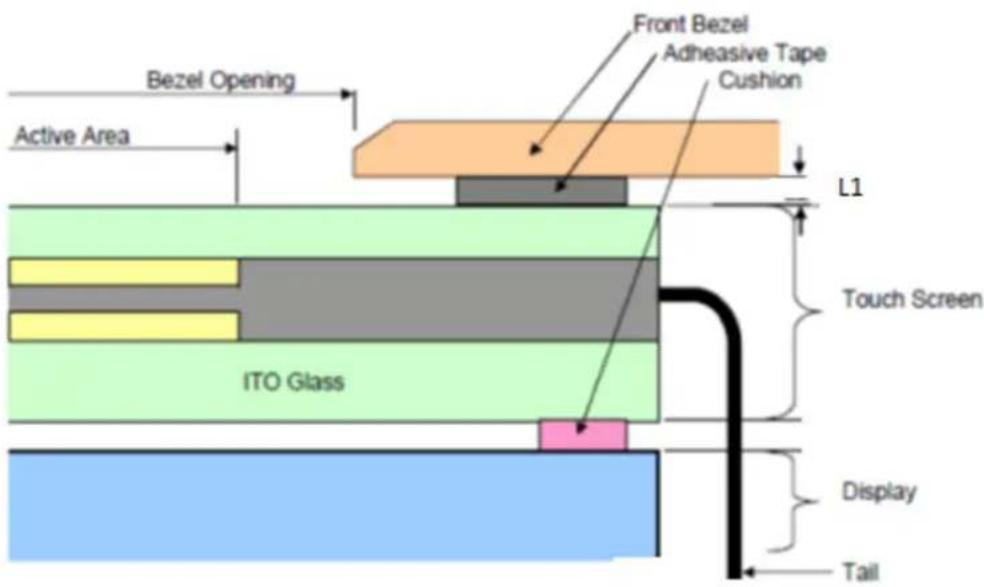
Firmly affix the touchscreen to ensure that the distance between the touchscreen and other components will not alter over time or upon contact. However, if the distance is insufficient, unexpected input may occur.
We recommend using insulating resin for the bezel. If a metal plate is used for the bezel, unintended capacitance coupling may occur on the periphery of the active area. Nonetheless, if a metal plate or other metallic material is used for the bezel, ensure a distance of approximately 2 mm between the touchscreen and the bezel (L1).
3.4.2 Tail
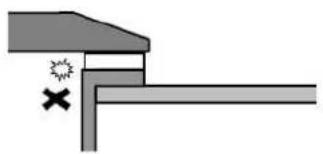
Do not force, stress, or bend the tail as this may cause conduction in the insulated area and/or wire breakage
natural_image
Pure diagram of a structural joint or bracket with no text, numbers, or symbolsAppendix A
Troubleshooting
A.1 Introduction
Should the monitor malfunction or fail to operate according to the user manual, please refer to the following instructions before calling the Advantech service center. If unable to correct the faults using the instructions below, then please contact the distributor or Advantech's service/repair center.
A.2 Troubleshooting
No image appears on screen
- Check that all I/O and power connectors are correctly installed and connected (refer to Section 1.4, Underside View).
■ Ensure none of the connectors are crooked, broken, or loose.
■ Ensure that the OSD power-on LED is lit.
■ Ensure that the monitor brightness is not at the minimum setting. - Ensure that the screen resolution setting is correct for the type of LCD, and that the setting does not exceed the resolution specified for the particular LCD model.
The image is displayed incorrectly, or a full screen image does not appear
■ Ensure that the screen resolution on the motherboard is correct.
The position of screen is not centered
■ Adjust the H-position and V-position or initiate auto adjust.
Out of range
If an “out of range” message appears onscreen, this indicates that the computer signal is not compatible with the LCD display (i.e., the output resolution exceeds the input resolution specified for the LCD).
■ Adjust the BIOS settings to correct the resolution.
No signal
The display is powered on, but is not receiving or displaying any signal from the computer. Check all power switches, power cables, and VGA signal cables to ensure that all are correctly connected on both sides.
Monitor is in sleep mode
If the system goes into sleep mode, then either the display has been set to power saving mode, or the display is experiencing a signal connection problem. Check the BIOS system settings and/or Windows configuration. Then check both ends of the power cable connection between the LCD and computer.
ADVANTECH
Enabling an Intelligent Planet
www.advantech.com
Please verify specifications before quoting. This guide is intended for reference purposes only.
All product specifications are subject to change without notice.
No part of this publication may be reproduced in any form or by any means, such as electronically, by photocopying, recording, or otherwise, without prior written permission from the publisher.
All brand and product names are trademarks or registered trademarks of their respective companies.
© Advantech Co., Ltd. 2018


- IDS-3218W Series
- Copyright
- Acknowledgements
- Product Warranty (2 years)
- Declaration of Conformity
- CE
- FCC Class A
- FM
- Technical Support and Assistance
- Warnings, Cautions, and Notes
- Document Feedback
- Safety Instructions
- Chapter 1 Overview......1
- Chapter 2 System Setup....5
- Chapter 3 Touchscreen....11
- Appendix A Troubleshooting 23
- Chapter 1
- Overview
- Introduction
- Features
- Applications
- Product Images
- Naming Rule
- Chapter 2
- System Setup
- Specifications
- Dimensions
- Rear Mount Assembly
- Cable Clamp
- Packing List
- Chapter 3
- Touchscreen
- Onscreen Display (OSD) Functions
- OSD Menu Details
- Luminance
- Image Setup
- Color Temperature
- OSD Setup
- Extra
- Touchscreen Drivers
- Mounting Notes (for Projected Capacitive Touchscreens)
- Rear Bezel Touchscreen Mounting
- Tail
- Appendix A
- A.1 Introduction
- A.2 Troubleshooting
- No image appears on screen
- The image is displayed incorrectly, or a full screen image does not appear
- The position of screen is not centered
- Out of range
- No signal
- Monitor is in sleep mode
- ADVANTECH
- www.advantech.com
Brand : Advantech
Model : IDS-3218W
Category : Tracking