DAEWOO

DSJ-4710CRA - TV DAEWOO - Free user manual and instructions

Find the device manual for free DSJ-4710CRA DAEWOO in PDF.

📄 61 pages English EN Download 💬 AI Question
Notice DAEWOO DSJ-4710CRA - page 2
Pick your language and provide your email: we'll send you a specifically translated version.

User questions about DSJ-4710CRA DAEWOO

0 question about this device. Answer the ones you know or ask your own.

Ask a new question about this device

The email remains private: it is only used to notify you if someone responds to your question.

No questions yet. Be the first to ask one.

Download the instructions for your TV in PDF format for free! Find your manual DSJ-4710CRA - DAEWOO and take your electronic device back in hand. On this page are published all the documents necessary for the use of your device. DSJ-4710CRA by DAEWOO.

USER MANUAL DSJ-4710CRA DAEWOO

natural_image Exterior view of a white CRT television displaying a black-and-white photo of a flower in the center (no visible text or symbols on the device itself)

DSJ-4710CRA / 5510CRA

DSJ-4720CRA / 5520CRA

PROJECTION TV
DAEWOO DSJ-4710CRA - PROJECTION TV - 1

CAUTION

RISK OF ELECTRIC SHOCK DO NOT OPEN

DAEWOO DSJ-4710CRA - CAUTION - 1

CAUTION: TO REDUCE THE RISK OF ELECTRIC SHOCK, DO NOT REMOVE COVER (OR BACK).

NO USER-SERVICEABLE PARTS INSIDE. REFER SERVICING TO QUALIFIED SERVICE PERSONNEL.
DAEWOO DSJ-4710CRA - CAUTION - 2

The lightning flash with arrowhead symbol, within an equilateral triangle, is intended to alert the user to the presence of uninsulated “dangerous voltage” within the product’s enclosure that may be of sufficient magnitude to constitute a risk of electric shock.

DAEWOO DSJ-4710CRA - CAUTION - 3

The exclamation point within an equilateral triangle is intended to alert the user to the presence of important operating and maintenance (servicing) instructions in the literature accompanying the appliance.

Note: This device complies with part 15 of the FCC Rules. Operation is subject to the following two conditions: (1) This device may not cause harmful interference, and (2) This device must accept any interference received, including interference that may cause undesired operation.

WARNING:

TO REDUCE THE RISK OF FIRE OR ELECTRIC SHOCK, DO NOT EXPOSE THIS PRODUCT TO RAIN OR MOISTURE.

CAUTION:

TO PREVENT ELECTRIC SHOCK, MATCH WIDE BLADE OF PLUG TO WIDE SLOT, FULLY INSERT.

IMPORTANT SAFEGUARDS

Please read the following safeguards for your TV and retain for future reference.

Always follow all warnings and instructions marked on the television.

1. Read, Retain and Follow All Instructions

Read all safety and operating instructions before operating the TV. Retain the safety and operating instructions for future reference. Follow all operating and use instructions.

2. Heed Warnings

Adhere to all warnings on the appliance and in the operating instructions.

3. Cleaning

Unplug the TV from the wall outlet before cleaning. Do not use liquid, abrasive, or aerosol cleaners. Cleaners can permanently damage the cabinet and screen. Use a lightly dampened cloth for cleaning.

4. Attachments and Equipment

Never add any attachment and/or equipment without approval of the manufacturer as such additions may result in the risk of fire, electric shock or other personal injury.

5. Water and Moisture

Do not use the TV where contact with or immersion in water is possible. Do not use near bath tubs, wash bowls, kitchen sinks, laundry tubs, swimming pools, etc.

6. Accessories
DAEWOO DSJ-4710CRA - Accessories - 1

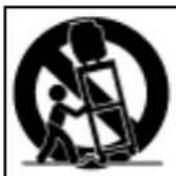
Do not place the TV on an unstable cart, stand, tripod, or table. The TV may fall, causing serious injury to a child or adult and serious damage to the TV. Use only with a cart, stand, tripod, bracket, or table recommended by the manufacturer, or sold with the TV. Any mounting of the TV should follow the manufacturer's instructions, and should use mounting accessories recommended by the manufacturer. An appliance and cart combination should be moved with care. Quick stops, excessive force, and uneven surfaces may cause the appliance and cart combination to overturn.

7. Ventilation

Slots and openings in the cabinet are provided for ventilation and to ensure reliable operation of the TV and to protect it from overheating. Do not block these openings or allow them to be obstructed by placing the TV on a bed, sofa, rug, or other similar surface. Nor should it be placed over a radiator or heat register. If the TV is to be placed in a rack or bookcase, ensure that there is adequate ventilation and that the manufacturer's instructions have been adhered to.

8. Power Source

This TV should be operated only from the type of power source indicated on the marking label. If you are not sure of the type of power supplied to your home, consult your appliance dealer or local power company.

9. Grounding or Polarization

This TV is equipped with a polarized alternating current line plug (a plug having one blade wider than the other). This plug will fit into the power outlet only one way. This is a safety feature. If you are unable to insert the plug fully into the outlet, try reversing the plug. If the plug should still fail to fit, contact your electrician to replace your obsolete outlet. Do not defeat the safety purpose of the polarized plug.

10. Power-Cord Protection

Power-supply cords should be routed so that they are not likely to be walked on or pinched by items placed upon or against them, paying particular attention to cords at plugs, convenience receptacles, and the point where they exit from the TV.

11. Lightning

For added protection for this TV during a lightning storm, or when it is left unattended and unused for long periods of time, unplug it from the wall outlet and disconnect the antenna or cable system. This will prevent damage to the TV due to lightning and power-line surges.

12. Power Lines

An outside antenna system should not be located in the vicinity of overhead power lines or other electric light or power circuits, or where it can fall into such power lines or circuits. When installing an outside antenna system, extreme care should be taken to keep from touching such power lines or circuits as contact with them might be fatal.

13. Overloading

Do not overload wall outlets and extension cords as this can result in a risk of fire or electric shock.

14. Object and Liquid Entry

Never push objects of any kind into this TV through openings as they may touch dangerous voltage points or short-out parts that could result in fire or electric shock. Never spill liquid of any kind on or into the TV.

15. Outdoor Antenna Grounding

If an outside antenna or cable system is connected to the TV, be sure the antenna or cable system is grounded so as to provide some protection against voltage surges and built-up static charges. Section 810 of the National Electric Code, ANSI/NFPA No. 70-1984, provides information with respect to proper grounding of the mast and supporting structure, grounding of the lead in wire to an antenna discharge unit, size of grounding conductors, location of antenna discharge unit, connection to grounding electrodes, and requirements for the grounding electrode.
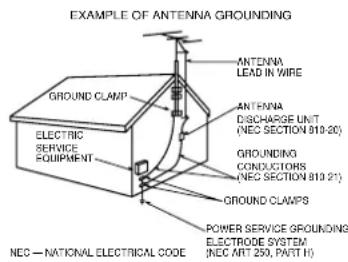
DAEWOO DSJ-4710CRA - Outdoor Antenna Grounding - 1

text_image EXAMPLE OF ANTENNA GROUNDING ANTENNA LEAD IN WIRE GROUND CLAMP ELECTRIC SERVICE EQUIPMENT ANTENNA DISCHARGE UNIT (NEC SECTION 819-20) GROUNDING CONDUCTORS (NEC SECTION 819-21) GROUND CLAMPS POWER SERVICE GROUNDING ELECTRODE SYSTEM (NEC ART 250, PART H) NEC — NATIONAL ELECTRICAL CODE

16. Servicing

Do not attempt to service this TV yourself as opening or removing covers may expose you to dangerous voltage or other hazards. Refer all servicing to qualified service personnel.

17. Damage Requiring Service

Unplug the TV from the wall outlet and refer servicing to qualified service personnel under the following conditions:

(a) When the power-supply cord or plug is damaged.
(b) If liquid has been spilled, or objects have fallen into the TV.
(c) If the TV has been exposed to rain or water.
(d) If the TV does not operate normally by following the operating instructions. Adjust only those controllers that are covered by the operating instructions as an improper adjustment of other controllers may result in damage and will often require extensive work by a qualified technician to restore the TV to its normal operation.
(e) If the TV has been dropped or the cabinet has been damaged.
(f) When the TV exhibits a distinct change in performance - this indicates a need for service.

18. Replacement Parts

When replacement parts are required, be sure the service technician has used replacement parts specified by the manufacturer or have the same characteristics as the original part. Unauthorized substitutions may result in fire, electric shock or other hazards.

19. Safety Check

Upon completion of any service or repair to the TV, ask the service technician to perform safety checks to determine that the TV is in safe operating condition.

20. Heat

The product should be situated away from heat sources such as radiators, heat registers, stoves, or other products (including amplifiers) that produce heat.

DAEWOO DSJ-4710CRA - Heat - 1

Warning

This section must be read carefully and followed by the user prior to the operation of the product.

The manual states important instructions for the user's own safety, and the proper operation of the product.

DAEWOO DSJ-4710CRA - This section must be read carefully and followed by the user prior to the operation of the product. - 1

Warning

Ignoring or disregarding the contents of this section and improper operation of the product may result in the person's death or serious injury.

In case of an accident, please unplug the unit from the outlet immediately.

To reduce the risk of electric shock, do not remove cover or back. No user -serviceable parts inside. Refer to qualified service personnel for repair.
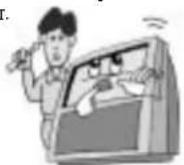
DAEWOO DSJ-4710CRA - Warning - 1

To prevent fire and damages to the product, unplug the unit from the outlet during lightning storm, or when it is left unattended and unused for a long period of time.
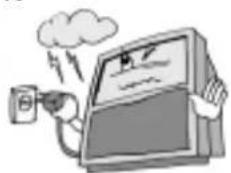
DAEWOO DSJ-4710CRA - Warning - 2

natural_image Cartoon illustration of a computer monitor with a hand holding a remote, emitting smoke and lightning (no text or symbols)

Slots and openings in the case are provided for ventilation to ensure reliable operation of the product. Never put in any item-such as a coin, paper, match- through these openings since it may touch dangerous voltage points that could result in fire or shock hazard.
DAEWOO DSJ-4710CRA - Warning - 3

Take the plug when unplugging the unit from the outlet. The cord may cause fire or electric shock if damaged.

DAEWOO DSJ-4710CRA - Warning - 4

Do not put any object that contains water - such as flowerpot - on the unit. The water may penetrate into the unit, and be a cause of fire or hazardous electric shock.
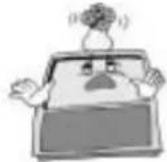
DAEWOO DSJ-4710CRA - Warning - 5

Do not put on or use the product near water and moisture-such as in a bathroom, washbowl, etc. It may be a cause of fire and electric shock hazards.
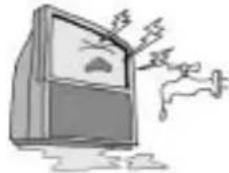
DAEWOO DSJ-4710CRA - Warning - 6

natural_image Cartoon illustration of a distressed TV with steam and flames, no text or symbols present

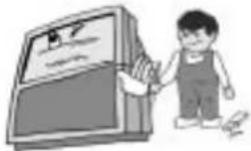
Do not let children hang on or climb on the product since it may be a cause of serious injury.
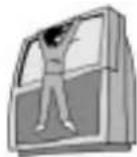
DAEWOO DSJ-4710CRA - Warning - 7

Do not place the product in a lean or unstable place since it may cause a serious injury to a person, as well as damage to the product if it falls.
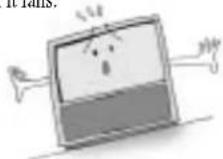
DAEWOO DSJ-4710CRA - Warning - 8

Caution

Please keep the user's manual in a safe place for future reference.

DAEWOO DSJ-4710CRA - Caution - 1

Caution

groring or disregard the contents of the sector and proper operator of the product may result in the person's death or serious injury.

This section must be read carefully and followed by the user when installing and transporting the product.

Do not put volatile substance-such as benzene, naphtha- near the product since it may cause a change in the product's color.

DAEWOO DSJ-4710CRA - Caution - 1

natural_image Cartoon illustration of a person waving at a computer screen with a small box nearby (no text or symbols)

Do not put magnetic related substance, or telephone near the product since it may cause distortion of the image
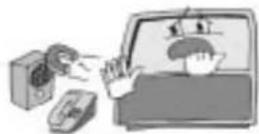
DAEWOO DSJ-4710CRA - Caution - 2

Do not expose the product in a dusty or moisturized place since it may be a cause of malfunctioning.

DAEWOO DSJ-4710CRA - Caution - 3

Place the television far away from the view since it may cause damage in your eyesight.
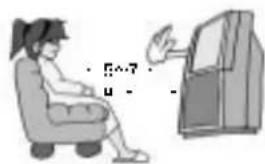
DAEWOO DSJ-4710CRA - Caution - 4

text_image Illustration showing a person sitting in a chair facing a door with handwritten annotations and symbols

Refer servicing to qualified service personnel for cleaning at least once a year since dust inside the TV set may be a result or fire and malfunctioning of the product.

DAEWOO DSJ-4710CRA - Caution - 5

Do not spill water or drop the remote controller since it may be a cause of malfunctioning.
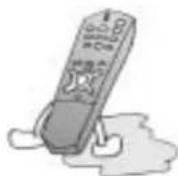
DAEWOO DSJ-4710CRA - Caution - 6

The product should be situated away from any heat source-such as radiators, heat registers, stoves, or other products that produce heat.
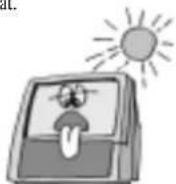
DAEWOO DSJ-4710CRA - Caution - 7

Do not put on any heavy item on the power cord since it may result in fire or hazardous electric shock if the cord is damaged.

DAEWOO DSJ-4710CRA - Caution - 8

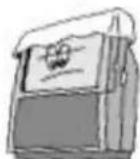
Do not cover the top of the television set. Ventilation will be prevented, and it may be a cause of fire if the product is internally overheated.
DAEWOO DSJ-4710CRA - Caution - 9

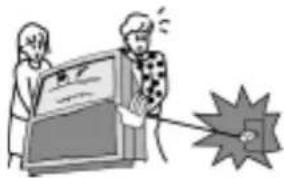
Unplug the power from the outlet and all the related connections from the unit to prevent electric shock. At least two people must work together to move the TV set when transporting to prevent the TV from falling, and consequently, any serious injury or damage.
DAEWOO DSJ-4710CRA - Caution - 10

natural_image Illustration of two people interacting with a computer screen and a megaphone (no text or symbols visible)

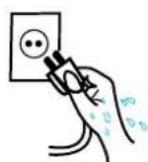
Do not touch the power cord with moisturized or watery hands when plugging to or unplugging from the outlet since it may be a cause of electric shock.
DAEWOO DSJ-4710CRA - Caution - 11

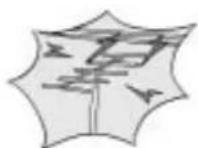
Please be advised of electric wires and cables when installing the antenna. It may be a cause of hazardous electric shock and fire if the antenna touches or falls on the electric wire; thus, it must be installed firmly, and far away from the cables.
DAEWOO DSJ-4710CRA - Caution - 12

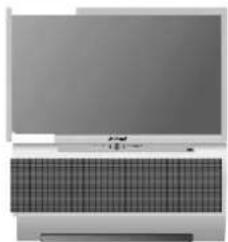
This product has advantages as follows.
DAEWOO DSJ-4710CRA - This product has advantages as follows. - 1

natural_image Front view of a computer monitor with a grid-patterned keyboard (no visible text or symbols)

Large Screen

You can enjoy favorite broadcasting by using a large screen with the size of 55"/47" bases on projection technology.
DAEWOO DSJ-4710CRA - Large Screen - 1

natural_image Illustration of a laptop with two curved arrows pointing outward, no text or symbols present.

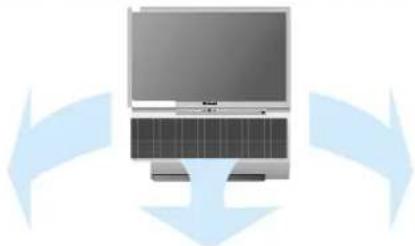
Adoption Dolby Virtual

You can enjoy vivid and stereo sound as in a theater.

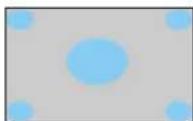
Various Screen

You can watch various sizes of screen such as 16:9, 4:3, Panorama, Zoom.
DAEWOO DSJ-4710CRA - Various Screen - 1
16:9

DAEWOO DSJ-4710CRA - Various Screen - 2
4:3 Zoom1

DAEWOO DSJ-4710CRA - Various Screen - 3
Zoom2Panorama

DAEWOO DSJ-4710CRA - Various Screen - 4

DAEWOO DSJ-4710CRA - Various Screen - 5

OPTIONAL ADJUSTMENT OF SOUND

You can adjust sound per frequency like Audio since the equalizer is built-in.

CONNECTION OF VARIOUS DEVICES

You can watch many kinds of media in a large screen through connection of DVD or DTV, etc.

Make Sure of Auxiliary Parts.

DAEWOO DSJ-4710CRA - Make Sure of Auxiliary Parts. - 1

natural_image Product line drawings of various electronic devices including remote, power cord, cable, and accessories (no text or symbols visible)

Information of setting up TV

TV is easily failed by pulling or pushing it.

Specially when children hang on TV or climb on it,

there accident could occur.

Install prevention of conduction for safety.

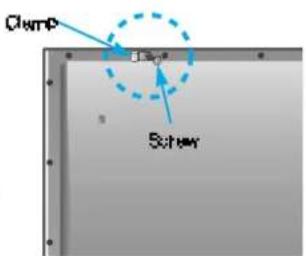
  1. Hold fixing hole and clamp by screw in the back of TV
  2. Bind it to steadily strong wall or prop by hard strings It is safe that strings is bound like right picture.

When you move the TV, you should attention the strings. Use prop for TV that can stand the weight of TV
DAEWOO DSJ-4710CRA - Information of setting up TV - 1

text_image Clamp Software

DAEWOO DSJ-4710CRA - Information of setting up TV - 2

natural_image Diagram showing light rays reflecting off a curved surface (no text or symbols)

Table of Contents

Installation and Maintenance

Antenna Connection 8

Video Connection 11.

Camcorder & Play station Connection 12.

DVD Connection 13....

Audio Connection 14

Digital Satellite Receiver Connection 15

Cable TV Broadcasting Connection 16....

Name of Each Part 18....

Basic Guide

To setup device change of remote control 22....

Method To Use Basic Menu 23....

To Watch TV 24.

Automatic Channel Memory 26....

Selection of Input Signal 32.

Application Guide

Screen Adjustment 35....

Selection of PIP 44

Sound Adjust 49.

Adjustment of Color Match 56.

Selection of Language 58

Troubleshooting 59

Standard of Product 60

DAEWOO DSJ-4710CRA - Application Guide - 1

Antenna Connection

Indoor Antenna Connection

  1. Connect the feeder cable of the antenna to the combining adapter.

WHEN THE IMAGE IS NOT CLEAR

- Unclear screen image and bad reception may be a cause of wrong antenna connection. Be sure to check its direction and place when installing.
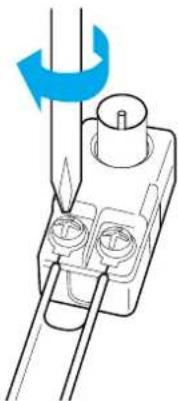
DAEWOO DSJ-4710CRA - WHEN THE IMAGE IS NOT CLEAR - 1

natural_image Diagram of a mechanical component with a rotating shaft and two circular ports, no text or symbols present.
  1. Connect the combining adapter to the antenna input at the back of the TV set.

WHEN USING THE COMBINING ADAPTER

- You may obtain the combining adapter at your closest Service Center.
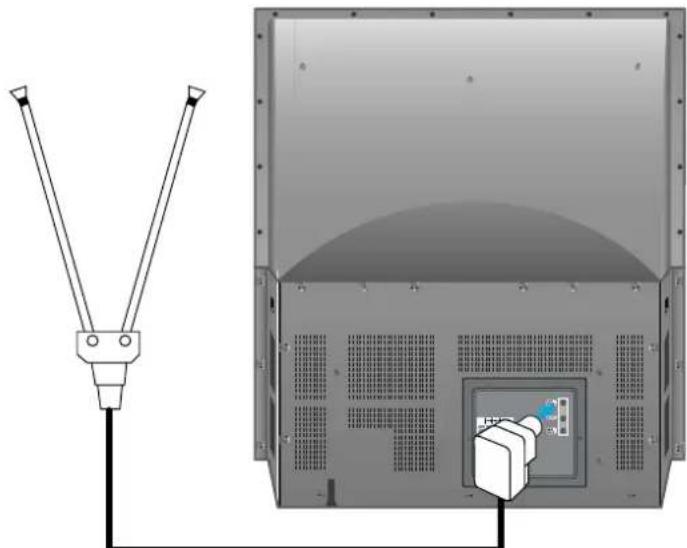
DAEWOO DSJ-4710CRA - WHEN USING THE COMBINING ADAPTER - 1

natural_image Diagram of a TV cable with two cables connected to a front panel, showing internal components and a close-up view (no text or symbols present)

Antenna Input

DAEWOO DSJ-4710CRA - WHEN USING THE COMBINING ADAPTER - 2

natural_image Blue gradient background with a white monitor and checkered pattern at the bottom (no text or symbols)

CTV Antenna Connection

Such community TV Antenna installation may be found in most of co-op apartments.

When a coaxial cable is used

Plug the coaxial cable to the antenna socket, and fix it firmly by turning it to the right.
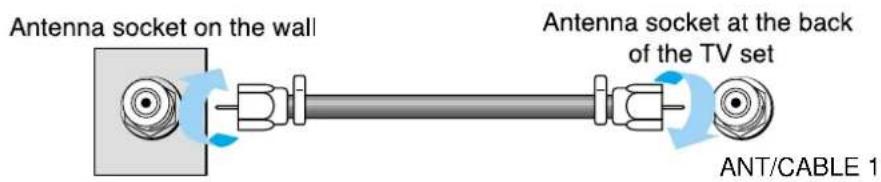
DAEWOO DSJ-4710CRA - When a coaxial cable is used - 1

text_image Antenna socket on the wall Antenna socket at the back of the TV set ANT/CABLE 1

When a feeder cable is used
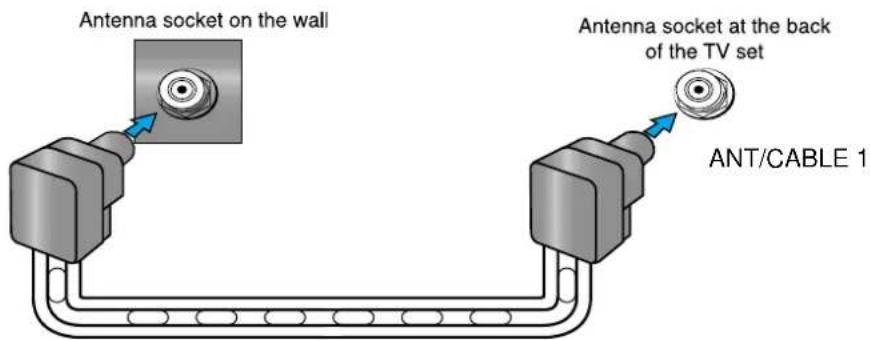
DAEWOO DSJ-4710CRA - When a feeder cable is used - 1

text_image Antenna socket on the wall Antenna socket at the back of the TV set ANT/CABLE 1

Feeder cable connection with the aombining adapter
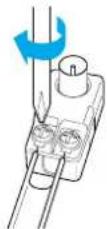
DAEWOO DSJ-4710CRA - When a feeder cable is used - 2

DAEWOO DSJ-4710CRA - When a feeder cable is used - 3

Outdoor Antenna Connection

Outdoor Antenna connection-such as VHF or/and UHF-may be necessary for installation at private houses

Single Antenna Connection.
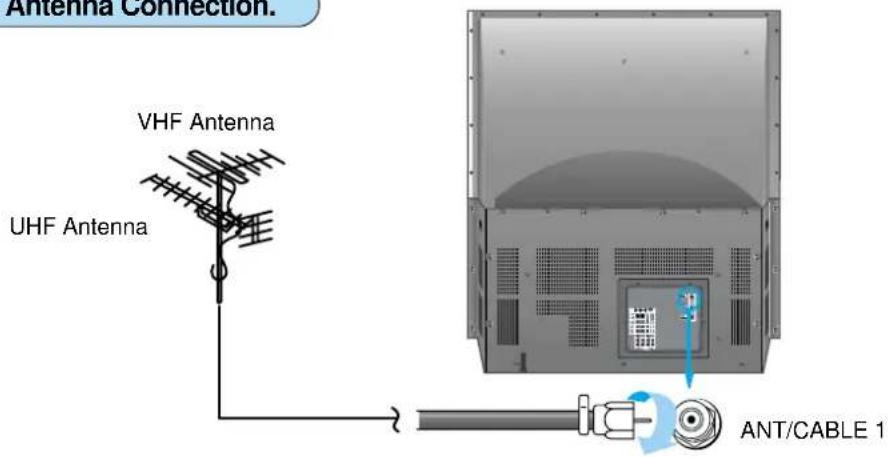
DAEWOO DSJ-4710CRA - Outdoor Antenna Connection - 1

text_image Antenna Connection. VHF Antenna UHF Antenna ANT/CABLE 1

Separate Antenna Connection.
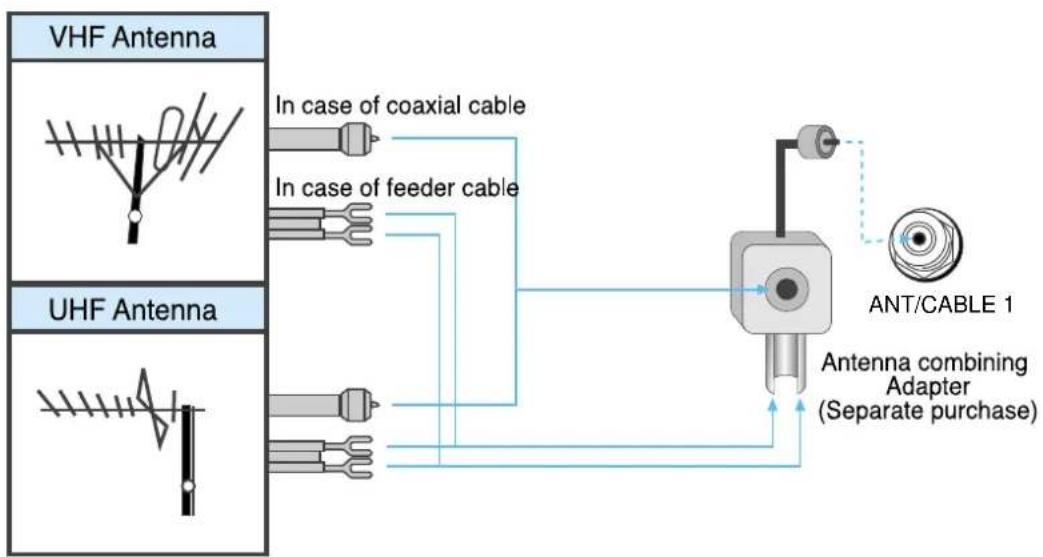
DAEWOO DSJ-4710CRA - Outdoor Antenna Connection - 2

flowchart
graph TD
    A["VHF Antenna"] --> B["In case of coaxial cable"]
    A --> C["In case of feeder cable"]
    D["UHF Antenna"] --> E["In case of coaxial cable"]
    D --> F["In case of feeder cable"]
    G["ANT/CABLE 1"] --> H["Antenna combining Adapter (Separate purchase)"]
    H --> I["In case of coaxial cable"]

Video Connection

Connecting with an External Source

You may connect S-Video input to enjoy a clearer and brighter picture images. You can choose and make the connection with any one of Video 1,2, or 3 inputs.
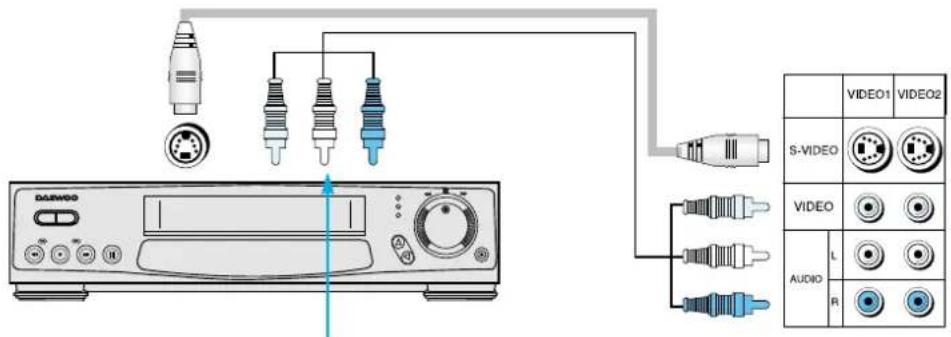
DAEWOO DSJ-4710CRA - Connecting with an External Source - 1

text_image DAVIDO VIDEO1 VIDEO2 S-VIDEO VIDEO AUDIO L R

■ Connection is not necessary in Mono mode.

- Connect either S-Video or Video input to the unit. When both are connected, the output display will be in S-Video.

: Note

The stated connection does not comply with recording TV programs. You must make the connection to the Antenna input socket as shown below for recording.
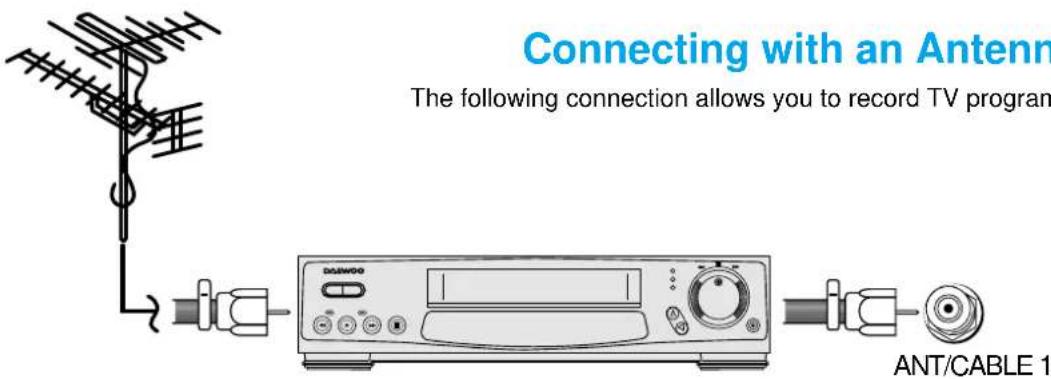
DAEWOO DSJ-4710CRA - Connecting with an External Source - 2

text_image Connecting with an Antenn The following connection allows you to record TV program ANT/CABLE 1

Connection Guide

  1. Connect the antenna to the antenna input of the video
  2. Make a connection of Antenna Output on Video and Antenna Input on TV with the coaxial cable provided.

Operating Instructions

  1. Adjust the channel selection switch at the rear side of the Video to 3 or 4.
  2. Turn on the TV set, and adjust the channel to 3 or 4, to the number adjusted for step1.
  3. Turn on the Video, insert the videocassette, and press the Play button.

DAEWOO DSJ-4710CRA - Operating Instructions - 1

Camcorder & Play station Connection

Watching the Camcorder Recording on TV

-Use the input jack provided at the side panel of the TV set

-Use the same connection method for playstation
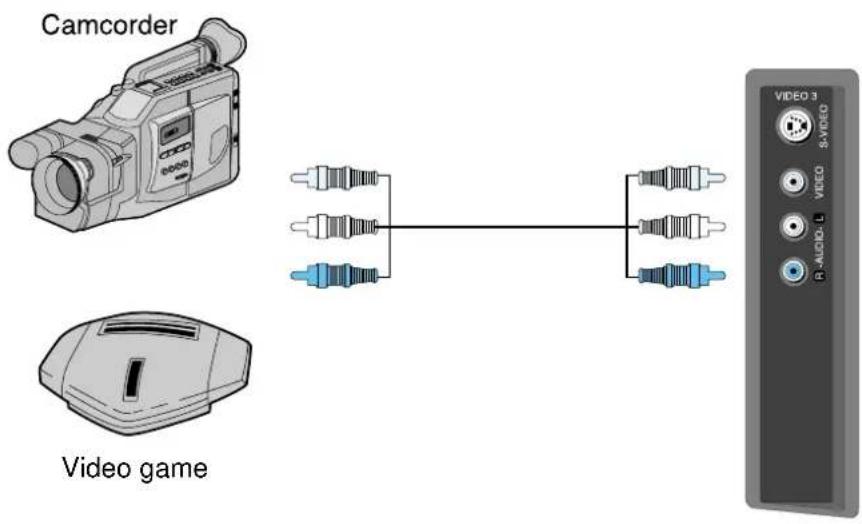
DAEWOO DSJ-4710CRA - Watching the Camcorder Recording on TV - 1

text_image Camcorder Video game VIDEO 3 S-VIDEO VIDEO B-AUDIO-L

Playing a Recorded Material and Recording a Video simultaneously

-Connect the camcorder and video as follows.
-Turn the camcorder's video output switch on, and play the recorded material.
-Press the "TV/VIDEO" button, and select Video 1.
-Select A/V INPUT for the Video Input, and start recording.
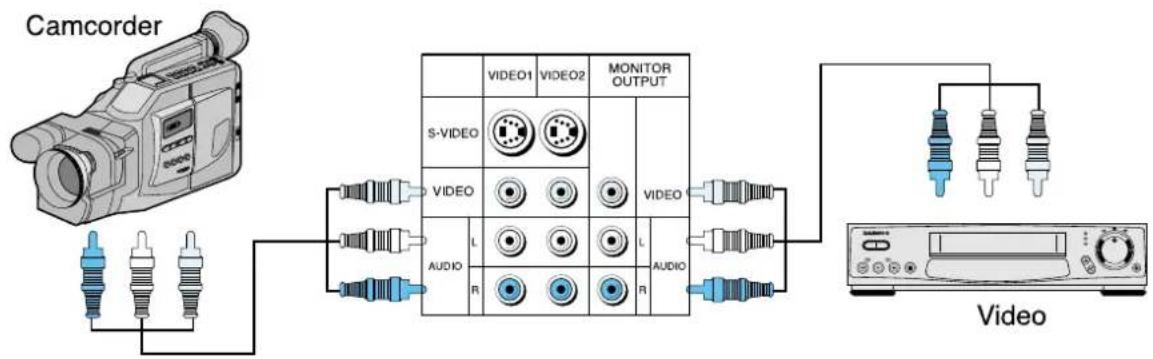
DAEWOO DSJ-4710CRA - Playing a Recorded Material and Recording a Video simultaneously - 1

flowchart
graph TD
    A["Camcorder"] --> B["Audio"]
    B --> C["S-Video"]
    C --> D["VIDEO1"]
    C --> E["VIDEO2"]
    D --> F["MONITOR OUTPUT"]
    E --> F
    F --> G["VIDEO"]
    G --> H["Audio"]
    H --> I["Video"]
    I --> J["Audio"]
    J --> K["Video"]

DVD Connection

DVD

-480i input signal is possible for DVD input.

-DVD screen output is composed of three separate primary color jack(Y/Cb/Cr), resulting in a higher image quality.

-Y/Cb/Cr, may also be noted as Y/PB/PR or Y/Pb/Pr in different DVD players.

-The DVD player's audio output must be connected to the DVD audio input socket at the back of the TV set. -You must use a 480p input capable DTV jack if you want to get the progressive scan (480p) DVD screen display.
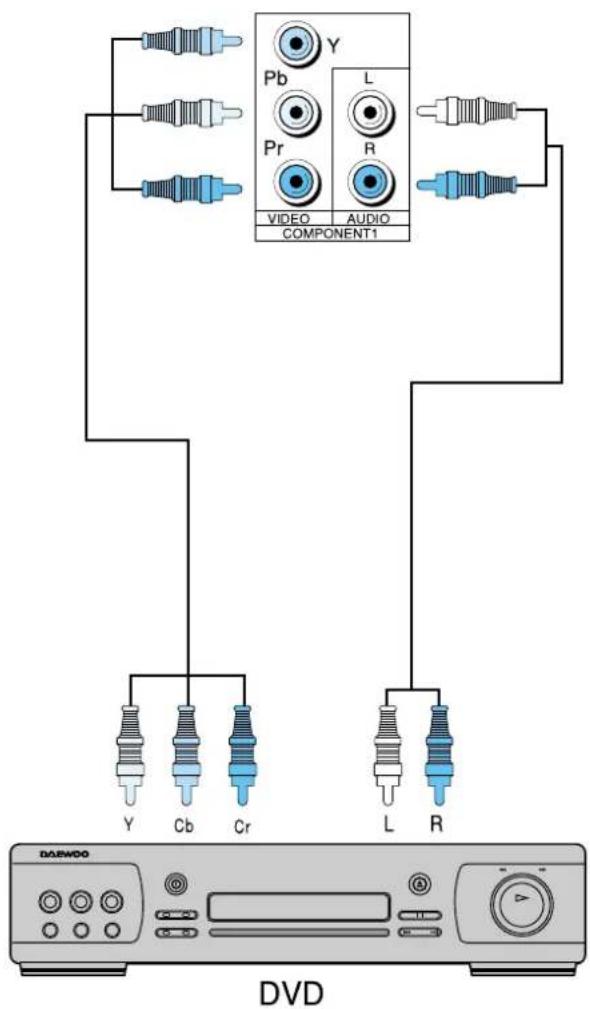
DAEWOO DSJ-4710CRA - DVD - 1

text_image Y Pb Pr L R VIDEO AUDIO COMPONENT1 Y Cb Cr L R DVD

DAEWOO DSJ-4710CRA - DVD - 2

Audio Connection

Standard Audio Connection

-You may minimize the volume of the TV set, and listen to the sound.
-The default status of 'Dolby Virtual' is in 'Line out: Internal'.
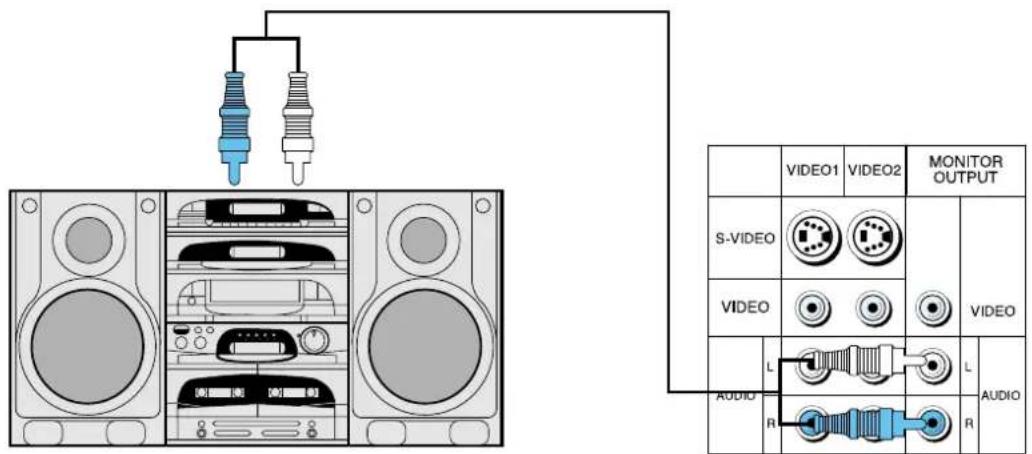
DAEWOO DSJ-4710CRA - Standard Audio Connection - 1

text_image Diagram showing audio and video connector connections to a speaker, with labeled video outputs and audio ports.

Audio System

Digital Satellite Receiver Connection

Watching High Definition Digital Broadcasting

The signal input of 1080i, 720p, and 480p are available in this product.

You may use a general A/V jack for its connection.
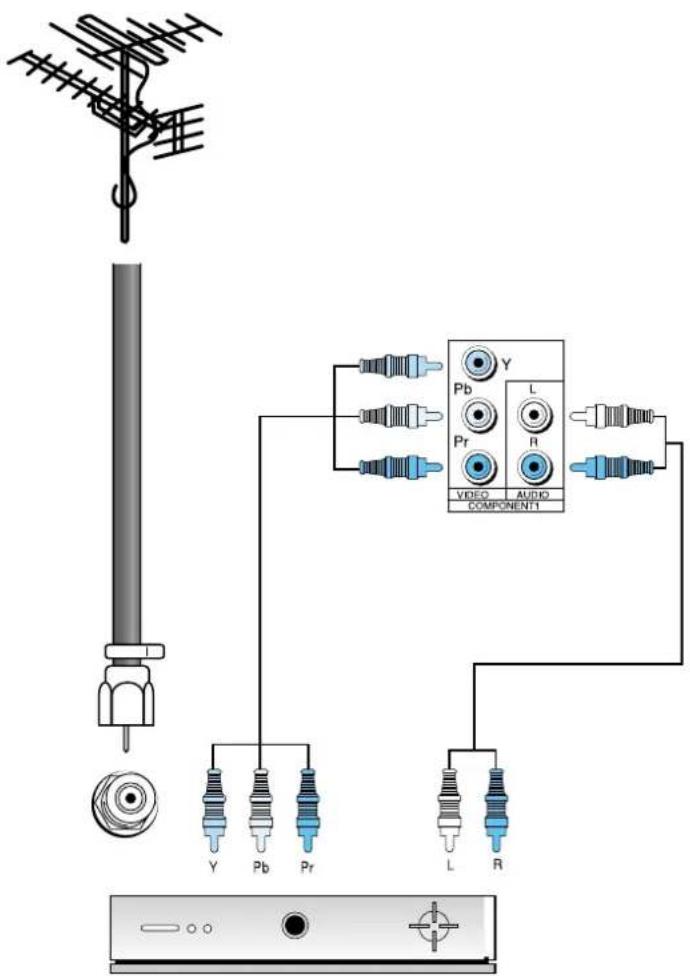
DAEWOO DSJ-4710CRA - Watching High Definition Digital Broadcasting - 1

text_image Diagram showing connections between a antenna, audio component, and audio output ports with labeled pins (Y, Pb, Pr, L, R)

Digital Satellite Receiver

DAEWOO DSJ-4710CRA - Watching High Definition Digital Broadcasting - 2

Cable TV Broadcasting Connection

External Input Connection Source

Watching cable television is only possible after you have subscribed to the local broadcasting company and installed a cable receiver. You may make the connection to any of the Video input 1, 2, & 3.
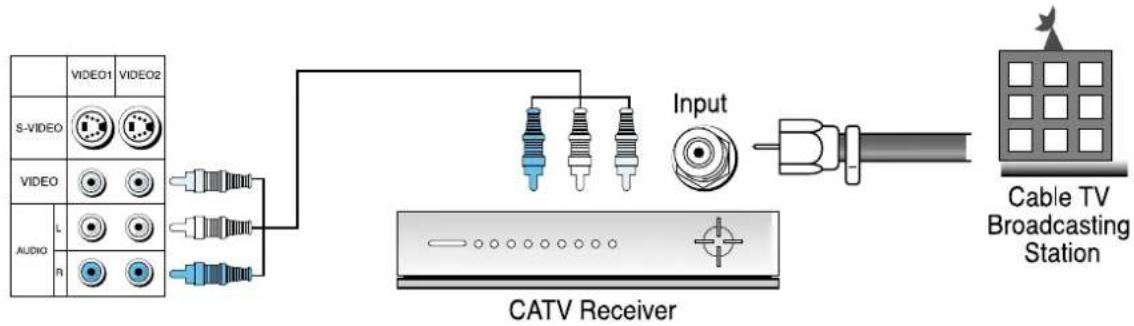
DAEWOO DSJ-4710CRA - External Input Connection Source - 1

text_image VIDEO1 VIDEO2 S-VIDEO VIDEO AUDIO L R Input CATV Receiver Cable TV Broadcasting Station

Antenna Input Connection

Watching cable television is only possible after you have subscribed to the local broadcasting company and installed a cable receiver.
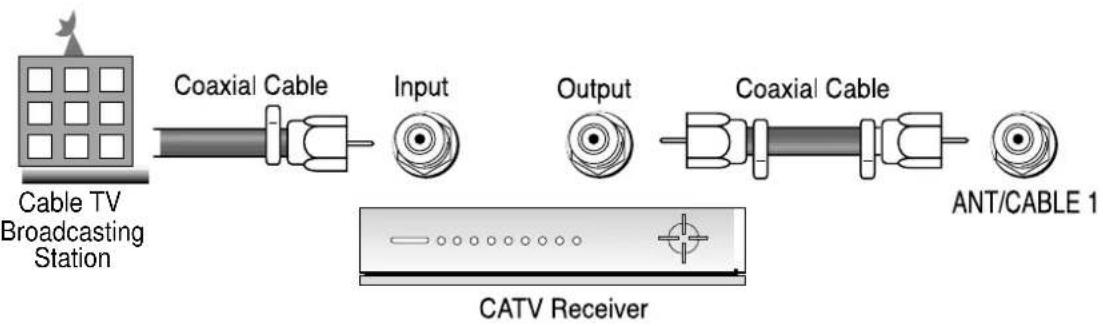
DAEWOO DSJ-4710CRA - Antenna Input Connection - 1

flowchart
graph LR
    A["Cable TV Broadcasting Station"] --> B["Coaxial Cable"]
    B --> C["Input"]
    C --> D["Output"]
    D --> E["Coaxial Cable"]
    E --> F["ANT/CABLE 1"]
    G["CATV Receiver"] --> H["Power Supply"]

In simultaneous use of antennas for Cable Broadcasting and General Broadcasting

You can alternatively use the antenna input 1 or the antenna input 2 if changing setup in the

, or .

DAEWOO DSJ-4710CRA - In simultaneous use of antennas for Cable Broadcasting and General Broadcasting - 1

text_image Diagram showing three stages of a weathering or radar system with labeled components and directional arrows

Connection to antennas for General Broadcasting or Cable Broadcasting

Connection to antennas for General Broadcasting or Cable Broadcasting

DAEWOO DSJ-4710CRA - In simultaneous use of antennas for Cable Broadcasting and General Broadcasting - 2

text_image ANT/ CABLE 1 OUTPUT ANT/ CABLE 2

DAEWOO DSJ-4710CRA - In simultaneous use of antennas for Cable Broadcasting and General Broadcasting - 3

Name of Each Part

Front Panel

Buttons on the TV set have the same function as those of the remote controller.

DAEWOO DSJ-4710CRA - Front Panel - 1

natural_image Front view of a desktop computer monitor with control buttons and a main power button (no text or symbols on the device itself)

Front Panel Button

If you turn the TV set off by pressing the main power button at this panel, it is as unplugging the power cord from the outlet since this will prevent all operation of both the TV set and the remote controller. Unless you are not using the unit for a long period of time, have the main power on this panel turned on at all times.

Remote controller signal receiver

the screen contains the remote controller signal receiving window; thus, point the remote controller towards the screen when using it.

Power/ Timer Lamp

Power lamp is blue color if power turns on and red color if power turns off. Timer lam turns on in Off/On reservation.

DAEWOO DSJ-4710CRA - Power/ Timer Lamp - 1

natural_image Blue gradient background with a white monitor icon and dotted border (no text or symbols)

Side and Rear Panel

DAEWOO DSJ-4710CRA - Power/ Timer Lamp - 2

natural_image Diagram showing a computer monitor with labeled buttons and a magnified inset view of its front panel (no text or symbols on the device itself)

Side Panel
It is convenient to use the input jacks provided at the side panel when connecting to the camcorder or play station. It is also convenient when connecting a personal computer to the TV set, and when listening to the sound through headphones.

DAEWOO DSJ-4710CRA - Power/ Timer Lamp - 3

natural_image Top-down view of a computer monitor with ventilation grilles and a central display (no visible text or symbols)

DAEWOO DSJ-4710CRA - Power/ Timer Lamp - 4

text_image VIDEO1 VIDEO2 MONITOR OUTPUT S-VIDEO VIDEO AUDIO R V Pb L Pb L PY B PY B OUTPUT ANT/ CABLE 1 ANT/ CABLE 2 COMPOSITE COMPONENT

Back Panel

DAEWOO DSJ-4710CRA - Power/ Timer Lamp - 5

natural_image Blue gradient background with a white monitor and light streak, no text or symbols present.

Parts of the remote controller

This remote controller is universal; thus, it may be convertible for TV, Video, CTV, etc.

DAEWOO DSJ-4710CRA - Parts of the remote controller - 1

text_image DISPLAY DISPLAY POWER Power TV/VCR/CATV 1 2 3 4 5 6 7 8 9 100 0 PREV CH 100 Use it when selecting a channel number of over 100 MENU Use it to make picture adjustment, screen format, sound adjustment, input selection, and utilities. TV/VIDEO Use this function to make video input selection. It changes in the following sequence TV VIDEO1 2 3 TV VOLUME ▶ DOLBY Virtual DH DH▼ TV/CATV MENU CH▲ TVCOMP. TV/Component TV Component 1 Component 2 TV CH ▲/▼ MUTE DOLBY VIRTUAL CHANNEL ADD/ERASE This feature either memorizes the current channel or erases a channel that has previously memorized. Sleep Timer This feature is used to set up the time of automatic turn off. ADD/ERASE SLEEP MTS SOUND MODE REW PLAY FF REC STOP PAUSE Sound Mode This feature allows you to choose the mode, Each time the button is pressed, it rotates from Normal - Music Movie News User. Bilingual Broadcasting This feature allows you to select the language while broadcasting.

DAEWOO DSJ-4710CRA - Parts of the remote controller - 2

natural_image Blue gradient background with a white computer monitor icon and a light beam of dots, no text or symbols present.

DAEWOO DSJ-4710CRA - Parts of the remote controller - 3

text_image ADD/ ERASE SLEEP MTS SOUND MODE REW PLAY FF REC STOP PAUSE VCR Function REW, PLAY, FF, STOP, REC, PAUSE Screen Size This feature converts the screen size by changing its aspect ratio. Each time you press the button, it will be changed from 16:9 4:3 Panorama ZOOM1 •ZOOM2 Auto Picture Standard Cinema Dynamic •User PIP Search TV/Video Position AUTO SCREEN PIP POSITION SWAP CH▲ SEARCH TV/VIDEO STILL CH▼ R-52D04 ANT Caption This feature allows you to choose the caption. Each time the button is pressed it rotates from CC1 • CC2 CC3 CC4-Off • PIP STILL SWAP

When the TV screen image is unclear

  • Do not drop or spill liquid on it.
  • Do not expose on heat, dust, and humidity

DAEWOO DSJ-4710CRA - When the TV screen image is unclear - 1

natural_image Simple line drawing of a person standing on a bench under sunlight, with no text or symbols present.

BATTERY INSTALLATION

  • Push to open the cover of the remote controller
  • Set the batteries in the battery cell after checking the electrode, and then shut the cover.

DAEWOO DSJ-4710CRA - BATTERY INSTALLATION - 1

DAEWOO DSJ-4710CRA - BATTERY INSTALLATION - 2

DAEWOO DSJ-4710CRA - BATTERY INSTALLATION - 3

To setup device change of remote control

Method to setup device change of remote control

- The remote control is setup to be used for operating the HDTV provided together.

You may also setup the remote control in order to operate cable TV receiver or video, etc with a remote control.

Notices:

Caution

- I All the preset codes are erased when replacing the battery.
I In this case, you must reset the remote control again.

METHOD TO SETUP DEVICE CHANGE OF REMOTE CONTROL

  • Ensure that power plugs of the outside device to be used are connected and that power turns off.
    • Find the code number of the outside device to be used in the code list (See Setup Code of Remote Control).
  • Continue to press the device change button related with the outside device to be used when the device change lamp (video / cable) flashes.
  • With the remote control oriented downward, enter the remote control setup code number made of three numbers by using the number button of the remote control. If the code is correctly entered, power will turn on in the designated device (if no power turns on, repeat this process by using another code).
  • Continue to press the device change button until the device change lamp flashes three times.

Remote Control Setup Code

Cable TV receiverVideo
Brand CodeBrand Code
Panasonic 046 049Daewoo 001 007 009012 060 061086 088 090 094 095 096
Philips 009 015 016 023064 078 083
JVC 013 030 032 040044 046051 056 103 119 121 128166
Samsung 001 033 067
Toshiba 054Mitzubisi 014 020 041042 045 047055 057 120 145
LG 013 014 020 079084 092099 127
Panasonic 062 066 070078 106 114122 146 147 156 160 161
Philips 030 032 033 050063 067079
Samsung 031 038 080082 083 085087 090 091 093 097 098101 153 163
Sharp 030 050 118 143150 164
Sony 005 011 030 048052 053054 072 073 074 118 136151

Method To Use Basic Menu

Basic Menu

- Basic menu appears on the screen if pressing the menu button of the remote control.

- There are 5 items of Picture, Sound, Function, Set up and Special in the basic menu.

- Each item has sub-items under it. If the desired item is selected, the relevant sub-items are displayed upward.

DAEWOO DSJ-4710CRA - Basic Menu - 1

Press the "Menu" button.

DAEWOO DSJ-4710CRA - Press the "Menu" button. - 1

- The main menu appears if pressing the Menu button.

DAEWOO DSJ-4710CRA - Press the "Menu" button. - 2

text_image Picture Move ▲Sel. —Exit

DAEWOO DSJ-4710CRA - Press the "Menu" button. - 3

Press the “◀VOL▶” button.

DAEWOO DSJ-4710CRA - Press the “◀VOL▶” button. - 1

- You may setup according to the directions on the screen after selecting the desired item and pressing the "◀VOL▶" button. - If the setup is completed, exit from the menu by pressing the "Menu" button.

DAEWOO DSJ-4710CRA - Press the “◀VOL▶” button. - 2

text_image Set Up Move Sel Exit

DAEWOO DSJ-4710CRA - Press the “◀VOL▶” button. - 3

PICTURE Adjusts Brightness, Contrast & Sharpness, Color, Tint and Picture NR.

DAEWOO DSJ-4710CRA - Press the “◀VOL▶” button. - 4

S O U N D Adjusts Mode, Balance and Equalizer.

DAEWOO DSJ-4710CRA - Press the “◀VOL▶” button. - 5

FUNCTION Adjusts Timer, PIP, Caption, Language and Parental Lock

DAEWOO DSJ-4710CRA - Press the “◀VOL▶” button. - 6

SETUP Adjusts Air/Cable, Auto Program, Ch Edit, Antenna

DAEWOO DSJ-4710CRA - Press the “◀VOL▶” button. - 7

SPECIAL Adjusts Convergence, Dolby Virtual, Component

DAEWOO DSJ-4710CRA - Press the “◀VOL▶” button. - 8

To Watch TV

To Watch TV

- Buttons with same name in the main body performs same function.

Press the "Main Power" button of the main body.

- The buttons of the remote control and the main body operate only when pressing the "Main Power" button of the main body. The remote control and the main body do not operate if turning the "Main Power" button of the main body off.

When pressing the Channel button

- Select two digits if using the number button for channel selection. For example, to watch the No.9 channel, Press the number button 0 and 9. If pressing only number 9, it takes long time for selecting channel.

To suddenly turn sound off

  1. Press the 'Mute' button.
  2. No sound is heard if 'Mute' is displayed on the screen.
  3. Sound is heard again if pressing the 'Mute' button once again.
    For example, please use this button when telephone rings or when guest comes while watching TV.

Check of TV operation status

- If pressing the "Display" button, status of channel or broadcasting being currently watched or entry status of video component is displayed on the screen.

DAEWOO DSJ-4710CRA - To Watch TV - 1

text_image DISPLAY TV VCR POWER CATV 1 2 3 4 5 6 7 8 9 100 PREV CH 0 MENU CH▲ TWVIDEO TWCOMP VOL VOL▼ DOUBLE VIRTUAL MUTE CH▼ TWICATV ADD/ ERASE SLEEP MTS SOUND MODE REW PLAY FF REC STOP PAUSE - - - - - - - - - - - - - - - - - - - - - - - - - - - - - - - - - - - - - - - - - - - - - - - - - - - - - - - - - - - - - - - - - - - - - - - - - - - - - - - - - - - - - - - - - - - - - - - - - - - - - AUTO SCREEN CAPTION ANT PIP POSITION SWAP CH▲ SEARCH TWVIDEO STILL CH▼ R-52D04

DAEWOO DSJ-4710CRA - To Watch TV - 2

natural_image Blue gradient background with a white computer monitor icon and a light beam, no text or symbols present.

1

Press the "Main Power" button.

DAEWOO DSJ-4710CRA - Press the "Main Power" button. - 1

  • Press the "Main Power" button of the main body.
  • The main power lamp turns on in red color.
  • Press the "Power" button of the main body or the "Power" button of the remote control.
  • The main power lamp turns on in "green" color and the TV turns on.

DAEWOO DSJ-4710CRA - Press the "Main Power" button. - 2

natural_image Black-and-white photo of a windmill in an open field with trees and distant buildings (no visible text or symbols)

2

Press the “▼CH▲” button.

DAEWOO DSJ-4710CRA - Press the “▼CH▲” button. - 1

- Select the desired channel by pressing the “▼CH▲” button or the number button. Ex) Channel 09

DAEWOO DSJ-4710CRA - Press the “▼CH▲” button. - 2

DAEWOO DSJ-4710CRA - Press the “▼CH▲” button. - 3

natural_image Black-and-white photo of a windmill in an open field with trees and sky in the background (no visible text or symbols)

3

Adjust volume.

DAEWOO DSJ-4710CRA - Adjust volume. - 1

  • Sound reduces if pressing the ◀VOL button.
  • Sound increases if pressing the VOL▶ button.

DAEWOO DSJ-4710CRA - Adjust volume. - 2

text_image Vol 9

4

Press the "Power" button for turning the TV off.

POWER

DAEWOO DSJ-4710CRA - Press the "Power" button for turning the TV off. - 1

• TV turns off and the power lamp changes to red color.

DAEWOO DSJ-4710CRA - Press the "Power" button for turning the TV off. - 2

natural_image Black-and-white photo of a windmill in an open field with trees in the background (no visible text or symbols)

DAEWOO DSJ-4710CRA - Press the "Power" button for turning the TV off. - 3

Automatic Channel Memory

Automatic Channel Memory

  • This is function for the TV to automatically memorize only the broadcasted channel. If setup the Auto Channel, you can simply find out channels with the channel "▼CH▲" button and so need not to select channels by pressing each channel number.
  • Always enter this function at the regular TV On-Air time with antenna connected. Air/Cable channel currently On-Air is memorized respectively if setup Auto channel for the General/Cable broadcasting. Always perform this process again if moving to another place or moving the TV.

DAEWOO DSJ-4710CRA - Automatic Channel Memory - 1

text_image DISPLAY TV VCR POWER CATV 1 2 3 4 5 6 7 8 9 100 PREV CH 0 MENU TWREO CH▲ VOL TVCOMP. DOLBY VIRTUAL VOL▲ MITE ADDY CH▼ TVCATV COLIAND on.

DAEWOO DSJ-4710CRA - Automatic Channel Memory - 2

Press the "Menu" button.

DAEWOO DSJ-4710CRA - Press the "Menu" button. - 1

• The menu screen appears as follows.
- Press the “◀VOL▶” button until the “△” mark will come on the “Set up”.
- Press the "CH▲" button if the "△" mark will come on the "Set up".

DAEWOO DSJ-4710CRA - Press the "Menu" button. - 2

text_image Set Up Move Sel. Exit

DAEWOO DSJ-4710CRA - Press the "Menu" button. - 3

DAEWOO DSJ-4710CRA - Press the "Menu" button. - 4

Select the "Air/Cable" by pressing the "▼CH▲" button.

DAEWOO DSJ-4710CRA - Select the "Air/Cable" by pressing the "▼CH▲" button. - 1

  • Select the "Air/Cable" by pressing the "▼CH▲" button.
  • Select "Air" to watch the general broadcasting, and select "Cable" to watch the cable TV by using the
    "◀VOL▶" button.

DAEWOO DSJ-4710CRA - Select the "Air/Cable" by pressing the "▼CH▲" button. - 2

text_image Setup Air/Cable ← Air Auto Program Ch Edit Antenna 1 Move Adj. Prev.

DAEWOO DSJ-4710CRA - Select the "Air/Cable" by pressing the "▼CH▲" button. - 3

natural_image Blue gradient background with a white monitor and checkered pattern at the bottom (no text or symbols)

2 Select the "Auto Program".

DAEWOO DSJ-4710CRA - Select the "Auto Program". - 1

- Select the "Auto Program" with the "▼CH▲" button.

DAEWOO DSJ-4710CRA - Select the "Auto Program". - 2

text_image Setup Air/Cable Air Auto Program ▶ Ch Edit Anienna 1 Move Sel. Prev.

Press the "VOL▶" button.

DAEWOO DSJ-4710CRA - Press the "VOL▶" button. - 1

  • Pressing the "VOL▶" button automatically searches On-Air Channel as in the right.
  • On Air TV, searches from 2 channels through 69 channels, and on Cable TV, searches from 1 channels through 125 channels.
  • In this case, if pressing the menu button, the automatic Channel search is stop. However, channels searched by that time are saved.

DAEWOO DSJ-4710CRA - Press the "VOL▶" button. - 2

text_image Auto Program Auto Programming Air 13 Stop

DAEWOO DSJ-4710CRA - Press the "VOL▶" button. - 3

Auto Program is completed.

DAEWOO DSJ-4710CRA - Auto Program is completed. - 1

• A screen appears as in the right if the Auto Program is completed.
• A screen appears as in the paragraph 1 if pressing the menu button.
- Continue to press the menu button until the menu screen disappears.

DAEWOO DSJ-4710CRA - Auto Program is completed. - 2

text_image Set up Air/Cable Air Auto Program ▶ Ch Edit Antenna 1 Move Sel. Prev.

Check by pressing the “▼CH▲” button.

DAEWOO DSJ-4710CRA - Check by pressing the “▼CH▲” button. - 1

• Searches only the memorized channel.

DAEWOO DSJ-4710CRA - Check by pressing the “▼CH▲” button. - 2

natural_image Black-and-white landscape photo of a windmill and trees under a cloudy sky (no text or symbols visible)

DAEWOO DSJ-4710CRA - Check by pressing the “▼CH▲” button. - 3

Additional Channel Memory

  • This is method for additionally memorize channels not memorized due to weak broadcasting signal.
  • This function is available even in the - - - .

DAEWOO DSJ-4710CRA - Additional Channel Memory - 1

text_image DISPLAY TV VCR POWER CATV 1 2 3 4 5 6 7 8 9 100 PREV CH 0 MENU CH▲ TWIRED TWCOMP VOL VOL▼ MULTI VIRTY CH▼ TWOATY ADD/ ERASE SLEEP MTS SOUND MODE REW PLAY FF REC STOP PAUSE AUTO SCREEN PAGE ANT PIR POSITION SWAP CHA SEARCH TWVIDEO STILL CHA▼ R-S2D04

1

Select the Channel to memorize.

DAEWOO DSJ-4710CRA - Select the Channel to memorize. - 1

- Select the Channel by pressing the number button. Ex) "13" channel

DAEWOO DSJ-4710CRA - Select the Channel to memorize. - 2

natural_image Black-and-white photo of a windmill in an open field with trees and distant buildings (no visible text or symbols)

2

Press the "Add/Erase" button.

DAEWOO DSJ-4710CRA - Press the "Add/Erase" button. - 1

  • Add – Erase character alternatively appears whenever pressing this button.
  • Add appears in green color and Erase appears in red color.
  • Adjust to Add.
  • Watch the memorized Channel with the “▼CH▲” button.

DAEWOO DSJ-4710CRA - Press the "Add/Erase" button. - 2

natural_image Black-and-white landscape photo of a windmill and trees in an open field (no visible text or symbols)

3

Check the Channel by pressing the “▼CH▲” button.

DAEWOO DSJ-4710CRA - Check the Channel by pressing the “▼CH▲” button. - 1

- "13" is selected by pressing the "▼CH▲" button.

DAEWOO DSJ-4710CRA - Check the Channel by pressing the “▼CH▲” button. - 2

natural_image Black-and-white exterior view of a windmill in an open field with trees and distant buildings (no visible text or symbols)

Erase of Memorized Channel

- This is function to erase unnecessary Channel memorized.

- This function is available even in the

- - - .

DAEWOO DSJ-4710CRA - Erase of Memorized Channel - 1

Select the Channel to erase.

DAEWOO DSJ-4710CRA - Select the Channel to erase. - 1

  • The Channel to erase with the "▼CH▲" button.
  • You may select the Channel by pressing the number button. Ex) "13" channel

DAEWOO DSJ-4710CRA - Select the Channel to erase. - 2

DAEWOO DSJ-4710CRA - Select the Channel to erase. - 3

natural_image Black-and-white landscape photo of a windmill and trees in an open field (no visible text or symbols)

DAEWOO DSJ-4710CRA - Select the Channel to erase. - 4

Press the "Add/Erase" button.

DAEWOO DSJ-4710CRA - Press the "Add/Erase" button. - 1

  • If pressing the "Add/Erase" button, the Channel number changes from green color to red color.
  • Add – Erase character alternatively appears whenever pressing this button.

DAEWOO DSJ-4710CRA - Press the "Add/Erase" button. - 2

natural_image Black-and-white photo of a windmill in an open field with trees and distant buildings (no visible text or symbols)

Notices:

Cautions in menu setup

  • Menu disappears if not operating any button for 10 seconds from the menu. Press the menu button to erase the menu.
  • Only Channel signal with signal in setting up automatic Channel is memorized and other channels becomes as erase status.
  • The screen appears as "Cable" when watching "Air" cable TV during reception of TV.
    You may select Air – Cable by pressing the “◀VOL▶” button.

DAEWOO DSJ-4710CRA - Cautions in menu setup - 1

text_image DISPLAY TV VCR CATV 1 2 3 4 5 6 7 8 9 100 PREV CH 0 MENU CH▲ TWED VOL VOL MUTE CH▼ SUNAY ADVO ERASE SLEEP MTS SOUND MODE REW PLAY FF REC STOP PAUSE AUTO SCREEN SIZE CAPTION ANT FP POSITION SWAP CHA SEARCH TVVIDEO STILL CH▼ R-S2D04

Minute Adjustment of Channel

- This is function to clearly adjust the screen to the minute part when any Channel screen appears as a dotted line or when no color appears or when a stripe figure appears or when the screen is unstable.

When color looks separated

- You must adjust "Color Match" when color of the screen (red, blue, yellow) looks separated or looks spread due to unmatched (See 56 page).

DAEWOO DSJ-4710CRA - When color looks separated - 1

text_image separated Match" (red, blue, or looks d (See 56 DISPLAY TV VCR POWER CATV 1 2 3 4 5 6 7 8 9 100 PREV CH 0 MENU CH▲ TW/CEO VOL DVCOMP. VOL▲ MITE ADD/ ERASE SLEEP MTS SOUND MODE TV/CATV

DAEWOO DSJ-4710CRA - When color looks separated - 2

Select the Set up with the "Menu" button and the "◀VOL▶" button.

DAEWOO DSJ-4710CRA - Select the Set up with the "Menu" button and the "◀VOL▶" button. - 1

- The “△” mark appears as in the right if pressing the “◀VOL▶” button until it will arrive at the Set up.

DAEWOO DSJ-4710CRA - Select the Set up with the "Menu" button and the "◀VOL▶" button. - 2

text_image Set Up Move Select Exit

DAEWOO DSJ-4710CRA - Select the Set up with the "Menu" button and the "◀VOL▶" button. - 3

Select "Air/Cable".

DAEWOO DSJ-4710CRA - Select "Air/Cable". - 1

- This screen is used for selecting "Air TV" and "Cable TV" - The screen is changed to "Air TV" and "Cable TV" whenever pressing the "◀VOL◀" button.

DAEWOO DSJ-4710CRA - Select "Air/Cable". - 2

text_image Set up Air/Cable Air Auto Program Ch Edit Antenna 1 Move Adj. Prev.

DAEWOO DSJ-4710CRA - Select "Air/Cable". - 3

natural_image Blue gradient background with a white computer monitor icon and a light beam of light, no text or symbols present.

3

Select Ch Edit

DAEWOO DSJ-4710CRA - Select Ch Edit - 1

- The screen appears as in the right if pressing the "Ch Edit".

DAEWOO DSJ-4710CRA - Select Ch Edit - 2

text_image Set up Air/Cable Air Auto Program Ch Edit Antenna 1 Move Sel Prev.

4

Other items for Channel adjustment

DAEWOO DSJ-4710CRA - Other items for Channel adjustment - 1

  • This item enables to erase, memorize or minute adjust the channel.
  • Select the desired Channel firstly.
    • Performs Add or Erase.
  • Minute adjust enables to adjust minute and clear thing on the screen.

DAEWOO DSJ-4710CRA - Other items for Channel adjustment - 2

text_image Air 35 Add/Erase Erase Fine 0 Move Adj. Prev.

5

Select Fine

DAEWOO DSJ-4710CRA - Select Fine - 1

  • Select Minute Adjust by using the "▼CH▲" button.
  • Stop to press the "◀VOL▶" button if the screen becomes best conditions.

DAEWOO DSJ-4710CRA - Select Fine - 2

text_image Close Air 3.5 Add/Erase Erase Fine 0 Move Sel. Prev.

DAEWOO DSJ-4710CRA - Select Fine - 3

Selection of Input Signal

When watching video, Camcorder, Cable TV

  • See 11p for connection method of TV and "Video".
  • You cannot designate channels when watching video.

DAEWOO DSJ-4710CRA - When watching video, Camcorder, Cable TV - 1

text_image DISPLAY TV VCR CATV 1 2 3 4 5 6 7 8 9 100 PREV CH 0 MENU CH▲ TVWED TICOMP VOL VOL▼ COUNT MUTE VIRTUAL CH▼ TWCATV ADO/ ERASE SLEEP MTS SOUND MODE REW PLAY FF REC STOP PAUSE - - - - - - - - - - - - - - - - - - - - - - - - - - - - - - - - - - - - - - - - - - - - - - - - - - - - - - - - - - - - - - - - - - - - - - - - - - - - - - - - - - - - - - - - - - - - - - - - - - - - - AUTO SCREEN CAPTION ANT FIP POSITION SWAP CHA SEARCH TIVIDED STILL CH▼ R-52D04

DAEWOO DSJ-4710CRA - When watching video, Camcorder, Cable TV - 2

Press the "TV/VIDEO" button.

- Screen changes as follows whenever pressing the "TV/Video Input" button.

DAEWOO DSJ-4710CRA - Press the "TV/VIDEO" button. - 1

flowchart
graph TD
    A["Screen changes as follows whenever "TV/Video Input" button."] --> B["Video Input"]
    B --> C["Image 1: Screen change"]
    C --> D["Image 2: Video change"]
    D --> E["Image 3: Video change"]
    E --> F["Image 4: Video change"]

Notices:

Cautions in menu setup

  • Menu disappears if not operating any button for 10 seconds from the menu.
  • Don't connect video signal and S-video signal to the video input terminal (1,2,3) at the same time. If connecting both signals at the same time, the S-video operates.
  • You can watch only when this input terminal must be connected to the composite video (generally video) signal.
  • If sound signal is of mono method, connect it to the L-terminal of the sound input terminal.

When watching DTV and DVD (component input)

- See 13p, 15p for connection method of DTV and DVD (component input).

- Input component video (called as color difference signal) as DVD signal.

DAEWOO DSJ-4710CRA - When watching DTV and DVD (component input) - 1

Press the "TV/COMP." button.

DAEWOO DSJ-4710CRA - Press the "TV/COMP." button. - 1

- The screen changes whenever pressing the button once.

DAEWOO DSJ-4710CRA - Press the "TV/COMP." button. - 2

natural_image Black-and-white photo of a person riding a vehicle in a cloudy sky (no visible text or symbols)

DAEWOO DSJ-4710CRA - Press the "TV/COMP." button. - 3

text_image f...uujt.nund t f...uujt.nund t

Component 2 Component 1

DAEWOO DSJ-4710CRA - Press the "TV/COMP." button. - 4

text_image DISPLAY TV VCR CATV 1 2 3 4 5 6 7 8 9 100 PREV CH 0 MENU CH▲ TVWED VOL VOL▼ MUTE CH▼ TVWED ADO/ERASE SLEEP MTS SOUND MODE REW PLAY FF REC STOP PAUSE AUTO SCREEN CAPTION ANT PIP POSITION SWAP CH▲ SEARCH TVWED STILL CH▼ R-52D04

DAEWOO DSJ-4710CRA - Press the "TV/COMP." button. - 5

Method to watch by using Menu button

DAEWOO DSJ-4710CRA - Method to watch by using Menu button - 1

text_image DISPLAY TV VCR CATV 1 2 3 4 5 6 7 8 9 100 PREV CH 0 MENU CH▲ TWAVEO VOL DCUP/VIRUAL VOL▼ MUTE CH▼ TWCATV ADD/ERASE SLEEP MTS SOUND MODE REW PLAY FF REC STOP PAUSE AUTO SCREEN SIZE CAPTION ANT FP POSITION SWAP CHA▼ SEARCH TWVIDEO STILL CH▼ R-52D04

DAEWOO DSJ-4710CRA - Method to watch by using Menu button - 2

Press the Menu button.

DAEWOO DSJ-4710CRA - Press the Menu button. - 1

  • Press the “◀VOL▶” button until the “△” mark will come on the “Special”.
  • Press the "CH▲" button in the "△" mark will come on the "Special"

DAEWOO DSJ-4710CRA - Press the Menu button. - 2

text_image Special Move ▲Sel. ▼Exit

DAEWOO DSJ-4710CRA - Press the Menu button. - 3

Select "Component 1" or "2" from the "Special".

  • Component Off is repeated whenever pressing the "VOL▶" button.
  • Component 1 is repeated whenever pressing the "VOL▶" button.
  • Component 2 is repeated whenever pressing the "VOL▶" button.

DAEWOO DSJ-4710CRA - Select "Component 1" or "2" from the "Special". - 1

DAEWOO DSJ-4710CRA - Select "Component 1" or "2" from the "Special". - 2

text_image Special Convergence Dolby Virtual Off Component 1 Move Adj. Prev.

Screen Adjustment

When setting up various screen mode

- The user may select various screens designed in good appearance in respect of a professional without adjusting the screen individually.

DAEWOO DSJ-4710CRA - When setting up various screen mode - 1

Press the "Auto Picture" button.

AUTO PICTURE

  • The screen adjustment status changes as following screens are displayed sequentially whenever pressing the button of the Screen mode.
  • Screen automatically changes to the User Screen if adjusting Brightness, Contrast, Sharpness, Color, Tint from individual screen mode.
  • The screen returns to the mode prior to turn power off if turning power off and then turning power in each screen status.

DAEWOO DSJ-4710CRA - Press the "Auto Picture" button. - 1

DAEWOO DSJ-4710CRA - Press the "Auto Picture" button. - 2

text_image DISPLAY TV VCR POWER CATV 1 2 3 4 5 6 7 8 9 100 PREV CH 0 MENU CH▲ TWREO VOL TWCOMP DOWN VIRTUAL VOL► MUTE CH▼ TWOATIV ADD/ERASE SLEEP MTS SOUND MODE REW PLAY FF REC STOP PAUSE AUTO SCREEN CAPTION ANT PIP POSITION SWAP CH▲ SEARCH TVVIDEO STILL CH▼ R-52D04

DAEWOO DSJ-4710CRA - Press the "Auto Picture" button. - 3

When removing screen noise

- Screen noise refers to that screen looks bad as abnormal signal (noise) generates on the screen when broadcasting signals are weak.

DAEWOO DSJ-4710CRA - When removing screen noise - 1

text_image DISPLAY TV VCR POWER CATV 1 2 3 4 5 6 7 8 9 100 PREV CH 0 MENU CH▲ TWIRED TCOMP VOL VOL> DOBY VIRTUAL MUTE CH▼ SWEAV ADD/ERASE SLEEP MTS SOUND MODE REW PLAY FF REC STOP PAUSE AUTO SCREEN CAPTION ANT PIE POSITION SWAP CH▲ SEARCH TVWIDE STILL CH▼ R-52D04

DAEWOO DSJ-4710CRA - When removing screen noise - 2

Press the "Menu" button.

DAEWOO DSJ-4710CRA - Press the "Menu" button. - 1

  • Press the “◀VOL▶” button until the “△” mark will come on the “Picture”.
  • Press the "CH▲" button if the "△" mark will come on the "Picture".
  • Press the "▼CH▲" button and select "Picture NR".

DAEWOO DSJ-4710CRA - Press the "Menu" button. - 2

text_image Picture Move ▲Sel. ▼Exit

DAEWOO DSJ-4710CRA - Press the "Menu" button. - 3

Press the "VOL▶" button.

DAEWOO DSJ-4710CRA - Press the "VOL▶" button. - 1

  • If pressing the "Volume ◆" button, On and Off of the Picture NR function are repeated.
  • Select On to select the Picture NR function.

DAEWOO DSJ-4710CRA - Press the "VOL▶" button. - 2

text_image Picture Brightness 32 Contrast 60 Sharpness 32 Color 32 Time 32:32 Picture NR Off Move Adj. Prev.

When adjusting the screen to taste

- You can enjoy various screens by adjusting Brightness, Contrast, Sharpness, Color, Tint, etc to the user's taste.

DAEWOO DSJ-4710CRA - When adjusting the screen to taste - 1

Press the "Menu" button and "Picture".

DAEWOO DSJ-4710CRA - Press the "Menu" button and "Picture". - 1

- Press the “◀VOL▶” button until the “△” mark will come on the “Picture”. - Press the “CH▲” button if the “△” mark will come on the “Picture”.

DAEWOO DSJ-4710CRA - Press the "Menu" button and "Picture". - 2

text_image Picture Move Sel. Exit

DAEWOO DSJ-4710CRA - Press the "Menu" button and "Picture". - 3

Select the item desired to adjust and press the “◀VOL▶” button.

DAEWOO DSJ-4710CRA - Select the item desired to adjust and press the “◀VOL▶” button. - 1

- Whenever pressing the "▼CH▲" button, you can select in the order of Brightness, Contrast, Sharpness, Color, Tint, Picture NR function.

DAEWOO DSJ-4710CRA - Select the item desired to adjust and press the “◀VOL▶” button. - 2

text_image Picture Brightness 32 Contrast 60 Sharpness 32 Color 32 Tint 32:32 Picture NR Off Move Adj. Prev.

DAEWOO DSJ-4710CRA - Select the item desired to adjust and press the “◀VOL▶” button. - 3

- The screen appears as in the right if pressing the “◀VOL▶” button after selecting items desired to adjust with the “▼CH▲” button. - You can adjust Brightness by pressing the “◀VOL▶” button.

DAEWOO DSJ-4710CRA - Select the item desired to adjust and press the “◀VOL▶” button. - 4

text_image Brightness ◄ 32

DAEWOO DSJ-4710CRA - Select the item desired to adjust and press the “◀VOL▶” button. - 5

Adjust Brightness, Contrast, Sharpness, Color, Tint, in the same manner.

Notice

Brightness : Adjusts the whole of screen brighter or darker.

Contrast : Adjusts difference between brightness and darkness between objects and background on the screen.

Sharpness : Adjusts outline of the screen smoothly or sharply.

Color : Adjusts color thinly or thickly.

Tint : Adjusts so that color of personal face becomes most naturally.

Picture NR : Automatically removes screen noise.

DAEWOO DSJ-4710CRA - Notice - 1

text_image DISPLAY TV VCR CATV 1 2 3 4 5 6 7 8 9 100 PREV CH 0 MENU CH▲ TVWED VOL DOWN VITUAL MUTE CH▼ SWATIV ADD/ERASE SLEEP MTS SOUND MODE REW PLAY FF REC STOP PAUSE AUTO SCREEN CAPTION ANT PIF POSITION SWAP CH▲ SEARCH TVWED STILL CH▼ R-52D04

DAEWOO DSJ-4710CRA - Notice - 2

Adjustment of Screen Size

  • Randomly change the size of the screen. Pleasure for enjoying the TV increases further.
  • This mode does not operation in the component 1 and 2 terminal. (However, the mode operates when 480i is entered into the component 1 and 2 terminal.)
  • The 16:9 screen operates when power is turned on firstly.

DAEWOO DSJ-4710CRA - Adjustment of Screen Size - 1

text_image DISPLAY TV VCR POWER CATV 1 2 3 4 5 6 7 8 9 100 PREV CH 0 MENU CH▲ TWWO TWO VOL DOPT VIRTUAL VOL▼ MUTE CH▼ TWOATV ADD/ ERASE SLEEP MTS SOUND/ MODE REW PLAY FF REC STOP PAUSE * # # # # # # # # # # # # # # # # # # # # # # # # # # # # # # # # # # # # # # # # # # # # # # # # # # # # # # # # # # # # # # # # # # # # # # # # # # # # # # # # # # # # # # # # # # # # # # # # # # # # R-52D04

DAEWOO DSJ-4710CRA - Adjustment of Screen Size - 2

Press the "Screen Size" button.

SCREEN SIZE

DAEWOO DSJ-4710CRA - Press the "Screen Size" button. - 1

- The screen changes as below whenever pressing the "Screen Size" button.

DAEWOO DSJ-4710CRA - Press the "Screen Size" button. - 2

natural_image Simple diagram with four blue circles on a gray background, no text or symbols present

DAEWOO DSJ-4710CRA - Press the "Screen Size" button. - 3

DAEWOO DSJ-4710CRA - Press the "Screen Size" button. - 4

natural_image Simple diagram with four blue circles on a gray background, labeled '4:3' at bottom center (no text or symbols within shapes)

DAEWOO DSJ-4710CRA - Press the "Screen Size" button. - 5

DAEWOO DSJ-4710CRA - Press the "Screen Size" button. - 6

DAEWOO DSJ-4710CRA - Press the "Screen Size" button. - 7

natural_image Three light blue circles on a gray background with a black label 'Zoom 2' in the bottom right corner (no other text or symbols)

DAEWOO DSJ-4710CRA - Press the "Screen Size" button. - 8

text_image Panorama

DAEWOO DSJ-4710CRA - Press the "Screen Size" button. - 9

DAEWOO DSJ-4710CRA - Press the "Screen Size" button. - 10

DAEWOO DSJ-4710CRA - Press the "Screen Size" button. - 11

natural_image Simple diagram with four blue circles on a gray background, labeled 'Zoom 1' at bottom (no other text or symbols)

• 16:9 : The 16:9 screen to prove atmosphere of the movie hall.
• 4:3 : General TV screen currently broadcasted.
- Panorama: Screen that extends the 4:3 image to 16:9 and spreads the left or right part, and whose center provides natural and energetic feeling.
- Zoom 1 : Screen that enlarges image upward or downward.
- Zoom 2 : Screen that enlarges image upward or downward and inserts title for video viewers into image.

Method to Setup the Caption Screen Mode

- You can watch in character (English) as well as hear sound in watching English caption program.

DAEWOO DSJ-4710CRA - Method to Setup the Caption Screen Mode - 1

Press the "Caption" button.

CAPTION

DAEWOO DSJ-4710CRA - Press the "Caption" button. - 1

- Setup performed once continues to keep the status as it is.

DAEWOO DSJ-4710CRA - Press the "Caption" button. - 2

Method to Setup the "Caption" with Menu button

Select "Caption" after selecting the "Menu" button and "Function".

DAEWOO DSJ-4710CRA - Method to Setup the "Caption" with Menu button - 1

- Off - CC1 - CC2 - CC3 - CC4 is repeated whenever pressing the "Volume ◆" button.

DAEWOO DSJ-4710CRA - Method to Setup the "Caption" with Menu button - 2

DAEWOO DSJ-4710CRA - Method to Setup the "Caption" with Menu button - 3

text_image Function Move Select Exit

DAEWOO DSJ-4710CRA - Method to Setup the "Caption" with Menu button - 4

text_image Function Timer PIP Caption Language Parental Lock Off English Move Adj. Prev.

DAEWOO DSJ-4710CRA - Method to Setup the "Caption" with Menu button - 5

text_image DISPLAY TV VCR CATV 1 2 3 4 5 6 7 8 9 100 PREV CH 0 MENU CH▲ TWAVE VOL VOL▼ PLUS SOLD MUTE CH▼ TWCATV ADD/ ERASE SLEEP MTS SOUND MODE REW PLAY FF REC STOP PAUSE AUTO PICTURE SCREEN SIZE CAPTION ANT PIP POSITION SWAP CH▲ SEARCH TWVIDEO STILL CH▼ R-52D04

DAEWOO DSJ-4710CRA - Method to Setup the "Caption" with Menu button - 6

Setup of Parental Lock

- This is function to protect children or juveniles from the harmful broadcasting or videotapes.

DAEWOO DSJ-4710CRA - Setup of Parental Lock - 1

text_image DISPLAY TV VCR CATV 1 2 3 4 5 6 7 8 9 100 PREV CH 0 MENU CH▲ TVWED VOL TICMP VOL▼ MUTE CH▼ SWEATV ADD/ ERASE SLEEP MTS SOUND MODE REW PLAY FF REC STOP PAUSE AUTO SCREEN PAGE CAPTION ANT PIP POSITION SWAP CH▲ SEARCH TVVIDEO STILL CH▼ R-52D04

1

Press the "Menu" button.

DAEWOO DSJ-4710CRA - Press the "Menu" button. - 1

- Main menu appears as in the right drawing.

DAEWOO DSJ-4710CRA - Press the "Menu" button. - 2

text_image Picture Move Sel. Exit

2

Select "Function".

DAEWOO DSJ-4710CRA - Select "Function". - 1

- Select "Function" with the "△" mark by using the "◀VOL◀" button.

- Sub-menu appears if pressing the "CH▲" button.

DAEWOO DSJ-4710CRA - Select "Function". - 2

text_image Function Move ▲Sel. — Exit

3

Select "Parental Lock" by pressing the "▲CH▼" button.

DAEWOO DSJ-4710CRA - Select "Parental Lock" by pressing the "▲CH▼" button. - 1

- Press the "VOL▶" button.

DAEWOO DSJ-4710CRA - Select "Parental Lock" by pressing the "▲CH▼" button. - 2

text_image Function Timer PIP Caption Language Parental Lock Move Sel. Prev.

DAEWOO DSJ-4710CRA - Select "Parental Lock" by pressing the "▲CH▼" button. - 3

natural_image Blue gradient background with a white computer monitor icon and a light blue dotted pattern at the bottom (no text or symbols)

DAEWOO DSJ-4710CRA - Select "Parental Lock" by pressing the "▲CH▼" button. - 4

Press "Password".

DAEWOO DSJ-4710CRA - Press "Password". - 1

- Press Password by using number 0\~9.

Caution) If using your password, remember it. It is needed for continuous use of this function hereafter.

DAEWOO DSJ-4710CRA - Press "Password". - 2

text_image Parental Control Enter the Password

# —

[0·9]: Adjust Prev.

DAEWOO DSJ-4710CRA - # — - 1

On – Off of the Parental Control is repeated whenever pressing the “◀VOL▶” button.

DAEWOO DSJ-4710CRA - # — - 2

text_image Parental Control Parental Lock TV Guidelines Movie Ratings No Ratings Ext. Source PIP Source Change Password Move Adj. Prev.

DAEWOO DSJ-4710CRA - # — - 3

text_image Parental Control Parental Lock : On TV Guidelines Movie Ratings No Ratings Unblock Ext. Source Unblock PIP Source Unblock Change Password Move Sel. Prev.

DAEWOO DSJ-4710CRA - # — - 4

- A guideline of TV is setup in all the TV programs including sports, news. - The “▼CH▲” button selects items and the “◀VOL▶” button sets up or cancels each item.

DAEWOO DSJ-4710CRA - # — - 5

text_image TV Guidelines Rating ALL FV V S L D TV-MA □ □ □ TV-14 □ □ □ □ TV-PG □ □ □ □ TV-G □ TV-V7 □ □ TV-V □ (✓: Block) Move Sel. Prev.

DAEWOO DSJ-4710CRA - # — - 6

text_image DISPLAY TV VCR CATV 1 2 3 4 5 6 7 8 9 100 PREV CH 0 MENU CH▲ TWVIDEO VOL DOBY VIRTUAL VOL▼ MUTE CH▼ SWCAIV ADD/ ERASE SLEEP MTS SOUND MODE REW PLAY FF REC STOP PAUSE AUTO PICTURE SCREEN SIZE CAPTION AIT PIP POSITION SWAP CHA▼ SEARCH TWVIDEO STILL CHA▼ R-52D04

DAEWOO DSJ-4710CRA - # — - 7

DAEWOO DSJ-4710CRA - # — - 8

text_image DISPLAY TV VCR POWER CATV 1 2 3 4 5 6 7 8 9 100 PREV CH 0 MENU CH▲ TWRED TWOOP VOL VOL▼ DOUP VIRTUAL MODE CH▼ TWOTY ADD/ ERASE SLEEP MTS SOUND MODE REW PLAY FF REC STOP PAUSE - - - - - - - - - - - - - - - - - - - - - - - - - - - - - - - - - - - - - - - - - - - - - - - - - - - - - - - - - - - - - - - - - - - - - - - - - - - - - - - - - - - - - - - - - - - - - - - - - - - - - AUTO SCREEN CAPTION ANT PIE POSITION SWAP CH▲ SEARCH TWDEC STILL CH▼ R-52D04

DAEWOO DSJ-4710CRA - # — - 9

- Rating of movie is setup even in movie, videotape and other media objects including TV program.

DAEWOO DSJ-4710CRA - # — - 10

text_image Parental Control Parental Lock : On TV Guidelines Movie Ratings No Ratings Unblock Ext. Source Unblock Pip Source Unblock Change Password Move Sel. Prev.

DAEWOO DSJ-4710CRA - # — - 11

- The “▼CH▲” button selects items and the “◀VOL▶” button sets up or cancels each item.

DAEWOO DSJ-4710CRA - # — - 12

text_image Movie Ratings X NC-17 R PG-13 PG G B (✓:Block) Move ►Sel. ►Prev.

DAEWOO DSJ-4710CRA - # — - 13

  • Interrupts program without rating.
  • Interrupts program of the input terminal for the outside video (video 1, 2, 3).
  • Interrupts program of the PIP.
  • Sets up the Unblock or the Block with the “◀VOL▶” button.

DAEWOO DSJ-4710CRA - # — - 14

text_image Parental Control Parental Lock : On TV Guidelines Movie Ratings No Ratings Unblock Ext. Source Unblock Pip Source Unblock Change Password Move Adj. Prev.

DAEWOO DSJ-4710CRA - # — - 15

natural_image Blue gradient background with a white computer monitor and light beam, no text or symbols present.

"Change Password".

  • In the initial purchase of TV set, password is set to blank. In continuous use of Parental Control, you need to change your password.
  • If pressing the “◀VOL▶” button after selecting password, the second screen of below drawing appears. Here, newly enter your unique password by using number of 0 through 9. Enter your password in the same manner once again.

DAEWOO DSJ-4710CRA - "Change Password". - 1

text_image Parental Control Parental Lock: On TV Guidelines Movie Ratings No Ratings Unblock Ext. Source Unblock PIP Source Unblock Change Passwords Move Sel. Prev.

DAEWOO DSJ-4710CRA - "Change Password". - 2

text_image Parental Control Enter a new Password

#

[0 - 9] : Adjust Prev.

DAEWOO DSJ-4710CRA - # - 1

text_image Parental Control Repeat the Password [0-9]: Adjust Prev.

Exit from the "Parental Control" menu.

  • The main menu appears if pressing the menu button once.
  • The OSD of the menu disappears if pressing the menu button until it disappears.

DAEWOO DSJ-4710CRA - Exit from the "Parental Control" menu. - 1

text_image DISPLAY TV VCR CATV 1 2 3 4 5 6 7 8 9 100 PREV CH 0 MENU CH▲ TWIRED VOL RHY VIRTUAL VCOMP VOL NOTE CH▼ TWIRED ADD/ERASE SLEEP MTS SOUND MODE REW PLAY FF REC STOP PAUSE AUTO SCREEN CAPTION ANT PIP POSITION SWAP CH▲ SEARCH TWIVIRED STILL CH▼ R-52D04

DAEWOO DSJ-4710CRA - Exit from the "Parental Control" menu. - 2

DAEWOO DSJ-4710CRA - Exit from the "Parental Control" menu. - 3

Selection of PIP

When selecting various PIP

  • You can enjoy various screens to your taste by selecting various functions of PIP.
    However, you cannot watch same Channel as main screen in the auxiliary screen.
  • You cannot also watch the input terminal screen of the component 1 and 2 with a PIP (auxiliary screen).

DAEWOO DSJ-4710CRA - When selecting various PIP - 1

text_image DISPLAY TV VCR CATV 1 2 3 4 5 6 7 8 9 100 PREV CH 0 MENU CH▲ TWWRO VOL TWCOMP POBY VIRTUAL VOL▶ MUTE CH▼ TWCAV ADD/ERASE SLEEP MTS SOUND MODE REW PLAY FF REC STOP PAUSE AUTO SCREEN CAPTION ANT PIP POSITION SWAP CH▲ SEARCH TVVIDEO STILL CH▼ R-52D04

1

Press the "Menu" button and select "Function".

DAEWOO DSJ-4710CRA - Press the "Menu" button and select "Function". - 1

text_image • Select "Function" with the "△" mark by using the "" button. • Sub-menu appears if pressing the "CH▲" button.

DAEWOO DSJ-4710CRA - Press the "Menu" button and select "Function". - 2

text_image Function Move Sel Exit

2

Select "PIP" by pressing the "▼CH▲" button.

DAEWOO DSJ-4710CRA - Select "PIP" by pressing the "▼CH▲" button. - 1

DAEWOO DSJ-4710CRA - Select "PIP" by pressing the "▼CH▲" button. - 2

text_image Function Timer PIP Caption Language Parental Lock CABCB Off English Move Adj. Prev.

3

3. Press the “◀VOL▶” button from the “PIP”.

DAEWOO DSJ-4710CRA - Press the “◀VOL▶” button from the “PIP”. - 1

- The screen status may change to General Screen → Main/Auxiliary Screen → Two Screen → Search Screen

DAEWOO DSJ-4710CRA - Press the “◀VOL▶” button from the “PIP”. - 2
General Screen

DAEWOO DSJ-4710CRA - Press the “◀VOL▶” button from the “PIP”. - 3
Main/Auxiliary Screen

DAEWOO DSJ-4710CRA - Press the “◀VOL▶” button from the “PIP”. - 4
Search Screen

DAEWOO DSJ-4710CRA - Press the “◀VOL▶” button from the “PIP”. - 5

Selection of Auxiliary Screen Channel

DAEWOO DSJ-4710CRA - Selection of Auxiliary Screen Channel - 1

Press the "PIP" button and press the "▼CH▲" button of the "PIP".

  • Select the Channel by pressing the “▼CH▲” button at the right of the “PIP” button.
    • The memorized Channel of the auxiliary screen can be selected.

DAEWOO DSJ-4710CRA - Press the "PIP" button and press the "▼CH▲" button of the "PIP". - 1

text_image PIP CH▲ CH▼ In case of Main/Auxiliary screen In case of both screens

Selection of Auxiliary Screen Position

DAEWOO DSJ-4710CRA - Selection of Auxiliary Screen Position - 1

Press the "PIP" button and press the "Position" button.

Position of the auxiliary screen changes whenever pressing the position button.

DAEWOO DSJ-4710CRA - Press the "PIP" button and press the "Position" button. - 1

text_image PIP POSITION 3D Dog Image

DAEWOO DSJ-4710CRA - Press the "PIP" button and press the "Position" button. - 2

text_image DISPLAY TV VCR CATV 1 2 3 4 5 6 7 8 9 100 PREV CH 0 MENU TWUDO VOL POUR R/WUL CH▼ SPLAY ADD/ ERASE SLEEP MTS SOUND MODE REW PLAY FF REC STOP PAUSE AUTO PICTURE SCREEN SIZE CAPTION ANT PIP POSITION SWAP CHA SEARCH TWIMED STILL CHA▼ R-52D04

DAEWOO DSJ-4710CRA - Press the "PIP" button and press the "Position" button. - 3

When converting both main screen to auxiliary screen

DAEWOO DSJ-4710CRA - When converting both main screen to auxiliary screen - 1

text_image DISPLAY TV VCR CATV 1 2 3 4 5 6 7 8 9 100 PREV CH 0 MENU CH▲ TWIKED TICOMP VOL POCKY VIRTUAL VOL▶ MUTE CH▼ SWEATIV ADD/ ERASE SLEEP MTS SOUND MODE REW PLAY FF REC STOP PAUSE AUTO SCREEN PAGE CAPTION ANT PI# POSEN SWAP CH▲ SEARCH TWVIDEO STILL CH▼ R-52D04

Press the "PIP" button and then press the "SWAP" button.

- The main screen changes to auxiliary screen and auxiliary screen changes to main screen.

DAEWOO DSJ-4710CRA - Press the "PIP" button and then press the "SWAP" button. - 1

4-screen Channel Search Function

- You can identify broadcasting contents while sequentially searching for only the memorized channel.

DAEWOO DSJ-4710CRA - 4-screen Channel Search Function - 1

Press the "Search" button.

DAEWOO DSJ-4710CRA - Press the "Search" button. - 1

DAEWOO DSJ-4710CRA - Press the "Search" button. - 2

natural_image Black-and-white collage showing a windmill, a dog, and a road scene (no visible text or symbols)

DAEWOO DSJ-4710CRA - Press the "Search" button. - 3

The “▶” mark sequentially moves on the search screen whenever pressing the position button on the search screen.

DAEWOO DSJ-4710CRA - Press the "Search" button. - 4

DAEWOO DSJ-4710CRA - Press the "Search" button. - 5

DAEWOO DSJ-4710CRA - Press the "Search" button. - 6

DAEWOO DSJ-4710CRA - Press the "Search" button. - 7

natural_image Simple gray arrow pointing upward to the right, no text or symbols present

DAEWOO DSJ-4710CRA - Press the "Search" button. - 8

If pressing the Main/Auxiliary Conversion button on the search screen, the search screen with the “▶” mark and the main screen converts each other.

DAEWOO DSJ-4710CRA - Press the "Search" button. - 9

natural_image Composite black-and-white image showing a landscape with wind turbines, a fox, and urban buildings (no text or symbols)

DAEWOO DSJ-4710CRA - Press the "Search" button. - 10

text_image DISPLAY TV VCR CATV 1 2 3 4 5 6 7 8 9 100 PREV CH 0 MENU CH▲ TVVIDEO VOL TICOMP VOL MUTE CH▼ TIVATV ADO/ ERASE SLEEP MTS SOUND MODE REW PLAY FF REC STOP PAUSE - - - - - - - - - - - - - - - - - - - - - - - - - - - - - - - - - - - - - - - - - - - - - - - - - - - - - - - - - - - - - - - - - - - - - - - - - - - - - - - - - - - - - - - - - - - - - - - - - - - - - AUTO SCREEN CAPTION ANT PIP POSITION SWAP CH▲ SEARCH TVVIDEO STILL CH▼ R-52D04

DAEWOO DSJ-4710CRA - Press the "Search" button. - 11

DAEWOO DSJ-4710CRA - Press the "Search" button. - 12

Still

  • This is function to temporarily stop the main screen or the auxiliary screen currently watched.
  • You can watch favorite scene, etc without missing important information since you can stop the screen.

DAEWOO DSJ-4710CRA - Still - 1

text_image DISPLAY TV VCR POWER CATV 1 2 3 4 5 6 7 8 9 100 PREV CH 0 MENU CH▲ TVWED VOL TWICATV ADD/ERASE SLEEP MTS SOUND MODE REW PLAY FF REC STOP PAUSE AUTO SCREEN CAPTION ANT PIP POSITION SWAP CH▲ SEARCH TWWED STILL CH▼ R-S2D04

DAEWOO DSJ-4710CRA - Still - 2

Still of Main Screen

DAEWOO DSJ-4710CRA - Still of Main Screen - 1

  • Press the "Still" button when desiring to still the screen currently watched.
  • Pressing the button once again returns to the screen being watched as the still screen is cancelled.

DAEWOO DSJ-4710CRA - Still of Main Screen - 2

natural_image Black-and-white photo of a windmill in an open field with trees and distant buildings (no visible text or symbols)

DAEWOO DSJ-4710CRA - Still of Main Screen - 3

Still of Auxiliary Screen

  • Press the "Still" button while pressing the "PIP" button.
  • The auxiliary screen is temporarily stop if pressing the "Still" button in the PIP.
  • Pressing the button once again returns to the screen being watched as the still screen is cancelled.

PIP STILL
DAEWOO DSJ-4710CRA - Still of Auxiliary Screen - 1

DAEWOO DSJ-4710CRA - Still of Auxiliary Screen - 2

DAEWOO DSJ-4710CRA - Still of Auxiliary Screen - 3

natural_image Black-and-white photo of a windmill in the foreground with a building in the background under a cloudy sky (no visible text or symbols)

DAEWOO DSJ-4710CRA - Still of Auxiliary Screen - 4

natural_image Black-and-white photo of a person standing in front of a building with large windows and trees (no visible text or symbols)

Notice

Selection of input signal from the auxiliary

DAEWOO DSJ-4710CRA - Selection of input signal from the auxiliary - 1

Press the "TV/VIDEO" button inside of the remote control on the PIP.
- You can watch video, cable broadcasting, etc on the auxiliary screen.
- This mode does not operation in the component 1 and 2 terminal.
Use the still function of external sets(DVD player.etc).
• The auxiliary screen changes in the order of TV → Video1 → Video2 → Video3 → TV whenever pressing the button.

Sound Adjust

When selecting various sound modes

DAEWOO DSJ-4710CRA - When selecting various sound modes - 1

Press the "Sound Mode" button.

SOUND MODE

DAEWOO DSJ-4710CRA - Press the "Sound Mode" button. - 1

- Sound status changes while the following screens displays in turn whenever pressing the Sound Mode button.

DAEWOO DSJ-4710CRA - Press the "Sound Mode" button. - 2

flowchart
graph TD
    A["User"] --> B["Music"]
    B --> C["News"]
    C --> D["Home"]

DAEWOO DSJ-4710CRA - Press the "Sound Mode" button. - 3

text_image DISPLAY TV VCR POWER CATV 1 2 3 4 5 6 7 8 9 100 PREV CH 0 MENU CH▲ TWINDO TWOOP VOL VOL▼ DOWN VIRTUAL NOTE CH▼ TWINDY ADD/ ERASE SLEEP MTS SOUND MODE REW PLAY FF REC STOP PAUSE AUTO PICTURE SCREEN SIZE CAPTION ANT. HIP POSITION SWAP CHA SEARCH TWINDO STILL CHA▼ R-S2D04

DAEWOO DSJ-4710CRA - Press the "Sound Mode" button. - 4

When adjusting sound to taste

- The user can enjoy various sounds by adjusting Sound Mode, Balance, Equalizer

DAEWOO DSJ-4710CRA - When adjusting sound to taste - 1

What's equalizer?

• High quality sound range adjustment method used for audio products.

DAEWOO DSJ-4710CRA - What's equalizer? - 1

Sound Balance

• Function to adjust balance of sound volume of the left and right speaker.

DAEWOO DSJ-4710CRA - Sound Balance - 1

text_image DISPLAY TV POWER VCH CATY 1 2 3 4 5 6 7 8 9 100 PREF CH MENU CH▲ TWOOD VOL QUIK SIPAL MOYA CH▼ CAYA ATRI EASE SLEEP MTS SOUND MODE ROW PLAY FF STOP PAUSE REC OFF AUTO PRETEN CAPTOR ANT FP POSITION LINE CHA BEACH TWO BIG CHN P-52D04

DAEWOO DSJ-4710CRA - Sound Balance - 2

Select "Sound" by pressing the "Menu" button.

DAEWOO DSJ-4710CRA - Select "Sound" by pressing the "Menu" button. - 1

• The menu screen appears as follows:

DAEWOO DSJ-4710CRA - Select "Sound" by pressing the "Menu" button. - 2

text_image Sound Move Sel Exit

DAEWOO DSJ-4710CRA - Select "Sound" by pressing the "Menu" button. - 3

Select items desired to adjust and press the “◀VOL▶” button.

DAEWOO DSJ-4710CRA - Select items desired to adjust and press the “◀VOL▶” button. - 1

- You can select item in the order of Mode → Balance → Equalizer whenever pressing the button.

DAEWOO DSJ-4710CRA - Select items desired to adjust and press the “◀VOL▶” button. - 2

text_image Sound Mode Monc Balance 32-32 Equalizer .ab. Move Adj. Prev.

DAEWOO DSJ-4710CRA - Select items desired to adjust and press the “◀VOL▶” button. - 3

natural_image Blue gradient background with a white computer monitor and light beam, no text or symbols present.

DAEWOO DSJ-4710CRA - Select items desired to adjust and press the “◀VOL▶” button. - 4

In case of adjusting equalizer

DAEWOO DSJ-4710CRA - In case of adjusting equalizer - 1

  • Select the Equalizer by pressing the “▼CH▲” button.
  • If pressing the “◀VOL▶” button, the Equalizer Adjust mode appears.

DAEWOO DSJ-4710CRA - In case of adjusting equalizer - 2

text_image Equalizer 0.3kHz 1.0kHz 3.0kHz 10.0kHz Adj Move Prev.

0.1 kHz, 0.3 kHz Low Sound Range
1.0 kHz, 3.0 kHz Middle Sound Range
10.0 kHz, 0.3 kHz High Sound Range

Select and use the relevant frequency by pressing the “◀VOL▶” button.

DAEWOO DSJ-4710CRA - Select and use the relevant frequency by pressing the “◀VOL▶” button. - 1

DAEWOO DSJ-4710CRA - Select and use the relevant frequency by pressing the “◀VOL▶” button. - 2

- You can adjust degree of the relevant frequency by using the "▼CH▲" button.

DAEWOO DSJ-4710CRA - Select and use the relevant frequency by pressing the “◀VOL▶” button. - 3

text_image Equalizer +10 10 0.3kHz 1.5kHz 3.3kHz 10.0kHz Adj Move Prev.

DAEWOO DSJ-4710CRA - Select and use the relevant frequency by pressing the “◀VOL▶” button. - 4

Adjust sound balance in the same manner, either.

Dolby Virtual Sound

You can perspective, orientation and a cubic effect through the left/right speaker by developing the existing surround system function.

DAEWOO DSJ-4710CRA - Dolby Virtual Sound - 1

Press the "Dolby Virtual" button.

DAEWOO DSJ-4710CRA - Press the "Dolby Virtual" button. - 1

- Dolby Virtual On → Dolby Virtual Off is repeated whenever pressing the Dolby Virtual button. - You can also operate this function with the menu button.

DAEWOO DSJ-4710CRA - Press the "Dolby Virtual" button. - 2

natural_image Black and white photo of a windmill in an open field with trees and sky (no visible text or symbols)

DAEWOO DSJ-4710CRA - Press the "Dolby Virtual" button. - 3

DAEWOO DSJ-4710CRA - Press the "Dolby Virtual" button. - 4

Multi-Sound and Stereo

  • You can select to your taste since multi-sound broadcasting is broadcast in the order of Mono → Stereo → SAP.
  • In stereo broadcasting, automatic conversion to the status selected in the multi-sound broadcasting is done.
  • You may also select this function even in → Mode by pressing the menu button.

DAEWOO DSJ-4710CRA - Multi-Sound and Stereo - 1

text_image DISPLAY TV VCR POWER CATV 1 2 3 4 5 6 7 8 9 100 PREV CH 0 MENU CH▲ TWRED VOL VCOMP VOL▼ DOBY VIRTUAL MITE CH▼ MCATV ADD/ ERASE SLEEP MTS SOUND MODE REW PLAY FF REC STOP PAUSE - - - - - - - - - - - - - - - - - - - - - - - - - - - - - - - - - - - - - - - - - - - - - - - - - - - - - - - - - - - - - - - - - - - - - - - - - - - - - - - - - - - - - - - - - - - - - - - - - - - - - AUTO SCREEN CAPTION ANT PPI POSITION SWAP CHA SEARCH TWVIDEO STILL CHA▼ R-52D04

In Multi-sound and Stereo Broadcasting

DAEWOO DSJ-4710CRA - In Multi-sound and Stereo Broadcasting - 1

Press the "MTS" button.

MTS

DAEWOO DSJ-4710CRA - Press the "MTS" button. - 1

- The status changes while following screens sequentially appears when pressing the button.

DAEWOO DSJ-4710CRA - Press the "MTS" button. - 2

text_image M: no Shun: 50/1

DAEWOO DSJ-4710CRA - Press the "MTS" button. - 3

natural_image Blue gradient background with a white monitor icon and dotted border (no text or symbols)

Adjustment of Current Time

- You must previously adjust current time in order to reserve Automatic On/Off.

DAEWOO DSJ-4710CRA - Adjustment of Current Time - 1

Press the "Menu" button and select "Function".

DAEWOO DSJ-4710CRA - Press the "Menu" button and select "Function". - 1

- Select "Function" by pressing the "◀VOL▶" button and then press the "CH▲" button.

DAEWOO DSJ-4710CRA - Press the "Menu" button and select "Function". - 2

text_image Function Move Sel Exit

DAEWOO DSJ-4710CRA - Press the "Menu" button and select "Function". - 3

Press the "Timer" for selection.

DAEWOO DSJ-4710CRA - Press the "Timer" for selection. - 1

- Select "Timer" by pressing the "▼CH▲" button and then press the "◀VOL▶" button.

DAEWOO DSJ-4710CRA - Press the "Timer" for selection. - 2

text_image Function Timer PIP Caption Language Parental Lock Move Set Prev.

DAEWOO DSJ-4710CRA - Press the "Timer" for selection. - 3

Setup the "Clock".

DAEWOO DSJ-4710CRA - Setup the "Clock". - 1

- Hour is set up if pressing the “◀VOL” button and minute is set sup if pressing the “VOL▶” button.

DAEWOO DSJ-4710CRA - Setup the "Clock". - 2

text_image Timer Clock PM05:00 On Time Off AM 12:00 Off Time Off AM 12:00 Move Adj. Prev.

DAEWOO DSJ-4710CRA - Setup the "Clock". - 3

Press the "Menu" button if time setup is completed.

DAEWOO DSJ-4710CRA - Press the "Menu" button if time setup is completed. - 1

• The menu disappears if pressing the menu button three times.

DAEWOO DSJ-4710CRA - Press the "Menu" button if time setup is completed. - 2

natural_image Black-and-white photo of a windmill in an open field with trees and sky in the background (no visible text or symbols)

Notice.

Current time is erased if setting up the Off status by pressing the main power button.

- Leave the main power button in the On status in the case of not using TV for a long time.

DAEWOO DSJ-4710CRA - Notice. - 1

text_image DISPLAY TV VCR POWER CATV 1 2 3 4 5 6 7 8 9 100 PREV.CH 0 MENU CH▲ TVVIDEO VOL TWICMP DOUP VIRTUAL VOL► NOTE CH▼ TVCATV ADO/ ERASE SLEEP MTS SOUND MODE REW PLAY FF REC STOP PAUSE AUTO PIRE SCREEN SIZE CAPTION ANT PIP POSITION SWAP CHA SEARCH TVVIDEO STILL CH▼ R-52D04

DAEWOO DSJ-4710CRA - Notice. - 2

DAEWOO DSJ-4710CRA - Notice. - 3

Setup of Off-time

The red lamp turns on even setting up either of Off-time/ On-time.

This function is very convenient since TV is automatically turned off at the fixed time if reserving the Off-time for sleeping time or at desired time.

If adjusted once, this function operate everyday unless canceling the Off-time setup or pulling the plugs out.

You can reserve current time if setting it up previously.

On/Off time setup is erased if pressing and turning the main power off.

DAEWOO DSJ-4710CRA - Setup of Off-time - 1

text_image DISPLAY TV VCR CATV 1 2 3 4 5 6 7 8 9 100 PREV CH 0 MENU CH▲ TWRED VOL VOL▼ X/SY VIRTUAL MUTE CH▼ WATV ADD/ERASE SLEEP MTS SOUND MODE REW PLAY FF REC STOP PAUSE AUTO SCREEN CAPTION ANT PIE POSITION SWAP CH▲ SEARCH TWVIDEO STILL CH▼ R-52D04

DAEWOO DSJ-4710CRA - Setup of Off-time - 2

Select "Function" after pressing the "Menu" button.

DAEWOO DSJ-4710CRA - Select "Function" after pressing the "Menu" button. - 1

- Select "Function" by pressing the "◀VOL▶" button and then press the "CH▲" button.

DAEWOO DSJ-4710CRA - Select "Function" after pressing the "Menu" button. - 2

text_image Function Move Select Exit

DAEWOO DSJ-4710CRA - Select "Function" after pressing the "Menu" button. - 3

Press "Timer" for selection.

DAEWOO DSJ-4710CRA - Press "Timer" for selection. - 1

- Select "Timer" by pressing the "▼CH▲" button and then press the "◀VOL▶" button.

DAEWOO DSJ-4710CRA - Press "Timer" for selection. - 2

text_image Function Timer PIP Caption QII Language English Parental Lock Move SellPrev.

DAEWOO DSJ-4710CRA - Press "Timer" for selection. - 3

Select "Off Time" by pressing the "▼CH▲" button.

DAEWOO DSJ-4710CRA - Select "Off Time" by pressing the "▼CH▲" button. - 1

- Hour is set up if pressing the "◀VOL" button and minute is set sup if pressing the "VOL◀" button.

DAEWOO DSJ-4710CRA - Select "Off Time" by pressing the "▼CH▲" button. - 2

text_image Timer Clock PM05:00 On Time Off AM06:00 Off Time On AM12:00 Move Adj. Prev.

DAEWOO DSJ-4710CRA - Select "Off Time" by pressing the "▼CH▲" button. - 3

Press the "Menu" button if time setup is completed.

DAEWOO DSJ-4710CRA - Press the "Menu" button if time setup is completed. - 1

- Select "Off-time" by pressing the "▼CH▲" button and select 'On' by pressing the "◀VOL▶" button. - Hour is set up if pressing the "◀VOL" button and minute is set sup if pressing the "VOL▶" button.

DAEWOO DSJ-4710CRA - Press the "Menu" button if time setup is completed. - 2

text_image Timer Clock PM05:00 On Time Off AM06:00 Off Time On PM11:00 Move Adj. Prev.

Notice.

Setup of On-Time

  • Setup in the same manner as in setup of Off Time.
  • Reservation function allowing TV to turn on to the desired time.
  • If adjusted once, the On-time continues to operate everyday unless canceling setup or taking out the TV plugs.
  • It is convenient if setting up so that it turns on the rising time in the morning.
  • You can reserve by previously adjusting current time.

DAEWOO DSJ-4710CRA - Setup of On-Time - 1

natural_image Blue gradient background with a white monitor and light beams, no text or symbols present.

Reservation of Sleep Time

- This is function to reserve so that TV turns off after a fixed time (10 min. \~ 90 min.)

has passed from the current time.

- Adjust sleep time with sleep reservation button of a remote control.

DAEWOO DSJ-4710CRA - Reservation of Sleep Time - 1

Press the "SLEEP" button.

DAEWOO DSJ-4710CRA - Press the "SLEEP" button. - 1

  • Sleep Off → Sleep 10 → Sleep 20 → Sleep 30 → Sleep 60 → Sleep 90 → Sleep Off is repeated whenever pressing the "Sleep" button.
  • Stop to pressing at the desired time.
  • Sleep Off means status that "Sleep" is not setup.

DAEWOO DSJ-4710CRA - Press the "SLEEP" button. - 2

text_image Sleep Off

DAEWOO DSJ-4710CRA - Press the "SLEEP" button. - 3

DAEWOO DSJ-4710CRA - Press the "SLEEP" button. - 4

natural_image Black-and-white photo of a windmill in an open field with trees and sky in the background (no text or symbols visible)

DAEWOO DSJ-4710CRA - Press the "SLEEP" button. - 5

DAEWOO DSJ-4710CRA - Press the "SLEEP" button. - 6

DAEWOO DSJ-4710CRA - Press the "SLEEP" button. - 7

natural_image Black and white photo of a windmill in an open field with trees and sky (no text or symbols visible)

DAEWOO DSJ-4710CRA - Press the "SLEEP" button. - 8

natural_image Black-and-white photo of a windmill in an open field with trees and sky in the background (no text or symbols visible)

DAEWOO DSJ-4710CRA - Press the "SLEEP" button. - 9

DAEWOO DSJ-4710CRA - Press the "SLEEP" button. - 10

DAEWOO DSJ-4710CRA - Press the "SLEEP" button. - 11

natural_image Black-and-white photo of a windmill in an open field with trees and sky in the background (no visible text or symbols)

DAEWOO DSJ-4710CRA - Press the "SLEEP" button. - 12

DAEWOO DSJ-4710CRA - Press the "SLEEP" button. - 13

natural_image Black and white photo of a windmill in an open field with trees in the background (no visible text or symbols)

DAEWOO DSJ-4710CRA - Press the "SLEEP" button. - 14

text_image DISPLAY TV VCR CATV 1 2 3 4 5 6 7 8 9 100 PREV CH 0 MENU CH▲ TVWEDD VOL VOL▼ DOBY VIRTUAL MUTE CH▼ ADVO ERASE SLEEP MTS SOUND MODE REW PLAY FF REC STOP PAUSE AUTO PIRE SCREEN SIDE CAPTION ANT PIP POSITION SWAP CHA▼ SEARCH TWIVDED STILL CH▼ R-52D04

DAEWOO DSJ-4710CRA - Press the "SLEEP" button. - 15

DAEWOO DSJ-4710CRA - Press the "SLEEP" button. - 16

Adjustment of Color Match

Adjustment of Color Match

- Perform this adjustment when color looks separated or when focus is not suitable or when the screen looks spread, after movement to another place or watching projection TV for a long time.

DAEWOO DSJ-4710CRA - Adjustment of Color Match - 1

text_image DISPLAY TV VCR CATV POWER 1 2 3 4 5 6 7 8 9 100 PREV CH 0 MENU CH▲ TWAVEO VOL CYCLRY VIRTUAL ADD/ ERASE SLEEP MTS SOUND MODE REW PLAY FF REC STOP PAUSE I1 AUTO PIE SCREEN SIZE CAPTION ANT POSITION SWAP CHA SEARCH TANBED STILL CH▼ R-S2D04 TIWAVEO VOL TIME TVCM2MP VOL▲ MUTE I1 Press the

Press the "Menu" button.

• The Menu screen appears as in the right.

DAEWOO DSJ-4710CRA - Press the "Menu" button. - 1

DAEWOO DSJ-4710CRA - Press the "Menu" button. - 2

text_image Special Move Select. Exit

2

Select "Special".

DAEWOO DSJ-4710CRA - Select "Special". - 1

  • Select "Special" with the "◀ VOL▶" button.
  • The extension appears if pressing the "CH▲" button.

DAEWOO DSJ-4710CRA - Select "Special". - 2

text_image Special Convergence Delay Virtual Off Component 1 Move Adj. Prev.

DAEWOO DSJ-4710CRA - Select "Special". - 3

natural_image Blue gradient background with a white computer monitor icon and a light beam of light, no text or symbols present.

2 Select "Convergence".

DAEWOO DSJ-4710CRA - Select "Convergence". - 1

DAEWOO DSJ-4710CRA - Select "Convergence". - 2

text_image Convergence Hor. R ▶ + 10 Hor. B - 96 Var. R - 6 Var. B - 13 Move Adj. Prev.

Adjust the Convergence.

DAEWOO DSJ-4710CRA - Adjust the Convergence. - 1

  • The “▼CH▲” button selects items and the “◀VOL▶” button changes data of the selected item.
  • The “◀VOL” button moves color to the left (upper) and the “VOL▶” button moves color to the right (lower).
  • Adjust the screen so that color of the middle cross becomes white.
  • Adjust blue color in the same manner.
  • Adjust the screen so that color of the middle cross becomes white in the length and the width.

DAEWOO DSJ-4710CRA - Adjust the Convergence. - 2

text_image Convergence Hor. R ← + 10 Hor. B - 96 Var. R - 6 Var. B - 13 Move Adj Prev.

Press the "Menu" button.

DAEWOO DSJ-4710CRA - Press the "Menu" button. - 1

  • Press the menu button until the menu screen disappears.
  • Ensure that color is correct by turning the channel.
  • Perform setup again if color is unmatched.
    • Before thinking it as failure

DAEWOO DSJ-4710CRA - Press the "Menu" button. - 2

DAEWOO DSJ-4710CRA - Press the "Menu" button. - 3

Selection of Language

Selection of Language

This function enables to select language of the OSD displayed on the TV screen. Language of the OSD consists of English, French and Spanish.

DAEWOO DSJ-4710CRA - Selection of Language - 1

text_image DISPLAY TV VCR POWER CATV 1 2 3 4 5 6 7 8 9 100 PREV CH 0 MENU CH▲ TVWED VOL TICOMP VOL▼ MUTE POCKY VIRTUAL CH▼ VOCATV ADD/ERASE SLEEP MTS SOUND MODE REW PLAY FF REC STOP PAUSE AUTO SCREEN CAPTION ANT PIP POSITION SWAP CH▲ SEARCH TVVIDEO STILL CH▼ R-52D04

DAEWOO DSJ-4710CRA - Selection of Language - 2

Press the menu button and select "Function"

DAEWOO DSJ-4710CRA - Press the menu button and select "Function" - 1

DAEWOO DSJ-4710CRA - Press the menu button and select "Function" - 2

text_image Function Move Sel. Exit

DAEWOO DSJ-4710CRA - Press the menu button and select "Function" - 3

Select language the “▼CH▲ button”

DAEWOO DSJ-4710CRA - Select language the “▼CH▲ button” - 1

DAEWOO DSJ-4710CRA - Select language the “▼CH▲ button” - 2

text_image Function Timer PIP Caption Language ← English Parental Lock Move Adj. Prev.

DAEWOO DSJ-4710CRA - Select language the “▼CH▲ button” - 3

Press the “◀VOL▶ button from Language.

Language of the OSD changes in the order of English → Français → Español whenever pressing the volume button.

DAEWOO DSJ-4710CRA - Press the “◀VOL▶ button from Language. - 1

text_image Function Timer PIP Caption Language ← English Parental Lock Move Adj. Prev.

Troubleshooting

Symptoms and Solutions

Please check the following list prior to calling Daewoo Electronics Service Center for assistance

WHEN TIC "VDOCS NO" TURN ON
DAEWOO DSJ-4710CRA - Symptoms and Solutions - 1

• Is the TV power cord plugged into the outlet correctly?
- Please check the power cord and connect it properly to the outlet.
- Press the main power button at the front controller panel.

WHIC THE VIDEO IS ON, BUT THE AUDIO IS OFF
DAEWOO DSJ-4710CRA - Symptoms and Solutions - 2

  • Has the "mute" button at the remote controller been pressed accidentally?
    .Have you checked its volume?
  • Press the "mute" button on the remote controller once more.
  • Adjust the volume pressing the "right" button

which ToC 402 928 DoT we:Ch ToC WAGE S HCT N CO.2A
DAEWOO DSJ-4710CRA - Symptoms and Solutions - 3

• Have you checked the Color?
- Isn't the program itself
broadcasting in black and white? - Have you checked the antenna connection?
- Adjust the color pressing the "Vol ▲/♥" buttons as explained in page 37
- Check other broadcasting programs
- Check the antenna

WHEN THE IMAGE IS DOUGLED
DAEWOO DSJ-4710CRA - Symptoms and Solutions - 4

• Is the antenna towards the right direction?
- Hasn't the Channel Fine Tuning been adjusted wrongfully?
- Turn the antenna towards where the broadcasting station is
- Press the Fine Tuning button and adjust the screen image

WHEN DO"TOD OR WHITE LINES ARE ON
DAEWOO DSJ-4710CRA - Symptoms and Solutions - 5

• Have you checked the antenna?
• Have you checked whether it has been interfered by vehicles or neon signs?
- Connect the antenna or change the antenna cable.

WHION THE NC-LIKE LINES ARE ON
DAEWOO DSJ-4710CRA - Symptoms and Solutions - 6

  • Have you checked whether it has been interfered by any other receiving waves-such as radio?
  • Avoid any subject that may interfere its proper operation

WHEN THE STEREO BROADCASTING IS NOT CLEAR
DAEWOO DSJ-4710CRA - Symptoms and Solutions - 7

  • This may happen when there is a bad reception due to interference or depending on the location of the broadcasting station.
  • Press the "map" button and select "Forced Mono"

WHON THE REMOTE CONTROLLER DOES NOT WORK
DAEWOO DSJ-4710CRA - Symptoms and Solutions - 8

  • Hasn't the remote controller receiving window be blocked or interfered by any object?
  • Aren't the batteries on the remote controller low?
  • Hasn't the remote controller mode set up in cable mode?
  • Please clear away any object that may block the TV from receiving the remote controller signals.
  • Press the "TV/Input" or "TV/CATV" button to change its current mode.

DAEWOO DSJ-4710CRA - Symptoms and Solutions - 9

Standard of Product

DSJ-4710CRA/4720CRAModel DSJ-5510CRA/5520CRA
VHF 2~13, 14~69Receipt Channel VHF 2~13, 14~69
CATV 1~125 CHANNELCATV 1~125 CHANNEL
119cm$creen Size 139cm
NTSCSignal Method NTSC
15W / ch (Main L/R)Speaker Output 15W / ch(Main L/R)
AC 120V, 60HzPowerAC 120V, 60Hz
AC 220V, 50/60Hz(Chile, Peru)AC 220V, 50/60Hz(Chile,Peru)
230WPower Consumption 230W
1110 x 1210 x 533mm(4710)1278 x 1352 x 586mm(5510)
1110 x 1210 x 530mm(4720)Dimension (W/H/D)1278 x 1352 x 591mm(5520)
62kgWeight 78kg

Appearance and standard of this product may change without prior notice for improvement.

Consult the service center after promptly cleaning this product with clean water and drying it at a shade. Never plug-in the power cords since electrical shock or damage of part may occur.

DAEWOO DSJ-4710CRA - Standard of Product - 1

natural_image Illustration of a smiling worker in a hard hat and uniform holding a wrench and a briefcase (no text or symbols)
Table of contents Click a title to access it
Manual assistant
Powered by Anthropic
Waiting for your message
Product information

Brand : DAEWOO

Model : DSJ-4710CRA

Category : TV