UH710SX-2NB - Radio UNIDEN - Free user manual and instructions
Find the device manual for free UH710SX-2NB UNIDEN in PDF.


User questions about UH710SX-2NB UNIDEN
0 question about this device. Answer the ones you know or ask your own.
Ask a new question about this device
Download the instructions for your Radio in PDF format for free! Find your manual UH710SX-2NB - UNIDEN and take your electronic device back in hand. On this page are published all the documents necessary for the use of your device. UH710SX-2NB by UNIDEN.
USER MANUAL UH710SX-2NB UNIDEN
For more exciting new products please visit our website:
Australia: www.uniden.com.au
New Zealand: www.uniden.co.nz
OWNER'S MANUAL

The citizen band radio service is licenced in Australia by ACMA Radio-communications (Citizen Band Radio Stations) Class Licence and in New Zealand by MED General User Licence for Citizen Band Radio and operation is subject to conditions contained in those licenses.

It is illegal to operate this radio transceiver outside of Australia and New Zealand.

Do not plug in any AC Adapter plug into the EXT. SPKR/MIC (SM-065) phone jack.
Introduction
Features 4
Controls & Indicators 5
Included in Your UH710SX-NB/UH720SX-NB Pack 7
Getting Started
Battery Installation 8
Belt Clip 8
Charging Batteries Using the Desktop Charger 9
Charging Batteries Using the Cigarette Lead Charger 9
Battery Life 9
Battery Level Display 10
Low Battery Alert 11
Operation
Power On/Off 12
Volume 12
Setting the Squelch 12
Selecting a Channel 13
To Transmit and Receive 13
To Operate in Duplex Mode (Repeaters 14
Transmit Power Select 15
Scanning 15
Open Scan (OS) Mode 16
Group Scan(GS) Mode 17
Priority Channel Watch During Group Scan 18
Programming Scan Channels 18
Drop-Out Delay 18
Programming the Instant Priority Channel 19
Recalling the Instant Channel 19
Dual Watch 19
Monitor 19
CTCSS 20
DCS 20
VOX 21
Room Monitor 21
Busy Channel Lockout 22
Call Tone 23
Roger Beep 23
Key Beep 23
Battery Save 24
Keypad Lock 24
Back Lighting 24
CTCSS Codes and Frequencies 25
DSC Codes Table 26
UHF-CB Channel Guidelines 27
UHF-CB Channels and Frequencies 28
Warranty 30
The UH710SX-NB/UH720SX-NB UHF CB radio is compact, rugged and fits easily in your hand. This hand held UHF-CB radio will give you consistent, outstanding performance in virtually all conditions and situations. To ensure that you get the most from the UH710SX-NB/UH720SX-NB's features, please read this operating guide carefully before using the unit.
Features
- Narrow Band (NB) 80 Channel Radio ^1
- Communicate with up to 77 Channels in the UHF-CB Band ^1
• TX output power: UH710SX-NB - 0.1W / 0.5W / 1.0W UH720SX-NB - 0.1W / 0.5W / 2.0W - Up to 10 km+ range ^2
- LCD display
- Battery level indicator
- Low Battery Alert
• AA Battery Compatible (Rechargeable or optional Alkaline) - Battery Power Save On/Off
- Desktop charger
- DC charge jack
• +12V to +24V DC Cigarette lead charger (optional for UH710SX-NB) - Channel select
- Backlit LCD and keypad: UH710SX-NB - orange UH720SX-NB - white
- Monitor
- Room monitor
- Instant Channel Programming
• One Touch Instant Channel Recall - Dual watch
- Group Scan with Priority CH Watch
- Open Scan
- OS/GS Scan separately
-
Channel Memory
-
Selectable scan direction upward or downward
- Duplex capability
- 5 Level VOX (Voice Activated Function)
- 5 Level Room Monitor transmission threshold
- Selectable 3 squelch position ("1" = threshold, "2" = middle, "3" = tight)
- Busy CH Lock-Out Function
- 5 different CALL tone
- Roger beep
• Key beep On/ Off - Keypad lock
- 38 Built in CTCSS (Continuous Tone Coded Squelch System) codes and 104 DCS (Digital Coded Squelch System) codes are selectable
• Volume and Power On/OFF Control Knob
• External Speaker / Microphone capability
^1 Refer to p.27 - p.29 for channel information.
^2 Range varies depending on the environment. 10km + range is noted in a flat open environment @ 2W transmit power. 6km + range is noted in a flat open environment @ 1W transmit power.
text_image
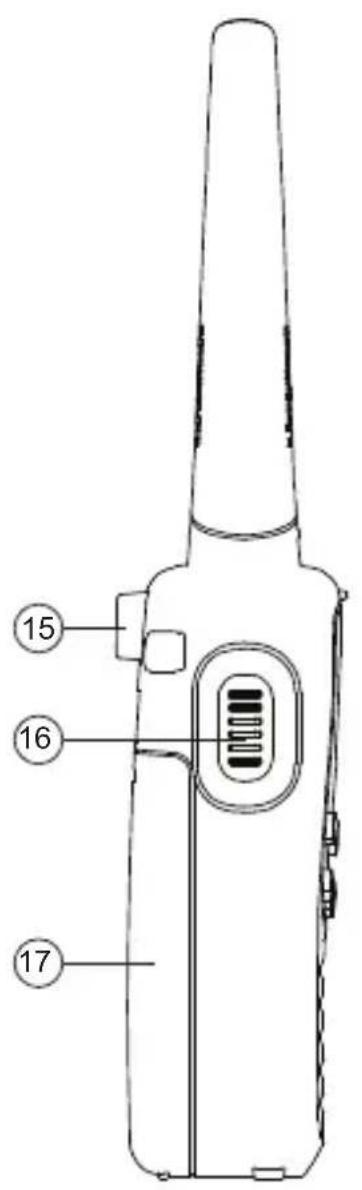
15 16 17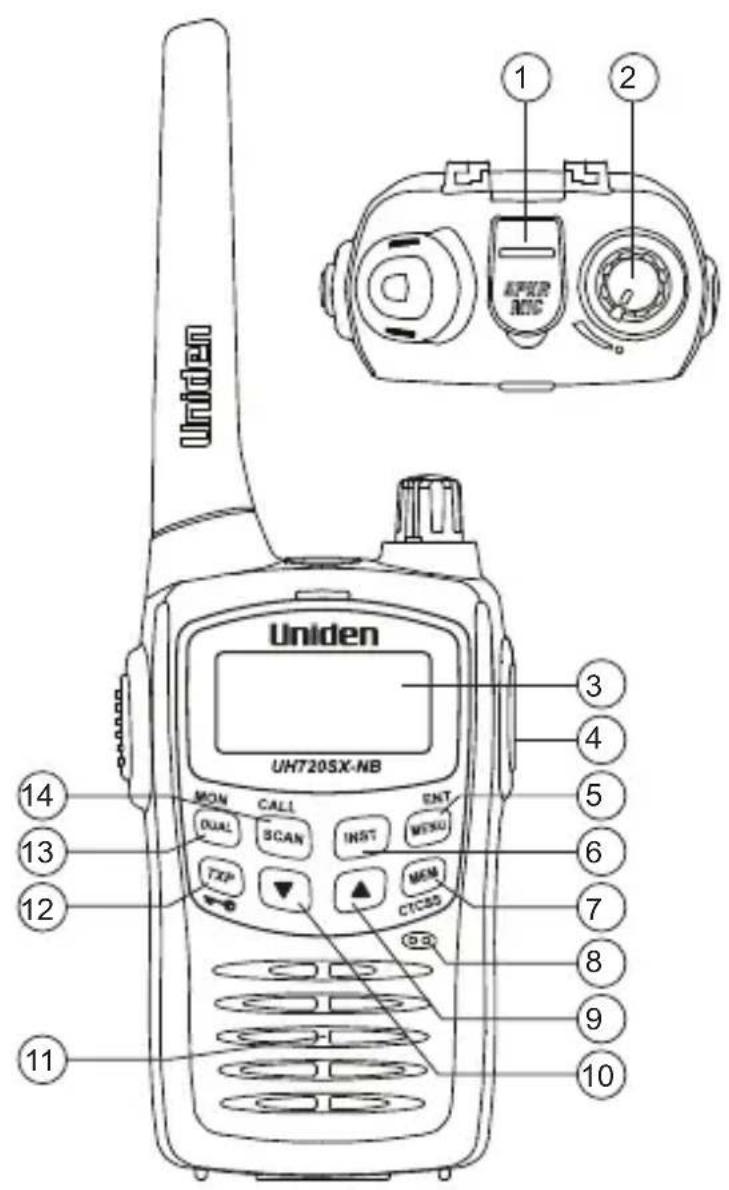
text_image
Uniden UH720SX-NB MON CALL ENT DUAL SCAN INST MENU FXP MEM CTCSS 14 13 12 11 1 2 3 4 5 6 7 8 9 10- EXT. SPKR/MIC Jack
- On/Off Volume Knob
- LCD Display
- Cigarette Lead Charger Jack
- Menu/Enter Button
- Instant Button
- Memory On/Off & DCS/CTCSS Button
- Microphone
-
Up Button
-
Down Button
- Speaker
- Transmit Power Select/Keylock Button
- Dual Watch/Monitor Button
- Scan/Call Tone Transmit Button
- Belt Clip Catch
- PTT (Push-to-talk) Button
- Battery Cover

text_image
80 TX BUSY M SCN SQT BCL DUAL LOH: GS PRI DCSCTCSS RM VOX 188.8 A B C D E F G H I J K L Q P O N MA. Memory
B. Transmit
C. Scan
D. Busy
E. Squelch
F. Busy Channel Lockout
G. Dual Watch
H. Battery Level Indicator
I. Transmission Power Level Indicator (High/Low)
J. Room Monitor
K. Key Lock
L. DCS/CTCSS code
M. DCS/CTCSS Indicator
N. Priority
O. Voice Activation
P. Group Scan
Q. Channel Number

NOTE
Radio images in this manual show UH720SX-NB, however the display indicators and keys are the same for the UH710SX-NB.
| Item | UH710 SX-NB | UH710 SX-2NB | UH710SX- 2NB-TP | UH720 SX-NB | UH720 SX-2NB |
| Radio 1x | UH710SX- NB | 2x UH710SX- NB | 2x UH710SX- 2NB | 1x UH720SX- NB | 2x UH720SX- NB |
| Rechargeable Batteries (AA NIMH) | 3x 700mAh | 6x 700mAh | 6x 700mAh | 3x 1800mAh | 6x 1800mAh |
| Beltclip 1x 2x 2x 1x 2x | |||||
| Earpiece Mic (EM-065) | 1x 2x 2x | 1x 2x | |||
| External Speaker Mic (SM-065) | -- 2x 1x | 2x | |||
| Desktop charger 1x | single 1x twin | 1x twin 1x single 1x twin | |||
| Cigarette lead charger (CK-720) | -- 2x 1x | 2x | |||
| AC Adaptor (AAD-065S(M)) | 1x 1x 1x | 1x 1x | |||
| Owner's Manual | 1x 1x 1x | 1x 1x | |||
| Carry Case | -- 1x -- | ||||

NOTE
If any of these items are missing from the box, contact your Uniden Dealer.
Optional Accessories
• +12V to +24V DC Cigarette Lead Charger (CK-720)
• Voice Activated (VOX) Headset (VM-041)
• Leather Case (LC-720)
• Commercial Quality Speaker Microphone (SM-060CQ)
• Commercial Quality Air Tube (EM-064CQ)
- Commercial Quality Referee's Kit (RK-060CQ)
• Commercial Quality Rubber Car Hook (EM-060CQ)
Battery installation
Your UH710SX-NB/UH720SX-NB pack includes 3 AA rechargeable NiMH batteries to power the unit. You must install and then charge the batteries for 15 hrs before use. The UH710SX-NB/UH720SX-NB can also use 3 AA Alkaline batteries.

NOTE
Do not mix old and new batteries to avoid damage to the unit.
To install batteries :
- Make sure your radio is OFF.
- Remove the battery compartment door by pressing down then sliding the cover away from the radio.
- Install the batteries to the battery compartment.
- Replace the battery compartment door.

natural_image
Line drawing of a walkie-talkie device (no text or symbols)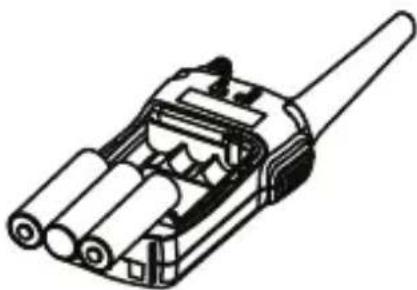
natural_image
Technical line drawing of a mechanical connector or housing assembly (no text or symbols)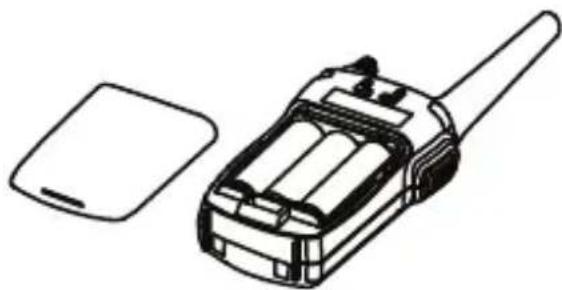
natural_image
Line drawing of a walkie-talkie device with a separate flat case (no text or symbols)Belt Clip
To attach the belt clip:
Slide the belt clip into the catch until it snaps into place.
To remove the belt clip:
Pinch and hold the belt clip and latch and then slide the belt clip up and out of the catch.
Charging Batteries Using The Desktop Charger
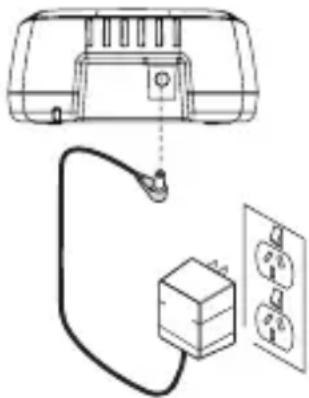
- Connect the AC adaptor to the charging cradle.
- Place the battery installed unit with keys facing forward onto the charging cradle to charge the batteries. The charge LED lights to indicate charging.

NOTE
Warning Notice!
Use only the supplied AAD-065S(M) power adaptor or supplied cigarette lead adaptor (UH720SX-NB pack only) if rechargeable batteries will be used in the radio.

NOTE
Battery charging times vary. A longer time is required to charge higher capacity batteries.
natural_image
Diagram of a device connected to an electrical outlet with a cable and switch (no text or symbols)UH710SX-NB/UH720SX-NB single charger is shown.
Charging Batteries Using The Cigarette Lead Charger (Supplied with UH720SX-NB packs only)
- Connect the cigarette lead charger into the DC charge jack of the radio.
- Connect the adaptor end to a cigarette jack (cigarette lead charger input voltage: +12V to +24V DC). The charge LED lights to indicate charging.
| Rechargeable NiMH Batteries Charging Time | |
| 1800mAh 9 hrs | |
| 700mAh 4 hrs | |
Battery Life
Duty cycle: TX 5% - RX 5% - STANDBY 90 %
50hrs typ.(AA SIZE 1800mAh ALKALINE)
50hrs typ.(AA SIZE 1800mAh Ni-MH)
20hrs typ.(AA SIZE 700mAh Ni-MH)
Condition measured:
Volume Level at rated power (50mW @ 16 ohms)
Transmit Level; LO
Standby; Battery Save ON
Battery Level Display
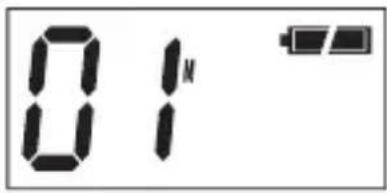
The upper right hand corner of the screen indicates the UH710SX-NB/UH720SX-NB current battery voltage level at all times. The battery level is displayed in 4 levels:
LEVEL 3
Battery 100% full
LEVEL 2
Battery approx
30% capacity
LEVEL 1
Battery approx
15% capacity
LEVEL 0
Almost Empty
text_image
01N
text_image
01M
text_image
01N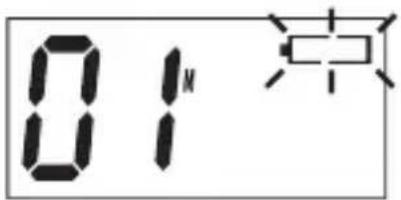
text_image
01N
NOTE
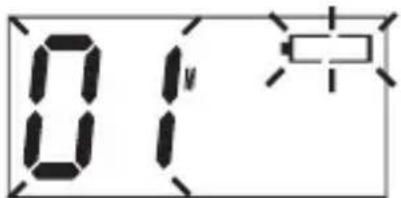
When [PTT] SW is pressed at Level 0, the PTT Error Tone will be heard and the channel number and the battery icon will flash.
text_image
01 中Low Battery Alert
The LCD on your radio shows a battery meter in the upper right hand corner.

icon indicates a fully powered unit.
The Low Battery Alert beep will sound when the battery level drops to Level 1.

text_image
01MIf you continue to use the radio at Level 1 the Low Battery Alert beep will sound at approximately 15 minutes intervals until the radio is turned off or the batteries are recharged to a higher level.
If the battery level falls to Level 0 (flashing empty) the LCD display will turn off after 30sec. An error tone will sound if any key is pressed.
Recharge the NiMH batteries or replace the Alkaline batteries immediately to continue using the radio.
Power On/Off
To turn the unit ON, rotate the [ON/OFF VOLUME] knob clockwise until a "click" is heard. A channel number and battery level should appear on the display.
To turn the unit OFF, rotate the [ON/OFF VOLUME] knob counter- clockwise until a "click" is heard to save the battery life. The display will disappear.
Volume
Rotate the [ON/OFF VOLUME] knob clockwise to increase the volume, counter-clockwise to decrease the volume.

Setting The Squelch
The squelch is used to eliminate any annoying background noise when there are no signals present.
- Press MENU once.
The current setting will flash.
- Press ▲ or ▼ to select desired squelch setting.
SQL-1 : Max sensitivity (Threshold)
SQL-2 : Med sensitivity
SQL-3 : Min sensitivity (Tight)
- Press and hold MENU to save setting and exit.
If SQL-3 is selected SQT will flash continuously.
Selecting A Channel
Press or to select the desired channel.

NOTE
If you press and hold or the channel numbers will scroll rapidly.
To Transmit And Receive
The radio uses the UHF-CB Channels. For your reference a list of the available channels and corresponding frequencies is printed on page 25. (Channels 22 and 23 are for telemetry and telecommand applications. Transmit is inhibited on these channels).
- The maximum RF transmit power of the UH720SX-NB is 2 Watts and UH710SX-NB is 1 Watt.
- Before you transmit, listen for activity on the selected channel.
- When the channel is clear, press and hold the PTT to transmit.
TX appears on the LCD.
Hold the radio with microphone approximately 5 cm in front of your mouth with the antenna at approximately 45° angle away from your head. Speak in a clear, normal conversational voice.

text_image
Uniden 01° UH720SX-NB MON CALL ENT DUAL SCAN INST MON TXP ▲ MEM CTCSS Uniden 01° UH720SX-NB MON CALL ENT DUAL SCAN INST MON TXP ▼ ▲ MEM CTCSS PTT button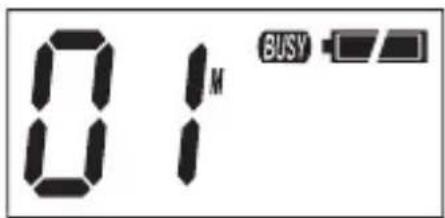
text_image
01M BUSY- When you have finished speaking, release the and listen for a response then TX disappears on the LCD. BUSY appears while receiving a signal.
To Operate In Duplex Mode (Repeaters)
The Duplex function enables you to access local repeater stations.

You can only activate Duplex on CH01-CH08 and CH41-CH48.
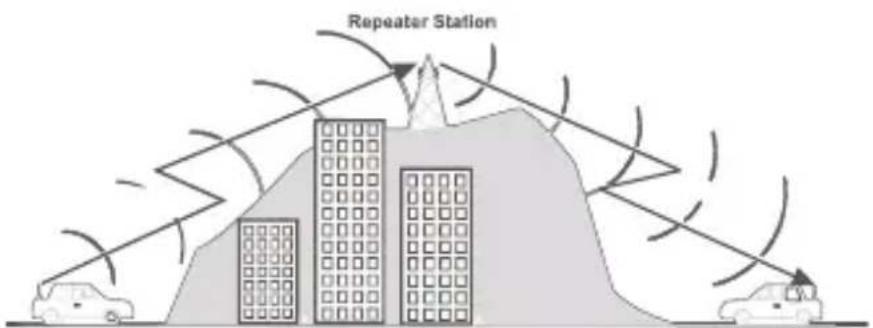
UHF CB Repeaters are used to retransmit or relay your signal. Repeaters will extend the range of your radio and overcome the shielding effect caused by solid obstructions.
Eg. CH01 is being used in your area for repeater use.
-
Press twice. dP will flash.
-
Press ▲ or ▼ to change the selection. r appears for CH01-CH08 and n appears for CH41-CH48 when duplex is selected.
-
Press and hold ☑ to save and exit.

text_image
01 dP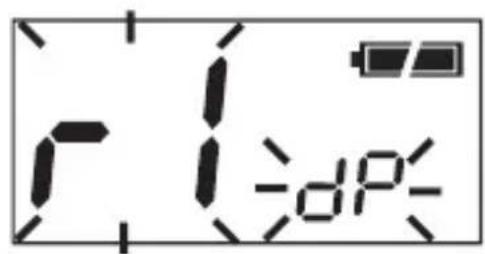
text_image
r i -dP-
Contact your retailer for a list of repeaters available in your area.
Operation with the aid of a Repeater
text_image
Repeater Station CarTransmit Power Select
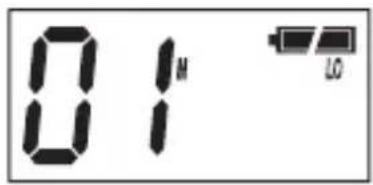
The UH720SX-NB has three transmit power levels: 2 Watt, 0.5 Watt and 0.1 Watt. The UH710SX-NB has three transmit power levels: 1 Watt, 0.5 Watt and 0.1 Watt.
To change your transmit power level:
- Press TXP while in the 'power middle level' to change to 'power high level.'
- Press ☐ while in the 'power high level' to change to the 'power low level.'
- Press ☐ while in the 'power low level' to change to 'power middle level.'
text_image
01 LO
text_image
01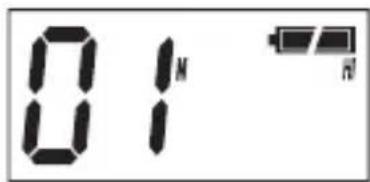
text_image
01 N HTX Power Low TX Power Middle TX Power High

Transmitting on a higher level will use more Battery power but will enable you to transmit further.
Scanning
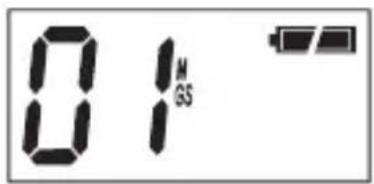
The UH710SX-NB/UH720SX-NB has two types of scanning; Open Scanning (OS) and Group Scanning (GS), OS Scan searches all the channels and
frequencies in its memory continuously. GS Scan is similar to OS scan but has the added ability to monitor the priority channel every 1.5 seconds.
Scanning allows you to search for active channels programmed in the OS or GS memory.
To initiate scanning,
-
Assuming the unit is on CH01 when switched on.
-
Press SCAN and scanning starts.
SCAN flashes during scanning.
text_image
01 M GS
text_image
Uniden UH720SX-NB MON CALL ENT SCAN INST MENU ▼ ▲ CYCS5Open Scan (OS) Mode
(The absence of GS icon indicates that the unit is on OS mode)
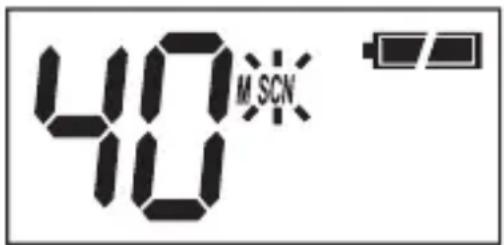
Allows continuous scanning of channels stored in the Open Scan (OS) memory. If an active channel is found, scanning will stop on that channel.

The factory has preprogrammed all the UHF-CB channels into the Open Scan channel memory. However, you can change or customise the channels by following the steps on programming Scan Channels on page 18.
Example. CH40 becomes active
If the received signal cease, the unit will wait for at least 3 seconds for the signal to return, otherwise scanning resumes.
text_image
40 M SCNTo skip the active channel, press ▲ or ▼ Scanning resumes.
To deactivate SCAN, press PTT or CALL SCAN

- If SCAN is deactivated while in an active channel, the radio will stay on that active channel. If no other channels are active, the radio will reinstate the starting channel.
- If OS Scanning is initiated when there are no channels programmed in OS memory, an error tone will be heard and scanning will not start.
Group Scan(GS) Mode
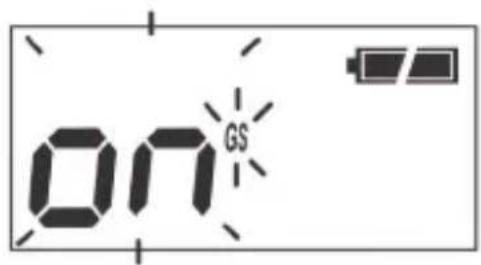
To change between OS and GS scan;
- Press ☐ four times.
GS setting ON or OFF will flash. - Press ▲ or ▼ to change the selection.
- Press and hold ☑ to save and exit.
text_image
ON GSTo initiate scanning,
-
When SCAN^* is pressed during Group Scan Mode, SCN will blink and Group Scan Scanning begins.
-
To deactivate GS scanning, press PTT or CALL SCAN

-
If SCAN is deactivated while it is tuned to an active channel, the UH710SX-NB/UH720SX-NB will stay on that active channel. If none of the channels re-active, the radio will reinstate the Scan start channel.
-
If GS Scanning is initiated when there are no channels programmed in GS memory, an error tone will be heard and scanning will not start.
Priority Channel Watch During Group Scan
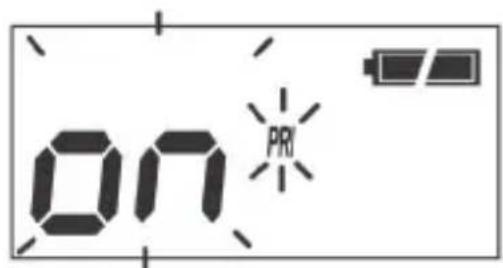
The feature allows user to monitor the Instant Priority channel (see page 19) every 1.5 secs during Group Scanning. The Priority Channel can also be monitored with Dual Watch, see page 19.
-
Press three times. PRI setting flashes.
-
Press ▲ or ▼ to change the selection.
-
Press and hold ☑ to save and exit.
text_image
ON PRIProgramming Scan Channels
- Select which Scanning Mode you wish to use on the channel OS or GS Mode.

OS is indicated by the absence of the GS icon.
-
Select the channel you want to store by pressing ▲ or ▼
-
Press MEM CTCSS to store. M icon appears.
-
To remove the channel from Memory, Press MEM CTCSS to remove. M icon disappears.
Drop-Out Delay
While scanning, the radio stops at a busy channel and receives a signal. When the received signal is over, the unit will wait for 3 seconds for the return of the signal, otherwise, the radio resumes scanning.
Programming the Instant Priority Channel
Select the Channel you want to store as the Instant Priority Channel by pressing ▲ or ▼
Press and hold INST for 3 seconds to program the channel. PRI icon appears.
Recalling the Instant Channel
Momentarily press the button to return to the Instant Channel.
Dual Watch
When Dual Watch function is active, priority channel is watched every 1.5 seconds.
Press ☐ to activate or deactivate Dual Watch. DUAL appears on the display when activated.
Monitor
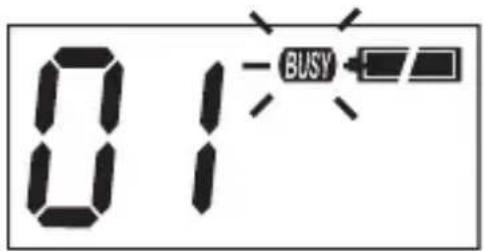
This feature enables users to listen in for weak signals on the current channel at the press of a button.
To use monitor,
• For continuous listening.
Press and hold

A double tone beep will be heard and the receiver circuit will stay open, letting in both the noise & weak signals.
• Display shows BUSY.
• To return to normal receive mode press and hold
text_image
01 BUSY
text_image
Uniden UH720SX-NB MON RUAL CALL SCAN INST MEN2 TXP ▼ ▲ CTCSS
CTCSS
CTCSS is a feature that allows a group to talk to each other without hearing other users on the same channel.
- Select desired channel.
- Press and hold MEM CTCSS. The current DCS/CTCSS setting flashes.
- Press ▲ or ▼ to select desired CTCSS code.
- To select off code, press and hold oF flashes.
- Press MEM CTCSS to save and exit.
DCS
DCS is a digital extension of CTCSS. It provides 104 extra, digitally coded, squelch codes that follow after the 38 CTCSS codes. CTCSS 1-38, followed by DCS 1-104.
Follow the steps for changing CTCSS code but select DCS code as desired.

text_image
01 CTCSS OF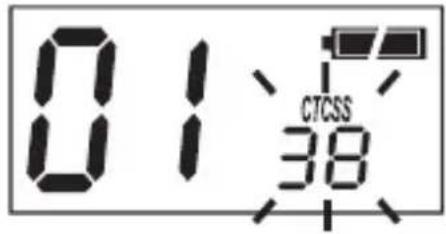
text_image
01:38 CTCSS
text_image
01 DCS
text_image
01 DCS 104
Channels 05 and 35 are used for emergency channels. CTCSS and DCS will not operate on these two channels.
VOX
VOX is the automatic transmitting function by inputting voice into the VOX headset mic without pressing the PTT key.
While headset microphone is not connected, VOX function is inactive even if vox level setting is from 1 to 4.
VOX blinks while VOX function is active.
- Press ☐ five times.
The current vox setting flashes. - Press ▲ or ▼ to select desired setting. The 5 VOX levels are from 1 (High sensitivity) to 4 (Low sensitivity) and Off.
- Press and hold ☑ to save and exit.

text_image
of vox 1 voxRoom Monitor
The Room Monitor function sets the radio to operate as a transmitter only - receive (speaker) is disabled.
The TX is activated by voice activation (VOX) without pressing PTT. TX will activate when the detected voice/noise volume exceeds the set threshold. If the voice/noise keeps TX open for over 4 seconds then TX will continue automatically for an additional 15 seconds. TX will finish when voice/noise volume falls below the set threshold for 15 seconds.
While in Room Monitor mode;
• The receive function is disabled.
• RM flashes on the display.
- Dual Watch function, if ON, is disabled.
- Duplex mode is disabled on duplex channels.
- Scan mode is disabled.
- All key touch tones are disabled.
Room Monitor can be temporarily disabled by pressing ⓄPIT or holding .
If no further operation is performed for 45 seconds then the temporary disable mode ends and Room Monitor mode re-activates.
- Press ☑ menu six times.
- Press ▲ or ▼ to select desired setting.
The 5 Room Monitor levels are from 1 (High sensitivity) to 4 (Low sensitivity) and Off.
- Press and hold ENT MENU to save and exit.

- If using this feature as Baby Monitor please note it is not a replacement for regularly checking the safety and security of children.
- The operating time is limited to the remaining charge of the battery and is not suitable for continuous overnight use.
- If there is any input at EXT SP MIC JACK, Room Monitor automatically turns off.
Busy Channel Lockout
This feature prevents accidental transmission on a busy channel. For example, BCL is used when CTCSS or DCS is selected to prevent transmission when the radio detects a transmission from another unit using the same CTCSS or DCS code.
- Press seven times. The current BCL setting flashes.
- Press or to select desired setting.
- Press and hold ENTER MENU to save and exit.
Call Tone
Your UH710SX-NB/UH720SX-NB radio is equipped with 5 selectable call tones that will be transmitted when SCAN^* is pressed and held.
-
Press eight times. The current call tone setting flashes.
-
Press ▲ or ▼ to select desired setting. The 5 call tones are C1, C2, C3, C4 and C5.
-
Press and hold ☑ to save and exit.

NOTE
Current regulations require calling tones to be restricted to one transmission per minute. If a second transmission is attempted within one minute then an error tone will sound.
Roger Beep
Roger Beep is a BEEP that is sent to notify the end of transmission (both PTT and VOX transmission.) Roger Beep can be heard through the speaker when Key Beep is on. Roger Beep is transmitted even if Key Beep is turned off. However, Roger Beep will not be heard from the speaker.
-
Press nine times. The current Roger Beep setting flashes.
-
Press ▲ or ▼ to select desired setting.
-
Press and hold ☑ to save and exit.
Key Beep
Assures the user that the keypad has been properly pressed by emitting a beep tone. This tone can be switched on or off.
-
Press ^ENT MENU ten times. The current Key Beep setting flashes.
-
Press ▲ or ▼ to change selection.
-
Press and hold ☑ to save and exit.
Battery Save
Battery Save feature extends the battery life by switching the receiver circuit power ON and OFF. This feature automatically activates during stand by mode (RX mode without signal). It turns OFF automatically when a signal is present, and activates again after channel inactivity. Battery Save can be switched on or off.
- Press eleven times. bS setting flashes.
- Press ▲ or ▼ to change selection.
- Press and hold Ⓗ to save and exit.
Keypad Lock
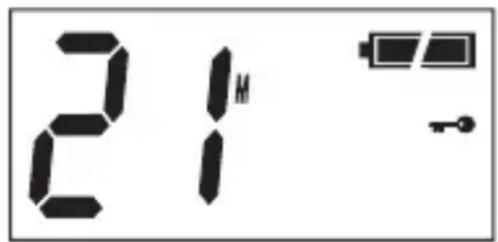
To prevent accidental entries, you can
lock the keypad. Press and hold the for 1.5 Secs until it beeps to activate Key Lock. The "appears."
To unlock the keypad, press and hold again for 1.5 Secs. The disappears.
text_image
21M ←
When the Key Lock is active, an error tone will be heard if you attempt to press the keys.
Back Lighting
The Liquid Crystal Display (LCD) is backlit for easy viewing at night or in low light situations. The back lighting automatically switches ON every time a key (except PTT) is pressed. It turns OFF 5 secs after the last key is pressed.
CTCSS Codes and Frequencies
| Code No. | Frequency (Hz) | Code No. | Frequency (Hz) | |
| “oF” OFF | 20 131.8 | |||
| 1 67.0 21 | 136.5 | |||
| 2 71.9 22 | 141.3 | |||
| 3 74.4 23 | 146.2 | |||
| 4 77.0 24 | 151.4 | |||
| 5 79.7 25 | 156.7 | |||
| 6 82.5 26 | 162.2 | |||
| 7 85.4 27 | 167.9 | |||
| 8 88.5 28 | 173.8 | |||
| 9 91.5 29 | 179.9 | |||
| 10 94.8 30 | 186.2 | |||
| 11 97.4 31 | 192.8 | |||
| 12 100.0 | 32 203.5 | |||
| 13 103.5 | 33 210.7 | |||
| 14 107.2 | 34 218.1 | |||
| 15 110.9 | 35 225.7 | |||
| 16 114.8 | 36 223.6 | |||
| 17 118.8 | 37 241.8 | |||
| 18 123.0 | 38 250.3 | |||
| 19 127.3 |
| Code No. | DCS Code (Octal) | Code No. | DCS Code (Octal) | Code No. | DCS Code (Octal) |
| 1 023 36 | 223 71 445 | ||||
| 2 025 37 | 225 72 446 | ||||
| 3 026 38 | 226 73 452 | ||||
| 4 031 39 | 243 74 454 | ||||
| 5 032 40 | 244 75 455 | ||||
| 6 036 41 | 245 76 462 | ||||
| 7 043 42 | 246 77 464 | ||||
| 8 047 43 | 251 78 465 | ||||
| 9 051 44 | 252 79 466 | ||||
| 10 053 45 | 255 80 503 | ||||
| 11 054 46 | 261 81 506 | ||||
| 12 065 47 | 263 82 516 | ||||
| 13 071 48 | 265 83 523 | ||||
| 14 072 49 | 266 84 526 | ||||
| 15 073 50 | 271 85 532 | ||||
| 16 074 51 | 274 86 546 | ||||
| 17 114 52 | 306 87 565 | ||||
| 18 115 53 | 311 88 606 | ||||
| 19 116 54 | 315 89 612 | ||||
| 20 122 55 | 325 90 624 | ||||
| 21 125 56 | 331 91 627 | ||||
| 22 131 57 | 332 92 631 | ||||
| 23 132 58 | 343 93 632 | ||||
| 24 134 59 | 346 94 654 | ||||
| 25 143 60 | 351 95 662 | ||||
| 26 145 61 | 356 96 664 | ||||
| 27 152 62 | 364 97 703 | ||||
| 28 155 63 | 365 98 712 | ||||
| 29 156 64 | 371 99 723 | ||||
| 30 162 65 | 411 100 731 | ||||
| 31 165 66 | 412 101 732 | ||||
| 32 172 67 | 413 102 734 | ||||
| 33 174 68 | 423 103 743 | ||||
| 34 205 69 | 431 104 754 | ||||
| 35 212 70 | 432 |

Always listen on a channel (or observe the receive signal level meter) to ensure it is not already being used before transmitting.
Channels 5 and 35 are used for emergency channels.
CTCSS will not operate on these channels.
Please follow these guidelines for channel use in Australia:
- Channels 05 and 35 are Emergency Channels.
• Channel 11 is a Calling Channel.
- Channels 22 and 23 are for telemetry and telecommand applications, channels 61, 62 and 63 are for future use and TX is inhibited on these channels.
General communication is accepted on all other channels with these guidelines:
• Channel 40 - road channel (Australia).
- Channels 01-08 (and 31-38), and Channels 41-48 (and 71-78) are repeater channels.
Important information - 80 Channel UHF-CB channel expansion
To provide all users additional channel capacity within the UHF-CB Band. The ACMA will change the majority of the current wideband 40 channel use to narrowband channel use. This allows for additional channels to be added, up to 80 (77 usable) Channels.
This simply means that the new narrowband radio you have purchased will have more channels than older radios. Please refer to the guidelines above and the channel chart for further channel information.
A list of currently authorised channels can also be obtained from the ACMA website in Australia and the MED website in New Zealand.

Interference / Poor Audio
When a new narrowband radio receives a signal from an older wideband radio the speech may sound loud.
Narrowband radios operating on CH41 - CH80 may encounter interference from a nearby wideband radios transmitting on high power on an adjacent channel (frequency).
When an older wideband radio receives a signal from a new narrowband radio the speech may sound quiet - the wideband radio user simply adjusts their radio volume for best performance.
The above situations are not a fault of the radio but a symptom of mixed wideband and narrowband radios in current use. It is expected that as older wideband radios are phased out this issue will be eliminated.
UHF-CB Channels and Frequencies
| CH No. | Simplex Mode Transmit / Receive Frequency (MHz) | Duplex Mode Transmit Frequency (MHz) | CH No. | Simplex Mode Transmit / Receive Frequency (MHz) |
| 1 47 | 6.425 477.175 (CH31) | 21 476.925 | ||
| 2 47 | 6.450 477.200 (CH32) | 22 476.950 (RX only) | ||
| 3 47 | 6.475 477.225 (CH33) | 23 476.975 (RX only) | ||
| 4 47 | 6.500 477.250 (CH34) | 24 477.000 | ||
| 5 47 | 6.525 477.275 (CH35) | 25 477.025 | ||
| 6 47 | 6.550 477.300 (CH36) | 26 477.050 | ||
| 7 47 | 6.575 477.325 (CH37) | 27 477.075 | ||
| 8 47 | 6.600 477.350 (CH38) | 28 477.100 | ||
| 9 47 | 6.625 29 477.125 | |||
| 10 47 | 6.650 30 477.150 | |||
| 11 47 | 6.675 31 477.175 | |||
| 12 47 | 6.700 32 477.200 | |||
| 13 47 | 6.725 33 477.225 | |||
| 14 47 | 6.750 34 477.250 | |||
| 15 47 | 6.775 35 477.275 | |||
| 16 47 | 6.800 36 477.300 | |||
| 17 47 | 6.825 37 477.325 | |||
| 18 47 | 6.850 38 477.350 | |||
| 19 47 | 6.875 39 477.375 | |||
| 20 47 | 6.900 40 477.400 |
UHF-CB Channels and Frequencies
| CH No. | Simplex Mode Transmit / Receive Frequency (MHz) | Duplex Mode Transmit Frequency (MHz) | CH No. | Simplex Mode Transmit / Receive Frequency (MHz) |
| 41 476.4375 477.1875 (CH) | 71) 61 | future use476.9375 (RX only) | ||
| 42 476.4625 477.2125 (CH) | 72) 62 | future use476.9625 (RX only) | ||
| 43 476.4875 477.2375 (CH) | 73) 63 | future use476.9875 (RX only) | ||
| 44 476.5125 477.2625 (CH) | 74) 64 477.0125 | |||
| 45 476.5375 477.2875 (CH) | 75) 65 477.0375 | |||
| 46 476.5625 477.3125 (CH) | 76) 66 477.0625 | |||
| 47 476.5875 477.3375 (CH) | 77) 67 477.0875 | |||
| 48 476.6125 477.3625 (CH) | 78) 68 477.1125 | |||
| 49 476.6375 69 477.1375 | ||||
| 50 476.6625 70 477.1625 | ||||
| 51 476.6875 71 477.1875 | ||||
| 52 476.7125 72 477.2125 | ||||
| 53 476.7375 73 477.2375 | ||||
| 54 476.7625 74 477.2625 | ||||
| 55 476.7875 75 477.2875 | ||||
| 56 476.8125 76 477.3125 | ||||
| 57 476.8375 77 477.3375 | ||||
| 58 476.8625 78 477.3625 | ||||
| 59 476.8875 79 477.3875 | ||||
| 60 476.9125 80 477.4125 |
UNIDEN UH720SX-NB, UH710SX-NB UHF-CB Radio
IMPORTANT: Satisfactory evidence of the original purchase is required for warranty service
Please refer to our Uniden website for any details or warranty durations offered in addition to those contained below.
Warrantor: The warrantor is either Uniden Australia Pty Limited ABN 58 001 865 498 (“Uniden Aust”) or Uniden New Zealand Limited (“Uniden NZ”) as the case may be.
Terms of Warranty: Uniden Aust/NZ warrants to the original retail purchaser only that the UH720SX-NB, UH710SX-NB Radio (“the Product”), will be free from defects in materials and craftsmanship for the duration of the warranty period, subject to the limitations and exclusions set out below.
Warranty period: This warranty to the original retail purchaser is only valid in the original country of purchase for a Product first purchased either in Australia or New Zealand and will expire one (1) year from the date of the original retail sale.
If a warranty claim is made, this warranty will not apply if the Product is found by Uniden to be:
(A) Damaged or not maintained in a reasonable manner or as recommended in the relevant Uniden Owner's Manual;
(B) Modified, altered or used as part of any conversion kits, subassemblies or any configurations not sold by Uniden Aust or Uniden NZ;
(C) Improperly installed contrary to instructions contained in the relevant Owner's Manual
(D) Repaired by someone other than an authorized Uniden Repair Agent in relation to a defect or malfunction covered by this warranty; or
(E) Used in conjunction with any equipment, parts or a system not manufactured by Uniden.
Parts Covered: This warranty covers the Product and included accessories.
User-generated Data: This warranty does not cover any claimed loss of or damage to user-generated data (including but without limitation phone numbers, addresses and images) that may be stored on your Product.
Statement of Remedy: If the Product is found not to conform to this warranty as stated above, the Warrantor, at its discretion, will either repair the defect or replace the Product without any charge for parts or service. This warranty does not include any reimbursement or payment of any consequential damages claimed to arise from a Product's failure to comply with the warranty.
Our goods come with guarantees that cannot be excluded under the Australian Consumer Law. You are entitled to a replacement or refund for a major failure and for compensation for any other reasonably foreseeable loss or damage. You are also entitled to have the goods repaired or replaced if the goods fail to be of acceptable quality and the failure does not amount to a major failure.
This warranty is in addition to and sits alongside your rights under either the COMPETITION AND CONSUMER ACT 2010 (Australia) or the CONSUMER GUARANTEES ACT (New Zealand) as the case may be, none of which can be excluded.
Procedure for obtaining warranty service: Depending on the country in which the Product was first purchased, if you believe that your Product does not conform with this warranty, you should deliver the Product, together with satisfactory evidence of your original purchase (such as a legible copy of the sales docket) to Uniden at the addresses shown below. You should contact Uniden regarding any compensation that may be payable for your expenses incurred in making a warranty claim. Prior to delivery, we recommend that you make a backup copy of any phone numbers, images or other data stored on your Product, in case it is lost or damaged during warranty service.
UNIDEN AUSTRALIA PTY LTD
Service Division
345 Princes Highway,
Rockdale, NSW 2216
Phone: 1300 366 895
Email: custservice@uniden.com.au
UNIDEN NEW ZEALAND LTD
Service Division
150 Harris Road, East Tamaki
Auckland 2013
Phone: (09) 273 8377
Email: service@uniden.co.nz
THANK YOU FOR BUYING A UNIDEN PRODUCT.
Uniden®