KFA213 - Small Appliances Kambrook - Free user manual and instructions
Find the device manual for free KFA213 Kambrook in PDF.


| Product Type | Desk Fan |
| Brand | Kambrook |
| Model | KFA213 |
| Fan Blade Size | 40 cm |
| Speed Settings | 3 (Low, Medium, High) |
| Oscillation | 80° side-to-side |
| Tilt Adjustment | Yes, with click stops (KFA211 & KFA213) |
| Grille Material | Metal |
| Blade Material | Plastic |
| Carry Handle | Yes, on rear grille |
| Control Type | Twist controller switch |
| Power Supply | 230-240V AC, 50Hz (Australia/NZ) |
| Power Consumption | Approx. 50 W |
| Assembly Required | Yes (base and fan head) |
| Cleaning Method | Wipe exterior with soft, damp cloth; no abrasive cleaners |
| Safety Features | Stable base, safety guards, automatic shut-off not specified |
| Warranty | 12 months replacement warranty (domestic use) |
| Intended Use | Household only, indoor use |
| Weight (Approx.) | 2.5 kg |
| Dimensions (Approx.) | 40 x 40 x 110 cm (height with base) |
Frequently Asked Questions - KFA213 Kambrook
User questions about KFA213 Kambrook
0 question about this device. Answer the ones you know or ask your own.
Ask a new question about this device
Download the instructions for your Small Appliances in PDF format for free! Find your manual KFA213 - Kambrook and take your electronic device back in hand. On this page are published all the documents necessary for the use of your device. KFA213 by Kambrook.
USER MANUAL KFA213 Kambrook
KFA210(23cm)/KFA211(30cm)
/KFA213(40cm)
Instruction Booklet
Contents
Kambrook Recommends p3
Safety First
Your Kambrook Arctic p5
Desk Fan
Using Your Kambrook p6
Arctic Desk Fan
Care and Maintenance p7
Warranty p8
Important
Please retain your instruction book for future use.
In the event that you need some assistance with your Kambrook appliance, please contact our Customer Service Department on 1300 139 798 (Australia) or 09 271 3980 (New Zealand). Alternatively, visit us on our website at www.kambrook.com.au
IMPORTANT: Please retain your instruction book for future use.
At Kambrook, we believe that safe performance is the first priority in any consumer product, so that you, our valued customer can confidently use and trust our products. We ask that any electrical appliance that you use be operated in a sensible fashion with due care and attention placed on the following important operating instructions.
Important Safeguards For Your Kambrook Arctic Desk Fan
- Carefully read all instructions before operating the Kambrook Arctic Desk Fan for the first time and save for future reference.
- To protect against electric shock, do no immerse the fan, cord or plug in water or any other liquid
- This fan is intended for household use only and not for commercial or industrial use.
- Disconnect the power plug before dismantling, assembling or before cleaning and when the fan is not in use.
- Avoid touching mobile parts of the fan.
- Ensure the fan is on a dry and even surface.
- Never insert fingers, pencils or any other objects through the guards whenever the power plug is connected, in particular while the fan is switched on.
-
The fan must not be used if the guards are not fastened correctly, according to these instructions.
-
Do not operate in the presence of explosives and/or flammable fumes or liquids.
- Never leave the fan unattended when in use.
- Do not unplug the fan by pulling on the cord.
- Never carry the fan by the cord or yank to disconnect from an outlet; instead, grasp the cord and pull to disconnect. Do not pull the cord around sharp edges or corners.
Important Safeguards For All Electrical Appliances
- Fully unwind the power cord before use.
- Do not let the power cord hang over the edge of a bench or table, touch hot surfaces or become knotted.
- To protect against electric shock do not immerse the power cord, power plug or housing in water or any other liquid.
- The appliance is not intended for use by persons (including children) with reduced physical, sensory or mental capabilities, or lack of experience and knowledge, unless they have been given supervision or instruction concerning use of the appliance by a person responsible for their safety.
- Children should be supervised to ensure that they do not play with the appliance.
-
It is recommended to regularly inspect the appliance. To avoid a hazard do not use the appliance if power cord, power plug or appliance becomes damaged in any way. Return the entire appliance to the nearest authorised Kambrook Service Centre for examination and/or repair.
-
Any maintenance other than cleaning should be performed at an authorised Kambrook Service Centre.
- This appliance is for household use only. Do not use this appliance for anything other than its intended use. Do not use in moving vehicles or boats. Do not use outdoors. Misuse may cause injury.
- The installation of a residual current device (safety switch) is recommended to provide additional safety protection when using electrical appliances. It is advisable that a safety switch with a rated residual operating current not exceeding 30mA be installed in the electrical circuit supplying the appliance. See your electrician for professional advice.
Your Kambrook Arctic Desk Fan
-
Fan blade size:
-
KFA210 23cm
- KFA211 30cm
-
KFA213 40cm
-
Choice of speed settings:
-
KFA210 2 settings
-
KFA211/KFA213 3 settings
-
80° oscillation to disperse the air throughout the room
- Easy to use controller switch (KFA210 only)
- Easy twist controller switch (KFA211 and KFA213 only)
-
Tilt adjustable head to control the direction of the air
-
Metal grille and plastic blades
- Convenient carry handle for easy portability
Parts List
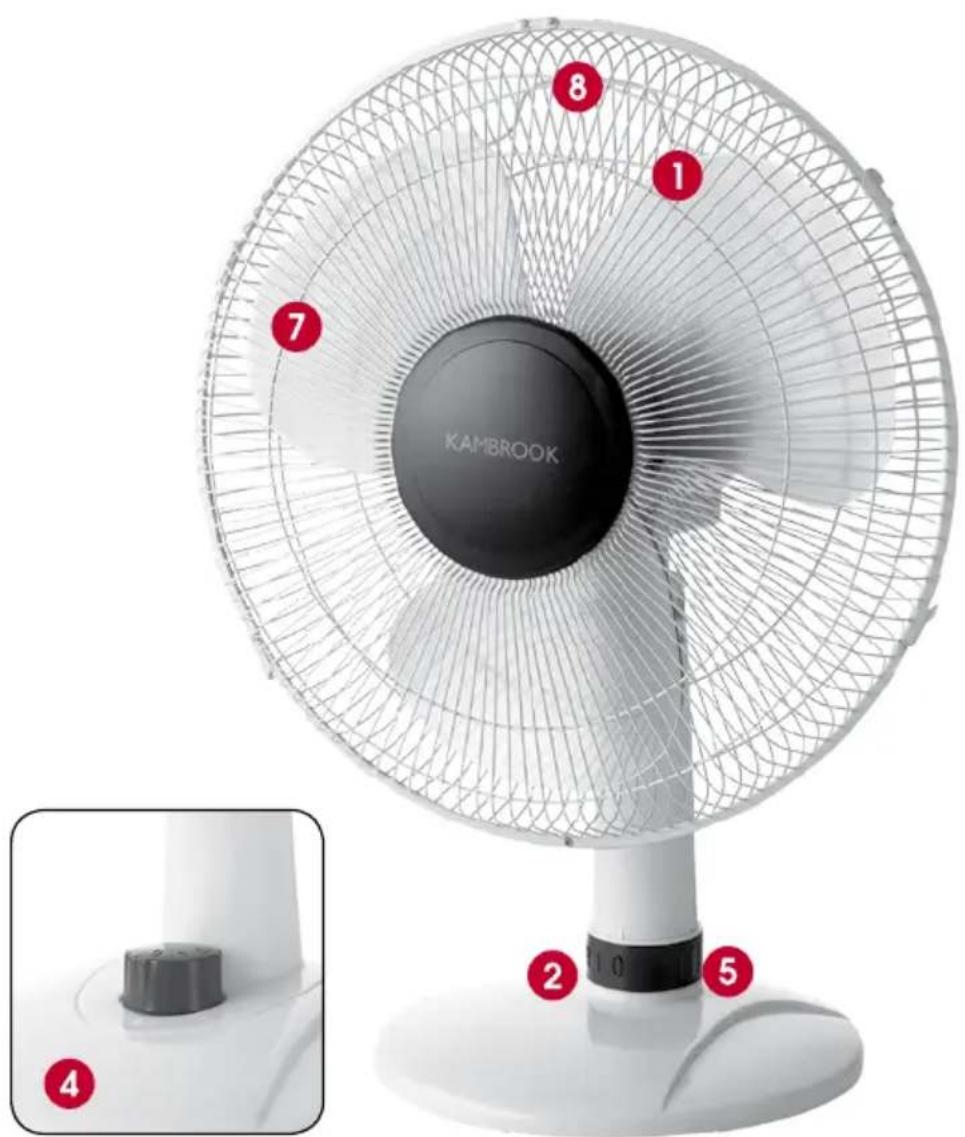
- Front grille with securing clips and screw
- Rear grille
- Guard locking nut and blade cap (KFA211 and KFA213 only)
- Plastic fan blade
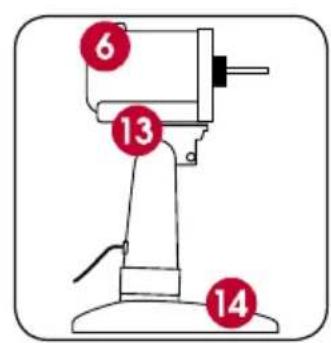
- Motor head
- Base
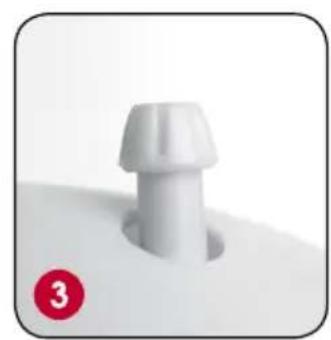
- Three base screws (not shown)
natural_image
Close-up of a white plastic pushpin with a red circular badge labeled '3' (no text or symbols on the object itself)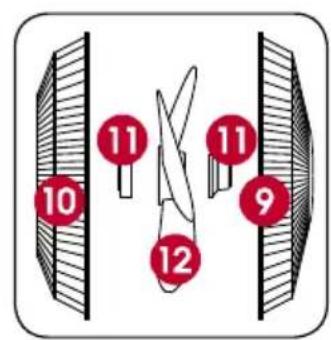
Using Your Kambrook Arctic Desk Fan
Before First Use
Remove any promotional material from the fan.

IMPORTANT: When unpacking the fan, check to see you have received all the items listed in the Parts List, before discarding the packaging.
Assembling Your Arctic Desk Fan
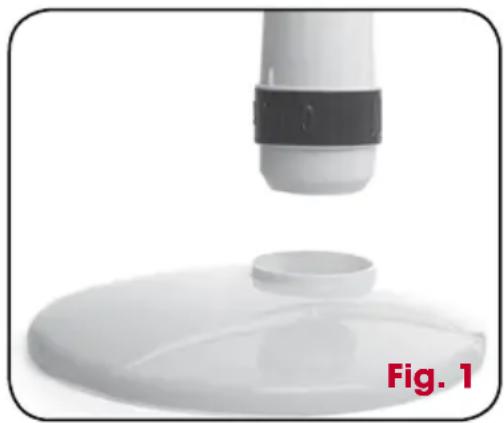
Base Assembly (KFA211 and KFA213 Only)
- Turn the motor head housing upside down.
- Locate the bottom of the housing onto the base so that it sits securely into place.
- Using the 3 supplied base screws, securely fasten the base to the motor head housing.
natural_image
Close-up of a white plastic container with a black-and-white cap, partially submerged in a circular opening, labeled 'Fig. 1' (no other text or symbols)NOTE: The KFA210 base is already connected with the motor housing.
Fan Head Assembly
- Remove the Blade Cap (KFA211 and KFA213 only) from the Motor shaft by turning it clockwise, and then remove the Guard Locking Nut by turning it anti-clockwise.
- Thread the Motor shaft through the centre hole of the Rear Grille, placing the Rear Grille into position. Make sure that the carry handle, on the back of the Rear Grille is located above the motor housing. Ensure the Rear Grille is aligned with the locating pins and fix the grille into position by replacing the Guard Locking Nut. Make sure that the Rear Grille has not slipped off the locating pins before tightening. This should be done by hand. Do not force.
NOTE: When positioning the Rear Grille on the Motor shaft, always ensure the carry handle on the grille is positioned in the upright position.
- Insert the Plastic Blade onto the Motor shaft, and match the pin slots in the blade with the Motor shaft pin.
- Fix the blade into place by tightening the Blade Cap (KFA211 and KFA213 only) onto the Motor shaft in an anticlockwise direction. This should be done by hand. Do not force.
NOTE: Ensure the fan blade engages fully onto the shaft. Please note this may require some force to ensure it is fully engaged.
-
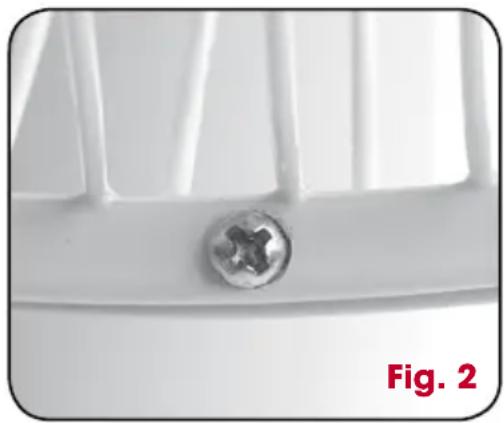
Unlatch the Securing Clips on the Front Grille and unscrew the small screw located at the bottom of the front guard.
-
Press together the Front and Rear Grille, and secure by snapping shut the Securing Clips over edges of both grilles. Make sure that the small holes at the bottom of both grilles are aligned. Tighten the Securing Clips by hand.
-
Thread the screw through the small holes of both the front and back grilles, and tighten using the nut provided.
natural_image
Close-up of a white plastic container with a central screw-like hole, labeled 'Fig. 2' (no other text or symbols)To Operate the Arctic Desk Fan
Plug the cord into a 230V or 240V power point and switch on.
NOTE: To avoid an electrical circuit overload, it is recommended that no other appliances are plugged into the same circuit as your fan, when it is in use.
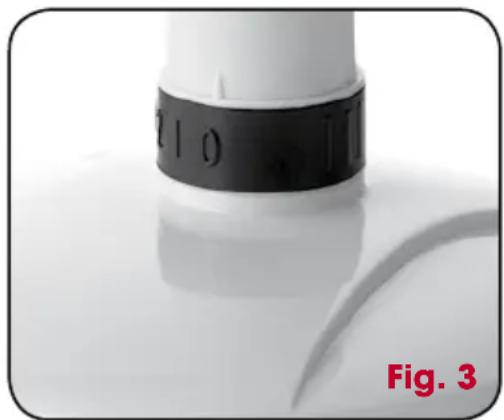
Use the Controller Switch to select the desired air flow speed setting.
0 - The fan is in the 'OFF' position
1 - Low
2 - Medium
3 - High
natural_image
Close-up of a white cylindrical object with black and red markings, labeled 'Fig. 3' at bottom (no other text or symbols)(KFA210 only offers 2 settings)
Setting the Oscillation
The oscillation function works in all air flow settings.
Press down the Oscillation button to activate. The fan will begin to oscillate from side to side.
Lift the Oscillation button to stop the fan from oscillating.
NOTE: The Oscillation button is located behind the Rear Grille, on the Motor head housing.
Adjustable Tilting Head
The Arctic Desk Fan incorporates an Adjustable Tilt Head for greater air coverage.
To adjust the angle of the head on the KFA210, loosen the Control Knob located beneath the Motor head housing, select the required tilt angle, then tighten the Control Knob.
To adjust the angle of the head on the KFA211 and KFA213, while securely holding the shaft of the fan body, simply lift or lower the Motor head housing, the head will click as it is being adjusted.
Care and Maintenance
Always switch the Arctic Desk Fan off, prior to cleaning the housing, base, grilles and blades.
To clean the outside of the fan, wipe the exterior with a soft, damp cloth. Never use an abrasive cleaner.
When not in use, store the fan (preferably in its original box) in a cool, clean and dry location.
Kambrook 12 Month Replacement Warranty
In Australia, this Kambrook Replacement Warranty does not affect the mandatory statutory rights implied under the Trade Practices Act 1974 and other similar State and Territory legislation relating to the appliance. It applies in addition to the conditions and warranties implied by that legislation.
In New Zealand, this Kambrook Replacement Warranty does not affect your mandatory statutory rights implied under the Consumer Guarantees Act 1993 in relation to the appliance. It applies in addition to the conditions and guarantees implied by that legislation.
This Kambrook Replacement Warranty is valid only in the country of purchase, but other statutory warranties may still apply.
This Warranty card and the purchase receipt for this product are to be retained as proof of purchase and must be presented if making a claim under the Kambrook Replacement Warranty. Please note that under any applicable statutory warranty you are not required to produce these documents, but may be required to provide a proof of purchase.
Kambrook warrants the purchaser against defects in workmanship and material for a period of 12 months domestic use from the date of purchase (or 3 months commercial use).
The Kambrook Replacement Warranty does not apply to any defect, deterioration, loss, injury or damage occasioned by, or as a result of, misuse or abuse, negligent handling or if the product has been used other than in accordance with the instructions. The Kambrook Replacement Warranty excludes breakables such as glass and ceramic items, consumable items and normal wear and tear.
This Kambrook Replacement Warranty is void if there is evidence of the product being tampered with by unauthorised persons.
If the product includes one or a number of accessories only the defective accessory or product will be replaced. Subject to your statutory rights, in the event of Kambrook choosing to replace the appliance, the Kambrook Replacement Warranty will expire at the original date, i.e. 12 months from the original date of purchase.
In the event that you need some assistance with your Kambrook appliance, please contact our Customer Service Department on 1300 139 798 (Australia) or 09 271 3980 (New Zealand). Alternatively, visit us on the website at www.kambrook.com.au
Kambrook 12 Month Replacement Warranty
Your Purchase Record (Please Complete)
Attach a copy of the purchase receipt here.
Date Of Purchase ____
Model Number
Serial Number
Purchased From ____
(Please don't return purchase record until you are making a claim)
Register your warranty at www.kambrook.com.au/service.asp
Kambrook - Australia
Building 2, Port Air Industrial Estate
1A Hale Street
Botany NSW 2019
Australia
Customer Service Line 1300 139 798
Customer Service Fax 1800 621 337
Kambrook - New Zealand
Private Bag 94411
Botany, Manukau
Auckland 2141
New Zealand
Customer Service Line/Spare Parts
0800 273 845 or 09 271 3980
Customer Service Fax 0800 288 513
- Contents
- Important
- Please retain your instruction book for future use.
- IMPORTANT: Please retain your instruction book for future use.
- Important Safeguards For Your Kambrook Arctic Desk Fan
- Important Safeguards For All Electrical Appliances
- Your Kambrook Arctic Desk Fan
- Parts List
- Using Your Kambrook Arctic Desk Fan
- Before First Use
- Assembling Your Arctic Desk Fan
- Base Assembly (KFA211 and KFA213 Only)
- Fan Head Assembly
- To Operate the Arctic Desk Fan
- Setting the Oscillation
- Adjustable Tilting Head
- Care and Maintenance
- Kambrook 12 Month Replacement Warranty
- Register your warranty at www.kambrook.com.au/service.asp
Brand : Kambrook
Model : KFA213
Category : Small Appliances