KFA241 - Small Appliances Kambrook - Free user manual and instructions
Find the device manual for free KFA241 Kambrook in PDF.


User questions about KFA241 Kambrook
0 question about this device. Answer the ones you know or ask your own.
Ask a new question about this device
Download the instructions for your Small Appliances in PDF format for free! Find your manual KFA241 - Kambrook and take your electronic device back in hand. On this page are published all the documents necessary for the use of your device. KFA241 by Kambrook.
USER MANUAL KFA241 Kambrook
Kambrook - Australia
Building 2, Port Air Industrial Estate
1A Hale Street
Botany NSW 2019
Australia
Customer Service Line 1300 139 798
Customer Service Fax 1800 621 337
www.kambrook.com.au
Kambrook - New Zealand
Private Bag 94411
Botany, Manukau
Auckland 2163
New Zealand
Customer Service Line/
Spare Parts 0800 273 845
Customer Service Fax 0800 288 513
www.kambrook.co.nz
KAMBROOK
THE SMARTER CHOICE
natural_image
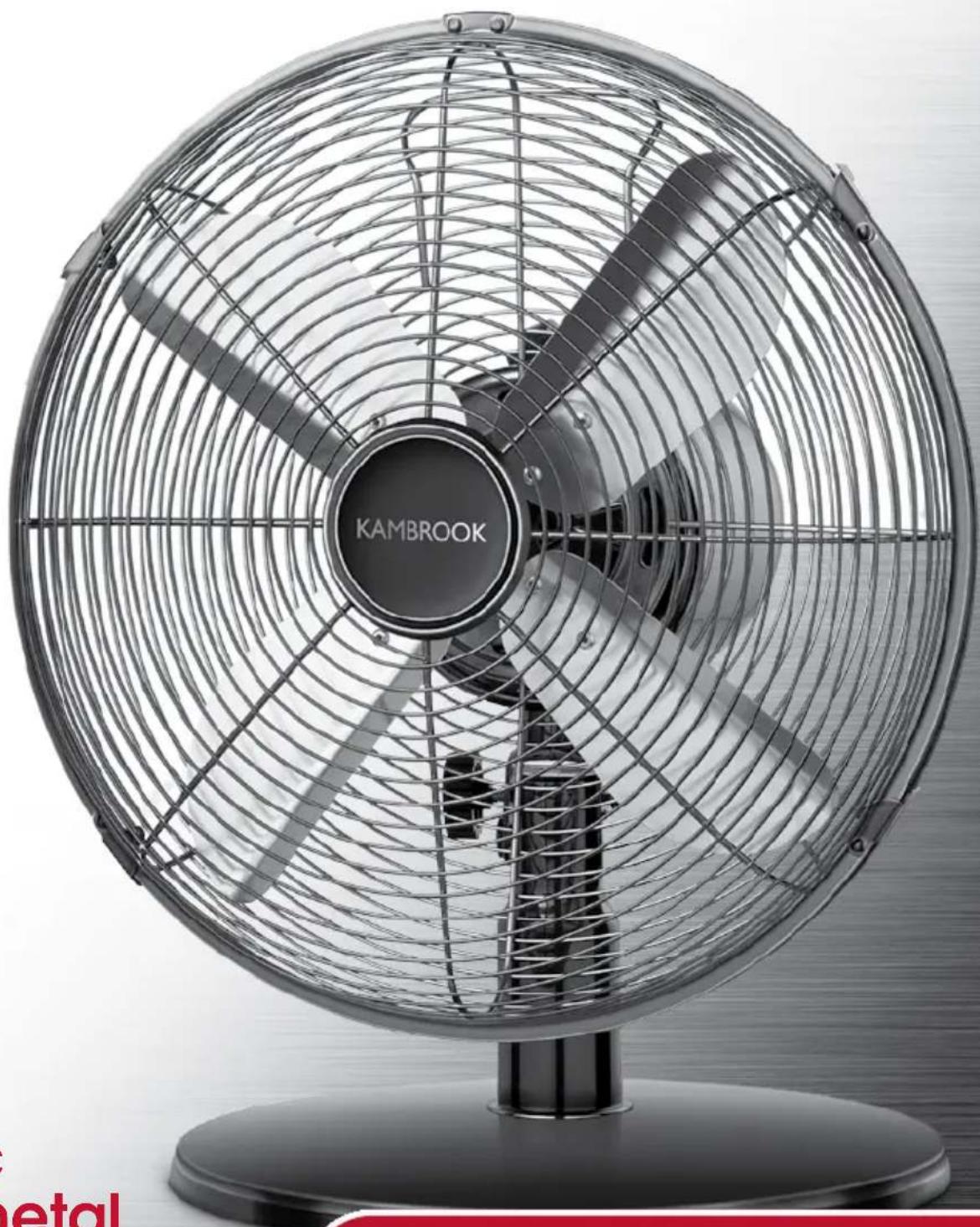
Black and white photo of a Kambrook air conditioner fan with visible blades and mounting base (no text or symbols on fan body)Arctic Gunmetal Desk Fan
KFA241
Instruction Booklet
Important
Please retain your instruction book for future use.
In the event that you need some assistance with your Kambrook appliance, please contact our Customer Service Department on 1300 139 798 (Australia) or 0800 273 845 (New Zealand). Alternatively, visit us on our website at www.kambrook.com.au or www.kambrook.co.nz
Contents
Kambrook Recommends p4
Safety First
Your Kambrook Arctic Gunmetal p6
Desk Fan
Using Your Kambrook Fan p8
Care, Cleaning and Storage p11
IMPORTANT: Please retain your instruction book for future use.
At Kambrook, we believe that safe performance is the first priority in any consumer product, so that you, our valued customer can confidently use and trust our products. We ask that any electrical appliance that you use be operated in a sensible fashion with due care and attention placed on the following important operating instructions.
Important Safeguards For Your Kambrook Arctic Gunmetal Desk Fan
- Carefully read all instructions before operating the fan for the first time and save for future reference.
- Remove and safely discard any packaging material and promotional labels before using the fan for the first time.
- To eliminate a choking hazard for young children, remove and safely discard the protective cover fitted to the power plug of this fan
- When unpacking the fan, check to see you have received all the items listed in the parts list, if applicable, before discarding the packaging.
- Do not place the fan near the edge of a bench or table during operation. Ensure that the surface is level, stable, clean and free of water and other substances.
- Always ensure the fan is properly assembled before use. Follow the instructions provided in this book.
- This fan is intended for household use only and not for commercial or industrial use.
- Disconnect the power plug before dismantling, assembling or before cleaning and when the fan is not in use.
- Avoid touching moving parts of the fan.
- Never insert fingers, pencils or any other objects through the guards whenever the power plug is connected, in particular while the fan is switched on.
-
The fan must not be used if the guards are not fastened correctly, according to instructions provided in this book.
-
When positioning the rear grille on the motor shaft, always ensure the carry handle on the grille is positioned in the upright position.
- Ensure the fan blades engage fully onto the shaft. Please note this may require some force to ensure it is fully engaged.
- The fan must not be used if the base is not fastened correctly, according to the instructions provided in this book.
- Do not operate in the presence of explosives and/or flammable fumes or liquids.
• Never leave the fan unattended when in use. - Do not unplug the fan by pulling on the cord.
- Never carry the fan by the cord or yank to disconnect from an outlet; instead, grasp the cord and pull to disconnect. Do not pull the cord around sharp edges or corners.
- Allow the fan blades to stop completely, then switch off at the power outlet and unplug the appliance from the outlet:
- Before leaving it unattended
- Before attempting to move the fan
- Before cleaning and maintenance unless otherwise specified in this booklet
- Immediately after use.
- To prevent damage to the fan, do not use alkaline cleaning agents when cleaning, uses a soft cloth and mild detergent.
- Do not place anything on top of the fan when assembled, when in use and when stored.
• Store the unit out of reach of children. - Keep the fan clean. Follow the cleaning instructions provided in this book.
Important safeguards for all electrical appliances
• Fully unwind the power cord before use.
- Connect only to a 230V or 240V power outlet.
- Do not let the power cord hang over the edge of a bench or table, touch hot surfaces or become knotted.
- To protect against electric shock, do not immerse the power cord, power plug or appliance in water or any other liquid or allow moisture to come in contact with the part, unless it is recommended in the cleaning instructions.
- The appliance is not intended for use by persons (including children) with reduced physical, sensory or mental capabilities, or lack of experience and knowledge, unless they have been given supervision or instruction concerning use of the appliance by a person responsible for their safety.
• Children should be supervised to ensure that they do not play with the appliance.
- It is recommended to regularly inspect the appliance. To avoid a hazard, do not use the appliance if power cord, power plug or appliance becomes damaged in any way. Return the entire appliance to the nearest authorized Kambrook service centre for examination and / or repair.
- Any maintenance other than cleaning should be performed at an authorised Kambrook Service Centre.
- This appliance is for household use only. Do not use this appliance for anything other than its intended use. Do not use in moving vehicles or boats. Do not use outdoors. Misuse may cause injury.
- The installation of a residual current device (safety switch) is recommended to provide additional safety protection when using electrical appliances. It is advisable that a safety switch with a rated residual operating current not exceeding 30mA be installed in the electrical circuit supplying the appliance. See your electrician for professional advice.
- Always turn the appliance to the OFF position, switch off at the power outlet and unplug at the power outlet when the appliance is not in use.
- Before cleaning, always turn the appliance to the OFF position, switch off at the power outlet, unplug at the power outlet and remove the power cord, if detachable, from the appliance and allow all parts to cool.
- Do not place this appliance on or near a heat source, such as hot plate, oven or heaters.
- Position the appliance at a minimum distance of 20cm away from walls, curtains and other heat or steam sensitive materials and provide adequate space above and on all sides for air circulation.
Your Kambrook Arctic Gunmetal Desk Fan
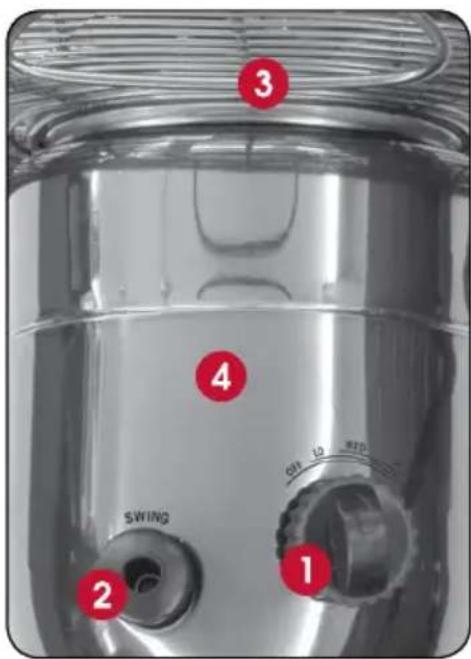
Insert 1:
-
Fan speed selection dial with choice of 3 speed settings
-
Swing button turns the oscillation on and off to disperse the air throughout the room
-
Convenient carry handle for portability
-
Fan motor head
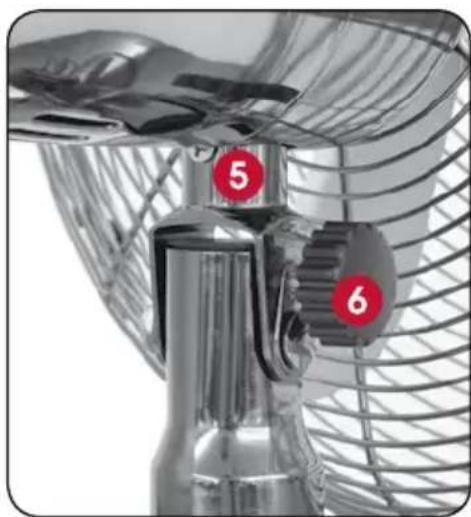
Insert 2:
-
Tilt adjustable head to control the direction of the air
-
Tilt control knob
Parts List Not Shown:
• 1x large screw for fitting base
• 1x large washer for fitting base
- 4x small screws and washers to fix the rear metal grille to the motor head.
- 1x small screw and nut to fix front and rear metal grilles together.
- 1x small screw to secure the fan blade to the motor shaft.
NOTE: the screws and nuts come screwed in other parts.
Insert 1 Insert 2
natural_image
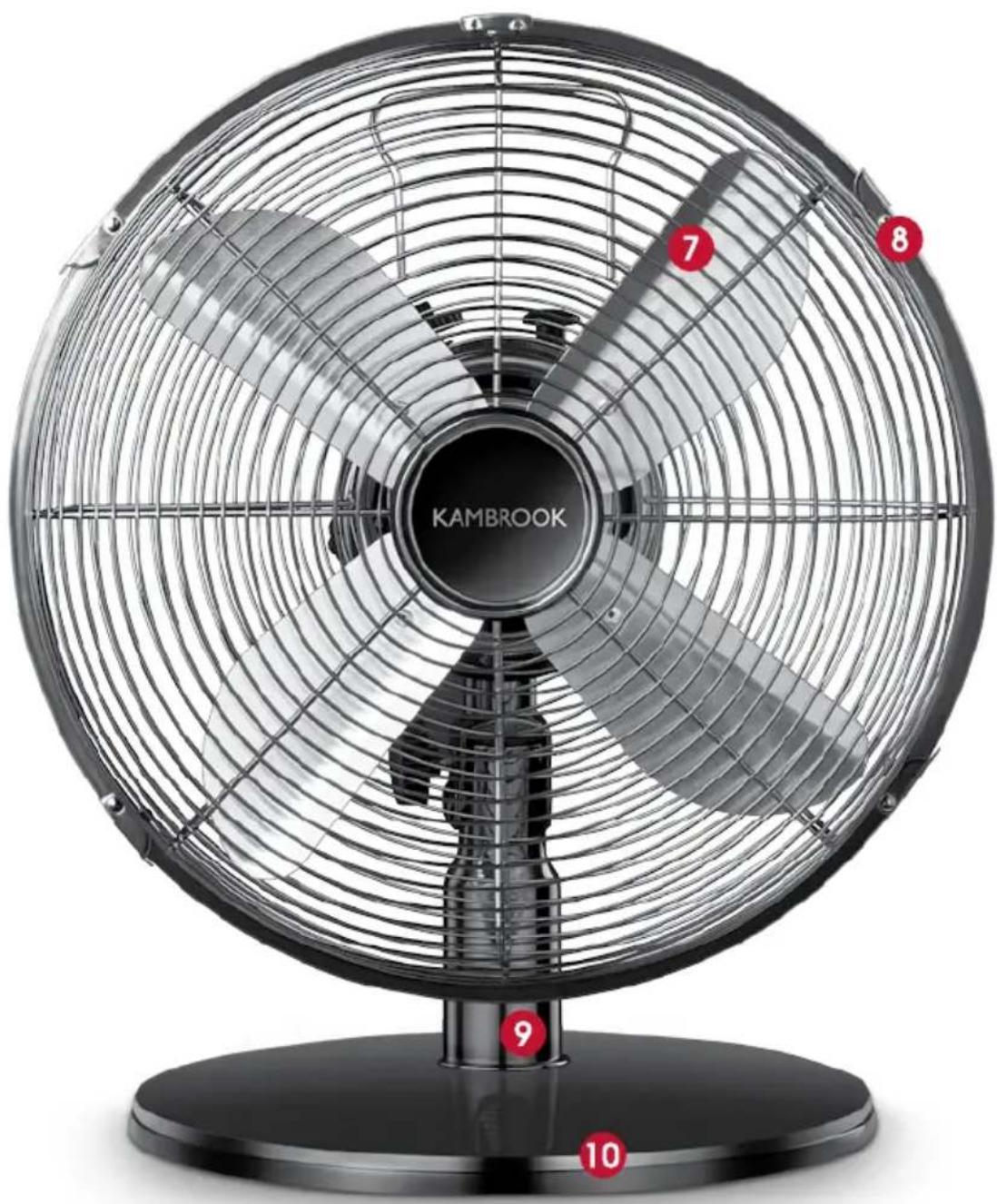
Close-up of a metallic fan or propeller with numbered red annotations (5 and 6) on its side, no visible text or symbols beyond labels.Main Image:
- 30cm metal fan blades
- Front and rear metal grilles
- Fan pole stand
- Flat base
natural_image
Black Kambrook fan with radial blades and mounting base (no text or symbols on fan body)Using Your Kambrook Desk Fan
Before First Use
Remove any promotional material from fan.

WARNING: When unpacking the fan, check to see you have received all the items listed in the Parts List, before discarding the packaging.
Assembling Your Kambrook Desk Fan
NOTE: Assembly of the desk fan requires a Phillips head screwdriver.
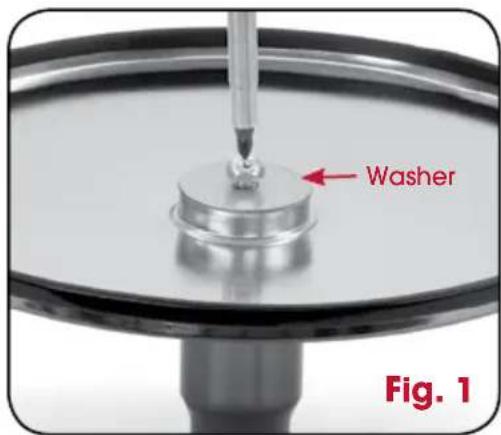
- Using a screw driver, unscrew the large screw and washer at the bottom of the fan pole stand and fit the pole stand into the aperture located at the centre of the flat base. Turn the pole stand over and screw both together with the washer situated between the screw and the base (See Fig. 1).
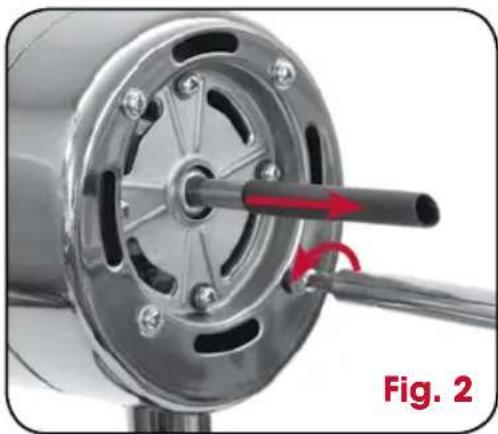
- Remove the black PVC protective sleeve from the motor head shaft. Unscrew the 4 small screws and washers situated on the motor head (See Fig. 2).
natural_image
Close-up of a mechanical component with a red arrow indicating rotation direction (no text or symbols)-
Separate the blades, front and rear grilles by opening the securing clips all around the front grille and untying the securing wire away from the fan blades.
-
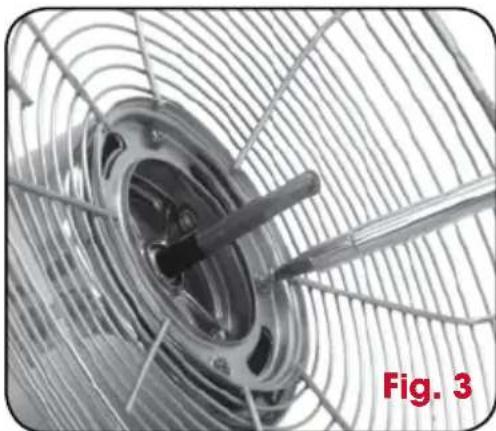
Thread the motor head through the centre hole of the rear grille, placing the rear grille into position. Make sure that the carry handle on the back of the rear grille is located above the motor head. Ensure the rear grille mounting holes are aligned with the mounting holes on the motor head and fix the grille into position with the 4 small screws and washers provided (See Fig.3). Make sure that the rear grille has not slipped off the mounting holes before tightening the screws.
natural_image
Close-up of a metallic fan or impeller with a central blade, mounted on a grid-patterned metal frame (no text or symbols visible)NOTE: When positioning the rear grille on the motor shaft, always ensure the carry handle on the grille is positioned in the upright position.
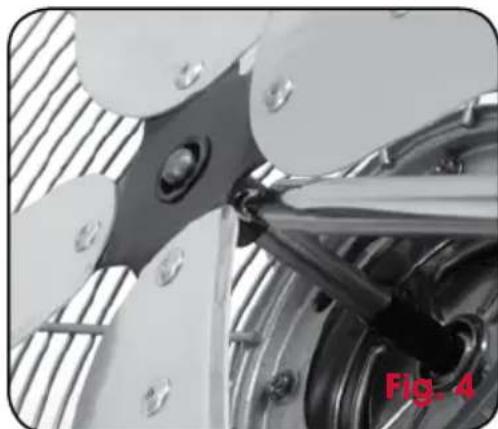
- Slightly loosen the securing screw located on the back of the fan blades so you can insert the blades onto the motor shaft. Make sure blades are inserted onto the motor shaft with the securing screw side facing the rear grille. Align the screw with the groove in the motor shaft. Once the screw is aligned with the motor shaft, tighten the screw making sure the fan blades are secure to the motor shaft and the blade are able to move freely (See Fig.4).
natural_image
Close-up of mechanical components with metallic parts and a red 'Fig. 4' label (no readable text or symbols)-
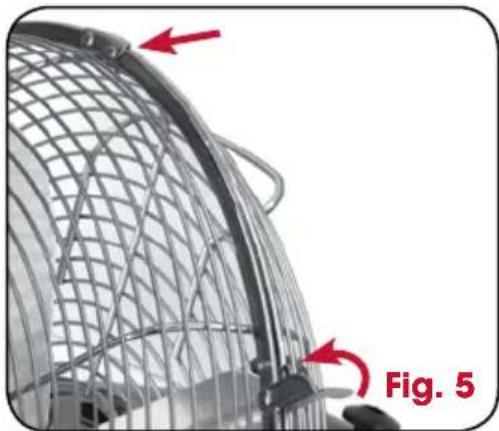
Loosen the small screw at the bottom of the front grille by hand. Locate the positioning tab on the top end of the front grille and slot into the top of the rear grille.
-
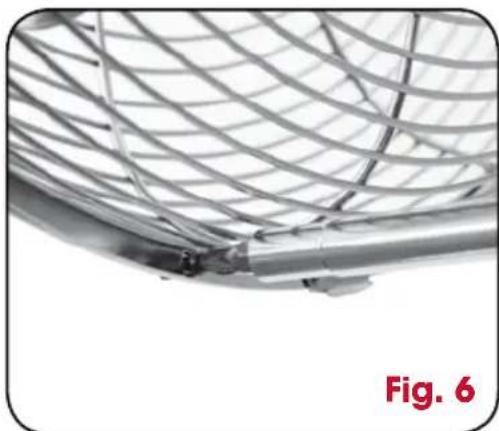
Thread the screw through the small holes at the bottom of both the front and rear grilles and loosely secure the screw using the nut provided.
Secure the front and rear grilles by snapping shut the securing clips over the edges of both grilles (See Fig. 5).
natural_image
Close-up of a wire mesh structure with red arrows pointing to features, labeled 'Fig. 5' (no text or symbols on the diagram itself)- Tighten the small screw and nut together (See Fig. 6).
natural_image
Close-up of a metallic mesh structure with curved and straight edges, labeled 'Fig. 6' in red at bottom left (no other text or symbols)Using Your Kambrook Desk Fan Continued...
Operating your Kambrook Desk Fan
Plug the cord into a 230V or 240V power point and switch on.

WARNING: Never insert fingers, pencils or any other objects through the guards whenever the power plug is connected, in particular while the fan is switched on.
The fan has 3 speed settings. To adjust the flow of air, turn the fan speed selection dial located at the back of the fan to the preferred speed setting - 'LO', 'MED' or 'HI'.
To turn Off, turn the fan speed selection dial to the 'OFF' position.
Setting the Oscillation
The oscillation works in all air flow settings.
Press down the 'SWING' button to activate. The fan will begin to oscillate from side to side.
Lift the 'SWING' button to stop the fan from oscillating.
NOTE: The 'SWING' button is located behind the rear grille, on the motor head.
Adjustable Tilting Head
The desk fan incorporates a manually adjustable tilt head for directional air coverage.
To adjust the angle of the head, loosen the tilt control knob located beneath the motor head, tilt the head to the required angle, then tighten the control knob.
Care, Cleaning and Storage
Always switch the Arctic Desk Fan off, turn off at the power outlet and unplug from the outlet. prior to cleaning the fan.
To clean the fan, wipe the exterior with a soft, damp cloth. Never use an abrasive cleaner.
When not in use, store the fan in a cool, clean and dry location.
- KAMBROOK
- Important
- Please retain your instruction book for future use.
- Contents
- IMPORTANT: Please retain your instruction book for future use.
- Important Safeguards For Your Kambrook Arctic Gunmetal Desk Fan
- Important safeguards for all electrical appliances
- Your Kambrook Arctic Gunmetal Desk Fan
- Insert 1:
- Insert 2:
- Parts List Not Shown:
- Main Image:
- Using Your Kambrook Desk Fan
- Before First Use
- Assembling Your Kambrook Desk Fan
- Using Your Kambrook Desk Fan Continued...
- Operating your Kambrook Desk Fan
- Setting the Oscillation
- Adjustable Tilting Head
- Care, Cleaning and Storage
Brand : Kambrook
Model : KFA241
Category : Small Appliances