Quattro XS - Smartphone Unnecto - Free user manual and instructions
Find the device manual for free Quattro XS Unnecto in PDF.


User questions about Quattro XS Unnecto
0 question about this device. Answer the ones you know or ask your own.
Ask a new question about this device
Download the instructions for your Smartphone in PDF format for free! Find your manual Quattro XS - Unnecto and take your electronic device back in hand. On this page are published all the documents necessary for the use of your device. Quattro XS by Unnecto.
USER MANUAL Quattro XS Unnecto
Unnecto™ Drone XS User Manual
Drone XS User Manual
Contents:
FOR YOUR SAFETY....2
ABOUT YOUR PHONE.... 3
INSTALLING AND REMOVING THE SIM CARD .... 4
INSTALLING AND REMOVING THE MICRO SD CARD.... 4
INSTALLING AND REMOVING THE BATTERY 4
CHARGING THE BATTERY 4
FIRST TIME STARTUP.... 4
DIALING OUT 5
Specifications of Battery and Charger
Battery: Li-ion 3.7 V|1100 mAh
Max Charging Voltage: 4.2 V
Charger Input: 100-240 VAC|50/60 Hz|150 mA
Output: DC 5.0 V|700 mA
Unnecto™ Drone XS User Manual
For Your Safety
Read these simple guidelines. Breaking the rules may be dangerous or illegal. Further detailed information is given in this manual.
1. Road Safety
Always keep your hands free to operate your vehicle while driving. Park your vehicle before using your phone.
2. Turning off your phone for air travel
Use of wireless telephones in an aircraft may disrupt the operation of the aircraft. It is dangerous and illegal. Please ensure that the phone is turned off before going aboard.
3. Turn off your phone in hospitals
Follow any restrictions or rules. Switch off your phone near medical equipment.
4. Turn your phone when refueling
Switch off your phone at a gas station.
5. Switch off phones near blast points
Don't use your phone where blasting is in progress. Observe restrictions and follow any regulations or rules.
6. Interference
All wireless phones may be susceptible to interference, which could affect the performance.
7. Use Normally
Use in the normal position explained in the product documentation. Don't touch the antenna unnecessarily.
8. Enhancements and Batteries
Use only the approved enhancements and batteries. Do not connect incompatible products.
9. Emergency Calls
Ensure that the phone is switched on. Enter the emergency number, and then press the call key. Do not end the call until given permission.
10. Keep Away from Children
Keep your phone and its accessories away from children.
Unnecto™ Drone XS User Manual
About Your Phone
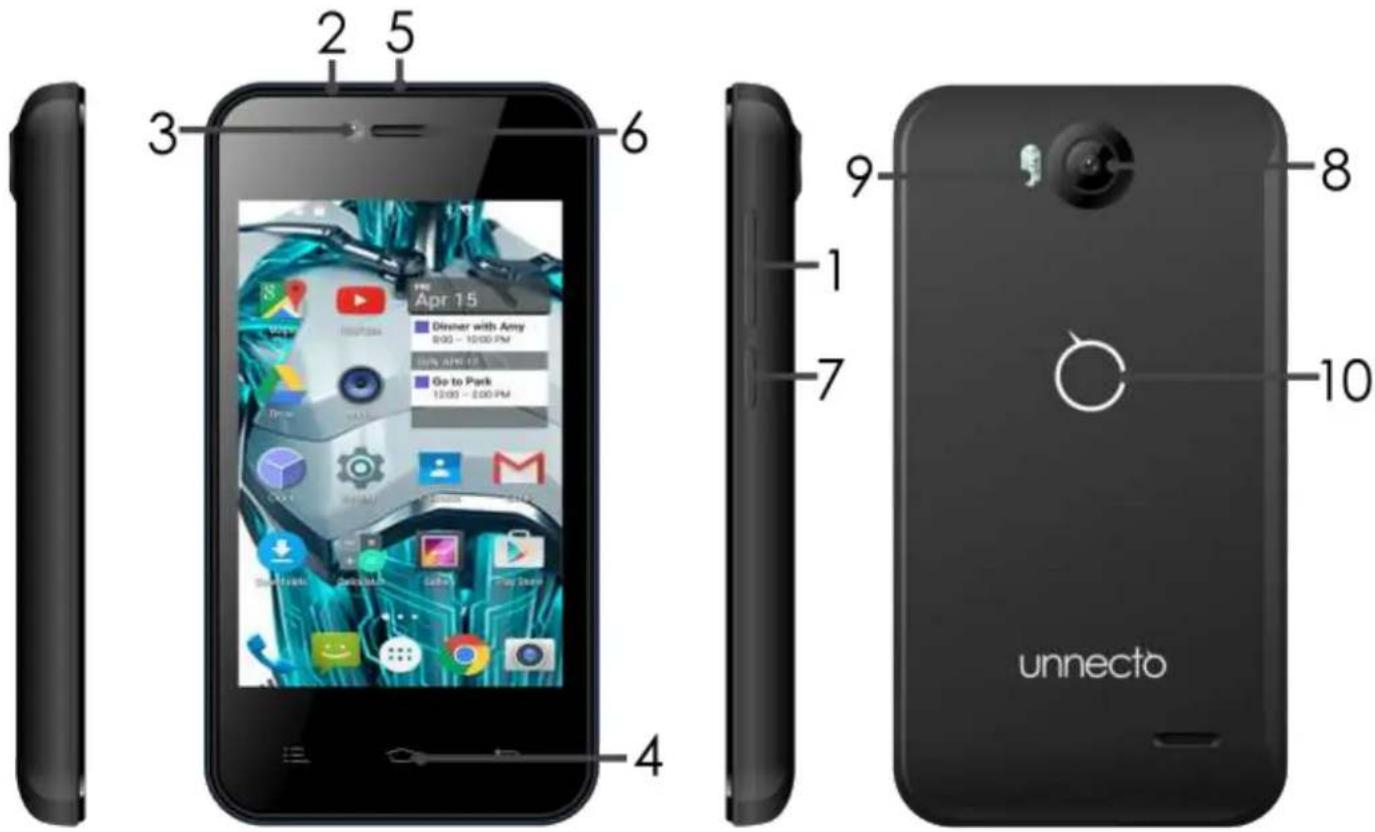
1 - Front Screen 7 - Receiver
2 -Back Cover 8 - Touch Panel
3 - Volume Keys 9 - Capacitive Buttons
4 - Micro USB Port 10 - Back Camera
5 - Front Camera 11 -Flash Light
6 - Earphone Jack 12 -Battery Cover
13- Power Key
Unnecto™ Drone XS User Manual
1. Installing and Removing the SIM Card
- Switch off the phone and remove the battery.
- Insert the SIM Card into the designated SIM 1 or SIM 2 slot.
- To remove the SIM Card; turn off the phone; remove the battery; then remove the SIM Card from the SIM Card slot.
2. Installing and Removing the Micro SD Card
- Turn off phone before inserting or removing the Micro SD Card.
- To insert, slide the Micro SD Card into the Micro SD Card slot (Micro SD Card facing up), located inside the back of the phone.
- To remove, pull the Micro SD Card out of the slot.
3. Installing and Removing the Battery
- Turn off the phone before removing the battery.
- Remove the back cover to access the battery.
- Place the battery into the phone; aligning the battery pins to the phone's pins.
- To remove the battery, lift up the crease on the corner of the phone.
4. Charging the Battery
- Plug the provided charger into a standard wall outlet.
- Plug the Micro USB charger into the USB port of the phone.
- When the phone is fully charged; unplug the charger from the standard wall outlet and from the phone.
- If the phone automatically powers off or the battery indicator is low; then you should immediately charge the phone.
5. First Time Startup
- Make sure one or two SIM cards are inserted before powering on the phone.
- Make sure the battery is charged for at least 30 minutes before the phone is powered on.
- Create or sign in an existing Google account for access to the Android features.
Unnecto™ Drone XS User Manual
6. Dialing Out
- Press the Phone Icon on the phone.
- Input the phone number; press the dial key to make the call.
- Default call setting is on “Always ask”. For outgoing calls, a prompt will ask you to select SIM 1 or SIM 2. The default can be changed in the SIM Management Settings.
7. SIM Management
- SIM Management is located in Settings.
- You are able to manage SIM 1 and/or SIM 2 Call, Data, and Roaming preferences.
8. Mobile Networks
- Mobile Networks are located in Settings → More → Mobile Network
- This setting allows you to select the preferred SIM Card for the 3G Data connection.
9. Play Store
- Create or sign in an existing account for access to the Play Store.
- Play Store is used to download/update Applications to the phone.
Unnecto™ Drone XS User Manual
FCC Caution
Labeling requirements:
This device complies with part 15 of the FCC Rules. Operation is subject to the following two conditions: (1) This device may not cause harmful interference, and (2) this device must accept any interference received, including interference that may cause undesired operation.
Information to user:
Any Changes or modifications not expressly approved by the party responsible for compliance could void the user's authority to operate the equipment.
Note: This equipment has been tested and found to comply with the limits for a Class B digital device, pursuant to part 15 of the FCC Rules. These limits are designed to provide reasonable protection against harmful interference in a residential installation. This equipment generates uses and can radiate radio frequency energy and, if not installed and used in accordance with the instructions, may cause harmful interference to radio communications. However, there is no guarantee that interference will not occur in a particular installation. If this equipment does cause harmful interference to radio or television reception, which can be determined by turning the equipment off and on, the user is encouraged to try to correct the interference by one or more of the following measures:
-Reorient or relocate the receiving antenna.
-Increase the separation between the equipment and receiver.
-Connect the equipment into an outlet on a circuit different from that to which the receiver is connected.
-Consult the dealer or an experienced radio/TV technician for help
Specific Absorption Rate (SAR) information:
This LTE mobile phone meets the government's requirements for exposure to radio waves. The guidelines are based on standards that were developed by independent scientific organizations through periodic and thorough evaluation of scientific studies. The standards include a substantial safety margin designed to assure the safety of all persons regardless of age or health.
FCC RF Exposure Information and Statement the SAR limit of USA (FCC) is 1.6 W/kg averaged over one gram of tissue. For more information about the SAR values of this device, please visit the FCC website and search using the phone FCCID: 2ADR3U510. This device was tested for typical body-worn operations with the back of the handset kept 1.0 cm from the body. To maintain compliance with FCC RF exposure requirements, use accessories that maintain a 1.0 cm separation distance between the user's body and the back of the handset. The use of belt clips, holsters and similar accessories should not contain metallic components in its assembly. The use of accessories that do not satisfy these requirements may not comply with FCC RF exposure requirements, and should be avoided.
Unnecto™ Drone XS User Manual
Body-worn Operation
This device was tested for typical body-worn operations. To comply with RF exposure requirements, a minimum separation distance of 1.0 cm must be maintained between the user's body and the handset, including the antenna. Third-party belt-clips, holsters, and similar accessories used by this device should not contain any metallic components. Body-worn accessories that do not meet these requirements may not comply with RF exposure requirements and should be avoided. Use only the supplied or an approved antenna.
Legal Information
Use only batteries, chargers and enhancements approved by Unnecto for use with this device model. The use of any other types may invalidate any approval or warranty, and may be dangerous. See enclosed materials for manufacturer's product Limited Warranty and important user guide information. Contains Li-Ion battery. Dispose of batteries according to local regulations (e.g. recycling). Do not dispose of as household waste. This carton is partially made from recycled paper fibers and is recyclable when local recycling programs are in place.
WARNING: This device contains small parts. Keep the device and its accessories out of small children's reach. ©2015 Unnecto. All rights reserved. Unnecto is registered trademark of Unnecto Holding Limited. Java is a trademark of Sun Microsystems, Inc. The Bluetooth word mark and logos are registered trademarks owned by Bluetooth SIG, INC. and any use of such marks by Unnecto is under license. Other company and product names may be trademarks or trade names of their respective owners. Unnecto operates a policy of ongoing development and may make changes to products or services and their specifications without prior notice. Product color and appearance may vary. Product meets current FCC RADIO Frequency Exposure Guidelines. Additional details within and at http://www.fcc.gov/oet/ea/. Product meets current FCC and Industry RF exposure guidelines.