1238AC - Audio monitors GENELEC - Free user manual and instructions
Find the device manual for free 1238AC GENELEC in PDF.


User questions about 1238AC GENELEC
0 question about this device. Answer the ones you know or ask your own.
Ask a new question about this device
Download the instructions for your Audio monitors in PDF format for free! Find your manual 1238AC - GENELEC and take your electronic device back in hand. On this page are published all the documents necessary for the use of your device. 1238AC by GENELEC.
USER MANUAL 1238AC GENELEC
natural_image
Black GENELEC audio amplifier with two identical speakers and a central speaker (no visible text or symbols on the devices themselves)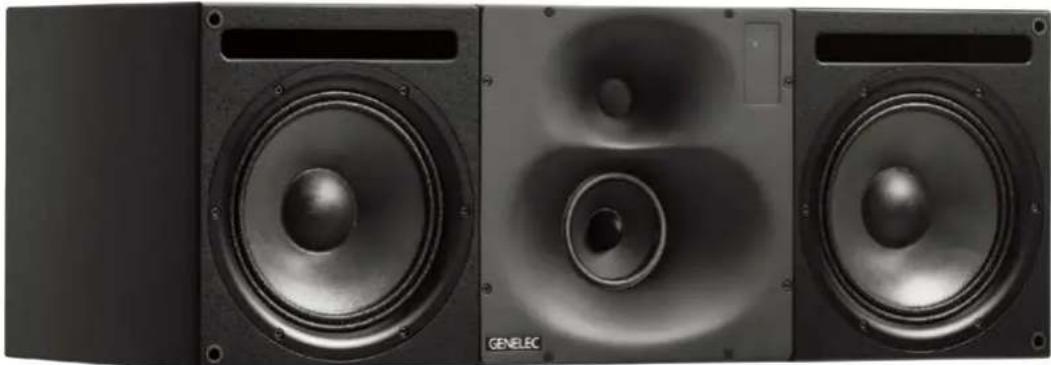
natural_image
Black and white photo of three GENELEC audio speakers with visible sound waves and speaker heads (no text or symbols on the speakers themselves)Genelec 1238AC Operating Manual
Introduction
Congratulations and thank you for choosing Genelec!
Since 1978, Genelec has been guided by a single idea - to make perfect active monitors that deliver neutral and accurate sound in every kind of acoustical environment. In Genelec's quest for this ultimate goal, our unrivalled commitment to research and development has led us to continuously develop innovative driver technology, electronic circuitry, enclosure designs and more.
Our design philosophy is based on sustainability and environmental values, where industrial design serves our products' acoustical performance. Your Genelec product has been designed and manufactured with care in our factory, in Finland, using environmentally efficient solutions to give you reliable operation over many years.
Please take the time to read this manual. Happy monitoring!
General Description
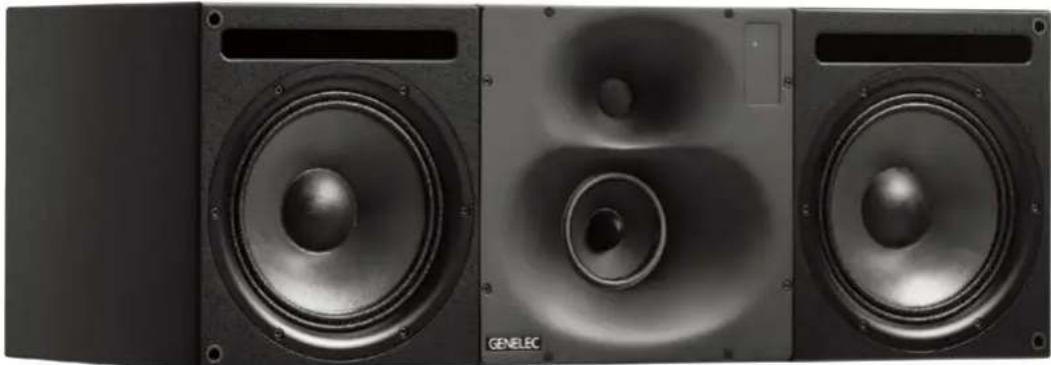
The Genelec 1238AC is a three-way monitoring system for medium sized control rooms. It performs well as free-standing monitor as well as flush-mounted in control room walls. It is suited for recording, film and video post-production, broadcast monitoring as well as for mastering.
The unique Directivity Control Waveguide™ (DCW™) technology by Genelec provides excellent stereo imaging and neutral frequency response even in difficult acoustics.
With program material at a 2 meter listening distance, the fast low distortion amplifiers drive a stereo system to peak sound levels in excess of 124 dB SPL.
The 1238AC is fully compatible with Genelec Loudspeaker Manager GLM™ and the proprietary Genelec control network. It can be used with 8200-series SAM monitors and 7200-series SAM subwoofers in the same network.
Drivers and Cabinet Construction
The 1238AC reproduces low frequencies with dual 250 mm (10 in) woofers in a 110 litre bass reflex enclosure. The proprietary 130 mm (5 in) direct radiating midrange driver, and a 25 mm (1 in) metal dome tweeter are acoustically loaded by the proprietary Directivity Control Waveguide. All drivers are magnetically shielded.
Amplifiers and Signal Processing
The 1238AC uses the RAM-L amplifier unit. The RAM-L is designed to be mounted in a 19 inch rack. Digital signal processing in the RAM-L amplifier unit is done with high precision algorithms, and includes driver and amplifier overload protection. The room response compensations include highly flexible parametric filters, level alignment, and acoustic delay compensation. These allow accurate matching to all console output sections and room acoustics.
Cables
Each 1238AC is delivered with the following cable kit:
• One mains cable
- Two 10 m (32 ft 9 in) 4-pole Speakon cables
• One 10 m (32 ft 9 in) RJ45 cable
• One 5 m (16 ft 4 in) RJ 45 cable
The 10 m cables are designed to go between the amplifier and the monitor enclosure. If you need to make custom length cables for this, please connect the Speakon cables pin to pin and see Table 1 for recommended wire gauges.
Operating Environment
These monitors and their RAM-L amplifiers are designed for indoor use only. The permissible ambient
text_image
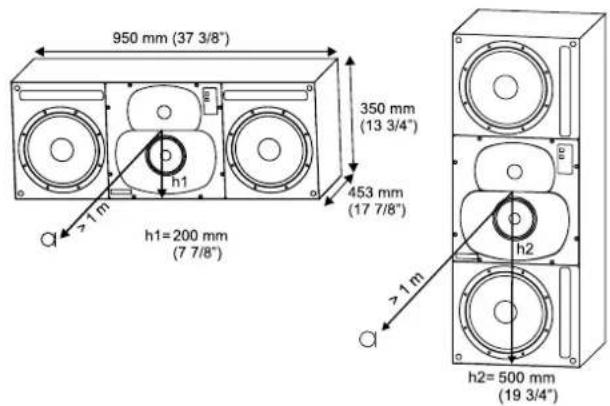
950 mm (37 3/8") 350 mm (13 3/4") 453 mm (17 7/8") h1=200 mm (7 7/8") h2=500 mm (19 3/4") >1 m >1 mFigure 1. The location of the acoustic axis.
text_image
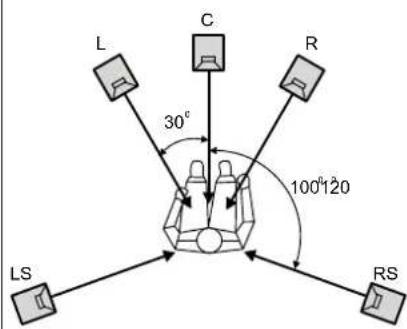
L C R 30° 100°120 LS RSFigure 2. Recommended placement and alignment of monitors in a 5-channel system (ITU-R BS.775-1)
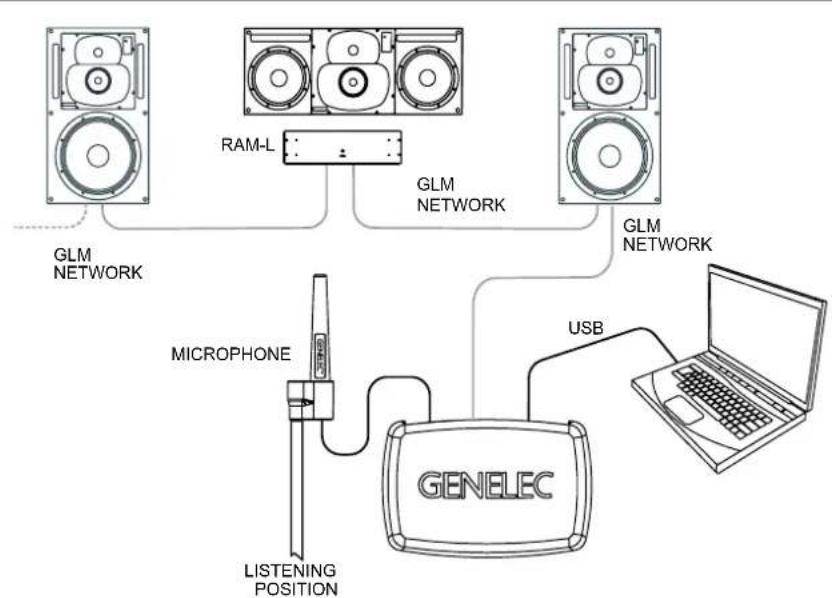
Figure 3. GLM network cabling
| Cable gauge Max. length |
| 2.0 mm ^2 (14 AWG) 30 m (100 ft) |
| 3.3 mm ^2 (12 AWG) 40 m (130 ft) |
| 5.3 mm ^2 (10 AWG) 60 m (200 ft) |
Table 1. Recommended cable thicknesses for different lengths of signal cable
temperature is 15-35 degrees Celsius (50-95°F) and permissible relative humidity between 20% and 80%. Humidity condensation on the product is not allowed during use. For instance, if the product has been stored or transported in a cool environment and then taken into a warm room, it must be allowed to warm up to the ambient temperature before connecting to mains power.
Mounting Considerations
Place the monitor so that its acoustic axes are aimed towards the listening position (see Figures 1 and 2). Place monitors with left-right symmetry and at an equal distance from the listening position. Acoustic reflections from objects close to monitors and the listening position can cause colouration and blurring of the sound image. Symmetrical positioning of reflective objects maintains good stereo imaging. When soffit (flush) mounting, the wall surface should extend to the monitor, forming a continuous surface.
text_image
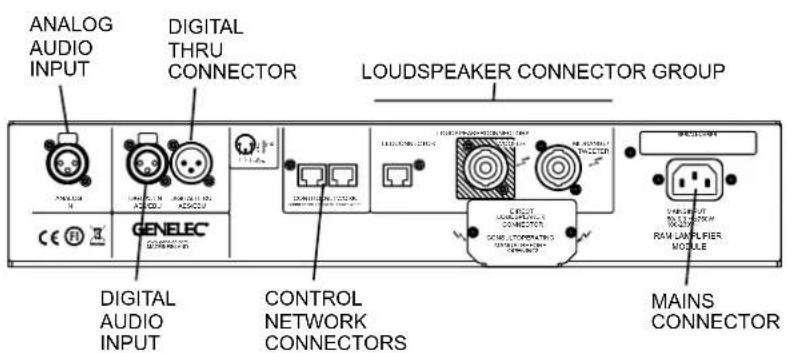
ANALOG AUDIO INPUT DIGITAL THRU CONNECTOR LOUDSPEAKER CONNECTOR GROUP DIGITAL AUDIO INPUT CONTROL NETWORK CONNECTORS MAINS CONNECTORFigure 4. Connector panel of the RAM-L amplifier.
Minimum Clearances
The ambient temperature around the
amplifier must not exceed 35 degrees Celsius (95°F).
When the RAM-L amplifier is mounted in a 19 in rack, the minimum free space is 1/2 U both above and below the amplifier and both sides of the amplifier fully open to enable free movement of air. Use the included rack mount front plate to ensure sufficient space above and below the amplifier.
When the RAM-L is mounted on a table, shelf or similar solid surface, there must be a free space of at least 250 mm (10 in) above and 10 cm (4 in) on both sides of the amplifier. Free air flow must be possible in the front side of the amplifier.
Description Of Connectors
"MAINS INPUT" Connector
Connect to the mains supply. The RAM-L amplifier accepts any AC 50/60 Hz mains voltage between 100 and 230 Volts.
"DIGITAL IN AES/EBU" Connector
The monitor defaults to reproducing an analog input signal. The digital audio AES/EBU input is selected automatically when a valid digital audio signal is presented. Use GLM software to define the AES/EBU subframe to monitor.
"DIGITAL THRU AES/EBU" Connector
This output carries an unaltered copy of the digital audio signal and can be used for daisy-chaining the signal up to three additional SAM monitors or subwoofers.
"ANALOG IN" Connector
The maximum input level of the analog input is +25.0 dBu. The analog input must not be overloaded, otherwise distortion will result. When the maximum input is exceeded, the enclosure front panel light turns red, indicating the overload.
The sensitivity of the monitor system is set using the GLM software. Coming from the factory, the analog input is set to the highest sensitivity, resulting in a sound output of 100 dB SPL for a -6 dBu analog input signal.
"CONTROL NETWORK" Connectors
The RJ45 sockets connect the monitor to the proprietary Genelec Loudspeaker Manager ^TM (GLM ^TM ) network. Do not connect to Ethernet LAN.
"Loudspeaker Connectors" Group
These connectors are used for connecting the rack mounted RAM-L amplifier to the monitor enclosure.
- "LED" Connector
This RJ45 socket is a connection for the front panel warning LED. - "Woofer" Connector
A standard four-pole Speakon cable connects to the woofer. - Midrange/Tweeter" Connector A standard four-pole Speakon cable connects to the midrange and tweeter.
Connecting Cables
Insert the connectors into the appropriate sockets "WOOFER", "MIDRANGE/TWEETER" and "LED CONNECTOR" found on the rear panel of the amplifier unit and the rear of the monitor. Note that each RAM-L amplifier is individually calibrated for use with the monitor enclosure that it is delivered with and marked with the same serial number. Do not mix these amplifier/monitor pairs.
Insert the connectors into the sockets and turn the connectors clockwise. The connectors lock automatically. The electrical connections are only made when the connectors are fully inserted.
To remove the signal connectors pull the release lever on the connector and turn the connector counterclockwise simultaneously. The connector can now be removed from the socket.
Set-up and Use
Monitor calibration and setup
The 1238AC is set up using the GLM software. The setup is fast and consists of the following steps:
- Run a CAT5 (RJ45) cable from the monitor control network to the next monitor.
- Run the final cable to control network input of the GLM Adapter device.
- Connect the GLM Adapter device to your computer USB connector. The cable is a part of the GLM User Kit.
- Place the Genelec measurement microphone at the listening location
text_image
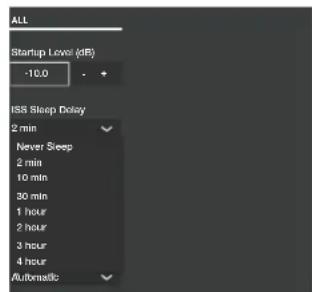
ALL Startup Level (dB) -10.0 ISS Sleep Delay 2 min Never Sleep 2 min 10 min 30 min 1 hour 2 hour 3 hour 4 hour AutomaticFigure 5. Selecting ISS setting.
of the engineer, on a stand, with the microphone pointing upwards and the microphone top at the height of the engineers ear in normal working position. The microphone is a part of the GLM User Kit.
- Run the microphone cable to the microphone input in the GLM Adapter device.
- Download GLM software at the Genelec web site (www.genelec.com). Install the GLM software.
- Follow the GLM software instructions to measure and set up your monitors.
- If you plan not to use a computer for controlling the monitors, use the GLM software to write the settings into the monitors ("Store the Settings").
Recommendations for AES/EBU Audio
For a digital input signal of -30 dB FS, the 1238AC monitor will produce a 100 dB sound level (SPL) at 1 meter distance, in free space. The sensitivity of the monitor system is set using the GLM software.
It is advantageous to keep the maximum incoming digital audio signal level high, near to 0 dBFS. It may be useful to lower the internal GLM level control. This enables maintaining high digital resolution in the digital source.
Single-wire mode of AES/EBU is the default and the older dual-wire mode is automatically detected if used at the source.
The standard AES/EBU cable carries two channels of audio, called A and B. As a default, both A and B subchannels are reproduced by the monitor. GLM software is used to set up the monitor to specific channel assignments.
RAM-L Amplifier Power Button
text_image
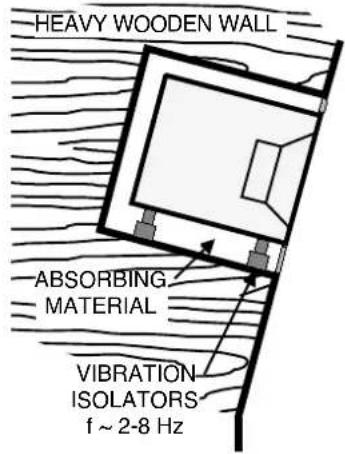
HEAVY WOODEN WALL ABSORBING MATERIAL VIBRATION ISOLATORS f ~ 2-8 HzFigure 6. Flush mounting the speaker in a wall constructed of wood
text_image
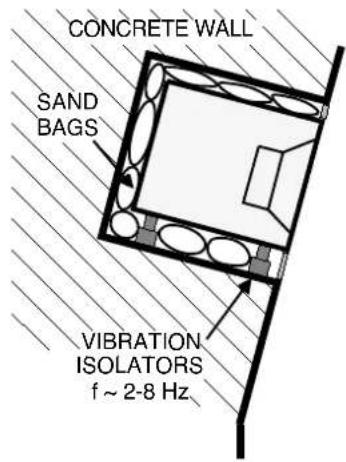
CONCRETE WALL SAND BAGS VIBRATION ISOLATORS f ~ 2-8 HzFigure 7. Flush mounting the speaker in a wall constructed of concrete
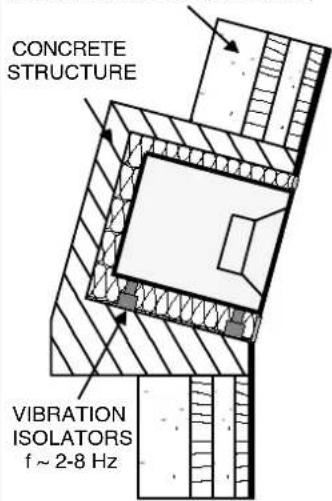
MULTI-LAYERED WALL (WOOD, CONCRETE, BRICKS)
text_image
CONCRETE STRUCTURE VIBRATION ISOLATORS f ~ 2-8 HzFigure 8. Flush mounting the speaker in a wall constructed of a combination of materials.
The power button in the middle of the RAM-L amplifier front panel controls several functions.
A short press of the power button turns RAM-L on or off. Turning on, the power button light flashes rapidly, and lights on steadily when the turn-on has been completed.
Testing modes are explained later in this manual.
Setting ISS™
The Intelligent Signal Sensing™ (ISS™) puts the monitor to a power-saving stand-by mode automatically. The factory setting for ISS is "OFF." The ISS can be activated using the GLM software (see Figure 5). When ISS is active, if no audio signal is sensed during the selected time, the monitor powers down. The monitor will power up again once a signal is detected. The ISS setting is applied to all ISS-enabled monitors in the currently selected Setup.
Front Panel Light Functions
The green light on the DCW panel of a 1238AC enclosure indicates normal operation. A yellow light indicates certain activities when the GLM control software is used. The light turns red in an overload condition. The overload light (red) is activated by several events:
- Exceeding the maximum input of the analog input
- Reaching close to the digital input maximum (high likelihood of digital clipping)
- Overload of drivers or amplifier, or clipping in the power amplifier
- An error detected in the AES/EBU audio data
If a red warning light appears on the monitor enclosure, turn the source level down. Ensure that there are no bit errors in the AES/EBU digital audio data transmission.
Flush Mounting the Monitor Enclosure
Flush mounting offers acoustical benefits. No cabinet edge diffraction will occur. Low frequency reflections from the wall behind the monitor can be avoided. The monitor's acoustical axis (Figure 1) should point to the seated listening position. The wall in which the monitors are mounted should be stiff and heavy. The monitors should not be mounted too high (maximum tilt angle < 15 degrees).
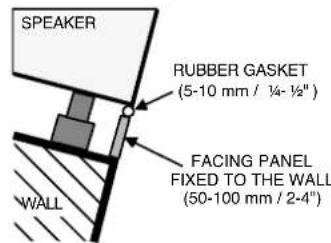
A space 50 to 100 mm (2 to 4 in) wide can be left around the monitor but this space should be covered with a panel in the front. Leave a gap of 5 to 10 mm ( 14 to 12 in) between the monitor and the panel. Fill this gap with a soft rubber gasket (see figure
text_image
SPEAKER RUBBER GASKET (5-10 mm / ¼- ½") FACING PANEL FIXED TO THE WALL (50-100 mm / 2-4") WALLFigure 9. Covering the gap between the wall and the monitor enclosure.
14). The monitor should be mounted on vibration isolators. The resonant frequency of movement for the mounted monitor should be between 2 to 8 Hz.
An empty cavity in the wall should be filled with absorbent mineral wool or foam plastic. A wooden wall structure must be heavily braced (see figure 11). In a solid (e.g. concrete) wall structure, the space around the cabinet should be filled with absorbent mineral wool or sand bags (see Figure 12).
Ensure that the cabinet is flush with the surface of the wall. If a decorative cloth frame is used the edges adjacent to the monitors must be less than 20 mm (3/4 in) deep. The cloth must be acoustically transparent. Genelec-approved cloth grilles are available.
| Button press Function Notes | ||
| Short press Power on, power | off | |
| Long press Enter special mode | de, exit special mode | Press longer than 5 seconds |
| Special mode: one short press | Mode 1: AES/EBU channel A selected, room-related calibration in use | Power button light blinks once every few seconds |
| Short press advances Mode | 2: AES/EBU channel B selected, room-related calibration in use | Power button light blinks twice every few seconds |
| Short press advances Mode | 3: AES/EBU channel A selected, factory calibration in use | Power button light blinks three times every few seconds |
| Short press advances Mode | 4: AES/EBU channel B selected, factory calibration in use | Power button blinks four times every few seconds |
| Special selection: long press | Once a special mode 1-4 has been selected, a long press selects the special mode | Press longer than 5 seconds; the RAM-L selects the special mode and starts playing. To exit the special mode turn off the amplifier. |
| Special mode: no press for 60 seconds | RAM-L exits the special mode and turns off | Automatically happens if user does not press the power button |
Table 2. Power button actions to activate testing modes
Testing Mode
Once on, when the power button is pressed for a long time, the RAM-L enters a mode for system testing. This special mode is intended for system debugging and testing. When the RAM-L is turned off, the special mode is reset. Upon restarting the RAM-L the current standard settings stored by GLM software are restored.
Test mode selection blinks the power button light (see Table 2). A special mode is activated by a long press on the power button. In a special mode the power button light remains on but blinks off 1-4 times indicating the mode currently selected.
The testing modes are not intended for continued operation. Use GLM software to set up permanent settings for 1238AC.
Safety Considerations
The 1238AC has been designed in accordance with international safety standards. To ensure continued safe operation and to maintain the monitor under safe operating conditions, the following warnings and precautions must be observed:
- Servicing and adjustment must only be performed by qualified service personnel. The monitor enclosure or the amplifier enclosure must not be opened.
- Do not use this product with a mains cable with no protective earth conductor, or a mains connection without the protective earth contact, as this may lead to personal injury.
- To prevent fire or electric shock, do not expose the unit to water or moisture.
- Do not place any objects filled with liquid, such as vases or water pipes on the amplifier or near it.
- Note that the amplifier is not completely disconnected from the AC mains service unless the mains power cord is removed from the amplifier or the mains outlet.
- Free flow of air around the amplifier
is necessary to maintain sufficient cooling. Do not obstruct airflow around the amplifier.
WARNING!
The Genelec 1238AC monitor is capable of producing sound pressure levels in excess of 85 dB, which may cause permanent hearing damage.
Maintenance
No user serviceable parts are to be found within the monitor enclosure or the RAM-L amplifier unit. Any maintenance or repair of the monitor should only be undertaken by qualified service personnel.
Guarantee
The Genelec 1238AC is supplied with a two year guarantee against manufacturing faults or defects that might alter the performance of the monitors. Refer to supplier for full sales and guarantee terms.
Accessories
A wide selection of accessories is available for Genelec monitors. Consult the Accessories Catalogue on www.genelec.com or your local distributor/dealer for up-to-date information.
Compliance to FCC Rules
This device complies with part 15 of the FCC Rules. Operation is subject to the following two conditions:
- This device may not cause harmful interference
- This device must accept any interference received, including interference that may cause undesired operation.
Note: This equipment has been tested and found to comply with the limits for a Class B digital device, pursuant to part 15 of the FCC Rules. These limits are designed to provide reasonable protection against harmful interference in a residential installation. This equipment generates, uses and can radiate radio frequency energy and, if not installed and used in accordance with the instructions, may cause harmful interference to radio communications. However, there is no guarantee that interference will not occur in a particular installation. If this
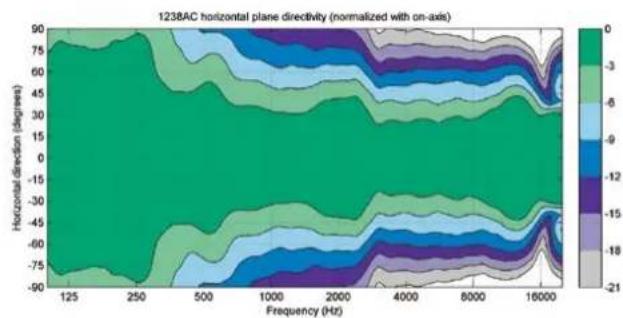
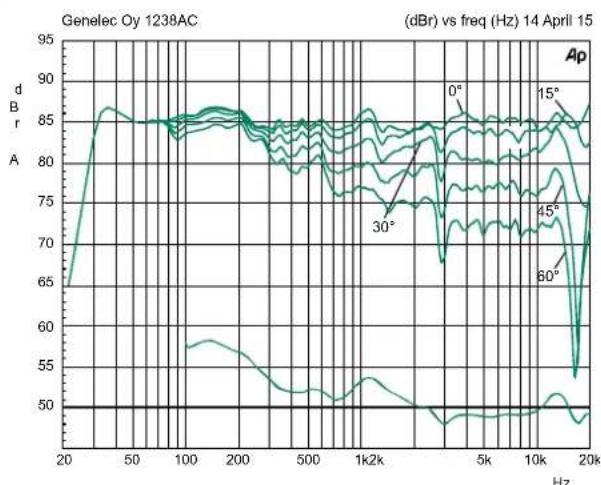
Figure 10. Horizontal directivity characteristics of the 1238AC.
heatmap
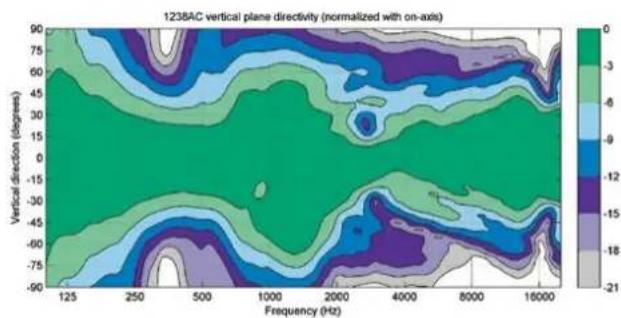
| Frequency (Hz) | 125 | 250 | 500 | 1000 | 2000 | 4000 | 8000 | 16000 | | -------------- | ------ | ------ | ------ | ------ | ------ | ------ | ------ | ------ | | Vertical direction (degrees) | -90 | -75 | -60 | -45 | -30 | -15 | 0 | 15 | | Vertical direction (degrees) | -75 | -60 | -45 | -30 | -15 | 0 | 15 | 21 | | Vertical direction (degrees) | -60 | -45 | -30 | -15 | 0 | 15 | 21 | 18 | | Vertical direction (degrees) | -45 | -30 | -15 | 0 | 15 | 21 | 18 | 15 | | Vertical direction (degrees) | -30 | -15 | 0 | 15 | 21 | 18 | 15 | 12 | | Vertical direction (degrees) | -15 | 0 | 15 | 21 | 18 | 15 | 12 | 8 | | Vertical direction (degrees) | 0 | 15 | 21 | 18 | 15 | 12 | 8 | 5 | | Vertical direction (degrees) | 15 | 21 | 18 | 15 | 12 | 8 | 5 | 3 | | Vertical direction (degrees) | 30 | 18 | 15 | 12 | 8 | 5 | 3 | 2 | | Vertical direction (degrees) | 45 | 15 | 12 | 8 | 5 | 3 | 2 | 1 | | Vertical direction (degrees) | 60 | 12 | 8 | 5 | 3 | 2 | 1 | 0 | | Vertical direction (degrees) | 75 | 8 | 5 | 3 | 2 | 1 | 0 | -1 | | Vertical direction (degrees) | 90 | 5 | 3 | 2 | 1 | 0 | -1 | -2 | The chart displays a contour plot of the normalized vertical plane directivity for each direction. The color scale ranges from -21 to +21, indicating the magnitude of the measured value at each direction. The label '1238AC vertical plane directivity (normalized with on-axis)' appears in the top-left corner. The data is presented in a grid format with rows and columns aligned by horizontal position. Values are estimated based on the color bar ranging from -21 to +21.Figure 11. Vertical directivity characteristics of the 1238AC.
line
| Frequency (Hz) | dBr (dB) | | -------------- | -------- | | 20 | ~65 | | 50 | ~85 | | 100 | ~85 | | 200 | ~85 | | 500 | ~80 | | 1k2k | ~75 | | 5k | ~85 | | 10k | ~80 | | 20k | ~70 |Figure 12. Horizontal directivity characteristics of the 1238AC. The lower curve is the power response graph.
equipment does cause harmful interference to radio or television reception, which can be determined by turning the equipment off and on, the user is encouraged to try to correct the interference by one or more of the following measures:
FCC rules.
- Reorient or relocate the receiving antenna.
- Increase the separation between the equipment and receiver.
- Connect the equipment into an outlet on a circuit different from that to which the receiver is connected.
- Consult the dealer or an experienced radio/TV technician for help.
Modifications not expressly approved by the manufacturer could void the user's authority to operate the equipment under
SYSTEM SPECIFICATIONS
| 1238AC | |
| Lower cut-off frequency, -3 dB < 33 Hz | |
| Upper cut-off frequency, -3 dB > 21 kHz | |
| Free field frequency response, ± 2.0 dB 35 Hz - 20 kHz | |
| Maximum short term sine wave acoustic output on axis in half space, averaged from 100 Hz to 3 kHz @ 1 m | >121 dB SPL |
| Maximum long term RMS acoustic output in the same conditions with IEC weighted noise (limited by driver protection circuit) @ 1 m | >116 dB SPL |
| Maximum peak acoustic output per pair in a listening room with music material @ 2 m | >124 dB |
| Self generated noise level in free space at 1 m on axis (A-weighted) | <10 dB |
| Harmonic distortion at 95 dB SPL at 1 m on axisFreq: 50...200 Hz>200 Hz | <1%<0.5% |
| DriversBassMidrangeTrebleAll drivers are magnetically shielded | 2 x 250 mm (10 in)cone125 mm (5 in) cone25 mm (1 in)metal dome |
| WeightMonitor enclosureAmplifier | 60 kg (130 lb)6 kg (13 lb) |
| Dimensions (monitor enclosure)HeightWidthDepth | 350 mm (13 34 in)950 mm (37 38 in)453 mm (17 78 in) |
| Amplifier dimensionsHeight (front panel)Height (amplifier casing)Width (front panel)Width (amplifier casing)Depth | 3U 132 mm ( 5^3/_6 in)80 mm ( 3^1/_8 in)483 mm (19 in)425 mm ( 16^3/_4 in)252 mm ( 9^15/_16 in) |
AMPLIFIER SECTION
| 1238AC | |
| Bass amplifier short term output power | 500 W |
| Midrange amplifier short term output power | 250 W |
| Treble amplifier short term output power | 200 W |
| Long term output power is limited by driver protection circuitry | |
| Amplifier system THD at nominal output <0.01 % | |
| Signal to Noise ratio, referred to full output | |
| Bass | >115 dB |
| Midrange | >115 dB |
| Treble | >115 dB |
| Mains voltage 100-240 VAC, | 50/60 Hz |
| Power consumption | |
| Standby | <0.5 W |
| Idle | 25 W |
| Full output | 750 W |
SIGNAL PROCESSING SECTION
| 1238AC | |
| Analog signal input connector XLR female, balanced 10 kOhm | pin 1 gndpin 2 non-inverting pin 3 inverting |
| Maximum analog input signal Analog input sensitivity (100 dB SPL at 1 m) Analog input gain selection | +25.0 dBu-6 dBu0, +6, +12, +18 dB |
| Digital signal input connector XLR female 110 Ohm | AES/EBU Single Wire or Dual Wire |
| Digital signal output / Thru connector XLR male 110 Ohm | AES/EBU Single Wire or Dual Wire |
| Digital audio input Word length Sample rate | 16 - 24 bits32 - 192 kHz |
| Digital input sensitivity (100 dB SPL at 1 m) Digital input gain selection | -30 dBFS0, +6, +12, +18 dB |
| Control network Type Connection | Proprietary GLMTMnetwork2 RJ45, CAT5 cables |
| Crossover frequency Bass/Mid Mid/Treble | 420 Hz3.0 kHz |
| GLMTMsoftware frequency response adjustment Notch filters Shelving filters | 4 LF and 2 HF2 LF and 2 HF |
| System calibration Genelec GLM | AutoCalTM |
Genelec Document D0114R002 Copyright Genelec Oy 3.2015. All data subject to change without prior notice
www.genelec.com
natural_image
Black studio photo of three identical black speaker units with visible sound waves and a 'GENELEC' logo on the front panel (no other text or symbols)Genelec 1238AC 操作手册
text_image
L C R 30° 100°120 LS RS数字环DUG(TAL THRU AES/EBU)
目录 (Genelec Accessories Catalogue)》或
者咨询经销商获取更多信息。