
WX3000 - Audio CAD Audio - Free user manual and instructions
Find the device manual for free WX3000 CAD Audio in PDF.


| Product Type | Wireless Microphone System |
| Brand | CAD Audio |
| Model | WX3000 |
| Frequency Range | R Band: 580-600 MHz / S Band: 655-679 MHz |
| Frequency Response | 40 Hz - 15 kHz |
| Dynamic Range | >110 dB |
| Transmitter Power | Switchable 10, 30, 50 mW |
| Battery Life | Up to 15 hours (AA alkaline) |
| Diversity | True Diversity for multipath interference reduction |
| Squelch | CADLock™ Automatic Tone Encoded Squelch |
| ScanLink™ | Automatic frequency selection and linking |
| Handheld Capsule | CADLive D90 supercardioid dynamic |
| Bodypack Input | CADTone™ with Hi-Z for guitar, Lo-Z for mic |
| Simultaneous Systems | Up to 15 per frequency band |
| Display | High-contrast LCD on transmitter and receiver |
| Receiver Outputs | XLR balanced, 1/4" unbalanced |
| Antenna | BNC 50 ohm inputs, relocation kit included |
| Power Supply (Receiver) | 12-18 VDC, 300 mA, center positive |
| Dimensions (Receiver) | 17" x 12" x 4" (43.2 x 30.5 x 10.2 cm) |
| Weight (System) | 5 lbs (2.3 kg) |
| Construction | All-metal receiver chassis, metal handheld transmitter |
| Accessories | Rack ears, BNC relocation kit, heavy-duty carry case |
| Warranty | Two-year limited warranty |
| Regulatory Compliance | FCC Part 15, Industry Canada RSS |
Frequently Asked Questions - WX3000 CAD Audio
User questions about WX3000 CAD Audio
0 question about this device. Answer the ones you know or ask your own.
Ask a new question about this device
Download the instructions for your Audio in PDF format for free! Find your manual WX3000 - CAD Audio and take your electronic device back in hand. On this page are published all the documents necessary for the use of your device. WX3000 by CAD Audio.
USER MANUAL WX3000 CAD Audio
WX3000
Wireless Microphone System
Manual and
Quick Start-up Guide


AUDIO
©2016 CAD Audio Part No. 62267 48 00 Apr2016

Two-Year Limited Warranty
CAD Audio hereby warrants that this product will be free of defects in material and workmanship for a period of two years from the date of purchase. In the unlikely event that a defect occurs CAD Audio will, at its option, either repair or replace with a new unit of equal or greater value. Retain proof of purchase to validate the purchase date and return it with any warranty claim.
This warranty excludes exterior finish or appearance, damage from abuse, misuse of the product, use contrary to CAD Audio's instructions or unauthorized repair. All implied warranties, merchantability, or fitness for a particular purpose is hereby disclaimed and CAD Audio hereby disclaims liability for incidental, special or consequential damages resulting from the use or unavailability of this product.
This warranty gives you specific legal rights and you may have other rights that vary from state to state. Some states do not allow the exclusion or limitation of incidental or consequential damages or limitations on how long an implied warranty lasts, so the above exclusions and limitations may not apply to you.
Note: No other warranty, written or oral is authorized by CAD Audio.
Individuals with cardiac pacemakers and other similar medical devices should consult with their physician before using any RF devices. Though the output level of this wireless system is below 50 milliwatts, the proximity of the transmitter to the implant device could pose a threat.
As with any wireless product, environmental conditions can reduce or in some cases prohibit a successful connection between the transmitter and the receiver.
This device complies with Part 15 of the FCC Rules. Most users of CAD Audio wireless products in the United States do not need a license for operation. However, the rules for unlicensed operation state that this device must not operate in excess of 50 milliwatts and it must not cause harmful interference to other wireless devices, and must accept interference received from other devices. Wireless products meeting CAD factory standards adhere to these rules. The FCC reserves the right to change these rules at any time. For more information contact the FCC at 1-888-CALL-FCC (TTY: 1-888-TELL-FCC) or visit the FCC's wireless microphone website at:
www.fcc.gov/cgb/wirelessmicrophones
This device complies with Industry Canada licence-exempt RSS standard(s). Operation is subject to the following two conditions: (1) this device may not cause interference, and (2) this device must accept any interference, including interference that may cause undesired operation of the device.
Under Industry Canada regulations, this radio transmitter may only operate using an antenna of a type and maximum (or lesser) gain approved for the transmitter by Industry Canada. To reduce potential radio interference to other users, the antenna type and its gain should be so chosen that the equivalent isotropically radiated power (e.i.r.p.) is not more than that necessary for successful communication.
CADLive™ is designed to outperform your expectations and deliver exceptional performance. Engineered to compliment the new generation of exceptional sound systems - The CADLive Series taps our Equitek studio heritage along with our live sound know-how in creating an impactful and easy-to-use line of mics.
The CADLive 3000 series feature True Diversity operation to minimize multipath interference along with CADLock™ Automatic Tone Encoded Squelch to eliminate unauthorized transmissions in the signal path. Frequency agile design when partnered with ScanLink™ technology will precisely scan, select and link to the optimum channel allowing for an easy, flexible frequency plan.
The CADLive handheld transmitter features metal construction and the CADLive D90 Supercardioid dynamic capsule provides a powerful, smooth and highly articulate profile. The handheld and body pack transmitters also include SoftTouch™ multi-function On-Off/Mute switches. CADLive bodypack transmitters are equipped with CADTone™ circuitry ensuring accurate reproduction of Hi-Z guitar and Lo-Z mic inputs.
CADLive wireless features 10, 30, 50mW transmitter power adjustment and dynamic range up to 110dB. Receivers and transmitters are equipped with a high definition LCD display and full RF, AF, Battery Life, Mic Sensitivity and RF power metering.
Receivers are housed in an all-metal chassis and supplied with single/dual rack ears and a BNC relocation kit. Body pack systems include Equitek E19 earworn and E29 lavalier mics. Both systems are supplied with a heavy-duty carry case.
The CADLive™ WX3000 includes the following features:
- True Diversity to minimize multipath interference
- CADLock™ Automatic Tone Encoded Squelch eliminates unauthorized interference
- Frequency agile operation for maximum frequency plan flexibility
- ScanLink™ technology for instantaneous and automatic channel configuration
- CADTone™ Body Pack input – Optimized Impedance interface - Hi-Z for Guitar and Lo-Z for mic
-
Metal construction Handheld Transmitter equipped with CADLive™ D90 capsule
• High Contrast LCD displays on TX and RX
• Transmitters feature 10, 30, 50mW power adjustment to aid in multiple system applications -
Simultaneous usage of up to 15 systems per frequency band
• Dynamic Range > 110dB
• AA Batteries with up to 15 Hrs of battery life - Systems ship with rack ears single/dual BNC relocation kit and durable carry case
• BodyPack systems include miniature E19 Earworn, E29 Lav, WXGTR guitar cable - XLR and 14 " outputs on receiver
Startup Guide
- Install new high quality alkaline batteries into transmitter, observing proper polarity.
- Power up receiver by holding power button for one second.
- Hold the SET button for one second to unlock the receiver menu.
- Hold the SCAN button for one second to activate the ScanLink™ environmental frequency analysis, which automatically selects a clear operating frequency.
- Turn on the transmitter by holding the power button for one second.
- Open the battery compartment to reveal the IR node.
- Press the LINK button (note the IR node will illuminate). Align the two IR nodes (transmitter and receiver) at a distance of 4"-12" (ambient room light can affect distance) for a few seconds while the receiver updates the transmitter. Your system is now ScanLink'd.
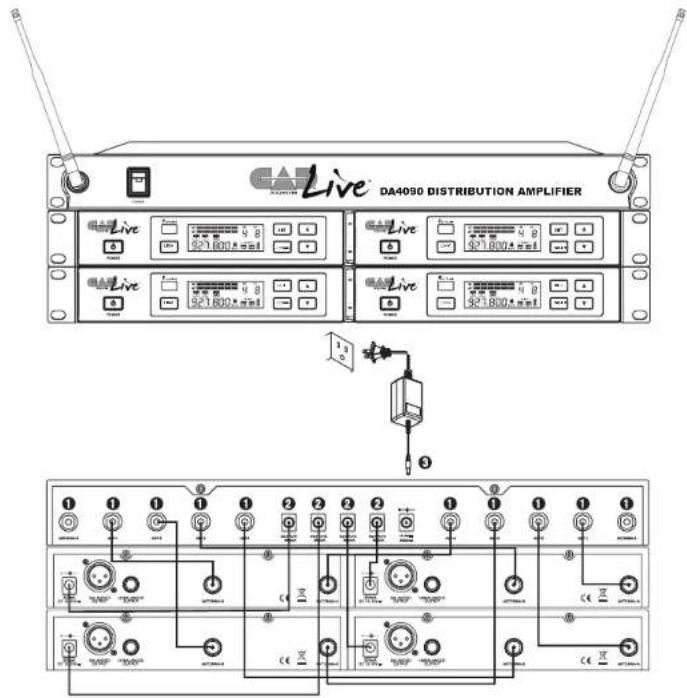
Using the DA4090 Distribution Amplifier to Simplify Multiple-System Installations
-
BNC 50 ohm cable.
-
Power cable.
- Power adapter.
Bodypack TX3010 Transmitter
-
Power/Mute button: hold for power, press for mute.
-
CADTone TB4M-type audio input connector.
- Transmitting antenna
- Power indicator
- High-contrast display
a) Operating frequency
b) RF power indicator
c) transmitter audio gain indicator
d) mute indicator
e) battery strength indicator
-
IR node for ScanLink
-
SET button. Unlocks advanced features.
- UP arrow button. Use to adjust advanced feature menu items.
- Battery compartment. Use only high quality AA alkaline batteries observing proper polarity.

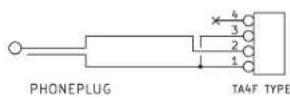
Interfacing to CADTone TB4M-type input connector
3-wire type electret mic
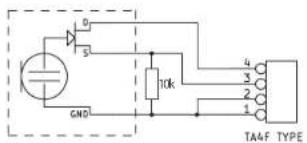
2-wire type electret mic

Dynamic mic

Instrument
Accessing Advanced Features (SET button)
All advanced features are accessed by holding the "SET" button for one second to unlock the menu. Press the "SET" button to advance through menu items. Menu items may be adjusted using arrow keys.
- Manually Select Frequencies
GR (frequency group)
CH (channel)
- Receiver Squelch Level
SQL (used to reduce sensitivity to competing RF by sacrificing operating distance)
- Transmitter Power
TX SET RF (higher power increases operating distance, lower power improves simultaneous usage)
- Transmitter audio gain
TX SET GAIN (lower gain may be used as needed for louder performers)
- Receiver Output Volume
VOL (may be reduced if audio signal overloads mixer)
Specifications WX3000
Frequency Range....R Band 580 - 600MHz
S Band 655 - 679MHz
Frequency Response 40Hz - 15kHz
Dynamic Range.....>110dB
Transmitter Power...... Switchable 10, 30, 50mW
Battery Life Up to 15 Hrs
Dimensions 17" [43.2cm] × 12" [30.5cm]
× 4" [10.2cm]
Weight....5lbs [2.3kg]
Receiver RX3000 (Front)
- Power button.
- IR ScanLink node. Use for linking transmitter and receiver.
- LINK button. Use to initiate TX-RX link.
- SET button. Unlocks advanced features.
- SCAN button. Use to initiate environmental frequency analysis.
- UP and DOWN buttons. Use to adjust advanced feature menu items.

- High-Contrast display.
a) Multi-segment RF signal strength meter.
b) Multi-segment AF signal level meter.
c) ANT.A/ANT.B diversity indicator.
d) IR indicates active IR communication.
e) SQL squelch level indicator.
f) GR CH group and channel indicator.
g) Operating Frequency.
h) TX SET RF indicates transmitter RF power setting.
i) TX SET GAIN indicates transmitter audio gain setting.

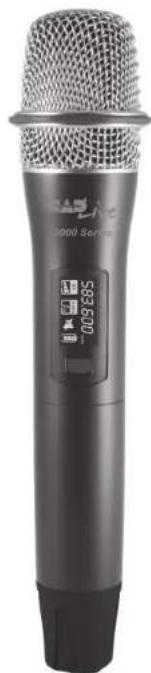
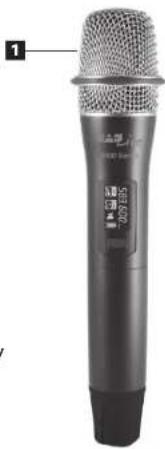
Handheld TX3000 Transmitter
- CADLive D90 supercardioid dynamic capsule.
- Enclosed transmitting antenna.
- IR node for Scan-Link™
- Power/Mute button. Hold for power, press for mute.
- High-contrast display
a) Operating frequency
b) RF power indicator
c) Transmitter audio gain indicator
d) Mute indicator
e) Battery strength indicator
- Battery compartment. Use only high quality AA alkaline batteries. Observe polarity.
natural_image
Close-up of a black audio recording device with metallic grille and control buttons (no visible text or symbols)
| Simultaneous Use580 - 600MHz Band R | ||
| Group Channel Frequency | ||
| 1 | 1 | 580.000 |
| 1 | 3 | 584.600 |
| 1 | 9 600.000 | |
| 3 | 5 | 586.900 |
| 3 | 6 | 588.800 |
| 3 | 7 | 590.900 |
| 3 | 9 597.400 | |
| 4 | 2 | 581.000 |
| 4 | 3 | 583.300 |
| 4 | 7 | 588.600 |
| 5 | 9 | 598.100 |
| 6 | 1 | 581.300 |
| 6 | 8 | 595.700 |
| 8 | 5 | 591.200 |
| 9 | 9 | 599.400 |
| Simultaneous Use655 - 679MHz Band S | ||
| Group Channel Frequency | ||
| 1 | 1 | 655.400 |
| 1 | 9 | 672.275 |
| 1 | 12 | 677.750 |
| 2 | 1 | 656.250 |
| 2 | 4 | 661.725 |
| 2 | 5 | 663.350 |
| 2 | 10 | 673.425 |
| 2 | 12 | 678.600 |
| 3 | 1 | 655.200 |
| 3 | 5 | 660.750 |
| 5 | 12 | 677.225 |
| 6 | 6 | 668.675 |
| 8 | 2 657.800 | |
| 8 | 12 | 678.900 |
| 10 | 3 | 661.500 |
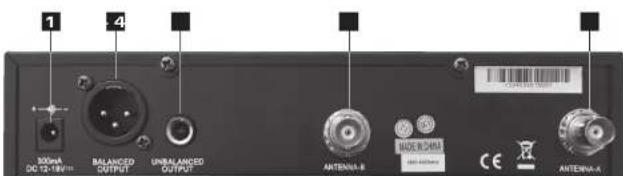
Receiver RX3000 (Rear)
- DC power input jack. 12-18VDC, 300mA min, center positive.
- XLRM-type low-impedance balanced audio output.
- 1/4" [6.35mm] high-level unbalanced output
- BNC 50 ohm antenna inputs.
Channelization
These frequencies have been approved for use within the United States and Canada as of the date of publication of this manual. It is the user's responsibility to comply with local regulations.
580 - 600MHz Band R
| CH | Group 1 | Group 2 | Group 3 | Group 4 | Group 5 |
| 1 | 580.000 | 580.600 | 582.500 | 580.500 | 580.800 |
| 2 | 582.200 | 581.100 | 583.500 | 581.000 | 583.000 |
| 3 | 584.600 | 582.400 | 584.900 | 583.300 | 584.000 |
| 4 | 586.600 | 583.400 | 586.100 | 584.700 | 585.400 |
| 5 | 588.500 | 584.800 | 586.900 | 585.900 | 587.400 |
| 6 | 590.600 | 586.000 | 588.800 | 586.700 | 589.300 |
| 7 | 593.500 | 586.800 | 590.900 | 588.600 | 591.400 |
| 8 | 596.500 | 594.300 | 594.400 | 590.700 | 595.200 |
| 9 | 600.000 | 597.300 | 597.400 | 594.200 | 598.100 |
| CH | Group 6 | Group 7 | Group 8 | Group 9 | |
| 1 | 581.300 | 581.900 | 582.100 | 583.100 | |
| 2 | 582.800 | 584.100 | 583.600 | 584.200 | |
| 3 | 584.500 | 586.500 | 584.300 | 587.300 | |
| 4 | 587.100 | 587.700 | 585.300 | 593.300 | |
| 5 | 587.900 | 591.000 | 591.200 | 599.200 | |
| 6 | 589.800 | 593.700 | 593.900 | 584.400 | |
| 7 | 592.700 | 595.800 | 596.000 | 587.500 | |
| 8 | 595.700 | 597.700 | 597.900 | 589.500 | |
| 9 | 598.200 | 599.300 | 599.500 | 599.400 |
655 - 679MHz Band S
| CH | Group 1 | Group 2 | Group 3 | Group 4 | Group 5 |
| 1 | 655.400 | 656.250 | 655.200 | 656.775 | 656.100 |
| 2 | 658.500 | 657.500 | 656.675 | 659.500 | 657.225 |
| 3 | 660.575 | 659.225 | 657.800 | 661.200 | 659.550 |
| 4 | 662.050 | 661.725 | 659.450 | 662.600 | 661.575 |
| 5 | 664.425 | 663.350 | 660.750 | 663.700 | 663.900 |
| 6 | 666.200 | 664.550 | 663.200 | 665.250 | 667.500 |
| 7 | 669.450 | 667.800 | 665.325 | 666.500 | 668.750 |
| 8 | 670.650 | 669.575 | 669.225 | 670.100 | 670.300 |
| 9 | 672.275 | 671.950 | 671.525 | 672.425 | 671.400 |
| 10 | 674.775 | 673.425 | 673.575 | 674.450 | 672.800 |
| 11 | 676.500 | 675.500 | 676.600 | 675.775 | 674.500 |
| 12 | 677.750 | 678.600 | 678.575 | 677.900 | 677.225 |
| CH | Group 6 | Group 7 | Group 8 | Group 9 | Group 10 |
| 1 | 655.425 | 655.700 | 656.550 | 655.500 | 657.075 |
| 2 | 657.400 | 658.800 | 657.800 | 656.975 | 659.800 |
| 3 | 660.425 | 660.875 | 659.825 | 658.100 | 661.500 |
| 4 | 662.475 | 662.350 | 662.025 | 659.750 | 662.900 |
| 5 | 664.775 | 664.725 | 663.650 | 660.050 | 664.000 |
| 6 | 668.675 | 666.500 | 664.850 | 663.500 | 665.550 |
| 7 | 670.800 | 669.750 | 668.100 | 665.525 | 666.800 |
| 8 | 673.250 | 670.950 | 669.875 | 669.525 | 670.400 |
| 9 | 674.550 | 672.575 | 672.250 | 671.825 | 672.725 |
| 10 | 676.200 | 675.075 | 673.725 | 673.875 | 674.750 |
| 11 | 677.325 | 676.800 | 675.800 | 676.900 | 676.075 |
| 12 | 678.800 | 678.050 | 678.900 | 678.875 | 678.200 |
- WX3000
- Two-Year Limited Warranty
- The CADLive™ WX3000 includes the following features:
- Startup Guide
- Using the DA4090 Distribution Amplifier to Simplify Multiple-System Installations
- Bodypack TX3010 Transmitter
- Interfacing to CADTone TB4M-type input connector
- Accessing Advanced Features (SET button)
- Specifications WX3000
- Receiver RX3000 (Front)
- Handheld TX3000 Transmitter
- Receiver RX3000 (Rear)
- Channelization
Brand : CAD Audio
Model : WX3000
Category : Audio