Halo - Headphones Cleer - Free user manual and instructions
Find the device manual for free Halo Cleer in PDF.


| Product Type | Over-ear wireless headphones |
| Brand | Cleer |
| Model | Halo |
| Driver Size | 40 mm |
| Frequency Response | 20 Hz – 20 kHz |
| Impedance | 32 Ω |
| Sensitivity | 105 dB |
| Bluetooth Version | 5.0 |
| Battery Life | Up to 30 hours |
| Charging Time | 2 hours |
| Charging Port | USB-C |
| Noise Cancellation | Active (ANC) |
| Microphone | Built-in, with noise reduction |
| Controls | On-ear buttons for volume, playback, calls |
| Foldable | Yes, for easy storage |
| Weight | 250 g |
| Dimensions (folded) | 180 x 180 x 80 mm |
| Supported Codecs | SBC, AAC, aptX |
| Cleaning | Wipe with a soft, dry cloth; remove ear cushions for washing |
| Safety | Complies with CE, FCC, RoHS |
| Spare Parts | Ear cushions, USB cable, audio cable available from Cleer |
Frequently Asked Questions - Halo Cleer
User questions about Halo Cleer
0 question about this device. Answer the ones you know or ask your own.
Ask a new question about this device
Download the instructions for your Headphones in PDF format for free! Find your manual Halo - Cleer and take your electronic device back in hand. On this page are published all the documents necessary for the use of your device. Halo by Cleer.
USER MANUAL Halo Cleer
WIRELESS NECK SPEAKER
ENGLISH
Quick Start Guide | User Manual | Warranty Card
CONTENTS
INTRODUCTION 2
QUICK START GUIDE 3
USER MANUAL
- Bluetooth pairing 4
- Audio control 5
- Enhanced Stereo Sound (ES Sound) mode 5
- Google Assistant 6
- Charging 6
- LED Behavior 7
- Specifications 7
WARRANTY 8
NOTICE 10
HALO INTRODUCTION
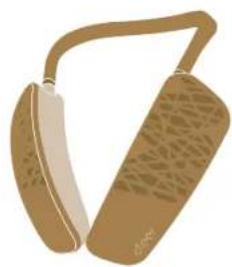
Box contents
natural_image
Illustration of a pair of beige accessories with textured surfaces (no text or symbols)HALO Wireless Neck Speaker

Quick start guide / User manual / Warranty card (This booklet)
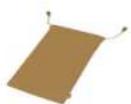
Soft pouch

Charging cable USB-C to USB-A
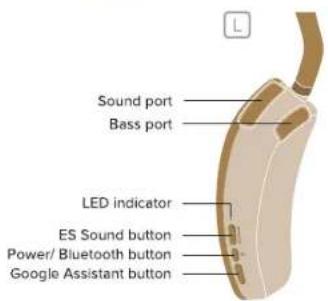
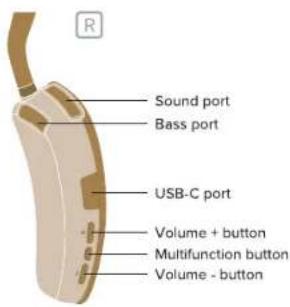
Overview
HALO QUICK START GUIDE
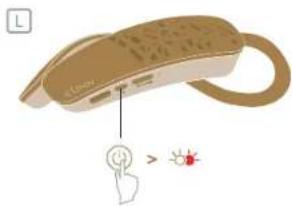
- Short press the Power/Bluetooth button to power ON your HALO
* HALO will go into pairing mode automatically when powered ON for the first time (if HALO does not automatically go into pairing mode when powered ON for the first time, follow the steps on page 4 to go into pairing mode manually)
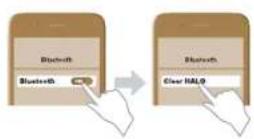
** HALO will automatically connect to the last connected device if it is in range and available for pairing - Find "Cleer HALO" on the Bluetooth device list to pair
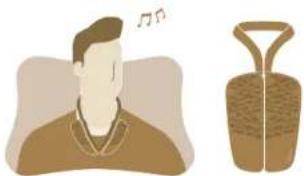
3. Put the flexible neckband around the back of your neck with the speakers resting on your upper chest area
Enjoy your HALO
* Make sure HALO is worn evenly on your for the best experience
** The speakers of HALO can come together and form a loop with the neckband
natural_image
Illustration of a person with musical notes and a vase, no text or symbols present- Long press the Power button to power OFF your HALO
HALO USER MANUAL
- Bluetooth pairing
natural_image
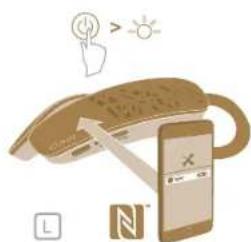
Illustration of a smartphone with a close-up of its screen, emitting a light icon above it (no text or symbols present)NFC
-
HALO is ON
-
Turn on NFC on your device and place it on top of the left speaker housing
-
HALO is now paired
*For NFC enabled devices only
Or
flowchart
graph TD
    A["Light Source"] --> B["Light Source"]
    B --> C["Flash Output"]
    D["Bluetooth"] --> E["Bluetooth"]
    E --> F["Clear HALO"]
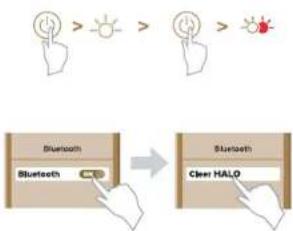
Pairing Mode
- HALO is ON. Short press the Power/Bluetooth button to go into pairing mode
- Find "Cleer HALO" on the Bluetooth device list
- HALO is now paired
4
HALO
USER MANUAL
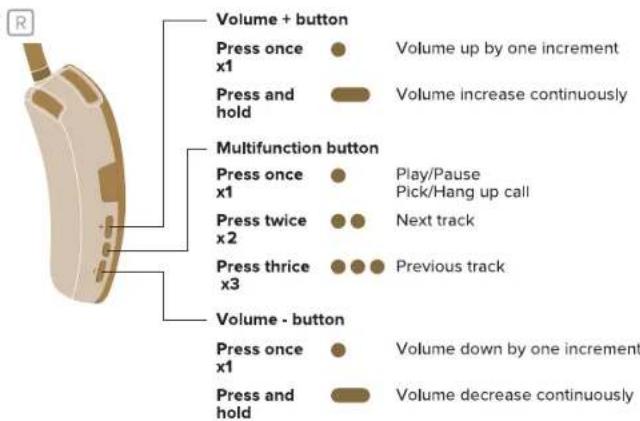
- Audio control
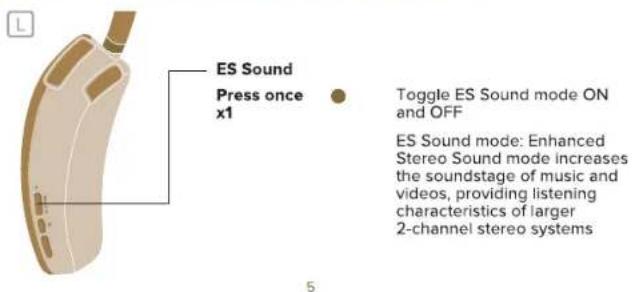
- Enhanced Stereo Sound (ES Sound) mode
HALO USER MANUAL
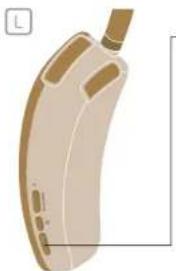
- Google Assistant
natural_image
Illustration of a beige handheld device with a cable and ports (no text or symbols)Google Assistant button
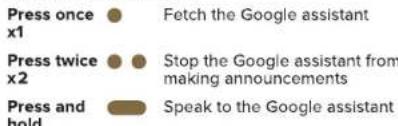
* You can play back music or look for information by talking to HALO to operate a smartphone or tablet (Android TM 5.0+/iOS 9.3 or higher) equipped with the Google Assistant app.
** When using an iOS smartphone or tablet, install the Google Assistant app in advance.
*** Connect the smartphone or tablet to the Internet. HALO cannot connect to the Internet directly.
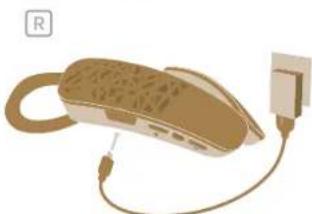
- Charging
natural_image
Illustration of a telephone handset connected to a power plug (no text or symbols)Connect HALO to a power source with the provided USB-C cable
A 10-minute charge will give 2 hours of playtime. HALO can be fully charged in 2 hours
HALO
USER MANUAL
-
LED Behavior
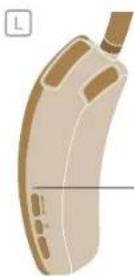
Power on
Power off
Power on but not connected to any device
Power on and connected to a device
Pairing mode
Incoming call
Battery low
Charging battery
Battery fully charged -
Specifications
| Driver: | 32mm full range driver |
| Audio CODEC support: | SBC, AAC, aptX, aptX Low Latency |
| Frequency response range: | 20-20KHz |
| Connections: | USB-C to USB-A cable for charging |
| Support: | BT 4.2, SPP v1.0, HFP v1.6, A2DP v1.2, AVRCP v1.4 |
| Bluetooth transmission frequency range: | 2.402-2.480GHz |
| Bluetooth transmission power: | <10dBm |
| Battery: | Rechargeable lithium ion rectangle cell (3.7V) |
| Playback time: | Up to 12 hours |
| Voice service: | Google Assistant |
| Weight: | 245 g |
HALO WARRANTY
Cleer Limited Warranty
Cleer Limited warrants this product against defects in material or workmanship for (1) year as set forth below when purchased directly from Cleer Limited or a Cleer Limited retailer. Pursuant to this Limited Warranty, Cleer Limited will, at its option, (i) repair the product using new or refurbished parts or (ii) replace the product with a new or refurbished product. For purposes of this Limited Warranty, "refurbished" means a product or part that has been returned to its original specifications. In the event of a defect, these are your exclusive remedies.
Labor: For a period of (1) year from the original date of purchase of the product ("Labor Warranty"), Cleer Limited will, at its option, repair or replace with new or refurbished product, product determined to be defective. If Cleer Limited elects to replace the product after this Labor Warranty has expired but while the parts warranty is still in effect, it will do so for the applicable labor charge.
Parts: For a period of (1) year from the original date of purchase of the product ("Parts Warranty"), Cleer Limited will supply new or refurbished replacement parts in exchange for parts determined to be defective.
This Limited Warranty covers only the hardware components packaged with the Product. It does not cover technical assistance for hardware or software usage and it does not cover any software products whether or not contained in the Product; any such software is provided "AS IS" unless expressly provided for in any enclosed software Limited Warranty. Please refer to the End User License Agreements included with the Product for your rights and obligations with respect to the software.
Instructions: To obtain warranty service, you must deliver the Product, freight prepaid, in either its original packaging or packaging affording an equal degree of protection to the original Cleer Limited retailer (point of purchase) or Cleer Limited Customer Service. It is your responsibility to backup any data, software or other materials you may have stored or preserved on your unit. It is unlikely that such data, software or other materials will be lost or reformatted during service and Cleer Limited will not be responsible for any such damage or loss. A dated purchase receipt from Cleer Limited or a Cleer Limited retailer is required. For specific instructions on how to obtain warranty service for your product,
Visit the Cleer Limited website: www.cleeraudio.com
Following warranty service your original Product or a replacement Product will be returned to you as your Product was configured when originally purchased.
Repair / Replacement Warranty: This Limited Warranty shall apply to any repair, replacement part or replacement product for the remainder of the original Limited Warranty period or for (90) days, whichever is longer. Any parts or product replaced under this Limited Warranty will become property of Cleer Limited.
This Limited Warranty shall not apply to: (a) consumable parts, such as batteries that are designed to diminish over time, unless failure has occurred due to a defect in materials or workmanship; (b) cosmetic damage, including but not limited to scratches, dents and broken plastic on ports; (c) defects caused by normal wear and tear or otherwise due to the normal aging of the device; (d) damage caused by accident, negligence, abuse, misuse, fire, earthquakes, acts of God or damage resulting from liquid outside of the approved levels; (e) damage caused by operating the device outside Cleer Limited published guidelines; (f) damage caused by service performed by anyone who is not a representative of Cleer Limited or a Cleer Limited authorized service provider; (g) Products whose seals are tampered; (h) Products whose serial
HALO WARRANTY
numbers have been removed or defaced from such Product; (i) modifications, alterations or repairs to the Product made by a party other than Cleer Limited or a party authorized by Cleer Limited; (j) any failure by End User or a third party to comply with environmental and storage requirements for the Product specified by Cleer Limited, including, without limitation, temperature or humidity ranges; or (k) use of the Product in combination with any third-party devices or products that have not been provided or recommended by Cleer Limited.
LIMITATION ON DAMAGES: CLEER LIMITED SHALL NOT BE LIABLE FOR ANY INCIDENTAL OR CONSEQUENTIAL DAMAGES FOR BREACH OF ANY EXPRESS OR IMPLIED WARRANTY ON THIS PRODUCT.
DURATION OF IMPLIED WARRANTIES: EXCEPT TO THE EXTENT PROHIBITED BY APPLICABLE LAW, ANY IMPLIED WARRANTY OF MERCHANTABILITY OR FITNESS FOR A PARTICULAR PURPOSE ON THIS PRODUCT IS LIMITED TO THE DURATION OF THIS WARRANTY.
DISCLAIMER: THE LIMITED WARRANTY SET FORTH HEREIN IS EXCLUSIVE AND IN LIEU OF ALL OTHER WARRANTIES OR CONDITIONS RELATING TO THE PRODUCT, WHETHER EXPRESS OR IMPLIED, AND CLEER LIMITED EXPRESSLY DISCLAIMS ALL OTHER WARRANTIES AND CONDITIONS WHETHER EXPRESS, IMPLIED OR STATUTORY, INCLUDING ANY IMPLIED WARRANTIES OF MERCHANTABILITY, NON-INFRINGEMENT, FITNESS FOR A PARTICULAR PURPOSE, AND ANY WARRANTIES ARISING OUT OF COURSE OF DEALING OR USAGE OF TRADE AND AGAINST HIDDEN DEFECTS. TO THE FULLEST EXTENT PERMITTED BY LAW. CLEER LIMITED DOES NOT WARRANT THAT THE PRODUCT WILL MEET CUSTOMER'S REQUIREMENTS OR THAT USE OF THE PRODUCT WILL BE UNINTERRUPTED OR ERROR FREE. NO ADVICE OR INFORMATION, WHETHER ORAL OR WRITTEN, OBTAINED FROM CLEER LIMITED OR ELSEWHERE WILL CREATE ANY WARRANTY NOT EXPRESSLY STATED IN THIS WARRANTY.
HALO NOTICE
Recycling


Your product is designed and manufactured with high quality materials and components, which can be recycled and reused. When you see the crossed out wheel bin symbol attached to a product, it means the product is covered by the European Directive 2002/96 EC:
Never dispose of your product with other household waste. Please inform yourself about the local rules on the separate collection of electrical and electronic products. The correct disposal of your old product helps prevent potentially negative consequences on the environment and human health. Your product contains batteries covered by the European Directive 2006/66/EC, which cannot be disposed of with normal household waste.
The device complies with RF specifications when the device used at 0mm from your body. Hereby, Cleer Limited. Declares that the product compliance with essential requirements and other relevant provisions of Directive 2014/53/EU.
Compliance with FCC rules
- This device complies with Part 15 of the FCC Rules. Operation is subject to the following two conditions:
(1) This device may not cause harmful interference.
(2) This device must accept any interference received, including interference that may cause undesired operation.
- Changes or modifications not expressly approved by the party responsible for compliance could void the user's authority to operate the equipment.
NOTE: This equipment has been tested and found to comply with the limits for a Class B digital device, pursuant to Part 15 of the FCC Rules. These limits are designed to provide reasonable protection against harmful interference in a residential installation.
This equipment generates uses and can radiate radio frequency energy and, if not installed and used in accordance with the instructions, may cause harmful interference to radio communications. However, there is no guarantee that interference will not occur in a particular installation. If this equipment does cause harmful interference to radio or television reception, which can be determined by turning the equipment off and on, the user is encouraged to try to correct the interference by one or more of the following measures:
• Reorient or relocate the receiving antenna.
- Increase the separation between the equipment and receiver.
- Connect the equipment into an outlet on a circuit different from that to which the receiver is connected. - Consult the dealer or an experienced radio/TV technician for help.
Radiation Exposure Statement:
This equipment complies with FCC radiation exposure requirement. The device can be used in portable exposure condition without RF restriction.
HALO NOTICE
Register your product and get support at www.cleeraudio.com
©2019 Cleer Limited. All rights reserved.
Google is a trademark of Google LLC.
The Bluetooth® word mark and logos are registered trademarks owned by Bluetooth SIG, Inc. and any use of such marks by Cleer Limited is under license. Other trademarks and trade names are those of their respective owners.
Qualcomm aptX is a product of Qualcomm Technologies International, Ltd. Qualcomm is a trademark of Qualcomm Incorporated, registered in the United States and other countries, used with permission. aptX is a trademark of Qualcomm Technologies International, Ltd., registered in the United States and other countries, used with permission.
Made in China.

Google Assistant

Bluetooth®


Qualcomm aptX

Qualcomm aptX Low Latency


OWN THE MOMENT
Find this user manual on
www.cleeraudio.com
Follow us on social media @Cleersound