Goal - Headphones Cleer - Free user manual and instructions
Find the device manual for free Goal Cleer in PDF.


| Product Type | True wireless active headphones (earbuds) |
| Brand | Cleer |
| Model | Goal |
| Driver Type | 13.4 mm neodymium dynamic driver |
| Frequency Response | 20 Hz – 20,000 Hz |
| Audio Codec Support | SBC, aptX, MP3 |
| Bluetooth Version | BT 5.0 |
| Bluetooth Profiles | A2DP v1.3, AVRCP v1.6, HFP v1.7 |
| Battery Life (Earbuds) | Up to 6 hours |
| Battery Life (with Charging Case) | Up to 20 hours (6 + 14 additional hours) |
| Quick Charge | 5 minutes charge gives 1 hour of playtime |
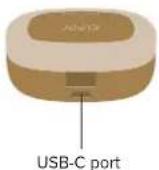
| Charging Port | USB-C (for case only) |
| Weight (Per Earbud) | 6.6 g |
| Weight (Total with Case) | 60 g |
| Water Resistance (Earbuds) | IPX4 (sweatproof and water-resistant) |
| Controls | Touch pad (single tap, double tap, triple tap, tap and hold) for playback, calls, volume, voice assistant |
| Fit System | Twist Fit with freebit silicone skirts (S, M, L) and silicone sleeve (no skirt) |
| Box Contents | Earbuds, charging case, USB-C to USB-A cable, freebit silicone skirts (S, M, L), silicone sleeve (no skirt), quick start guide, user manual, warranty card, thank you card |
| Warranty Period | 1 year labor, 1 year parts |
| Compliance | CE, FCC Part 15, EU Directive 2014/53/EU |
| Operating Frequency | 2402–2480 MHz |
| Maximum RF Power | <100 mW |
Frequently Asked Questions - Goal Cleer
User questions about Goal Cleer
0 question about this device. Answer the ones you know or ask your own.
Ask a new question about this device
Download the instructions for your Headphones in PDF format for free! Find your manual Goal - Cleer and take your electronic device back in hand. On this page are published all the documents necessary for the use of your device. Goal by Cleer.
USER MANUAL Goal Cleer
Quick Start Guide | User Manual | Warranty Card
CONTENTS
INTRODUCTION 2
QUICK START GUIDE 3
USER MANUAL
- Bluetooth pairing 4
- Twist Fit 5
- Freebit silicone skirt 6
- Earbuds control (Playback and call) 7
- Earbuds control (Volume) 7
- LED behavior 8
- Charging 9
- Specifications 10
WARRANTY 11
NOTICE 13
GOAL
INTRODUCTION
Box contents
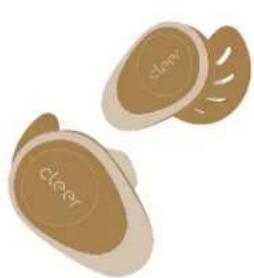
natural_image
Illustration of two smooth, beige objects with circular patterns and the word 'cleary' on their surfaces (no additional text or symbols)GOAL
True wireless active headphone
Quick start guide / User manual /
Warranty card (This booklet) / Thank you card

Charging cable USB-C to USB-A

Charging case

Freebit silicone skirts (S, M, L), Silicone sleeve (no skirt)
Overview
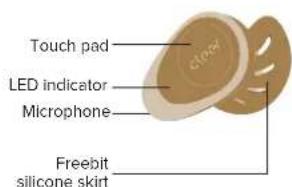
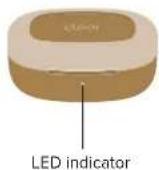
natural_image
Illustration of a compact charging case with two small earphones (no text or symbols visible)- GOAL will power ON automatically when removed from the charging case.
* GOAL will go into pairing mode automatically when powered ON for the first time (if you need to manually go into pairing mode, please follow the steps on page 4).
^++ GOAL will automatically connect to the last connected device if it is in range and available for pairing.
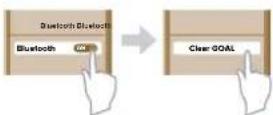
- Select "Cleer GOAL" on the Bluetooth device list to pair the earbuds.

natural_image
Illustration of a person's head in profile with musical notes above their head (no text or symbols)- Enjoy your music with GOAL.
GOAL USER MANUAL
1. Bluetooth pairing

x5
Pairing Mode
-
Remove both GOAL earbuds from the charging case.
-
Tap the touch pad 5 times on either earbud, the LED will blink in red and white.
-
Select your "Cleer GOAL" on the Bluetooth device list to pair the earbuds.
-
GOAL is now paired.
* To clear the pairing record of your GOAL:
1. Remove both earbuds from the charging case
2. Put both earbuds into pairing mode
3. Press and hold the touch pad until the LEDs on the earbuds flash red 3 times
4. The pairing record is now cleared and the device will enter pairing mode
GOAL USER MANUAL
2. Twist Fit
natural_image
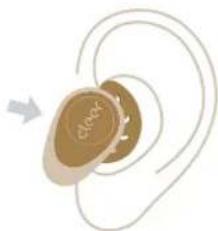
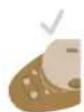
Illustration of a medical or therapeutic device with a labeled 'Check' and curved trajectory lines (no text or symbols beyond the label)- Remove GOAL from the charging case. Insert them into your ears with the silicone skirts facing backwards, until they sit comfortably in your ears.
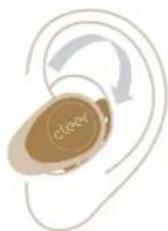
- Twist the GOAL earbuds to fit your ears and make sure the silicone skirts fit securely in your ear. If the silicone skirts do not fit comfortably in your ears, try a different size.
* The skirts that are already attached are medium size
GOAL
USER MANUAL
GOAL
USER MANUAL
3. Freebit silicone skirt 4. Earbuds control (Playback and call)
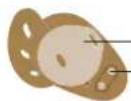
Driver housing
Charging plates
The Freebit silicone skirts are designed to keep the GOAL earbuds in your ears comfortably.
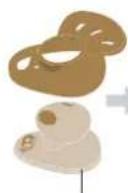
If you need to change the silicone skirts to a different size (small, large or no skirt), follow these steps to attach the skirts to the earbuds.
Groove


-
Place the circular opening of the skirt through the driver housing.
-
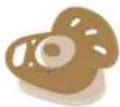
Snap the sides of the skirt into the groove in the main housing.
-
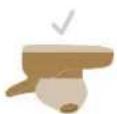
Adjust the skirt so that the charging plates and microphone openings are not covered by the skirt.

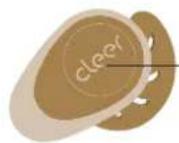
Single tap x1

Music: Play/Pause
Double tap x2

Music: Next track
Call: Pick up/hang up call
Triple tap x3

Music: Previous track
Tap and hold

Trigger default voice assistant
Call: Reject call
*Removing either earbuds from your ears during playback will pause the playback.
5. Earbuds control (Volume)
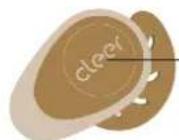
Right earbud
Double tap x2 hold on 2nd tap

Volume up continuously
Left earbud
Double tap x2 hold on 2nd tap

Volume down continuously
GOAL USER MANUAL
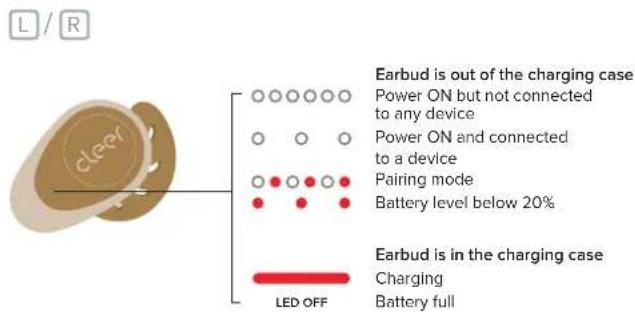
- LED behavior
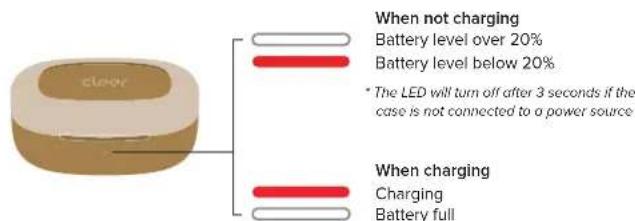
GOAL USER MANUAL
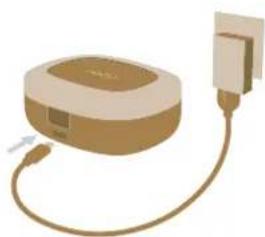
- Charging
natural_image
Illustration of a beige electronic device connected to a power plug (no text or symbols)Connect the GOAL charging case to a power source with the provided USB-C cable.
A 5-minute charge of the earbuds will give 1 hour of playtime. Up to 20 hours of total playtime with fully charged earbuds and charging case.
GOAL USER MANUAL
8. Specifications
| Driver: | 13.4mm neodymium dynamic driver |
| Audio CODEC support: | SBC, aptX, MP3 |
| Frequency response range: | 20 - 20,000Hz |
| Connections: | USB-C cable for case charging |
| Battery charging (earbuds) : | A 5-minute charge will give 1 hour of playtime |
| Playback time: | Up to 6 hours, up to additional 14 hours with charging case |
| Support: | BT 5.0, A2DP v1.3, AVRCP v1.6, HFP v1.7 |
| Protection from water: | IPX4 water-resistant and sweatproof (for earbuds only) |
| Weight: | 6.6g (per earbud), 60g (both earbuds and case) |
GOAL
WARRANTY
Cleer Limited Warranty
Cleer Limited warrants this product against defects in material or workmanship for (f) year as set forth below when purchased directly from Cleer Limited or a Cleer Limited retailer. Pursuant to this Limited Warranty, Cleer Limited will, at its option, (i) repair the product using new or refurbished parts or (ii) replace the product with a new or refurbished product. For purposes of this Limited Warranty, "refurbished" means a product or part that has been returned to its original specifications. In the event of a defect, these are your exclusive remedies.
Labor: For a period of (1) year from the original date of purchase of the product ("Labor Warranty"), Cleer Limited will, at its option, repair or replace with new or refurbished product, product determined to be defective. If Cleer Limited elects to replace the product after this Labor Warranty has expired but while the parts warranty is still in effect, it will do so for the applicable labor charge.
Parts: For a period of (1) year from the original date of purchase of the product ("Parts Warranty"), Cleer Limited will supply new or refurbished replacement parts in exchange for parts determined to be defective.
This Limited Warranty covers only the hardware components packaged with the Product. It does not cover technical assistance for hardware or software usage and it does not cover any software products whether or not contained in the Product; any such software is provided "AS IS" unless expressly provided for in any enclosed software Limited Warranty. Please refer to the End User License Agreements included with the Product for your rights and obligations with respect to the software.
Instructions: To obtain warranty service, you must deliver the Product, freight prepaid, in either its original packaging or packaging affording an equal degree of protection to the original Cleer Limited retailer (point of purchase) or Cleer Limited Customer Service. It is your responsibility to backup any data, software or other materials you may have stored or preserved on your unit. It is unlikely that such data, software or other materials will be lost or reformatted during service and Cleer Limited will not be responsible for any such damage or loss. A dated purchase receipt from Cleer Limited or a Cleer Limited retailer is required. For specific instructions on how to obtain warranty service for your product,
Visit the Cleer Limited website: www.cleeraudio.com
Following warranty service your original Product or a replacement Product will be returned to you as your Product was configured when originally purchased.
Repair / Replacement Warranty: This Limited Warranty shall apply to any repair, replacement part or replacement product for the remainder of the original Limited Warranty period or for (90) days, whichever is longer. Any parts or product replaced under this Limited Warranty will become property of Cleer Limited.
GOAL WARRANTY
This Limited Warranty shall not apply to: (a) consumable parts, such as batteries that are designed to diminish over time, unless failure has occurred due to a defect in materials or workmanship; (b) cosmetic damage, including but not limited to scratches, dents and broken plastic on ports; (c) defects caused by normal wear and tear or otherwise due to the normal aging of the device; (d) damage caused by accident, negligence, abuse, misuse, fire, earthquakes, acts of God or damage resulting from liquid outside of the approved levels; (e) damage caused by operating the device outside Cleer Limited published guidelines; (f) damage caused by service performed by anyone who is not a representative of Cleer Limited or a Cleer Limited authorized service provider; (g) Products whose seals are tampered; (h) Products whose serial numbers have been removed or defaced from such Product; (i) modifications, alterations or repairs to the Product made by a party other than Cleer Limited or a party authorized by Cleer Limited; (j) any failure by End User or a third party to comply with environmental and storage requirements for the Product specified by Cleer Limited, including, without limitation, temperature or humidity ranges; or (k) use of the Product in combination with any third-party devices or products that have not been provided or recommended by Cleer Limited.
LIMITATION ON DAMAGES: CLEER LIMITED SHALL NOT BE LIABLE FOR ANY INCIDENTAL OR CONSEQUENTIAL DAMAGES FOR BREACH OF ANY EXPRESS OR IMPLIED WARRANTY ON THIS PRODUCT.
DURATION OF IMPLIED WARRANTIES: EXCEPT TO THE EXTENT PROHIBITED BY APPLICABLE LAW, ANY IMPLIED WARRANTY OF MERCHANTABILITY OR FITNESS FOR A PARTICULAR PURPOSE ON THIS PRODUCT IS LIMITED TO THE DURATION OF THIS WARRANTY.
DISCLAIMER: THE LIMITED WARRANTY SET FORTH HEREIN IS EXCLUSIVE AND IN LIEU OF ALL OTHER WARRANTIES OR CONDITIONS RELATING TO THE PRODUCT, WHETHER EXPRESS OR IMPLIED, AND CLEER LIMITED EXPRESSLY DISCLAIMS ALL OTHER WARRANTIES AND CONDITIONS WHETHER EXPRESS, IMPLIED OR STATUTORY, INCLUDING ANY IMPLIED WARRANTIES OF MERCHANTABILITY; NON-INFRINGEMENT, FITNESS FOR A PARTICULAR PURPOSE, AND ANY WARRANTIES ARISING OUT OF COURSE OF DEALING OR USAGE OF TRADE AND AGAINST HIDDEN DEFECTS, TO THE FULLEST EXTENT PERMITTED BY LAW. CLEER LIMITED DOES NOT WARRANT THAT THE PRODUCT WILL MEET CUSTOMER'S REQUIREMENTS OR THAT USE OF THE PRODUCT WILL BE UNINTERRUPTED OR ERROR FREE. NO ADVICE OR INFORMATION, WHETHER ORAL OR WRITTEN, OBTAINED FROM CLEER LIMITED OR ELSEWHERE WILL CREATE ANY WARRANTY NOT EXPRESSLY STATED IN THIS WARRANTY.
GOAL NOTICE
Recycling
Year-product is designed and manufactured with high quality materials and components, which can be recycled and reused. When you see the crossed out wheel bin symbol attached to a product, it means the product is covered by the European Directive 2002/96 EC:
Never dispose of your product with other household waste. Please inform yourself around the local rules on the separate collection of electrical and electronic products. The correct disposal of your old product helps prevent potentially negative consequences on the environment and human health. Your product contains batteries covered by the European Directive 2006/66/EC, which cannot be disposed of with normal household waste.
The device complies with RF specifications when the device used at 0mm from your body. Hereby, Cleer Limited. Declares that the product compliance with essential requirements and other relevant provisions of Directive 2014/53/EU.
This device may be operated in all member states of the EU.
Declaration for EU compliance: Operation Frequency Band/Max. RF power transmitted: 2402-2480MHz, <100mW.
Compliance with FCC rules
NOTE: This equipment has been tested and found to comply with the limits for a Class B digital device, pursuant to part 15 of the FCC Rules. These limits are designed to provide reasonable protection against harmful interference in a residential installation. This equipment generates uses and can radiate radio frequency energy and, if not installed and used in accordance with the instructions, may cause harmful interference to radio communications. However, there is no guarantee that interference will not occur in a particular installation. If this equipment does cause harmful interference to radio or television reception, which can be determined by turning the equipment off and on, the user is encouraged to try to correct the interference by one or more of the following measures:
- Reorient or relocate the receiving antenna. - Increase the separation between the equipment and receiver. - Connect the equipment into an outlet on a circuit different from that to which the receiver is connected. - Consult the dealer or an experienced radio/TV technician for help
Changes or modifications not expressly approved by the party responsible for compliance could void the user's authority to operate the equipment.
This device complies with Part 15 of the FCC Rules. Operation is subject to the following two conditions: (1) this device may not cause harmful interference, and (2) this device must accept any interference received, including interference that may cause undesired operation.
GOAL NOTICE
Battery:
Do not ingest battery, Chemical Burn Hazard
This product contains a coin / button cell battery. If the coin / button cell battery is swallowed, it can cause severe internal burns in just 2 hours and can lead to death.
Keep new and used batteries away from children.
If the battery compartment does not close securely, stop using the product and keep it away from children.
If you think batteries might have been swallowed or placed inside any part of the body, seek immediate medical attention.
Register your product and get support at www.cleeraudio.com
©2020 Cleer Limited. All rights reserved.
The Bluetooth® word mark and logos are registered trademarks owned by Bluetooth SIG, Inc. and any use of such marks by Cleer Limited is under license. Other trademarks and trade names are those of their respective owners.
Qualcomm aptX is a product of Qualcomm Technologies International, Ltd. Qualcomm is a trademark of Qualcomm Incorporated, registered in the United States and other countries, used with permission. aptX is a trademark of Qualcomm Technologies International, Ltd., registered in the United States and other countries, used with permission.
Made in China.
Bluetooth
Qualcomm' aptX
BC CE
OWN THE MOMENT
Find this user manual on
www.cleeraudio.com
Follow us on social media


@Cleersound @ClearAudio

THANK YOU
We're passionate about the products we design and engineer, the industry we work in, and the music we bring to your ears.
We hope you enjoy GOAL as much as we did making it for you.
The Team at Cleer

- CONTENTS
- INTRODUCTION 2
- QUICK START GUIDE 3
- USER MANUAL
- WARRANTY 11
- NOTICE 13
- GOAL
- INTRODUCTION
- GOAL USER MANUAL
- Bluetooth pairing
- Pairing Mode
- Twist Fit
- Freebit silicone skirt 4. Earbuds control (Playback and call)
- Earbuds control (Volume)
- Specifications
- WARRANTY
- Cleer Limited Warranty
- GOAL WARRANTY
- GOAL NOTICE
- Recycling
- OWN THE MOMENT
- THANK YOU
Brand : Cleer
Model : Goal
Category : Headphones