S4-W65 - Pregnant DYNAUDIO - Free user manual and instructions
Find the device manual for free S4-W65 DYNAUDIO in PDF.


User questions about S4-W65 DYNAUDIO
0 question about this device. Answer the ones you know or ask your own.
Ask a new question about this device
Download the instructions for your Pregnant in PDF format for free! Find your manual S4-W65 - DYNAUDIO and take your electronic device back in hand. On this page are published all the documents necessary for the use of your device. S4-W65 by DYNAUDIO.
USER MANUAL S4-W65 DYNAUDIO
Studio Series User manual
- Dynaudio custom install limited warranty
- Important safety instructions
■Environmental note - Disposal
■Introduction - Carton Contents
■Preparation - Dimensions
- Back Boxes
■Speaker Positions
■Background Audio
■Stereo Audio
■Multi-channel Audio - In-ceiling Speaker Installation
- In-wall Speaker Installation
- Specifications
S4-C65
S4-DVC65
S4-C80
S4-W65
S4-W80
Dynaudio custom install limited warranty
Dynaudio warrants its custom install products to be free from defects in materials and workmanship under conditions of normal use and service for a lifetime period from the date of original purchase. For this warranty to apply, the unit must be installed and used according to its written instructions.
The obligation under this warranty shall be limited to the replacement, repair or refund of any such defective device within the warranty period, provided that:
- inspection by Dynaudio indicates the validity of the claim;
- the defect is not the result of damage, misuse, lightning, power surges, negligence, improper operation (installation) or failure to follow instructions contained in the manual or written instructions provided by Dynaudio after the original purchase;
- the product has not been altered in any way or repaired by others and that factory sealed units are unopened (a service charge plus parts and labour will be applied to units defaced or physically damaged);
- the dealer from whom the Dynaudio products were purchased was authorized to sell such products at the time of the original purchase;
- the service provider for, including but not limited, installation or repair of the product, was authorized in writing by Dynaudio;
- the original, dated Bill of Sale is presented whenever service is required during the warranty period;
-
freight charges for the return of products to Dynaudio are prepaid;
-
all units 'out of warranty' are subject to a service charge. The service charge will cover minor repairs (major repairs will be subject to additional charges for parts and labour).
This warranty is in lieu of and excludes all other warranties, expressed or implied. Neither this warranty nor any other warranty, express or implied, including implied warranties of merchantability and fitness, shall extend beyond the warranty period.
Dynaudio shall not be liable for damages to any other equipment or other items at the site of use, or any other damages whether incidental, consequential or otherwise. Dynaudio shall not be liable for any anticipated profits, any incidental or consequential damages, loss of time or other losses incurred by the purchaser in connection with the purchase, operation or use of the product.
The information this document contains is subject to change without notice. In the event that there are differences between this warranty and the provisions of any advertisements, documentation, product brochures or packaging cartons, the terms of this warranty shall prevail.
Important safety instructions

- Read these instructions.
- Keep these instructions.
- Heed all warnings.
- Follow all instructions.
- Do not use this apparatus near water
- Clean only with dry cloth.
- Do not block any ventilation openings. Install in accordance with the manufacturer's instructions.
- Do not install near any heat sources such as radiators, heat registers, stoves, or other apparatus that produce heat.
- Only use attachments / accessories specified by the manufacturer.
- Refer all servicing to qualified service personnel.
Environmental note
This product complies with international directives, including but not limited to the Restriction of Hazardous Substances (RoHS) in electrical and electronic equipment, the Registration, Evaluation, Authorisation and restriction of Chemicals (REACH) and the disposal of Waste Electrical and Electronic Equipment (WEEE). Consult your local waste disposal authority for guidance on how properly to recycle or dispose of this product.
Disposal
Disposal of used electrical and electronic equipment (applicable in European countries with separate collection systems for this equipment).
This symbol on the product or its packaging indicates that the product may not be treated as household waste. Instead it must be handed over to the applicable collection point for the recycling of electrical and electronic equipment. By ensuring this product is disposed of correctly, you will help prevent potential negative consequences for the environment and human health. The recycling of materials helps to conserve natural resources. For more detailed information on recycling this product, please contact your local authority, community waste disposal of, or the shop where you purchased the product.

Introduction
Welcome to the custom install Studio Series and thank you for choosing a Dynaudio Custom Install product.
The Studio Series comprises the S4-C65, S4-DVC65 and S4-C80 in-ceiling speakers and the S4-W65 and S4-W80 in-wall speakers.
Each is designed to offer high quality audio performance while at the same time incorporating features and facilities designed to ease installation.
This manual describes the installation of Studio Series speakers within drywall/plasterboard walls and coilings. It begins by listing the contents of the Studio Series cartons and continues with sections that provide information common to in-ceiling and in-wall speakers. Later sections in the manual provide information specific to installing in-ceiling or in-wall speakers.
If this is your first time working with Dynaudio Studio Series custom install speakers, or if you have not done so for a while, we recommend that you read the appropriate sections of this manual before you begin.
Note
Visit dynaudio.com for the latest Studio Series news and information.
The Studio Series is designed to provide very high quality audio in custom installations where speakers are required to be fitted flush in walls and ceilings. The Studio Series not only benefits from four decades of Dynaudio speaker expertise but has been designed from first principles to offer a new approach to custom speaker installation and performance.
Studio Series speakers are uniquely simple to install. Once a ceiling or wall cut-out is created, no tools are required and installation can be completed by one person without assistance. Every element of the Studio Series installation procedure, from unpacking the speakers to painting and fitting the magnetic grilles is simplified and streamlined by design.
Studio Series speakers employ numerous Dynaudio speaker technologies, borrowed from the company's recording studio monitors and high-end hi-fi speakers, to bring genuinely high performance audio to custom installations: unique bass/mid drivers with large diameter aluminium voice coils and finite element optimised high-power, low-distortion magnet systems, proprietary MSP (Magnesium Silicate Polymer) diaphragms, and precision coated soft dome tweeters with powerful neodymium magnet systems are just a few examples among many.
Studio Series in-ceiling speakers incorporate 18° angled, 360° rotatable bass/mid drivers, and three position, adjustable tilt tweeters to enable their acoustic directivity to be optimised for the installation arrangement and acoustic character of the listening room.
The S4-DVC65 in-ceiling speaker incorporates twin tweeters and a dual voice-coil bass/mid driver that enable it to reproduce both channels of stereo programme material. The twin tweeters of the S4-DVC65 can also be switched to opposite polarity to enable its use as a dipole mode surround speaker in multi-channel home theatre installations. When used in dipole mode the S4-DVC65 should be connected to only one amplifier channel.
Studio Series speakers comprise a Speaker Unit and Installation Frame. The Installation Frame is inserted into the ceiling or wall cut-out and securely fixed in place using auto-locking clamps. The Speaker Unit is then connected to the speaker cables before being inserted into the Installation Frame to be held in place by a latch system. The grille is then fitted, securely attached by magnets integrated within the Installation Frame.
Carton Contents
The carton contents for all Studio Series in-ceiling and in-wall speakers are essentially the same. Items only differ in terms of ceiling/wall format and dimension. Within each carton can be found:

1 x Speaker Unit
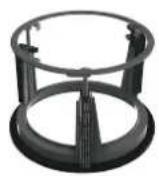
1 x Installation Frame
1 x Grille

1 x Cut-out Template

1 x Paint Mask

1 x Document pack
Note
Square grilles are optionally available for Studio Series in-coiling speakers. Contact Dynaudio directly or your local retailer/distributor for more information.
Note
Diagram illustrates in-ceiling speaker pack contents. In-wall pack contents are equivalent.
Preparation
Dimensions
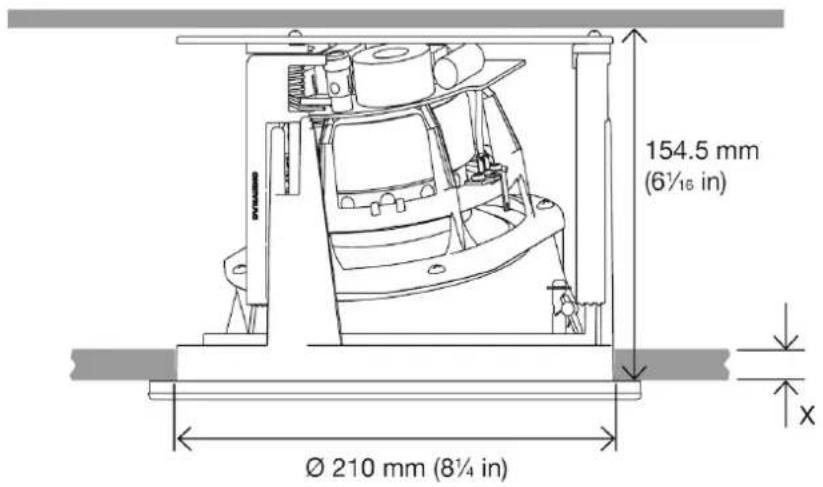
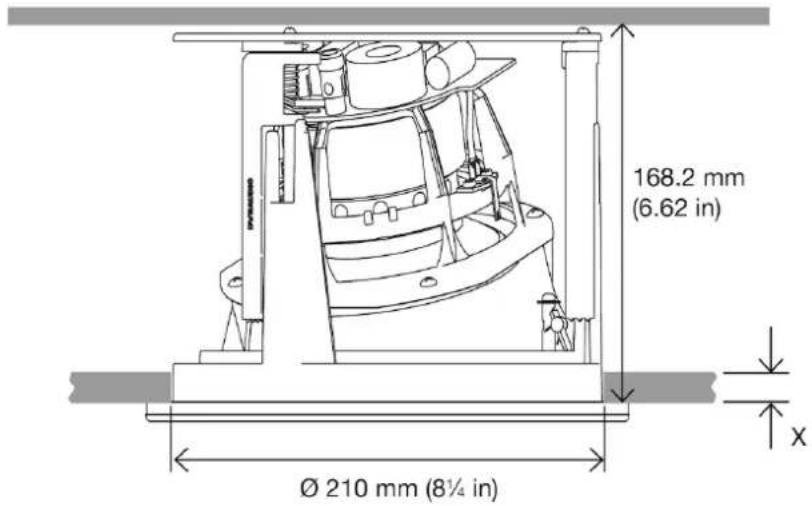
Each Studio Series speaker requires specific ceiling or wall cut-out dimensions, mounting depth space and drywall (plasterboard) thickness constraints. These dimensions are tabulated below and illustrated in Diagram 2.
S4-C65
text_image
154.5 mm (6½ in) Ø 210 mm (8¼ in) x- Cut-out size:
210 mm
(8 ^1 /4 in)
- Minimum Clear Depth:
154.5 mm
(6 ^1 /16 in)
- Drywall (Plasterboard) thickness:
X = 36.5 mm max
7.5 mm min
1 ^7 /16 in max
^5/_16 in min
S4-DVC65
text_image
168.2 mm (6.62 in) Ø 210 mm (8¼ in) x- Cut-out size:
210 mm
(8 ^1 /4 in)
- Minimum Clear Depth:
167 mm
(69/16 in)
- Drywall (Plasterboard) thickness:
X = 48.5 mm max
7.5 mm min
17/8 in max
^5/_6 in min
S4-C80
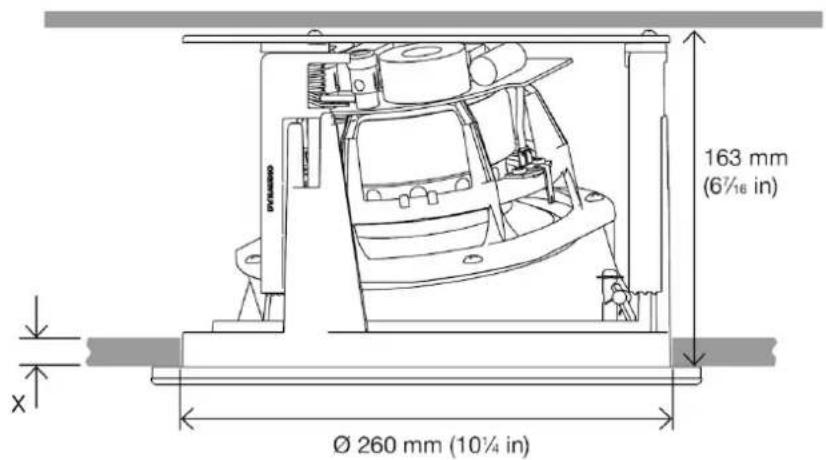
text_image
163 mm (6½ in) Ø 260 mm (10¼ in)- Cut-out size:
260 mm
$$ (1 0 ^ {1} / _ {4} \text { in }) $$
- Minimum Clear Depth:
$$ 1 6 3 \mathrm{mm} $$
$$ (6 ^ {7} / 6 \text { in }) $$
- Drywall (Plasterboard) thickness:
$$ X = 4 5. 0 \mathrm{mm} \max $$
$$ 7. 5 \mathrm{mm} \min $$
$$ 1 \frac {3}{4} \text { in max } $$
$$ ^ {5} / 1 6 \text {in min} $$
S4-W65
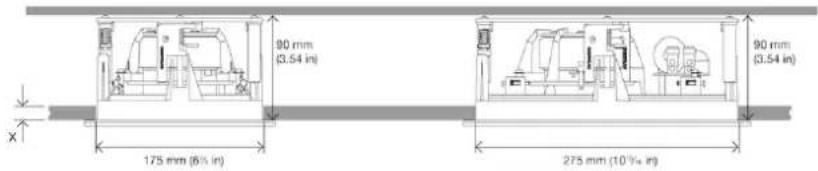
text_image
80 mm (3.54 in) 90 mm (3.54 in) 175 mm (6% in) 275 mm (10'½ m)- Cut-out size:
$$ 1 7 5 \mathrm{mm} \times 2 7 5 \mathrm{mm} $$
$$ (6 ^ {7} / 8 \times 1 0 1 ^ {3} / _ {1 6} \mathrm{in}) $$
- Minimum Clear Depth:
$$ 9 0 \mathrm{mm} $$
$$ (3 ^ {9} / 1 6 \text { in }) $$
- Drywall (Plasterboard) thickness:
$$ X = 3 3. 0 \mathrm{mm} \max $$
$$ 8. 5 \mathrm{mm} \min $$
$$ 1 ^ {5} / _ {1 6} \text { in max } $$
$$ ^ 3 / 8 \text {in min} $$
S4-W80
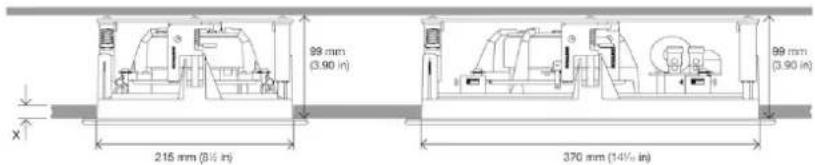
text_image
99 mm (3.90 in) 215 mm (3½ in) 99 mm (3.90 in) 370 mm (14½ in)- Cut-out size:
$$ 2 1 5 \mathrm{mm} \times 3 7 0 \mathrm{mm} $$
$$ (8 ^ {1} / 2 \times 1 4 ^ {9} / 6 \text { in }) $$
- Minimum Clear Depth:
$$ 9 9 \mathrm{mm} $$
$$ (3 ^ {7} / 8 \text { in }) $$
■Drywall (Plasterboard) thickness:
X = 35.5 mm max
8.8 mm min
1^3/_8 in max
^3/_8 in min
Back Boxes
Studio Series speakers can be installed with back boxes in order to reduce sound transmission into adjacent rooms or to satisfy any local statutory building regulations. If back boxes are to be used they must be installed within the walls and ceilings before the drywall (plasterboard) is affixed to the studs or joists. Alternatively, the existing drywall (plasterboard) around each speaker installation position may be removed to enable a back box to be installed, and reinstated following back box installation. Further information on Dynaudio back boxes can be found at dynaudio.com.
Generic back boxes from alternative manufacturers can be used, or back boxes may be constructed on site. In either case, Studio Series speakers require a 22 Litre (0.8 ft3) minimum back box volume in order to reach their full audio performance potential.
Before commencing any Studio Series installation you must be sure that the wall and ceiling positions chosen are free of obstructions such as pipe work, ducting or wiring that might interfere with the installation. Stud-finding, pipe detecting and wire detecting tools can help map the wall construction and identify any potential obstructions.
CAD drawings for Dynaudio Custom Install back boxes
In-wall: dynaudiodata.blob.core.windows.net/media/6556/30l-in-wall-wood-backbox.pdf
- In-ceiling: dynaudiodata.blob.core.windows.net/media/6555/30I-in-ceiling-wood-backbox.pdf

Check with local building regulations for fire safety. In some areas it is required to have a fire-rated back box as a fire safety barrier. Ensure that the surrounding materials meet the flammability Class 5VA. A fire rated metal back box must have a minimum uncoated thickness of 1.35 mm.
Speaker Positions
The appropriate positions for Studio Series speakers within the installation space will depend on their application. Position guidelines and diagrams for Studio Series in-ceiling and in-wall models are covered in the following sections and illustrated in the accompanying diagrams.
Background Audio
In-ceiling and In-wall Speakers: If one or more Studio Series speakers are required simply to provide mono background audio, they can be located essentially as dictated by coverage, convenience and architecture. The primary acoustic constraint to consider is that corner positions are likely to result in bass emphasis.
The S4-DVC65 in-ceiling speaker is particularly suited to background sound applications as it can play stereo audio from a single unit.
Stereo Audio
In-ceiling Speakers
If a pair of Studio Series in-ceiling speakers are required for stereo audio reproduction, they should ideally be located between 3 m (10 ft) and 5 m (16.5 ft) apart and a similar distance from listening area.
Note
The S4-DVC65 in-ceiling speaker can also be used to reproduce stereo audio thanks to its twin tweeter and dual voice-coil format. Single S4-DVC65 units are however unable to create conventional stereo images.
In-wall Speakers
If a pair of Studio Series in-wall speakers are required for stereo audio reproduction, they should ideally be located between 3 m (10 ft) and 5 m (16.5 ft) apart and a similar distance from the listening area. They should ideally be mounted approximately at head height when seated at the listening position or slightly higher.
Note
The acoustic environment around each speaker and distance from each one to adjacent walls should ideally be similar. Aim to avoid corner positions for either speaker.
Multi-channel Audio
Studio Series in-ceiling and in-wall speakers can be combined for multi-channel audio installations. In the majority of combined installations, in-wall speakers are best suited to front (left and right) and centre channel applications, and in-ceiling speakers more suited to surround channel applications.
In-ceiling Speakers (Front and Centre channels)
If Studio Series in-ceiling speakers are utilised in multi-channel installations, the front (left and right) and centre speakers should be located approximately 0.5 m (20 in) in front of the plane of the screen. The centre speaker should be on the centre line of the screen and the front (left and right) speakers each within approximately 0.5 m (20 in) of the sides of the screen.
In-wall Speakers (Front and Centre channels)
If Studio Series in-wall speakers are utilised in multi-channel installations, the front (left and right) speakers should ideally be located either side of the screen with each one approximately 0.5 m (20 in) away. The centre channel speaker should be located either directly above or below the screen or, in the case of an acoustically transparent screen, directly behind it.
In-ceiling and In-wall Speakers (Surround channels)
Surround channel speakers should be located as close as possible to the requirements of the specific multi-channel format, usually just behind and at either side of the listening position. The acoustic environment around each speaker and the distance from each one to nearby walls should ideally be similar. Aim to avoid corner
positions if possible for any speaker installation.
S4-DVC65 in-ceiling speakers can be used in Dipole mode for surround channel applications. In Dipole mode the twin tweeters of the S4-DVC65 are connected in opposite polarity so that a high frequency acoustic null is generated on the unit's centrally forward axis. S4-DVC65 units used in Dipole mode should have their bass/mid unit rotated and the tweeter angle adjusted so that they are orientated towards the listening position.
Note
Dipole mode is selected via a switch on the rear of the S4-DVC65. Speakers used in Dipole mode must be connected to only one amplifier channel. The dipole switch should not be used if a S4-DVC65 is connected to two amplifier channels for use in stereo.
Note
The directional characteristics of Studio Series in-ceiling speakers can be optimised by rotating the Speaker Unit within its Installation Frame and adjusting the tweeter tilt. See Section 4.1 for more.
Note
Studio Series in-ceiling and in-wall speakers are fully appropriate for use in 5.1(2), 7.1(2), 9.1(2) multi-channel systems. Studio Series in-ceiling speakers are suitable for use in Dolby Atmos® installations.
Note
The nature of the installation of in-ceiling and in-wall speakers means that it is sometimes impractical to locate them in acoustically optimal positions. Compromise is often more likely to be necessary in multi-channel installations where positions have to be found for multiple speakers. In these circumstances it is preferable to favour the position of the front and centre channel speakers over that of the surround channel speakers.

text_image
Stereo Audio Speaker Positioning >0.5 m (<1.6 ft) 3 m - 5 m (10 ft - 16.5 ft) >0.5 m (<1.6 ft) 3 m - 5 m (10 ft - 16.5 ft) >1.25 m (<4.1 ft) 3 m - 5 m (10 ft - 16.5 ft)Diagram 3: Stereo Audio Speaker Positioning
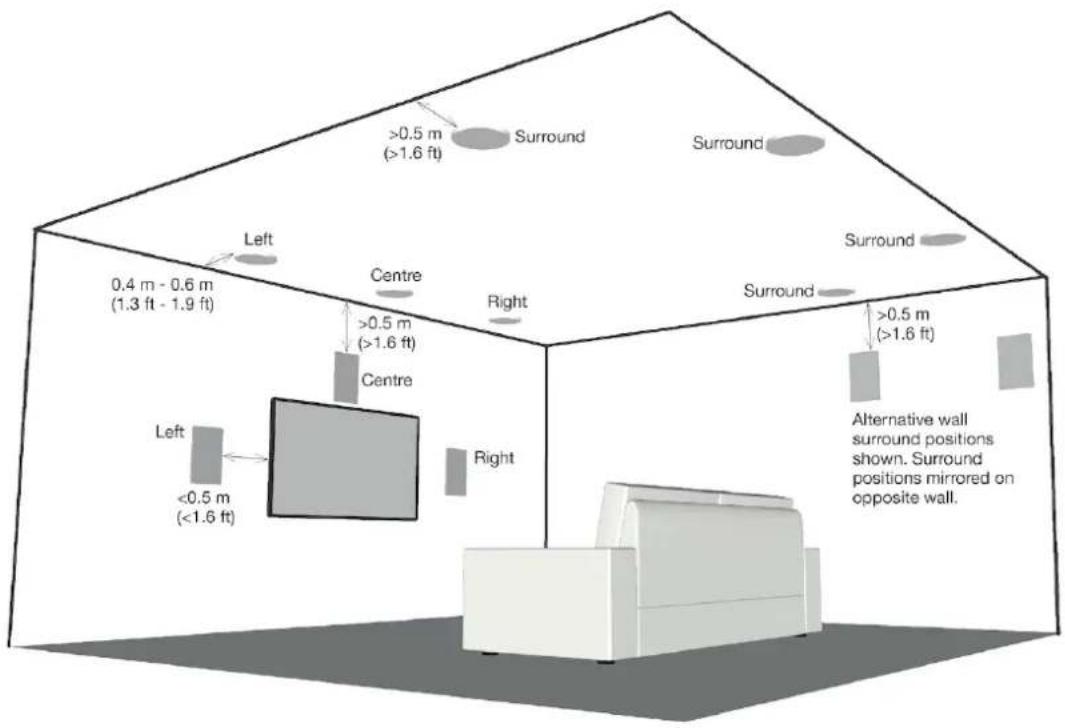
text_image
0.4 m - 0.6 m (1.3 ft - 1.9 ft) Left <0.5 m (<1.6 ft) Centre >0.5 m (>1.6 ft) Right Left >0.5 m (>1.6 ft) Surround Surround Surround >0.5 m (>1.6 ft) Alternative wall surround positions shown. Surround positions mirrored on opposite wall.Diagram 4: Multi-channel Audio Speaker Positioning
In-ceiling Speaker Installation
Note
Those installation instructions broadly assume that speaker cables are pre-installed in ceilings and walls.
To install a Studio Series in-ceiling speaker, proceed as described in the following paragraphs and accompanying diagrams:
Having selected the installation position and checked for the presence of studs (joists), pipe work, ducts or cables, mark a cut-line on the ceiling using the supplied template. Check that the diameter of the cut-line is correct: 210 mm (8 ^1/4 in) for the S4-C65 and S4-DVO65, and 260 mm (10 ^1/4 in) for the S4-C80.
Use an appropriate tool to cut along the cut-line to create a cut-out in the ceiling. Trial fit the speaker Installation Frame in the cut-out to check clearances.

natural_image
Abstract geometric design with a white circular cutout on a dark gray square background (no text or symbols)Note
The orientation of the Installation Frame within the cut-out is inconsequential.
Note
If using a pre-construction ring, follow the instructions in the pre-construction document.
Note
In order to reduce the possibility of audible ceiling vibration it may be prudent to apply a bead of adhesive mastic between the ceiling joists and the drywall (plasterboard) in the vicinity of in-ceiling speakers.
With the ceiling cut-out checked, the Installation Frame can be installed. Lift the frame into place and while holding it against the ceiling with one hand use the other hand to turn the three yellow securing clamps outwards and slide them down against the inner surface of the drywall (plasterboard).
natural_image
Three identical grayscale images showing a circular mechanical component with a clamp, displayed side by side (no text or symbols visible)Note
If speaker cables are not already installed it should be done at this stage. It is possible that access will be required through the floor above to route the cables. Use low resistance speaker cable with clear polarity marking on its insulation. Low resistance is especially important if the length of cable from amplifier to speaker exceeds 5 m. Your local Dynaudio retailer or distributor will be able to offer advice on speaker cable selection if required.
Pull the speaker cable through the Installation Frame and ceiling cut-out. The length of free cable should be sufficient to allow the Speaker Unit to be held in one hand while connecting the cable to the Speaker Unit terminals with the other hand.
The speaker cable can now be connected to the Speaker Unit. Strip 15 mm insulation from the cable (if necessary), twist the wire strands and insert the stripped ends into the appropriate speaker spring terminals.
If the ceiling speaker is a S4-C65 or S4-C80 model simply ensure that the positive conductor is connected to the red speaker terminal and the negative conductor is connected to the black speaker terminal.
natural_image
Mechanical assembly diagram showing internal components connected by wires, no visible text or symbolsS4-C65/C80
If the speaker is a S4-DVC65 model it can be connected in one of two modes: Stereo and Mono.
Stereo mode
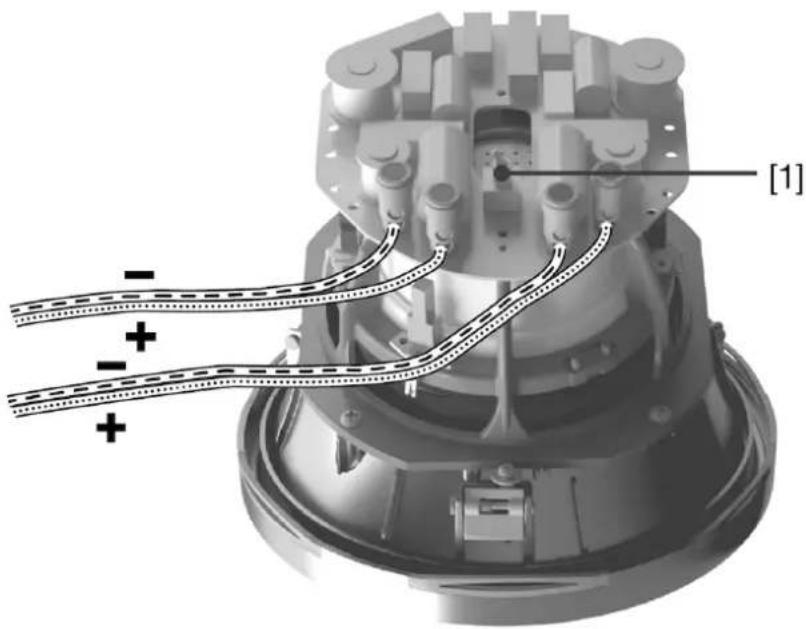
Stereo mode is appropriate if the S4-DVO65 is to be connected to stereo left and right amplifier channels. Connect the positive and negative conductors from each amplifier channel to one set of red and black speaker terminals. Ensure that the positive conductors are connected to red terminals and the negative conductors are connected to black terminals.
natural_image
Mechanical assembly diagram showing motor components with wiring and mounting holes (no text or symbols)S4-DVC65
Normal Mode
The dipole switch on the rear of the S4-DVC65 model should be set to Normal.
Mono mode
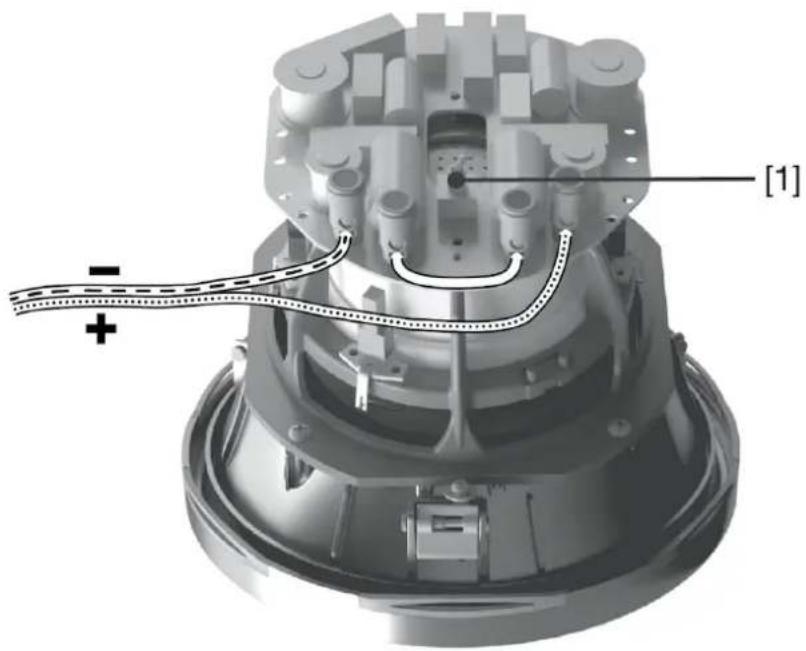
Mono mode is appropriate if the S4-DVO65 is to be connected to a single amplifier channel for multi-channel surround applications. Connect the positive conductor to the left hand red terminal and the negative conductor to the right hand black terminal. Use a short length of cable to connect the remaining two terminals together.
The dipole switch on the rear of the S4-DVC65 model will change the phase of the loft tweeter from 0 degree in normal to 180 degrees in Dipole. Set the switch to Normal or Dipole as appropriate.
text_image
[1]S4-DVC65
Dipole Mode
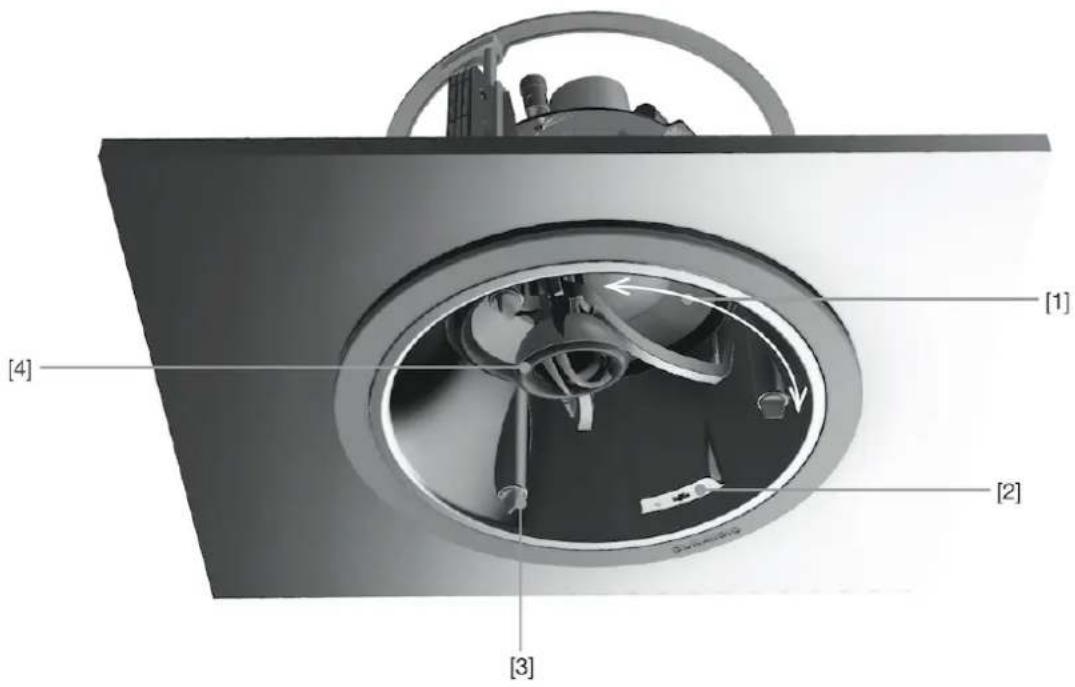
With the Speaker Unit connected to the speaker cable the unit can be lifted up into the Installation Frame. Turn the locking tabs on the front surface of the Speaker Unit fully clockwise (aligned with the lock icons) and insert it into the Installation Frame. Push gently around each locking tab until a click is heard. The Speaker Unit will then be secure in the frame.
text_image
[1] [2] [3] [4][1] Rotate speaker to adjust bass/mid driver directivity
[2] Switch to adjust tweeter level
[3] Push to click. Three locations. Rotate clockwise to lock. Rotate counter-clockwise to release.
[4] Tilt to adjust tweeter directivity
Note
Take care that the speaker cable is positioned in such a way that it will not get trapped as the Speaker Unit is secured into the Installation Frame and is not touching the Speaker Unit in such a manner that it is likely to result in audible vibrations.
Note
To remove the Speaker Unit from the Installation Framo turn the locking tabs 90° counter-clockwise. Take care to support the speaker as the locking tabs are released.
With the speaker connected and secured into the Installation Frame, its bass/mid driver orientation and tweeter angle can be adjusted. In most installations, the orientation and angle should be adjusted so that the drivers face towards the listening position. To adjust the bass/mid driver orientation, grip the tweeter mounting arm and rotate the entire Speaker Unit as necessary. To adjust the tweeter tilt, grip the tweeter body and angle it to one of the three positions.
The high frequency tonal balance of Studio Series speakers can be adjusted to suit different installation environments. A twocor level switch located on the front bozel offers +3 dB, 0 dB and -3 dB options on the S4-C65 or S4-C80, and 0 dB dB or -3 dB options on the S4-DVC65.
Note
Different tweeter levels may be appropriate to suit different listening environments. An environment dominated by carpets, soft furnishings and curtains for example might require a higher tweeter level than an environment where tiled floors and glass predominate.
In-ceiling speaker installation is completed by fitting the grille. The grille is secured magnetically and requires no more than placing into position.
Note
Square Studio Series in-ceiling speaker grilles are optionally available. Magnetic attachment enables square grilles to be rotated as required to align perfectly with ceiling or wall lines.
Note
If the ceiling is to be painted following speaker installation, the supplied paint mask must be used to protect the speaker hardware from paint ingress. Speaker grillos should not be fitted during painting. They should be painted separately.
In-wall Speaker Installation
To install a Studio Series in-wall speaker, proceed as described in the following paragraphs and accompanying diagrams:
Having selected the installation position and checked for the presence of studs (joists), pipe work, ducts or cables, mark a portrait orientation cut-line on the wall using the supplied template. Check that the dimensions of the cut-line are correct: 175 × 275 mm ( 678 × 101316 in) for the S4-W65 and 215 × 370 mm ( 812 × 14916 in) for the S4-W80.
Note
Studio Series in-wall speakers are intended to be used in portrait orientation.
Use an appropriate tool to cut along the cut-line to create a cut-out in the wall. Trial fit the speaker Installation Frame in the cut-out to check clearances.

natural_image
Simple 3D geometric shape with a square cutout, no text or symbols presentNote
In order to reduce the possibility of audible wall vibration it may be prudent to apply a bead of adhesive mastic between the wall studs and the drywall (plasterboard) in the vicinity of wall speakers.
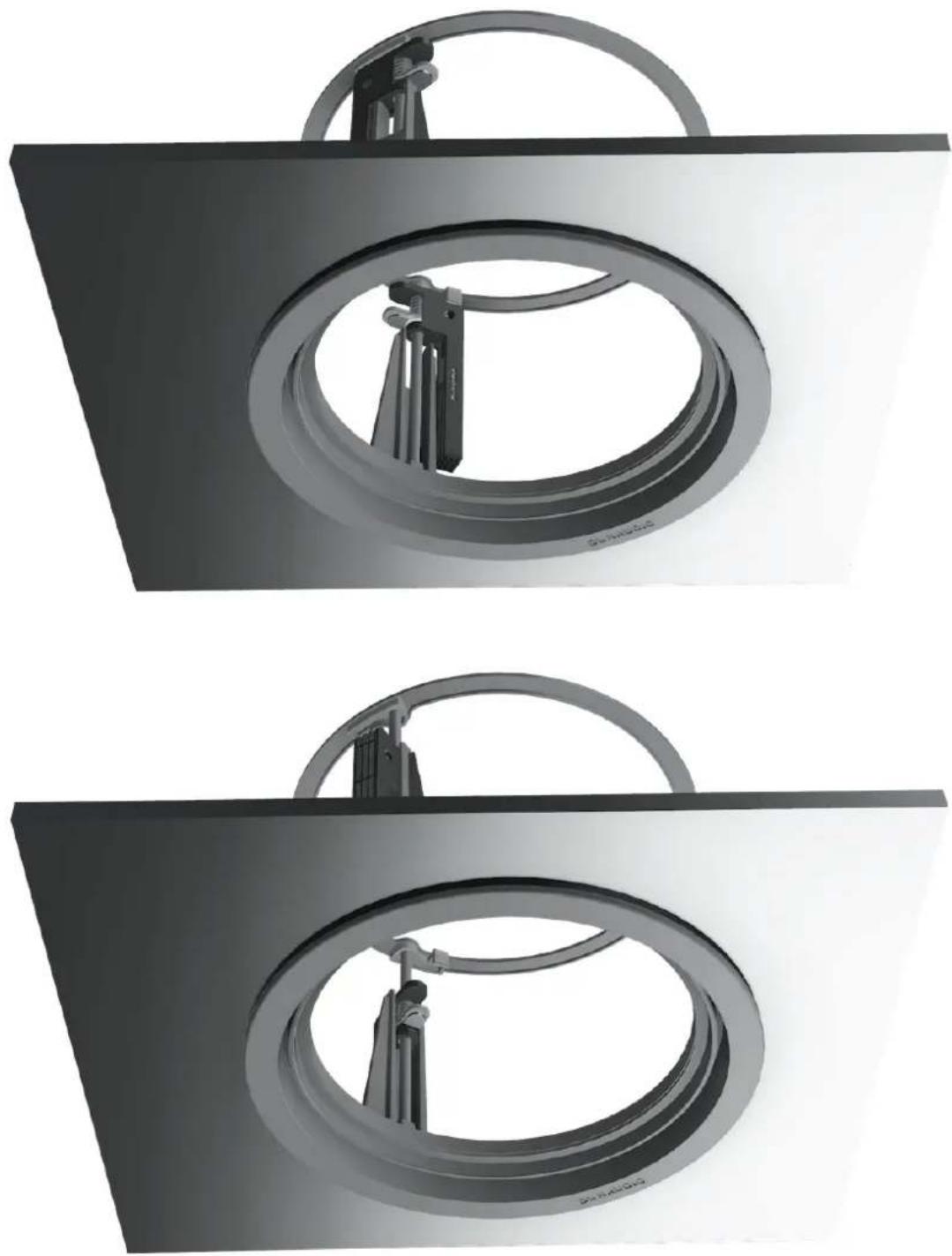
With the cut-out checked, the Installation Frame can be installed. Insert the frame into place and while holding it against the wall with one hand use the other hand to turn and slide the four yellow securing clamps outwards and slide them down against the inner surface of the drywall (plasterboard).

natural_image
3D rendering of a mechanical component inside a square frame, showing internal components and a bracket (no text or symbols)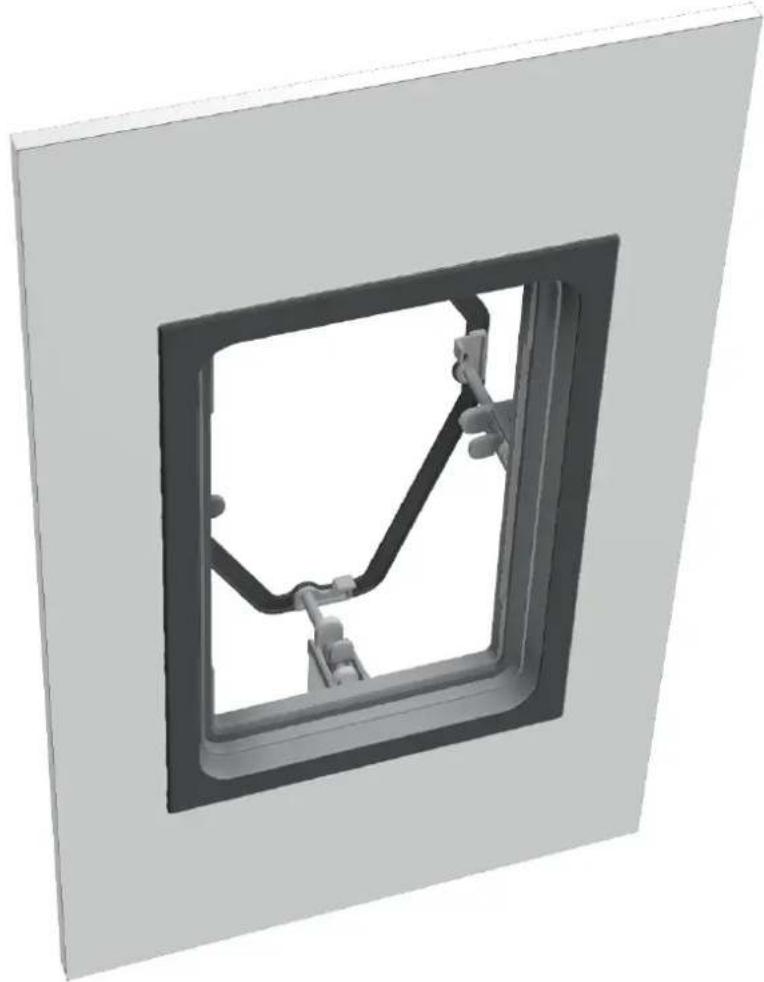
natural_image
3D rendering of a mechanical component inside a square frame, showing internal components and mounting brackets (no text or symbols)Note
If speaker cables are not already installed it should be done at this stage. It is possible that access will be required through the opposite side of the wall to route the cables. Use low resistance speaker cable with clear polarity marking on its insulation. Low resistance is especially important if the length of cable from amplifier to speaker exceeds 5 m. Your local Dynaudio retailer or distributor will be able to offer advice on speaker cable selection if required.
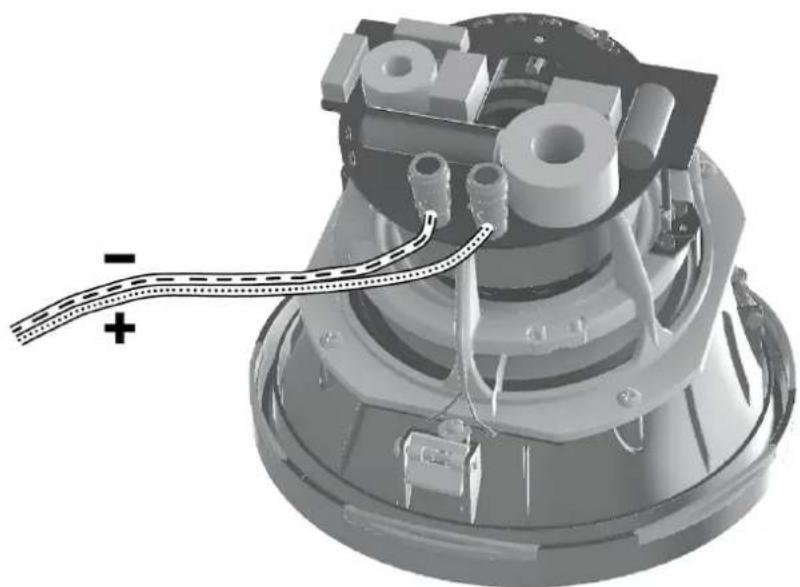
Pull the speaker cable through the Installation Frame and wall cut-out. The length of free cable should be sufficient to allow the Speaker Unit to be held in one hand while connecting the cable to the Speaker Unit terminals with the other hand.
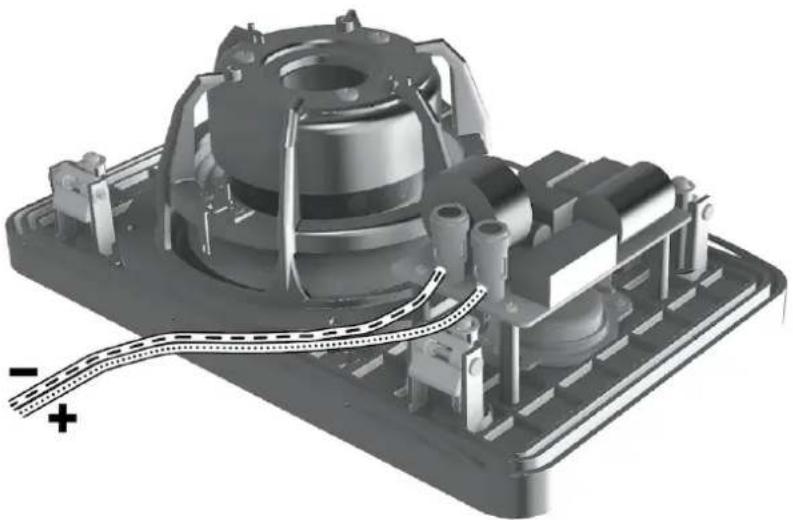
The speaker cable can now be connected to the speaker. Strip 15 mm insulation from the cable (if necessary), twist the wire strands and insert the stripped ends into the speaker spring terminals. Ensure that the positive conductor is connected to the red speaker terminal and the negative conductor is connected to the black speaker terminal.
natural_image
3D mechanical assembly diagram showing internal components and wiring (no text or symbols)With the Speaker Unit connected to the speaker cable it can be inserted into the Installation Frame. Turn the locking tabs on the front surface of the Speaker Unit fully clockwise (aligned with the lock icons) and insert it in the Installation Frame. Push gently around each locking tab until a click is heard. The Speaker Unit will then be secured in the frame.
Note
Take care that the cable is positioned in such a way that it will not get trapped as the Speaker Unit is secured into the Installation Frame and is not touching the Speaker Unit in such a manner that it is likely to result in audible vibrations.
Note
To remove the Speaker Unit from the Installation Frame turn the locking tabs 90° counter-clockwise. Take care to support the speaker as the locking tabs are turned.
Note
Studio Series wall speakers are intended to be installed with the tweeter above the bass/mid driver.
The high frequency tonal balance of the Studio Series speakers can be adjusted to suit different installation environments. A tweeter level switch located on the Speaker Unit front panel offers +3 dB, 0 dB and -3 dB options. The level adjustment operates from approximately 3 kHz upwards.
Note
The +3 dB tweeter level option may be appropriate if, for example, carpets, soft furnishings and curtains dominate in the listening environment. Alternatively the -3 dB option may be more suited to an environment where hard floors and glass predominate. In more balanced acoustic environments, the 0 dB option is likely to be most appropriate.
With the speaker connected and secured into the Installation Frame, in-wall speaker installation is completed by fitting the grille. The grille is secured magnetically and requires no more than placing into position.
Note
If the wall is to be painted following speaker installation, the supplied paint mask must be used to protect the speaker hardware from paint ingress. Speaker grilles should not be fitted during painting. They should be
painted separately.
Diagram 6 illustrates the in-wall speaker installation procedure.

text_image
[1] [2][1] Switch to adjust tweeter level
[2] Push to click. Four locations. Rotate clockwise to lock. Rotate counter-clockwise to release.
Specifications
S4-C65
| ParameterValue | |
| Type 2-way in-ceiling | |
| Drivers - Tweeter 25 mm (1 in) | |
| Drivers - Bass/mid | 165 mm ( 612 in) |
| Frequency response 55 Hz - 20 kHz ± 3 dB | |
| Impedance - nominal 8 Ω | |
| Impedance - minimum 5 Ω | |
| Sensitivity 87.5 dB @ 1 m, 2.83 V | |
| Rated power* 50 W | |
| Long term power* 125 W | |
| Tweeter level options -3 dB, 0 dB +3 dB | |
| Tweeter orientation Three tilt angles | |
| Bass/mid orientation 18° x 360° | |
| Dimensions/Depth | 232 mm / 155 mm 918 in / 618 in |
| Cut-out dimensions | 210 mm 814 in |
| Grille material Painted steel | |
| Grille options Round/square | |
| Grille attachment | Magnetic |
| Grille finish | Paintable |
| Certifications | CE |
| Environmental | RoHS |
S4-DVC65
| ParameterValue | |
| Type 2-way in-ceiling | |
| Drivers - Tweeter 2 x 25 mm (1 in) | |
| Drivers - Bass/mid | 165 mm (6 12 in) |
| Frequency response 50 Hz - 20 kHz ±3 dB | |
| Impedance - nominal 2 x 4 Ω | |
| Impedance - minimum 2 x 3.2 Ω minimum | |
| Sensitivity 83.5 dB @ 1 m, 2.83 V | |
| Rated power* 2 x 50 W | |
| Long term power* 2 x 100 W | |
| Tweeter level options 0 dB, -3 dB | |
| Twocolor orientation Three tilt angles | |
| Bass/mid orientation 18° x 360° | |
| Dimensions/Depth | ∅ 232 mm / 167 mm∅ 918 in / 658 in |
| Cut-out dimensions | ∅ 210 mm 814 in |
| Grille material Painted steel | |
| Grille options Round/square | |
| Grille attachment Magnetic | |
| Grille finish Paintable | |
| Certifications CE | |
| Environmental RoHS | |
S4-C80
| ParameterValue | |
| Type 2-way in-ceiling | |
| Drivers – Tweeter 25 mm (1 in) | |
| Drivers – Bass/mid | 200 mm (8.0 in) |
| Frequency response | 45 Hz – 20 kHz ±3 dB |
| Impedance – nominal | 8 Ω |
| Impedance – minimum | 5 Ω |
| Sensitivity | 89.0 dB @ 1 m, 2.83 V |
| Rated power* 100 W | |
| Long term power* 140 W | |
| Tweeter level options -3 dB, 0 dB +3 dB | |
| Tweeter orientation Three tilt angles | |
| Bass/mid orientation 18° x 360° | |
| Dimensions/Depth | ∅ 280 mm / 163 mm∅ 11 in / 67/16 in |
| Cut-out dimensions | ∅ 260 mm101/4 in |
| Grille material Painted steel | |
| Grille options Round/square | |
| Grille attachment Magnetic | |
| Grille finish Paintable | |
| Certifications CE | |
| Environmental RoHS | |
S4-W65
| ParameterValue | |
| Type 2-way in-wall | |
| Drivers – Tweeter 25 mm (1 in) | |
| Drivers – Bass/mid | 165 mm ( 6^1/_2 in) |
| Frequency response 55 Hz – 20 kHz ± 3 dB | |
| Impedance – nominal 8 Ω | |
| Impedance – minimum 5 Ω | |
| Sensitivity 87.5 dB @ 1 m, 2.83 V | |
| Rated power* 50 W | |
| Long term power* 125 W | |
| Tweeter level options | -3 dB, 0 dB +3 dB |
| Tweeter orientation | N/A |
| Bass/mid orientation | N/A |
| Dimensions/Depth | 198 x 296 mm / 90 mm 7^3/_4 × 111^1/_6 in / 3^9/_16 in |
| Cut-out dimensions | 175 x 275 mm 6^7/_8 × 101^3/_6 in |
| Grille material | Painted steel |
| Grille options | Rectangular |
| Grille attachment | Magnetic |
| Grille finish | Paintable |
| Certifications | CE |
| Environmental | RoHS |
S4-W80
| ParameterValue | |
| Type 2-way in-wall | |
| Drivers – Tweeter 25 mm (1 in) | |
| Drivers – Bass/mid | 200 mm (8.0 in) |
| Frequency response 45 Hz – 20 kHz ±3 dB | |
| Impedance – nominal 8 Ω | |
| Impedance – minimum 5 Ω | |
| Sensitivity 89.0 dB @ 1 m, 2.83 V | |
| Rated power* 100 W | |
| Long term power* 140 W | |
| Tweeter level options -3 dB, 0 dB +3 dB | |
| Tweeter orientation N/A | |
| Bass/mid orientation N/A | |
| Dimensions/Depth | 237 x 392 mm / 99 mm9 516 x 15 38 in / 31 516 in |
| Cut-out dimensions | 215 x 370 mm8 12 x 14 916 in |
| Grille material Painted stool | |
| Grille options Rectangular | |
| Grille attachment Magnetic | |
| Grille finish Paintable | |
| Certifications | CE |
| Environmental | RoHS |
DYNAUDIO
Studio Series
Designed and engineered by Dynaudio Labs in Denmark
Dynaudio A/S
8660 Skanderborg
Denmark
dynaudio.com
© 2022 Dynaudio A/S
All text and image copyrights reserved.
Subject to change without notice.