
CS-E15GKDW - Air conditioner PANASONIC - Free user manual and instructions
Find the device manual for free CS-E15GKDW PANASONIC in PDF.


| Product Type | Split System Air Conditioner |
| Model | CS-E15GKDW |
| Cooling Capacity (BTU/h) | 12000 |
| Cooling Capacity (kW) | 3.5 |
| Power Supply | 220-240V, 50Hz |
| Indoor Unit Dimensions (WxHxD) | 799 x 232 x 183 mm |
| Outdoor Unit Dimensions (WxHxD) | 646 x 430 x 250 mm |
| Indoor Unit Weight | 8.5 kg |
| Outdoor Unit Weight | 25 kg |
| Refrigerant Type | R32 |
| Energy Efficiency Ratio (EER) | 3.5 |
| Annual Energy Consumption (kWh) | 800 |
| Inverter Technology | Yes |
| Nanoe-G Air Purification | Yes |
| Sleep Mode | Yes |
| Timer Function | 24-hour timer |
| Air Filter Type | Washable, Allergy-Clear |
| Filter Cleaning Reminder | Yes |
| Noise Level Indoor (dB) | 21-39 |
| Noise Level Outdoor (dB) | 46 |
| Remote Control | Yes |
| Self-Cleaning Function | Yes |
| Installation Type | Wall-mounted |
| Warranty | 2 years (parts and labor) |
| Repairability Index | 8.5/10 |
Frequently Asked Questions - CS-E15GKDW PANASONIC
User questions about CS-E15GKDW PANASONIC
0 question about this device. Answer the ones you know or ask your own.
Ask a new question about this device
Download the instructions for your Air conditioner in PDF format for free! Find your manual CS-E15GKDW - PANASONIC and take your electronic device back in hand. On this page are published all the documents necessary for the use of your device. CS-E15GKDW by PANASONIC.
USER MANUAL CS-E15GKDW PANASONIC
Indoor Unit (GK-series)

natural_image
Illustration of a modern air conditioner unit (no text or symbols visible)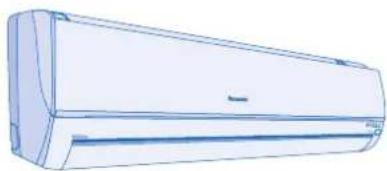
natural_image
Line drawing of a single air conditioner unit (no text or symbols)Indoor Unit (DT-series)
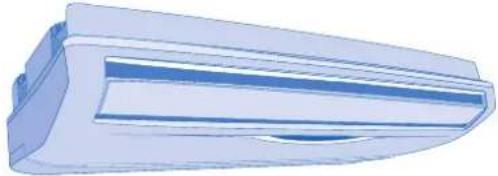
natural_image
3D rendering of a blue and white air conditioner unit (no text or symbols visible)Indoor Unit (DD-series)

natural_image
3D rendering of a modular industrial container with blue panels and ventilation slots (no text or symbols visible)Indoor Unit (DB-series)

natural_image
Technical line drawing of a multi-level kitchen or ventilation unit with ventilation duct and fan (no text or symbols)Indoor Unit (GF-series)

natural_image
Front view of a white air conditioner unit with blue ventilation grilles (no visible text or symbols)
ENGLISH 2\~17
Before operating the unit, read these operating instructions thoroughly and keep them for future reference.
CE
Panasonic®
Operating Instructions Air Conditioner
Indoor Unit (GK-series)
CS-E7GKEW CS-E7GKDW
CS-E9GKEW CS-E9GKDW
CS-E12GKEW CS-E12GKDW
CS-E15GKEW CS-E15GKDW
CS-E18GKEW CS-E18GKDW
Indoor Unit (DT-series)
Indoor Unit (DD-series)
Indoor Unit (DB-series)
CS-E15DB4EW CS-E18DB4EW
Indoor Unit (GF-series)
CS-E9GFEW CS-E12GFEW
CS-E18GFEW
Outdoor Unit
CU-3E18EBE CU-3E23CBPG
CU4E27CBPG
ESPAÑOL 18 \~ 33
To prevent personal injury, injury to others, or property damage, please observe the following.
Incorrect operation due to failure to follow instructions may cause harm or damage, the seriousness of which is classified as below:

Warning
This sign warns of death or serious injury.
The instructions to be followed are classified by the following symbols:

This symbol denotes an action that is PROHIBITED.

Warning

Caution
This sign warns of injury or damage to property.


These symbols denote actions that are COMPULSORY.

Caution
Remote Control
During Operation

- Do not use rechargeable (Ni-Cd) batteries.
- Do not allow infants and small children to play with the remote control to prevent them from accidentally swallowing the batteries.
- Remove the batteries if the unit is not going to be used for a long period of time.
- New batteries of the same type must be inserted following the polarity stated to prevent malfunction of the remote control.
Indoor Unit
During Installation

- Do not install, remove and reinstall the unit by yourself; improper installation will cause leakage, electric shock or fi re. Please consult an authorized dealer or specialist for the installation work.
During Operation

- Do not insert your fingers or other objects into the indoor or outdoor unit. - Do not attempt to repair the unit by yourself.
Air inlet
Indoor Unit
During Installation

- Do not install the unit in a potentially explosive atmosphere.

- Ensure that the drainage pipe is connected properly. Otherwise, leakage may occur.
During Operation

- Do not wash the unit with water, benzene, thinner or scouring powder.
- Do not use for other purposes such as preservation of food.
- Do not use any combustible equipment in front of the airflow outlet.
- Do not expose directly to cold air for a long period.
- Aerate the room regularly.

Power Supply
During Operation

- Switch off the power supply before cleaning or servicing.
- Turn off the power supply if the unit is not used for a long period of time.
- This air conditioner is equipped with a built-in surge protective device. However, in order to further protect your air conditioner from being damaged by abnormally strong lightning activity, you may want to disconnect it from the power supply. Do not touch the air conditioner during lightning, it may cause electric shock.
Power Supply
During Installation

- This equipment must be earthed and installed with ELCB. Otherwise, it may cause electrical shock or fire in case of malfunction.
During Operation

- Do not share the same power outlet with other equipment.
- Do not modify power cords.
- Do not use extension cords.
- Do not operate with wet hands.
- Use the specified supply cord.
- If the supply cord is damaged, it must be replaced by the manufacturer, its service agent or similarly qualified persons in order to avoid a hazard.
- In case of emergency or abnormal conditions (burnt smell, etc), turn off the power supply, and consult your nearest dealer.
Air inlet
Air inlet
Air outlet
Outdoor Unit
During Installation

- Ensure that the drainage pipe is connected properly. Otherwise, leakage may occur.
During Operation

- Do not sit or place anything on the indoor or outdoor unit.

• After long periods of use, make sure the installation rack is not damaged.
REGULATORY INFORMATION
The appliance is not intended for use by young children or the infirm person without supervision. Young children should be supervised to ensure that they do not play with the appliance.

ENVIRONMENTAL REQUIREMENTS
Battery Disposal
The batteries must be recycled or disposed of properly.

END-OF-LIFE DISPOSAL
"Instructions for end-user" for air conditioners:
This air conditioner bears the above mark, indicating that electrical equipment should not be disposed of alongside general household waste. European Community countries (*), should have a dedicated collection system for these products. Do not try to dismantle the system yourself as this could have harmful effects on your health and on the environment as a result of incorrect waste handling. This dismantling and disposal of refrigerant, oil and other parts must be done by a qualified installer in accordance with relevant local and national regulations. Air conditioners must be treated at a specialized treatment facility for re-use, recycling and recovery and should not be disposed of in the municipal waste stream. Please contact your installer, dealer or local authority for more information. Penalties may also be applicable for incorrect disposal of waste products, in accordance with national legislation.
*subject to the national law of each member state
Information on Disposal in other countries outside the European Union
This symbol is only valid in the European Union. If you wish to discard this product, please contact your installer, dealer or local authority and ask for the correct method of disposal.
OPERATION CONDITION
Use this air conditioner under the following temperature range.
| Temperature (°C) | Indoor Outdoor | ||||
| *DBT *WBT *DBT *WBT | |||||
| COOLING | Maximum | 32 23 | 43 26 | ||
| Minimum | 16 11 | 16 11 | |||
| HEATING | Maximum | 30 – 24 | 18 | ||
| Minimum | 16 – -10 | -11 | |||
*DBT: Dry bulb temperature
*WBT: Wet bulb temperature
Thank you for purchasing Panasonic Air Conditioner
TABLE OF CONTENTS
SAFETY PRECAUTIONS
2
REGULATORY INFORMATION
3
HOW TO OPERATE
(For GK-series indoor unit)
4\~7
HOW TO OPERATE
(For DB, DD, DT, GF-series indoor unit)
8\~9
MULTI AIR CONDITIONER FUNCTION
CARE & CLEANING
(For DD-series indoor unit)
10
CARE & CLEANING
(For GK-series indoor unit)
11\~12
CARE & CLEANING
(For DB-series indoor unit)
13
CARE & CLEANING
(For DT-series indoor unit)
14
CARE & CLEANING
(For GF-series indoor unit)
15
TROUBLESHOOTING
16\~17
QUICK GUIDE
Back cover
Note:
The illustrations in this manual are for explanation purposes only and may differ from the actual unit. It is subjected to change without notice for future improvement.
HOW TO OPERATE (For GK-series indoor unit)
CS-E7GKDW, CS-E9GKDW, CS-E12GKDW, CS-E15GKDW, CS-E7GKEW, CS-E9GKEW, CS-E12GKEW, CS-E15GKEW
REMOTE CONTRO PREPARATION
Inserting the batteries
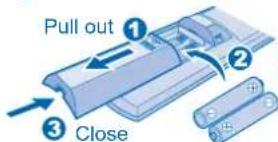
Insert AAA or R03 batteries
- The batteries can be used for approximately 1 year. Replace the batteries when the remote control display or transmission signal becomes weak.
Setting the current time

MODE OPERATION

AUTO MODE - FOR YOUR CONVENIENCE
- Unit selects the operation mode according to temperature setting, outdoor and room temperature.
• Operation mode is reselected every 3 hours. During operation mode selection the power indicator blinks.
HEAT MODE - TO ENJOY WARM AIR
- In heat mode, it takes a while for the unit to warm up. The power indicator blinks during this operation.
COOL MODE - TO ENJOY COOL AIR
DRY MODE - TO DEHUMIDIFY THE ENVIRONMENT
- During soft dry operation, the indoor fan operates at low fan speed to give a very gentle cooling operation.
- The range of temperature for selection is 16^ 30^ .
- Operating the unit within the recommended temperature could induce energy saving.
HEAT MODE : 20°C \~ 24°C.
COOL MODE : 26°C \~ 28°C.
DRY MODE : 1°C \~ 2°C lower than room temperature.
REMOTE CONTROL TRANSMITTER
For use with GK-series indoor unit.
• Make sure it is not obstructed.
- Certain fluorescent lights may interfere with signal transmission. Please consult your nearest dealer.
Maximum distances : 8m

Notes:
- Press RC RESET button to restore the remote control's default setting.
- For normal operation, the SET and ARESET buttons are not in use.
- While using remote control, please be aware of the OFF indication on the remote control display to prevent the unit from starting / stopping improperly.
• PATROL operates automatically once the unit is switched on OFF/ON
with


TO SELECT FAN SPEED
• There are 5 fan speeds, as well as automatic*.
* For automatic fan speed, the speed of the indoor fan is automatically adjusted according to the operation.


TO ADJUST AIRFLOW DIRECTION
- Keeps the room ventilated.
- There are 5 options for vertical airflow direction.
- If automatic vertical airflow direction has been set, the louvers swing up/down automatically.
- In heat mode, the air blows horizontally for a while, then starts to blow downwards.
- Do not adjust the vertical airflow direction louvers by hand.
- Horizontal airflow direction louver is manually adjustable.



TO MONITOR AIR QUALITY
- This setting enables the patrol sensor to automatically detect the air quality.
- When the air quality is unsatisfactory, e-ion operation will start automatically.

TO ENJOY CLEAN AIR
- This setting provides clean air by producing negative ions to attract dust which will then be captured at the positively charged e-ion filters.


TO ENJOY QUIET ENVIRONMENT
- This setting provides a quiet environment by reducing the airflow noise.


TO ACHIEVE TEMPERATURE QUICKLY
- This setting enables the desired temperature to be reached quickly.

PATROL e-ion QUIET POWERFUL
- , and operations are available in all modes and could be cancelled by pressing the respective button again.
PATROL
e-ion
QUIET
POWERFUL
-
and or and
operations
could not be
activated at the same time.
PATROL
e-ion
• and operations could be activated even when the air-conditioner is turned off. In this condition, once e-ion indicator is ON, the unit will operate with AUTO fan speed and air swing.

unit is activating heating operation.
TO SET THE TIMER

- When you want the air conditioner to turn ON or OFF automatically at a preset time.

Select ON or OFF timer.

Set the desired time.

Confirm the setting.
To cancel ON or OFF timer, press


, then press

- When ON Timer is set, the unit may start earlier (up to 35 minutes) before the actual set time in order to achieve the temperature you preferred.
• The timers repeat daily once set. - If there is a power failure, you can restore the previous setting (once power is resumed) by pressing the SET button.
- If the timer is cancelled, press to restore the previous setting.
- The timer is based on the time set in the remote control.
- You can set your preferred time for ON and OFF timers.
Hints
■ Temperature setting of 1^ C higher in cool mode or 2^ C lower in heat mode than the desired temperature performs a 10% power saving.
■ To reduce power consumption during cool mode, close the curtains to prevent the sunlight and heat from coming in.
■ To disable the PATROL operation during unit start with OFFION®, press and hold PATROL for 5 seconds then
release.
To reset, press PATROL again for 5 seconds then release.
■ To set either 12-hour (am/pm) or 24-hour time indication, press and hold for approximately 5 seconds.
■ To dim the indicator display on the air conditioner: Press and hold ▲ for 5 seconds.
To reset, press
for 5 seconds.
■ To switch the temperature setting to °C or °F, press and hold □ for approximately 10 seconds.

• To turn off the air conditioner, press

HOW TO OPERATE (For GK-series indoor unit)
Inserting the batteries
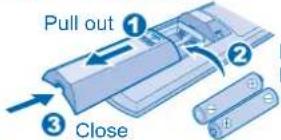
Insert AAA or R03 batteries
- The batteries can be used for approximately 1 year. Replace the batteries when the remote control display or transmission signal becomes weak.
Setting the current time

MODE OPERATION
AUTO MODE - FOR YOUR CONVENIENCE
- Unit selects the operation mode according to temperature setting, outdoor and room temperature.
• Operation mode is reselected every 3 hours. During operation mode selection the power indicator blinks.
HEAT MODE - TO ENJOY WARM AIR
- In heat mode, it takes a while for the unit to warm up. The power indicator blinks during this operation.
COOL MODE - TO ENJOY COOL AIR
DRY MODE - TO DEHUMIDIFY THE ENVIRONMENT
- During soft dry operation, the indoor fan operates at low fan speed to give a very gentle cooling operation.
- The range of temperature for selection is 16^ 30^ .
- Operating the unit within the recommended temperature could induce energy saving. HEAT MODE : 20°C \~ 24°C. COOL MODE : 26°C \~ 28°C. DRY MODE : 1°C \~ 2°C lower than room temperature.

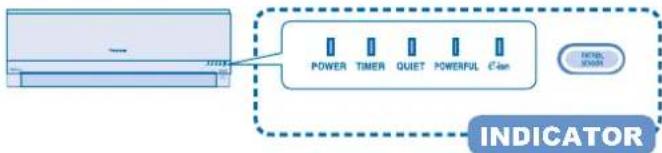
flowchart
graph LR
    A["Power"] --> B["TIMER"]
    B --> C["QUIET"]
    C --> D["POWERFUL"]
    D --> E["C-ion"]
    E --> F["INDICATOR"]
REMOTE CONTROL TRANSMITTER
For use with GK-series indoor unit.
• Make sure it is not obstructed.
- Certain fluorescent lights may interfere with signal transmission. Please consult your nearest dealer.

Notes:
- Press RC RESET button to restore the remote control's default setting.
- For normal operation, the SET and ARESET buttons are not in use.
- While using remote control, please be aware of the OFF indication on the remote control display to prevent the unit from starting / stopping improperly.
• PATROL operates automatically once the unit is switched on OFF/ON①
with button.
TO SELECT FAN SPEED
• There are 5 fan speeds, as well as automatic*.
* For automatic fan speed, the speed of the indoor fan is automatically adjusted according to the operation.

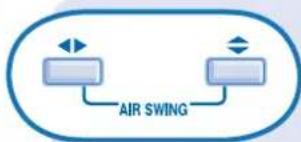
flowchart
graph TD
    A[" "] --> B["AIR SWING"]
    C[" "] --> B
    D[" "] --> B
TO ADJUST AIRFLOW DIRECTION
- Keeps the room ventilated.
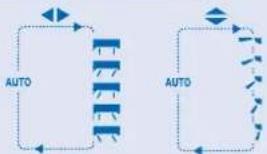
• There are 5 options for horizontal/vertical airflow direction.
- Do not adjust the horizontal and vertical louvers by hand.
- If automatic horizontal/vertical airflow direction has been set, the louvers swing left/right and up/down automatically.
- In heat mode, the air blows horizontally for a while, then starts to blow downwards and the airflow louver start to swing left/right after the temperature rises.
flowchart
graph TD
    A["Start"] --> B{Process}
    B -->|Auto| C["Process Step 1"]
    B -->|Auto| D["Process Step 2"]
    C --> E["End"]
    D --> E
    style A fill:#f9f,stroke:#333
    style E fill:#bbf,stroke:#333

TO MONITOR AIR QUALITY
• This setting enables the patrol sensor to automatically detect the air quality.
- When the air quality is unsatisfactory, e-ion operation will start automatically.


TO ENJOY CLEAN AIR
- This setting provides clean air by producing negative ions to attract dust which will then be captured at the positively charged e-ion filters.

TO ENJOY QUIET ENVIRONMENT
- This setting provides a quiet environment by reducing the airflow noise.


TO ACHIEVE TEMPERATURE QUICKLY
- This setting enables the desired temperature to be reached quickly.

PATROL
e-ion
QUIET
POWERFUL

operations are available in all
modes and could be cancelled by pressing the respective button again.
PATROL
m = 311
e-ion
QUIET
POWERFUL

and
or and
operations could not be
activated at the same time.
PATROL
e-ion

and
ope
ratio
ns could be activated ev
air-conditioner is turned off. In this condition, once e-ion indicator is ON, the unit will operate with AUTO fan speed and air swing.

operation could not be activated if other indoor
unit is activating heating operation.
TO SET THE TIMER

- When you want the air conditioner to turn ON or OFF automatically at a preset time.

Select ON or OFF timer.

Set the desired time.

Confi rm the setting.
To cancel ON or OFF timer, press

or

, then press

- When ON Timer is set, the unit may start earlier (up to 35 minutes) before the actual set time in order to achieve the temperature you preferred.
• The timers repeat daily once set. - If there is a power failure, you can restore the previous setting (once power is resumed) by pressing the SET button.
- If the timer is cancelled, press to restore the previous setting.
- The timer is based on the time set in the remote control.
- You can set your preferred time for ON and OFF timers.
Hints
■ Temperature setting of 1^ C higher in cool mode or 2^ C lower in heat mode than the desired temperature performs a 10% power saving.
■ To reduce power consumption during cool mode, close the curtains to prevent the sunlight and heat from coming in.
■ To disable the PATROL operation during unit start with OFFION① , press and hold PATROL for 5 seconds then
release.
To reset, press

again for 5 seconds then release.
■ To set either 12-hour (am/pm) or 24-hour time indication, press and hold for approximately 5 seconds.
■ To dim the indicator display on the air conditioner:
Press and hold

for 5 seconds.
To reset, press

again for 5 seconds.
■ To switch the temperature setting to °C or °F, press and hold for approximately 10 seconds.
• To turn off the air conditioner, press

HOW TO OPERATE (For DB, DD, DT, GF-series indoor unit)
CS-E15DB4EW, CS-E18DB4EW, CS-ME10DTEG, CS-E15DTEW, CS-E18DTEW, CS-E9GFEW, CS-E12GFEW, CS-E18GFEW, CS-ME10DD3EG, CS-E15DD3EW, CS-E18DD3EW
REMOTE CONTRO PREPARATION
Inserting the batteries

Insert AAA or R03 batteries
- The batteries can be used for approximately 1 year. Replace the batteries when the remote control display or transmission signal becomes weak.
Setting the current time

(DB-Series)
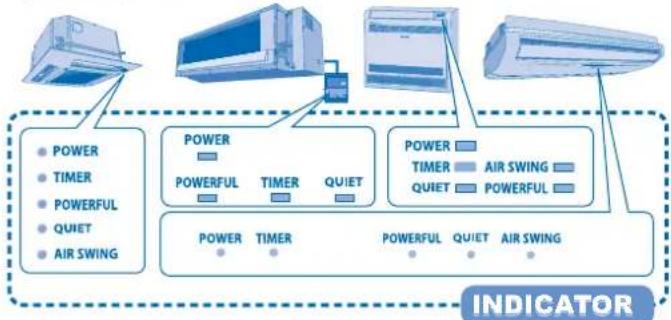
flowchart
graph TD
    A["AC System"] --> B["POWER"]
    A --> C["TIMER"]
    A --> D["POWERFUL"]
    A --> E["QUIET"]
    A --> F["AIR SWING"]
    G["AC Thermostat"] --> H["POWER"]
    G --> I["TIMER"]
    G --> J["QUIET"]
    G --> K["AIR SWING"]
    L["AC Air Swing"] --> M["POWER"]
    L --> N["TIMER"]
    L --> O["QUIET"]
    L --> P["AIR SWING"]
    Q["Indicator"] --> R["Power"]
    Q --> S["TIMER"]
    Q --> T["QUIET"]
    Q --> U["AIR SWING"]
REMOTE CONTROL TRANSMITTER
For use with DB, DD, DT, GF-series indoor unit.
• Make sure it is not obstructed.
- Certain fluorescent lights may interfere with signal transmission. Please consult your nearest dealer.
MODE OPERATION


Adjust temperature
AUTO MODE - FOR YOUR CONVENIENCE
- Unit selects the operation mode according to temperature setting, outdoor and room temperature.
• Operation mode is reselected every 3 hours. During operation mode selection the power indicator blinks.
HEAT MODE - TO ENJOY WARM AIR
- In heat mode, it takes a while for the unit to warm up. The power indicator blinks during this operation.
COOL MODE - TO ENJOY COOL AIR
DRY MODE - TO DEHUMIDIFY THE ENVIRONMENT
- During soft dry operation, the indoor fan operates at low fan speed to give a very gentle cooling operation.
● ● ● ● ● ● ● ● ● ● ● ● ● ● ● ● ● ● ● ● ● ● ● ● ● ● ● ● ● ● ● ● ● ● - The range of temperature for selection is 16^ 30^ .
- Operating the unit within the recommended temperature could induce energy saving. HEAT MODE: 20°C \~ 24°C.
COOL MODE : 26°C \~ 28°C.
DRY MODE : 1°C - 2°C lower than room temperature.
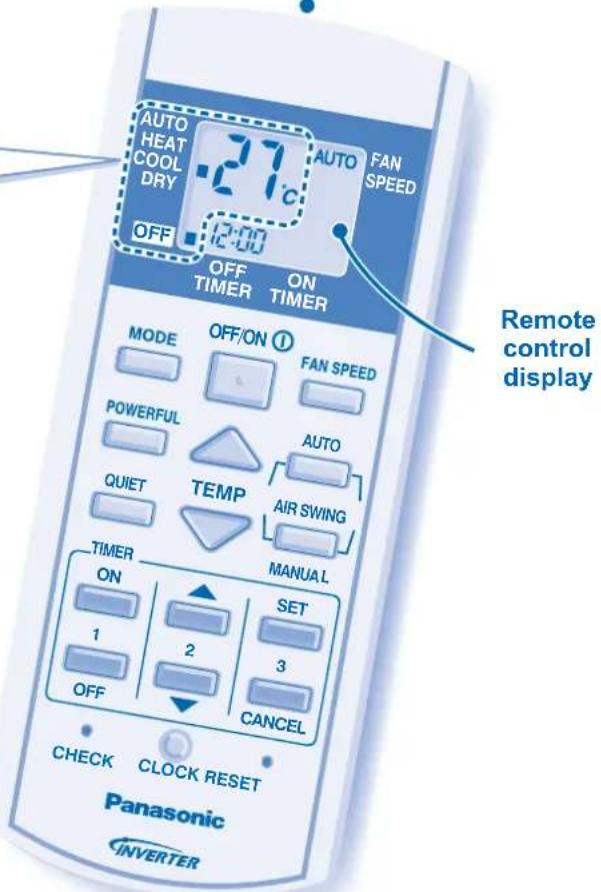
Notes:
- Press RESET button to restore the remote control's default setting.
- While using remote control, please be aware of the OFF indication on the remote control display to prevent the unit from starting / stopping improperly.
TO SELECT FAN SPEED
- There are 5 fan speeds, as well as automatic*.
* For automatic fan speed, the speed of the indoor fan is automatically adjusted according to the operation.

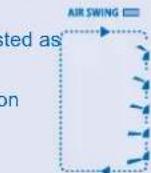
TO ADJUST AIRFLOW DIRECTION
- Keeps the room ventilated.
• AIR SWING - AUTO
- The vertical airflow louver swings up and down automatically.
- In heat mode, the air blows horizontally for a while, then starts to blow downwards.
• AIR SWING - MANUAL
- The airflow direction can be adjusted as desired by using remote control.
- Do not adjust the vertical airflow direction louvers by hand.

- Horizontal airflow direction louver is manually adjustable.

(DT-Series)
- Both upper and lower horizontal airflow direction louvers are manually adjustable.

(GF-Series)
• The air is discharge evenly through 4 output vents.

(DB-Series)
• Air Swing is not applicable for DD-series indoor unit.


TO SET THE TIMER

- When you want the air conditioner to turn ON or OFF automatically at a preset time.
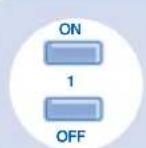
Select ON or OFF timer.

Set the desired time.

Confirm the setting.
To cancel ON or OFF timer, press

or

, then press

- When ON Timer is set, the unit may start earlier (up to 35 minutes) before the actual set time in order to achieve the temperature you preferred.
• The timers repeat daily once set. - If there is a power failure, you can restore the previous setting (once power is resumed) by pressing the SET button.
-
If the timer is cancelled, press SET to restore the previous setting.
-
The timer is based on the time set in the remote control.
- You can set your preferred time for ON and OFF timers.
Hints
■ Temperature setting of 1°C higher in cool mode or 2°C lower in heat mode than the desired temperature performs a 10% power saving.
■ To reduce power consumption during cool mode, close the curtains to prevent the sunlight and heat from coming in.
■ To set either 12-hour (am/pm) or 24-hour time indication, press and hold for approximately 10 seconds. CLOCK
• To turn off the air conditioner, press
OFF/ON ①


TO ENJOY QUIET ENVIRONMENT
- This setting provides a quiet environment by reducing the airflow noise.


TO ACHIEVE TEMPERATURE QUICKLY
• This setting enables the desired temperature to be reached quickly.

POWERFUL
• and operations are available in all modes and could be cancelled by pressing the respective button again.
POWERFUL
• and operations could not be activated at the same time.
MULTI AIR CONDITIONER FUNCTION
DEFINITION
Multi air conditioner system has one outdoor unit connected to multiple indoor units.
INDOOR UNIT
- It is possible to operate the indoor units individually or simultaneously.
• The operation mode priority is given to the first unit that turned on. - During operation, heating and cooling mode could not be activated at the same time for different indoor unit.
- The power indicator blinks to indicate the indoor unit is standing by for different operation mode.

Caution (For GK-series indoor unit):

e-ion and operations could be
activated even when the air-conditioner is turned off. In this condition, once e-ion indicator is ON, the unit will operate with AUTO fan speed and air swing.
e-ion However, operation could not be
activated if other indoor unit is activating heating operation.
CARE & CLEANING (For DD-series indoor unit)
natural_image
3D diagram of a computer monitor connected to an electronic device labeled 'ALSO SPOT' (no text or symbols on the device itself)AUTO OFF/ON BUTTON
To operate the air-conditioner when the remote control is misplaced or malfunctioned.
| Action Mode | |
| Press once. Automatic | |
| Press and hold until you hear one beep, then release. | Cooling |
| Press and hold until you hear one beep then release. Press and hold until you hear two beeps then release. | Heating |
• To turn off, press the AUTO OFF/ON button again.
Hint
These units are mounted inside the ceiling. It uses external air intake vent and air outlet vent to operate. Please consult your nearest dealer for seasonal inspection.
CARE & CLEANING (For GK-series indoor unit)
CS-E7GKDW, CS-E9GKDW, CS-E12GKDW, CS-E15GKDW, CS-E7GKEW, CS-E9GKEW, CS-E12GKEW, CS-E15GKEW

Switch off the power supply before cleaning
e-ion AIR PURIFYING SYSTEM

Do not touch during operation
e-ion FILTERS
- Clean the filters regularly.
- Wash/rinse the filters gently with water to avoid damage to the filter surface.
- Dry the filters thoroughly under the shade, away from fire or direct sunlight.
ACTIVE e-ion POWER MODULE
ACTIVE e-ion GENERATOR
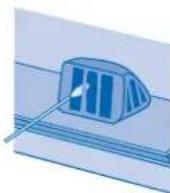
Clean with dry cotton bud.
• Active e-ion generator cleaning is recommended every 6 months.
FRONT PANEL
Raise and pull to remove. Wash gently and dry.

INDOOR UNIT
Wipe the unit gently with a soft, dry cloth.
AUTO OFF/ON BUTTON
To operate the air-conditioner when the remote control is misplaced or malfunctioned.
| Action Mode | |
| Press once. Automatic | |
| Press and hold until you hear one beep, then release. | Cooling |
| Press and hold until you hear one beep then release. Press and hold until you hear two beeps then release. | Heating |
- To turn off, press the AUTO OFF/ON button again.
WASHING INSTRUCTIONS
- Do not use benzene, thinner or scouring powder.
• Use only soap ( pH7) or neutral household detergent. - Do not use water hotter than 40^ .
Hints
■ Clean the filter regularly for best performance and to reduce power consumption.
■ Please consult your nearest dealer for seasonal inspection.
CARE & CLEANING
(For GK-series indoor unit)
Switch off the power supply before cleaning
e-ion AIR PURIFYING SYSTEM

Do not touch during operation
e-ion FILTERS
- Clean the filters regularly.
- Wash/rinse the filters gently with water to avoid damage to the filter surface.
- Dry the filters thoroughly under the shade, away from fire or direct sunlight.
ACTIVE e-ion POWER MODULE
ACTIVE e-ion GENERATOR

Clean with dry cotton bud.
• Active e-ion generator cleaning is recommended every 6 months.
FRONT PANEL
Raise and pull to remove. Wash gently and dry.
AIRFLOW DIRECTION LOUVER
AUTO OFF/ON BUTTON
To operate the air-conditioner when the remote control is misplaced or malfunctioned.
| Action Mode | |
| Press once. Automatic | |
| Press and hold until you hear one beep, then release. | Cooling |
| Press and hold until you hear one beep then release. Press and hold until you hear two beeps then release. | Heating |
• To turn off, press the AUTO OFF/ON button again.
WASHING INSTRUCTIONS
- Do not use benzene, thinner or scouring powder.
• Use only soap ( pH7) or neutral household detergent. - Do not use water hotter than 40^ C .
Hints
■ Clean the filter regularly for best performance and to reduce power consumption.
■ Please consult your nearest dealer for seasonal inspection.
CARE & CLEANING (For DB-series indoor unit)
CS-E15DB4EW, CS-E18DB4EW

Switch off the power supply before cleaning
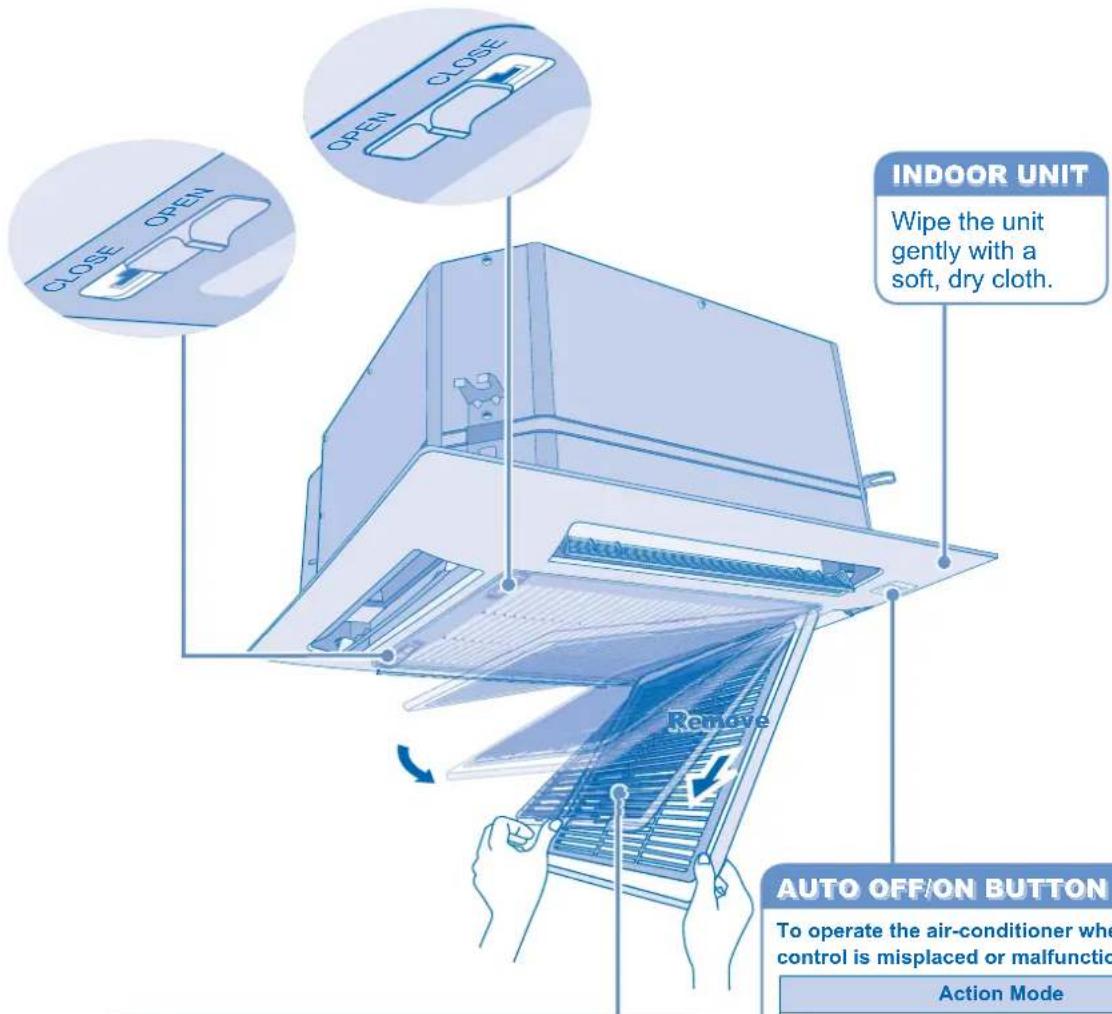
AIR FILTER
- It is recommended to clean the fi Iters once every 6 weeks.
- Wash/rinse the filters gently with water to avoid damage to the filter surface.
- Dry the filters thoroughly under the shade, away from fire or direct sunlight.
AUTO OFF/ON BUTTON
To operate the air-conditioner when the remote control is misplaced or malfunctioned.
| Action Mode | |
| Press once. Automatic | |
| Press and hold until you hear one beep, then release. | Cooling |
| Press and hold until you hear one beep then release. Press and hold until you hear two beeps then release. | Heating |
- To turn off, press the AUTO OFF/ON button again.
WASHING INSTRUCTIONS
- Do not use benzene, thinner or scouring powder.
• Use only soap ( pH7) or neutral household detergent. - Do not use water hotter than 40°C.
Hints
■ Clean the filter regularly for best performance and to reduce power consumption.
■ Please consult your nearest dealer for seasonal inspection.
CARE & CLEANING
(For DT-series indoor unit)
CS-ME10DTEG, CS-E15DTEW, CS-E18DTEW

Switch off the power supply before cleaning

WASHING INSTRUCTIONS
- Do not use benzene, thinner or scouring powder.
• Use only soap ( pH7) or neutral household detergent.
• Do not use water hotter than 40^ C.
Hints
■ Clean the filter regularly for best performance and to reduce power consumption.
■ Please consult your nearest dealer for seasonal inspection.
CARE & CLEANING (For GF-series indoor unit)
CS-E9GFEW, CS-E12GFEW, CS-E18GFEW

Switch off the power supply before cleaning
AIR FILTER
- Clean the filters regularly.
- Wash/rinse the filters gently with water to avoid damage to the filter surface.
- Dry the filters thoroughly under the shade, away from fire or direct sunlight.
AUTO OFF/ON BUTTON
To operate the air-conditioner when the remote control is misplaced or malfunctioned.
| Action Mode | |
| Press once. Automatic | |
| Press and hold until you hear one beep, then release. | Cooling |
| Press and hold until you hear one beep then release. Press and hold until you hear two beeps then release. | Heating |
To turn off, press the AUTO OFF/ON button again.
Remove

INDOOR UNIT
Wipe the unit gently with a soft, dry cloth.
INTAKE GRILLE
- Release 2 levers to open.
- Release string to remove. Wash gentle and dry.
AIR OUTLET SELECTION SWITCH
To select preferred airflow pattern.
| Selection Pattern Description | ||
 |  | This setting blows air from upper outlet only. |
 | This setting automatically decides airflow pattern depending on mode and conditions (Default and recommended). | |
| [GHTT] |  | For Heat mode, during start or low discharge temperature / For Cool mode, when setting temperature is achieved, the air is blown from the upper air outlet only. |
| [YYY] |  | Air is blown from the upper and lower air outlets for high speed cooling during COOL mode, and for fllling the room with warm air during HEAT mode. |
WASHING INSTRUCTIONS
- Do not use benzene, thinner or scouring powder.
• Use only soap ( pH7) or neutral household detergent. - Do not use water hotter than 40°C.
Hints
■ Clean the filter regularly for best performance and to reduce power consumption.
■ Please consult your nearest dealer for seasonal inspection.
TROUBLESHOOTING
The following symptoms do not indicate malfunction.
| Symptom Cause | |
| Power indicator blinks before the unit is switched on. | The operation mode is different from other indoor unit.This is a preliminary step in preparation for the operation when the ON timer has been set. |
| Power indicator blinks during operation and the indoor fan is stopped. | The unit is in defrost mode, and the melted frost is drained from the outdoor unit. |
| Occasionally knocking sound is heard. | Switching over of refrigerant gas in the system during defrosting and at the end of operations. |
| Cracking sound can be heard during operations. | Panel expanding/contracting due to change in temperature. |
| Water flowing sound during operations. | Refrigerant flow inside the unit. |
| Airflow continues even after operation has stopped. | Extraction of remaining heat from the indoor unit (maximum 30 seconds). |
| Indoor fan stops occasionally during heating operation. | To avoid unintended cooling effect. |
| Indoor fan stops occasionally during automatic fan speed setting. | This helps to remove the surrounding odour. |
| The room has a peculiar odour. | This may due to damp smell emitted by the wall, carpet, furniture or clothing. |
| Mist emerges from indoor unit. | Condensation effect due to cooling process. |
| Outdoor unit emits water/steam. | Condensation or evaporation occurs on pipes. |
| Timer indicator is always on. | The timer setting repeats daily once set. |
| Operation is delayed a few minutes after restart. | The delay is a protection to the unit's compressor. |
Check the following before calling for servicing.
| Symptom Check | |
| Heating/Cooling operation is not working effi ciently. | Set the temperature correctly.Close all doors and windows.Clean or replace the fi lters.Clean any obstruction at the air inlet and air outlet vents. |
| Noisy during operation. | Check if the unit has been installed at an incline.Close the front panel properly. |
| Remote control does not work. | Insert the batteries correctly.Replace weak batteries. |
| The unit does not work. | Check if the circuit breaker is tripped.Check if timers have been set. |
| Patrol sensor or e-ion indicator on the indoor unit is blinking (for GK-series indoor unit). | PressPATROLortwice.If the patrol sensor or e-ion indicator still blinking, please consult your nearest dealer. |
The unit stops and the timer indicator blinks.
■ For GF-series indoor unit.
Jot down error code at indicator.
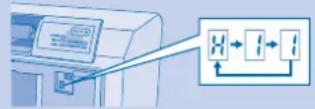
If the error code does not appear at the indicator.

Press to retrieve error code, then jot down the error code at indicator.
■ For DB, DD, DT, GK-series indoor unit.

1 Press for 5 seconds.
2 Press until you hear beep sound, then jot down the error code.
③ Press for 5 seconds to quit checking.
■ Turn the unit off and reveal the error code to your nearest dealer.
Note:
- The unit may be operable (with 4 beeps) on a limited basis, depending on the error.
FOR EXTENDED NON-USE
- Activate heat mode for 2\~3 hours to thoroughly dry the unit.
• Turn off the power supply. - Remove the remote control batteries.
SEASONAL INSPECTION AFTER EXTENDED NON-USE
- Checking of remote control batteries.
• No obstruction at air inlet and air outlet vents.
• After 15 minutes of operation, it is normal to have the following temperature difference between air inlet and air outlet vents:
Cooling: ≥ 8°C
Heating: ≥ 14°C
NON SERVICEABLE CRITERIAS
TURN OFF POWER SUPPLY and CALL Authorized Distributor under the following conditions:
- Abnormal noise during operation. - Circuit breaker switches off frequently.
- Water/foreign particles have entered the remote control. • Power cord becomes unnaturally warm.
- Water leaks from Indoor unit. • Switches or buttons are not functioning properly.

flowchart
graph TD
    A[" "] --> B["AIR SWING"]
    C[" "] --> B
    D[" "] --> B
● ● ● ● ● ● ● ● ● ● ● ● ● ● ● ● ● ● ● ● ● ● ● ● ● ● ● ● ● ● ● ● ● ● ● ● ● ● ● ● ● ● ● ● ●
PATROL
e-ion
QUIET
POWERFUL
v están
disponibles
[Unreadable]
natural_image
3D diagram of a computer monitor connected to an output device (no text or symbols visible)flowchart
graph TD
    A[" "] --> B["AIR SWING"]
    C[" "] --> B
    D[" "] --> B
PARA AJUSTAR A DIRECÇÃO DO FLUXO DE AR
natural_image
3D diagram of a computer monitor connected to an electronic device (no text or symbols visible)BOTÃO AUTO OFF/ON
UNIDADE INTERIOR
natural_image
3D diagram of a device with a control panel connected to a power outlet (no text or symbols visible)KOYMN1 AUTO OFF/ON
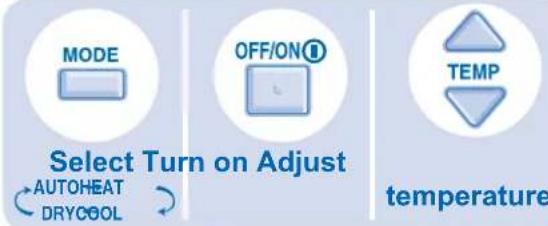
Select the desired mode.
Start/stop the operation.
Select the desired temperature.
flowchart
graph TD
    A[" "] --> B["AIR SWING"]
    C[" "] --> B
    D[" "] --> B

Adjust the airflow direction louver.
For detailed explanation, please refer to pages 4 \~ 9.
- Panasonic®
- Operating Instructions Air Conditioner
- Warning
- Caution
- Remote Control
- During Operation
- Indoor Unit
- During Installation
- Power Supply
- Outdoor Unit
- REGULATORY INFORMATION
- ENVIRONMENTAL REQUIREMENTS
- Battery Disposal
- END-OF-LIFE DISPOSAL
- OPERATION CONDITION
- TABLE OF CONTENTS
- SAFETY PRECAUTIONS
- HOW TO OPERATE
- MULTI AIR CONDITIONER FUNCTION
- CARE & CLEANING
- TROUBLESHOOTING
- QUICK GUIDE
- Note:
- HOW TO OPERATE (For GK-series indoor unit)
- AUTO MODE - FOR YOUR CONVENIENCE
- HEAT MODE - TO ENJOY WARM AIR
- COOL MODE - TO ENJOY COOL AIR
- DRY MODE - TO DEHUMIDIFY THE ENVIRONMENT
- REMOTE CONTROL TRANSMITTER
- Notes:
- TO SELECT FAN SPEED
- TO ADJUST AIRFLOW DIRECTION
- TO MONITOR AIR QUALITY
- TO ENJOY CLEAN AIR
- TO ENJOY QUIET ENVIRONMENT
- TO ACHIEVE TEMPERATURE QUICKLY
- TO SET THE TIMER
- To cancel ON or OFF timer, press
- Hints
- MODE OPERATION
- HOW TO OPERATE (For DB, DD, DT, GF-series indoor unit)
- POWERFUL
- DEFINITION
- Caution (For GK-series indoor unit):
- CARE & CLEANING (For DD-series indoor unit)
- AUTO OFF/ON BUTTON
- Hint
- CARE & CLEANING (For GK-series indoor unit)
- e-ion AIR PURIFYING SYSTEM
- e-ion FILTERS
- ACTIVE e-ion POWER MODULE
- ACTIVE e-ion GENERATOR
- FRONT PANEL
- WASHING INSTRUCTIONS
- CARE & CLEANING (For DB-series indoor unit)
- Switch off the power supply before cleaning
- AIR FILTER
- CARE & CLEANING (For GF-series indoor unit)
- INTAKE GRILLE
- AIR OUTLET SELECTION SWITCH
- The unit stops and the timer indicator blinks.
- FOR EXTENDED NON-USE
- SEASONAL INSPECTION AFTER EXTENDED NON-USE
- NON SERVICEABLE CRITERIAS
- PARA AJUSTAR A DIRECÇÃO DO FLUXO DE AR
- BOTÃO AUTO OFF/ON
- UNIDADE INTERIOR
- KOYMN1 AUTO OFF/ON
Brand : PANASONIC
Model : CS-E15GKDW
Category : Air conditioner