
CQ-CB9900U - Car Radio PANASONIC - Free user manual and instructions
Find the device manual for free CQ-CB9900U PANASONIC in PDF.


| Type | Car Radio |
| Brand | Panasonic |
| Model | CQ-CB9900U |
| Category | Removable Full Front MP3/WMA CD Player/Receiver with Full Dot Matrix Display and CD Changer Control |
| Power Supply | 12 V DC, negative ground battery system |
| FM Tuner | HD Radio (iBOC) capable, analog and digital reception |
| AM Tuner | HD Radio (iBOC) capable, analog and digital reception |
| Playback Formats | CD, CD-R/RW, MP3, WMA (Windows Media Audio) |
| Sound Processing | SQ7 (7-band Sound Quality presets and custom adjustments) |
| Filters | HPF (High Pass Filter) and LPF (Low Pass Filter) for subwoofer system |
| CD Changer Control | Supports up to 2 optional CD changers (CA-CD55U required for dual) |
| Display | Full Dot Matrix Display |
| Volume Control | Large-sized rotary knob |
| Remote Control | Included (YEFX9992663) with lithium battery (CR2025) |
| Clock | 12-hour system, adjustable via menu |
| Subwoofer Output | Yes, with adjustable level and LPF cutoff frequency |
| Installation Angle | Horizontal position, front end up, max 30° tilt |
| Safety | Class I laser product; FCC compliant; do not expose to moisture |
| Accessories Included | Remote control, lithium battery, mounting collar, trim plate, screw kit, rear support strap, face plate case, power connector, instruction kit |
| Mercury Notice | Contains fluorescent lamp with small amount of mercury; dispose according to local regulations |
Frequently Asked Questions - CQ-CB9900U PANASONIC
User questions about CQ-CB9900U PANASONIC
0 question about this device. Answer the ones you know or ask your own.
Ask a new question about this device
Download the instructions for your Car Radio in PDF format for free! Find your manual CQ-CB9900U - PANASONIC and take your electronic device back in hand. On this page are published all the documents necessary for the use of your device. CQ-CB9900U by PANASONIC.
USER MANUAL CQ-CB9900U PANASONIC
Removable Full Front MP3 WMA CD Player/Receiver with Full Dot Matrix Display and CD Changer Control
CQ-CB9900U
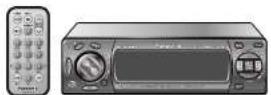
Operating Instructions
natural_image
Black-and-white photo of a winding highway leading to snow-capped mountains in the background (no text or symbols visible)
MP3 WMA

- Please read these instructions carefully before using this product and save this manual for future use.
Safety Information
WARNING:
TO REDUCE THE RISK OF FIRE OR ELECTRIC SHOCK, DO NOT EXPOSE THIS PRODUCT TO RAIN OR MOISTURE.
TO REDUCE THE RISK OF FIRE OR ELECTRIC SHOCK, AND ANNOYING INTERFERENCE, USE ONLY THE INCLUDED COMPONENTS.
CAUTION:
THIS PRODUCT IS A CLASS I LASER PRODUCT.
USE OF CONTROLS OR ADJUSTMENTS OR PERFORMANCE OF PROCEDURES OTHER THAN THOSE SPECIFIED HEREIN MAY RESULT IN HAZARDOUS RADIATION EXPOSURE. DO NOT OPEN COVERS AND DO NOT REPAIR BY YOURSELF. REFER SERVICING TO QUALIFIED PERSONNEL.
Part 15 of the FCC Rules
FCC Warning:
Any unauthorized changes or modifications to this equipment would void the user's authority to operate this device.
NOTICE:
This product has a fluorescent lamp that contains a small amount of mercury. It also contains lead in some components. Disposal of these materials may be regulated in your community due to environmental considerations.
For disposal or recycling information please contact your local authorities, or the Electronics Industries Alliance: http://www.eiae.org
Precautions
When Driving
Keep the volume level low enough to be aware of road and traffic conditions.
When Washing Your Car
Do not expose the product, including the speakers and CDs, to water or excessive moisture. This could cause electrical shorts, fl re, or other damage.
When Parked
Parking in direct sunlight can produce very high temperatures inside your car. Give the interior a chance to cool down before switching the unit on.
Use the Proper Power Supply
This product is designed to operate with a 12 V DC, negative ground battery system (the normal system in a North American car).
Disc Mechanism
Do not insert coins or any small objects. Keep screwdrivers and other metallic objects away from the disc mechanism and disc.
Use Authorized Servicenters
This product is made of precision parts. Do not attempt to disassemble or adjust any parts. Please refer to the Servicenter list including with this product for service assistance.
For Installation
This product should be installed in a horizontal position with the front end up at a convenient angle, but not more than 30°.
Note:
- The preset memory is cleared to return to the original factory setting when the power connector or battery is disconnected.
Find the model number and serial number on either the back or bottom of the unit. Please record them in the space below and retain this booklet as a permanent record of your purchase to help with identification in case of theft.
| MODEL NUMBER CQ-CB9900U | |
| SERIAL NUMBER | |
| DATE PURCHASED | |
| FROM | |
CQ-CB9900U
Panasonic welcomes you to our ever growing family of electronic product owners. We know that this product will bring you many hours of enjoyment. Our reputation is built on precise electronic and mechanical engineering, manufactured with carefully selected components and assembled by people who take pride in their work. Once you discover the quality, reliability, and value we have built into this product, you too will be proud to be a member of our family.
CQ-CB9900U
Removable Full Front MP3 WMA CD Player/Receiver with Full Dot Matrix Display and CD Changer Control
Accessories
| Item Diagram Qty | ||
| Remote Control Unit(YEFX9992663) | 1 | |
| Lithium Battery | 1 | |
| Instruction kit | ||
| • Operating Instructions(YEFM284210) | 1 | |
| • Warranty Card, etc. | 1 set | |
| Mounting Collar(YEFX0217099) | 1 | |
| Trim Plate(YEFC05650) | 1 | |
| Item Diagram Q'ty | ||
| Screw Kit (YEP0FZ2105) | ||
| ● Hex. Nut (5 mmφ) | 1 | |
| ● Tapping Screw(5 mmφ×16 mm) | 1 | |
| ● Mounting Boll(5 mmφ) | 1 | |
| ● Lock Cancel Plate | 2 | |
| Rear Support Strap(YEFG04019) | 1 | |
| Removable Face PlateCase(YEFA131921) | 1 | |
| Power Connector(YEAJ012010) | 1 | |
Note:
- The number in parenthesis underneath each accessory part name is the part number for maintenance and service.
- Accessories and their parts numbers are subject to modification without prior notice due to improvements.
- Mounting collar ① and trim plate ⑦ are mounted on the main unit at shipment (page 50).
CQ-CB9900U
Features
Built-in AM/FM tuner for HD Radio (IBOC system\*) broadcasts
Digital broadcasts can now be heard along with conventional analog broadcasts thanks to the incorporation of the iBOC system that adds digital signals to the existing analog radio signals. As a result, during digital reception AM broadcasts take on a sound quality comparable to FM broadcasts, and FM broadcasts have a sound quality on a par with CDs. The station names, call signs, artists and song titles can also be displayed.
^ "IBOC" stands for In Band On Channel. It refers to analog digital simulcast broadcasting that uses the double sideband of the existing FM 400 kHz and AM 40 kHz broadcast carrier frequencies.
MP3/WMA Playback from CD-R/RW
You can play your MP3/WMA (Windows Media Audio) files as well as regular CDs. With up to 10 to 12 times* the capacity of a conventional CD, a single MP3/WMA-encoded disc can keep you entertained throughout your entire journey.
^Depending on bit rate.
System Upgrade
CQ-CB9900U
SQ7 (7 bands Sound Quality)
SQ is a function that can call up various sound types at the touch of button in accordance with your listening music type.
At SQ7, SQ presets 2 to 6 can also be finely adjusted as desired (page 32).
HPF (High Pass Filter)/LPF (Low Pass Filter)
Genuine subwoofer system achieved thanks to HPF (High Pass Filter) and LPF (Low Pass Filter)
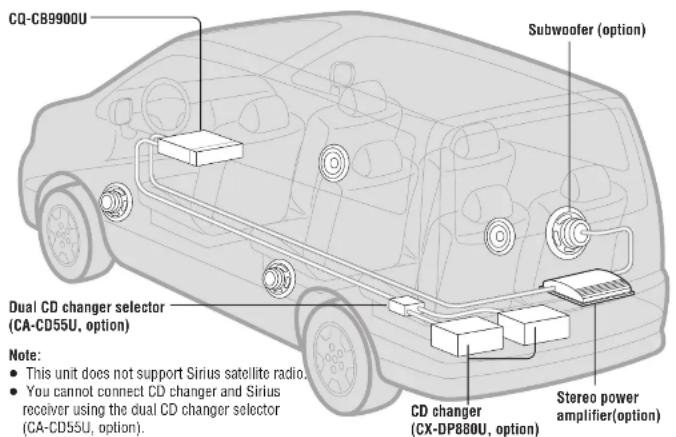
CD Changer Control
You can connect the optional CD changer unit. For details, refer to the operating instructions on the CD changer unit.
- 2 CD changers (option) can be controlled with this unit. To connect 2 CD changers to it, the dual CD changer selector CA-CD55U (option) is necessary.
Large-sized Volume Control
An large-sized rotary volume control that looks like one belonging to a Hi-Fi audio system is featured.
What is HD Radio™?
Today's AM and FM radio is broadcast in analog, which has lower audio quality and is filled with static, hiss, pops and fades. Radio stations have begun a transformation to the world of digital using a new technology called HD Radio™. Today's analog signals and the new HD Radio digital signals will be transmitted at the same time from AM and FM stations. The radios you use today will continue to function for years, however, new receivers are needed to hear the HD Radio digital signals broadcast from the stations.
Using these new receivers, you can pick up the new HD Radio digital signals at the same place on the dial (106.7 KROQ will be digital 106.7 KROQ broadcasting in HD Radio, 710 WOR will be digital 710 WOR broadcasting in HD Radio). Your favorite HD Radio digital station will be right where you left it. Additionally, new HD Radio receivers will still pick up stations broadcasting in analog, so you don't need two radios.
The benefit is of digital far outweigh old analog technology. HD Radio makes radio "fun" again. FM digital will sound like a CD throughout the coverage area, and AM digital will sound like today's FM throughout the coverage area, both without the static, hiss, pops or fades that you've had to put up with for almost a century.
While HD Radio will bring you pristine audio quality, it will also provide data services*. Both AM and FM HD Radio stations will transmit song and artist title, traffic updates, weather alerts, news reports and much more. For more information, visit www.hd-radio.com. Stay tuned!
* This unit supports text displays for the following items; station name, call sign, artist, song title.
HD Radio is a trademark of iBiquity Digital Corporation.
HD Radio broadcasts can be enjoyed only in those areas in the United States where the broadcasts can be received. This means that the HD Radio feature cannot be used outside the U.S. or in areas inside the U.S. where these broadcasts cannot be received. (as of December 2003)
Before Reading these Instructions

This can only be controlled through the main unit.

This can only be controlled through the remote control unit.
Operations with neither mark can be performed either by the main unit or the remote control unit.
CQ-CB9900U
Preparation
Remote Control Unit
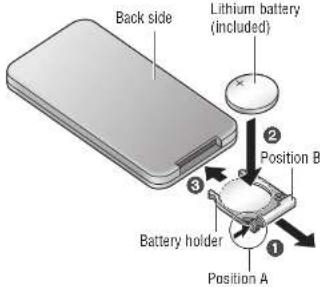
Battery Installation
① Remove the battery holder.
Pull the holder out at position B while pushing position A as indicated.
② Install the battery on the battery holder.
③ Insert the battery holder back into its original position.
Battery Notes
- Battery type: Panasonic lithium battery (CR2025) (included)
- Battery life: Approximately 6 months under normal use (at room temperature)
Caution:
- Improper use of the battery may cause overheating, an explosion or ignition, resulting in injury or a fire.
- Remove and dispose of an old battery immediately.
- Do not disassemble or short the battery. Do not throw a battery into a fire.
- Keep the battery away from children to avoid the risk of accidents.
- Follow local regulations when disposing of the battery.
CQ-CB9900U
Subwoofer
Preparation:
- Connect the subwoofer and the amplifier (option) (page 60).
Subwoofer level setting:
- You can change the subwoofer level (page 34).
Subwoofer low pass filter setting:
- You can select the upper limit frequency of the sound from subwoofer (page 34).
Clock Setting
The 12-hour system is used for the clock.
- Turn your car's ignition key to the ACC or ON position.
- Press [SOURCE] (PWR).
- When the power is switched on for the first time, a demonstration appears on the display. Press [DISP] (display) to change to regular mode (page 10).
① Press [MENU].
![PANASONIC CQ-CB9900U - ① Press [MENU]. - 1](/content/2026/06/1191032/images/09e2b16ea65f3914caef93f001802870534eda65825c597e39dc3713662932aa.jpg)
Press and hold [MENU] for more than 2 seconds.
② Press [>] to select "DISPLAY".
![PANASONIC CQ-CB9900U - ① Press [MENU]. - 2](/content/2026/06/1191032/images/54ce5c4c1a6a4fcd7d75600ee3e6d80e16a1a34c6b8d5c50c006231edb4fd7fb.jpg)
③ Press [√] to select "CLOCK ADJ".
![PANASONIC CQ-CB9900U - ① Press [MENU]. - 3](/content/2026/06/1191032/images/6a20739947ce39251dadae32e401b37447c7b8dcae675e1c54298987a4bf265c.jpg)
4 Press [SET].
5 Setting.
Hours
![PANASONIC CQ-CB9900U - ① Press [MENU]. - 4](/content/2026/06/1191032/images/35d7ad468bfe41509ba90d9900584b6fe96e0d4889a1094a068ce67f1914d137.jpg)
① Press [<].
The hour display hilights.
② Press [^]: Put forward
③ Press [∨]: Put back
Minutes:
![PANASONIC CQ-CB9900U - ① Press [MENU]. - 5](/content/2026/06/1191032/images/ccb66b8e2171433396d2becd1d2f8792c1f65fd13d5cf644176afd8ceec5ef06.jpg)
① Press [>].
The Minutes display hilights.
② Press [^]: Put forward
③ Press [∨]: Put back
6 Complete.
Press [SET].
Note:
- Press and hold [∧] or [∨] to change numbers rapidly.
CQ-CB9900U
- Safety Information
- WARNING:
- CAUTION:
- Part 15 of the FCC Rules
- FCC Warning:
- NOTICE:
- Precautions
- When Driving
- When Washing Your Car
- When Parked
- Use the Proper Power Supply
- Disc Mechanism
- Use Authorized Servicenters
- For Installation
- Note:
- CQ-CB9900U
- Features
- Built-in AM/FM tuner for HD Radio (IBOC system\*) broadcasts
- MP3/WMA Playback from CD-R/RW
- SQ7 (7 bands Sound Quality)
- HPF (High Pass Filter)/LPF (Low Pass Filter)
- CD Changer Control
- Large-sized Volume Control
- What is HD Radio™?
- Before Reading these Instructions
- Preparation
- Battery Installation
- Battery Notes
- Subwoofer
- Preparation:
- Subwoofer level setting:
- Subwoofer low pass filter setting:
- Clock Setting
- ① Press [MENU].
Brand : PANASONIC
Model : CQ-CB9900U
Category : Car Radio