CE-H22V14-S1 - Headphones Siig - Free user manual and instructions
Find the device manual for free CE-H22V14-S1 Siig in PDF.


| Type | Over-ear wired headphones |
| Model | CE-H22V14-S1 |
| Brand | Siig |
| Connectivity | Wired (3.5mm audio jack) |
| Driver Diameter | 40 mm |
| Frequency Response | 20 Hz - 20 kHz |
| Impedance | 32 ohms |
| Sensitivity | 108 dB |
| Cable Length | 2.0 m (6.6 ft) |
| Weight | 250 g (0.55 lbs) |
| Microphone | Built-in omnidirectional microphone |
| Volume Control | In-line remote with volume slider |
| Ear Cushions | Padded leatherette over-ear cushions |
| Headband | Adjustable padded headband |
| Foldability | Folds flat for storage |
| Compatibility | PC, Mac, smartphones, tablets, gaming consoles |
| Power Source | No battery required (passive) |
| Cleaning Instruction | Wipe with soft dry cloth; do not use liquids |
| Storage | Store in cool, dry place away from direct sunlight |
| Warranty | 1 year limited warranty |
Frequently Asked Questions - CE-H22V14-S1 Siig
User questions about CE-H22V14-S1 Siig
0 question about this device. Answer the ones you know or ask your own.
Ask a new question about this device
Download the instructions for your Headphones in PDF format for free! Find your manual CE-H22V14-S1 - Siig and take your electronic device back in hand. On this page are published all the documents necessary for the use of your device. CE-H22V14-S1 by Siig.
USER MANUAL CE-H22V14-S1 Siig
natural_image
Simple line icon of a computer mouse with a scroll wheel (no text or symbols)USB 3.0 HDMI Capture Adapter User Reference Guide
Introduction
The USB 3.0 HDMI Capture Adapter records HD video and stereo audio through USB 3.0 interface for low latency. Great for gaming, meetings or live streaming on YouTube, Twitch and more.
Key Features and Benefits
- Delivers stunning picture quality by supporting video resolutions up to 1080p at 60fps
• Supports USB video class (UVC), USB audio class (UAC) protocol and firmware upgrade - Plug and play - no driver installation and no external power source required
- Compatible with Windows, Mac and Linux OS. Works with most 3rd party software such as OBS Studio and VLC
- Multiple devices on one host is supported. Converts input audio formats up to 48 KHz PCM
Specifications
| Interface USB 3.0 | |
| Video/Audio input HDMI | |
| Output formats (Resolutions) | 720 x 480 (60p), 720 x 576 (50p), 1280 x 720p (50p), 1280 x 720p(60p), 1920 x 1080 (50i), 1920 x 1080 (60i), 1920 x 1080 (24p), 1920 x 1080 (25p), 1920 x 1080 (30p), 1920 x 1080 (50p), 1920 x 1080 (60p) |
| Software compatibility (not complete list) | OBS Studio (Windows, OS X); Windows Media Encoder (Windows); Adobe Flash Media Live - Encoder (Windows, OS X); Real Producer Plus (Windows); VLC (Windows, OS X, Linux); QuickTime Broadcaster (OS X); QuickTime Player (OS X); Wirecast (Windows,OS X); vMix(Windows), Potplayer (Windows) |
| Development interface compatibility | DirectShow (Windows), DirectSound (Windows), V4L2 (Linux), ALSA (Linux), OS X (QuickTime) |
| Housing material Aluminum | |
| Dimensions 3.75" (W) x 1.93" (H) x 0.7" (D) | |
| Weight 0.22lbs | |
Package Contents
• USB 3.0 HDMI Capture Adapter
- USB 3.0 A to A cable x1
- User Reference Guide
System Requirements
- Windows ^ 10 (32-/64-bit) / 8.x (32-/64-bit) / 7 (32-/64-bit)
- MAC OS X ^ 10.9 and later
• Linux kernel 2.6.38 and later
CPU Requirements
• PC Intel Core i5-3400 and later
• NB Intel Core i7-3537U 2.0GHz and later
• MAC i5 quad-core and later
Display Card Requirements
• PC NVIDIA GT630 / AMD R9 200 series and later (support DirectX 10 and later)
- NBNVIDIA GT735 and later (support DirectX 10 and later)
RAM Requirements
- 4 GB RAM and later
NOTE:1. It is not absolutely necessary to have a computer that meets these requirements for System, CPU, Display Card and RAM (Recommended) 2. The quality of the recording video depends on your computer's performance and software setting.
Layout
text_image
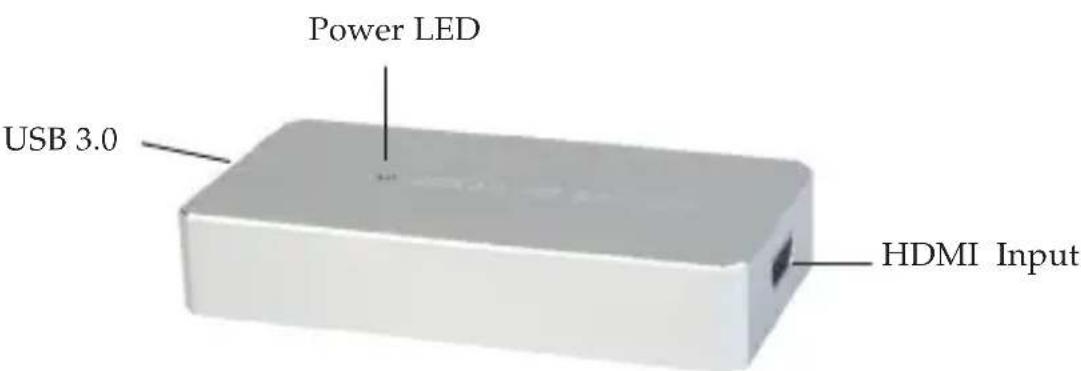
Power LED USB 3.0 HDMI InputFigure 1: USB 3.0 HDMI Capture Adapter
- USB 3.0: Connects to an available USB port using the included cable
• Power LED: Lights up when connected to the computer - HDMI Input: Connects to the HDMI source with an HDMI cable (not included)
The setting of the sound
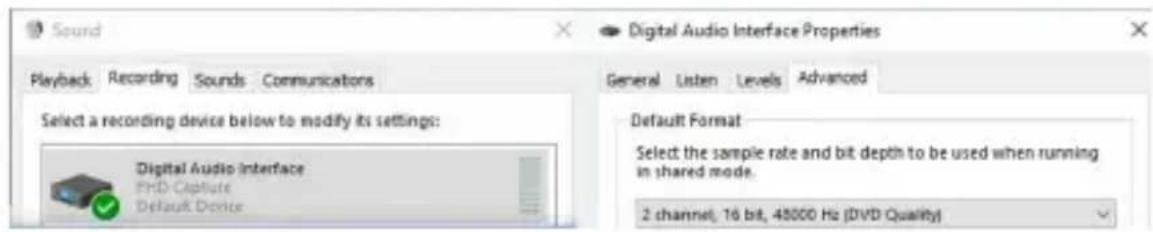
After hardware installation, please follow below steps to set the audio format before recording. Important: In order to have better audio quality, this setting is required.
- Right click the speaker icon and choose Recording devices.

text_image
Open Volume Mixer Playback devices Recording devices Sounds Volume control optionsFigure 2
- Double click FHD Capture and go to Advanced section. Then, choose the sample rate for 2 channel, 16 bit, 48000 Hz (DVD Quality).
text_image
Sound Digital Audio Interface Properties Playback Recording Sounds Communicators Select a recording device below to modify its settings: Digital Audio Interface PHD-Captitude Default Device General Listen Levels Advanced Default Format Select the sample rate and bit depth to be used when running in shared mode. 2 channel, 16 bit, 48000 Hz (DVD Quality)Figure 3
To Verify Installation
-
Right click This PC or Computer on the desktop, click Manage, then click Device Manager.
-
Double click Imaging devices / Sound, video and game controllers, and FHD Capture should be displayed.
Application
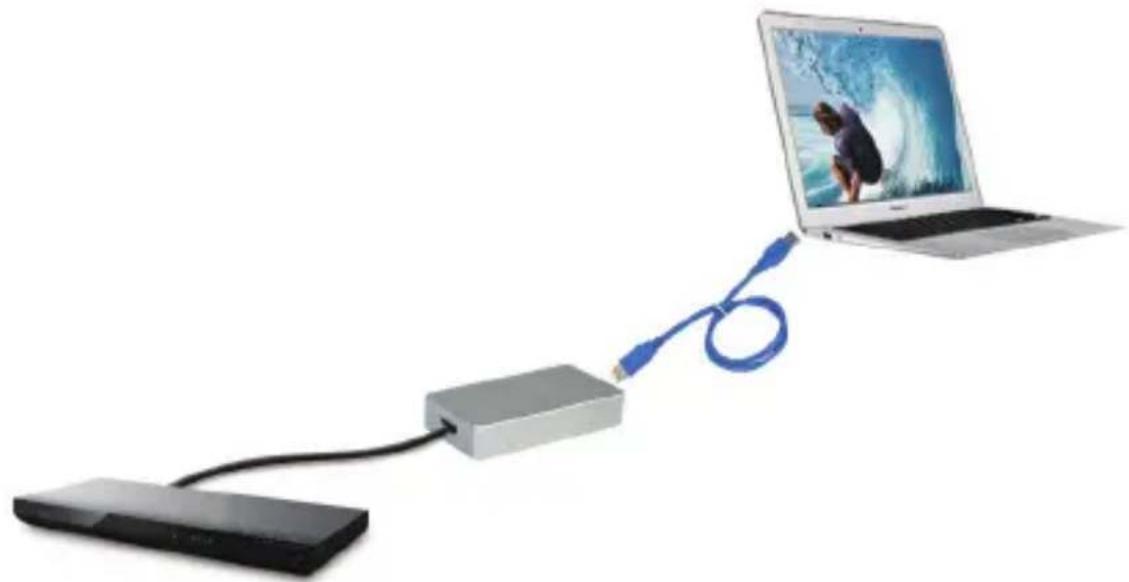
USB 3.0 HDMI Capture Adapter provides an easy way to record or stream your gameplay with 1080p resolution.
natural_image
Laptop connected via USB cable to a device (no text or symbols visible)Figure 4
Technical Support and Warranty
QUESTIONS? SIIG's Online Support has answers! Simply visit our web site at www.siig.com and click Support. Our online support database is updated daily with new drivers and solutions. Answers to your questions could be just a few clicks away. You can also submit questions online and a technical support analyst will promptly respond.
SIIG offers a 1-year manufacturer warranty with this product. This warranty covers the original purchaser and guarantees the product to be free of any defects in materials or workmanship for one (1) years from the date of purchase of the product. This warranty is not transferable and is available only to the original purchaser of the product.
SIIG will, at our discretion, repair or replace (with an identical product or product having similar features and functionality) the product if defective in materials or workmanship. This warranty gives you specific legal rights, and you may also have other rights which vary from state to state. Please see our web site for more warranty details.
If you encounter any problems with this product, please follow the procedures below.
A) If it is within the store's return policy period, please return the product to the store where you purchased from.
B) If your purchase has passed the store's return policy period, please follow the steps below to have the product repaired or replaced.
Step 1: Submit your RMA request.
Go to www.siig.com, click Support, then REQUEST A PRODUCT REPLACEMENT to submit a request to SIIG RMA or fax a request to 510-657-5962. Your RMA request will be processed, if the product is determined to be defective, an RMA number will be issued.
Step 2: After obtaining an RMA number, ship the product.
- Properly pack the product for shipping. All accessories that came with the original package must be included
- Include a copy of your original sales receipt inside the package with date of purchase and place of purchase circled and clearly visible
- Clearly write your RMA number on the top of the returned package. SIIG will refuse to accept any shipping package, and will not be responsible for a product returned without an RMA number posted on the outside of the shipping carton
- You are responsible for the cost of shipping to SIIG. Ship the product to the following address:
SIIG, Inc.
6078 Stewart Avenue
Fremont, CA 94538-3152, USA
RMA #: ____
- SIIG will ship the repaired or replaced product via Ground in the U.S. and International Economy outside of the U.S. at no cost to the customer
About SII G, Inc.
Founded in 1985, SIIG, Inc. is a leading manufacturer of IT connectivity solutions (including Serial ATA and Ultra ATA Controllers, FireWire, USB, and legacy I/O adapters) that bridge the connection between Desktop/Notebook systems and external peripherals. SIIG continues to grow by adding A/V and Digital Signage connectivity solutions to our extensive portfolio.
SIIG products offer comprehensive user manuals, many user-friendly features, and are backed by an extensive manufacturer warranty. High quality control standards are evident by the overall ease of installation and compatibility of our products, as well as one of the lowest defective return rates in the industry. SIIG products can be found in computer retail stores, mail order catalogs, through major distributors, system integrators, and VARs in the Americas and the UK, and through e-commerce sites.
PRODUCT NAME
USB 3.0 HDMI Capture Adapter
FCC RULES: TESTED TO COMPLY WITH FCC PART 15, CLASS B OPERATING ENVIRONMENT: FOR HOME OR OFFICE USE
FCC COMPLIANCE STATEMENT:
This device complies with part 15 of the FCC Rules. Operation is subject to the following two conditions: (1) This device may not cause harmful interference, and (2) this device must accept any interference received, including interference that may cause undesired operation.
THE PARTY RESPONSIBLE FOR PRODUCT COMPLIANCE
SIIG, Inc.
6078 Stewart Avenue
Fremont, CA 94538-3152, USA
Phone: 510-657-8688
USB 3.0 HDMI Capture Adapter is a trademark of SIIG, Inc. SIIG and the SIIG logo are registered trademarks of SIIG, Inc. All other names used in this publication are for identification only and may be trademarks of their respective owners.