81166 - Scale ASSMANN Electronic - Free user manual and instructions
Find the device manual for free 81166 ASSMANN Electronic in PDF.


| Product Type | Wireless Notebook Mouse |
| Model | 81166 |
| Brand | ASSMANN Electronic (ednet) |
| Interface | 2.4 GHz Wireless with Nano USB Receiver |
| Resolution (DPI) | 800 / 1200 / 1600 (switchable) |
| Wireless Range | Up to 10 meters |
| Scroll Wheel | 1 mechanical scrolling wheel |
| Power Consumption | DC 1.5V, 19mA |
| Power Source | 1x AA battery (not included) |
| Auto Power-Saving | Yes |
| Ergonomic Design | Ambidextrous, suitable for left and right hand |
| Compatibility | Notebook and PC with USB port |
| Operating System Support | Windows, macOS, Linux (plug & play) |
| Dimensions (approx.) | 100 x 60 x 35 mm |
| Weight (with battery) | Approx. 80 g |
| Certifications | CE, RoHS, Class B device |
| Manufacturer Address | Assmann Electronic GmbH, Auf dem Schüffel 3, 58513 Lüdenscheid, Germany |
| Safety Warnings | Do not use on shiny/transparent surfaces; keep away from metal objects; do not recharge non-rechargeable batteries; dispose of batteries properly |
| Cleaning Instructions | Use a soft dry cloth; avoid liquids and abrasives |
| Repairability | No user-serviceable parts; contact manufacturer for issues |
Frequently Asked Questions - 81166 ASSMANN Electronic
User questions about 81166 ASSMANN Electronic
0 question about this device. Answer the ones you know or ask your own.
Ask a new question about this device
Download the instructions for your Scale in PDF format for free! Find your manual 81166 - ASSMANN Electronic and take your electronic device back in hand. On this page are published all the documents necessary for the use of your device. 81166 by ASSMANN Electronic.
USER MANUAL 81166 ASSMANN Electronic
natural_image
Close-up of a gray computer mouse with a black scroll wheel and 'ednet.' logo on the side (no additional text or symbols visible)Quick Installation Guide 81166
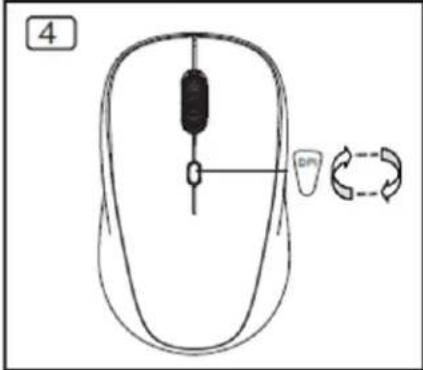
The wireless notebook mouse is reliable and particularly designed for use with notebook. The optical mouse with 2.4 GHz nano USB receiver offers, with its range of up to 10 m, maximum flexibility. The ergonomic design offers best comfort and makes the mouse suitable for both left and right handers. The ednet wireless mouse allows, thanks to its features and functions, accurate control of notebook or PC. The fast scroll wheel is perfectly suitable for fast navigation. With its adjustable sensitivity settings (800, 1200, 1600 DPI), the mouse can be adjusted to your individual needs. The energy saving mode helps to conserve battery power.
Specification
• Maximum Wireless working distance is 10 meters
• 2.4GHz mouse: Radio Frequency/32channels hopping with 2 group from 2.405\~2.476GHz
• Resolution: 800/1200/1600DPI switchable
• Receiver: nano receiver
• Wheel: 1 mechanical scrolling wheel
• Power Consumption: DC=1.5V, 19mA
• Automatic power-saving mode.
Installation
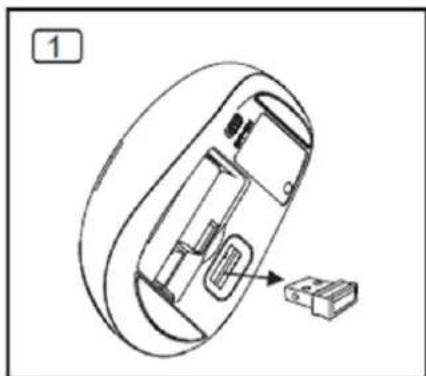
- Take out nano receiver
- Connect nano receiver to PC, until the automatic installation is completed.
- Open the battery cover on bottom and insert battery.
- Finish above steps, click left or right button, then you can start to use it.
natural_image
Technical line drawing of a mechanical device with internal components and a small component (no text or symbols)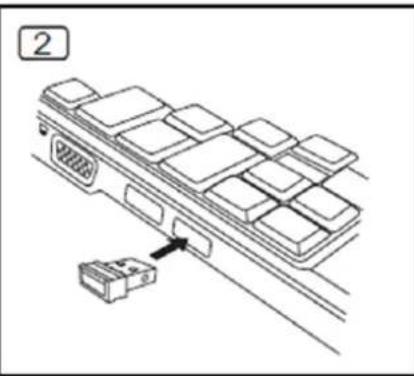
natural_image
Diagram of a device panel with an attached connector (no text or symbols)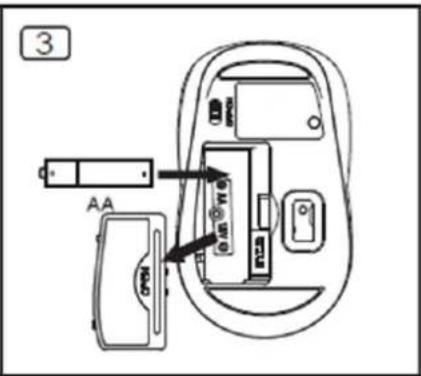
natural_image
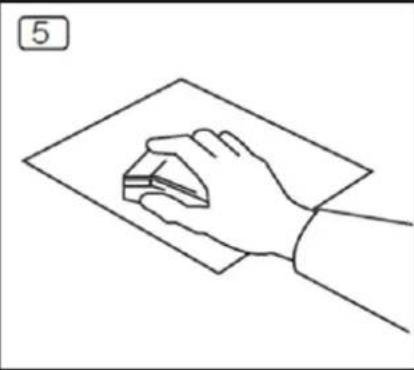
Line drawing of a hand holding a small object over a flat surface, no text or symbols presentCaution: Below factors may cause the wireless performance
- Please do not use any metal object to be close the nano receiver.
- If some other wireless devices closing Nano receiver, please remove it and reconnect nano receiver to get different communication ID.
- When the battery is out of energy, please change a new battery.
- Please do not use mouse on very shiny surface or transparent surface.
- Please do not put Nano receiver next to Bluetooth dongle
- Never recharge the Non-Rechargeable Batteries and never throw them into fire.
- Please observe local regulations for disposing of batteries.
Hereby ASSMANN Electronic GmbH, declares that this device is in compliance with the requirements of Directive 2014/53/EU and the Directive 2011/65/EU for RoHS compliance. The complete declaration of conformity can be requested by post under the below mentioned manufacturer address.
Warning:
This device is a class B product. This equipment may cause some radio interference in living environment. In this case, the user can be requested to undertake appropriate measures to prevent interference.
www.assmann.com
Assmann Electronic GmbH
Auf dem Schüffel 3
58513 Lüdenscheid
Germany

Brand : ASSMANN Electronic
Model : 81166
Category : Scale