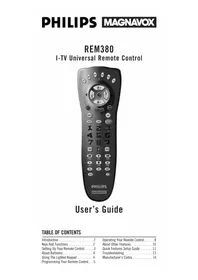
REM380 - Remote control PHILIPS - Free user manual and instructions
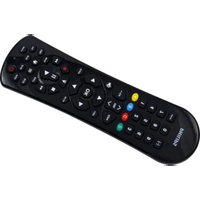
Find the device manual for free REM380 PHILIPS in PDF.


| Product Type | Universal Remote Control |
| Brand | Philips |
| Model | REM380 |
| Power Supply | 4 AAA alkaline batteries (not included) |
| Battery Life | Approximately 6-12 months with normal use |
| Range | Up to 15 feet (4.6 meters) |
| Control Capacity | Up to 6 components (TV, VCR, DVD, Cable, Satellite, Audio) |
| Programming Methods | Manual code entry, Auto Scan code search |
| Code Saver | Retains codes up to 10 minutes during battery replacement |
| Lighted Keypad | Backlit keys with 5-second illumination after key press |
| Battery Saver | Auto deactivates if a key is pressed for more than 30 seconds |
| Special Keys | I-TV, GUIDE, SELECT, SCAN, MCP (multi-component power), FC1/FC2 (favorite command), SLEEP, LAST, MUTE |
| Volume Lock | Can lock volume control to a specific component |
| Punch Through | VCR transport keys work in TV, CBL, DSS modes without switching |
| Pre-Programmed For | Philips/Magnavox components (skip programming) |
| Dimensions (approx.) | 8.5 x 2.5 x 1.2 inches (21.6 x 6.4 x 3.0 cm) |
| Weight (approx.) | 0.5 lbs (0.23 kg) with batteries |
| Color | Black |
| Cleaning | Wipe with a soft, dry cloth. Avoid liquids and abrasives. |
| Safety | Do not mix old/new batteries or battery types. Keep away from moisture and heat. |
| Warranty | 1 year limited (check with manufacturer) |
Frequently Asked Questions - REM380 PHILIPS
User questions about REM380 PHILIPS
0 question about this device. Answer the ones you know or ask your own.
Ask a new question about this device
Download the instructions for your Remote control in PDF format for free! Find your manual REM380 - PHILIPS and take your electronic device back in hand. On this page are published all the documents necessary for the use of your device. REM380 by PHILIPS.
USER MANUAL REM380 PHILIPS
I-TV Universal Remote Control

User's Guide
TABLE OF CONTENTS
| Introduction | 2 |
| Keys And Functions | 2 |
| Setting Up Your Remote Control | 3 |
| About Batteries | 4 |
| Using The Lighted Keypad | 4 |
| Programming Your Remote Control | 5 |
| Operating Your Remote Control. | 8 |
| About Other Features | 10 |
| Quick Features Setup Guide | 11 |
| Troubleshooting | 13 |
| Manufacturer's Codes | 14 |
INTRODUCTION
The I-TV Universal Remote Control is the complete solution for all of your interactive-television remote control needs. It can be programmed to operate a variety of components, up to six at a time, and is packed with easy-to-use features such as:
- Easy access to On-Screen menus of the TV, VCR, DSS, and Cable Box (see page 8 for details).
-
Channel Scan, a convenient way to “channel surf” by scanning channels.
-
Auto Scan code search to help p remote control for a variety of components, including older/discontinued models.
- Multi-component Power Key for master on/off control of home entertainment components with a single key press.
- Favorite Command Keys that allow you to define and program a number of key presses into a sequence that can be accessed by a single key press.
KEYS AND FUNCTIONS
Use the illustration below to locate I-TV keys and then study the numbered Key
Charts (on the next page) to learn how each one functions.

Key Charts
① Red Indicator Light
The Red Indicator Light blinks to show that the remote control is working and also provides feedback during programming sequences.
② Component Keys
Press TV, VCR, CBL, AUD, DSS, or CD once to select a home entertainment component to control.
③ CH Keys
Use CH + (or CH-) to select the next higher (or lower) channel for the selected home entertainment component.
④ VOL Keys
Use VOL + (or VOL -) to raise (or lower) the sound volume.
⑤ I-TV Key
Press I-TV to access the On-Screen Menu for your home entertainment components (see page 8).
⑥ EXIT Key
Use EXIT to exit out of the selected component's menu or guide.
⑦ SELECT Key
Use SELECT to choose options from your selected component's menu or guide.
⑧ GUIDE Key
Use GUIDE to display the programming guide for your components (if applicable).
⑨ MUTE Key
Press MUTE once to turn sound off or on.
⑩ LAST Key
Press LAST once to recall the last channel and to page back one screen in the main menu.
⑪ SLEEP Key
Press SLEEP to activate your TV's internal sleep timer.(Not available for all TVs.)
⑫ LIGHT Key
Press LIGHT once to turn on or off the keypad back light.
⑬ POWER Key
Press POWER once to turn on or off the selected home entertainment component.
⑭ Keypad
Use the keypad (0 \~ 9) to directly enter in channels (for example, 09 or 31). The keypad is also used for all programming sequences, such as entering in your programming codes.
⑮ SCAN Key
Press SCAN once to change channels every 3 seconds. Press it again to stop the scan.
⑯ ENTER Key
Press ENTER once after entering channel numbers on some TV models.
⑰ VCR Transport Keys
Use the VCR Transport Keys to control your VCR, as well as CD or DVD player. Press REC twice to record a tape.
⑱ FC1 and FC2 Keys
User-programmable Favorite Command Keys (see page 9 for details).
⑲ MCP Key
Multiple-component On/Off Key (see page 8 for details).
⑳ TV/VCR Key
Press TV/VCR once to view VCR playback or TV through the VCR.
②1 SET Key
Use SET for all programming sequences.
SETTING UP YOUR REMOTE CONTROL
Before using your new I-TV remote control, you will need to obtain and install new batteries, as described on the next page.
Then you'll also need to program the I-TV remote control with the correct code numbers for your specific components. See instructions starting on page 5.
ABOUT BATTERIES
NOTE: The I-TV requires four (4) new "AAA" alkaline batteries (not supplied). Do not mix old and new batteries or mix alkaline with manganese-type batteries.
Installing Batteries

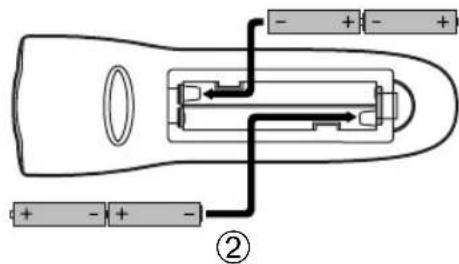
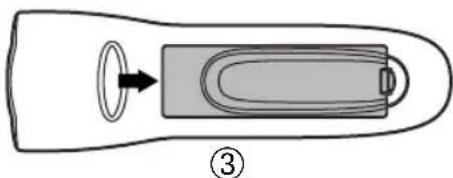
- On the back of the remote control, push the tab and lift the battery compartment cover off.
- Match the + and - marks on the batteries to the + and - marks in the battery case and insert four (4) "AAA" alkaline batteries.
- Press the battery cover back into place. The tab should click when the cover is locked.
USING THE LIGHTED KEYPAD
When activated, the I-TV remote control features a lighted keypad that illuminates all of the remote control keys whenever you press any key.
-
To turn on the keypad back light, press LIGHT once. The keypad will remain lit for 5 seconds after you release any key.
-
Test the unit by pressing POWER and any Component key (e.g., TV, VCR, CBL, etc.). If the batteries are inserted correctly, the red indicator light will blink once.
Battery Saver
The I-TV has a Time-Out feature that will automatically deactivate the remote control if a key is depressed for more than 30 seconds. This feature will help conserve the battery life should your remote control get stuck in a place where keys remain depressed (e.g., between the sofa cushions).
Replacement And Code Saver
When the batteries need replacing, the I-TV remote control will stop working and will require four (4) new "AAA" alkaline batteries for continued operation. Once you remove the old batteries, program settings and codes will be saved for 10 minutes, allowing adequate time to insert new ones.
However, if you do not replace the batteries within the allotted time (i.e., 10 minutes), you will have to reprogram the I-TV remote control (see next page).
- To turn off the keypad back light, press LIGHT once again.(The keypad will not light whenever you press any key.)
Philips/Magnavox Components
The I-TV remote control can control up to six different components and is already pre-programmed for use with newer Philips/Magnavox audio/video equipment. Unless you want to change a factory setting, skip the programming instructions and simply start using your new remote control.
Programming Other Components
To control component brands other than Philips/Magnavox, you'll need to perform the following steps to manually program the I-TV with codes listed under Manufacturer's Codes on pages 14 through 19. Or as alternative, you can use the Auto Scan feature, on page 6, to program your component codes.
The following chart lists the I-TV's component keys and what type of device each key will control:
Key Programmed To Control
TV TV
VCR VCR, DVD or LD Player
CBL Cable Box
AUD Amplifier, Tuner, Misc.Audio, or CD Player
DSS Digital Satellite System
CD CD Player, Amplifier, Tuner, or Misc. Audio
NOTE: If you want the component keys to control other types of devices, you'll need to reassign the component keys. See page 7.
IMPORTANT: Please completely read and review the following steps before proceeding. We recommend highlighting the codes (starting on page 14) for the brands you wish to program or writing them down in the supplied chart.
Setup Codes For My Components
| TV | ||||
| VCR | ||||
| CBL | ||||
| DSS | ||||
| CD | ||||
| DVD | ||||
| AUDIO | ||||
| LD | ||||
| OTHER |
To Manually Program The Remote Control:
NOTE: To program a TV/VCR Combo, skip these instructions and follow the steps on the next page.
- Manually turn on a component (e.g., TV, VCR, etc.) and, if applicable, insert media (e.g., cassette).
- On the remote control, press a component key once (e.g., TV, VCR, CBL, AUD, DSS, or CD).
- SET Press and hold SET (approx. 5 seconds) until the red light blinks twice, then release SET.
- Enter the first four-digit code for your brand of component. If performed correctly, the red light will blink twice.
- AIMI Aim the remote control at the component and press POWER once. It should turn off. If it does not respond, repeat steps 2 and 3, trying each code for your brand until you find one that works. If it still does not work, try using Auto Scan (on page 6) to program your component.
- Repeat steps 1 through 5 for each component you want to program into the I-TV remote control
NOTES: Press each key within 10 seconds of the previous entry. Otherwise, the remote control will exit the programming mode.
If you press SET at any time (except during step 3), the remote control will exit the programming mode without saving your entries. You will have to start with step 1 to begin programming again.
Programming A TV/VCR Combo
Perform the following instructions to have the I-TV control a TV/VCR Combo. For Sharp and Sony models, also see page 13.
IMPORTANT: Please completely read and review these steps before proceeding. Highlight the code (on page 16) for the brand you wish to program or write it down in the supplied chart.
Setup Code For My Component
TV/VCR

- Manually turn on the TV/VCR Combo; insert a video cassette.
- On the remote control, press VCR once.
- Press and hold SET until the red light blinks twice, then release SET.
- Use the Setup Codes For TV/VCR Combos (on page 16) to find the brand name.Enter the first four-digit code for your component.If performed correctly, the red light will blink twice.
- A# the remote control at the TV/VCR Combo. Press POWER once. It should turn off. If it does not respond, repeat steps 2-3, trying each code for your brand until you find one that works. If it still doesn't work, use Auto Scan (later on this page) to program your TV/VCR combo.
NOTE: If the TV/VCR Combo does not have a Power key, press PLAY on the I-TV.
- If you've located a TV/VCR code that works, but it has a separate TV code, you'll also need to program it into the remote control to access volume control as follows:
a. Press TV once. The red light will blink twice.
b. Press and hold SET until the red light blinks twice, then release SET.
c. Enter the TV code for
the TV/VCR Combo.
If performed correctly, the red light will blink twice.
- (continued)
If there is no separate TV code listed, you will need to perform the following steps to access volume control:
a. Press VCR once.
b. Press and hold SET until the red light blinks twice, then release SET.
c. Press VOL +.
Programming With Auto Scan
If your component does not respond to the remote control after trying all codes listed for your brand, or if your brand is not listed at all, try searching for your code using Auto Scan. For example, to search for a code for a TV:
- On the remote control, press TV once.
- Press and hold SET until the red light blinks twice, then release SET.
- Aim the remote control at the TV and press SCAN. The red light will blink twice.
- Continue aiming the remote control at the TV (which may take up to 5 minutes) until it turns off. Immediately press any key except VOL+, VOL-, EXIT, SCAN, or SET.
NOTES: In the search mode, the remote will send IR (infrared) codes from its library to the selected device, starting with the most popular code first.
If you have passed by the code that turns off the TV, press VOL—one or more times until the TV turns on again.
- Todlock in the code and exit Auto Scan, press and release SET the red light will blink twice.
- To search for codes of other com- ponents, repeat steps 1 through 5, but substitute the appropriate key (e.g., VCR, CBL, AUD, DSS, or CD) for the (VCR, Cable, Audio, Satellite, or CD) component you are searching for.
Checking The Auto Scan Codes
If you have set up the remote control using Auto Scan, you can now find out which four-digit code is operating your component:
- On the remote con-

trol, press a component key once (e.g., AUD, DSS, or CD).
-
Press and hold SET until the red light blinks twice, then release SET.
-
Enter 9-9-0. The red light will blink twice.

- To view the code for the first digit, press 1 once. Wait 3 seconds, count the red light blinks (e.g., 3 blinks = 3) and write down the number.
NOTE: If a code digit is "0", the red light will not blink.
-
Repeat step 4 three more times 3 for remaining digits. Use 2 for the second digit, 3 for the third digit, and 4 for the fourth digit.
-
To find codes of other components, repeat steps 1 through 5, but substitute the appropriate key (e.g., VCR, CBL, AUD, DSS, or CD) for the component you are checking. As before, write down each four-digit code.
Re-Assigning Component Keys
The I-TV remote can be set up to control any combination of six home entertainment components. By following these instructions, you can re-assign or duplicate a component key onto an unused component key.
-
Press and hold SET until the red light blinks twice, then release SET.
-
9 Enter 9-9-2. The red light will blink twice.
-
Press the Component key (e.g., TV, VCR, etc.) to be moved once, then press the Component key (e.g., AUD, etc.) to be re-assigned once. When re-assignment is done, the red light will blink twice to confirm your choice.
-
The re-assigned key is now ready to be programmed for the new component. See Programming Other Components on page 5.
Example – Re-assigning The AUD Key To Be A DVD (Or VCR) Key:
For example, to have the I-TV control a TV, a Cable Converter, and two VCRs, you will need to re-assign the unused AUD key to operate the second VCR as follows:
-
Press and hold SET until the red light blinks twice, then release SET.
-
Enter 9-9-2. The red light will blink twice.
-
Press VCR once.
-
Then press AUD once. When re-assignment is done, the red light will blink twice to confirm your choice.
-
The AUD key is now ready to be programmed for your DVD (or VCR) player. See Programming Other Components on page 5.
The I-TV Universal Remote Control is designed to be an enhanced replacement for your original remote control. Although most keys operate the same (see Key Charts on page 3), some do differ or provide unique features as described below.
I-TV Key
The I-TV key works just like the MENU key of your original remote control and allows you to access the on-screen menu of the component you have selected (e.g., TV, VCR, DVD, LD, CBL, or DSS).
Moreover, while in the I-TV mode, the VOL+, VOL-, CH+, and CH - keys* will allow you to navigate and adjust the on screen menu settings just like you would with your original remote control.
To exit out of I-TV mode, either press I-TV again or EXIT (depending on how the original remote control functioned) to return to normal operation.
*NOTE: If your component's On-Screen menu requires the use of the Volume and Channel keys to navigate and change the On-Screen menu settings, press I-TV again while the On-Screen menu is displayed.
GUIDE Key
The GUIDE key works just like the GUIDE key of your original remote control and allows you to access the On-Screen guide* of the component you have selected (e.g.CBL,DSS, and some newer TVs).
While in the Guide mode, the VOL+, VOL−, CH+, and CH− keys* will allow you to navigate Up, Down, Left and Right just like you would with your original remote control.
To exit out of the Guide mode, either press GUIDE key again or EXIT (depending on how the original remote control functioned) to return to normal operation.
NOTE: *On-Screen guide is an interactive channel listings menu that is available on most DSS Satellite systems and is also used with advanced converters being offered by some cable systems. This feature is not applicable for all DSS or cable boxes.
SELECT Key
The SELECT key allows you to choose features displayed on your On-Screen menu while in the I-TV mode, and programs while in the GUIDE mode.
If your original remote control includes a SELECT key, then the I-TV's SELECT key will operate in the same manner for the selected component.
SCAN Key
The SCAN key allows the remote control to scan the TV, VCR, CBL and DSS channels. When activated, the remote control will change channels every 3 seconds.
- On the remote con-

trol, press TV, VCR, CBL, or DSS once.
-
Press SCAN once. Scanning will start with the current channel, then proceed to the next channel up, and continue until all channels of your TV, VCR, CBL or DSS component are scanned.
-
To stop scanning channels, press SCAN (or any key).
MCP Key
The I-TV remote control includes a multi-component power (MCP) key that can be programmed for master power on/off control of components using a single key.
To Program The MCP Key:
-
On the remote control, press and hold SET until the red light blinks twice, then release SET.
-
Enter 9-9-5. The red light will blink twice.

- Press MCP once.

Press a Component key once (e.g., TV, VCR, CBL, AUD, DSS, or CD).
-
Press POWER.
-
Repeat steps 4 and 5 one or more times for each component you want under master power on/off control.
-
Press and hold SET until the red light blinks twice, then release SET.
MCP Key (continued)
To Clear The MCP Key:
-
On the remote control, press and hold SET until the red light blinks twice, then release SET.
-
En 9-9-5. The red light will blink twice.
-
Press MCP once.
-
Press and hold SET until the red light blinks twice, then release SET.
FC1 And FC2 Keys
The FC1 and FC2 keys can be setup to perform a number of functions with a single key press once the selection is programmed. Repetitive, time-consuming operations can be grouped for easy, convenient access through the press of one key.
The FC keys are ideal for home theater operations, setting a favorite channel, adding to multiple component uses, guide steps or other multiple functions you would like to control with one key press. On one key, you can define and program a sequence of events.
Moreover, each FC key can hold up to 15 key presses, allowing optimal individual customization. Below are a few examples to get you started.
Programming A Favorite Channel
With so many channels available through your cable system or satellite provider, a favorite channel can be programmed for easy, direct channel selection with one key press.
For example, let's assume your favorite programs are on channel 71. Use the following instructions to program the FC1 or FC2 key for this channel:
-
On the remote control, press and hold SET until the red light blinks twice, then release SET.
-
Ent 9-9-5. The red light will blink twice.
-
Press and release either FC1 or FC2.
-
On the remote con-
trol, press TV, VCR, CBL, or DSS once.
- Ente 7-1. 1
NOTE: If you have access to over 100 channels, enter in 071.
- Press and hold SET until the red light blinks twice, then release SET.
Programming A Secondary MCP Key With Instant Channel Selection
Just like the MCP key, the FC1 and FC2 keys can be programmed to turn on and off your equipment. For instance, let's say you want your child to be able to easily turn on the equipment and select their favorite channel.
You can setup a sequence on the FC1 or FC2 key to turn on the TV and cable box, and then tune the cable box to a specific channel (e.g., 11) with the push of one key.
-
On the remote control, press and hold SET until the red light blinks twice, then release SET.
-
Ent 9-9-5. The red light will blink twice.
-
Press and release either FC1 or FC2.
-
Enter the following sequence:

- Press and hold SET until the red light blinks twice, then release SET.
Now when you press the programmed FC key, the Cable box and TV will turn on and the Cable box will tune to channel 11.
Volume Lock
The I-TV remote control is set at the factory to control the volume independently while in the TV, VCR, DSS, CBL, AUD, and CD modes.
To control the volume from one mode (e.g., TV) while in another mode (e.g., CBL, DSS, or VCR*), perform the instructions below to lock the volume setting. This procedure will not affect separate control of your audio component's volume in the AUD and CD modes*.
*NOTE: By pressing AUD or CD before entering the sequence below, the I-TV remote control will operate your stereo and home theater volume controls in all modes.
Example – To Set Volume Lock To TV Mode:
- On the remote control, press TV once.
- Press and hold SET until the red light blinks twice, then release SET.
- Press VOL+. The red light will blink twice.
Punch Through
The VCR Transport Keys (i.e., REW, PLAY, FFWD, REC, STOP, and PAUSE) are set at the factory to control the VCR, even if TV, CBL, or DSS is the selected mode. In other words, VCR control “punches through” regardless of what mode is on. Moreover, you do not have to press VCR before pressing the mode key.
However, if AUD or CD is the selected mode, the VCR Transport Keys will not control the VCR unless you press VCR first. In these two modes, the VCR Transport Keys will operate the functions for the selected component.
QUICK FEATURES SETUP GUIDE
This guide is provided here for your convenience as a quick reference for performing remote control sequences.
If you need more details, reread the full instructions presented in earlier pages.
Component Setup
| Turn on component (e.g., TV). | Press component key once (e.g., TV). | Press SET until Red Light blinks twice; release SET. | Enter 4-digit code for your brand; Red Light blinks twice after last #. | Press POWER once; if no response, repeat steps with next code. |
| 1 | 2 | 3 | 4 | 5 |
Auto Scan
| Turn on component (e.g., TV). | Press component key once (e.g., TV). | Press SET until Red Light blinks twice; release SET. | SCAN | Press SET until Red Light blinks twice; release SET to lock code. |
| * NOTE: Not VOL+, VOL-, EXIT, SCAN, or SET. | ||||
| 1 | 2 | 3 | 4 | 5 |
Code Verification
| Press component key once (e.g., TV). | Press SET until Red Light blinks twice; release SET. | Enter 9-9-0; the Red Light will blink twice. | Press 1 once for 1st digit. Wait 3 sec. and count blinks. Number of blinks equals value of code digit. Repeat with 2, 3, and 4. |
Volume Lock
| Press component* key once (e.g., CBL).* NOTE: Component must have volume capabilities.1 | Press SET until Red Light blinks twice; release SET.2 | Press VOL+ once. Volume now controlled through component selected in step 1.3 |
Device Re-Assignment (e.g., AUD Key Becomes Secondary VCR Key)

Press SET until Red Light blinks twice; release SET.

Enter 9-9-2; the Red Light will blink twice.

Press component key to be moved once (e.g., VCR).

Press component key to be reassigned once (e.g., AUD). Red Light will blink twice. Reassigned key is now ready for programming.
①
②
③
④
Programming The FC Keys (See Page 9 For Further Instructions)

Press SET until Red Light blinks twice; release SET.

Enter 9-9-5; the Red Light will blink twice.

Press FC1 or FC2 once.

Press component key that controls channels once (e.g., CBL). Then enter channel # (e.g. 7-1)*.

Press SET until Red Light blinks twice; release SET.
* NOTE: If over 100 channels, enter 0-7-1.
①
②
③
④
⑤
PROBLEM: Red Indicator Light does not blink when you press a key.
SOLUTION: Replace the batteries with four (4) new “AAA” alkaline batteries (see page 4).
PROBLEM: The VOL+, VOL−, and MUTE keys are not functional.
SOLUTION: Make sure the remote control is not in the I-TV mode, and that volume control is locked to a component that has volume capabilities and is programmed into the I-TV remote control.
PROBLEM: Red Indicator Light blinks when you press a key, but home entertainment component does not respond.
SOLUTION: Make sure you are aiming the I-TV remote control at your home entertainment component and that you are within 15 feet of the component you are trying to control.
PROBLEM: The remote control does not control home entertainment components or commands are not working properly.
SOLUTION: Try all listed codes for the component brand being set up. Make sure all components can be operated with an infrared remote control.
PROBLEM: TV/VCR Combo does not respond properly.
SOLUTION: Use the VCR codes for your brand. Some combo units may require both a TV code and a VCR code for full operation (see page 6).
PROBLEM: CH+, CH-, and LAST do not work for your RCA TV.
SOLUTION: Due to an RCA design (1983-1987), only the original remote control will operate these functions.
PROBLEM: Changing channels does not work properly.
SOLUTION: If original remote control required pressing ENTER to change channels, press ENTER on the I-TV after entering a channel number.
PROBLEM: Tried Auto Scan and still could not find a working code.
SOLUTION: Try Auto Scan again after clearing out the component key as follows: Press and hold ENTER until Red Light blinks twice, then release. Next enter 9 - 9 - 2. Then press and release the component key to be cleared twice.
PROBLEM: Remote control does not turn on Sony or Sharp TV/VCR Combo.
SOLUTION: For power on, these products require programming TV codes into the I-TV remote control. For Sony, use TV code 0029 and VCR code 0061. For Sharp, use TV code 0112 and VCR code 0077.
Setup Codes for TVs:
| A-Mark 0032 | ||
| AOC 0032, 0048, 0059, 0081, 0214 | ||
| Abex 0061 | ||
| Admiral 0122, 0492 | ||
| Adventura 0075 | ||
| Aiko 0121 | ||
| Akai 0059 | ||
| Alaron 0208 | ||
| Ambassador 0206 | ||
| America Action 0209 | ||
| Ampro | 0780 | |
| Anam | 0209 | |
| Anam National 0084 | ||
| Archer 0032 | ||
| Astro Text 0408 | ||
| Audiovox | 0032, 0121, 0209, 0480, 0652 | |
| Baysonic | 0209 | |
| Belcor | 0048 | |
| Bell & Howell | 0045, 0183 | |
| Bradford | 0209 | |
| Brockwood | 0048 | |
| Broksonic | 0032, 0265, 0492 | |
| CCF | 0246 | |
| CXC | 0209 | |
| Candle 0059,0075,0085,0215 | ||
| Carnivalc | 0059 | |
| Carver 0083 | ||
| Celebrity | 0029 | |
| Cineral | 0121, | 0480 |
| Citizen | 0059,0068,0075,0085,0089,0121,0215, | 0309 |
| Clairtone | 0214 | |
| Concerto | 0085 | |
| Contec | 0186,0187,0209,0214 | |
| Craig | 0209 | |
| Crosley | 0083 | |
| Crown | 0068, 0209 | |
| Curtis Mathes | 0045, 0059, 0068, 0076, 0080, 0083,0085, 0089, 0122, 0174, 0183, 0195,0480, 0495, 1176, 1376 | |
| Daewoo | 0048, 0068, 0121, 0480, 0652, 0653 | |
| Daytron | 0048 | |
| Denon | 0174 | |
| Dumont | 0046,0048 | |
| Dwin | 0749, | 0803 |
| Electroband | 0029, | 0214 |
| Electrohome | 0410,0418 | |
| Emerson | 0048, | 0067, |
| 0207, | 0208, | |
| 0311, | 0492, | |
| Envision | 0059 | |
| Fisher | 0183, | 0188 |
| Fujitsu | 0208 | |
| Funai | 0200,0208,0209 | |
| Futuretech | 0209 | |
| GE | 0050, | 0056, |
| 0122, | 0164, | |
| 1176, | 1376 | |
| Gibraltar | 0046, | 0048, |
| GoldStar | 0030, | 0048, |
| Gradiente | 0082, | 0085, |
| Grunpy | 0208, | 0209 |
| Hallmark | 0207 | |
| Harley Davidson | 0208 | |
| Harman/Kardon | 0083,0107 | |
| Harvard | 0209 | |
| Hitachi | 0061, 0067, 0085, 0174, 0180, 0308 | |
| Infinity | 0083 | |
| Inteq 0046 | ||
| JBL | 0083 | |
| JCB | 0029 | |
| JVC | 0082 | |
| Janeil | 0075 | |
| KEC | 0209 | |
| KTV | 0059, | 0068, |
| Kawasho | 0187 | |
| Kaypani | 0081 | |
| Kenwood | 0048, | 0059 |
| Kloss | 0053,0075,0107 | |
| LG | 0085 | |
| LXI | 0076,0083,0183,0185,0207 | |
| Logik | 0045 | |
| Luxman | 0085 | |
| MEI | 0214 | |
| MGA | 0048, | 0059, |
| MTC | 0048, | 0059,0085, |
| Magnavox | 0049, | 0053, |
| 0208, | 0215, | |
| Majestic | 0045 | |
| Marantz | 0059, | 0083 |
| Matsushita | 0279 | |
| Megatron | 0032, | 0174, |
| Memorex | 0045,0085,0179,0183,0207,0279,0492 | |
| Midland | 0046, | 0061, |
| Minutz | 0050 | |
| Mitsubishi | 0048,0122,0179,0207 | |
| Motorola | 0084, | 0122 |
| Multitech | 0209,0246 | |
| NAD | 0185,0195,0207 | |
| NEC | 0048, | 0059, |
| NTC | 0121 | |
| Nikko | 0059, | 0121, |
| Noblex | 0459 | |
| Noshi | 0047 | |
| Onwa | 0209 | |
| Optimus | 0183, | 0195, |
| Optonica | 0122, | 0194 |
| Orion | 0208, | 0265, |
| Panasonic | 0080, | 0084, |
| Penney | 0032, | 0047, |
| 0061, | 0068, | |
| 0164, | 0185, | |
| Philco | 0048, | 0049, |
| 0174, | 0492 | |
| Philips | 0083 | |
| Pilot | 0048,0059,0068 | |
| Pioneer | 0067, | 0195 |
| Portland | 0048,0068, | 0121 |
| Prism | 0080 | |
| Proscan | 0076 | |
| Proton | 0183, 0032,0081,0207,0195 | 0206, |
| Pulsar | 0214, 0046, | 0265, 0048 |
| Quasar | 0653, 0080, | 0084, |
| RCA | 0047,0048,0058,0067,0076,0080,0119,1376, | 0122,1476 |
| Radio Shack | 0048,0059,0061,0068,0076,0085,0183,0194,0207,0209 | |
| Realtek | 0058, 0076, 0048,0059,0061,0068,0085,0183,0194,0207,0209 | 0080,0311, |
| Rhapsody 0214 | ||
| Runco | 0059, 0046,0059,0526,0632 | |
| SSS | 0059, 0061,0085,0183,0209 | 0207 |
| Sampo 0059,0061,0068,0081 | ||
| Samsung | 0048,0059,0061,0085,0089,0207 | |
| Samsux | 0068 | |
| Sansei | 0480 | |
| Sansui 0492 | ||
| Sanyo | 0175,0183,0188,0513 | |
| Scimitsu | 0048 | |
| Scotch | 0207 | |
| Scott | 0048,0207,0208,0209,0265 | |
| Sears | 0076,0083,0085,0175,0183,0185,0188,0200,0207,0208 |
Setup Codes for TVs (cont.):
| Semivox 0209 | |
| Semp 0185 | |
| Sharp 0068, 0122, 0186, 0194, 0415 | |
| Shogun 0048 | |
| Signature 0045 | |
| Simpson 0215, 0216 | |
| Sony 0029, 0109, 0140 | |
| Soundesign 0207, 0208, 0209, 0215 | |
| Spectricon 0032 | |
| Squareview 0200 | |
| Starlite 0209 | |
| Suprc-Macy 0075 | |
| Supremc 0029 | |
| Sylvania 0049, 0057, 0059, 0083, 0125, 0410 | |
| Symphonic | 0200 |
| TMK | 0085, 0206, 0207 |
| Tandy | 0122 |
| Tatung | 0032, 0084 |
| Technics 0080, 0279 | |
| Technol Acc 0208 | |
| Techwood | 0032, 0080,0085 |
| Teknika | 0045, 0048,0068,0083,0085,0089,0121, 0179,0208,0209,0215 |
| Telefunken | 0085 |
| Toshiba | 0089, 0183, 0185 |
| Tosonic 0214 | |
| Totevision | 0068 |
| Trical | 0186 |
| Universal 0056 | |
| Vector Research | 0059 |
| Victor | 0082 |
| Vidikron 0083 | |
| Vidtech | 0048, 0207 |
| Viking | 0075 |
| Wards | 0045, 0048, 0049, 0050, 0056, 0057,0058, 0059, 0083, 0085, 0109, 0125,0140, 0194, 0207, 0208 |
| White Westinghouse | 0492, 0652, 0653 |
| Yamaha | 0048,0059 |
| Zenith | 0045, 0046, 0121, 0492 |
| Zonda | 0032 |
Setup Codes for VCRs:
| Admiral 0077, 0238 | |
| Adventura | 0029 |
| Aiko | 0307 |
| Aiwa | 0029, 0066, 0336 |
| Akai | 0070, 0078, 0082, 0090, 0135 |
| America Action | 0307 |
| American High | 0064 |
| Asha | 0269 |
| Audiovox 0066 | |
| Beaumark | 0269 |
| Bell & Howell | 0133 |
| Brocksonic | 0238 |
| Broksonic | 0031,0150,0213,0238,0240,0324,0390, 0508 |
| CCE | 0101, 0307 |
| Calix | 0066 |
| Canon | 0064 |
| Capehart | 0049 |
| Carver | 0110 |
| Cineral | 0307 |
| Citizen | 0066,0307 |
| Colt | 0101 |
| Craig | 0066,0076,0101,0269,0300 |
| Curtis Mathes | 0064, 0070, 0089, 0191 |
| Cybernex 0080,0269 | |
| Dacwoo 0049, 0074,0307,0590 | |
| Daytron 0049 | |||
| Denon | 0071 | ||
| Dynatech | 0029 | ||
| Electrohome | 0066 | ||
| Electrophonic | 0066 | ||
| Emerex | 0061 | ||
| Emerson | 0029, | 0031, | 0065, |
| 0097, | 0117, | 0150, | |
| 0240, | 0241, | 0307, | |
| 0508, | 0590 | ||
| Fisher | 0076, | 0083, | 0095, |
| Fuji | 0062, | 0064 | |
| Funai | 0029 | ||
| GE | 0064, | 0077, | 0089, |
| Garrard | 0029 | ||
| Go Video | 0261,0461,0555 | ||
| GoldStar 0066,0067 | |||
| Gradiente | 0029,0037 | ||
| Grundig 0224 | |||
| HI-Q | 0076 | ||
| Harley Davidson | 0029 | ||
| Harman/Kardon | 0067,0104,0110 | ||
| Harwood 0097,0101 | |||
| Headquarter | 0075 | ||
| Hitachi | 0029,0070,0071,0094,0134 | ||
| Hughes Network Sys. | 0071 | ||
| JVC | 0037,0070,0096 | ||
| Jensen | 0070 | ||
| KFC | 0066,0307 | ||
| KI.H | 0101 | ||
| Kenwood 0067,0070,0096 | |||
| Kodak | 0064,0066 | ||
| LXI | 0066 | ||
| Lloyd's | 0029,0237 | ||
| Logik 0101 | |||
| MEI | 0061 | ||
| MGA | 0072,0090,0269 | ||
| MGN Technology | 0269 | ||
| MTC | 0029,0269 | ||
| Magnasonic | 0307 | ||
| Magnavox | 0029,0064,0068,0110,0139,0178,0592 | ||
| Magnin | 0269 | ||
| Marantz 0064,0110 | |||
| Marta | 0066 | ||
| Matsushita | 0064,0191,0483 | ||
| Memorex | 0029, | 0064, | 0066, |
| 0077, | 0133, | 0238, | |
| 1191, | 1291 | ||
| Minolta | 0071,0134 | ||
| Mitsubishi | 0072, | 0077, | 0090, |
| Motorola | 0064, | 0077 | |
| Multitech | 0029, | 0101 | |
| NAD | 0087 | ||
| NEC | 0067, | 0069, | 0070, |
| Nikko | 0066 | ||
| Nikon | 0063, | 0282 | |
| Noblcx | 0269 | ||
| Olympus | 0064 | ||
| Optimus | 0066, | 0077, | 0087, |
| 0461, | 0483, | 1077, | |
| Optonica | 0091 | ||
| Orion | 0031,0213,0238,0324,0508 | ||
| Panasonic | 0064, | 0106, | |
| Penney | 0064,0066,0067,0069,0071,0083,0269 | ||
| Pentax | 0071,0094,0134 | ||
| Philco | 0064,0238,0508 | ||
| Philips | 0064,0091,0110,0139 | ||
| Pilot | 0066 | ||
| Pioneer | 0087, | 0096 | |
| Portland | 0049 | ||
| Profitronic | 0269 | ||
continued on next page...
Setup Codes for VCRs (cont.):
| Proscan 0089, 0231 | ||
| Protec | 0101 | |
| Pulsar | 0068,0080 | |
| Quarter | 0075Quartz | 0075 |
| Quasar | 0064, | 0106, |
| RCA | 0064, | 0071, |
| 0134, | 0135, | |
| Radio Shack 0029, 1066 | ||
| Radix | 0066 | |
| Randex | 0066 | |
| Realistic | 0029,0064,0066,0075,0076,0077,0091, | 0095, |
| Ricoh | 0063, | 0282 |
| Runco | 0068 | |
| STS | 0071 | |
| Salora | 0104 | |
| Samsung | 0074, | 0080, |
| Sanky | 0068, | 0077 |
| Sansui | 0029, | 0070, |
| Sanyo | 0075, | 0076, |
| Scott | 0072, | 0074, |
| 0240, | 0241 | |
| Sears | 0029, | 0064, |
| 0083, | 0095, | |
| Semp | 0074 | |
| Sharp | 0077, | 0091 |
| Shintom | 0101 | |
| Shogun | 0080, | 0269 |
| Singer | 0101 | |
| Sony | 0029, | 0061, |
| Sunpak | 0282 | |
| Sylvania | 0029, | 0064, |
| Symphonic | 0029 | |
| TMK | 0065, | 0237, |
| Tatung | 0070 | |
| Teac | 0029, | 0070 |
| Technics | 0064, | 0191 |
| Teknika | 0029, | 0064, |
| Thomas | 0029 | |
| Toshiba | 0072,0074,0095,0239,0241,0395 | |
| Totevision | 0066, | 0269 |
| Unitech | 0269 | |
| Vector | 0074 | |
| Vector Research | 0067,0069 | |
| Video Concepts | 0069,0074,0090 | |
| Videosonic | 0269 | |
| Wards 0029,0064,0071,0076,0077,0089,0091,0101,0110,0178,0241,0269 | ||
| White Westinghouse | 0238,0307 | |
| XR-1000 | 0029,0064,0101 | |
| Yamaha 0067 | ||
| Zenith | 0029,0062,0063,0068,0238,0508 | |
Setup Codes for TV/VCR Combos:
| American High | 0064 (for TV use 0080) |
| Brocksonic | 0031, 0323, |
| Colt | 0101 |
| Curtis Mathis | 0064 (for TV use 0080) |
| Daewoo | 0307 |
| Emerson | 0031, 0323, 0508 |
| Funai 0029 | |
| GE | 0064 (for TV use 0080), 0089 (for TV use 0076), 0077 (for TV use 0122), 0269 |
| Hitachi 0064 (for TV use 0080),0029 | |
| HQ | 0029 |
| Lloyds | 0029 |
| MGA | 0269 |
| Magnavox | 0110 (for TV use 0083), 0064 (for TV use 0080), 0029 |
| Magnin 0269 | |
| Memorcx | 0066, 0191 (for TV usc 0279) |
| Mitsubishi | 0077 (for TV usc 0122) |
| Orion 0031, 0323,0508 | |
| Panasonic 0191, | 0064 (for TV use 0080), 0191 (for TV use 0279) |
| Penney 0178, | 0089 (for TV use 0080), 0269, 0191 (for TV use 0279) |
| Quasar | 0064 (for TV use 0080), 0191 (for TV use 0279) |
| RCA 0089 (for TV use 0076), 0064 (for TV use 0080), 0077 (for TV use 0122) | |
| 0133 | |
| Sansui 0029, 0508 | |
| Sanyo 0269 | |
| Sears 0029, 0066 | |
| Sharp 0077 (for TV use 0122) | |
| Sony 0061 (for TV use 0029) | |
| Symphonic Zenith 0133, | 0029 0238, 0029 0269 0213, |
| 0150, | |
Setup Codes for Cable Converters:
| 0133, | 0134 | |
| ABC | 0030, 0032, 0036, 0037, 0040, 0042,0043, 0046 | |
| Allegro | 0182,0344 | |
| Antronix | 0051, 0236 | |
| Archer 0051,0182,0236,0826 | ||
| BB7062, | 029063, | 0064, |
| Belcor 0085 | ||
| Bell Andgewell | 0048110, | 0139 |
| Cable Star | 0085 | |
| Cabotogma | 0051 | |
| Cableview | 0051 | |
| Century | 0182 | |
| Citizen | 0182,0344 | |
| ColourNetec 0054, 0060 | ||
| Comtronics | 0069, 0089 | |
| Contec 0048 | ||
| Digi | 0666 | |
| Eastern 0031 | ||
| Emerson | 0826 | |
| Everquest | 0044, 0069 | |
| Focus 0429 | ||
| GC Electronics | 0085, 0236 | |
| Garrard 0182 | ||
| Gemini | 0044, 0099, 0826 | |
| General Instrument | 0040, 0305, 0505, 0839 | |
| GoldStar | 0069, 0173 | |
| Goodmind | 0826 | |
| Hamlin 0038, 0049,0063,0288,0302 | ||
| Hitachi | 0040 | |
| Hytex 0036 | ||
| Jasco 0044,0182,0344 | ||
| Jerrold 0032,0040,0041,0043,0044,0053,0305, 0505, 0839 | ||
| Linsay 0469 | ||
| Magnavox | 0043,0056,0571 | |
| Memorex | 0029 | |
| Movie Time | 0092, 0185 | |
| NAP 0036 | ||
| NSC | 0092, 0099, 0185 | |
| Novaplex 0647 | ||
| Oak | 0036, 0048 | |
| Optimus | 0050 | |
| Panasonic | 0029, 0050, 0136 | |
| Panther 0666 | ||
| Paragon | 0029 | |
| Philips | 0054,0056,0060,0182 | |
| Pioneer 0052, 0173, 0562 | ||
Setup Codes for Cable Converters (continued):
Popular Mechanics 0429
Prelude 0799
Proscan 0050
Pulsar 0029
Quasar 0029
RCA 0050
Radio Shack 0044, 0344, 0826, 0912
Realistic 0236
Recoton 0429
Regal 0049, 0288, 0302
Regency 0031
Rembrandt 0040, 0099
Runco 0029
SL Marx 0069
Samsung 0069, 0173
Scientific Atlanta 0035, 0037, 0046, 0506, 0906
Seam 0539
Signal 0044, 0069
Signature 0040
Sprucer 0050
StarSight 0451,0571
Starcom 0032,0044
Stargate 0044, 0069, 0799, 0826
Starquest 0044
Sylvania 0030
TFC 0339
TV860092
Tandy 0287
TeleCaption 0250
Teleview 0069
Texscan 0030
Timeless 0447
Tocom 0041,0042
Toshiba 0029
Tusa 0044
Unika 0051,0182,0236
United Artists 0036
Universal 0051,0085,0182,0220,0236
Viewstar 0056,0089,0092,0287
Zenith 0029,0037,0044,0083,0236,0554
Zentek 0429
Setup Codes for Satellite/DBS:
AlphaStar 0801
Echostar 0804
Expressvu 0804
General Instrument 0390, 0656, 0898
HTS 0804
Hitachi 0848
Hughes Network Sys. 0778
JVC 0804
Jerrold 0390, 0656
Magnavox 0751,0753
Memorex 0753
Next Level 0898
Panasonic 0730
Philips 0751,0753
Primestar 0390,0656
RCA 0172,0421,0595,0884
Radio Shack 0898
Sony 0668
Star Choice 0898
Toshiba 0819
Uniden 0751,0753
Zenith 0885
Setup Codes for CD Players:
ADC 0047,0062
Adcom 0184,0263
Aiwa 0041,0153,0186
Akai 0185
Audio Alchemy 0223
Audio-Technica 0199
BSR 0223,0274,0395
Burmester
California Audio Labs 0058
Carrera 0223
Carver 0186,0208,0328,0466
Craig 0644
Crown 0151
Curtis Mathes 0058
DAK 0274
DBX 0283
DKK 0029
Denon 0032,0063,0902
Emerson 0184,0193,0334,0498
Fisher 0117, 0203, 0208, 0371
GE 0038,0363
Garrard 0274,0309,0422,0449,0454
Genexxa 0061,0193,0334
GoldStar 0446
Harman/Kardon 0137,0186,0202,0455
Hitachi 0061,0184
JVC 0101,0684,0685,0686,0687
Kenwood 0057,0066,0219,0655,0855,0710
Kodak 0316
Koss 0763
Krell 0186
Kyocera 0047
LXI 0334
Linn 0186
Luxman 0122
MCS 0058,0072
MGA 0112
MTC 0449
Magnavox 0067,0158,0186,0254,0334,0555
Marantz 0058, 0067, 0186,
McIntosh 0316
Mission 0186
Mitsubishi 0112
NAD 0048,0328
NEC 0072, 0263
NSM 0186
Nakamichi 0176
Nikko 0193, 0198, 019
Onkyo 0130, 0897
Optimus 0029,0061,0066,0116,0174,0204,
0208, 0223, 022
0449, 0455, 046
Panasonic 0058,0332, 0396,
Parasound 0223,0449
Philco 0763
Philips 0186, 0303, 031
Pioneer 0061, 0273, 033
Proscan 0082
Proton 0186
QED 0186
Quasar 0058
RCA 0038, 0082, 0184,
Realistic 0184, 0193, 020
Rotel 0186, 0449
SAE 0186
STS 0047
Sansui 0186,0231,0334
Sanyo 0116, 0208
Scott 0184, 0193, 033
Sears 0334
continued on next page..
Setup Codes for CD Players (continued):
Sharp 0066, 0209, 0890
Sherwood 0143, 0209, 0225, 0455
Shure 0072
Signature 0137
Sony 0029, 0214, 0519, 0633, 0634
Soundesign 0174, 0454
Sylvania 0254
Tascam 0449
Teac 0203, 0209, 0407, 0422, 0449
Technics 0058, 0236, 0332
Toshiba 0048, 0328
Vector Research 0062, 0223, 0446
Victor 0101
Wards 0082,0137,0186
Yamaha 0065,0199,0216,0290
Yorx 0490
Zenith 0644
Setup Codes for DVD Players:
Harman/Kardon 0611
JVC 0587,0652
Kenwood 0563
Magnavox 0532
Mitsubishi 0550
Onkyo 0532,0656
Panasonic 0519
Philips 0532, 0568
Pioneer 0554, 0600
Proscan 0551
RCA 0551
Samsung 0602
Sony 0562
Technics 0519
Theta Digital 0600
Toshiba 0532
Yamaha 0519,0574
Zenith 0532,0620
Setup Codes for LD Players:
Aiwa 0232
Carver 0093,0223,0352
Denon 0088,0201
Disco Vision 0052
Funai 0232
Harman/Kardon 0223
Hitachi 0052
Magnavox 0223,0246
Marantz 0093, 0223
Mitsubishi 0088
NAD 0088
Panasonic 0233
Philips 0093,0223
Pioneer 0052,0088
Quasar 0233
Realistic 0232
Samsung 0352
Sega 0052
Sony 0222, 0230
Technics 0233
Theta Digital 0223
Yamaha 0246
Setup Codes for Tuners/Receivers:
ADC 0560
Adcom 0645
Aiwa 0150,0187,0218,0434,1118,1434
Akai 0105,0253
Capetronic 0560
Carver 0037,0071,0218,0389,1118,1218
Casio 0224
Clarinette 0224
Curtis Mathes 0109
Denon 0033, 0302, 0800, 1133, 1189
Emerson 0284, 0453
Fisher 0071, 0248, 0389
Garrard 0175,0310,0453,0492
Haller 0175
Harman/Kardon 0139,0218,0920
Inkel 0091
JBL 0139
JVC 0103
Kenwood 0056,0071,0106,0215,0342,0343,
1056, 1342, 1598
Koss 0284,0453
LXI 0210
Linn 0218
Lloyd's 0224
MCS 0068, 0375
Magnavox 0157, 0218, 0.
1118, 1218
Marantz 0068,0157,0218,0229,1118,1218
Modulaire 0224
NAD 0349
NEC 0264
Nakamichi 0126, 0376
Onkyo 0129, 0148, 0.
Optimus 0071, 0206, 0.
0699, 0767, 08
Panasonic 0068,0338,0547
Penney 0224
Philips 0218, 0420, 1118, 1218
Pioneer 0043,0109,0179,0318,0560,0659,
1052
Quasar 0068
RCA 0083, 0375, 038
Realistic 0192, 0210, 022
Sansui 0218,0222,0375,1118
Sanyo 0248, 0830
Scott 0192,0351
Semivox 0284
Sharp 0215
Sherwood 0091, 0520, 0531
Sonic 0310
Sony 0187, 0197, 0503, 1087, 1187, 1287
Soundesign 0699
Sylvania 0251
Teac 0192, 0416, 0492
Technics 0068, 0237, 0338, 0547, 1337, 1338,
1547
Techwood 0310
Thorens 1218
Victor 0103
Wards 0043,0083,0109,0187,0218
Yamaha 0111,0205,0215
Yorx 0224
Zenith 0310,0886
Setup Codes for Audio Amplifiers:
| Aiwa 0435 | ||
| Carver 0298 | ||
| Curtis Mathes 0329 | ||
| Denon 0189 | ||
| GE 0107 | ||
| Harman/Kardon 0921 | ||
| JVC 0360 | ||
| Linn | 0298 | |
| Luxman | 0194 | |
| Magnavox | 0298 | |
| Marantz | 0298, | 0350 |
| Nakamichi | 0350 | |
| Optimus | 0424 | |
| Panasonic | 0337 | |
| Philips | 0298, | 0921 |
| Pioneer | 0042, | 0329 |
| Realistic | 0424 | |
| Sansui | 0350 | |
| Sony | 0249, | 0718 |
| Sounddesign | 0107 | |
| Technics | 0337 | |
| Victor | 0360 | |
| Wards | 0042, | 0107 |
| Yamaha | 0383 | |
Setup Codes for DBS Audio:
| Aiwa 0039, 0188, 0433 | |
| Fisher | 0081 |
| Harman/Kardon 0506 | |
| JBL | 0506 |
| JVC 0102 | |
| Jerrold | 0488, 0549 |
| Nikko | 0405 |
| Paramount Pictures | 0346 |
| RCA | 0085 |
| SSI | 0346 |
| Schneider | 0405 |
| Scientific Atlanta | 0489 |
| Sony | 0039, 0188 |
| Soundesign | 0405 |
| Starcom 0488 | |
| Yorx | 0405 |
©1999

- I-TV UNIVERSAL REMOTE CONTROL
- INTRODUCTION
- KEYS AND FUNCTIONS
- KEY CHARTS
- ① RED INDICATOR LIGHT
- ② COMPONENT KEYS
- ③ CH KEYS
- ④ VOL KEYS
- ⑤ I-TV KEY
- ⑥ EXIT KEY
- ⑦ SELECT KEY
- ⑧ GUIDE KEY
- ⑨ MUTE KEY
- ⑩ LAST KEY
- ⑪ SLEEP KEY
- ⑫ LIGHT KEY
- ⑬ POWER KEY
- ⑭ KEYPAD
- ⑮ SCAN KEY
- ⑯ ENTER KEY
- ⑰ VCR TRANSPORT KEYS
- ⑱ FC1 AND FC2 KEYS
- ⑲ MCP KEY
- ⑳ TV/VCR KEY
- ②1 SET KEY
- SETTING UP YOUR REMOTE CONTROL
- ABOUT BATTERIES
- USING THE LIGHTED KEYPAD
- BATTERY SAVER
- REPLACEMENT AND CODE SAVER
- PHILIPS/MAGNAVOX COMPONENTS
- PROGRAMMING OTHER COMPONENTS
- KEY PROGRAMMED TO CONTROL
- TO MANUALLY PROGRAM THE REMOTE CONTROL
- PROGRAMMING A TV/VCR COMBO
- SETUP CODE FOR MY COMPONENT
- TV/VCR
- PROGRAMMING WITH AUTO SCAN
- CHECKING THE AUTO SCAN CODES
- RE-ASSIGNING COMPONENT KEYS
- EXAMPLE – RE-ASSIGNING THE AUD KEY TO BE A DVD (OR VCR) KEY
- I-TV KEY
- GUIDE KEY
- SELECT KEY
- SCAN KEY
- MCP KEY
- TO PROGRAM THE MCP KEY
- MCP KEY (CONTINUED)
- TO CLEAR THE MCP KEY
- FC1 AND FC2 KEYS
- PROGRAMMING A FAVORITE CHANNEL
- PROGRAMMING A SECONDARY MCP KEY WITH INSTANT CHANNEL SELECTION
- VOLUME LOCK
- EXAMPLE – TO SET VOLUME LOCK TO TV MODE
- PUNCH THROUGH
- QUICK FEATURES SETUP GUIDE
- DEVICE RE-ASSIGNMENT (E.G., AUD KEY BECOMES SECONDARY VCR KEY)
- PROGRAMMING THE FC KEYS (SEE PAGE 9 FOR FURTHER INSTRUCTIONS)
- SETUP CODES FOR CABLE CONVERTERS (CONTINUED)
- SETUP CODES FOR SATELLITE/DBS
- SETUP CODES FOR CD PLAYERS
- SETUP CODES FOR CD PLAYERS (CONTINUED)
- SETUP CODES FOR DVD PLAYERS
- SETUP CODES FOR LD PLAYERS
- SETUP CODES FOR TUNERS/RECEIVERS
Brand : PHILIPS
Model : REM380
Category : Remote control