BML-04 - Car stereo BRIGMTON - Free user manual and instructions
Find the device manual for free BML-04 BRIGMTON in PDF.


| Product Type | Car Stereo |
| Brand | Brigmton |
| Model | BML-04 |
| Dimensions (WxHxD) | 178x50x100 mm (1-DIN) |
| Weight | 0.5 kg |
| Power Supply | 12V DC (negative ground) |
| Radio Bands | FM, AM |
| Bluetooth | Yes (hands-free calling and audio streaming) |
| USB Input | Yes (playback and charging) |
| SD Card Slot | Yes |
| AUX Input | Yes (3.5mm) |
| Audio Output | 4 x 40W (max power) |
| Equalizer | Built-in (presets + custom) |
| Display | LCD with backlight |
| Remote Control | Included |
| Maintenance | Clean with a soft, dry cloth. Avoid liquids. |
| Safety | Disconnect battery before installation. Use proper fuses. |
| Spare Parts & Repairability | Contact an authorized service center for repairs. Spare parts available. |
| General Information | Supports MP3, WMA, WAV playback. Steering wheel control compatible. |
Frequently Asked Questions - BML-04 BRIGMTON
User questions about BML-04 BRIGMTON
0 question about this device. Answer the ones you know or ask your own.
Ask a new question about this device
Download the instructions for your Car stereo in PDF format for free! Find your manual BML-04 - BRIGMTON and take your electronic device back in hand. On this page are published all the documents necessary for the use of your device. BML-04 by BRIGMTON.
USER MANUAL BML-04 BRIGMTON
"FUNCTIONA CON ENERGÍA SOLAR"
ALTAVOZ MULTIPUNTO PARA EL TELÉFONO MÓVIL Manual de Instrucciones
1. Altavoz Bluetooth
This versatile Bluetooth speakerphone is specially designed for user to enjoy convenience and freedom of wireless communication. Dual capacity of use on desk-top like a Conference Speakerphone and in-car like a Hands-free car kit. Advanced built-in microphone with D.S.P. solution for Echo Cancellation & Noise Suppression that gives you impeccable full duplex sound quality.
2. About Bluetooth Technology
Bluetooth wireless technology is set to revolutionize the personal connectivity by providing freedom from wired connections-enabling links and connectivity between notebook/laptop, mobile phones, portable handheld devices and other Bluetooth enabled devices within 10 meters. Utilizing global sound & digital data 2.4GHz ISM transmission, it makes global communication in the way you’ve never dreamed of!
3. Appearance and Function
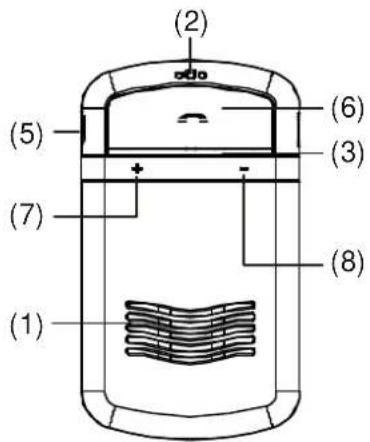
(1) Speaker
(2) Microphone
(3) LED
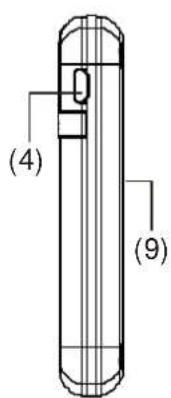
(4) Charging Socket (5-pin USB)
(5) Mute Button
(6) MFB Button (Multi-Function Button)
(7) Volume Increase (V+)
(8) Volume Decrease (V-)
(9) Solar Panel
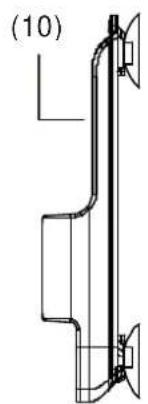
(10) Windshield Mount
4. Recommend Installation Position
It is recommended that the speakerphone is positioned on to the top of the left side of the windshield as shown in the pictures below:
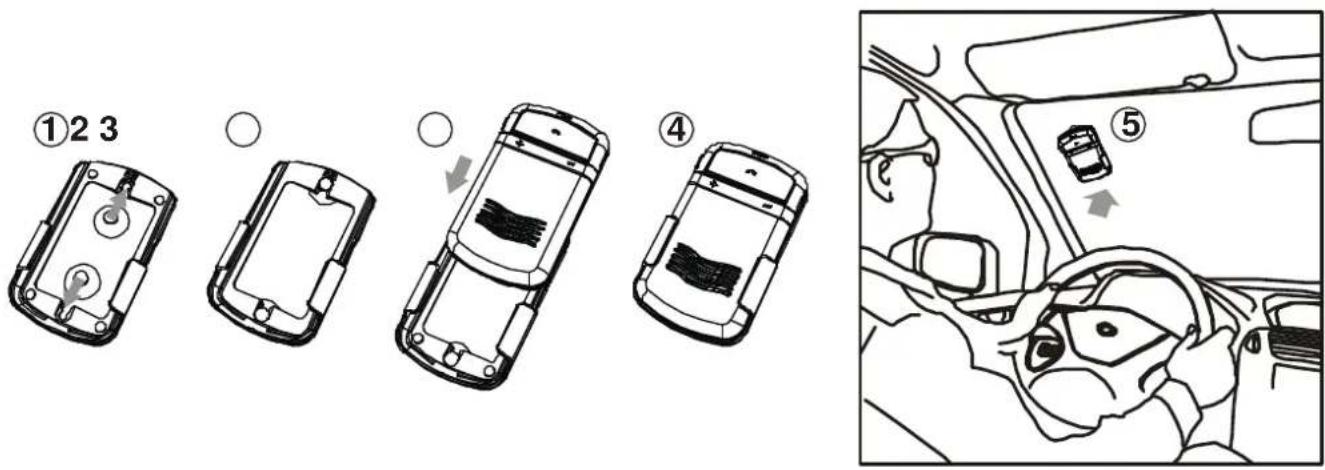
WARNING: Do not place or store the speakerphone over the area of the automobiles safety airbag deployment, or it may cause serious injury when a safety airbag deploys.
5. Charging Your Bluetooth Speakerphone
The Bluetooth speakerphone comes with a built-in rechargeable battery. Prior to using the speakerphone, it is recommended to charge the battery fully for the first time.
Using the car charger
- Insert the car charger completely into the charging slot until the LED flash red, and the speakerphone will be powered off automatically after connected with charger.
● Normal full charge time is 3 hours. (approx.), and the LED will flash off when charge is completed.
Using solar power
- Direct the solar panel on the back side of the speakerphone toward sun. (Please refer to the recommended installation position, as mentioned above.)
- If the speakerphone receives sufficient sunlight for 2 hours, you can talk for duration of up to 1 hour. Using solar power charge, the operation time (the talk time and the standby time) will be extended continuously without any additional charge required by the car charger.
WARNING: Do not attempt to charge the speakerphone with any charger other than the one provided. Using another charger may damage or destroy the speakerphone.
6. Turning ON/OFF the Speakerphone
Power On: When speakerphone is under off mode, press and hold the “MFB” for 4 seconds until you hear a short beep. The blue LED will flash 5 times, and then the speakerphone will automatically connect to the last connected mobile phone.
Power Off: Speakerphone is under standby mode, press and hold the “MFB” button for 4 seconds until you hear a short beep. The red LED will flash 5 times before power off.
7. Pairing
Prior to using the speakerphone for the first time, you must pair it with a Bluetooth enabled mobile phone. The steps below describe pairing instructions for a typical Bluetooth enabled mobile phone.
(1) Place the speakerphone and mobile phone no more than 1 meter (3 feet) apart.
(2) Ensure the speakerphone is turned off.
(3) Press and hold the “MFB” button for 6 seconds until the LED flash red and blue alternatively, it is now ready for pairing.
(4) Activate the Bluetooth function on your mobile phone and search for accessible Bluetooth device by referring to your mobile phone user guide for details.
(5) Select "BT Speaker" from the list of searched devices.
(6) Enter the pre-programmed code “0000” and press “OK” to pair the speakerphone and the phone.
(7) When pairing is completed, the speakerphone is under the standby mode with the blue LED flashes in every 3 seconds. Please place the mobile phone and the speakerphone within 10 meters (32 feet) sensing distance.
NOTE: If the pairing cannot be completed within 2 minutes after the pairing mode is activated, the speakerphone will power off automatically. Please repeat steps above to pair the speakerphone and mobile phone again.
8. Connection/Link between Speakerphone and Mobile Phone
After pairing is completed, speakerphone is always under standby mode. Before you place or answer a call, if the headset icon is not shown on phone screen, please follow the steps below to activate the Bluetooth connection/link through your mobile phone or speakerphone until the headset icon is on the screen.
* On phone: Select the “BT Speaker” from the paired list on your mobile phone’s Bluetooth menu.
* On speakerphone: Short press “MFB” and select “Accept” on phone screen to accept connection.
9. Disconnection between Speakerphone and Mobile Phone
When you need to connect your speakerphone with another Bluetooth enabled mobile phone, please follow the steps below to disconnect the speakerphone with the pre-paired mobile phone.
* On phone: Select “Disconnecting” on the Bluetooth device list of your mobile phone’s Bluetooth menu to remove the connection.
* On speakerphone: Power off the speakerphone.
NOTE: When losing the connection/link, the speakerphone will turn off automatically in 10 minutes. The blue LED will flash twice in every 3 seconds when the speakerphone is not connected with mobile phone.
10. Using the Speakerphone
(1) Answering a Call
When receiving a phone call, short press the "MFB" button to answer the call.
(2) Ending a Call
Short press the "MFB" button to end a call.
(3) Reject a Call
When you hear the ringing tone, press and hold the "MFB" button for 2 seconds to reject the call.
(4) Voice Dial
If your mobile phone is voice dialing enabled, under standby mode, short press the “MFB” button and say the voice tag after you hear a beep.
Note: Please make sure to record voice tag into the mobile phone before using voice dial function.
Functionality varies depending on the mobile phone models. Please refer to your mobile phone user guide for details.
(5) Last Number Re-Dialing
Under standby mode, short press the "MFB" button twice for last number redials.
(6) Adjusting the Volume
During a call, press the “V+” or “V-” buttons repeatedly until you reach the desired volume level.
(7) Mute & Un-Mute
a: Mute: During a call, short press the “MUTE” button to mute the speakerphone. The red LED will flash on during mute mode.
b: Un-Mute: Short press the "MUTE" button during mute mode to un-mute the speakerphone.
(8) Transferring Calls
a: Speakerphone to Mobile Phone: During a call, press both of “V+” and “V-” buttons, and the call is routed to your mobile phone.
b: Mobile Phone to Speakerphone: Press both of "V+" and "V-" buttons to route the call to speakerphone.
(9) Hold the Call
During a call, press the “MFB” button twice to hold the phone call. Press “MFB” button twice again to resume conversation.
(10) Answer the Second Call
a: When receiving a second call, press “MFB” button twice to hold the first call on line and answer the second call.
b: When receiving a second call, press "MFB" button once to end the first call and answer the second call.
(11) Reject the Second Call
When receiving a second call, press and hold the "MFB" button for 2 seconds to reject the second call.
(12) Switch between 2 Phone Calls
a: When having 2 calls on the line, press "MFB" button twice to switch between these 2 phone calls.
b: When having 2 calls on the line, press "MFB" button once to end the first call and stay with the second call.
11. MultiPoint Feature
(1) Activate Multipoint Connection
The default setting of speakerphone's multipoint function is off. Please activate the multipoint function for connecting with 2 mobile phones in the same time.
a. Multipoint On: Under standby mode, press and hold “V+” button for 3 seconds until you hear a beep. After turn on the multipoint function, the speakerphone will automatically connect to the last 2 mobile phones that have been paired before.
b. Multipoint Off: Under standby mode, press and hold "V-" button for 3 seconds until you hear a beep. The speakerphone will turn off the multipoint function and power off automatically. When power on the speakerphone again, it will only connect to the last connected Bluetooth device.
(2) Multipoint Pairing
a. First mobile phone: Pair the speakerphone with one of the Bluetooth-enabled mobile phone.
b. Second mobile phone: Power off the speakerphone. Press and hold the "MFB" button for 6 seconds to enter pairing mode again to pair and connect with the second mobile phone.
c. Connect with the first paired mobile phone to the speakerphone.
(3) Multipoint Connection/Link with 2 Mobile Phones
After the multipoint function is activated, please follow the steps below to connect with 2 Bluetooth enabled mobile phones in the same time.
a. When power on the speakerphone, it will automatically search and connect the last 2 mobile phones that have been connected before.
b. Under standby mode, press and hold "V+" button for 3 seconds until you hear a beep, then the speakerphone will automatically connect the last 2 mobile phone that have been connected before.
(4) Using the Secondary Mobile Phone through Speakerphone
When connected with 2 Bluetooth mobile phones, the first connected one is primary phone that can use "MFB" button for voice dial and redial. The second connected phone is secondary phone that will use "V+" button for voice dial and redial.
a. Voice Dial: Press "V+" button once to activate the secondary phone's voice dialing function.
b. Re-Dialing: Press "V+" button twice to redial the last outgoing number of secondary phone.
Note:
- When the speakerphone is in Multipoint off mode, it can also enter voice dial function by press "V+" button once, or make last outgoing number re-dialing by press "V+" button twice.
- The Multipoint speakerphone can be paired with 2 mobile phones at the same time. When one of them receives an incoming call, the other phone will be disconnected from speakerphone but resume connection automatically after the first one has finished the phone call.
12. Low Voltage Protection of Battery
When the voltage of battery decreased to 3.3V, the red LED will flash in every 3 seconds, and the speakerphone will be power off automatically when the voltage under 3.0V.
13. Restore to Default Setting
Please follow the steps below to reset the speakerphone to its original setting and remove all the previous pairing and connection.
(1) Ensure the speakerphone is under standby mode.
(2) Press and hold both of “V+” and “V-” buttons for 10 seconds until the blue and red LED flash 5 times, then the speakerphone will resume standby mode. The speakerphone is now back to original setting, and after power on the speakerphone again, it will enter pairing mode automatically.
NOTES: If the speakerphone is connected with a mobile phone before restore to default setting, it will enter pairing mode automatically after restored to default. If the speakerphone is not connected with the mobile phone before restore to default setting, it will be under standby mode after restored to default setting.
14. Safety Information
(1) Check local laws regarding use of a mobile phone and speakerphone while driving. If you use the speakerphone while driving, ensure your attention and focus remain on your responsibility of driving safely.
(2) Never allow children to play with the speakerphone. Small parts may be a choking hazard.
(3) Observe all signs that require an electrical device or RF radio product to be switched off in the designated areas. These could include hospitals, blasting areas, and potentially explosive atmospheres.
(4) Turn off your speakerphone prior to boarding an aircraft. Do not use your speakerphone in an aircraft.
(5) Never place or store the speakerphone over the area of the automobile's safety airbag deployment, or it may cause serious injury when a safety airbag deploys.
15. LED Indication
| Speakerphone Status | LED Indication |
| Power Off Mode | Off |
| Power On | Blue LED flash 5 times rapidly |
| Power Off | Red LED flash 5 times rapidly |
| Standby Mode | Blue LED flash once every 3 seconds |
| Standby (Disconnect Bluetooth device) | Blue LED flash twice every 3 seconds |
| Standby-Low Voltage | Red LED flash once every 3 seconds |
| Talk in progress | Blue LED flash once every 6 seconds |
| Mute | Red LED steady on |
| Pairing in progress | The red and blue LED flash on alternatively |
| Chargubg in progress | Red LED steady on |
| Charging completed | Off |
16. Product Specification
Bluetooth Compliance: Bluetooth V2.1+EDR
Operating Frequency Band: 2.4GHz \~ 2.48GHz unlicensed ISM band
Output Power: Class 2, up to 10 meters
Support Profiles: Headset and Handsfree 1.5 Profiles
Support Multiple Paired Devices: Memorize paired data of 8 Bluetooth phones
Stand-by Time: Up to 800 hours
Talk Time: Up to 13 hours
Battery Charging Time: Using charger about 3 hours
Using solar power about 18 hours
Charger Voltage: DC5.0V, 400mA
Battery: 3.7V 550mAh, (Rechargeable Lithium-ion Battery)
Size: 92.5 x 54 x 15.5 mm
Weight: 60g (without windshield mount)
69g (with windshield mount)
NOTES: This speakerphone is in compliance with the specified Bluetooth version. It does not guarantee compatibility of all functions on every Bluetooth enabled device. Please check with your mobile phone's user manual for compatibility and functionality.

KVFESA S. COOP.
MIGUEL SERVET, 7
46015 VALENCIA
ESPAÑA