BCD-504-BT - Car stereo BRIGMTON - Free user manual and instructions
Find the device manual for free BCD-504-BT BRIGMTON in PDF.


User questions about BCD-504-BT BRIGMTON
0 question about this device. Answer the ones you know or ask your own.
Ask a new question about this device
Download the instructions for your Car stereo in PDF format for free! Find your manual BCD-504-BT - BRIGMTON and take your electronic device back in hand. On this page are published all the documents necessary for the use of your device. BCD-504-BT by BRIGMTON.
USER MANUAL BCD-504-BT BRIGMTON
natural_image
Abstract curved white shape on white background, no text or symbols presentBRIGMTON
surfing technology
natural_image
Illustration of two electronic devices with internal components, no visible text or symbolsDIAGRAMA DE CABELADO
natural_image
Abstract curved white shape on white background, no text or symbols presentBRIGMTON
surfing technology
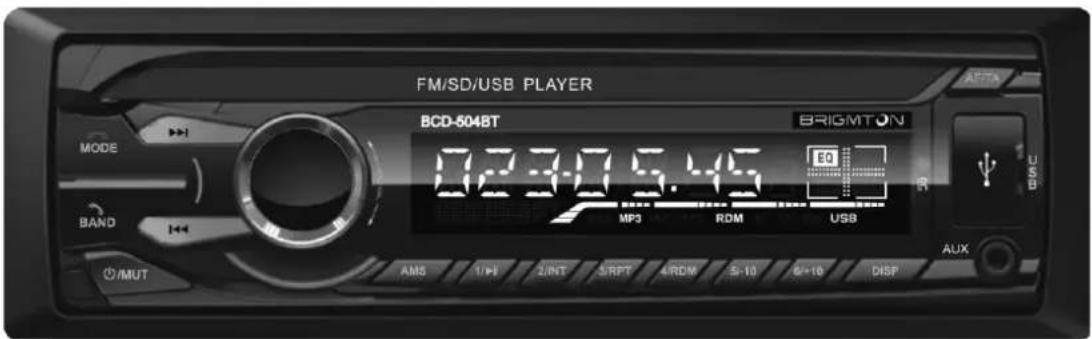
INSTRUCTION MANUAL
AUTO-RADIO MP3-SD-USB-BLUETOOTH
BCD-504BT
OPERATION
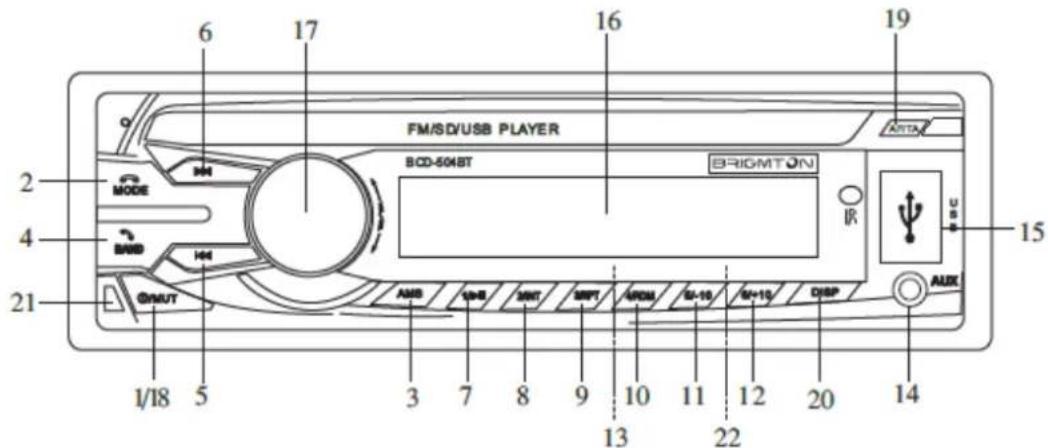
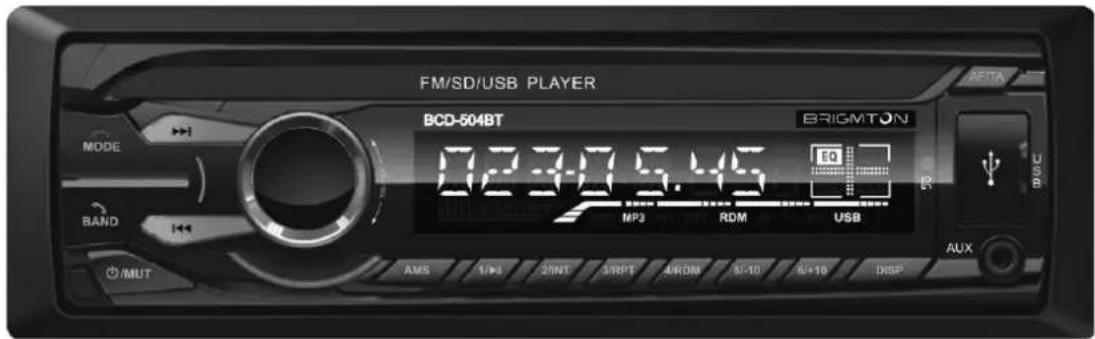
- POWER ON / OFF: Press briefly to turn. Press for 3 seconds to turn off.
- MODE - SELECTION FUNCTION: Press this button several times and the LCD display will show the following sequence: RADIO → USB → SD AUX IN → BT.
- AUTOMATIC SEARCH (AMS): In RADIO mode, press to search stations. Hold to auto save stations. In playback mode use this button to select the track.
- BAND: Press shortly to change band FM1-FM2-FM3.
5./6 FORWARD/REVERSE: In music playback mode press briefly to move tracks back and forth.
Radio mode press to search radio stations
- 1/PLAY: Press once to play, press again to pause playback.
Select the desired number (1 in this case) to select the track during music playback.
-
2/INT: Pressing INT display and enter the input sound mode in which only the first few seconds of each song.
-
3/RPT: Pressing RPT is displayed and you can select the repeat mode of the track.
To cancel this function press RPT again.
- 4/RDM: Pressing RDM displayed and the tracks are played randomly mixed.
To cancel this function press again RDM
-
5/-10: In playback mode, press briefly to select folders.
-
6/+10: In playback mode, press briefly to select folders.
-
SD: Insert the SD card into the slot by gently pushing inward. Select SD with the mode selector. The music starts playing automatically. File format compatible music: MP3, WMA.
-
AUX IN: Enter your portable player in the Jack input and reproduced sound from the speakers.
-
USB: Connect a USB device with music in MP3 or WMA.
-
LCD DISPLAY: The LCD display shows the current playback and functions.
-
VOLUME/SELECT CONTROL: Turn the volume control to control the
volume. To select another function, press the volume button on and select the desired functions: GRAVES - TREBLE - BALANCE - FADER - LOUD - EQ (pop-flat-rock classic)
- MUTE: Press to mute. press to cancel again.
19.AF/TA: Activate and deactivate the AF and TA - DISPLAY: Shows the different display options.
- EXTRAIBLE: Ejects the removable cover
- RESET: Restore the factory settings.
PROGRAMMABLE CONTROLS
Press and hold the button VOL and will access different functions:
AF ON / OFF: See RDS.
TA ON / OFF: See RDS.
PTY (MUSIC / WORD / OFF): See RDS.
TA-TA ALARM / SEEK TA-: See RDS.
SOUND PI-PI SOUND / PI MUTE: See RDS.
BACK L & S VOLVERL / VOLVERS: See RDS
RDS
The RDS system allows radio stations to send additional digital information. Among the customizable options include:
PI: Program Identification.
Press the AF button for 2 seconds to enter mode region. With this mode enabled the program is tuned according to the PI code identifying the region. If you do not activate this code will be ignored and will remain on the same frequency.
PS: Program Service Name.
AF: Alternative frequencies, for similar programs.
PTY: Program Type Codes. Is the program code (music, news, etc.)
The order followed when activated is Program Music, Talk shows / Spoken (no music) and OFF mode. Press the 1-6 button to select the desired option.
TA: Traffic Announcement. Press TA briefly to activate this feature. If active and is playing from SUB / SD / MMC / AUX can receive traffic information. If a TP (Traffic Programme) is received TP appears in the display.
Press TA for two seconds to activate the selection EON TA LOCAL (EON LOC) or EON TA DISTANT (EON DX):
EON TA LOCAL: When the EON intensity level is less than the threshold level, the radio will not switch to that station, and hardly can listen to the station without interference. When EON TA LOCAL mode is selected it will be displayed.
REMOTE CONTROL
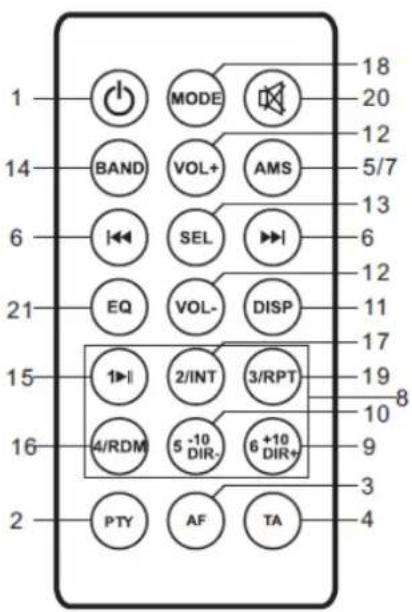
- ON / OFF
- Control PTY
- Control AF
- Control TA / LO / DX
- Control AMS
- Control Tunning / Track
- Automatic memory storage / Music Search (AMS)
- Stations 1-6
- Button +10
- Button -10
- Display
- Volume -
- Mode selector
- FM Selector
- Play / Pause
- Random Mode
- Mode Intro
- Playback Mode
- Repeat
- Mute
- EQ Control
INSTALLATION
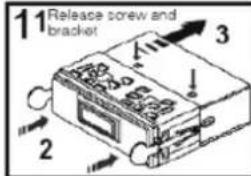
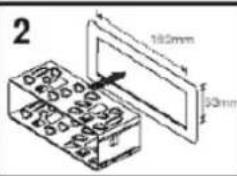
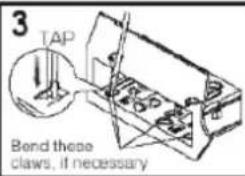
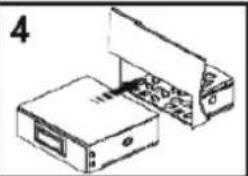
The device must be installed by a qualified professional. We are not responsible for failures resulting from faulty installation or performed by unqualified personnel.
Carefully remove the equipment from the box, retaining the packaging
for future reference.
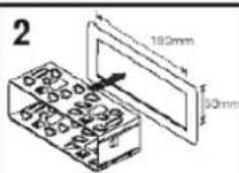
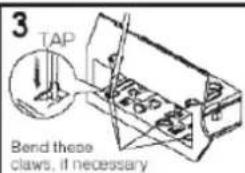
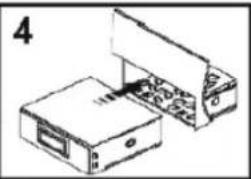
- Select the mounting place so that the device does not interfere with normal driving operations the driver.
- Avoid installing the unit where it may be exposed to high temperatures, for example, direct sunlight or hot air from the heater, or exposed to dust, dirt or excessive vibration.
- Use only the supplied mounting hardware for safe and secure installation. Installation example:
natural_image
Technical line drawing of two electronic devices with internal components (no text or symbols)WIRING DIAGRAM
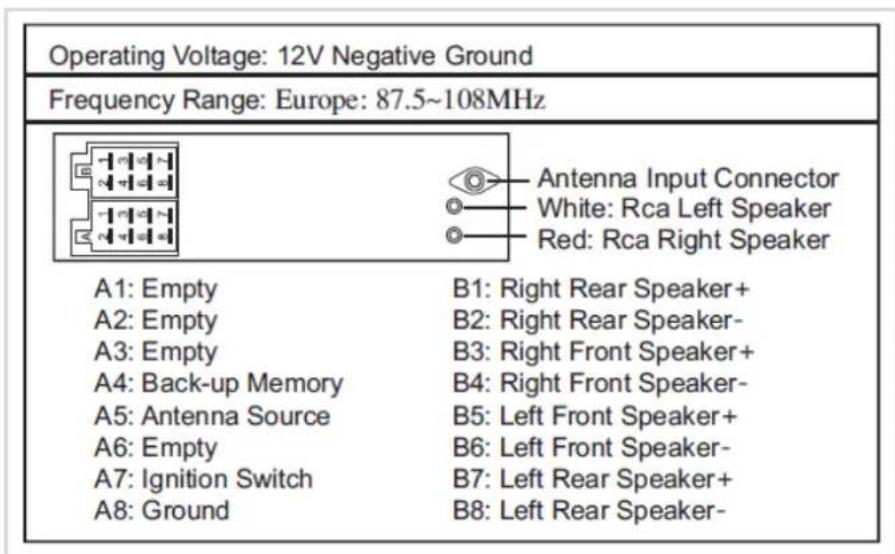
| Operating Voltage: 12V Negative Ground | |
| Frequency Range: Europe: 87.5~108MHz | |
| Antenna Input ConnectorWhite: Rca Left SpeakerRed: Rca Right Speaker | |
| A1: Empty | B1: Right Rear Speaker+ |
| A2: Empty | B2: Right Rear Speaker- |
| A3: Empty | B3: Right Front Speaker+ |
| A4: Back-up Memory | B4: Right Front Speaker- |
| A5: Antenna Source | B5: Left Front Speaker+ |
| A6: Empty | B6: Left Front Speaker- |
| A7: Ignition Switch | B7: Left Rear Speaker+ |
| A8: Ground | B8: Left Rear Speaker- |
"Features can change without notice"
BRIGMTON
surfing technology
IMPORTED
FERSON ELECTRÓNICA, S.A.
CIF: A-41111881
SANTA CLARA DE CUBA 12
SEVILLA
ESPAÑA
DECLARATION OF CONFORMITY
Ferson Electrónica, S.A. declares under our responsibility that the equipment meets the requirements indicated in the following directives:
EMC DIRECTIVES
EN55013:2001+A1:2003+A2:2006
EN61000-3-2:2006+A1:2009+A2:2009
EN61000-3-3:2008
EN55020:2007
Description of apparatus:
BRIGMTON Model BCD-504BT
FM RADIO
CE
BRIGMTON
surfing technology