Iris 355 - Cellphone LAVA - Free user manual and instructions
Find the device manual for free Iris 355 LAVA in PDF.


User questions about Iris 355 LAVA
0 question about this device. Answer the ones you know or ask your own.
Ask a new question about this device
Download the instructions for your Cellphone in PDF format for free! Find your manual Iris 355 - LAVA and take your electronic device back in hand. On this page are published all the documents necessary for the use of your device. Iris 355 by LAVA.
USER MANUAL Iris 355 LAVA
5.6 EMERGENCY CALLS 12
5.7 ANSWER CALLS 13
5.3 CONNECTION OPTION 13
- MENU FUNCTIONS....19
6.1 FILE EXPLORE 14
6.2 NOTES 14
6.3 CAMERA 14
6.4 BROWSER....14
6.5 CALCULATOR 14
6.5 CALENDAR 15
6./Clock 15
Lava Iris 355
6.8 E-MAIL 15
6.9 GALLERY 15
6.10 MESSAGING 16
6.11 MUSIC 15
6.12 PHONE....17
6.13 CALL LOG 17
6.14 SETTINGS 17
6.15 FLASHGIFT....19
6.16 VIDEOS 19
6.17 FM RADIO 19
6.18 ASNEEDATH 20
6.19 SHATOCUT 20
6.19 SIMT BOLKI 20
5.70 R. M 20
6.20 PROCESS MANAGER.... 20
6.21 DOWNLOADS 20
6.22 C 79
6.22 CONTACTS 20
6.23 SOUND RECORDER 21
6.24 FUSION 21
6.25 GMAIL 21
6.26 GOOGLE+ 21
6.27 LAVA ZONE 22
6.28 MESSENGER 22
6.29 NIA RUSH 22
6.30 PLAY STORE 22
6.31 TALK 22
6.32 VOICE SEARCH 22
6.33 YOUTUBE 22
6.34 Mbps 22
7. INPUT 2+
1 FREQUENTLY ASKED QUESTIONS AND TROUBLESHOOTING 2
1. FREQUENTLY ASKES QUESTIONS AND TROUBLESHOING....
2. SAFETY INFORMATION AND NOTICES 26
+ GPRS SETTING....+0
9 SERVICE CENTRE NUMBER ....+5
Lava
iris 355
© 2013. All rights are reserved. No part of this document may be reproduced without permission.
While all efforts have been made to ensure the accuracy of all the contents in this manual, we assume no liability for errors or omissions or statements of any kind in this manual, whether such errors or omissions or statements resulting from negligence, accidents, or any other cause. The contents of this manual are subject to change without notice,
Protect our environment! We strive to produce products in compliance with global environmental standards. Please consult your local authorities for proper disposal.
Note: User Manual is just to guide the user about the functionality of the phone. It is not a certificate of technology. Some functions may vary due to modifications and upgrade of software, or due to print mistake.
Lava
1s 355
For your safety
Read these simple guideline. Not following them may be dangerous or illegal. Read the complete user manual for further information.
| Do not switch your phone on when the use of wireless devices is prohibited or when the wireless device may cause interference or danger. | |
| Do not use your phone while driving. | |
| Follow relevant rules or regulations in hospitals and health care facilities. Switch your phone off near medical devices. | |
| Switch your phone off in an aircraft. The radio signal from it may cause interference in signals of the aircraft. | |
| Switch your phone off near high-precision electronic devices. It may affect the performance of these devices. | |
| Do not attempt to disassemble your phone or its accessories. Only qualified personnel may service or repair the phone. | |
| Do not place your phone and its accessories in containers with strong electromagnetic field. | |
| Do not place magnetic storage media near your phone. Radiation from the phone may erase the information stored on them. | |
| Do not put your phone in a high-temperature place or use it in a place with flammable gas such as a petrol pumps. | |
| Keep your phone and its accessories away from children. Do not allow children to use your phone without guidance. | |
| Respect others' privacy and legal rights when using your phone. |
Lava
11s 355
1. Welcome
Congratulations on your purchase of the LAVA mobile phone. Your phone provides many functions which are practical for daily use, such as a hands-free loudspeaker, camera, MP3 player, internet and much more.
You can read the manual to understand how to use iris 355 Mobile phone and experience the well-established functions and simple operation method. Please use the original accessory in order to achieve the best use of effects. Use of non-original components may lead to damage caused to the machinery, in which case Lava shall not be responsible.
Lava
11s 355
2.LAVA support and contact Information
Check www.Lavamobiles.com web site for additional information, downloads, and services related to your LAVA product.
Lava
1s 355
3. Introduction
3.1 Phone Display
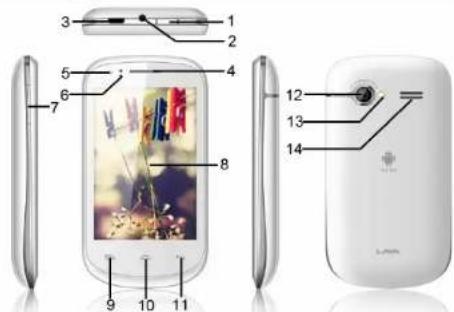
3.2 Key
| No | Key Description | ||
| 1 | Power key | 8 Screen | |
| 2 | Earphone point | 9 Menu key | e |
| 3 | USB/Charging point | 10 Home key | m |
| 4 | Earpiece 11 Back key | ||
| 5 Front camera 12 Back camera | |||
| 6 Proximity sensor 13 Flashlight | |||
| 7 Volume key 14 Loudspeaker | |||
Lava
1s 355
4. Getting Started
Please read the safety instructions in the "Safety Information and Notices" section before use.
4.1 Inserting the SIM Card and the battery
Remove the back cover
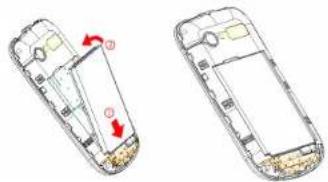
Make sure the phone is switched off. You need to remove the back cover of your phone before you can insert the SIM card. Hold the phone with the front facing downwards; pull the battery cover downwards and lift the cover upwards to remove it.
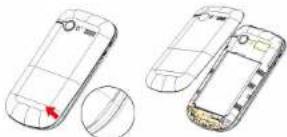
natural_image
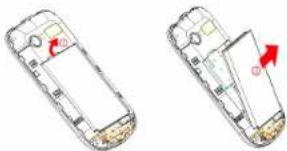
Two views of a smartphone showing front and side designs with a red arrow indicating a specific area (no text or symbols present)Remove the battery
Put your finger on the black holder located at the bottom of the battery slot and lift the battery up to remove it.
Lava
1s 355
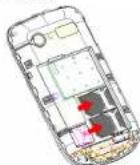
Insert the SIM card
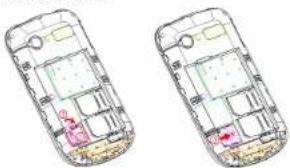
Make sure that the clipped corner of the SIM card is facing the correct direction (clipped corner at top left) and the metallic contacts are facing downwards. Slide the SIM card into the card slot until it stops.
Install the battery
With the metallic contacts of the battery facing the metallic contacts in the battery slot, press the battery down until it locks into place.
Lava
1s 355
Install the back cover
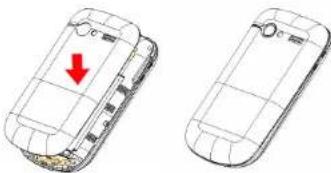
Align and hook the back cover to the top of the battery slot and then push the cover upwards until it locks into place.
natural_image
Two views of a smartphone showing front and side views with a red arrow indicating a location (no text or symbols present)4.2 Inserting a T-Flash (External Memory) Card Image
Lift up the T-Flash card cover on the side of the SIM card slot. Pull the cover down if it is locked and then lift it.
With the metal contacts facing down, gently slide the T-Flash card into the slot
Lava
1s 355
Press and pull the cover up to lock it.
natural_image
Two views of a smartphone showing internal components with no visible text or symbols4.3 Switch ON/OFF
Hold down the Power key until the phone powers on. It will take some seconds before the screen lights up.
Hold down the Power key from the Home screen until the Phone options appear, select Power off, and touch OK to confirm.
4.4 Unlock SIM Card
To avoid illegal use, the SIM card is enciphered with PIN (personal identification number) as a protection. When this function is ON and you have already set a PIN code, you need to type in PIN code every time, the handset is switched on in order to unlock SIM card and use the handset.
You can turn off the SIM PIN code. Yet in this situation, the SIM card can't prevent illegal use.
Input PIN code, press arrowhead icon to erase typing error and press OK to end typing. For example, if the PIN code is set as 1234, then type "1234" then press OK. The SIM card will be locked if you type in wrong code for three times continuously. The handset will inform you to type in PUK code.

Your network provider will set a standard PIN code (four to eight numbers) for your SIM card. It is recommended that you change the code into a personal code as soon as possible.
5
Lava
11s 355
4.5 Connection to Network
When the SIM card is successfully unlocked, the handset will automatically search for available network (the lock screen shows searching). The handset will show the information of the network provider, the status bar will show the signal strength and the network condition once the handset is successfully connected to a network.
Note: If the lock screens shows "Emergency", it means that you're out of network coverage (service coverage) or your card is not valid, yet you can still have emergency calls based on signal strength.
4.6 Charging the Battery
Ensure the battery inserted in the handset. To charge the battery, plug in the charger connector at the bottom of your phone (USB interface) and then plug the other end into an AC power socket.
The battery symbol indicates the charging status. While charging, the charge indicators will scroll. When all the scroll bars are steady, the battery is fully charged. Disconnect the charger from the phone.
Disconnect the charger from the AC power socket.

Note: If the battery is powerless, the battery icon will reappear after a few minutes of charging.
Lava
11s 355
5. Basic Functions
5.1 Make calls
When the network provider icon appears on the standby screen, you can call out or answer calls. The indicator on the upper right part shall show the signal strength. Quality of connection will be greatly influenced by obstructions. So movement in a small range may effectively improve the quality of connection.
5.2 Make Domestic Calls
Use virtual keyboard to enter phone numbers and then press Dial icon to call. If you need to change the phone number, please press the delete key on the touch screen to delete. When the call is answered, the screen shall show the connection status.
5.3 Call Extension Phone
Some of the extension phones can't be directly connected to. Use the virtual keyboard, enter switchboard number, open the option menu and choose * Add 2-sec pause*, and then dial the extension phone number. Type in as follows to call extension phone: Zone description > switchboard number > Add 2-sec pause > extension phone number < call
5.4 Make International Calls
If you need to make an international call, do a long press on the 0 key on the virtual keyboard until there appears the sign "-" for international call prefix, which helps you call from any country even if you don't know the international call prefix of that country.
You can make an international call according to the following typing order: + > country code > complete phone number > dialing icon (type in the prefix code, and then continue to enter the country code and complete phone number). Country code usually follows conventional practice: German is 49, Britain 44, Sweden 46 and so on. When making international phone calls, the "0" in the city code should be emitted.
5.5 Make Listed Calls
Every dialed and received phone number is recorded in the call history list. Recently dialed, answered and missed phone numbers are chronologically (newest to oldest) listed in the "all" log. You can also choose and check missed, answered and dialed list according to your need.
5.6 Emergency Calls
Lava
1s 355
You can call for emergency service as long as you are in the network coverage (check the signal strength indication bar on the upper right side of the handset screen). If your network provider doesn't provide roaming service in this area, there will be *Emergency Calls * on the lock screen. If you are in the network coverage, you can have emergency calls even without a SIM card.
5.7 Answer Calls
Directly press "answer" key to answer an incoming call. If your headphone is connected to the handset, you can use the key on the headphone to answer calls.

Note: A short press of the headphone key will answer the call while a long one will refuse to answer the phone.
5.8 Connection Option
This option can only be seen during a call. The waiting call, hold call, multi-party call functions require the support of the network. Please contact with the network provider.
In the connection option, you can do the following operations: Mute:Turn on/off Mute. When the mute is ON, the other person can't hear this handset's sound.
Hold:Temporarily hold the current one-line call.
Speak: Switching hands-free and handheld
Contacts: Enter the Contacts menu
Add Call: Enter the dialing screen for a new call.
Dialpad: Enter the dialing screen of the current call.
End: End the current call.
Start recording.: Record the current call.
Conference
In Conference call mode, you answer the incoming call and add it to the conference in accordance with the instructions; Hold multiparty conference; Have a private conversation with one party and hold other parties' call; Connect one party to the other and end the conference call; Put one party on hold; End current call and all hold on calls.

Note: Menu items market by ^* happen only under certain situations. Users need to apply for opening the conference call functions to relevant service provider.
Lava
11s 355
6. Menu Functions
6.1 File Explore
You can manage file, including Download, Music, and Received File. Press menu key to create a new folder or select folders to copy, move and delete.
6.2 Notes
Press the "+" icon at the upper right side of the screen to add notes. Press the menu key to select 'add note', 'remind me', 'delete' and 'get more' items. In the 'remind me' menu, you can set the reminding time for the note.
6.3 Camera
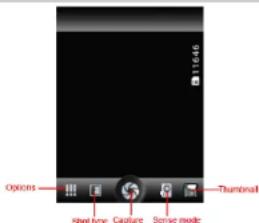
Under viewing condition, press the bottom icons to do the following operations. Press the Capture icon to capture a picture. Press the Sense mode icon to switch between camera mode, video mode or other mode. The Thumbnail icon shows the currently captured picture or video.
6.4 Browser
On Browser screen touch the URL box at the top, enter the address of the web page, then confirm. Some websites will hide the URL box automatically, you can scroll down the web page to let it be displayed.
6.5 Calculator
Lava
Irs 355
The handset is provided with a calculator with basic functions. You can carry out the operation for plus, minus, multiply, and divide by pressing the screen. You can use some functions in the advanced panel.
the accuracy is limited and round-off error may occur.

Note: The accuracy is limited and round-off error may occur.
6.6 Calendar
Enter the calendar menu and there shall appear a calendar on the screen with the current date market out by background frame with a special color. Press the touch screen to browse date and the calendar information on the screen shall be correspondingly updated.
6.7 Clock
Enter the clock menu and press alarm icon to add a new alarm. Scroll the scrollbar to set alarm time. Press alarm of list to edit the activation. Time, Ringtone, vibrate and label, choose "done" to finish the setting. If you need to reset the settings, choose "Revert". If you want to delete the alarm, choose "Delete".

Note: Enter the clock menu and set your position for weather forecast to get weather information.
6.8 E-mail
Besides your Email account, you can also set-up external POP3 ,IMAP or Exchange email accounts in your phone. To access this function, touch Application tab from Home screen, then select Email. An email wizard will guide you through the steps to set-up an email account.
- Enter the email address and password of the account you want to set-up. - Touch Next. If the account you entered is not provided by your service provider in the phone, you will be prompted to go to the email account settings screen to enter settings manually. Or you can touch Manual setup to directly enter the incoming and outgoing settings for the email account you are setting up.
6.9 Gallery
In the gallery interface, there are different folders. Select a folder and press to enter it. Press image or video to view pictures or videos.
Lava
Irs 355
When viewing the picture, if you press the screen or press the menu key, a menu with "share, delete, more" will pop out. Choose "share" to send the file through Bluetooth or via a message; choose "more" for further functions like detailed information, set as, edit, print, and rotate left or right.
6.10 Messaging
Compose new message
Press edit new message to get a new text message:
Click the edit frame, type in after a virtual keyboard pops out.
Press the number frame and enter number, or press add contact icon and select
stored contact number from Contacts, call log and contact group.
Input contents into the typing frame on the touch screen. After editing, press send
Icon to send the text. Press many key to call add subject. Attach Delete messages, insert quick text and
Press menu key to call, add subject, Attach, Delete message, Insert quick text and more prompts.
more operations.
Message Settings Include storage settings, SMS settings, MMS settings, notice settings, service
include storage settings, SMS settings, MMS settings, notice settings, service message setting and so on.
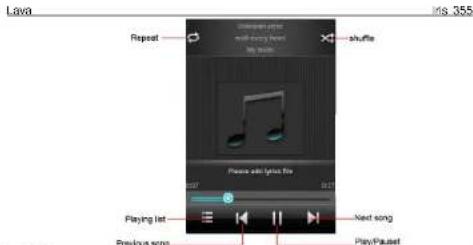
6.11 Music
Use the Music player to play music files. The songs saved in your SD Card can be played using the Music Player of the device.
The songs are categorized by Artist, Albums and Songs. You can make your
favorite playlist by long pressing on a song and selecting Add to Playlist. While
listening to the music, you can choose among the various sound effects.
In the playback mode, press menu key, select Sound Effects and choose among
the various sound effects, such as Bass, Classical, Hip Hop, Jazz, Pop, Rock etc.
6.12 Phone
Press the keyboard, enter the phone number, and press Dial icon.
6.13 Call Log
Enter Call history interface, press and change the tagged pages on the upper side of the screen, choose call log, contacts and group.
Use finger to scroll from down to up to select phone numbers. Short press of the log can call the contact directly while long press will present functions like dialing number, video call, send text message, edit number before call, add to contacts, remove from call log and so on.
6.14 Settings
The contents in this menu will differ according to different network providers. For detailed information, please look at the phone.
Wireless & networks Change settings for wireless connection and network such as Airplane mode, Wi-Fi, Wi-Fi settings, Bluetooth, Bluetooth settings, Tethering & portable hotspot, VPN settings, Mobile networks and GPRS transfer prefer.
Bluetooth
To activate Bluetooth, you need to select Bluetooth option.
Bluetooth settings:
- Bluetooth: Activate/Inactivate Bluetooth.
Lava
1s 355
-
Device name: check and change Device name.
-
Discoverable: others can find your Device if you activate this function.
-
Discoverable timeout: when the discoverable is enabled, this option is
available; set how long device will be discoverable.
-
Advanced settings: you can transfer files, select visit authority.
-
Scan for device: Scan and search Device
Call settings
Change settings of voice call, video call and other settings.
Audio profiles
Include General, Silent, Meeting and Outdoor. You can also add
custom profiles.
Display
Change settings of brightness, auto-rotate screen, animation and Screen
timeout.
Locatio
Locate your position through tools like wireless network.
Security
Change the settings of screen unlock, SIM card lock, passwords, device
administration and Credential storage.
Screen lock settings:
- Pattern: unlock the screen through designed pattern. Draw a private
pattern to unlock the screen so as to avoid unauthorized use of
the handset
2 PIN
- PIN: type in PIN numbers to unlock the screen.
-
password: type in code to unlock the screen.
-
password: type in code to unlock the screen.
Application
Include the management of applications, the condition and development of the
currently used service and storage space.
Accounts & Sync
Include general synchronisation settings and account management. The
general synchronization settings include background data and automatic
synchronization. You can also choose to add new account. After adding new
account. you can do operations like synchronizing the calendar and contacts
Privacy
Restore original settings—in this menu, related settings will be restored to
original status if you press "Factory data reset". You can also format the SD card. If
original status in your price factory data report. You also confirm the SD card will you select this option, all of the DATA in the SD card will be erased.
Lava
1s 355
Storage
Include the SD card storage, available storage, insert SD card (If a SD card has already been inserted, then this option will become "Unmount SD card"), format SD card and all available storage in the internal storage space.
Language & keyboard
Include language settings, keyboard settings, input method and so on.
Voice Input & output
Include text to voice settings. You can use the default setting, engine, and install linguistic data.
Power button: press power button to end calls.
Quick boot: power on your mobile will take less time.
Date & time
Include automation, set date, select time zone, set time, use 24 hour format and select date format.
Schedule power on/off
You can set the time for ON/OFF, which include setting time and repeated date. About phone
Include status information, battery use information, Legal information, android version, baseband version, Kernel version and Build number.
6.15 Flashlight
Open the application to open or close the flashlight
6.16 Videos
Play video. Enter the video list, scroll the screen to browse and choose the file you want to play.
6.17 FM Radio
Lava
1s 355
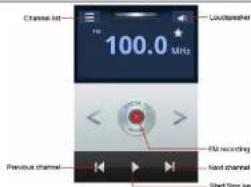

Note: This handset doesn't have a built-in antenna. If you want to listen to the radio, please insert the headphone first. Pressing the side key can adjust the volume.
Channel list: check all the channels and select. FM recording: choose recording after playing the FM radio. Start/stop: start/stop FM. Previous/Next: press this key to change FM channel. Loudspeaker: Switching headphones and speakers.
6.18 Agneepath
This is a game. When you enter the game interface, on the screen, there are four icons you can touch to let the person you controlled perform action to hit the enemy.
6.19 SIM Toolkit
The contents in this menu will differ according to different network providers. For detailed information, please look at the phone.
6.20 Process Manager
Into the process manager, you can view all current mobile processes, you can end a particular process, you can also choose to end or withdraw from all processes.
6.21 Downloads
You can check the downloaded or being-downloaded contents. 6.22 Contacts
Lava
1s 355
Entering the Contacts, you can check all the contacts, search for contacts or add new contact. New contact means a newly added phone number that is recorded in the SIM card or the handset.
When adding a new contact, you can type in the name, address, phone number, other phone number, work place, other email address and so on. You can also check call history and contact group.
6.23 Sound Recorder
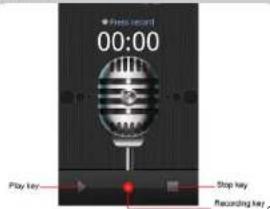
Press Recording Key to start recording. In the middle of the screen is a timer. Press Stop Key to stop recording and select "Save" in the popped out "Save/Cancel" option to save the record. You can press play key to listen to the record before selecting "Save/Cancel".
6.24 Fusion
Fusion music player is free and void of any advertisements. Designed with a philosophy that nothing should come between "U and Music".
6.25 Gmail
Gmail also known as Google Mail, is a free email service with innovative features like "conversation view" email threads, search-oriented.
6.26 Google+
Google Plus is a SNS social networking platform, you can through your Gmail account, in the social networking sites you can share something funny with the different interest friend.
Lava
Irs 355
6.27 Lava Zone
It will open the browser to the lava website.you can download videos,wilpapers, music and so on.
6.28 Messenger
It is a Real-time chat tool provided by Google, you can through Gmail account chat with your friends.
6.29 Ninja Rush
Rush to the end of this ninja world. Yet another excellent free game from feeling touch inc. Shunken, Lurker, Samurai, Dash! This is the jungle of ninja master.
6.30 Play store
Play store is dedicated to establishing the latest, fastest and most comprehensive third-party application store that makes Android system simpler. You can pick software and games to your taste from more than 10,000 applications anywhere and anytime.
6.31 Talk
Talk is a freeware voice over Internet protocol client application offered by Google Inc.
6.32 Voice Search
Search the web and your phone by voice and control your phone with Voice Actions Quickly search your phone, the web, and nearby locations by speaking, instead of typing. Call your contacts, get directions, and control your phone with Voice Actions.
6.33 YouTube
YouTube is a video-sharing website, it is the leader in online video, and the premier destination to watch and share original videos worldwide through a Web.
6.34 Maps
The phone provide maps service for your travel.
Lava
11s 355
7.Input
7.1 Using Onscreen Keyboard
Onscreen Keyboard settings
Touch application tab from the home screen, select Settings 'Language & keyboard touch the Settings icon on the right of Android keyboard, a series of settings are available for your selection.
7.2 Text editing
You can edit the text you have entered. Touch and hold or double-tap within the text you would like to edit.
- Touch the text, Select word /Select all to select text, Drag the tap to change the high-lighted selection. touch Cut /Copy to cut or copy the selected text then touch Paste.
- touch the blank to go back without any action.
Lava
1s 355
1 Frequently Asked Questions and Troubleshooting
| Frequently Asked Questions | Cause and Solution |
| Unable to turn on phone | Press the power on key for over 1 second.Check if the battery is properly connected. Please remove and install it again, retry to turn on:Check if battery is appropriately charged |
| Unable to connect to a network | Weak signal. PleaseTry and move to a location with strong signal and try connecting to the network again:Please ensure that you are not beyond the network coverage of service providers:Please ensure you have a valid SIM card. Please contact your network provider for further information: |
| Display information while turning on | Check if the SIM card (insert the SIM card) is installed correctlyHandset lock password. If the handset lock is activated, you have to input handset password before using.Input PIN. Inputting PIN while turning on each time is activated, you have to input the PUK code.Input PUK code: Having input wrong PIN code for 3 times straight will lock the SIM card. You need to input the PUK code provided by your network provider. |
| Poor quality of calling | Please check if the sound volume is tuned improperlyIn an area with poor receiving condition, example: basement, the signal might be weak. Try reaching a location with stronger signal reception and call again.While using the mobile phone in the peak period of communication, like commute time, you may be unable to call because of line congestion. |
| Standby duration shortened | The standby duration is relative to the system setting of network.While the mobile phone is in an area with poor signal strength and can not receive the signal, the handset will continuously search for a base station. This will significantly reduce battery charge. It is recommended that you turn off your mobile in area with no signal reception to save battery.Need replacing the battery. Please change a new battery. |
Lava
Irs 355
| SIM Card Error | Dirt on the metal surface of an SIM card. Use clean cloth to wipe the metal touch point on an SIM card.The SIM card is not installed.The SIM card is damaged. Please contact your network service provider. |
| Unable to dial out | Please confirm if youpressEDpressedthe dial key after disling.Please confirm if calling is forbidden because of default settings.Please confirm if the SIM is valid.Please confirm if the call barring is set.Please confirm if the fixed dial function is set. |
| Callers unable to contact you | Please confirm if the mobile phone is on and connected with the network.Please confirm if calling is forbidden because of defaulting.Please confirm if the SIM card is valid.Please confirm if the call barring is set. |
| Unable to charge handset | Poor contact. Please check if the plug is connected well.Please confirm if the environment temperature is within the range of 0°C ~40°C while charging.The battery or charger is damaged. You need to replace it. |
| Unable to set some functions | Wrong operation.The network provider does not support the function, or you have not applied for it. |
Note: If the instruction above cannot help you solve problems, please record:
Mobile phone model and serial number
Specific content of warranty
Then contact your local dealer or a LAVA authorized service center in your area.
Lava
11s 355
2. Safety Information and Notices
Using the Cellular Phone and Charger
Only use authorised battery and charger. Using other brands may cause battery leakage, overheating, explosion or even fire.
Caution:
Keep the phone away from dust, water and damp areas. Dust, water or other liquids may cause overheating, electrical leakage, and/or phone failure.
The phone, battery, charger and AC adapter are not waterproof. Keep them away from rain and liquid.
Warning
Do not bump, shake or tamper with the phone or charger. This may cause battery leakage, overheating, explosion or even fire.
Do not place the battery, phone or charger near a microwave or high-voltage device. This may cause battery leakage, overheating, explosion or even fire; also prevent the phone and AC adapter from overheating, smoking or short circuiting. Do not use the phone around volatile oil. This may cause fire, breakdown or
Do not damage.
To avoid any damage or breakdown, do not disassemble the phone, battery, charger or internal components by yourself.
Using the Cellular Phone
Warning:
Do not use the phone while you are driving. Pull over and stop your automobile to dial or listen to a phone call.
Usage of cellular phones in aircrafts or hospitals is prohibited. Switch the phone off to prevent interference with electronic medical devices. Follow any rules or regulations in such places.
Do not use the phone at a gas station, near fuel or near chemicals.
Do not use the phone near electronic medical devices such as hearing aids, pacemakers and auto-control devices such as fire detectors and automatic doors.
If you have to use your cellular phone near an electronic medical device such as a pacemaker, please contact your manufacturer or dealer for information about preventing interference.
Caution:
Electronic systems in automobiles such as anti-lock brakes, speed control, or fuel spraying systems, are usually not influenced by wireless devices. Manufacturers of
Lava
1s 355
these systems will tell you whether they are provided with good screening functions.
If you suspect that an automobile failure is caused by a wireless wave, please
contact your automobile dealer.
Avoid using your phone in crowded places.
Do not store your cellular phone near or with a credit card, disk or other magnetic
materials. This may effect information stored on your phone.
Keep your phone away from pins. Pins can be absorbed by the phone's receiver
magnet, which may cause harm.
Using the Battery
Do not dispose of the battery into a fire. Doing so may cause battery explosion or even fire.
If you have difficulties installing the battery, do not force the installation. This may cause battery leakage, overheating, explosion or even fire.
Keep metal objects away so they do not come in contact with the battery or
connectors as it may cause the battery to short circuit, overheat or explode.
Do not weld the polarities of the battery directly together. This may cause battery leakage, overheating, explosion or even fire.
Battery liquid is severely harmful for your eyes. If battery liquid gets in your eyes, do
not rub them. Instead, wash your eyes with water first and then go directly to a
doctor for help
Do not use or store your phone in high temperature areas. This may cause battery
leakage, overheating, explosion or even fire.
Warning:
Replace the battery when the normal usage time begins to decrease or if you
notice the battery is overheated or has changed shape or color.
If battery liquid leaks onto your skin or clothes, immediately wash the affected parts
with water
If the battery begins to leak or emits a strange odor, properly dispose of the battery
according to local regulations. Do not throw it into a fire.
Caution:
Do not leave the product or its battery inside a vehicle or in places where the temperature may exceed 60^ C ( 140^ F), such as on a car dashboard, window sill, or behind a glass that is exposed to direct sunlight or strong ultraviolet light for extended periods of time. This may damage the product, overheat the battery, or pose a risk to the vehicle.
Lava
Irs 355
Using the Charger
Only use the charger that came with the phone. Using a different charger may cause the phone to breakdown or explode.
If the charger short circuits, a fire may occur.
Do not use a damaged, worn or broken charger. This may cause a fire.
Do not store the charger near any liquids. If liquids spill onto the charger it may cause it to overheat or breakdown.
If liquid does spill onto the charger, immediately unplug the power cable to prevent overheating, fire or another type of breakdown.
Do not use the charger in places with high humidity like a bathroom. This may cause a fire or other breakdown.
Do not touch the charger, power cable or socket with wet hands. This may cause an electric shock.
Caution:
Keep the environment temperatures within the range of 0^ C \~ 40°C while charging. Temperature below 0^ C or higher than 40^ C will cause insufficient charging, terminate charging or even cause the battery to explode.
Onplug the charger from its power source before cleaning it
Do not place heavy objects on the power cord. This may cause electric shock or fire
Hold the plug while unplugging the power cord. This will avoid any potential damage or even fire.
Requirements for Cellular Phone
Avoid using your cellular phone in extremely high or low temperatures. Use the phone in a temperature range between -10\~55°C and humidity of 35%\~85%. It is recommended that you do not use your cellular phone near a telephone, TV set, radio or other radio frequency sensitive devices.
Requirements for the Battery
When not in use, store the battery in a cool, well-ventilated place with sunshine. If you will not be using the cellular phone for an extended period of time, charge the battery on a regular basis to avoid battery breakdown.
The phone battery wears out fast. If charging the battery does not improve its performance, it is time to replace the battery. Properly dispose of the battery according to local regulations. Do not throw it into a fire.
Lava
Irs 355
Requirements for the Charger and AC Adapter
Do not charge your phone under the following circumstances: sunshine, temperatures equal to or lower than 0^ C, temperatures equal to or higher than 40^ C, high humidity, dust, high vibration areas, or near a TV, a radio, etc.
Cleaning and Maintenance
The cellular phone, the battery and the charger are not waterproof. Do not use them in places with high humidity like a bathroom and also avoid spilling any liquids on them.
Use a soft cloth to clean the cellular phone, the battery and the charger. Do not use alcohol, diluted liquid or beverages to clean the cellular phone.
Do not use alcohol, diluted liquid or benzene to clean the cellular phone. If dust gets in the sockets the phone can be damaged, short-circuit or even the lose the ability to be re-charged. Be sure to clean the socket regularly.
SAR declaration
The highest SAR value for this mobile phone is < 1.6 W/kg, in accordance with the requirements of the ICNIRP, which recommended the limit for exposure to radio waves is 1.6 watts/kilogram(W/kg) averaged over 1 gram of tissue. For more information, please visit (www.lavamobiles.com) to query Safety precautions:
a. Use a wireless hands-free system (Headphone, headset) with a low power Bluetooth emitter
b. Make sure the cell phone has a low SAR
c. Keep your calls short or send a text message (SMS) instead. This advice applies especially to children, adolescents and pregnant women
d. Use cell phone when the signal quality is good
e. People having active medical implants should preferably keep the cell phone at least 15cm away from the implant
Lava
1s 355
3GPRS Setting
GPRS setting
Input Proxy name, Access point of GPRS, User name, Password, and select Auth.
type, SIM card;
Advanced settings: Homepage, Connection type, Use proxy, Proxy address, Proxy port, Proxy user name, Proxy password, Primary DNS, Secondary DNS, IP Address, Subnet mask, For example:
| Advanced settings: Data account | |||
| Homepage http://www.on | Account name: Anel wrap | ||
| Connection type: HTTP | |||
| Use Proxy Yes | APN: Anel wrap | ||
| Proxy address: 172.017.063.098 | |||
| Proxy port: 9000 | Username: NULL | ||
| Proxy user name: NULL | |||
| Proxy Password: NULL | Password: NULL | ||
| Primary DNS: NULL | |||
| Secondary DNS | NULL | Auth. type | Normal |
| IP Address | NULL | ||
| Submit mask: NULL | SIM selection | SIM1 or SIM2 | |
MMS setting
Firstly, The first three steps are similar to the GPRS settings. For example:
| Advanced settings | Date account | ||
| Homepage http://6.50.1/88/sandateama | Account name | Arcoimms | |
| Connection type HTTP | |||
| Use Proxy | Yes | APN | arcoimms |
| Proxy address | 172.017.083.069 | ||
| Proxy port: 8080 | Username NULL | ||
| Proxy user name | NULL | ||
| Proxy Password NULL | Password NULL | ||
| Primary DNS NULL | |||
| Secondary DNS NULL | Auth. type Normal | ||
| IP Address | NULL | ||
| Subset mask NULL | SIM selection SIM1 or SIM2 | ||
Lava
1s 355

Note: in case of any problem, please contact your network operator of SIM card for help.
Detailed Manual for GPRS-MMS-Internet Settings common for all models
| Company | Operator name | Innovative use | Balance | app type | price issue | price | Interest rate | Line type | speed | Issuer no. | Issuer sold |
| BASF | WASF | 47002-489527 | 47002H,489527,47506H,489527,47506H,489527,47506H,489527,47506H,489527,47506H,489527,47506H,489527,47506H,489527,47506H | SALTA, MSCI CNTY CORP, WTR, TELLEN G | OMOCAN WTR SPDR | SALTA, MSCI SPDR | SALTA, MSCI SPDR | SALTA, MSCI SPDR | SALTA, MSCI SPDR | SALTA, MSCI SPDR | SALTA, MSCI SPDR |
| BASF | WASF | 47002-489527 | 47002H,489527,47506H,489527,47506H,489527,47506H,489527,47506H,489527,47506H, 489527,47506H,489527,47506H,489527,47506H,489527,47506H,489527,47506H,489527,47506H,489527,47506H,47002,47002,47002,47002,47002,47002,47002,47002,47002,47002,47002,47002,47002,47002,47002,47002,47002,47506H,489527,489527,47506H,489527,47506H,489527,47506H,489527,47506H,489527,47506H,489527,47506H,489527,47506H, 489527,489527,47506H,489527,47506H,489527,47506H,489527,47506H,489527,47506H,489527,47506H,489527,489527,47506H,489527,47506H,489527,47506H,489527,47506H,489527,47506H,489527,47506H, 489527,489527 | SALTA, MSCI CNTY CORP, WTR, TELLEN G | OMOCAN WTR SPDR | SALTA, MSCI SPDR | SALTA, MSCI SPDR | SALTA, MSCI SPDR | SALTA, MSCI SPDR | SALTA, MSCI SPDR | SALTA, MSCI SPDR |
| BASF | LPG | 47002-489527 | 47002H,489527,47506H,489527,47506H,489527,47506H,489527,47506H,489527,47506H,489527,48952,47002,47002,47002,47002,47002,47002,47002,47002,47002,47002,47002,47002,47002,47002,47002,47002,46902,489527,489527,47506H,489527,489527,47506H,489527,47506H,489527,47506H,489527,47506H,489527,47506H,489527, 489527,489527,47506H,489527,489527,47506H,489527,47506H,489527,47506H,489527,47506H,489527,47506H,47002,47002,47002,47002,47001,47002,47002,47002,47002,47002,47002,47002,47002,47002,47002,47002,47002,47002,47002,47002,47002,47302,489527,489527,489527,47506H,489527,489527,47506H,489527,47506H,489527,47506H,489527,47506H,489527,47506H, 489527,489527,47506H,489527-489527,489527,47506H,489527,489527,47506H,489527,47506H,489527,47506H,489527,47506H,489527,47506H,49002,489527,489527,489527,47506H,489527,489527,47506H,489527,47506H,489527,47506H,489527,47506H,489528,489527,489527,489527,47506H,489527,489527,47506H,489527,489527,47506H,489527,489527,47506H,489527,489527,47506H,489527,489527, 489527,489527,489527,489527,489527,489527,489527,489527,489527,489527,489527,489528,489527,489527,489527,489527,489527,489527,489527,489527,489527,489527,489527,489527,489527,489527,489528,489527,489527,47506H,489527,489527,489527,489527,489527,489527,489527,489527,489527,489527,489527,489527,489527,489527, 489527,489527,489527,489527,489527,489527,489527,489527,489527,489527,489527,489528 | SALTA, MSCI CNTY CORP | SALTA, MSCI SPDR | SALTA, MSCI SPDR | SALTA, MSCI SPDR | SALTA, MSCI SPDR | SALTA, MSCI SPDR | SALTA, MSCI SPDR | SALTA, MSCI SPDR |
| BASF | LPG | 47002-489527 | 47002H,489527,47506H, 489527,47506H,489527,47506H,489527,47506H,489527,47506H,489527,47506H,489527,47506 H, 489527,489527,489527,489527,489527,489527,489527,489527,489527,489527,489527,489527,489527,489527,47506H, 489527,489527,489527,489527,489527,489527,489527,489527,489527,489527,489527,489527,489527,489527 | SALTA, MSCI CNTY CORP | SALTA, MSCI CNTY CORP | SALTA, MSCI CNTY CORP | SALTA, MSCI CNTY CORP | SALTA, MSCI CNTY CORP | SALTA, MSCI CNTY CORP | SALTA, MSCI CNTY CORP | |
| BASF | LPG | 47002-489527 | 47002H,489527,47506H, 489527,47506H,489527,47506H,489527,47506H,489527,47506H(489527,489527,489527,489527,489527,489527,489527,489527,489527,489527,489527,489527,489527,489527,4 |
Lava
1s 355
| 47301-47302-47303-47304-47305-47306-47307-47308-47309-47310-47311-47312-47313-47314-47315-47316-47317-47318-47319-47320-47321-47322-47323-47324-47325-47326-47327-47328-47329-47330-47331-47332-47333-47334-47335-47336-47337-47338-47339-47340-47341-47342-47343-47344-47345-47346-47347-47348-47349-47350-47351-47352-47353-47354-47355-47356-47357-47358-47359-47360-47361-47362-47363-47364-47365-47366-47367-47368-47369-47370-47371-47372-47373-47374-47375-47376-47377-47378-47379-47380-47381-47382-47383-47384-47385-47386-47387-47388-47389-47390-47391-47392-47393-47394-47395-47396-47397-47398-47399-47400-47401-47402-47403-47404-47405-47406-47407-47408-47409-47410-47411-47412-47413-47414-47415-47416-47417-47418-47419-47420-47421-47422-47423-47424-47425-47426-47427-47428-47429-47430-47431-47432-47433-47434-47435-47436-47437-47438-47439-47440-47441-47442-47443-47444-47445-47446-47447-47448-47449-47450-47451-47452-47453-47454-47455-47456-47457-47458-47459-47460-47461-47462-47463-47464-47465-47466-47467-47468-47469-47470-47471-47472-47473-47474-47475-47476-47477-47478-47479-47480-47481-47482-47483-47484-47485-47486-47487-47488-47489-47490-47491-47492-47493-47494-47495-47496-47497-47498-47499-47500-47501-47502-47503-47504-47505-47506-47507-47508-47509-47510-47511-47512-47513-47514-47515-47516-47517-47518-47519-47520-47521-47522-47523-47524-47525-47526-47527-47528-47529-47530-47531-47532-47533-47534-47535-47536-47537-47538-47539-47540-47541-47542-47543-47544-47545-47546-47547-47548-47549-47550-47551-47552-47553-47554-47555-47556-47557-47558-47559-47560-47561-47562-47563-47564-47565-47566-47567-47568-47569-47570-47571-47572-47573-47574-47575-47576-47577-47578-47579-47580-47581-47582-47583-47584-47585-47586-47587-47588-47589-47590-47591-47592-47593-47594-47595-47596-47597-47598-47599-47600-47601-47602-47603-47604-47605-47606-47607-47608-47609-47610-47611-47612-47613-47614-47615-47616-47617-47618-47619-47620-47621-47622-47623-47624-47625-47626-47627-47628-47629-47630-47631-47632-47633-47634-47635-47636-47637-47638-47639-47640-47641-47642-47643-47644-47645-47646-47647-47648-47649-47650-47651-47652-47653-47654-47655-47656-47657-47658-47659-47660-47661-47662-47663-47664-47665-47666-47667-47668-47669-47670-47671-47672-47673-47674-47675-47676-47677-47678-47679-47680-47681-47682-47683-47684-47685-47686-47687-47688-47689-47690-47691-47692-47693-47694-47695-47696-47697-47698-47699-47700-47701-47702-47703-47704-47705-47706-47707-47708-47709-47710-47711-47712-47713-47714-47715-47716-47717-47718-47719-47720-47721-47722-47723-47724-47725-47726-47727-47728-47729-47730-47731-47732-47733-47734-47735-47736-47737-47738-47739-47740-47741-47742-47743-47744-47745-47746-47747-47748-47749-47750-47751-47752-47753-47754-47755-47756-47757-47758-47759-47760-47761-47762-47763-47764-47765-47766-47767-47768-47769-47770-47771-47772-47773-47774-47775-47776-47777-47778-47779-47780-47781-47782-47783-47784-47785-47786-47787-47788-47789-47790-47791-47792-47793-47794-47795-47796-47797-47798-47799-47800-48001-48002-48003-48004-48005-48006-48007-48008-48009-48010-48011-48012-48013-48014-48015-48016-48017-48018-48019-48020-48021-48022-48023-48024-48025-48026-48027-48028-48029-48030-48031-48032-48033-48034-48035-48036-48037-48038-48039-48040-48041-48042-48043-48044-48045-48046-48047-48048-48049-48050-48051-48052-48053-48054-48055-48056-48057-48058-48059-48060-48061-48062-48063-48064-48065-48066-48067-48068-48069-48070-48071-48072-48073-48074-48075-48076-48077-48078-48079-48080-48081-48082-48083-48084-48085-48086-48087-48088-48089-48090-48091-48092-48093-48094-48095-48096-48097-48098-48099-48100- |
Lava
1s 355
| DATE: 19/07 | |||||||||||
| 1924. No. | ISSN | CPTG-053-0452 (1986,0452-0452) CPTG-0452 (1976,0452-0452) No. | NO. | No. | No. | ||||||
| 1924. No. | ISSN | CPTG-053-0452 (1986,0452-0452) CPTG-0452 (1976,0452-0452) No. | NO. | No. | No. | ||||||
| New NA | NA | NA | |||||||||
| 1924. No. | ISSN | CPTG-053-0452 (1986,0452-0452) CPTG-0452 (1976,0452-0452) No. | NO. | No. | No. | ||||||
Lava
1s 355
| Intrangie | sample code | prom_address | prom power | prom power demand | prom power demand | primary_data | secondary_data | Fridgestone agent | coronal gen_type |
| Lacromia coli, Lactobacillus | Cdc 10.263.50.20 | R4 | HFP | H | |||||
| Mucococcus pneumoniae | Cdc 2.687.99.44 | R4 | R4 | R4 | HFP | HFP | |||
| Lactococcus faecalis, Lactobacillus | R4 | R4 | R4 | R4 | HFP | ||||
| Lactobacillus influenzae | R4 | R4 | R4 | R4 | HFP | ||||
| Lactococcus pneumoniae | R4 | R4 | R4 | R4 | HFP | ||||
| Lactococcus faecalis, Lactobacillus | R4 | R4 | R4 | R4 | HFP | ||||
| Lactococcus faecalis, Lactobacillus | R4 | R4 | R4 | R4 | HFP | ||||
| Lactococcus faecalis, Lactobacillus | R4 | R4 | R4 | R4 | R4 | HFP | |||
| Lactococcus faecalis, Lactobacillus | R4 | R4 | R4 | R4 | R4 | HFP | |||
| Lactococcus faecalis, Lactobacillus | R4 | R4 | R4 | R4 | R4 | HFP | |||
| Lactococcus faecalis, Lactobacillus | R4, R4, R4, R4, R4, R4, R4, R4, R4, R4, R4, R4, R4, R4, R4, R4, R4, R4, R4, R4, R4, R4, R4, R4, R4, R4, R4, R4, R4, R4, R4, R4, R4, R4, R | ||||||||
| Lactococcus faecalis, Lactobacillus | R4, R4, R4, R4, R4, R4, R4, R4, R4, R4, R4, R4, R4, R4, R4, R4, R4, R4, R4, R4, R4, R4, R4, R4, R4, R4, R4, | R4, R4, R4, R4, R4, R4, R4, R4, R4, R4, R4, R4, R4, R4, R4, R4, R4, R4, R4, R4, R4, R4, R4, R4, R4, R4, R4, R4, R4, R4, R4, R4, R4 | R4, R4, R4, R4, R4, R4, R4, R4, R4, R4, R4, R4, R4, R4, R4, R4, R4, R4, R4, R4, R4, R4, R4, R4, R4, R4, R4, R4, R4, R4, R4, R4, R4 | ||||||
| Lactococcus faecalis, Lactobacillus | R4, R4, R4, R4, R4, R4, R4, R4, R4, R4, R4, R4, R4, R4, R4, R4, R4, R4, R4, R4, R4, R4, R4, R4, R4, R | ||||||||
| Lactococcus faecalis, Lactobacillus | |||||||||
| Lactococcus faecalis, Lactobacillus | R4, R4, R4, R4, R4, R4, R4, R4, R4, R4, R4, R4, R4, R4, R4, R4, R4, R4, R4, R4, R4, R4, R4, R4, R4 | R4, R4, R4, R4, R4, R4, R4, R4, R | |||||||
| Lactococcus faecalis, Lactobacillus | R4, R4, R4, R4, R4, R4, R4, R4, R4, R4, R4, R4, R4, R4, R4, R4, R4, R4, R4, R4, R4, R4, R4, R | ||||||||
| Lactococcus faecalis, Lactobacillus | R4, R4 | R4, R4, R4, R4, R4, R4, R4, R4, R4, R4, R4, R4, R4, R4, R4, R4, R4, R4, R | |||||||
| Lactococcus faecalis, Lactobacillus | R4, R4, R4, R4, R4, R4, R4, R4, R4, R4, R4, R4, R4, R | ||||||||
| Lactococcus faecalis, Lactobacillus | R4, R4, R4, R4, R4, R4, R4, R4, R4, R4, R | ||||||||
| Lactococcus faecalis, Lactobacillus | R4, R4, R4, R4, R4, R4, R4, R4, R | ||||||||
| Lactococcus faecalis, Lactobacillus | R4, R4, R4, R4, R4, R4, R4, R | ||||||||
| Lactococcus faecalis, Lactobacillus | R4, R4, R4, R4, R4, R4, R | ||||||||
| Lactococcus faecalis, Lactobacillus | R4, R4, R4, R4, R4, R |
Lava
11s 355
4Service centre Number
Please visit www.lavamobiles.com to find the Lava Service Centre nearest
9No: +919560394002
To9findthe9nearest9Lava9Service9Center9nearest9to9you,9Kindly9send9area9code9of9your9place9through9SMS9to9the9above9number9and9in9return9you9will9get9address9of9service9center9nearest9to9you9by9SMS.9