BAMP-605 - Docking Station BRIGMTON - Free user manual and instructions
Find the device manual for free BAMP-605 BRIGMTON in PDF.


User questions about BAMP-605 BRIGMTON
0 question about this device. Answer the ones you know or ask your own.
Ask a new question about this device
Download the instructions for your Docking Station in PDF format for free! Find your manual BAMP-605 - BRIGMTON and take your electronic device back in hand. On this page are published all the documents necessary for the use of your device. BAMP-605 by BRIGMTON.
USER MANUAL BAMP-605 BRIGMTON
natural_image
Four different plastic cup holders in grayscale and white, arranged side by side (no text or symbols visible)ALTAVOZ BLUETOOTH-ACABADO EN SILICONA-3W-AUX-IN
BAMP-605-B-N-A-R
natural_image
Four identical plastic cup holders in black, gray, and white, arranged side by side (no text or symbols visible)BLUETOOTH SPEAKER-RUBBER FINNISH-3W-AUX-IN
BHF-2010-B-N
Instruction Manual
GETTING STARTED
Remove the unit from the box.
Remove any packaging from the product.
Please retain all packaging until you have checked and counted all the parts and
the contents against the parts list.
PACKAGE CONTENTS
Wireless Speaker Cone
USB charging cable
3.5mm audio connection cable
Instruction manual
FEATURES
- Compatible with Bluetooth® devices & connects via 3.5mm audio jack
- Perfect for use with a variety of electronic devices, indoors or outdoors
- Compact portable size that goes anywhere
- USB rechargeable built-in battery
- Durable, rugged and splash proof
IMPORTANT SAFETY INFORMATION
- Read all instructions before using this product.
- Do not leave this product unattended while connected to the power supply.
- Do not immerse in water or any other liquids.
- Do not use if unit has been dropped or damaged in any way.
- Repairs to electrical equipment should only be performed by qualified personnel. Improper repairs may place user at serious risk.
- Place unit on sound, even surface, free of vibrations and away from sources of heat.
- Do not use with wet hands.
- Do not put objects into openings.
- Keep free of dust, lint, hair etc.
- Do not use this unit for anything other than its intended use.
- Keep this product out of reach of children.
- This product is not a toy.
- Do not play music at excessive levels especially near children, as damage to hearing may occur.
DESCRIPTION OF PARTS
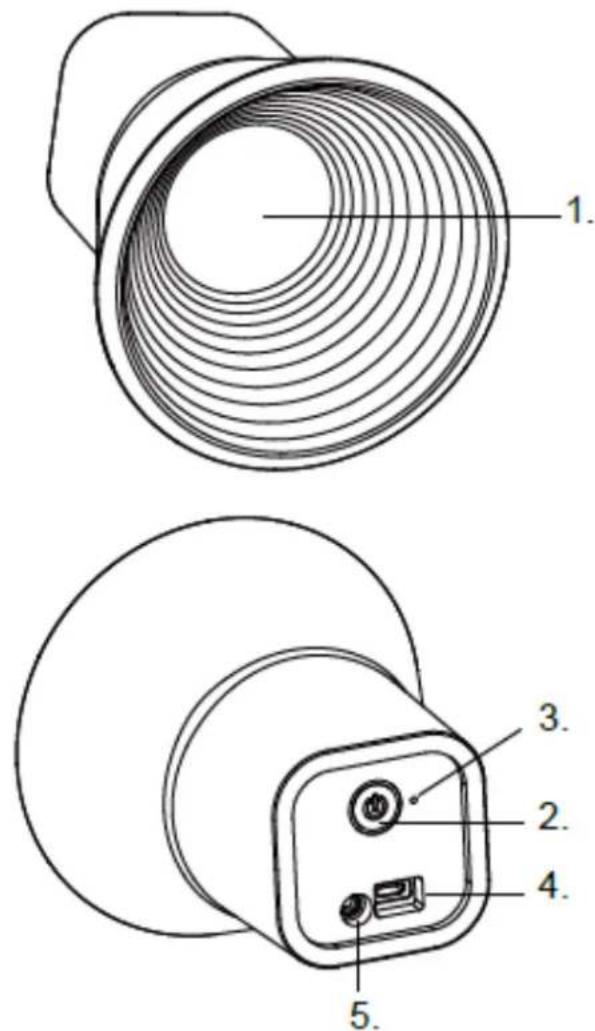
| S.No. | Description |
| 1 | Speaker |
| 2 | On/Off Button |
| 3 | LED Indicator |
| 4 | USB charging port |
| 5 | 3.5mm Aux port |
INSTRUCTIONS FOR USE
CHARGING THE UNIT
For best results, fully charge the unit before first use.
- Connect the USB cord to the charging port located at the back of the speaker and insert the other end into a USB port of your computer or similar power source.
- The LED at the back turns red when the battery is being charged. Once it is fully charged, the Red LED will turn off. It will take 3 to 4
hours to fully charge the Battery.
Press the On/Off button at the back of speaker.
TURN THE SPEAKER TO BLUETOOTH PAIRING MODE -
- Press the On/Off button at the back of speaker.
- The Blue LED blinks. This indicates that it is in pairing mode.
(Note: If no device is paired with the Bluetooth speaker, it will turn off automatically after around 5 minutes.)
(Note: If you have paired to the speaker before, then the speaker will pair automatically with the last device it connected.)
PAIRING YOUR DEVICE WITH BLUETOOTH SPEAKER
Your Wireless Speaker Cone can wirelessly stream audio from any Bluetooth enabled device within \~30 Feet. Simply follow the below steps.
- Turn ON the speaker and the Blue LED light will blink.
- Turn on the Bluetooth on your Mobile Phone or Tablet or Computer
- It will search for Bluetooth devices
- The pairing name of our Bluetooth Speaker is "BT CONE", Pair it with this device.
- If required, enter the password '0000' to confirm to finalize pairing.
- Once paired successfully, the Blue LED will flash slowly.
- If you fail to pair it within the time frame or you want to pair it with a new device please follows the steps outlined above.
Select your favorite song at the Bluetooth device and play it through the Wireless Speaker Cone.
AUX FUNCTION OF THE SPEAKER
- Turn on speaker by pressing the On/Off button at the back of the speaker.
- Put the 3.5 mm Aux in cable (provided) to the Aux port of the speaker. And, the other end of the cable connects in the audio device (such as computer / tablet / .....etc.).
- The Blue LED will light up.
Select your favorite song at the source device and play it through the Wireless Speaker Cone.
(Note: When you put 3.5 mm Aux in cable into the Aux port of the speaker, the Bluetooth connectivity of the speaker will be lost when Aux is in use.)
(Note: Suggest you turn off the Bluetooth of your mobile phone when the Aux is being used.)
(Note: Battery life & charging time may vary, based on usage & types of devices used)
TROUBLESHOOTING
| PROBLEMA | CAUSA SOLUCIÓN |
| Low sound Volemen too low Adjust volumen | |
| Low sound Low battery Charge battery | |
| Distortion Battery too low Charge battery | |
| No sound Emitter OFF ON Emitter | |
| No sound Speaker OFF ON Speaker | |
| No sound Volumen at MIN Increase volumen | |
| No sound Pause on emitter Press PLAY on emitter | |
BRIGMTON
"Features can change without notice"
Imported: I.R.P., S.L.
DECLARATION OF CONFORMITY
I.R.P., SL declare under our responsibility that the equipment meets the requirements indicated in the following directives:
EMC DIRECTIVES
ETSI EN 300 328 V1.7.1. (2006-10)
LCS130322502TE
Description of apparatus:
BRIGMTON Model BAMP-605-B-N-A-R
Portable Speaker
Importer: I.R.P., SL
Address: Avenida Santa Clara de Cuba 5, 41007, Sevilla.