
BAMP-700-N - Docking Station BRIGMTON - Free user manual and instructions
Find the device manual for free BAMP-700-N BRIGMTON in PDF.


| Product Type | Docking Station |
| Brand | Brigmton |
| Model | BAMP-700-N |
| Compatible Devices | Smartphones, Tablets, MP3 Players |
| Charging Function | Yes, via USB port |
| Audio Output | 3.5 mm headphone jack |
| Built-in Speaker | Not included |
| Number of USB Ports | 1 (USB-A, 5V/1A) |
| Power Input | DC 5V, micro USB |
| Power Adapter | Included (5V/1A) |
| Dimensions (L x W x H) | Approx. 12 x 8 x 4 cm |
| Weight | Approx. 150 g |
| Cable Length | Approx. 80 cm |
| Material | ABS plastic |
| Color | Black |
| LED Indicator | Power LED |
| Operating Temperature | 0°C to 40°C |
| Storage Temperature | -20°C to 60°C |
| Certifications | CE, RoHS |
| Maintenance | Wipe with dry cloth, avoid moisture |
| Safety | Do not expose to liquids, use only included adapter |
| Spare Parts Availability | Contact Brigmton support |
| Repairability | Non-user serviceable |
Frequently Asked Questions - BAMP-700-N BRIGMTON
User questions about BAMP-700-N BRIGMTON
0 question about this device. Answer the ones you know or ask your own.
Ask a new question about this device
Download the instructions for your Docking Station in PDF format for free! Find your manual BAMP-700-N - BRIGMTON and take your electronic device back in hand. On this page are published all the documents necessary for the use of your device. BAMP-700-N by BRIGMTON.
USER MANUAL BAMP-700-N BRIGMTON
natural_image
Two black BRIGMTN-branded sound speakers with digital display, no visible text or symbols on device bodyBAMP-700-N-A-R
ALTAVOZ BLUETOOTH-MICRO SD- MICRÓFONO
natural_image
Line drawing of a rectangular electronic device with internal components and a control panel (no text or symbols)natural_image
Two black BRIGMTN-branded audio speakers with digital display, no visible text or symbols on device bodyBAMP-700-N-A-R
BLUETOOTH SPEAKER-MICROSD-MICROPHONE
IMPORTANT SAFETY INSTRUCTIONS
- Keep speaker away from water and other liquids.
- Keep speaker away from any source of heat.
- Adjust the volume to a suitable level so as to avoid damaging your hearing, or the unit itself.
- If does not use this speaker for long time, please charge at lease once within three month, in order to prevent the lithium battery from causing and damaging because of excessive consumption.
SLOT AND KEYS
QUICK START
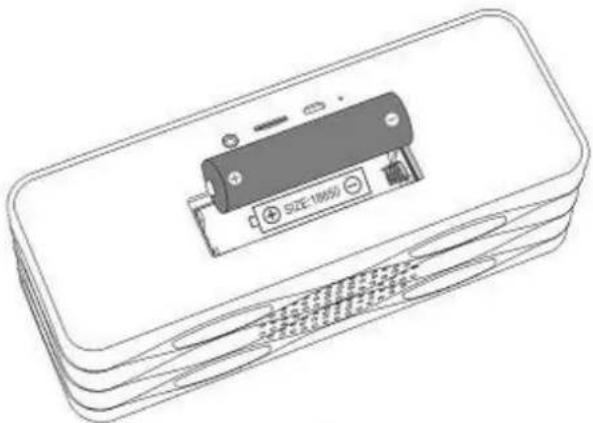
Please follow below picture to install the battery, please do not anti-access the battery polarity. And do use the included battery for working.
natural_image
Line drawing of a battery pack with a small battery and two buttons, no text or symbols present.INSTRUCTIONS
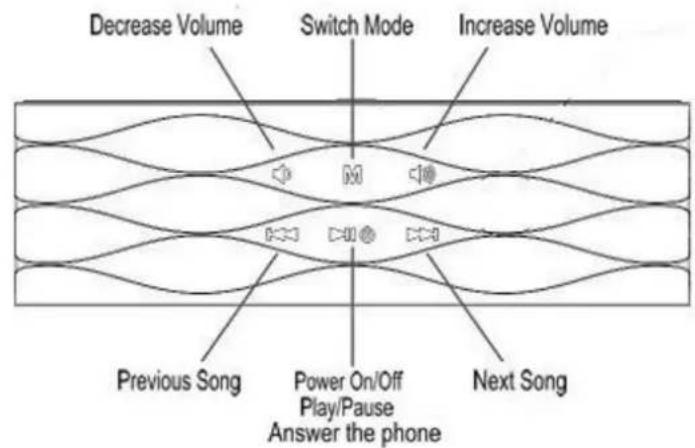
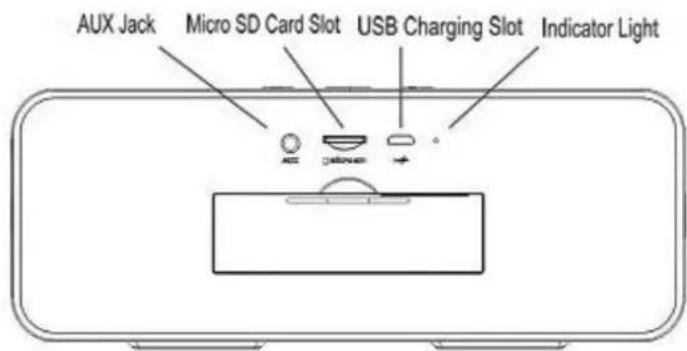
POWER ON/OFF: Long press the button and hold for 2 seconds to power on the speaker, the Working Indicator Light will be on. Long press the button to power off the speaker.
Please not take out the battery and using the USB adaptor to charge the speaker for better sound quality, as the output of the speaker is large.
VOLUME ADJUSTMENT: Short press the buttons to decrease / increase the volume gradually. Long press the buttons to decrease / increase the volume continuously.
SONG/FM CHANNEL SWITCHING: Under music playing mode, short press the /▶▶ buttons to switch to the previous / next song.
Under FM mode, short press the buttons to switch to the previous / next channel.
FAST REVERSE/FAST FORWARD: Under Micro SD card music playing mode, long press the buttons for fast reverse/fast forward.
PAUSE/PLAY - MUTE / PLAY: Under the mode of Micro SD card music playing, PC USB, Bluetooth, short press the button for pause/play.
Under the mode of AUX, FM, short press the button for mute/play.
BLUETOOTH: Press the M button to enter the Bluetooth mode, the LED display will show the icon "BL". Now please turn on the Bluetooth function of your mobile/other devices. And start to search for Bluetooth devices, the "BAMP-700" will be found, please connect it. The mobile may remind you to input the pairing code. The speaker's default pairing code is "0000". (The speaker will voice "paired" when connecting).
Please turn on the mobile or other devices' music player, and speaker will play the selected music.
Under pairing, when phone call comes in, the speaker will ring and the display will show "CALL". Please short press the ▶ button to answer the phone, re-press the ▶ button to end up the phone.
MICRO SD CARD MUSIC PLAYING: Inserting the Micro SD Card into the speaker to enter the memory card mode, the speaker will play the Micro SD card music directly. (Speaker will voice memory card). The LED display will show the playing time of the current song.
The speaker support music format at WAV, MP3, WMA, APE, FLAC. Please using the bigger bit rate music for better music enjoyment (for example bit rate at 320kbps)
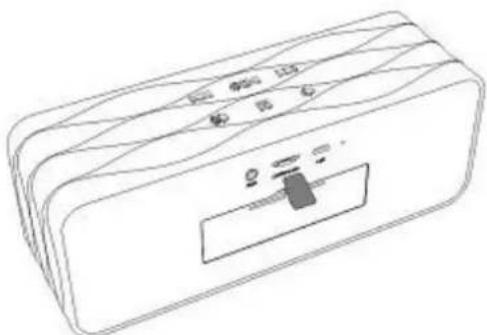
Please Note: The speaker support to select the music by the songs' numbers. Please double press the buttons and hold it. The display will show the song's number. Please select your needed song's number to play.
AUX IN: Use the 3.5mm audio cable included to connect the speaker to an audio source (PC, MP3/MP4, mobile phone). Short press the M button to enter "AUX IN" mode (the speaker will voice Aux). The speaker will play the music from the audio source. And short press the button to play/mute the music.
Please Note: Low battery will affect the music sound quality, please charge the speaker by adaptor (5V 1A) under Aux in mode.
PC USB: Please use the USB cable included to connect the speaker to the computer, short press the M button to enter the PC USB Mode(speaker will voice PC), which will work as a computer speaker. The first time to use this function, computer will automatically identify the speaker and install the driver for it.
FM RADIO: Press the M button to the FM mode (the speaker will voice FM), The display will show the FM channel, press the buttons for previous/next channel.
CARD READER: Power on the speaker(with Micro SD card), Please use the USB cable included to connect the speaker to the computer, and long press the ▶ button to power off the speaker. The speaker will enter the card reader mode, and the display will show "Hdd". Then the Micro SD card can be read and written on the computer directly.
CHARGING: The speaker with the 2000 mAh lithium battery, can working for 5 hours in the normal status. If low capacity, the indicator light at the back will flash quickly. And the speaker will decrease the volume automatically in order to protect the battery when low capacity. Please charge the battery by USB adaptor immediately.
Under charging, the indicator light will flash slowly, when fully charge, the indicator light will stop flashing in blue.
Please use the branded good quality 5V 1A adaptor to charge the battery. You can use the Smartphone's adaptor for charging.
TROUBLESHOOTING
-
What should I do if the speaker can not pair with the Bluetooth device and play music accordingly? Please check the specification/ the manual of the Bluetooth device (your mobile or computer), and see if the device can support the A2DP stereo audio transmission. If yes, please turn on the A2DP stereo mode.
-
What should I do if the Micro SD card can not work?
(1) Ensure that the Micro SD card is in good condition. Also check that the audio files are the correct formats - MP3/WMA/WAV/APE/FLAC.
(2) Beside the above case, the problem maybe the compatibility of the Micro SD card.
We recommend you formatting the Micro SD Card to FAT32 file formats.
- What should I do if the PC USB function could not work?
(1) Connect the speaker to the computer via the USB cable included, and enter the PC USB mode. And then play the video/ audio from the computer.
(2) If it could not work, it may be the problem that the sound card of the speaker is incompatible with the computer. Please try to click the device manager--- click the Voice video and games controller---right click the USB Audio device---click the uninstall. Then please switch the speaker to PC USB mode again. The computer will automatically update the USB sound card drive to achieve the compatibility
Features can be change without notice.
I.R.P., S.L.
SANTA CLARA DE CUBA NAVE 5
SEVILLA
ESPAÑA
DECLARATION OF CONFORMITY
I.R.P., SL declare under our responsibility that the equipment meets the requirements indicated in the following directives:
EMC DIRECTIVES
ETSI EN 300 328 V1.7.1 (2006-10)
ETSI EN 301 489-1 V1.9.2 (2011-09)
ETSI EN 301 489-17 V2.2.1 (2012-09)
EN 62479: 2010
EN60950-1: 2006+A11:2009+A1:2010+A12:2011
Description of apparatus:
BRIGMTON Model BAMP-700-N-A-R
Wireless Speaker
Importer: I.R.P., SL
Address: Avenida Santa Clara de Cuba 5, 41007, Sevilla.
Brand : BRIGMTON
Model : BAMP-700-N
Category : Docking Station