L405 - Mobile Phone MOTOROLA - Free user manual and instructions
Find the device manual for free L405 MOTOROLA in PDF.


User questions about L405 MOTOROLA
0 question about this device. Answer the ones you know or ask your own.
Ask a new question about this device
Download the instructions for your Mobile Phone in PDF format for free! Find your manual L405 - MOTOROLA and take your electronic device back in hand. On this page are published all the documents necessary for the use of your device. L405 by MOTOROLA.
USER MANUAL L405 MOTOROLA
text_image
MOTOROLA HANDSET 1 5:30 - 6:15 HEAD START MENU ID ID READU 2 1 2 4 7 0 6 8 0 1 2 3 4 5 6 7 8 9 0 OPEN INT 6.0
MOTOROLA
User's Guide
For L401 / L402 / L403 / L404 / L405
DECT 6.0 Cordless Phones with Answering System
Warning
Use only the power adapters and telephone line cord provided in the box.
Welcome...
to your new Motorola Digital Cordless Phone!
Please retain your original dated sales receipt for your records. For warranty service of your Motorola product, you will need to provide a copy of your dated sales receipt to confirm warranty status. Registration is not required for warranty coverage.
For product related questions, please call:
US and Canada: 1-888-331-3383
On the Web: www.motorola.com
• 30 name and number phonebook.
- Answering machine with 15 minutes digital recording time.*
- Caller ID shows you who's calling and you can see details of the last 30 callers in a calls list.**
- Register up to 5 handsets to a single base.
- Make internal calls, transfer external calls, hold 3-way conversation between two internal callers and an external caller (for multi-handset pack only).
*The recording time includes the pre-recorded voice menu and outgoing announcements.
**You must subscribe to your network provider's Caller ID or Call Waiting service for these features to work.
Please note that this equipment is not designed for making emergency telephone calls when the power fails. Alternative arrangements should be made if emergency telephone call is necessary.

This ENERGY STAR ^® program (www.energystar.gov) recognizes and encourages the use of products that save energy and help protect our environment. We are proud to mark this product with the ENERGY STAR ^® label indicating it meets the latest energy efficiency guidelines.
This User's Guide provides you with all the information you need to get the most from your phone.
Before you make your first call you will need to set up your phone. Follow the simple instructions in 'Getting Started', on the next few pages.
IMPORTANT
Only use the telephone line cord supplied.
This equipment is not designed for making emergency telephone calls when the power fails. Alternative arrangements should be made for access to emergency services.
Got everything?
- Handset
- Base
- User's guide
- Quick start guide
- Battery door
• NiMH rechargeable battery pack
• Power adapter - Telephone line cord
In multihandset packs, you will find one or more additional handsets, chargers with power adapter units, additional rechargeable battery packs and battery doors.

MOTOROLA
-
Getting started ....6
-
Getting to know your phone ....9
-
Using the phone....17
3.1 Calls.... 17
3.1.1 Make a call 17
3.1.2 Predial 17
3.1.3 Dial one touch numbers 1 to 9 ...... 17
3.1.4 Call from the phonebook 17
3.1.5 Call from the calls list 17
3.1.6 Call from the redial list 17
3.1.7 Answer a call 18
3.1.8 Adjust volume 18
3.1.9 Mute 18
3.1.10 End a call 18
3.2 Intercom.... 19
3.2.1 Call another handset 19
3.2.2 Transfer an external call to another handset 19
3.2.3 Three-party conference call 19
3.3 Voicemail.... 20
3.3.1 Clear voice mail indication 20
- Phonebook ....20
4.1 View an Entry 20
4.2 Add an Entry....20
4.3 Edit an Entry 21
4.4 Delete an Entry....22
4.5 Delete all Entries 22
4.6 View Phonebook Capacity 22
4.7 Store a Phonebook Entry as a One Touch Number....22
4.8 Change the Phonebook Entry in a One Touch Number....22
4.9 Delete a One Touch Number .....22
- Caller ID....23
5.1 Calls List....23 5.1.1 View the calls list ....23
5.1.2 Save a number from the calls list to the phonebook 24
5.1.3 Delete a calls list entry .....24
5.1.4 Delete entire calls list 24
5.2 Redial 24
5.2.1 View the redial list .....24
5.2.2 Copy a redial number to the phonebook ..24
5.2.3 Delete a redial list entry 25
5.2.4 Delete entire redial list 25
- Personal Settings 25
6.1 Set Date & Time 25
6.2 Handset Tones ......26
6.2.1 Set the ringer tone 26
6.2.2 Set the ringer volume 26
6.2.3 Key tones on/off 26
6.2.4 Battery low tone on/off 26
6.2.5 No coverage tone on/off 26
6.3 Handset Name 27
6.4 Set the Display Language ......27
6.5 Set the LCD Contrast .....27
6.6 Auto Talk On/Off....27
6.7 Registration 28
- Advanced Settings 28
7.1 Set the Dial Mode....28
7.2 Set the Flash Time 28
7.3 Set the Area Code....29
7.4 Reset All Settings....29
- Using your Answering Machine...... 29
8.1 Play Messages ......29
8.2 Delete All Messages....31
8.3 Announcement 31
8.3.1 Record the announcement 31
8.3.2 Play the announcement .....31
8.4 Answering Machine Settings....32
8.4.1 Set the answer mode .....32
8.4.2 Message alert on/off 32
8.4.3 Set the number of rings 32
8.4.4 Record a memo 32
8.4.5 Call screening on/off 33
8.4.6 Remote access on/off 33
8.4.7 Set the security code ....34
-
Default Settings.... 35
-
Help 35
- General Information...... 37

MOTOROLA
1. Getting started
WARNING
Do not place your phone in the bathroom or other humid areas.
Location
When choosing a location for your new phone, here are some important guidelines you should consider:
- Avoid sources of noise and heat, such as motors, fluorescent lighting, microwave ovens, heating appliances and direct sunlight.
- Avoid areas of excessive dust, moisture and low temperature.
- Avoid other cordless telephones or personal computers.
- Never install telephone wiring during a lightning storm.
- Never install telephone jacks in wet locations unless the jack is specifically designed for wet locations.
- Never touch non-insulated telephone wires or terminals unless the telephone line has been disconnected at the network interface.
- Use caution when installing or modifying telephone lines.
HANDSET RANGE
Optimal range is reached when there are no other electrical appliances working within the range area. Any obstruction between the base and handset will also reduce the range significantly.
SIGNAL STRENGTH
When out of range of the base, the screen shows SEARCHING... If you are on a call, the line will hang up. Move back within in range. The handset will automatically re-connect to the base.
Setting up
IMPORTANT
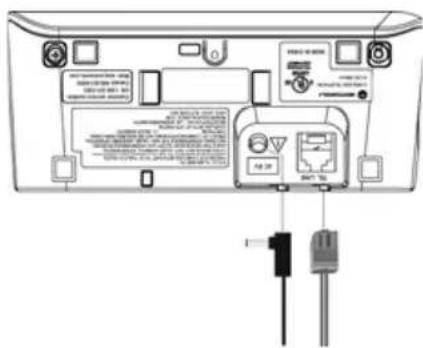
The base must be plugged into the electrical outlet at all times. Do not connect the telephone line cord into the wall jack until the handset is fully charged. Only use the power adapter and telephone line cord supplied with the product.
WHICH POWER ADAPTER
The power adapter with the smaller pin is for the base unit and the power adapter with the bigger pin is for the charger unit (for multi-pack only).
Connecting the base
text_image
Diagram of a device rear panel with labeled ports, connectors, and internal components, showing connections to a battery outlet.- Plug the power adapter with smaller pin plug & telephone line cord into the base. Power adapter with bigger pin plug is for charger (for multi-pack only).
- Plug the other end of the power adapter & telephone line cord into the wall jack.
- Always use the telephone line cord provided in the box.
- Use only the provided power adapter.
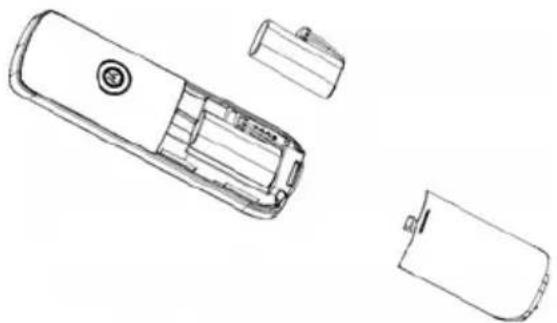
Install and charge the handset battery pack
natural_image
Line drawing of a mobile phone casing with internal components and battery housing (no text or symbols)- Slide out the battery compartment cover.
- Place the supplied rechargeable battery pack in the battery compartment, with the battery connector plugged in, as shown.
- Slide the battery compartment cover back.
- Put the handset on the base to charge for at least 24 hours. When the handset is fully charged the will indicate that it is fully charged.
- Use only the rechargeable battery pack provided.

MOTOROLA
BATTERY LOW WARNING
If the flashes in the display, you will need to recharge the handset before you can use it again. During charging, the will scroll in the display.
BATTERY PERFORMANCE
In ideal conditions, a fully charged battery pack should give up to 12 hours talk time or up to 18 hours standby time on a single charge.
Note that new battery packs do not reach full capacity until they have been in normal use for several days.
To keep your battery packs in the best condition, leave the handset off the base for a few hours at a time.
Running the battery packs all the way down at least once a week will help them last as long as possible.
The charge capacity of rechargeable battery packs will reduce with time as they wear out, giving the handset less talk/standby time. Eventually they will need to be replaced.
After charging your handset for the first time, subsequent charging time is about 6-8 hours a day. The battery pack and handset may become warm during charging. This is normal.
8 Getting started
2. Getting to know your phone Overview of your handset

text_image
15 MOTOROLA 1 2 3 4 5 6 7 8 9 10 11 12 13 14 15 16 17 18 19 20 21 22 23 24 25 26 27 28 29 30 31 32 33 34 35 36 37 38 39 40 41 42 43 44 45 46 47 48 49 50 51 52 53 54 55 56 57 58 59 60 61 62 63 64 65 66 67 68 69 70 71 72 73 74 75 76 77 78 79 801 Menu/ Select
In idle mode: press to access menu list.
In menu/editing mode: press to confirm and save the settings.
During a call: press to hold a call.
In calls list entry: press to save the entry to the phonebook. In phonebook entry: press to go to phonebook editing mode
2 Scroll up/ Volume up
In menu mode: press to scroll up.
In editing mode: press to move cursor to the left.
During a call: press to increase volume.
Calls list/phonebook/redial list entry: press to scroll up the list.
In answering machine mode: press to increase volume.
3 Right/ Calls list
In idle mode/during a call: press to access calls list.
In editing mode: press to move the cursor to the right.
4 Scroll down/ Volume down/ Redial list
In idle/pre-dial mode: press to access redial list.
In menu mode: press to scroll down.
In editing mode: press to move cursor to the right.
During a call: press to decrease volume.
Calls list/phonebook/redial list entry: press to scroll down the list.
In answering machine mode: press to decrease volume.
5 Talk off/ Back
In menu/editing mode/phonebook entry: press to exit to previous level.

MOTOROLA
In pre-dial mode/calls list/redial list entry/answering machine mode: press to exit to idle. During a call: press to end a call.
6 Alphanumeric keypad
In idle/pre-dial/editing mode/during a call: press to enter characters/numbers. Long press to activate speed dial.
7 #/ Pause/ ABC/ Format
In idle/pre-dial/number editing mode/during a call: press to insert a "#", press and hold to insert a pause. In name editing mode: toggle ABC/Abc/abc. In calls list entry: press to toggle the Caller ID display format between 7, 8, 10 and 11 digits.
8 Intercom
In idle mode/during a call: press to initiate an intercom call.
9 Microphone
10 Speaker
In idle/menu/pre-dial mode/during a call: press to turn on/off the speakerphone. Call List/phonebook/redial list entry: press to make a call with speakerphone. During ringing: press to answer a call with speakerphone. In answering machine mode: press to toggle the message playback via earpiece/speakerphone
11 \*/ Tone
In idle/pre-dial/editing mode: press to insert a "*". During a call: press to switch from pulse to tone dialing temporarily if pulse mode was selected before. After the call has ended, the dial mode will change back to pulse.
12 Talk on/ Flash
In idle/menu/pre-dial mode: press to make a call. Call List/phonebook/redial list entry: press to make a call to the selected entry. During a call: press to make a flash. During ringing: press to answer a call.
13 Left/ Phonebook
In idle mode/during a call: press to access the phonebook. In editing mode: press to move the cursor to the left.
14 ITAD/ Mute/ Clear/ X
In idle mode: press to play the voice prompt of answering machine main menu.
In pre-dial/editing mode: press to delete one character/digit. Long press to delete all characters/digits.
During a call: press to mute/unmute the call.
In calls list/phonebook entry: press to delete the entry.
In answering machine mode: press to delete the current message playback.
15 Earpiece
Handset LCD display

text_image
NEW MUTE 88:00 AM 88:00 PM 88/88Display icons

On when the line is in use. Flashes when there is an incoming call.

On when speakerphone is turned on.

On when answering machine is turned on. Flashes when new answering machine message is received.
NEW
Indicates when new call is received. Off when new call has been viewed.

On when ringer volume is turned off.

On when there is new voice mail not yet listened to. Off when new voice mail has been listened to.
MUTE
On when a call is muted.

Full battery power level.

2/3 battery power level.

1/3 battery power level.

Flashes when low battery level is detected, needs charging.


Animation in cycle. Battery is charging.

MOTOROLA
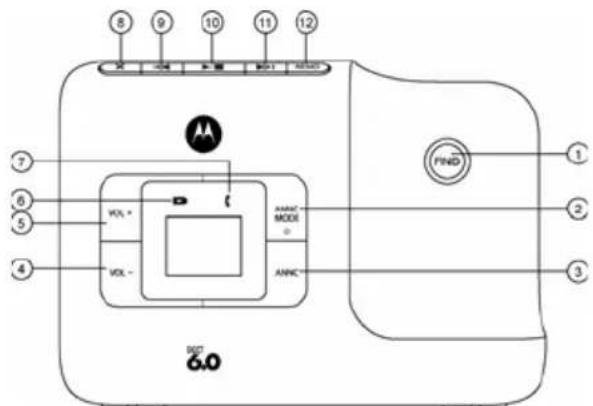
Overview of the base
text_image
8 9 10 11 12 -24 +24 +24 +24 AM VOL * VOL - AVANC MODE ANINC FIND 1 2 3 6.01 FIND
Press to find/page all registered handsets.
2 ANSWER ON/OFF/ANSWER MODE
Press to toggle answering machine mode between ANSWER OFF, ANNC & RECORD and ANNOUNCE ONLY mode.
3 ANNOUNCE
In Idle: Short press to play the current announcement. In Idle: Press and hold to hear a voice prompt of how to
record the personalized announcement of the current answer mode, release key to stop recording.
4 V O L U M E -
Decrease the loudspeaker volume by one level (0 to 8) in idle, during message playback or during call screening.
5 V O L U M E +
Increase the loudspeaker volume by one level (0 to 8) in Idle, druing message playback or during call screening.
6 Charging LED - Green
Steadily ON: When the handset is put into base cradle for charging.
7 In Use LED - Red
Steadily ON: During a call or when an extension phone (another registered handset) or the built-in answering machine is off hook. Flashing at a rate similar to the incoming ring pattern: During an incoming call. Flash at a rate of 0.5s on and 0.5s off for 2 minutes: During paging or registration.
8 DELETE
During message playback: Delete the current message. In Idle: Press and hold to erase all read messages (applicable only when messages in answering machine are all read, new message(s) will not be deleted.)
9 SKIP BACKWARD
Press once to replay current message from the beginning. Press twice to playback the previous message.
12 Getting to know your phone
10 PLAY/ STOP
In message playback mode: Press to playback or stop playing messages.
11 SKIP FORWARD
Skip to play the next message.
12 MEMO
In Idle: Press and hold to hear a voice prompt recording a memo and then start to record a memo. Release key to stop recording memo.
2-digit 7-seg Behavior base display
-- Answering machine is OFF.
00 Steadily ON: No voice messages in answering machine.
09 Flash in idle: Indicates the number of answering machine messages and that there is an unread message. (e.g. there are 9 answering machine messages in total. Total number of messages is from 1 to 59.)
Flash during message playing: The selected answering machine message is being played.
Steadily ON: All the new messages have been read and there are 9 answering machine messages in total.
F
[1]
≡≡/09
in
Rn
L R
L R/OS
13
Flashing: Answering machine memory is full.
Flashing - -: Time is not set and there are old voice messages kept in the answering machine memory only (no new voice messages).
Blinking between 09/ : Personalized announcement or memo is being recorded. The numbers (e.g.09) indicate the total number of messages in answering machine when playing announcement.
Flashing: Indicates an incoming call / recording of an incoming call.
Steadily ON: Represents Announce Only mode.
Flashing: Line Remote access is in progress.
Blinking between L 8/09: Remote access is in progress and the numbers (e.g.09) indicate the total number of messages.
Steadily ON: Indicates the base speaker volume level is 3. Nine volume levels from L0 to L8 are provided (L0 means ringer off).
23 disappears after 3 seconds.

MOTOROLA
Paging is a useful way of finding lost handsets.
- Press Ⓗ on the base.
- All handsets ring.
- To stop the paging call, press Ⓗ again, or place the handset on the cradle or press any key on the handset.
Navigating the menus
- Press
- Press ⓞ to scroll through the menu.
- Press 📄 to open a sub-menu or validate an option. Press 📋 to go back to previous menu level or cancel an action.
If you do not press any button on the handset for 30 seconds the display will automatically return to standby. It will also return to standby when the handset is placed on the base or charger.
14 Getting to know your phone
Menu map
| MAIN MENU | DATE & TIME | PHONEBOOK | SETUP HS | SETUP BS | ANSWER MACHINE | RESET SETTINGS |
| SUB MENU YEAR | DATE | VIEW | RINGER TONE | DIAL MODE | ANSWER MODE | CLR VOICE MAIL |
| ADD | RINGER VOLUME | FLASH TIME | MESSAGE ALERT | ALL SETTINGS | ||
| EDIT | KEY TONE | AREA CODE | NUMBER OF RINGS | |||
| DELETE | LOW BATT TONE | ANNOUNCEMENT | ||||
| DELETE ALL | OUT RANGE TONE | RECORD MEMO | ||||
| PB CAPACITY | HANDSET NAME | CALL SCREENING | ||||
| SPEED DIAL | LANGUAGE | REMOTE ACCESS | ||||
| LCD CONTRAST | SECURITY CODE | |||||
| AUTO TALK | ||||||
| REGISTRATION |
Character map
Uppercase Lowercase
Key Character versus key press number
| 1 space 1 # ', - . & | ||||||
| 2 A | B | C | 2 | |||
| 3 D | E | F | 3 | |||
| 4 G | H | I | 4 | |||
| 5 J | K | L | 5 | |||
| 6 M | N | O | 6 | |||
| 7 P | Q | R | S | 7 | ||
| 8 T | U | V | 8 | |||
| 9 | W | X | Y | Z | 9 | |
| 0 0 | ||||||
| * | * | ? | ! | / | ( ) | @ |
| # Toggle the letter case - ABC / Abc / abc | ||||||
Key Character versus key press number
| 1 space 1 # ', - . & | ||||||
| 2 a | b | c | 2 | |||
| 3 d | e | f | 3 | |||
| 4 g | h | i | 4 | |||
| 5 | j | k | l | 5 | ||
| 6 m | n | o | 6 | |||
| 7 p | q | r | s | 7 | ||
| 8 | t | u | v | 8 | ||
| 9 w | x | y | z | 9 | ||
| 0 0 | ||||||
| * | * | ? | ! | / | ( ) | @ |
| # Toggle the letter case - ABC / Abc / abc | ||||||
3. Using the phone
3.1 Calls
3.1.1 Make a call
-
Press or
-
Dial the phone number.
3.1.2 Predial
-
Enter the phone number (maximum 32 digits). If you make a mistake, press 📄 to delete a digit.
-
Press 📄 or 📋 to dial the phone number entered.
3.1.3 Dial one touch numbers 1 to 9
- Press and hold a key from 1 to 2 until the number is displayed and dialed.
NOTE
You need to set the one touch number first. - If no number is stored, you hear a double beep.
3.1.4 Call from the phonebook
-
Press ☐. The first entry in the phonebook is displayed.
-
Scroll ⓞ to the entry you want.
-
Press 📂 or 📋 to dial the number.
TIPS
Instead of scrolling to browse the phonebook entries, press the numeric key corresponding to the first letter of the entry you wish to locate. For example, pressing 2_asc^2 will show the entries starting with A. Pressing 2_asc^2 again will show the entries starting with B, etc.
3.1.5 Call from the calls list
NOTE
You need to subscribe to your network's Caller ID service to be able to see the caller's number in the calls list. See section "5. Caller ID" for more details.
- Press Ⓞ. The first entry in the call list is displayed.
- Scroll ⓞ to the entry you want.
- Press FLASH or 📋 to dial the number.
3.1.6 Call from the redial list
The last five numbers called are saved and can be redialed later.
- Press ☐. The first entry in the redial list is displayed.
- Scroll ⓞ to the entry you want.
- Press FLASH or to dial the number.
Using the phone 17

MOTOROLA
3.1.7 Answer a call
- When the phone rings and flashes in the display, press or press to answer the call via the loudspeaker.
WARNING
When the phone is ringing, avoid holding the earpiece too close to your ear as it may damage your hearing. Handsfree activation can suddenly increase the volume in the earpiece to a very high level. Make sure the handset is not too close to your ear.
TIPS
If Auto Talk mode (see Section 6.6 for more details) is on, simply lift up the handset from its base to answer the call. The default setting is Off.
NOTE
An incoming call has priority over other events. Whenever there is an incoming call, other operations in progress such as phone settings, menu navigation, etc. will be ended.
3.1.8 Adjust volume
- During a call, press ⏱ to adjust the earpiece or loudspeaker volume.
- The level is shown in the handset display, as VL1 up to VL5.
3.1.9 Mute
Mute the microphone so that you can talk to someone else in the room without your caller hearing you.
- During a call, press ☐.
- The microphone is muted.
- Press ☐ again to turn the microphone back on.
3.1.10 End a call
- During a call, press 50N or put the handset on the cradle.
After you hang up, the duration of your call is displayed for around 2 seconds.
3.2 Intercom
This feature is only available when there are at least 2 registered handsets. It allows you to make internal calls, transfer external calls from one handset to another and use the conference option.
3.2.1 Call another handset
- Press INT.
- Press Ⓞ to the handset you want to call.
- Press 📋 to call the handset.
TIPS
You may enter the number of the handset (1 to 5) you want to call.
- Press 📄 to hang up.
NOTE
If the handset is not within the valid operation range, this function may not be available.
3.2.2 Transfer an external call to another handset
- During an external call, press INT.
- Your caller is put on hold.
- Press Ⓞ to the handset you want to call.
- Press 📋 to call the handset.
TIPS
You may enter the number of the handset (1 to 5) you want to call.
- When the other handset answers by pressing ☐ or ☑, press ☐ to transfer the call. If the other handset does not answer, press ☐ to talk to your caller again.
3.2.3 Three-party conference call
- During an external call, press INT.
- Your caller is put on hold.
- Press ☐ to the handset you want to call.
- Press 📋 to call the handset.
TIPS
You may enter the number of the handset (1 to 5) you want to call.
- When the other handset answers the intercom call, press ☐ to set up the conference call.
- Press 140 to hang up.

MOTOROLA
3.3 Voicemail
Voice Mail Waiting Indication is an indication given to you when a new voice mail message is waiting on the network service provider. This feature is available if you have subscribed to the voicemail service from your network service provider.
3.3.1 Clear voice mail indication
- Press 📄 and ⓞ to select RESET SETTINGS.
- Press 📋 to select CLR VOICE MAIL.
- Press 📋 to select YES.
- Press 📋 to clear voice mail indication.
4. Phonebook
The handset phonebook can store up to 30 names and numbers.
NOTE
Numbers can be up to 24 digits long and names up to 16 characters long. Entries are stored in alphabetical order.
4.1 View an Entry
- Press (TO).
- Press Ⓞ to the entry you want.
- Press 📋 to select VIEW.
- Press 📋 to view the entry.
NOTE
If the number is more than 15 digits, press 📄 to view the next page of remaining digits.
4.2 Add an Entry
-
Press (T°).
-
If the list is empty, LIST EMPTY is displayed. Press 📋 to select ADD.
If there are entries in the phonebook, press Ⓞ to the entry you want. Press 📋 and Ⓞ to select ADD.
- Press ▼ and enter the name.
- Press 📋 and enter the number.
- Press 📋 and ⏰ to select a melody.
- Press 📋 to save settings.
NOTE
Cancel storing an entry by pressing ☐ at any time during the process.
Entering names
Use the alphanumeric keypad to enter names in the phonebook. For instance to enter the name Paul
P Press

once
A Press

once
U Press

twice
L Press

three times
To enter a space, press 1^104 .
Press ☐ to delete a character or press and hold ☐ to delete all characters.
Enter a pause
If your phone is connected to a switchboard, you may need to enter a pause in a stored number. This gives the switchboard time to get an outside line. A pause is normally stored after the switchboard access code (e.g. 9).
When storing a number, press and hold 📄 and the display shows P. You can then continue storing the phone number.
4.3 Edit an Entry
- Press ^1110 .
- Press Ⓞ to the entry you want.
- Press 📋 and 🔍 to select EDIT.
- Press 📋 and edit the name.
- Press MINI and edit the number.
- Press and to select a melody.
- Press 📋 to save the entry.
NOTE
Press ☐ to delete a digit/character or press and hold ☐ to delete all digits/characters.

MOTOROLA
4.4 Delete an Entry
- Press

- Press

- Press

- Press

4.5 Delete all Entries
- Press

- Press

- Press

- Press

4.6 View Phonebook Capacity
- Press

- Press

- Press
4.7 Store a Phonebook Entry as a One Touch Number
- Press

- Press


to select SPEED DIAL.
- Press and to select the speed dial key 1 to 9.
- Press 📋 and Ⓞ to the entry you want.
- Press 📋 to save.
4.8 Change the Phonebook Entry in a One Touch Number
- Follow steps 1 to 3 in "4.7 Store a Phonebook Entry as a One Touch Number".
- Press 📋 and the stored number is displayed.
- Press 📋 to select ADD.
- Press 📋 and 🔒 to the entry you want.
- Press 📋 to save.
4.9 Delete a One Touch Number
- Follow steps 1 to 3 in "4.7 Store a Phonebook Entry as a One Touch Number".
- Press 📋 and the stored number is displayed.
- Press 📋 and 🔊 to select DELETE.
- Press 📋 to delete the stored number.
22 Phonebook
5. Caller ID
If you have subscribed to Caller ID, and provided the identity of the caller is not withheld, the number of the caller will be displayed together with the date and time of the call (if provided by the network).
NOTE
- If the telephone number is not available for incoming calls, the handset will display UNAVAILABLE.
- If the incoming call is from a withheld telephone number, the handset will display PRIVATE.
- Information about incoming calls will vary by country and network operator. Some operators may charge a subscription for their Caller ID service.
5.1 Calls List
The calls list contains details of missed and received calls. Details include the date and time of the call. Entries are displayed in chronological order with the most recent call at the top of the list.
NOTE
- When the calls list is full, a new call replaces the oldest in the list.
- The received and missed calls log holds details of up to 30 calls.
- If you receive more than one call from the same number, only the most recent call is kept in the calls list. When you have missed calls (incoming calls that you haven't answered) the NEW on will be displayed in the display on all handsets registered to the base. If one handset is used to view the calls log, the icon on the other handsets remains on (For multi-pack use only).
5.1.1 View the calls list
- Press to enter the calls list.
- Scroll through the calls list.
NOTE
- When reviewing an entry from the calls list, press repeatedly to display the number in a different format. For example, if a caller number is displayed as 888-331-3383, the various formats will be:

MOTOROLA
331-3383
1-331-3383
888-331-3383
1-888-331-3383
User can choose the desired number format for local and long distance numbers before dialing or saving it into the phonebook.
- The Neon is removed once the new call has been viewed.
5.1.2 Save a number from the calls list to the phonebook
- Press Ⓞ to enter the calls list.
- Press ⓞ to the entry you want.
- Press 📋 and enter the name.
- Press 📋 and edit the number.
- Press and to select a melody.
- Press 📋 to save.
5.1.3 Delete a calls list entry
- Press Ⓞ to enter the calls list.
- Press ⓞ to the entry you want.
- Press ☐ to delete the entry.
5.1.4 Delete entire calls list
- Press ⓞ to enter the calls list.
- Press and hold ☐ . DELETE ALL CALL LOG ENTRIES? is displayed.
- Press 📋 to confirm and all entries are deleted.
5.2 Redial
Your phone lets you redial any of the last 5 numbers called. Numbers can be up to 32 digits long.
5.2.1 View the redial list
- Press ⚫ to enter the redial list. The last number dialed is displayed.
- Scroll through the redial list.
5.2.2 Copy a redial number to the phonebook
- Press Ⓞ to enter the redial list.
- Press (○) to select the entry you want.
- Press 📋 to select SAVE TO PB.
- Press 📋 and enter the name.
-
Press 📋 and edit the number.
-
Press and to select a melody.
- Press 📋 to save.
5.2.3 Delete a redial list entry
- Press ⓞ to enter the redial list.
- Press Ⓞ to select the entry you want.
- Press ☐ to delete the entry. OR
- Press 📋 and 🔍 to select DELETE. Press 📋 again to delete the entry.
5.2.4 Delete entire redial list
- Press Ⓞ to enter the redial list.
- Press and to select DELETE ALL.
- Press 📋 and DELETE ALL? is displayed.
- Press 📋 to confirm and all entries are deleted.
6. Personal Settings
6.1 Set Date & Time
Providing you have subscribed to your network's Caller ID service, the date and time is set automatically for all handsets every time a call is received, but you may still need to set the correct year. The date and time is recorded with each answering machine message you receive. If you do not have a Caller ID service you can set the date and time manually.
- Press 📋 to select DATE & TIME.
- Press 📋 and edit the year and date.
TIPS
You can press Ⓗ to move the cursor between the input fields YEAR and DATE.
- Press 📋 and edit the time in 12hr format. Press ⏻ to toggle AMPM settings.
- Press ☑ to save the settings.

MOTOROLA
6.2 Handset Tones
WARNING
When the phone is ringing, avoid holding the earpiece too close to your ear as it may damage your hearing.
6.2.1 Set the ringer tone
- Press 📄 and Ⓞ to select SETUP HS.
- Press 📋 to select RINGER TONE.
- Press □ and ⓞ to select a ringer melody. The current ringer melody is played for around 5 seconds.
- Press 📋 to save.
6.2.2 Set the ringer volume
- Press 📄 and Ⓗ to select SETUP HS.
- Press 📋 and 🔒 to select RINGER VOLUME.
- Press 📋 and 🔍 to increase or decrease the volume level. (6 levels are available, including ringer off. The corresponding volume effect will be played while browsing the volume option.)
- Press 📋 to save.
6.2.3 Key tones on/off
When you press a key on the handset you hear a beep. You can switch these beeps on or off.
- Press □ and Ⓤ to select SETUP HS.
- Press 📋 and Ⓞ to select KEY TONE.
- Press 📂 and ⏻ to turn on/off the key tone.
- Press 📋 to save.
6.2.4 Battery low tone on/off
- Press 📋 and 🔒 to select SETUP HS.
- Press and to select LOW BATT TONE.
- Press 📂 and ⏻ to turn on/off the battery low tone.
- Press 📋 to save.
6.2.5 No coverage tone on/off
- Press 📋 and ⏻ to select SETUP HS.
- Press □ and Ⓞ to select OUT RANGE TONE.
- Press 📋 and 🌐 to turn on/off the no coverage tone.
- Press 📋 to save.
6.3 Handset Name
Personalize your handset with a name or location, for example Peter or Bedroom. Maximum 14 characters.
- Press 📋 and Ⓞ to select SETUP HS.
- Press 📋 and ⏻ to select HANDSET NAME.
- Press 📋 and edit the handset name.
- Press 📋 to save.
NOTE
Handset name will be displayed on the idle screen. A space and a handset number are automatically added after the name set.
6.4 Set the Display Language
You can change the display language. When the menu language is changed, the voice prompt language of answering machine will also be changed accordingly.
- Press 📋 and Ⓞ to select SETUP HS.
- Press and to select LANGUAGE.
- Press 📋 and 🔍 to the language you want.
- Press 📋 to save.
6.5 Set the LCD Contrast
- Press 📋 and Ⓞ to select SETUP HS.
- Press 📋 and Ⓞ to select LCD CONTRAST.
- Press □ and ○ to increase or decrease the contrast level. (Five levels are available)
- Press 📋 to save.
6.6 Auto Talk On/Off
With auto talk is turned on, you can answer a call just by lifting the handset off the base or charger. If turned off, you will have to press 📄 or 📋 to answer a call. The default setting is Off.
- Press 📋 and 🔊 to select SETUP HS.
- Press 📋 and Ⓜ to select AUTO TALK.
- Press 📋 and ⏻ to turn on/off auto talk.
- Press 📋 to save.

MOTOROLA
6.7 Registration
Up to 5 handsets can be registered to one base. The original handset is pre-registered to use. Additional handsets must be registered to the base before you can use them.
To register an additional handset,
- Press and to select SETUP HS.
- Press and to select REGISTRATION.
- Press 📋 and Ⓗ to select YES or NO.
-
Select YES and press 📄 to enter the registration procedure as below:
-
Place the unregistered cordless handset on the charger.
- Press and hold ⓕ for 4 seconds on base.
- Release 📋 once IN USE LED is flashing.
- A confirmation tone is generated if registration is successful. HANDSET X is displayed where X denotes the number of handsets and the phone goes back to idle.
7. Advanced Settings
7.1 Set the Dial Mode
The default dialing mode is suitable for your country and network operator. It is unlikely that you should need to change this setting unless advised to do so.
- Press 📋 and 🔒 to select SETUP BS.
- Press 📋 to select DIAL MODE.
- Press 📂 and Ⓞ to select TONE or PULSE.
- Press 📋 to save.
NOTE
If pulse mode is selected, press *120 to switch from pulse to tone dialing temporarily when dialing out. After the call is ended, the dial mode will change back to pulse.
7.2 Set the Flash Time
The default flash time is 600MS. It is unlikely that you should need to change this setting unless advised to do so.
- Press 📋 and 🔒 to select SETUP BS.
- Press and to select FLASH TIME.
28 Advanced Settings
- Press ▼ and ⓞ to the flash time you want. (8 options are available: 90, 100, 110, 250, 300, 400, 600 and 700MS)
- Press 📋 to save.
7.3 Set the Area Code
- Press □ and Ⓤ to select SETUP BS.
- Press 📋 and ⏻ to select AREA CODE.
- Press 📋 and enter the area code.
- Press 📋 to save.
7.4 Reset All Settings
All personalized settings will be reset to default. Phonebook entries, calls list and redial list will remain unchanged.
- Press 📋 and 🔒 to select RESET SETTINGS.
- Press 📋 and Ⓞ to select ALL SETTINGS.
- Press 📋 to select YES.
- Press 📋 to reset all settings to default.
8. Using your Answering Machine
The answering machine records unanswered calls when it is activated. It can store up to 59 messages within the maximum recording time of 15 minutes. Each message can be up to 3 minutes long. Your personal outgoing messages can be up to 1 minute long.
8.1 Play Messages
Through the base:
- Press ▶■.
- The new messages are played from the loudspeaker on the base in the sequence they are recorded.
- Press ☐ or ☑ to increase or decrease the volume during message playback respectively.
- During message playback, press the keys below to perform the following functions:

Press to playback or stop playing messages.

MOTOROLA

Press once to replay current message from the beginning. Press twice to playback the previous message.

Skip to play the next message.

Delete the current message.

Increase the loudspeaker volume by one level (0 to 8).

Decrease the loudspeaker volume by one level (0 to 8).
NOTE
Ringer will be off when the volume is decreased to level 0.
Through the handset:
- Press ☐ from idle mode. Voice prompts of the menu list options will play.
-
Press 2 to play the messages.
-
During message playback, press the keys below to perform the following functions:

Skip to repeat the current message from the beginning. Press twice to playback the previous message.

Stop the current message playback.

Skip to play the next message.

Increase the volume

Decrease the volume.

Delete the current message and the next message will be played.

Toggle the message playback via earpiece/speakerphone.

Exit to idle.
8.2 Delete All Messages
- Press and hold ☒ on base to erase all read messages (applicable only when messages in answering machine are all read, new message(s) will not be deleted.)
NOTE
When answering machine is full, will flash if there are new messages which have not been heard. ERASE SOME ANSWERER MSG will toggle within 2 seconds with MEMORY FULL in idle to alert user to delete some answering machine messages to free up the memory.
8.3 Announcement
This is the message your callers hear on the answering machine. There are two pre-recorded outgoing messages, or you can record your own.
8.3.1 Record the announcement
- Press 📋 and ⏻ to select ANSWER MACHINE.
- Press 📋 and 🔒 to select ANNOUNCEMENT.
- Press 📋 to select RECORD.
-
Press 📋 and 🔒 to select the answer mode ANNC & RECORD or ANNOUNCE ONLY.
-
Press 📂 to start recording after a "beep" sound is heard.
- Press 📋 again to stop recording and save the message. The just saved message is played automatically.
You can also record the announcement by pressing and holding key on base to start recording after a voice prompt and beep sound is heard. Release the key to stop recording and save the message.
NOTE
When playing the message, pressing 📄 will delete it and the predefined message will be played automatically.
8.3.2 Play the announcement
- Press 📋 and 🔒 to select ANSWER MACHINE.
- Press and to select ANNOUNCEMENT.
- Press and to select PLAY.
- Press 📄 and 🔒 to select the answer mode ANNC & RECORD or ANNOUNCE ONLY.
- Press 📂 and the message is played.

MOTOROLA
NOTE
- When playing the message, press 📄 to stop playing.
- When playing the message, pressing 📄 will delete it and the predefined message will be played automatically.
8.4 Answering Machine Settings
8.4.1 Set the answer mode
- Press 📋 and 🔒 to select ANSWER MACHINE.
- Press 📋 to select ANSWER MODE.
- Press 📋 and 🔍 to select the answer mode you want. (3 options are available: ANSWER OFF, ANNC & RECORD and ANNOUNCE ONLY)
NOTE
ANNC & RECORD invites your callers to leave a message. ANNOUNCE ONLY lets callers hear your announcement but they cannot leave a message.
- Press 📋 to save.
8.4.2 Message alert on/off
If the message alert is turned on, the base will give a short alert beep at the speaker volume set, when there is a new message recorded on the answering machine.
- Press 📂 and 🔒 to select ANSWER MACHINE.
- Press 📋 and 🌐 to select MESSAGE ALERT.
- Press 📋 and 🌐 to turn on/off the message alert.
- Press 📋 to save.
8.4.3 Set the number of rings
-
Press 📋 and 🔍 to select ANSWER MACHINE.
-
Press 📋 and 🔒 to select NUMBER OF RINGS.
-
Press 📋 and 🔒 to select the number of rings. (4 options are available: TOLL SAVER, 2 RINGS, 4 RINGS and 6 RINGS)
NOTE
If Toll Saver setting is selected, the answering machine will pick up after two rings if there are new messages, and after four rings if there are no messages.
- Press 📋 to save.
8.4.4 Record a memo
You can record a memo which is stored on your answering machine and played back like a normal message.
- Press 📋 and 🌐 to select ANSWER MACHINE.
-
Press 📂 and 🔒 to select RECORD MEMO.
-
Press 📋 to start recording.
- Press 📋 again to stop recording and save the message. The just saved message is played automatically.
You can also record memo by pressing and holding MEMO on base to start recording after a voice prompt and beep sound is heard. Release the key to stop recording and save the message.
NOTE
When playing the message, pressing 📄 will delete it.
8.4.5 Call screening on/off
You are able to hear a caller leaving a message. You can then choose to ignore the caller or pick up the call.
Handset screening
- When the answering machine is recording, the cordless handset displays SCREENING?
- Press 📄 to listen to the caller through the handset earpiece, the handset displays CALL SCREENING.
-
Press ☑ to listen via the handset loudspeaker.
-
Press ☐ to stop screening and leave the answering machine to record the message.
- Press 📄 to talk to the caller and stop recording.
Base screening
The caller is automatically heard through the base speaker at the volume set, but this can be turned off if you want, as follows:
- Press 📋 and Ⓧ to select ANSWER MACHINE.
- Press 📋 and 🔊 to select CALL SCREENING.
- Press and to turn on/off call screening.
- Press 📋 to save.
8.4.6 Remote access on/off
Remote access allows you to operate your answering machine and listen to your messages by calling your phone from another phone.
- Press and to select ANSWER MACHINE.
- Press 📋 and 🔊 to select REMOTE ACCESS.
- Press 📋 and Ⓞ to turn on/off remote access.
- Press 📋 to save.

MOTOROLA
The correct sequence of the 3 security PIN digits needs to be detected before entering remote access mode. Random digits detected prior to the correct 3 digits sequence are ignored, and answering machine recording continues until the complete PIN is detected. There is no system prompt to enter the remote access code.
Press the following keys on your handset to carry out your desired function after entering remote access mode.
Press... To...
1 Repeat message
2 Play/Stop message
3 Skip forward to the next message
4 Toggle Answer Off/Announce Only/
Announce and Record modes
7 Listen to the Main Menu (for Full Voice prompts only)
0 Delete message
8.4.7 Set the security code
This is used to change the remote access PIN if necessary.
- Press 📋 and 🔒 to select ANSWER MACHINE.
- Press 📋 and 🔒 to select SECURITY CODE.
- Press view and enter the 3-digit security code.
- Press 📋 to save.
34 Using your Answering Machine
9. Default Settings 10. Help
Items Default values
Date & Time YEAR: 2009
DATE: 01/01
TIME: 12:00 AM
Ringer tone MELODY 1
Ringer volume Level 3
Key tone ON
Battery low tone ON
No coverage tone ON
Handset name HANDSET
Language ENGLISH
LCD contrast Level 3
Auto talk OFF
Dial mode TONE
Flash time 600 MS
Answer mode ANNC & RECORD
Message alert OFF
Number of rings 6 RINGS
Remote access ON
Charging
The 📄 is not scrolling when the handset is placed on the base
- Bad battery contact - move the handset slightly.
- Dirty contact - Clean the battery contact with a cloth moistened with alcohol.
- Battery is full - no need to charge.
Calls
No dial tone
- No base power - check the connections. Reset the phone: unplug and plug back in the electrical outlet.
- Handset batteries are empty - charge the battery pack for at least 24 hours.
- Handset may be too far from the base - move closer to the base.
- Wrong telephone line cord - use the telephone line cord provided.

MOTOROLA
Poor audio quality
The base is too close to electrical appliances, reinforced concrete walls or metal doorframes - move the base away from any electrical appliances.
No ring tone
• The ring tone is deactivated.
- Increase the volume.
Caller ID service does not work
Check your subscription with your network operator.
Phonebook
A phonebook entry cannot be stored
The phonebook is full. Delete an entry to free memory.
Display
No display
- Try recharging or replacing the battery pack.
- Reset the telephone base. Unplug the unit's electrical power, then plug it back in.
- If LED is not lit up, then try to unplug the unit's electrical power, then plug it back in.
Registration
When the handset lost its link with the base during a call
- Check the power cord is connected properly into the base.
- Check the power adapter is connected properly into an electrical outlet.
- Move the handset closer to the base. It may be out of range.
- Reset the base by unplugging the unit's electrical power. Wait for around 15 seconds and plug it back in again. Allow up to one minute for the handset and the base to synchronize.
Interference
Noise interference on your radio or television
Your base or charger may be too close. Move it as far away as possible.
Answering machine
Answering machine does not record messages
- Switch the answering machine on.
- The memory may be full. If so, you will need to delete some messages.
- Answer mode may be set to ANNOUNCE ONLY.
- Change the mode to ANNC & RECORD.
Cannot access messages remotely
- Remote access may be switched off.
- If wrong security code is entered a beep is played. You can enter the security code once again.
Cannot record outgoing message
- The memory may be full. If so, you will need to delete some messages.
Answering machine stops automatically
- The memory may be full. If so, you will need to delete some messages.
- The maximum message length is 3 minutes.
11. General Information
If your product is not working properly...
- Read this User's Guide or the Quick Start Guide.
- Visit our website: www.motorola.com
- Contact Customer Service in the US and Canada at 1-888-331-3383.
To order a replacement battery, contact customer service or visit our website.

MOTOROLA
Important safety instructions
Follow these safety precautions when using your phone to reduce the risk of fire, electric shock, and injury to persons or property:
- Keep all slits and openings of the phone unblocked. Do not set the phone on a heating register or over a radiator. Ensure that proper ventilation is provided at the installation site.
- Do not use while wet or while standing in water.
- Do not use this product near water (for example, near a bath tub, kitchen sink, or swimming pool).
- Do not allow anything to rest on the power cord. Place the power cord so that it will not be walked on.
- Never insert objects of any kind into the product slits as that may result in fire or shock.
- Unplug this product from the wall outlet before cleaning. Do not use liquid cleaners or aerosol cleaners. Use a damp cloth for cleaning.
-
Do not disassemble this product. If service or repair work is required, contact the customer service helpline found in this user's guide.
-
Do not overload wall outlets and extension cords.
- Avoid using during an electrical storm. Use a surge protector to protect the equipment.
- Do not use this phone to report a gas leak, especially if you are in the vicinity of the gas line.
CAUTION
To reduce the risk of fire, use only No. 26 AWG or larger UL Listed or CSA Certified Telecommunication Line Cord.
Unplug this cordless phone immediately from an outlet if:
- The power cord or plug is damaged or frayed.
• Liquid has been spilled into the product. - The product has been exposed to rain or water. Do not retrieve the handset or base until after you have unplugged the power and phone from the wall. Then retrieve the unit by the unplugged cords.
- The product has been dropped or the cabinet has been damaged.
- The product exhibits a distinct change in performance.
Installation Guidelines
- Read and understand all instructions and save them for future reference.
- Follow all warnings and instructions marked on the product.
- Do not install this product near a bath tub, sink, or shower.
- Operate this phone using only the power source that is indicated on the marking label. If you are unsure of the power supply to your home, consult with your dealer or local power company.
- Do not place this product on an unstable cart, stand, or table. This product may fall, causing serious damage to the product.
-
Adjust only those controls that are covered by the operating instructions. Improper adjustment of other controls may result in damage and will often require extensive work to restore the product to normal operation.
-
Clean this product with a soft, damp cloth. Do not use chemicals or cleaning agents to clean this phone.
- Use only the power supply that came with this unit. Using other power supplies may damage the unit.
- Because this phone operates on electricity, you should have at least one phone in your home that could operate without electricity in case the power in your home goes out.
- To avoid interference to nearby appliances, do not place the base of the phone on or near a TV, microwave oven, or VCR.
CAUTION
To maintain compliance with the FCC's RF exposure guidelines, place the base unit at least 20 cm from nearby persons.

MOTOROLA
Battery Safety Instructions
- Do not burn, disassemble, mutilate, or puncture the battery. The battery contains toxic materials that could be released, resulting in injury.
CAUTION
There is a risk of explosion if you replace the battery with an incorrect battery type. Use only the battery pack that came with your phone or an authorized replacement recommended by the manufacturer.
- Keep battery packs out of the reach of children.
- Remove battery packs if storing over 30 days.
- Do not dispose of battery packs in fire, which could result in explosion.
- The rechargeable battery packs that power this product must be disposed of properly and may need to be recycled. Refer to your battery's label for battery type. Contact your local recycling center for proper disposal methods.
SAVE THESE INSTRUCTIONS
Consumer Products and Accessories purchased in the United States or Canada
What Does this Warranty Cover?
Subject to the exclusions and limitations contained below, Binatone Electronics International LTD. warrants the Motorola branded consumer products that it manufactures (“Products”) and the Motorola branded or certified accessories sold for use with these Products that it manufactures (“Accessories”) to be free from defects in materials and workmanship under normal consumer usage for the period(s) outlined below. This limited warranty is a consumer’s exclusive remedy, and only applies as follows to new Motorola branded Products and Accessories manufactured by Binatone Electronics International LTD., and purchased by consumers in the United States or Canada, which are accompanied by this written warranty:
Who is covered?
This warranty covers only the first consumer purchaser, and is not transferable.
What will BINATONE ELECTRONICS INTERNATIONAL LTD. do?
BINATONE ELECTRONICS INTERNATIONAL LTD., at its sole option, will at no charge repair, replace or refund the purchase price of any Products or Accessories that does not conform to this warranty. Binatone Electronics International LTD. may use functionally equivalent reconditioned/refurbished/pre-owned or new Products, Accessories or parts in such repair or replacement and any Products, Accessories or parts removed or being replaced under this warranty become the property of Binatone Electronics International LTD.
What Other Limitations Are There?
ANY IMPLIED WARRANTIES OR CONDITIONS IRRESPECTIVE OF WHETHER THEY ARE IMPOSED BY LAW OR OTHERWISE, INCLUDING WITHOUT LIMITATION THE IMPLIED WARRANTIES OF MERCHANTABILITY AND FITNESS FOR A PARTICULAR PURPOSE, SHALL BE LIMITED TO THE DURATION OF THIS LIMITED WARRANTY, OTHERWISE THE REPAIR, REPLACEMENT, OR REFUND AS PROVIDED UNDER THIS EXPRESS LIMITED WARRANTY IS THE EXCLUSIVE REMEDY OF
THE CONSUMER, AND IS PROVIDED IN LIEU OF ALL WARRANTIES AND MOTOROLA AND BINATONE ELECTRONICS INTERNATIONAL LTD. MAKES NO OTHER WARRANTIES OR CONDITIONS, EXPRESS OF IMPLIED. IN NO EVENT SHALL MOTOROLA OR BINATONE ELECTRONICS INTERNATIONAL LTD. BE LIABLE, WHETHER UNDER THIS LIMITED WARRANTY OR IN CONTRACT OR TORT (INCLUDING NEGLIGENCE OR STRICT PRODUCT LIABILITY) OR OTHERWISE FOR DAMAGES OR CLAIMS IN EXCESS OF THE PURCHASE PRICE OF THE PRODUCT OR ACCESSORY, OR FOR ANY INDIRECT, INCIDENTAL, SPECIAL OR CONSEQUENTIAL DAMAGES OF ANY KIND, OR LOSS OF REVENUE, SAVINGS OR PROFITS, LOSS OF BUSINESS, LOSS OF PROGRAMS DATA INFORMATION (WHETHER CONFIDENTIAL PROPRIETARY OR PERSONAL IN NATURE OR OTHERWISE) OR OTHER FINANCIAL LOSS ARISING OUT OF OR IN CONNECTION WITH THE ABILITY OR INABILITY TO USE THE PRODUCTS OR ACCESSORIES AND BINATONE ELECTRONICS INTERNATIONAL LTD. SHALL UNDER NO CIRCUMSTANCES BE LIABLE FOR ANY CLAIMS OR DEMANDS MADE BY ANY THIRD PARTY OR MADE BY

MOTOROLA
YOU ON BEHALF OF ANY THIRD PARTY TO THE FULL EXTENT THESE DAMAGES OR CLAIMS MAY BE DISCLAIMED BY LAW.
Some states, countries or jurisdictions do not allow the limitation or exclusion of incidental or consequential damages, or limitation on the length of an implied warranty, so the above limitations or exclusions may not apply to you in such states, countries or jurisdictions. This warranty gives you specific legal rights, and you may also have other rights that vary from state to state or from one country/jurisdiction to another.
| Products or Accessories Covered | Length of Coverage |
| Consumer Products One | (1) year from the date of purchase by the first consumer purchaser of the product. |
| Consumer Accessories | Ninety (90) days from the date of purchase by the first consumer purchaser of the accessory. |
| Consumer Products and Accessories that are Repaired or Replaced | The balance of the original warranty or for ninety (90) days from the date returned to the consumer, whichever is longer. |
Exclusions
Normal Wear and Tear. Periodic maintenance, repair and replacement of parts due to normal wear and tear are excluded from coverage.
Batteries. Only batteries whose fully charged capacity falls below 80% of their rated capacity and batteries that leak are covered by this limited warranty. Battery life and the changes in battery capacity with time or use are excluded from this warranty.
Abuse & Misuse. Defects or damage that result from: (a) improper or unreasonable use, operation, storage, misuse or abuse, accident or neglect or other external cause, such as physical damage (cracks, scratches, etc.) to the surface of the product resulting from misuse; (b) your failure to follow or operation outside the usage parameters stated in the user instructions that came with the Products or Accessories; (c)
contact with liquid, water, rain, extreme humidity or heavy perspiration, sand, dirt or the like, extreme heat, or food; (d) use of the Products or Accessories for commercial purposes or subjecting the Product or Accessory to abnormal usage or conditions; or (e) other acts or omissions which are not the fault or neglect of Motorola or Binatone Electronics International LTD., are excluded from coverage.
Use of Non-Motorola branded Products and
Accessories. Defects or damage that result from the use of Non-Motorola branded or certified Products or Accessories or other peripheral equipment are excluded from coverage.
Unauthorized Service or Modification. Defects or damages resulting from service, testing, adjustment, installation, maintenance, alteration, or modification in any way by someone other than Motorola, Binatone Electronics International LTD. or its authorized service centers, are excluded from coverage.
Altered Products. Products or Accessories with (a) serial numbers or date tags that have been removed, altered or obliterated; (b) broken seals or that show evidence of tampering; (c) mismatched board serial numbers; or (d)
nonconforming or non-Motorola branded housings, or parts, are excluded from coverage.
Communication Services. Defects, damages, or the failure of Products or Accessories due to any communication service or signal you may subscribe to or use with the Products or Accessories is excluded from coverage.
How to Obtain Warranty Service or Other Information?
To obtain service or information, please call:
US and Canada: 1-888-331-3383
You will receive instructions on how to ship the Products or Accessories, the shipment of which shall be at your own risk and expense, to a BINATONE ELECTRONICS INTERNATIONAL LTD. Authorized Repair Center. To obtain service, you must include: (a) a copy of your receipt, bill of sale or other comparable proof of purchase of the Products or Accessories showing the date of purchase; (b) a written description of the problem; and, most importantly; (c) your address and telephone number.

MOTOROLA
These terms and conditions constitute the complete warranty agreement between you and BINATONE ELECTRONICS INTERNATIONAL LTD. regarding the Products or Accessories purchased by you, and supersede any prior agreement or representations, including representations made in any literature publications or promotional materials issued by BINATONE ELECTRONICS INTERNATIONAL LTD. or representations made by any agent employee or staff of BINATONE ELECTRONICS INTERNATIONAL LTD., that may have been made in connection with the said purchase.
FCC, ACTA and IC regulations
FCC Part 15
This equipment has been tested and found to comply with the requirements for a Class B digital device under Part 15 of the Federal Communications Commission (FCC) rules. These requirements are intended to provide reasonable protection against harmful interference in a residential installation. This equipment generates, uses and can radiate radio frequency energy and, if not installed and used in accordance with the instructions, may cause harmful interference to radio communications. However, there is no guarantee that interference will not occur in a particular
installation. If this equipment does cause harmful interference to radio or television reception, which can be determined by turning the equipment off and on, the user is encouraged to try to correct the interference by one or more of the following measures:
- Reorient or relocate the receiving antenna.
- Increase the separation between the equipment and receiver.
- Connect the equipment into an outlet on a circuit different from that to which the receiver is connected.
- Consult the dealer or an experienced radio/TV technician for help.
Changes or modifications to this equipment not expressly approved by the party responsible for compliance could void the user's authority to operate the equipment.
This device complies with Part 15 of the FCC rules.
Operation is subject to the following two conditions: (1) this device may not cause harmful interference, and (2) this device must accept any interference received, including interference that may cause undesired operation. Privacy of communications may not be ensured when using this telephone.
To ensure safety of users, the FCC has established criteria for the amount of radio frequency energy that can be safely absorbed by a user or bystander according to the intended usage of the product. This product has been tested and found to comply with the FCC criteria. The handset may be safely held against the ear of the user. The corded base shall be installed and used such that parts of the user's body other than the hands are maintained at a distance of approximately 20 cm (8 inches) or more.
This Class B digital apparatus complies with Canadian ICES-003.
FCC Part 68 and ACTA
This equipment complies with Part 68 of the FCC rules and with technical requirements adopted by the Administrative Council for Terminal Attachments (ACTA). The label on the back or bottom of this equipment contains, among other things, a product identifier in the format US:
AAAEQ##TXXXX. This identifier must be provided to your local telephone company upon request.
The plug and jack used to connect this equipment to premises wiring and the telephone network must comply with applicable Part 68 rules and technical requirements adopted by ACTA. A compliant telephone cord and modular plug is provided with this product. It is designed to be connected to a compatible modular jack that is also compliant. An RJ11 jack should normally be used for connecting to a single line and an RJ14 jack for two lines. See Installation Instructions in the user's manual.
The Ringer Equivalence Number (REN) is used to determine how many devices you may connect to your telephone line and still have them ring when you are called. The REN for this product is encoded as the 6th and 7th characters following the US: in the product identifier (e.g., if ## is 03, the REN is 0.3). In most, but not all areas, the sum of all RENs should be five (5.0) or less. For more information, please contact your local telephone company.
This equipment may not be used with Party Lines. If you have specially wired alarm dialing equipment connected to your telephone line, ensure the connection of this equipment does not disable your alarm equipment. If you have questions about what will disable alarm equipment, consult your telephone company or a qualified installer.

MOTOROLA
If this equipment is malfunctioning, it must be unplugged from the modular jack until the problem has been corrected. Repairs to this telephone equipment can only be made by the manufacturer or its authorized agents. For repair procedures, follow the instructions outlined under the Limited Warranty.
If this equipment is causing harm to the telephone network, the telephone company may temporarily discontinue your telephone service. The telephone company is required to notify you before interrupting service. If advance notice is not practical, you will be notified as soon as possible. You will be given the opportunity to correct the problem and the telephone company is required to inform you of your right to file a complaint with the FCC. Your telephone company may make changes in its facilities, equipment, operation, or procedures that could affect the proper functioning of this product. The telephone company is required to notify you if such changes are planned.
If this product is equipped with a corded or cordless handset, it is hearing aid compatible.
If this product has memory dialing locations, you may choose to store emergency telephone numbers (e.g., police, fire, medical) in these locations. If you do store or test emergency numbers, please:
- Remain on the line and briefly explain the reason for the call before hanging up.
- Perform such activities in off-peak hours, such as early morning or late evening.
Industry Canada
Operation is subject to the following two conditions: (1) this device may not cause harmful interference, and (2) this device must accept any interference, including interference that may cause undesired operation.
The term "IC:" before the certification/registration number only signifies that the Industry Canada technical specifications were met.
The Ringer Equivalence Number (REN) for this terminal equipment is 0.0. The REN is an indication of the maximum number of devices allowed to be connected to a telephone
interface. The termination on an interface may consist of any combination of devices subject only to the requirement that the sum of the RENs of all the devices does not exceed five.
This product meets the applicable Industry Canada technical specifications.
RENSEIGNEMENTS RELATIFS AUX RÈGLEMENTS DE LA COMMISSION FÉDÉRALE DES COMMUNICATIONS 'FCC', DU CONSEIL ADMINISTRATIF DES UNITÉS DE CONNEXION 'ACTA' ET D'INDUSTRIE Canada 'IC'
Technical Specifications
| RF frequency band 1921.536 MHz — 1928.448 MHz | |
| Channels 5 | |
| Operating temperature | 5°C to 45°C |
| Telephone base voltage (AV voltage, 60Hz) | 96 — 130 Vms |
| Telephone base voltage (Adapter output) | 6V DC, 600mA |
| Handset voltage 2.4V 550mAh Ni-MH battery pack | |
| Charge voltage (Adapter output) | 6V AC, 300mA |

MOTOROLA
Manufactured, distributed or sold by Binatone Electronics International LTD., official licensee for this product. MOTOROLA and the Stylized M Logo, and other Motorola trademarks and trade dress are owned by Motorola, Inc. and are used under license from Motorola, Inc. MOTOROLA and the Stylized M Logo are registered in the US Patent & Trademark Office. All other product or service names are the property of their respective owners.
© Motorola, Inc. 2009. All rights reserved.

Version 2.0
Printed in China