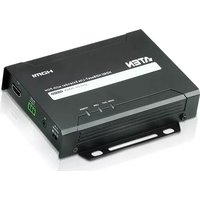
VE802R - AV Switch ATEN - Free user manual and instructions
Find the device manual for free VE802R ATEN in PDF.


Pick your language and provide your email: we'll send you a specifically translated version.
| Product Type | AV Switch |
| Brand | ATEN |
| Model | VE802R |
| Number of Inputs | 2 |
| Number of Outputs | 1 |
| Video Input Connector | VGA (HD-15) |
| Video Output Connector | VGA (HD-15) |
| Audio Support | Yes, stereo 3.5mm |
| Maximum Resolution | 1920 × 1200 |
| Housing Material | Metal |
| Dimensions (W × D × H) | 200 × 75 × 45 mm |
| Weight | 0.5 kg |
| Power Supply | External AC adapter, DC 5V |
| Operating Temperature | 0°C to 50°C |
| Storage Temperature | -20°C to 60°C |
| Front Panel Controls | Push buttons for input selection |
| LED Indicators | Yes, for power and selected input |
| Included Accessories | Power adapter, user manual |
| Maintenance | Clean with dry cloth; avoid liquids |
| Safety | Keep away from moisture and extreme temperatures |
| Spare Parts and Repairability | Not user-serviceable; contact ATEN support |
Frequently Asked Questions - VE802R ATEN
How do I connect the VE802R to my devices?
Connect each source (e.g., PC, laptop) via a VGA cable to the input ports. Connect the output to your monitor or projector using another VGA cable. For audio, use a 3.5mm stereo cable.
How do I switch between inputs?
Press the front panel button corresponding to the desired input (Input 1 or Input 2). The LED will indicate the active input.
What video resolutions does the VE802R support?
It supports resolutions up to 1920 × 1200 (WUXGA). Common resolutions like 1080p, 720p, and XGA are also supported.
Does the VE802R require an external power supply?
Yes, it requires the included external AC adapter (DC 5V). Plug it into a power outlet and connect to the switch.
Can I use the VE802R with a KVM switch?
The VE802R is a standalone AV switch. For KVM functionality (sharing keyboard/mouse), consider a dedicated KVM switch. However, you can cascade it with a KVM if needed.
Why is there no video output?
Ensure all cables are securely connected. Confirm the source device is powered on and outputting a signal. Check that the correct input is selected on the switch. If using audio, ensure audio cables are plugged in.
Is the VE802R plug-and-play?
Yes, it is a passive switch with no driver installation required. Simply connect and power on.
What cables are included with the VE802R?
Only the power adapter and user manual are included. You must supply your own VGA and audio cables.
How do I clean and maintain the VE802R?
Disconnect power before cleaning. Wipe the exterior with a dry, soft cloth. Do not use liquids or cleaning agents.
What is the warranty period for the VE802R?
ATEN typically offers a limited warranty of 2 years from the date of purchase. Check with your retailer or ATEN support for details.
User questions about VE802R ATEN
0 question about this device. Answer the ones you know or ask your own.
Ask a new question about this device
No questions yet. Be the first to ask one.
Download the instructions for your AV Switch in PDF format for free! Find your manual VE802R - ATEN and take your electronic device back in hand. On this page are published all the documents necessary for the use of your device. VE802R by ATEN.
USER MANUAL VE802R ATEN


Manual assistant
Powered by Anthropic
Waiting for your message
Product information
Brand : ATEN
Model : VE802R
Category : AV Switch