
Chromebox 90MS00G1 - Mini PC ASUS - Free user manual and instructions
Find the device manual for free Chromebox 90MS00G1 ASUS in PDF.


| Product Type | Mini PC |
| Brand | ASUS |
| Model | Chromebox 90MS00G1 |
| Operating System | Chrome OS |
| Processor | Intel (model varies by configuration) |
| Memory | 4 GB (typical) |
| Storage | 32 GB eMMC (typical) |
| Display Outputs | 1x HDMI, 1x DisplayPort |
| USB Ports | 4x USB 3.0 (2 front, 2 rear) |
| LAN | 1x RJ-45 Gigabit Ethernet |
| Audio | 1x Headphone/Audio Out jack |
| Card Reader | MMC/SD cards |
| Security | Kensington security slot |
| Power Adapter | 65 W, 19 V, 3.42 A |
| Dimensions (approx.) | 124 x 124 x 40 mm (4.88 x 4.88 x 1.57 in) |
| Weight (approx.) | 0.5 kg (1.1 lbs) |
| Included Accessories | Wireless keyboard and mouse, power adapter |
| Regulatory Compliance | FCC, CE, ENERGY STAR |
| Supported Display | Full-HD via HDMI or DisplayPort |
| Ventilation | Air vents on rear panel |
Frequently Asked Questions - Chromebox 90MS00G1 ASUS
User questions about Chromebox 90MS00G1 ASUS
0 question about this device. Answer the ones you know or ask your own.
Ask a new question about this device
Download the instructions for your Mini PC in PDF format for free! Find your manual Chromebox 90MS00G1 - ASUS and take your electronic device back in hand. On this page are published all the documents necessary for the use of your device. Chromebox 90MS00G1 by ASUS.
USER MANUAL Chromebox 90MS00G1 ASUS
No part of this manual, including the products and software described in it, may be reproduced, transmitted, transcribed, stored in a retrieval system, or translated into any language in any form or by any means, except documentation kept by the purchaser for backup purposes, without the express written permission of ASUSTeK COMPUTER INC. ("ASUS").
ASUS PROVIDES THIS MANUAL "AS IS" WITHOUT WARRANTY OF ANY KIND, EITHER EXPRESS OR IMPLIED, INCLUDING BUT NOT LIMITED TO THE IMPLIED WARRANTIES OR CONDITIONS OF MERCHANTABILITY OR FITNESS FOR A PARTICULAR PURPOSE. IN NO EVENT SHALL ASUS, ITS DIRECTORS, OFFICERS, EMPLOYEES OR AGENTS BE LIABLE FOR ANY INDIRECT, SPECIAL, INCIDENTAL, OR CONSEQUENTIAL DAMAGES (INCLUDING DAMAGES FOR LOSS OF PROFITS, LOSS OF BUSINESS, LOSS OF USE OR DATA, INTERRUPTION OF BUSINESS AND THE LIKE), EVEN IF ASUS HAS BEEN ADVISED OF THE POSSIBILITY OF SUCH DAMAGES ARISING FROM ANY DEFECT OR ERROR IN THIS MANUAL OR PRODUCT.
Products and corporate names appearing in this manual may or may not be registered trademarks or copyrights of their respective companies, and are used only for identification or explanation and to the owners' benefit, without intent to infringe.
SPECIFICATIONS AND INFORMATION CONTAINED IN THIS MANUAL ARE FURNISHED FOR INFORMATIONAL USE ONLY, AND ARE SUBJECT TO CHANGE AT ANY TIME WITHOUT NOTICE, AND SHOULD NOT BE CONSTRUED AS A COMMITMENT BY ASUS. ASUS ASSUMES NO RESPONSIBILITY OR LIABILITY FOR ANY ERRORS OR INACCURACIES THAT MAY APPEAR IN THIS MANUAL, INCLUDING THE PRODUCTS AND SOFTWARE DESCRIBED IN IT.
Copyright © 2016 ASUSTeK COMPUTER INC. All Rights Reserved.
LIMITATION OF LIABILITY
Circumstances may arise where because of a default on ASUS' part or other liability, you are entitled to recover damages from ASUS. In each such instance, regardless of the basis on which you are entitled to claim damages from ASUS, ASUS is liable for no more than damages for bodily injury (including death) and damage to real property and tangible personal property; or any other actual and direct damages resulted from omission or failure of performing legal duties under this Warranty Statement, up to the listed contract price of each product.
ASUS will only be responsible for or indemnify you for loss, damages or claims based in contract, tort or infringement under this Warranty Statement.
This limit also applies to ASUS' suppliers and its reseller. It is the maximum for which ASUS, its suppliers, and your reseller are collectively responsible.
UNDER NO CIRCUMSTANCES IS ASUS LIABLE FOR ANY OF THE FOLLOWING: (1) THIRD-PARTY CLAIMS AGAINST YOU FOR DAMAGES; (2) LOSS OF, OR DAMAGE TO, YOUR RECORDS OR DATA; OR (3) SPECIAL, INCIDENTAL, OR INDIRECT DAMAGES OR FOR ANY ECONOMIC CONSEQUENTIAL DAMAGES (INCLUDING LOST PROFITS OR SAVINGS), EVEN IF ASUS, ITS SUPPLIERS OR YOUR RESELLER IS INFORMED OF THEIR POSSIBILITY.
SERVICE AND SUPPORT
Visit our multi-language web site at https://www.asus.com/support/
Contents
About this user guide 4
Conventions used in this user guide
Typography
Package contents
Getting to know your Chromebox
Features
Front view
Left side view
Rear view
Using your Chromebox
Getting started
Connect the AC power adapter to your Chromebox
Connect a display panel to your Chromebox
Connect the wireless keyboard and mouse
Turn on your Chromebox
Appendix
Safety information....20
Setting up your system....20
Care during use 20
Regulatory notices....22
ASUS contact information 29
About this user guide
This user guide provides information about the hardware and software features of your Chromebox, organized through the following chapters:
Chapter 1: Getting to know your Chromebox
This chapter details the hardware components of your Chromebox.
Chapter 2: Using your Chromebox
This chapter provides you with information on using your Chromebox.
Appendix
This section includes notices and safety statements for your Chromebox.
Conventions used in this user guide
To highlight key information in this user guide, some text are presented as follows:
IMPORTANT! This message contains vital information that must be followed to complete a task.
NOTE: This message contains additional information and tips that can help complete tasks.
WARNING! This message contains important information that must be followed to keep you safe while performing certain tasks and prevent damage to your Chromebox's data and components.
Typography
Bold text indicates a menu or an item to select.
Italic
This indicates sections that you can refer to in this user guide.
Package contents
Your Chromebox package contains the following items:
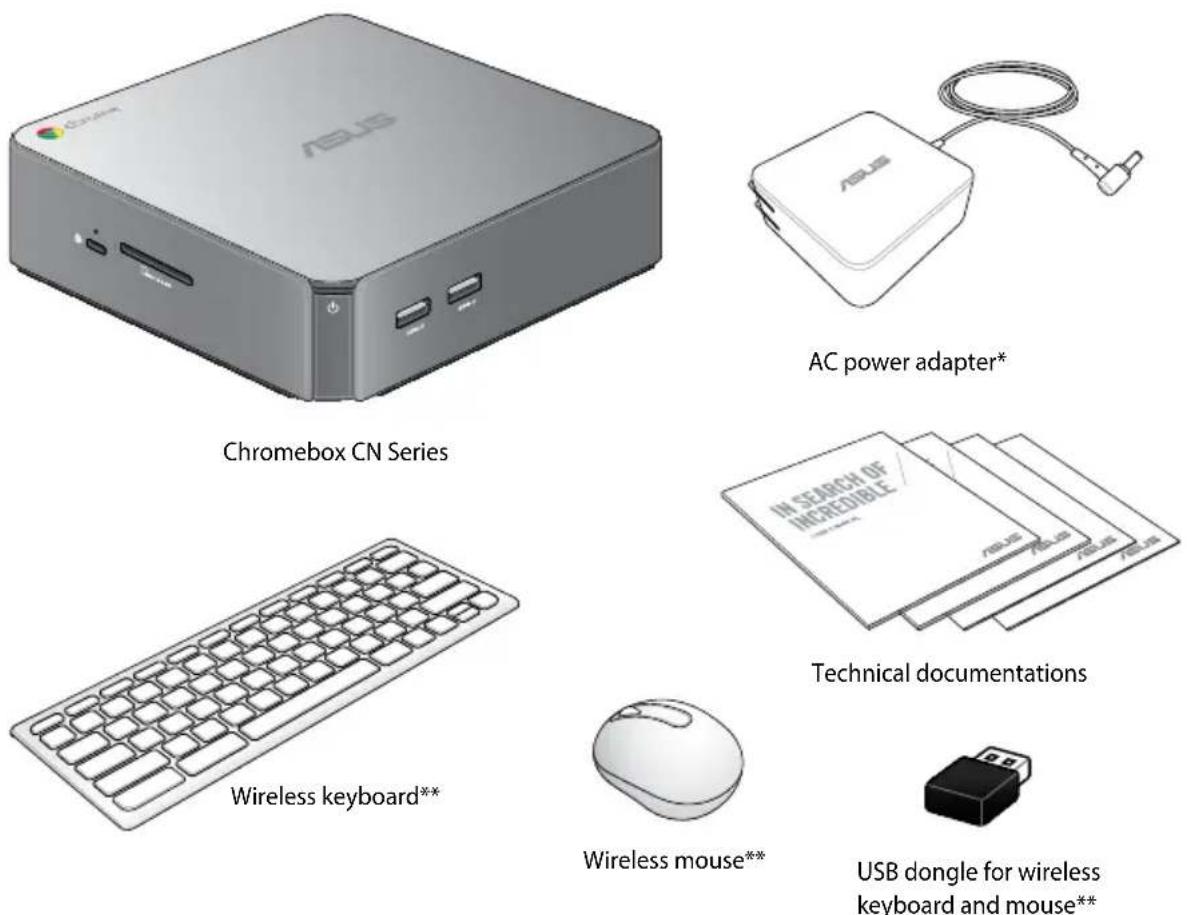
NOTE:
• *The bundled power adapter may vary with territories. - **The availability of these accessories may vary with your Chromebox package. - Some bundled accessories may vary with different models. For details on these accessories, refer to their respective user manuals. - If the device or its components fail or malfunction during normal and proper use within the warranty period, bring the warranty card to the ASUS Service Center for replacement of the defective components.
1
Getting to know your Chromebox
Features
Front view
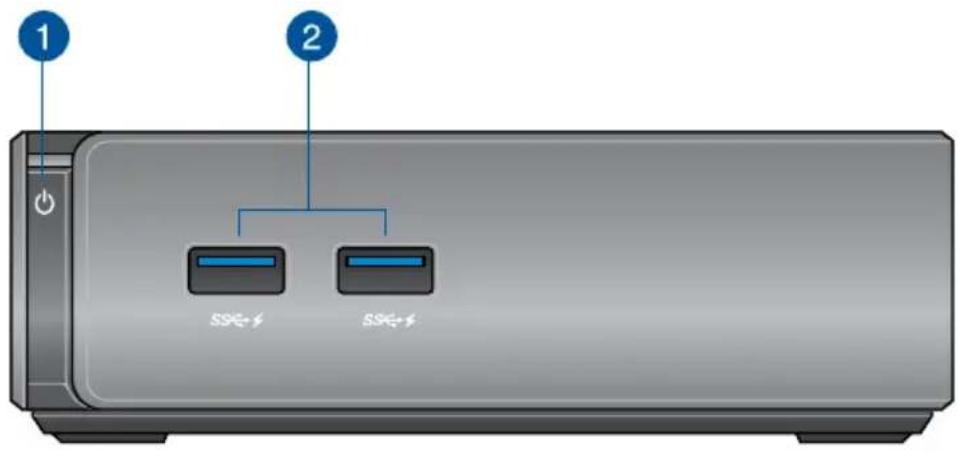
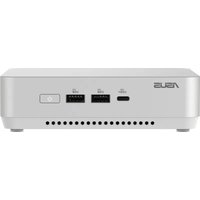
1
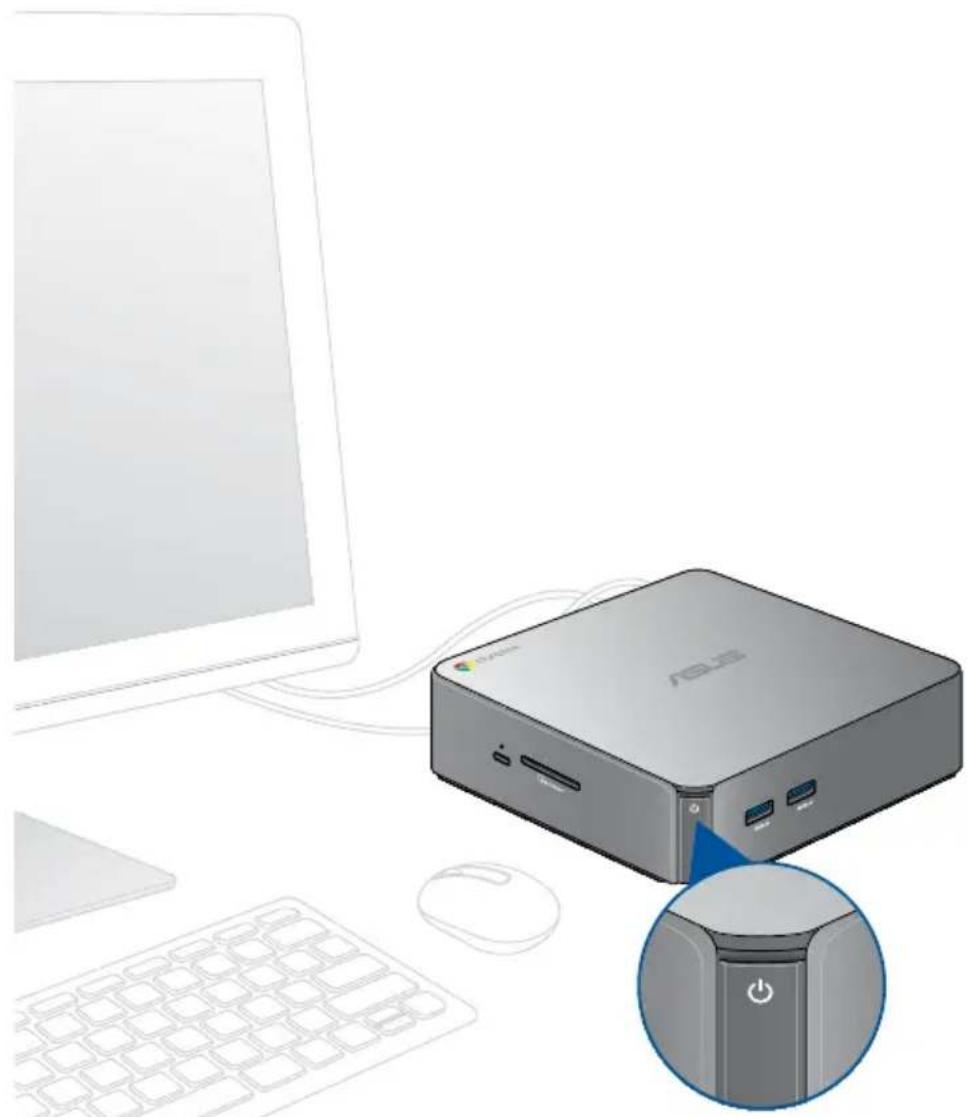
Power button
The power button allows you to turn the Chromebox on or off. You can use the power button to put your Chromebox to sleep mode or press it for four (4) seconds to force shutdown your Chromebox.
IMPORTANT! Forcing the system to restart may result in data loss. We strongly recommend that you back up your data regularly.
2
USB 3.0 ports
These USB (Universal Serial Bus) 3.0 ports provide a transfer rate of up to 5 Gbit/s and are backward compatible with USB 2.0. These ports also support the Battery Charging 1.2 technology that allows you to charge your USB devices.
Left side view
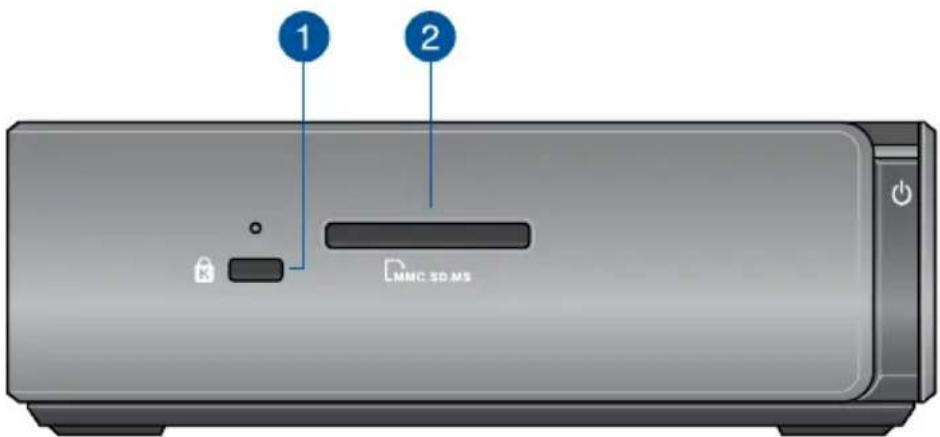
1
Kensington security slot
The Kensington security slot allows you to secure your Chromebox using Kensington security products.
2
Memory card slot
The built-in memory card reader enables your Chromebox to read and write data to and from MMC/SD cards.
Rear view
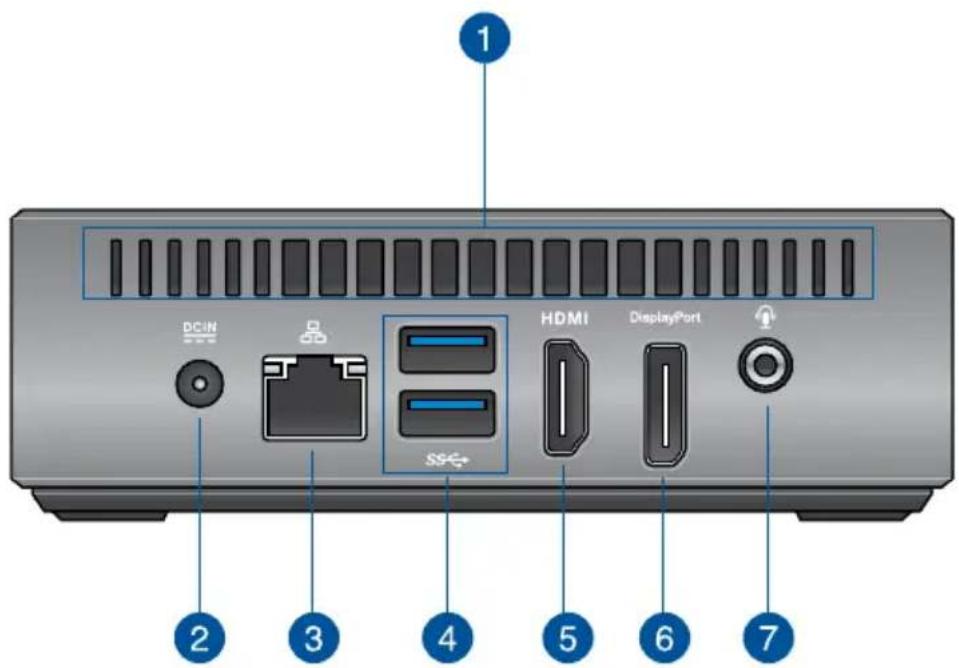
1
Air vents
The air vents allow cooler air to enter your Chromebox chassis.
IMPORTANT: For an optimum heat dissipation and air ventilation, ensure that the air vents are free from obstructions.
2

Power input
The supplied power adapter converts AC power to DC power for use with this jack. Power supplied through this jack supplies power to the Chromebox. To prevent damage to the Chromebox, always use the supplied power adapter.
WARNING! The power adapter may become warm to hot when in use. Do not cover the adapter and keep it away from your body.


LAN port
The 8-pin RJ-45 LAN port supports a standard Ethernet cable for connection to a local network.


USB 3.0 ports
These USB (Universal Serial Bus) 3.0 ports provide a transfer rate of up to 5 Gbit/s and are backward compatible with USB 2.0.


HDMI port
The HDMI (High Definition Multimedia Interface) port supports a Full-HD device such as an LCD TV or monitor to allow viewing on a larger external display.


DisplayPort
The DisplayPort sends high-performance digital output from your Chromebox to a display device such as an LCD TV or HD monitor.


Headphone/Audio Out jack
The stereo headphone jack is used to connect the system's audio out signal to amplified speakers or headphones.
Using your Chromebox
2
Getting started
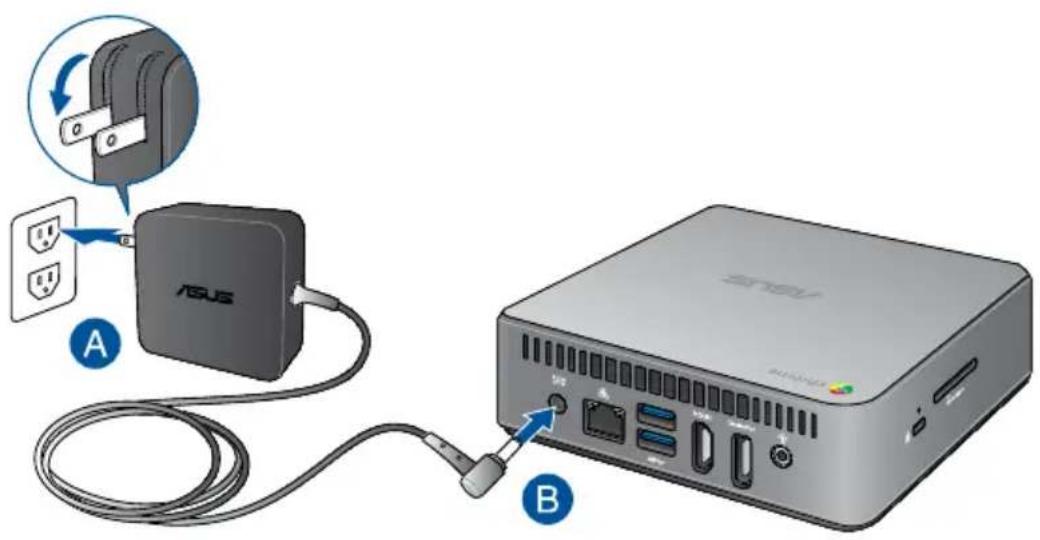
Connect the AC power adapter to your Chromebox
To connect the AC power adapter to your Chromebox:
A. Plug the AC power cord into a 100 V~240 V power source.
B. Connect the DC power connector into your Chromebox's power (DC) input port.
NOTE: The power adapter may vary in appearance, depending on models and your region.
IMPORTANT!
• We strongly recommend that you use only the AC power adapter and cable that came with your Chromebox. • We strongly recommend that you use a grounded wall socket while using your Chromebox. - The socket outlet must be easily accessible and near your Chromebox. - To disconnect your Chromebox from its main power supply, unplug your Chromebox from the power socket.
NOTE:
Power adapter information:
• Input voltage: 100-240 Vac • Input frequency: 50-60 Hz • Rating output current: 3.42 A (65 W) • Rating output voltage: 19 V
Connect a display panel to your Chromebox
You can connect a display panel or projector to your Chromebox that has the following connectors:
- HDMI connector
- DisplayPort
• DVI connector (used with an HDMI–DVI adapter)
NOTE: The HDMI-DVI adapter is sold separately.
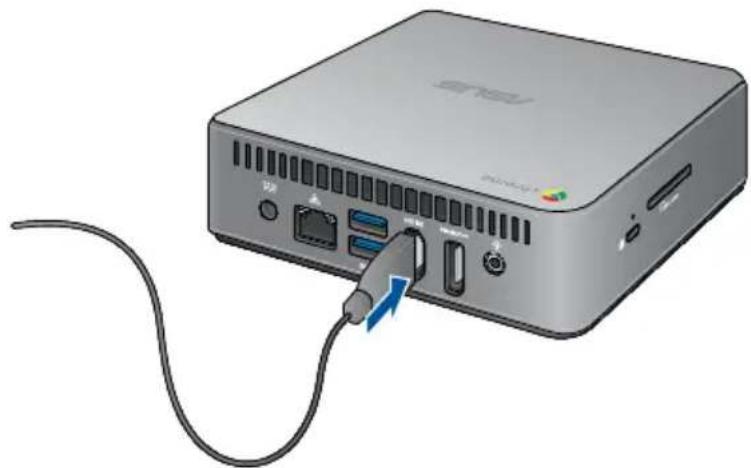
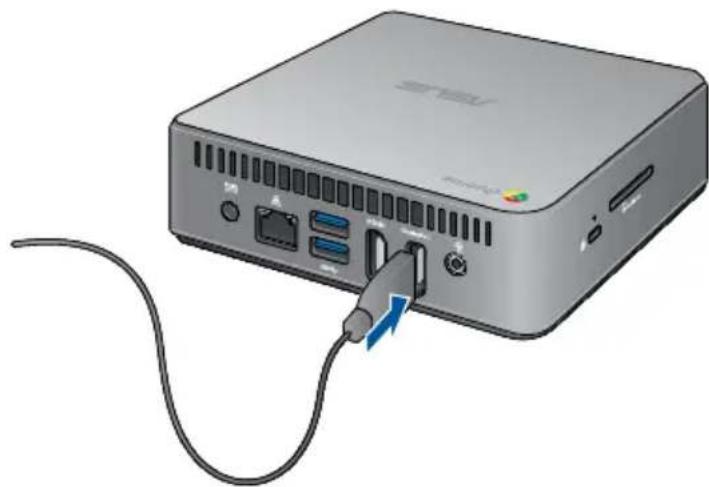
To connect a display panel to your Chromebox:
Connect a display cable either to the HDMI port or the DisplayPort.
Connect display via HDMI port
Connect display via DisplayPort
Connect the wireless keyboard and mouse
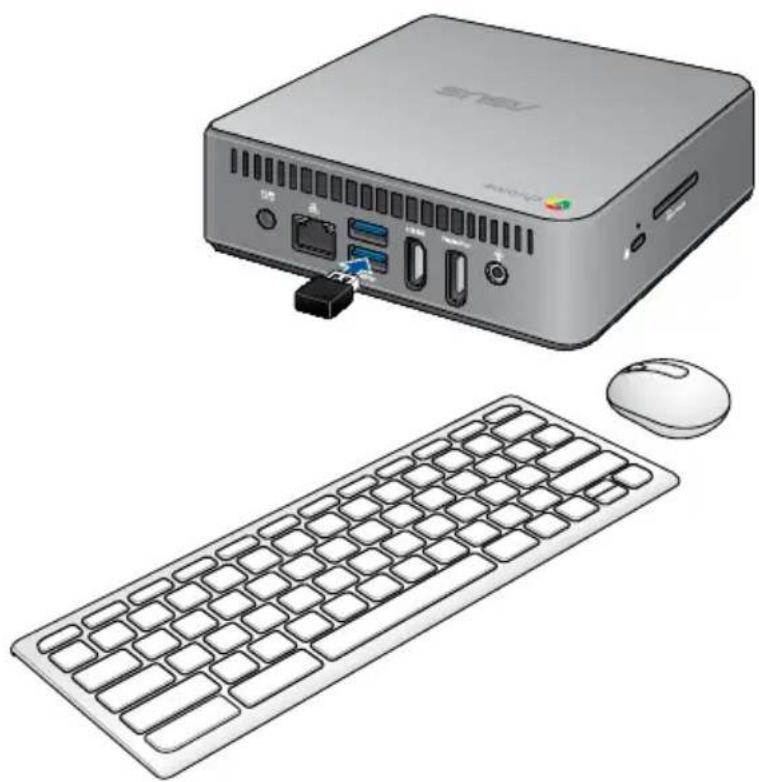
Connect the USB dongle to use the bundled wireless keyboard and mouse.
NOTE: You can also connect any USB keyboard and mouse to your Chromebox.
To connect a keyboard and mouse to your Chromebox:
Connect the USB dongle of your keyboard and mouse to any of the USB 3.0 ports on the rear side of your Chromebox.
Connect the USB dongle of the keyboard and mouse via the USB 3.0 port
Turn on your Chromebox
Press the power button to turn on your Chromebox.
Appendix
Safety information
Your Chromebox is designed and tested to meet the latest standards of safety for information technology equipment. However, to ensure your safety, it is important that you read the following safety instructions.
Setting up your system
- Read and follow all instructions in the documentation before you operate your system.
- Do not use this product near water or a heated source.
- Set up the system on a stable surface.
- Openings on the chassis are for ventilation. Do not block or cover these openings. Make sure you leave plenty of space around the system for ventilation. Never insert objects of any kind into the ventilation openings.
- Use this product in environments with ambient temperatures between 0°C to 35°C.
- If you use an extension cord, make sure that the total ampere rating of the devices plugged into the extension cord does not exceed its ampere rating.
Care during use
- Do not walk on the power cord or allow anything to rest on it.
- Do not spill water or any other liquids on your system.
- When the system is turned off, a small amount of electrical current still flows. Always unplug the power cord from the power outlets before cleaning the system.
- If you encounter the following technical problems with the product, unplug the power cord and contact a qualified service technician or your retailer.
- The power cord or plug is damaged. – Liquid has been spilled into the system.
- The system does not function properly even if you follow the operating instructions. – The system was dropped or the cabinet is damaged. – The system performance changes.
Lithium-Ion Battery Warning
CAUTION: Danger of explosion if battery is incorrectly replaced. Replace only with the same or equivalent type recommended by the manufacturer. Dispose of used batteries according to the manufacturer's instructions.
NO DISASSEMBLY
The warranty does not apply to the products that have been disassembled by users
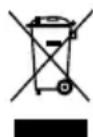
DO NOT throw the Chromebox in municipal waste. This product has been designed to enable proper reuse of parts and recycling. This symbol of the crossed out wheeled bin indicates that the product (electrical, electronic equipment, and mercury-containing button cell battery) should not be placed in municipal waste. Check local technical support services for product recycling.
Regulatory notices
REACH
Complying with the REACH (Registration, Evaluation, Authorization, and Restriction of Chemicals) regulatory framework, we publish the chemical substances in our products at ASUS REACH website at http://csr.asus.com/english/REACH.htm.
ASUS Recycling/Takeback Services
ASUS recycling and takeback programs come from our commitment to the highest standards for protecting our environment. We believe in providing solutions for you to be able to responsibly recycle our products, batteries, other components, as well as the packaging materials. Please go to http://csr.asus.com/english/Takeback.htm for the detailed recycling information in different regions.
COATING NOTICE
IMPORTANT! To provide electrical insulation and maintain electrical safety, a coating is applied to insulate the device except on the areas where the I/O ports are located.
Federal Communications Commission Statement
This device complies with Part 15 of the FCC Rules. Operation is subject to the following two conditions:
• This device may not cause harmful interference, and - This device must accept any interference received including interference that may cause undesired operation.
This equipment has been tested and found to comply with the limits for a Class B digital device, pursuant to Part 15 of the FCC Rules. These limits are designed to provide reasonable protection against harmful interference in a residential installation. This equipment generates, uses and can radiate radio frequency energy and, if not installed and used in accordance with manufacturer's instructions, may cause harmful interference to radio communications. However, there is no guarantee that interference will not occur in a particular installation. If this equipment does cause harmful interference to radio or television reception, which can be determined by turning the equipment off and on, the user is encouraged to try to correct the interference by one or more of the following measures:
• Reorient or relocate the receiving antenna. - Increase the separation between the equipment and receiver. - Connect the equipment to an outlet on a circuit different from that to which the receiver is connected. - Consult the dealer or an experienced radio/TV technician for help.
CAUTION: Any changes or modifications not expressly approved by the grantee of this device could void the user's authority to operate the equipment.
RF exposure warning
This equipment must be installed and operated in accordance with provided instructions and the antenna(s) used for this transmitter must be installed to provide a separation distance of at least 20 cm from all persons and must not be co-located or operating in conjunction with any other antenna or transmitter. End-users and installers must be provide with antenna installation instructions and transmitter operating conditions for satisfying RF exposure compliance.
Declaration of Conformity (R&TTE directive 1999/5/EC)*
* Replaced in 2017 by RED 2014/53/EU
The following items were completed and are considered relevant and sufficient:
• Essential requirements as in [Article 3] • Protection requirements for health and safety as in [Article 3.1a] • Testing for electric safety according to [EN 60950] - Protection requirements for electromagnetic compatibility in [Article 3.1b] - Testing for electromagnetic compatibility according to [EN 301 489-1] & [EN 301 489-17] • Effective use of the radio spectrum as in [Article 3.2] • Radio test suites according to [EN 300 328-2]
France Restricted Wireless Frequency Bands
Some areas of France have a restricted frequency band. The worst case maximum authorized power indoors are:
• 10 mW for the entire 2.4 GHz band (2400 MHz–2483.5 MHz) • 100 mW for frequencies between 2446.5 MHz and 2483.5 MHz
NOTE: Channels 10 through 13 inclusive operate in the band 2446.6 MHz to 2483.5 MHz.
There are few possibilities for outdoor use: On private property or on the private property of public persons, use is subject to a preliminary authorization procedure by the Ministry of Defense, with maximum authorized power of 100mW in the 2446.5–2483.5 MHz band. Use outdoors on public property is not permitted.
In the departments listed below, for the entire 2.4 GHz band:
• Maximum authorized power indoors is 100 mW • Maximum authorized power outdoors is 10 mW
Departments in which the use of the 2400–2483.5 MHz band is permitted with an EIRP of less than 100 mW indoors and less than 10 mW outdoors:
01 Ain 02 Aisne 03 Allier
05 Hautes Alpes 08 Ardennes 09 Ariège
11 Aude 12 Aveyron 16 Charente
24 Dordogne 25 Doubs 26 Drôme
This requirement is likely to change over time, allowing you to use your wireless LAN card in more areas within France. Please check with ART for the latest information (www.art-telecom.fr).
NOTE: Your WLAN Card transmits less than 100 mW, but more than 10 mW.
Canadian Department of Communications Statement
This digital apparatus does not exceed the Class B limits for radio noise emissions from digital apparatus set out in the Radio Interference Regulations of the Canadian Department of Communications.
This class B digital apparatus complies with Canadian ICES-003.
IC Radiation Exposure Statement for Canada
This equipment complies with IC radiation exposure limits set forth for an uncontrolled environment. To maintain compliance with IC RF exposure compliance requirements, please avoid direct contact to the transmitting antenna during transmitting. End users must follow the specific operating instructions for satisfying RF exposure compliance.
Operation is subject to the following two conditions:
• This device may not cause interference and - This device must accept any interference, including interference that may cause undesired operation of the device.
CE Mark Warning

CE marking for devices without wireless LAN/Bluetooth
The shipped version of this device complies with the requirements of the EMC directives 2004/108/EC (replaced in April 2016 by 2014/30/EU) "Electromagnetic compatibility" and 2006/95/EC (replaced in April 2016 by 2014/35/EU) "Low voltage directive".

CE marking for devices with wireless LAN/ Bluetooth
This equipment complies with the requirements of Directive 1999/5/EC (replaced in 2017 by RED 2014/53/EU) of the European Parliament and Commission from 9 March, 1999 governing Radio and Telecommunications Equipment and mutual recognition of conformity.
Wireless Operation Channel for Different Domains
N. America 2.412-2.462 GHz Ch01 through CH11
Japan 2.412-2.484 GHz Ch01 through Ch14
Europe ETSI 2.412-2.472 GHz Ch01 through Ch13
Regional notice for California
WARNING! This product may contain chemicals known to the State of California to cause cancer, birth defects or other reproductive harm. Wash hands after handling.
ENERGY STAR complied product

ENERGY STAR is a joint program of the U.S. Environmental Protection Agency and the U.S. Department of Energy helping us all save money and protect the environment through energy efficient products and practices.
All ASUS products with the ENERGY STAR logo comply with the ENERGY STAR standard, and the
power management feature is enabled by default. The monitor and computer are automatically set to sleep after 10 and 30 minutes of user inactivity. To wake your computer, click the mouse or press any key on the keyboard.
Please visit http://www.energystar.gov/powermanagement for detail information on power management and its benefits to the environment. In addition, please visit http://www.energystar.gov for detail information on the ENERGY STAR joint program.
NOTE: Energy Star is NOT supported on FreeDOS and Linux-based products.
ASUS contact information
ASUSTeK COMPUTER INC.
Address 4F, No. 150, Li-Te Rd., Peitou, Taipei 112, Taiwan
Telephone +886-2-2894-3447
Fax +886-2-2890-7798
Web site http://www.asus.com
Technical Support
Telephone +86-21-3842-9911
Fax +86-21-5866-8722, ext. 9101#
Online support http://qr.asus.com/techserv
ASUS COMPUTER INTERNATIONAL (America)
Address 800 Corporate Way, Fremont, CA 94539, USA
Telephone +1-510-739-3777
Fax +1-510-608-4555
Web site http://usa.asus.com
Technical Support
Support fax +1-812-284-0883
General support +1-812-282-2787
Online support http://qr.asus.com/techserv
ASUS COMPUTER GmbH (Germany and Austria)
Address: Harkort Str. 21-23, D-40880 Ratingen, Germany
Fax: +49-2102-959931
Website: http://www.asus.com/de
Online contact: http://eu-rma.asus.com/sales
Technical Support
Telephone: +49-2102-5789555
Support Fax: +49-2102-959911
Online support: http://qr.asus.com/techserv
| Manufacturer | ASUSTeK Computer Inc. | |
| Tel: | +886-2-2894-3447 | |
| Address: | 4F, No. 150, LI-TE RD., PEITOU, TAIPEI 112, TAIWAN | |
| Authorised representative in Europe | ASUSTeK Computer GmbH | |
| Address: | HARKORT STR. 21-23, 40880 RATINGEN, GERMANY | |
DECLARATION OF CONFORMITY
Per FCC Part 2 Section 2.1077(a)

Responsible Party Name: Asus Computer International
Address: 800 Corporate Way, Fremont
, CA 94539.
Phone/Fax No: (510)739-3777/(510)608-4555
hereby declares that the product
Product Name: Chromebox
Model Number: ChromeboxXXXXXXXXXXXXXXXXXX
(X can be 0~9, a~z, A~Z, -, / or blank)
Conforms to the following specifications:
☒ FCC Part 15, Subpart B, Unintentional Radiators
Supplementary Information:
This device complies with part 15 of the FCC Rules. Operation is subject to the following two conditions: (1) This device may not cause harmful interference, and (2) this device must accept any interference received, including interference that may cause undesired operation.
Representative Person's Name: Steve Chang / President
Steve Chang
Signature:
DECLARATION OF CONFORMITY
Per FCC Part 2 Section 2.1077(a)

Responsible Party Name: Asus Computer International
Address: 800 Corporate Way, Fremont, CA 94539.
Phone/Fax No: (510)739-3777/(510)608-4555
hereby declares that the product
Product Name: Chromebox
Model Number: ChromeboxXXXXXXXXXXXXXXXXXXXX (X can be 0~9, a~z, A~Z, -, / or blank)
Conforms to the following specifications:
☒ FCC Part 15, Subpart B, Unintentional Radiators
Supplementary Information:
This device complies with part 15 of the FCC Rules. Operation is subject to the following two conditions: (1) This device may not cause harmful interference, and (2) this device must accept any interference received, including interference that may cause undesired operation.
Representative Person's Name: Steve Chang / President
Steve Chang
Signature:
Original Declaration Date: Jul. 2, 2014

- LIMITATION OF LIABILITY
- SERVICE AND SUPPORT
- CONTENTS
- GETTING TO KNOW YOUR CHROMEBOX
- USING YOUR CHROMEBOX
- APPENDIX
- ABOUT THIS USER GUIDE
- CHAPTER 1: GETTING TO KNOW YOUR CHROMEBOX
- CHAPTER 2: USING YOUR CHROMEBOX
- CONVENTIONS USED IN THIS USER GUIDE
- TYPOGRAPHY
- PACKAGE CONTENTS
- NOTE
- FEATURES
- FRONT VIEW
- POWER BUTTON
- USB 3.0 PORTS
- LEFT SIDE VIEW
- KENSINGTON SECURITY SLOT
- MEMORY CARD SLOT
- REAR VIEW
- AIR VENTS
- POWER INPUT
- LAN PORT
- HDMI PORT
- DISPLAYPORT
- HEADPHONE/AUDIO OUT JACK
- GETTING STARTED
- CONNECT THE AC POWER ADAPTER TO YOUR CHROMEBOX
- IMPORTANT
- CONNECT A DISPLAY PANEL TO YOUR CHROMEBOX
- CONNECT THE WIRELESS KEYBOARD AND MOUSE
- TURN ON YOUR CHROMEBOX
- SAFETY INFORMATION
- SETTING UP YOUR SYSTEM
- CARE DURING USE
- LITHIUM-ION BATTERY WARNING
- NO DISASSEMBLY
- THE WARRANTY DOES NOT APPLY TO THE PRODUCTS THAT HAVE BEEN DISASSEMBLED BY USERS
- REGULATORY NOTICES
- REACH
- ASUS RECYCLING/TAKEBACK SERVICES
- COATING NOTICE
- FEDERAL COMMUNICATIONS COMMISSION STATEMENT
- RF EXPOSURE WARNING
- DECLARATION OF CONFORMITY (R&TTE DIRECTIVE 1999/5/EC)
- FRANCE RESTRICTED WIRELESS FREQUENCY BANDS
- CANADIAN DEPARTMENT OF COMMUNICATIONS STATEMENT
- IC RADIATION EXPOSURE STATEMENT FOR CANADA
- CE MARK WARNING
- CE MARKING FOR DEVICES WITHOUT WIRELESS LAN/BLUETOOTH
- CE MARKING FOR DEVICES WITH WIRELESS LAN/ BLUETOOTH
- WIRELESS OPERATION CHANNEL FOR DIFFERENT DOMAINS
- REGIONAL NOTICE FOR CALIFORNIA
- ENERGY STAR COMPLIED PRODUCT
- ASUS CONTACT INFORMATION
- ASUSTEK COMPUTER INC
- TECHNICAL SUPPORT
- ASUS COMPUTER INTERNATIONAL (AMERICA)
- ASUS COMPUTER GMBH (GERMANY AND AUSTRIA)
- DECLARATION OF CONFORMITY
- PRODUCT NAME: CHROMEBOX
- SUPPLEMENTARY INFORMATION
Brand : ASUS
Model : Chromebox 90MS00G1
Category : Mini PC