EAGE240TG-SAU3R - Hard Drive Enclosure iStarUSA - Free user manual and instructions
Find the device manual for free EAGE240TG-SAU3R iStarUSA in PDF.


| Product Type | Hard Drive Enclosure |
| Model | EAGE240TG-SAU3R |
| Brand | iStarUSA |
| Number of Drive Bays | 4 |
| Compatible Drive Size | 3.5-inch SATA Hard Drives |
| Interface | USB 3.0 (USB 2.0 backward compatible) |
| Power Supply | Internal power supply; 120W AC adapter |
| Dimensions (L x W x H) | 200 x 124 x 165 mm (7.9 x 4.9 x 6.5 inches) |
| Weight | 1.5 kg (3.3 lbs) |
| Material | Aluminum chassis with steel trays |
| Cooling | 1x 80mm cooling fan (rear) |
| LED Indicators | Power and HDD activity per bay |
| Hot Swap Support | Yes, tool-less drive trays |
| RAID Support | Hardware RAID 0, 1, 3, 5, 10 via JMicron chipset |
| Operating System Compatibility | Windows, macOS, Linux (no driver needed) |
| Maximum Drive Capacity | Up to 10TB per drive (depending on drive) |
| Ports | 1x USB 3.0 Type-B, 1x eSATA (optional) |
| Cleaning Instructions | Wipe with a soft, dry cloth; avoid liquids |
| Safety Warnings | Ensure ventilation, do not block fan, use only provided power adapter |
| Replaceable Parts | Fan and power supply are replaceable |
Frequently Asked Questions - EAGE240TG-SAU3R iStarUSA
User questions about EAGE240TG-SAU3R iStarUSA
0 question about this device. Answer the ones you know or ask your own.
Ask a new question about this device
Download the instructions for your Hard Drive Enclosure in PDF format for free! Find your manual EAGE240TG-SAU3R - iStarUSA and take your electronic device back in hand. On this page are published all the documents necessary for the use of your device. EAGE240TG-SAU3R by iStarUSA.
USER MANUAL EAGE240TG-SAU3R iStarUSA
natural_image
Isometric line drawing of a black rectangular electronic device with mounting holes and a central screen (no text or symbols)EAGE240TG-SAU3R
natural_image
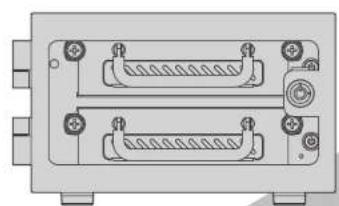
Front view of a dual-chamber electronic device with two connectors and mounting holes (no text or symbols visible)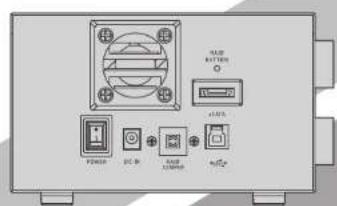

Product Overview - Front
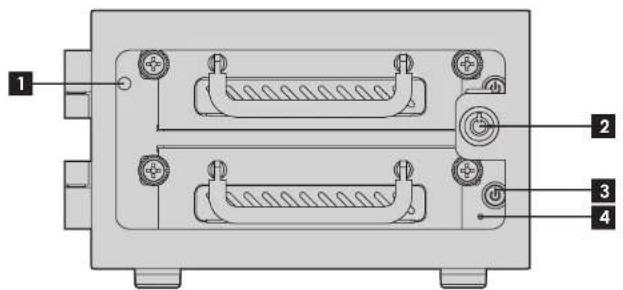
1 POWER LED
2 KEY LOCK
3 HDD ON/OFF SWITCH & LED
4 RAID ERROR INDICATOR LED
■ LED Behavior
POWER LED
| Color | Status |
| Solid Green | System Power ON |
| System Power OFFOff |
HDD LED
| Color | Status |
| Solid Blue | HDD Power ON |
| Drives Working (Read/Write)Blinking Blue | |
| HDD Power OFFOff |
*please note: some of SSDs (Solid-State Drive) do not support access (read/write) signa
RAID ERROR INDICATOR LED
| Color | Status |
| Solid Red | Raid Errors or HDD Damaged |

Product Overview - Rear
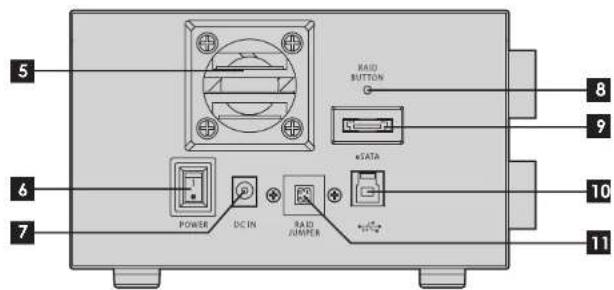
5 40mm FAN
6 POWER SWITCH
7 DC INLET
8 RAID CONFIRM BUTTON
9 eSATA CONNECTOR
10 USB 3.0 (TYPE B) CONNECTOR
11 RAID RESET JUMPER
C
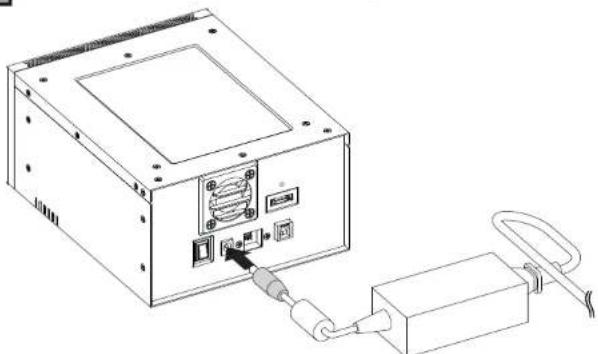
Connecting Power Adapter
natural_image
Line drawing of a computer drive with ports and cable connections (no text or symbols)- Plug in DC Jack to connect power adapter to the device.
*make sure to connect power adapter to power source securely.
D
Installing 3.5" Hard Drive
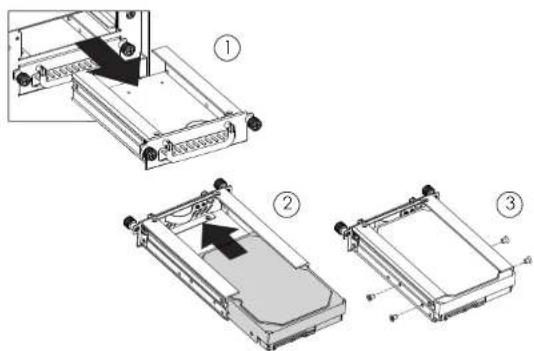
- Pull HDD tray out
- Install 3.5 HDD onto tray
- use four #6-32 screws to secure 3.5" HDD to tray
E
Powering ON/OFF System
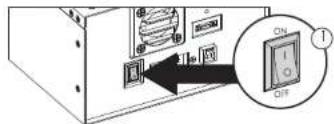
- Make sure power switch in the back of chassis is in ON position
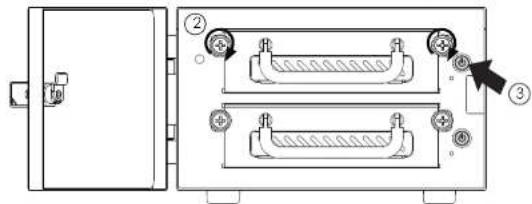
- Tighten two hand screws to secure HDD tray
- Push individual power buttons to power on each hard drive
- Push power buttons again to power off hard drives
*CAUTION:
To prevent drive failures or data loss,
unmount the device in OS before powering off hard disk bay
F
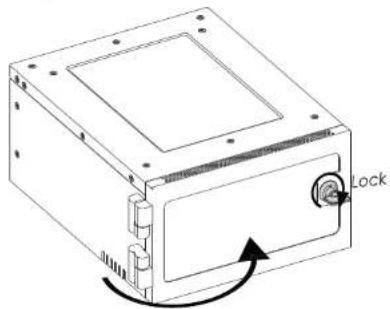
Locking and Unlocking Door
-
Turn the key clockwise to lock the door
-
Turn the key counterclockwise to unlock the door
natural_image
Technical line drawing of a computer case with a lock mechanism indicated by an arrow (no text or symbols present)USB 3.0 RAID | EAGE2402TG-SAU3RUser

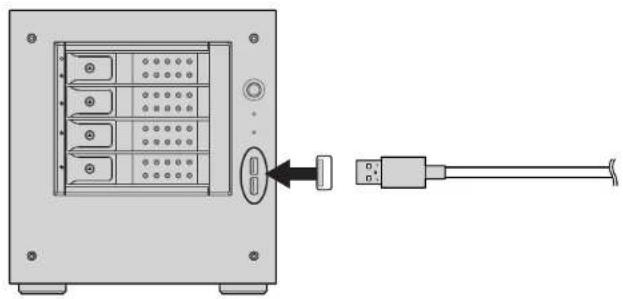
Connect to Your Computer by USB 3.0
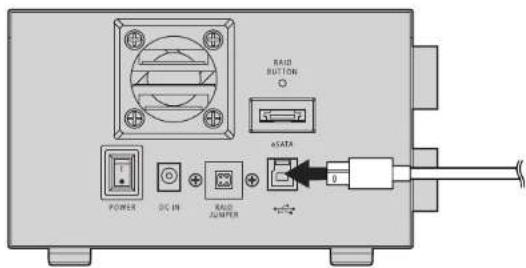
USB 3.0 (type B to type A) Cable
One USB 3.0 (type B to type A) cable is required.
natural_image
Diagram showing a server rack with internal socket and connector, connected to a USB cable (no text or symbols present)USB 3.0
Please use USB 3.0 cables to ensure maximum data transfer performance when connected to a compatible USB 3.0 port. The devices will also work when connected to a USB 2.0 or 1.1 port, but the performance will be limited to their respective transfer rates.
*please make sure all the cable connectors are secured (locked) properly.

Connect to Your Computer by eSATA
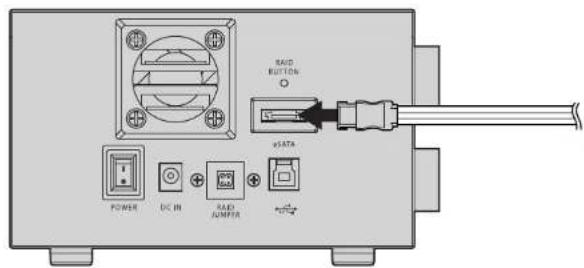
eSATA Cable
One eSATA cable is required.
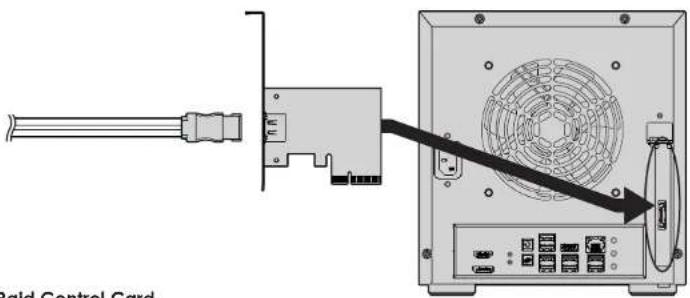
Raid Control Card
EAGE240TG-SAU3R requires a controller that supports Port Multiplier function with one eSATA connector.
*please make sure all the cable connectors are secured (locked) properly.

Raid Configuration Guide
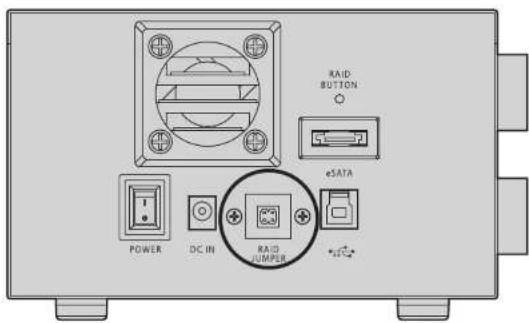
- Power Off the device
- Set RAID Jumper to desired RAID configuration
- Press the RAID Button then turn on the device
[do Not release until system recognizes drives]
WARNING: Changing the RAID level will erase all data on the drive. Be sure all of the files you want to save are backed up to separate media.
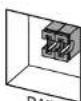

RAID 0 (Default)


Port Multiplier (Individual Drives)


RAID 1


JBOD (One Big Drive)


iStarUSAcare
We will help you navigate our website to find the information that you need. Go to www.istarusa.com, and click on live chat bubble above the Search Bar.
Our technicians are standing by to take your questions. Visit http://istarusa.com/support/, and you will receive a technical support ticket to help track your requests from the beginning to the end. Or you can contact us @888-989-1189
Copyright:
Copyright © 2014 by iStarUSA Global, all rights reserved. No part of this publication may be reproduced, transmitted, transcribed, stored in a retrieval system, translated into any language, in any form or by an means or otherwise, without the prior written permission of iStarUSA Global. 727 Phillips Dr., City of Industry, CA 91748.
iStarUSA Global reserves the right to make modification and additions to this product and manual without notice or taking any liability.
Disclaimer
iStarUSA Global assumes no liability for errors or omissions in this document. Nor does iStarUSA Global make any commitment to update the information contained herein. Pictures in this document are for demonstration purpose only and may not be the same as the actual product.