EVM9SS - Range hood CDA - Free user manual and instructions
Find the device manual for free EVM9SS CDA in PDF.


| Product Type | Range Hood |
| Brand | CDA |
| Model | EVM9SS |
| Annual Energy Consumption | 139.0 kWh |
| Maximum Airflow | 596.0 m³/h |
| Motor Power | 290 W |
| Number of Speeds | 3 + Intensive |
| Control Type | Touch Control |
| Lighting Power | 40 W |
| Illuminance on Cooking Surface | 200 Lux |
| Noise Level | 66 dBA |
| Filter Type | Grease filter + Charcoal filter (optional) |
| Grease Filter Efficiency Class | G (45%) |
| Lamp Efficiency Class | F |
| Fluid Dynamic Efficiency Class | D (13.7) |
| Energy Efficiency Index | 94.5 (D) |
| Electrical Connection | 230-240 V ~ 50 Hz, 3A fuse |
| Minimum Distance from Hob | 450 mm (CDA hob) / 760 mm (other) |
| Duct Diameter Recommended | 150 mm |
| Dimensions (approximate) | Standard built-in size |
| Weight (approximate) | Not specified, typical ~15 kg |
| Timer Function | Yes, 15 minutes |
| Clean Air Function | Yes, 10 min per hour at speed 1 |
| Washable Grease Filter | Yes, dishwasher safe |
| Installation Type | Wall-mounted, recirculation or extraction |
| Safety | Class II (double insulated) |
Frequently Asked Questions - EVM9SS CDA
User questions about EVM9SS CDA
0 question about this device. Answer the ones you know or ask your own.
Ask a new question about this device
Download the instructions for your Range hood in PDF format for free! Find your manual EVM9SS - CDA and take your electronic device back in hand. On this page are published all the documents necessary for the use of your device. EVM9SS by CDA.
USER MANUAL EVM9SS CDA
Manual for Installation, Use and Maintenance
C|D|A|
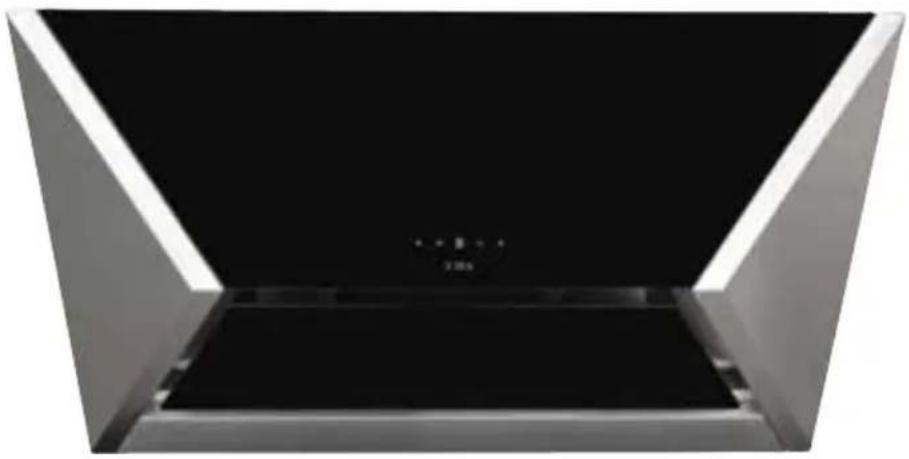
natural_image
Interior view of a modern office building (no signage)
Important
The manufacturer cannot be held responsible for injuries or losses caused by incorrect use or installation of this product. Please note that the manufacturer reserves the right to invalidate the guarantee supplied with this product following incorrect installation or misuse of the appliance or use in a commercial environment.
This appliance is not designed to be used by people (including children) with reduced physical, sensorial or mental capacity, or who lack experience or knowledge about it, unless they have had supervision or instructions on how to use the appliance by someone who is responsible for their safety.
Under no circumstances should any external covers be removed for servicing or maintenance except by suitably qualified personnel.
Appliance information:
Please enter the details on the appliance rating plate below for reference, to assist CDA Customer Care in the event of a fault with your appliance and to register your appliance for guarantee purposes.
Appliance Model
Serial Number
CE Declarations of Conformity:
This appliance has been manufactured to the strictest standards and complies with all applicable legislation, including gas safety, Electrical safety (LVD) and Electromagnetic interference compatibility (EMC).
IMPORTANT INFORMATION FOR CORRECT DISPOSAL OF THE PRODUCT IN ACCORDANCE WITH EC DIRECTIVE 2002/96/EC.
At the end of its working life, the product must be taken to a special local authority waste collection centre or to a dealer providing appliance recycling services. Disposing of a household appliance separately avoids possible negative consequences for the environment and health. It also enables the constituent materials to be recovered, saving both energy and resources. As a reminder of the need to dispose of household appliances separately, the product is marked with a crossed-out wheeled dustbin.
Please note:
• Under no circumstances should the extractor be connected to any gas ventilation system, flue system or hot air ducting system.
- Do not vent the extractor into an attic or loft space.
- Only house the extractor in rooms with adequate ventilation. Remember that the extractor is powerful and whatever air is extracted needs to be replaced.
- Do not tile the extractor in. It should be removable for service or maintenance.
- Do not use silicone sealant to secure the hood to the wall.
• You must be able to isolate the extractor from the mains electrical supply after installation.
• Steam cleaners must not be used when cleaning this appliance.
- The performance of your extractor will vary depending on a number of factors. These include: type of extraction, length of ducting, room volume, ventilation available and cleanliness of the filters.
Using your Extractor
For best performance, you should switch on the extractor 15 minutes before starting to cook and leave it to run for approximately 15 minutes after the end of cooking.
Control Panel
A - Light key
B - Decrease speed key
C - Display
D - Increase speed key
E - Timer key
Fig. 1

To switch the extractor light on and off
- Touch key A.
To switch on the extractor
- Touch either key B or D. The appliance will switch on at the first speed.
• To increase the speed touch key D. - To switch the extractor off, touch and hold key B for two seconds when the extractor is working at higher speeds, or touch key B at speed one.
The intensive function
- The extractor is equipped with an intensive function which runs for ten minutes before returning to the previous selected speed. To activate the intensive function, touch key D at speed three. The display will blink whilst the intensive function is on.
The timer
- The extractor is equipped with a timer that allows the extractor to run for 15 minutes before switching off automatically.
• To activate the timer, touch key E. The display will flash a decimal point when the timer is on.
Please note
The timer cannot be activated when the intensive function is on.
The clean air function
- The extractor is equipped with a clean air function that switches on the motor for ten minutes every hour at speed one.
- To activate the clean air function, touch key E for two seconds when the appliance is off. To return to normal function, touch either key B or D. To switch off the clean air function, touch key E. The display C will light up in sections whilst the motor is running, and will show the letter C during the fifty minutes when the motor is not running.
Care and Maintenance
IMPORTANT: DO NOT PERFORM MAINTENANCE OR CLEANING OF THE EXTRACTOR WITHOUT FIRST SWITCHING OFF THE ELECTRICITY SUPPLY.
Cleaning
You should use a nonabrasive cleaner. Any abrasive cleaner (including Cif) will scratch the surface and could erase the control panel markings.
You can clean your extractor effectively by simply using a dilute solution of water and mild detergent and drying to a shine with a clean cloth.
Cleaning the grease filter
The grease filter should be kept clean to minimise the risk of fire.
When the display flashes alternating the speed selected with the letter A, or at least once a month you should remove and clean the grease filter with hot soapy water. You can also wash the grease filter in a dishwasher, ensuring that you place it in an upright position to prevent damage from other items in the dishwasher. After rinsing and drying, replace the filter. After the grease filter has been replaced, the electronic memory must be reset by touching key A for approximately five seconds, until the letter A stops flashing.
To remove the grease filter follow the steps below:
- Open the glass cover panel as shown in fig 2.
- Pull open the handle on the grease filter as shown in fig. 2. It will release at the handle side. Then lower the grease filter to remove it completely.
To replace the grease filter, repeat the steps in reverse.
Please note:
Cleaning the grease filter in the dishwasher may lead to discolouration. This is normal and does not constitute a fault with the appliance.
Changing the charcoal filter (re-circulating only)
When the display flashes alternating the speed selected with the letter F, the charcoal filters must be replaced. After the charcoal filter has been replaced, the electronic memory must be reset by touching key A for approximately five seconds, until the letter F stops flashing.
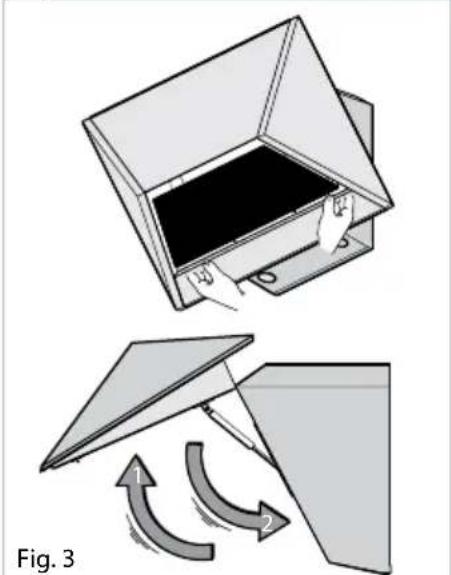
To attach a new charcoal filter, first open the body of the extractor as shown in figure 3. Then offer up the charcoal filter into the frame as shown in figure 4 until it locks into place. Repeat with the other charcoal filter, then close the body of the extractor..

Fig. 2
natural_image
Diagram showing two steps of folding a flatboard into a container, with arrows indicating motion (no text or symbols)
natural_image
Technical diagram of a mechanical device with internal components and directional arrows, labeled Fig. 4 (no text or symbols on the diagram itself)Changing the Light
IMPORTANT: DO NOT PERFORM MAINTENANCE OR CLEANING OF THE EXTRACTOR WITHOUT FIRST SWITCHING OFF THE ELECTRICITY SUPPLY.
DO NOT CHANGE THE LIGHT BULB IMMEDIATELY AFTER USE AS THE BULB WILL BE HOT. ALLOW IT TO COOL BEFORE REMOVING IT.
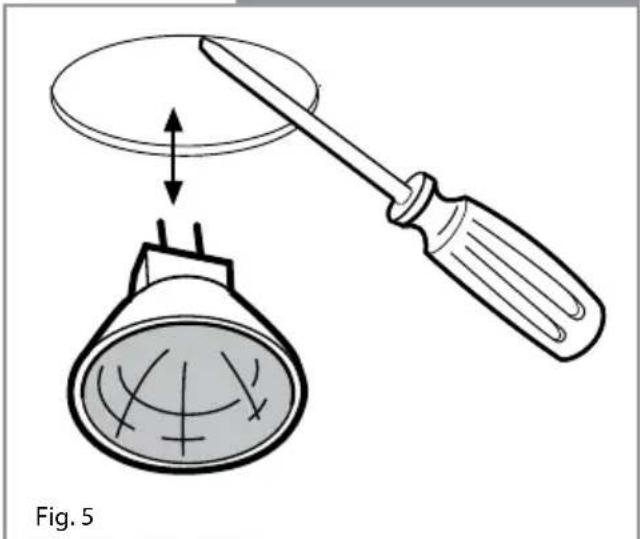
Carefully prise the bulb from the extractor using a small, flat-bladed screwdriver. Refit the new bulb taking care not to touch the glass (Fingerprints will lead to premature failure of the bulb).
Do not touch bulbs or adjacent areas during or straight after prolonged use of the lights.
natural_image
Diagram showing a screwdriver holding a conical object above a bulb, with no text or symbols present.Mains Electricity Connection
THIS APPLIANCE MUST BE CONNECTED TO THE MAINS SUPPLY BY A COMPETENT PERSON, USING FIXED WIRING VIA A DOUBLE POLE SWITCHED FUSED SPUR OUTLET AND PROTECTED BY A 3A FUSE.
We recommend that the appliance is connected by a qualified electrician, who is a member of the N.I.C.E.I.C. and who will comply with the I.E.E. and local regulations.
The wires in the mains lead of this appliance are coloured in accordance with the following code:
BLUE = NEUTRAL, BROWN = LIVE.
As the colours of the wires in the mains lead for the appliance may not correspond with the coloured markings identifying the terminals connecting to the fused spur, proceed as follows:
- The wire which is coloured blue must be connected to the terminal marked N (Neutral), or coloured black.
- The wire which is coloured brown must be connected to the terminal marked L (Live), or coloured red.
NOTE: USE A 3A FUSE
Assembly and electrical connection should be carried out by competent personnel.
When installing this product we recommend you seek the help of another individual.
IMPORTANT: THIS APPLIANCE IS A CLASS II APPLIANCE (DOUBLE INSULATED) AND IS NOT INTENDED TO BE EARTHED. DO NOT FIT AN EARTH LEAD TO THIS EXTRACTOR.
Do not mount the isolation switch behind the chimney section. It is a requirement that you must be able to isolate the extractor from the mains electrical supply after installation.
This appliance is intended to be connected to the mains electrical supply by means of an isolation switch and fused spur and is intended to be protected by a 3A fuse. The use of a 13A fuse can cause damage to the internal wiring in the event of a fault, and may also invalidate the warranty.
Electrical Information
Mains electrical voltage: 230 - 240Vac, 50Hz
Total rated power consumption:
290W
Troubleshooting
If your extractor is not working:
- Check that the mains supply has not been switched off.
- Check that the fuse in the spur has not blown.
DOUBLE POLE SWITCHED
FUSED SPUR OUTLET

USE A 3 AMP FUSE
Installation
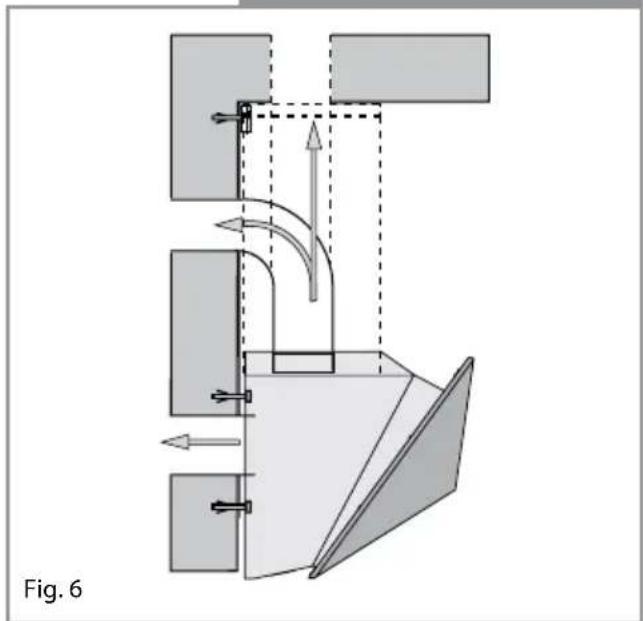
Your extractor can be used to filter and recycle the air within your kitchen, or to extract the air outside. When extracting air to the outside, the unit can be vented as shown in the diagram below. Note that we recommend the use of ducting with a diameter of 150mm. Ducting with diameters of 100mm or 120mm may be used, but performance will be reduced.
When installing this appliance over a CDA hob, the clearance between the extractor and the hob must be equal to or exceed 450mm. This instruction overrides the instructions supplied with the CDA hob. (The height should be measured from the top of the hotplates or burners)
Where the extractor is to be installed above a non-CDA hob, the instructions supplied with the hob may dictate that the height required above the hob is greater than 450mm.
IN THE ABSENCE OF ANY INSTRUCTIONS SUPPLIED WITH THE HOB, THE MINIMUM DISTANCE BETWEEN THE HOB AND EXTRACTOR MUST BE AT LEAST 760mm.
Fitting your extractor to the wall
Before commencing the installation open front panel. Hold the panel as shown in figure 8 and lift upwards and out.
natural_image
Diagram of a mechanical or fluidic system with directional arrows and components, labeled Fig. 6 (no text or symbols on the diagram itself)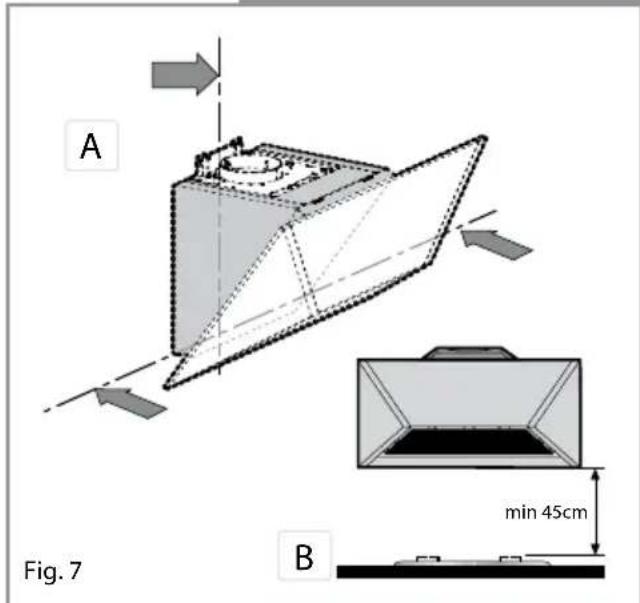

natural_image
Illustration showing two steps of a folding or lifting device, one open with a hand and the other tilted upward with curved arrows indicating motion (no text or symbols)Fitting your extractor to the wall
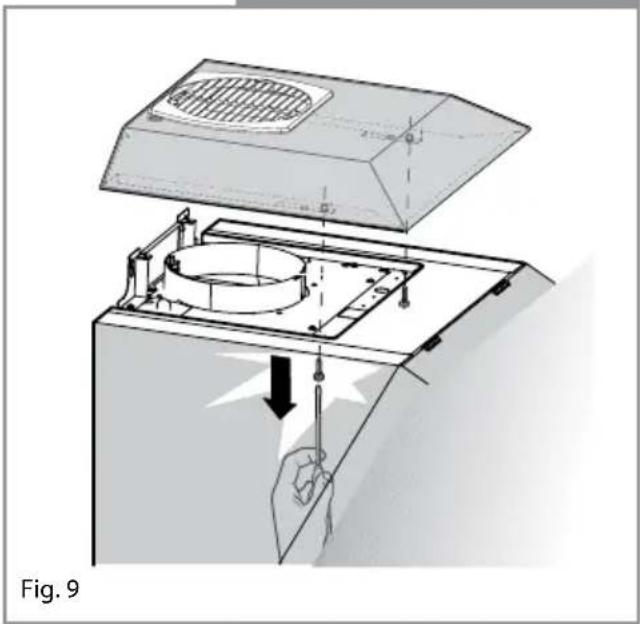
Next, remove the top cover by loosening the screws (b), closing the front panel and then lifting the cover off.
The extractor is mounted using four screws. Ensure that the wall fixings and screws are suitable for the wall material. Mark the positions of the four holes on the wall, according to (fig 11.)
natural_image
Diagram of a kitchen appliance with a lid and internal components, showing a hand operating the valve (no text or symbols present)
natural_image
Illustration of a device being processed with a grating cover, showing hands and components (no text or symbols)
Fitting your extractor to the wall
Insert the 4 wall plugs in to the holes and fix 2 screws in the top holes so that they are protruding from the wall by approx 5mm (fig 12).
Next, lift the hood onto the 2 screws as shown in (fig12).
Secure the top two screws and fix the hood into position using screws inserted into the 2 lower holes (fig 13). The extractor is now secured to the wall.

natural_image
Diagram of a mechanical setup with arrows indicating motion or force direction, no text or symbols present
Using the extractor as a recirculation device
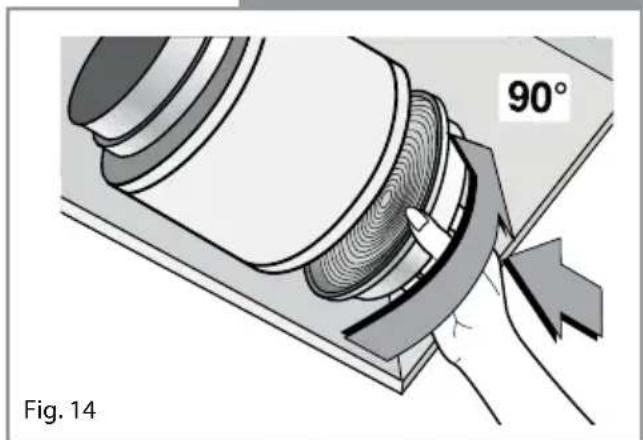
Refit the top cover and grill as below before proceeding to fit the charcoal filter – locate each filter onto the motor housing spigot and rotate to lock into position.
natural_image
Technical illustration of a mechanical component with a 90-degree angle标注, showing internal gear and cutting edge (no text or symbols beyond label)Using the extractor as an extraction device
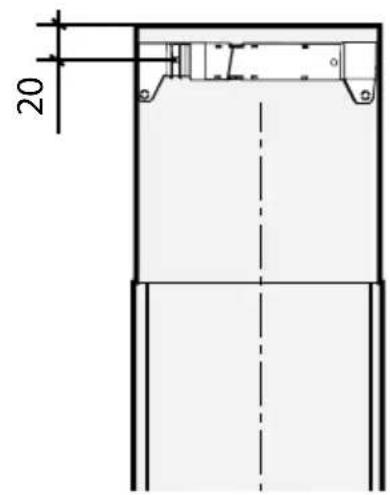
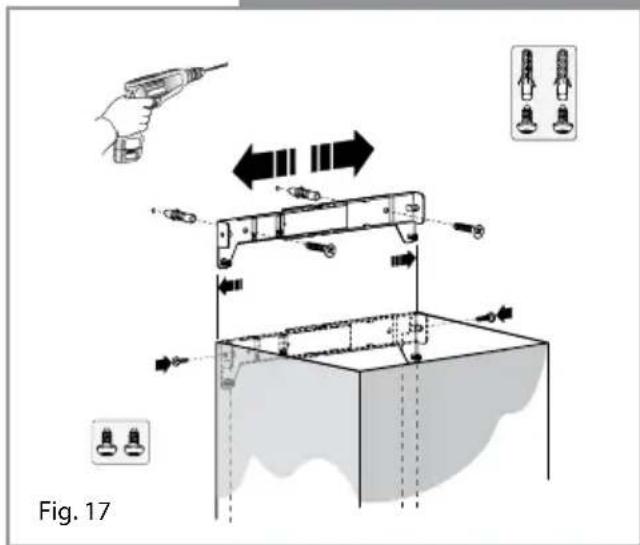
Work out the required height of the optional chimney for your ceiling and mount the chimney fixing bracket as shown in the (fig 16), then secure the chimney as shown in (fig 17a).
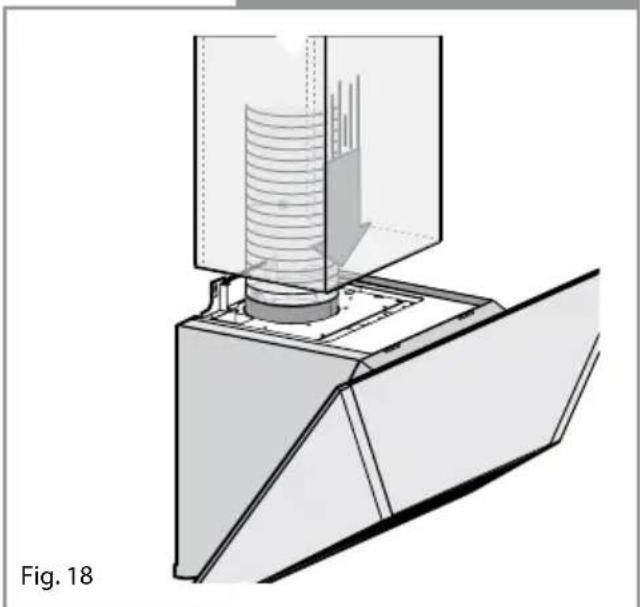
Finally, locate the chimney to the body of the extractor as shown in (fig 18).
Fig. 16
natural_image
Technical illustration of a mechanical assembly with layered components and a central cylindrical component (no text or symbols)| Energy Efficiency Information | |||
| Attribute Symbol Value Units | Symbol | Value | Units |
| Model Identification evm9 | |||
| Annual Energy Consumption AEC | Hood | 139.0 kWh | |
| Time increase factor f 1.5 | |||
| Fluid Dynamic Efficiency FDE | Hood | 13.7 (D) | |
| Energy Efficiency Index EEI | Hood | 94.5 (D) | |
| Measured airflow at Best Efficiency Point | Q_BEP | 402.1 | m^3/h |
| Measured Pressure at Best Efficiency Point | P_BEP | 244.5 Pa | |
| Maximum airflow Q | MAX | 596.0 | m^3/h |
| Measured electric power at Best Efficiency Point | W_BEP | 199.5 W | |
| Nominal lighting power WL 40.0 W | |||
| Average illumination of the lighting system on the cooking surface | E_Middle | 200.0 Lux | |
| Measured power consumption in standby | P_S | 1.0 | W |
| Measured power consumption off mode | P_O | NA | W |
| Sound power level | L_WA | 66.0 dBA | |
| Grease Filter Efficiency | GFE_Hood | 45 (G) | % |
| Lamp efficiency | LE_Hood | 5 (F) | % |
|C|D|A
To contact our Customer Care Department, or for Service, please contact us on the details below.
- C|D|A|
- Important
- Please note:
- Using your Extractor
- Care and Maintenance
- Changing the Light
- Mains Electricity Connection
- Electrical Information
- Troubleshooting
- Installation
- Fitting your extractor to the wall
- Using the extractor as a recirculation device
- Using the extractor as an extraction device
- |C|D|A
Brand : CDA
Model : EVM9SS
Category : Range hood