HDRULT-1608 - Commutateur AV Smart-AVI - Free user manual and instructions
Find the device manual for free HDRULT-1608 Smart-AVI in PDF.


| Product Type | HDMI Matrix Switch |
| Model | HDRULT-1608 |
| Number of Inputs | 16 |
| Number of Outputs | 8 |
| Maximum Resolution | 4K@60Hz (3840x2160) |
| HDR Support | HDR10, Dolby Vision, HLG |
| HDCP Version | HDCP 2.2 |
| Video Bandwidth | 18 Gbps per channel |
| Audio Formats | PCM, Dolby Digital, DTS, Dolby TrueHD, DTS-HD Master Audio |
| Control Interfaces | RS-232, IR remote, Ethernet (TCP/IP), front panel buttons |
| Mounting | 19-inch rack-mountable, 1U height |
| Dimensions (WxDxH) | 17.2 x 10.5 x 1.75 inches (437 x 267 x 44 mm) |
| Weight | 7.5 lbs (3.4 kg) |
| Power Supply | 100-240V AC, 50/60Hz, internal power supply |
| Power Consumption | 30W (max) |
| Operating Temperature | 32°F to 104°F (0°C to 40°C) |
| Compliance | CE, FCC, RoHS |
| Included Accessories | IR remote, RS-232 cable, power cord, rack ears, user manual |
Frequently Asked Questions - HDRULT-1608 Smart-AVI
User questions about HDRULT-1608 Smart-AVI
0 question about this device. Answer the ones you know or ask your own.
Ask a new question about this device
Download the instructions for your Commutateur AV in PDF format for free! Find your manual HDRULT-1608 - Smart-AVI and take your electronic device back in hand. On this page are published all the documents necessary for the use of your device. HDRULT-1608 by Smart-AVI.
USER MANUAL HDRULT-1608 Smart-AVI
Smart-AVI SMART AUDIO VIDEO INNOVATION
HDR-ULTRA

text_image
Smart-AM HDR-Ultra CAT5e/6 HDMI MATRIX SERIESHDMI 16x16 Matrix over Cat 5e/6
QUICK INSTALLATION GUIDE
www.smartavi.com
INTRODUCTION
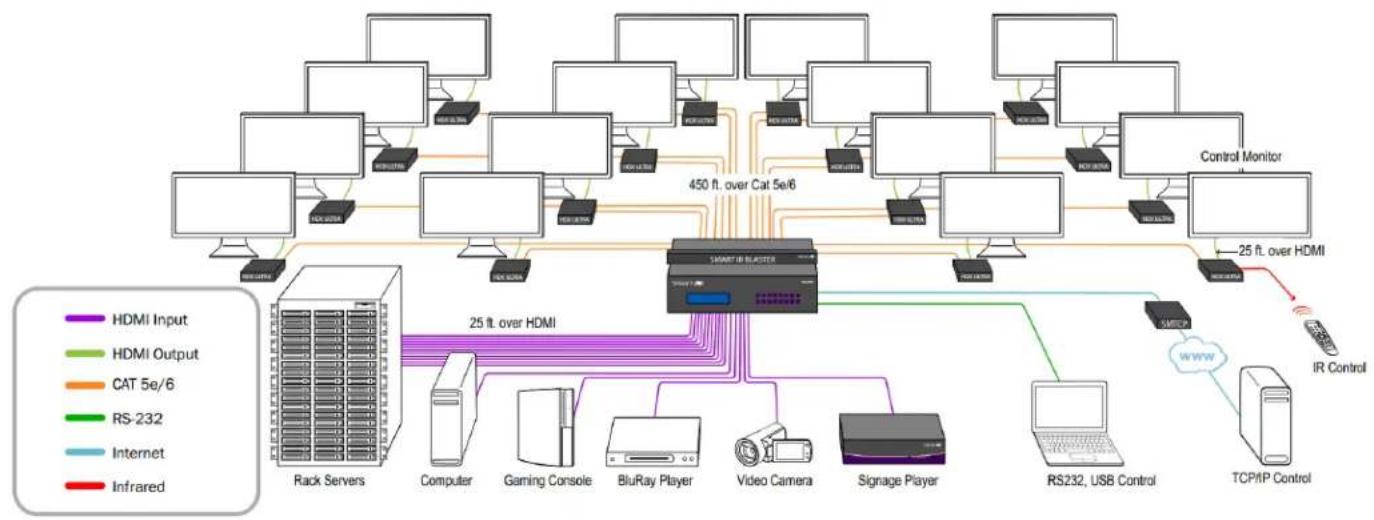
The HDR-ULTRA is a High Definition video router that enables users to route HD signals up to 425 feet over CAT 5e/6 cables, providing the ultimate solution to create clean and efficient video and digital signage systems in configurations up to 16x16.
Pristine high definition video has become the standard for entertainment, video systems and digital signage, but HD video routing has been confined by the necessity of short, bulky and unsightly cables. The HDR-ULTRA, utilizing HDBaseT technology, breaks the distance limits that have tethered users as it facilitates the routing of crystal clear 1080p HD video, multi-channel audio, Ethernet, IR and power up to an incredible 425 feet through the use of inexpensive CAT 5e/6 cables. With unprecedented flexibility and convenience, the HDR-ULTRA is overhauling the old challenges of HD Matrix routers with an elegant and easy-to-install solution.
The HDR-ULTRA can direct as many as 16 HD inputs and 16 HD outputs effortlessly. Routing HD signals across long distances from the user-friendly HDR-ULTRA exponentially increases users' ability to create the ideal digital video and audio experience in any environment.
APPLICATION DIAGRAM
flowchart
graph TD
    subgraph Smart IR Bluetooth
        A["Computer"] -->|25 ft over HDMI| B["RS-232"]
        C["BluRay Player"] -->|450 ft over Cat 5e/6| D["Internet"]
        E["Signage Player"] -->|25 ft over HDMI| F["IR Control"]
        G["RS232, USB Control"] --> H["TCP/IP Control"]
    end

    subgraph Control Monitor
        I["Control Module"] --> J["Internet"]
        K["Hardware Module"] --> L["Hardware Module"]
        M["Hardware Module"] --> N["Hardware Module"]
        O["Hardware Module"] --> P["Hardware Module"]
        Q["Hardware Module"] --> R["Hardware Module"]
        S["Hardware Module"] --> T["Hardware Module"]
    end

    subgraph Smart IR Bluetooth
        U["RAM"] --> V["Switch"]
        W["Computer"] --> X["Computer"]
        Y["Video Camera"] --> Z["Video Camera"]
        AA["Signal Generator"] --> AB["Signal Generator"]
        AC["RS232"] --> AD["RS232, USB Control"]
        AE["IR Control"] --> AF["IR Control"]
    end

    style Smart IR Bluetooth fill:#f9f9f9,stroke:#333
    style Control Monitor fill:#f9f9f9,stroke:#333
    style Smart IR Bluetooth fill:#e6f7ff,stroke:#333
    style Control Monitor fill:#e6f7ff,stroke:#333
    style Smart IR Bluetooth fill:#e6f7ff,stroke:#333
    style Control Monitor fill:#e6f7ff,stroke:#333
    style Smart IR Bluetooth fill:#e6f7ff,stroke:#333
    style Control Monitor fill:#e6f7ff,stroke:#333
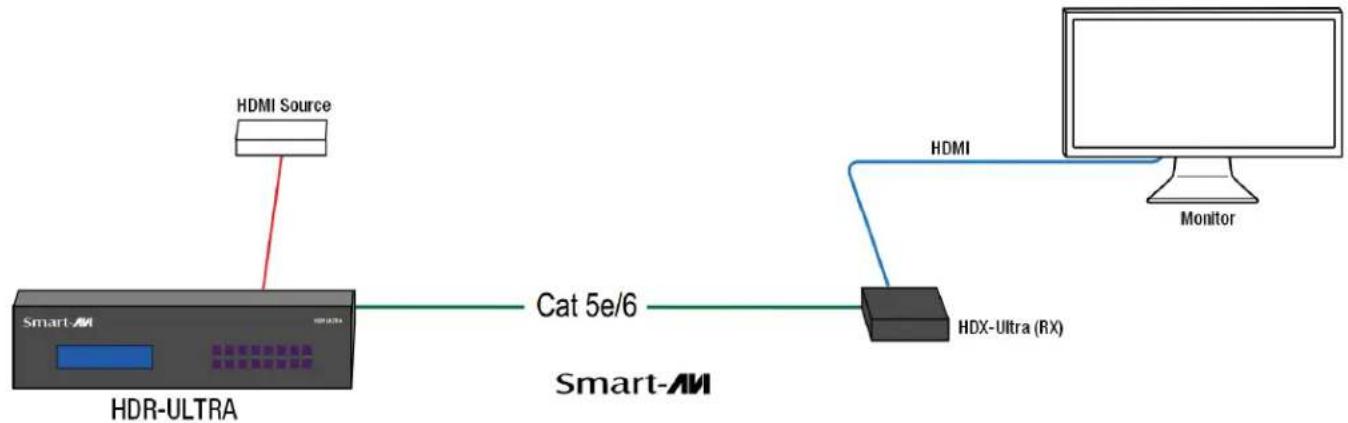
INSTALLATION
flowchart
graph LR
    A["Smart-AM"] -->|HDR-ULTRA| B["Cat 5e/6"]
    B --> C["HDX-Ultra (RX)"]
    C -->|HDMI| D["Monitor"]
    A -->|HDMI Source| E["User"]
- Turn off all input devices and displays.
- Connect the HDMI cables from the input devices and tothe "IN" ports on the HDR-ULTRA matrix.
- Connect the HDMI cables from the HDMI port of the HDX-Ultra Receivers to the HDMI displays.
- Connect the RJ-45 port of each HDX-Ultra Receivers to the respective "OUT" ports on the HDR-ULTRA using CAT5e/6 cables.
- Power on the HDX-Ultra Receivers by plugging in their power adapters (5VDC2A).
- Connect the power cord and power-on the HDR-ULTRA.
- Power on the input devices and the displays.
CONTROLLING THE HDR-ULTRA
There are multiple ways to control the HDR8X8/HDR16X16:
- Front panel
• SmartControl software
• RS-232 commands
• TCP-IP module (NET-IP-Pro)
Front Panel
The HDR ULTRA front panel enables one to switch directly from the Matrix without the use of any software. Its LCD (40x4) offers detailed information about the status of the switch at any given moment.
SmartControlPro Software
SmartControlPro is the Windows® GUI application that enables users to control SmartAVI matrixes using graphic user interface without having to write the codes and send serial commands to the devices. The software enables configuration of the size and type of the Matrix, including a preset defined at macro. The software also enables identification by name for each source and display.
RS-232 Commands
There are two primary modes of operation for the RS-232 control of the HDR-ULTRA: Command Mode and Debug Mode. When connecting to the HDR-ULTRA via RS-232, it will start in Command Mode, in which raw commands are allowed to be sent matrix to control its various functions without the use of a menu or prompt. This mode is intended for advanced Debug mode is a more user-friendly way of operating the HDR-ULTRA and it also includes instructional menus.
TCP/IP Control (NET-IP-Pro)
Net-IP-Pro gives the user full control of the matrixes from anywhere in the world through this advanced new web browser software. It enables multiple users to control and configure the Matrix, including names of sources, names of displays, IP address and low level features of the Matrix. The Net-IP-Pro enables the support of telnet for easy integration with other control systems.
LEARNING THE EDID OF THE MONITOR
- Power on the HDR-ULTRA.
- Connect CAT5e/6 cable from one of the HDX-Ultra Receivers to the OUT1 of the HDR-ULTRA.
- Connect a straight-through male-to-female RS-232 cable from the computer to the RS-232 port of the HDR-ULTRA.
- Run HyperTerminal on your PC (or use the terminal client of your choice).
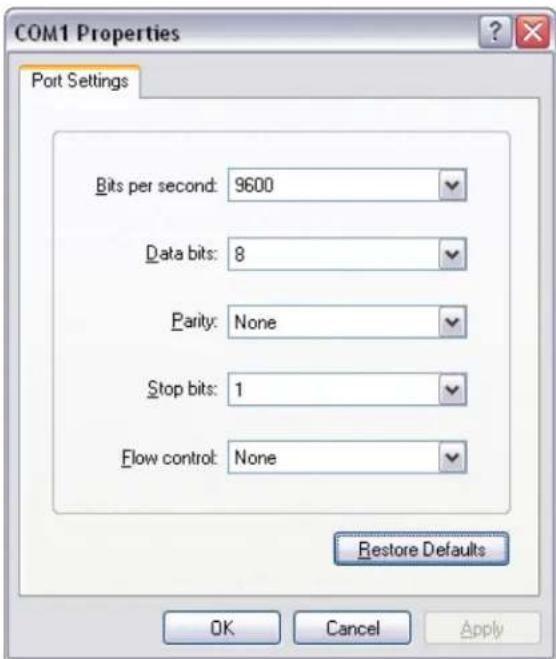
- Choose the correct COM port and use the following parameters:
text_image
COM1 Properties Port Settings Bits per second: 9600 Data bits: 8 Parity: None Stop bits: 1 Flow control: None Restore Defaults OK Cancel Apply- Cycle the power of the HDMI (reset) and you should see the following on the screen:
SmartAVI HDMI 16X16 ver 12.06.11#1
- To enter the Debug Mode Modled on" and hit ENTER. You will see the following prompt:
DBG>
- Type in "edid" and hit ENTER to go to Manage EDID Manage EDID
EDID>
- Type in "learn" and hit ENTER to learn the monitor plugged in port 1 port 1
EDID> learn
Successfully learned EDID!