EXT-2DVIKVM-ELR - Émetteur AV Gefen - Free user manual and instructions
Find the device manual for free EXT-2DVIKVM-ELR Gefen in PDF.


User questions about EXT-2DVIKVM-ELR Gefen
0 question about this device. Answer the ones you know or ask your own.
Ask a new question about this device
Download the instructions for your Émetteur AV in PDF format for free! Find your manual EXT-2DVIKVM-ELR - Gefen and take your electronic device back in hand. On this page are published all the documents necessary for the use of your device. EXT-2DVIKVM-ELR by Gefen.
USER MANUAL EXT-2DVIKVM-ELR Gefen
Technical Support Hours:
8:00 AM to 5:00 PM Monday thru Friday.
Write To:
Gefen LLC
c/o Customer Service
20600 Nordhoff St
Chatsworth, CA 91311
www.gefen.com
support@gefen.com
Notice
Gefen LLC reserves the right to make changes in the hard ware, packaging, and any accompanying doc u men ta tion without prior written notice.
2x DVIKVM Extender is a trademark of Gefen LLC
1 Intr oduction
2 Operation Notes
3 Features
4 Sender Unit Layout
5 Sender Unit Descriptions
6 Receiver Unit Layout
7 Receiver Unit Descriptions
8 Connecting the 2x DVIKVM Extender
8 Wirin Diagram
9 DIP Switch Configuration
11 Network Cable Wiring Diagram
12 Rack Tray Installation
13 Troubleshooting
14 Specifications
15 Warranty
Congratulations on your purchase of the Gefen 2x DVIKVM Extender. Your complete satisfaction is very important to us.
Gefen
Gefen delivers innovative, progressive computer and electronics add-on solutions that harness integration, extension, distribution and conversion technologies. Gefen's reliable, plug-and-play products supplement cross-platform computer systems, professional audio/video environments and HDTV systems of all sizes with hard-working solutions that are easy to install and simple to operate.
The Gefen 2x DVIKVM Extender
The 2x DVIKVM Extender extends any two DVI sources and USB to two monitors, touch screen displays, or digital signage applications up to 330 feet (100 meters), using two CAT-5e cables. USB 2.0 data rates up to 100 Mbps are supported in addition to backward-compatibility with USB 1.1. The Receiver unit allows the connections of up to three USB devices, providing access to printers, scanners, cameras, external storage media, digital signage, and automated control systems. This product uses Geten ELR technology, allowing DVI and USB signals to travel along the same CAT-5e cables, reducing cabling costs and providing easier installation.
How It Works
Place the 2x DVIKVM Extender Sender unit next to the DVI sources. Use the included DVI cables to connect the DVI sources to the Sender unit. Use the supplied USB cable to connect the USB host (source) device to the USB port on the Sender unit. Connect the Receiver unit to the displays with DVI cables. Connect the USB devices to the Receiver unit. Use two CAT-5e cables, each up to 330 feet (100 meters), to connect the Sender to the Receiver unit. Connect the included locking power supplies to the Sender and Receiver units and plug both power cords into available electrical outlets.
PLEASE READ THESE NOTES BEFORE INSTALLING OR OPERATING THE 2X DVIKVM EXTENDER
• Cat-5 or Cat-6 cables should not exceed 330 feet (100 meters).
- Shielded (STP) Cat-5 or Cat-6 is recommended. However, un-shielded (UTP) Cat-5 or Cat-6 is acceptable.
NOTE: The shielded cable has an advantage by providing immunity to Electromagnetic Interference (EMI), cell phones and A/C motors.
- The Gefen 2x DVIKVM Extender features the ability to generate compatible EDID and Hot Plug signals when working with different brands of source devices and monitors.
- This product supports HD CP with HDMI sources.
- Dual-link resolutions are not supported.
Features
- Extends two DVI sources and U SB up to 330 feet (100 meters)
• Supports resolutions up to 1920 x 1200 (WUXGA)
• Supports 100 Mbps using USB 2.0 - Backward-compatible with U SB 1.1 devices
• Field-upgradeable via mini-USB service port
• Supports DDWG standard for DVI-compliant monitors
• Supports any Operating System (OS)
• EDID management for rapid integration of source and display devices - HDBaseT® Certified
- Rack-mountable
Applications
• Ideal for digital signage applications
• Extension of KVM works tations
Package Includes
(1) 2x DVIKVM Extender - Sender unit
(1) 2x DVIKVM Extender - Receiver unit
(2) 6 ft. DVI cables
(1) 6 ft. US B cable
(2) 5V DC Locking Power Supplies
(2) AC Power C ords
(1) Quick-S tart Guide
Front

flowchart
graph TD
    A["Gefen"] --> B["Link 8"]
    A --> C["DV18"]
    B --> D["1"]
    C --> E["2"]
    F["Over One CATS"] --> G["Link 1"]
    F --> H["DVI 1"]
    G --> I["Power"]
    H --> J["USB"]
    I --> K["3"]
    J --> L["4"]
    K --> M["5"]
    L --> N["6"]
Back
text_image
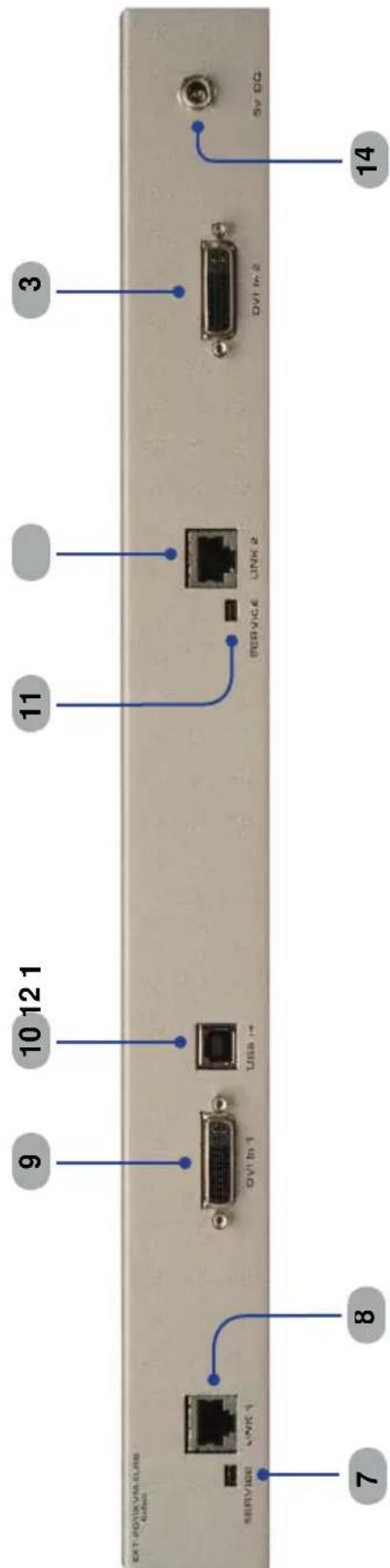
EXT-FOXIXVIA-ULRS 64bit SERVICE LINK 1 8 9 10 12 1 DVI to -1 USA +- 11 SERVICE LINK 2 3 DVI to -2 5v DG 141 Link 2
This LED glows bright blue when the Sender Unit and Receiver Unit are connected using Cat-5 / Cat-6 cable.
2 DVI 2
This LED flashes on (bright blue) and off when a DVI video source is connected to the Sender Unit. The Sender Unit and Receiver Unit must also be connected using a Cat-5 / Cat-6 cable.
3 Power Indicator
This LED will turn bright blue once the included 5V D C locking power supply has been connected and plugged into an available electrical outlet.
4 Link 1
This LED glows bright blue when the Sender Unit and Receiver Unit are connected using Cat-5 / Cat-6 cable.
5 USB
This LED glows bright blue when a USB source is connected to the Sender Unt.
6 DVI 1
This LED flashes on (bright blue) and off when a DVI video source is connected to the Sender Unit. The Sender Unit and Receiver Unit must also be connected using a Cat-5 / Cat-6 cable.
7 Service
Mini-US B service port used for upgrading the firmware (primary board).
8 Link 1
Connects the Sender Unit to the Receiver Unit using Cat-5 / Cat-6 cable.
9 DVI In
Connect a DVI cable from the computer to this DVI-I connector.
10 USB In
C connects a USB cable from this port to the computer.
11 Service
Mini-US B service port used for upgrading the firmware (secondary board).
12 Link 2
Connects the Sender Unit to the Receiver Unit using Cat-5 / Cat-6 cable.
13 DVI In 2
Connect a DVI cable from the computer to this DVI-I connector.
14 5V DC Locking Power Connector r
C onnect the included 5V DC locking power supply to this connector.
Front
text_image
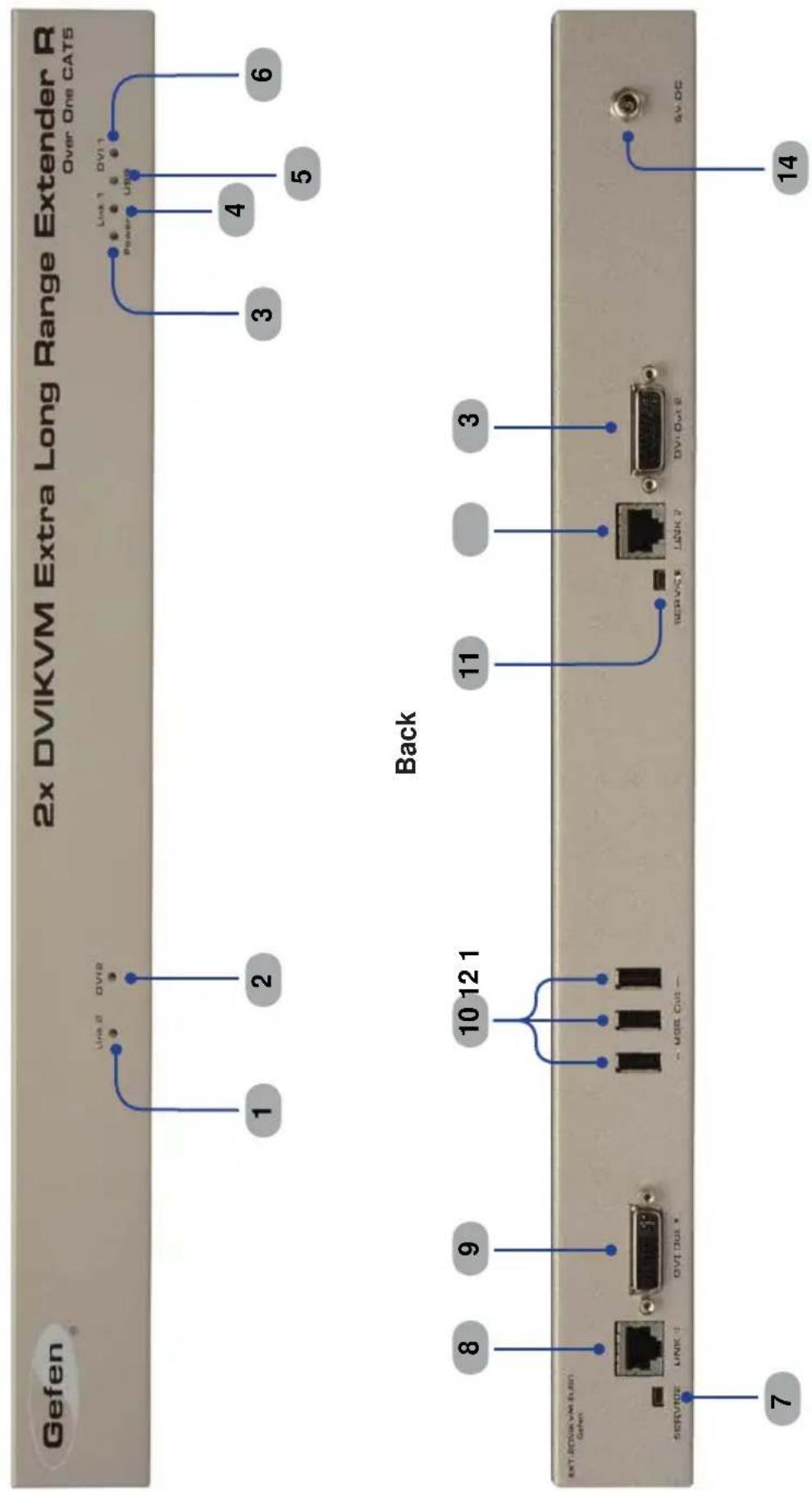
Gefen 2x DVIKVM Extra Long Range Extender R Over One CAT5 1 2 Link 2 DV12 Back 3 4 5 6 Power USB 8 9 10 12 1 11 3 SERVICE LINK 7 DV1 Out 8 Service DV1 Out 9 SERVCE LINK 7 SERVCE LINK 8 DV1 Out 9 SV.OC 7 141 Link 2
This LED glows bright blue when the Sender Unit and Receiver Unit are connected using Cat-5 / Cat-6 cable.
2 DVI 2
This LED flashes on (bright blue) and off when a DVI video source is connected to the Sender Unit. The Sender Unit and Receiver Unit must also be connected using a Cat-5 / Cat-6 cable.
3 Power
This LED will turn bright blue once the included 5V D C locking power supply has been connected and plugged into an available electrical outlet.
4 Link 1
This LED glows bright blue when the Sender Unit and Receiver Unit are connected using Cat-5 / Cat-6 cable.
5 USB
This LED glows bright blue when a USB source is connected to the Sender Unt.
6 DVI 1
This LED flashes on (bright blue) and off when a DVI video source is connected to the Sender Unit. The Sender Unit and Receiver Unit must also be connected using a Cat-5 / Cat-6 cable.
7 Service
Mini-US B service port used for upgrading the firmware (primary board).
8 Link 1
Connects the Sender Unit to the Receiver Unit using Cat-5 / Cat-6 cable.
9 DVI Out 1
Connect a DVI cable from the extender to an HDTV display.
10 USB Ou
Connect up to three USB device to these USB ports.
11 Service
Mini-US B service port used for upgrading the firmware (secondary board).
12 Link 2
Connects the Sender Unit to the Receiver Unit using Cat-5 / Cat-6 cable.
13 DVI Out 2
Connect a DVI cable from the extender to an HDTV display.
14 5V DC Locking Power Connector r
C connect the included 5V DC locking power supply to this connector.
How to Connect the 2x DVIKVM Extender
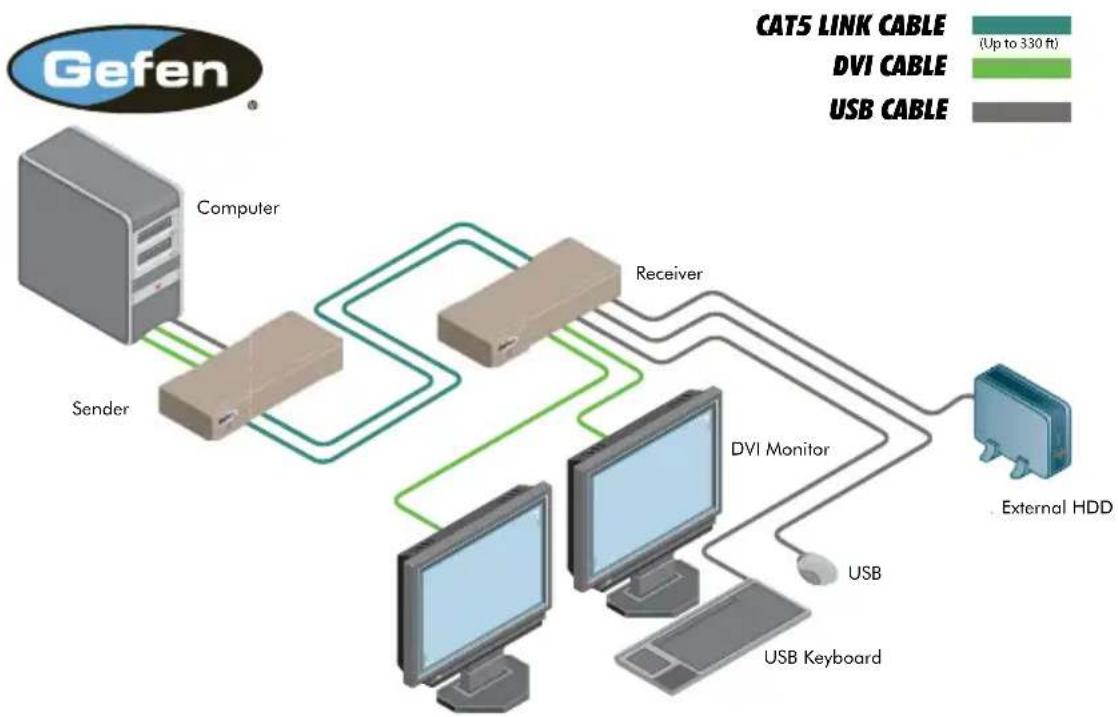
- Connect the included dual-link DVI cables between the DVI outputs on the computer and the DVI input connectors on the 2x DVIKVM Extender Sender unit.
- Connect the included USB cable from the computer to the 2x DVIKVM Extender Sender unit
- Connect up to three USB devices to the 2x DVIKVM Extender Receiver unit
- Connect two CAT-5 cables between the 2x DVIKVM Extender Sender and Receiver units. Note that each connector on the Sender and Receiver unit is identified by Link 1 and Link 2. When connecting the CAT-5 cables, make sure that the connectors on the Sender unit are connected to the corresponding connectors on the Receiver unit (e.g. Link 1 --> Link 1 and Link 2 -> Link 2).

NOTE: It terminating network cables in the field, please adhere to the TIA/EIA568B specification (see page 11).
- Use two DVI cables to connect two displays to the Receiver unit.
- Connect the included 5V DC locking power supplies to the 2x DVIKVM Extender Sender unit and Receiver unit. Do not overtighten the locking connectors. Plug the two (2) AC power cords from the power supplies to available electrical outlets.
Wiring Diagram for the 2x DVIKVM Extender
flowchart
graph TD
    A["Gefen"] --> B["Computer"]
    B --> C["Sender"]
    C --> D["Receiver"]
    D --> E["DVI Monitor"]
    E --> F["External HDD"]
    G["USB"] --> E
    H["USB Keyboard"] --> E
    I["CAT5 LINK CABLE (Up to 330 ft)"] --> D
    J["DVI CABLE"] --> D
    K["USB CABLE"] --> E
EXT-2DVIKVM-ELR
Receiver Unit
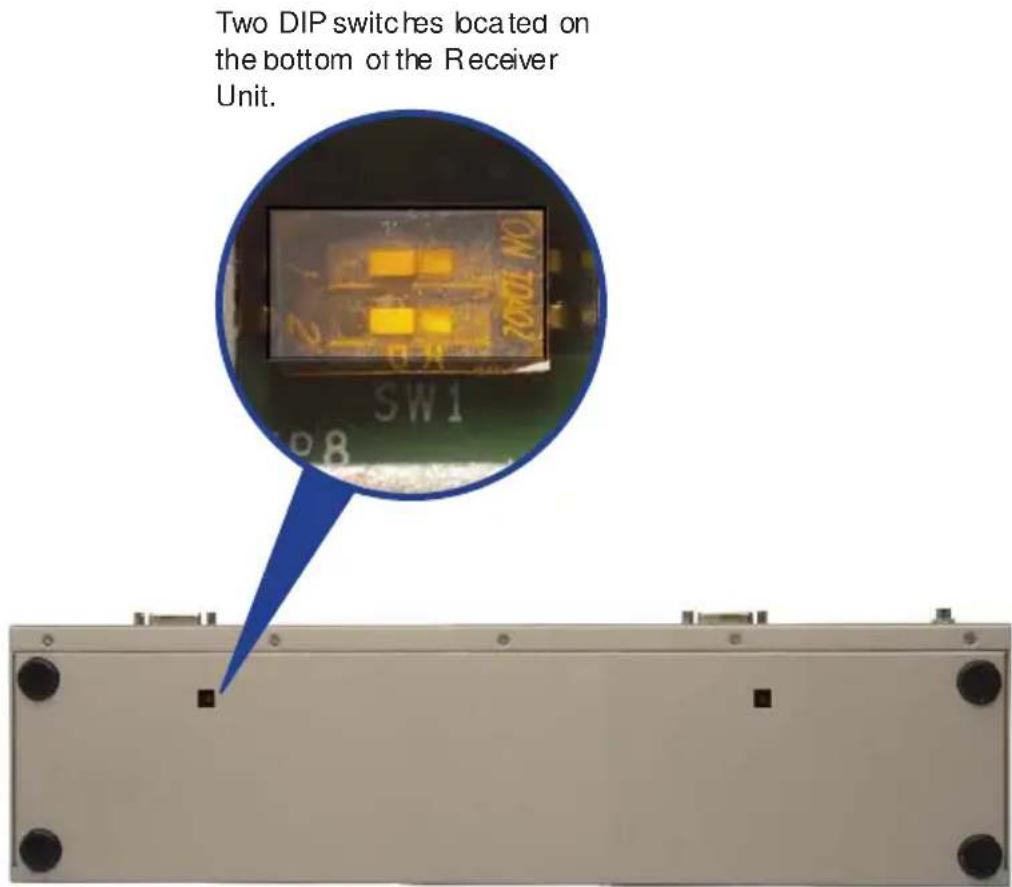
The Gefen 2x DVIKVM Extender contains two banks of two DIP switches on the bottom of the Receiver Unit (the Sender Unit does not contain any DIP switches). Each DIP switch performs a different function. Each DIP switch bank controls the settings for each DVI input.
text_image
Two DIP switches located on the bottom of the Receiver Unit. SW1 P8DIP Switch 1 - EDID Management
- OFF - Local EDID
When Local EDID mode is used, the EDID will be assembled by copying all video and audio features of the connected output device.
• ON (default) - Pass Through EDID
Allows all video and audio features of the connected devices to be passed to the source device. By default, the unit is shipped with DIP 1 in the ON position.
DIP Switch 2\* - DVI Support
• OFF
If an HDMI source is connected, set DIP switch 2 to the OFF position.
• ON(default)
For DVI connections, set DIP switch 2 to the ON position. DVI is supported by disabling HDC P pass-through.
*DIP switch is only functional when DIP switch 1 is set to the OFF position.

NOTE: Once DIP switch changes have been made, the unit must be power-cycledt or the changes to take effect.

natural_image
3D cutaway illustration of a black RJ4 connector showing internal structure and terminal connections (no text or symbols)Gefen recommends the TIA/EIA-568-B wiring option. Please adhere to the table below when field terminating cable for use with Gefen products.
| Pin Color | |
| 1 | Orange / White |
| 2 | Orange |
| 3 | Green / White |
| 4 | Blue |
| 5 | Blue / White |
| 6 | Green |
| 7 | Brown / White |
| 8 | Brown |

natural_image
Diagram of an Ethernet cable connector with pin numbering (1-7-3) and a top connector, no text or symbols present.Cat-5, Cat-5e, and Cat-6 cabling comes in stranded and solid core types. Gefen recommends using solid core cabling.
It is recommended to use one continuous run from one end to the other. In some cases, connecting through a patch might not work.
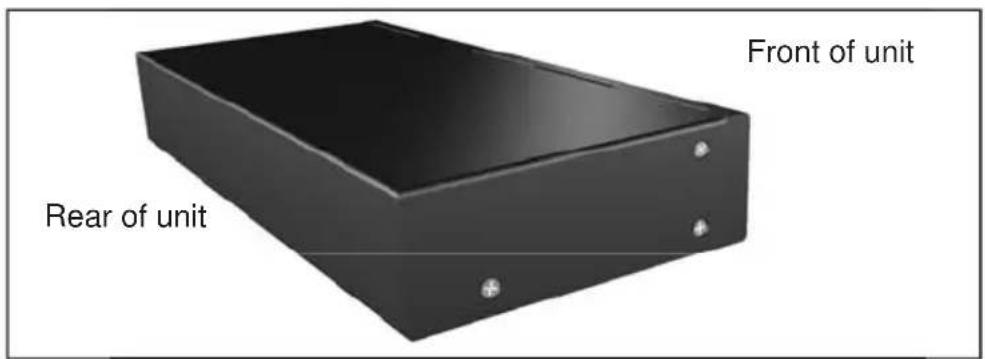
Pack mount ears are provided for installation of this unit into a 1U rack mount space.
- Locate the side screws on the unit.
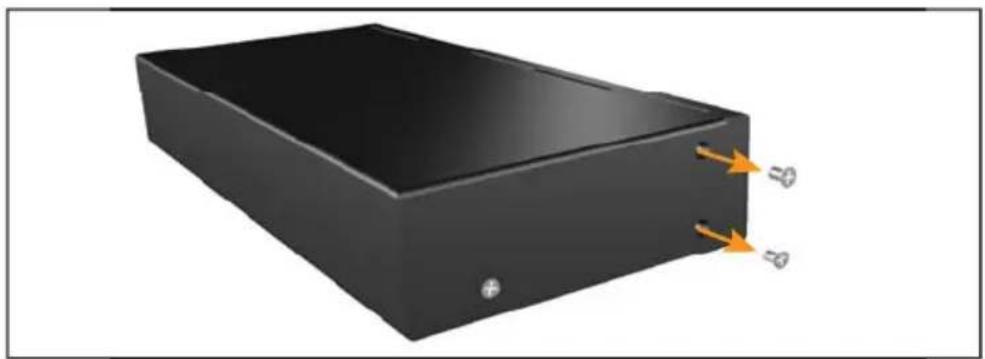
- Remove the front 2 screws that are located closest to the front of the unit.
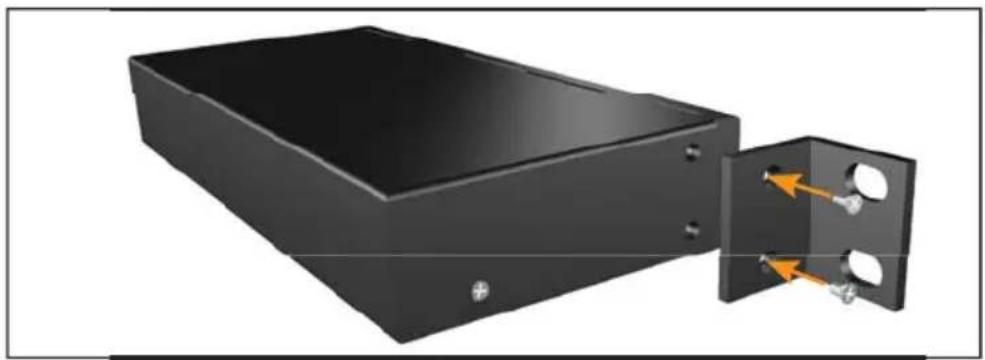
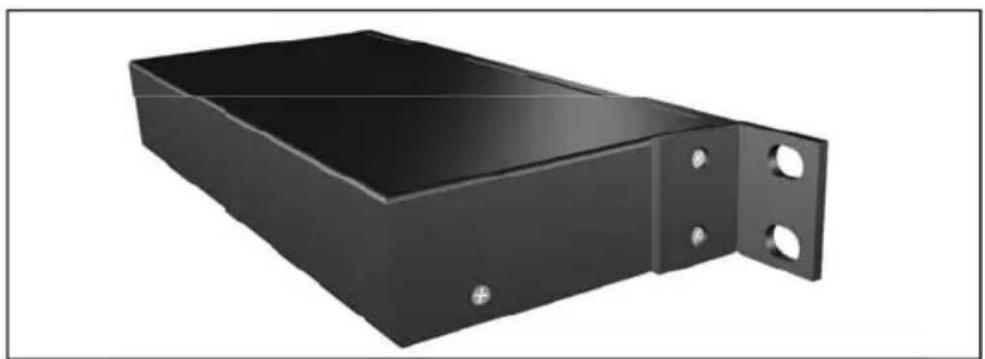
- Using the removed screws, screw the rack mounting bracket into the unit.
- Repeat the procedure on the opposite side of the unit
1
text_image
Front of unit Rear of unit2
natural_image
3D rendering of a black rectangular electronic device with two orange arrows pointing to its side (no text or symbols visible)3
natural_image
3D rendering of a black rectangular electronic device with two internal components and an orange arrow indicating direction (no text or symbols)4
natural_image
3D rendering of a black metal enclosure with two circular holes and mounting holes (no text or symbols)Cable recommendations
Solid core Cat-5e cable rated at 350 MHz and terminated in 568a or 568b is the minimum requirement. For resolutions greater than 1280x1024 or 1080i, Gefen recommends solid shielded Cat-6 cables.
No video
Make sure that the source is not a dual-link source (resolutions greater than 1920 x 1200). If using a DVI, the source signal must not be HDCP-encrypted. Make sure that DIP switch 2 on the Receiver Unit is set to the ON position. The 2x DVIKVM Extender will only pass HDCP content when using HDMI sources. If this does not resolve the issue, then make sure that the display (sink) is compatible with the source. Ensure that the resolution and timing of the source device can be used with the display (or other sink) connected to the Receiver Unit. Next, make sure that the Cat-5 cable, connecting the Sender Unit and Receiver Unit is firmly connected to the LINK ports on both units. If this does not solve the issue, try disconnecting and then reconnecting the power from both the Sender Unit and the Receiver Unit. Make sure that both units work with shorter Cat-5e cables (15 - 20 feet) before extending to greater distances.
Intermittent loss of video
Flickering or a blinking image is the result of a loss of sync between the display and the source. Try lowering the source resolution (e.g. from 1080p to 720p). If this solves the issue, then the Cat-5 cables being used to connect the Sender Unit and the Receiver Unit are unable to handle the bandwidth of the higher resolution and thus you are losing sync. Replace the existing Cat-5 cables with a shielded Cat-6 cable. Electromagnetic Interference (EMI) from fluorescent lights, generators, and A/C unit motors can also cause intermittent loss of video. Shielded Cat-6 cable with the drain wire soldered to the connectors will resolve the issue. Also make sure to eliminate any patch panels and wall plates. Patch panels and wall plates are prone to EMI if they are not shielded properly
Image is tinted green or pink
An image that is tinted green or pink is the result of the incorrect color space being transmitted. Make sure that the display and source both support the same color space. Setting DIP switch 1 on the Receiver Unit, to the OFF position, will use the Local EDID. EDID features newer than HDMI 1.3 are removed when the display is read. This provides a general EDID which is compatible with more displays.
Maximum Pixel Clock.... 165 MHz
Video Input Connectors (Sender)...... (2) DVI-I 29-pin, female (digital only y)
Video Output Connectors (Receiver)...... (2) DVI-I 29-pin, female (digital only)
USB Host Connector (Sender).... (1) USB Type B, female
USB Device Connectors (Receiver).... (3) USB Type A, female
Link Connectors (Sender/Receiver)....(2) RJ-45, shielded
USB Connector (Sender / Receiver).... (2) USB Mini-B, female
Power Supply (Sender / Receiver).... 5V DC, locking
Power Consumption (Sender / Receiver) 20W (max.)
Operating Temperature.... 0 to +40°C
Dimensions (W x D x H) (Sender / Receiver) 17.1" x 4.2" x 1.7" (434mm x 107mm x 43mm)
Rack Space.... 1U (rack ears included)
Shipping Weight.... 9 lbs. (4 kg)
Gefen warrants the equipment it manufactures to be free from defects in material and workmanship.
If equipment fails because of such defects and Gefen is notified within two (2) years from the date of shipment, Gefen will, at its option, repair or replace the equipment, provided that the equipment has not been subjected to mechanical, electrical, or other abuse or modifications. Equipment that fails under conditions other than those covered will be repaired at the current price of parts and labor in effect at the time of repair. Such repairs are warranted for ninety (90) days from the day of reshipment to the Buyer.
This warranty is in lieu of all other warranties expressed or implied, including without limitation, any implied warranty or merchantability or fitness for any particular purpose, all of which are expressly disclaimed.
- Proof of sale may be required in order to claim warranty.
- Customers outside the US are responsible for shipping charges to and from Cefen.
- Copper cables are limited to a 30 day warranty and cables must be in their original condition.
The information in this manual has been carefully checked and is believed to be accurate. However, Geten assumes no responsibility for any inaccuracies that may be contained in this manual. In no event will Gefen be liable for direct, indirect, special, incidental, or consequential damages resulting from any defect or omission in this manual, even if advised of the possibility of such damages. The technical information contained herein regarding the features and specifications is subject to change without notice.
For the latest warranty coverage information, refer to the Warranty and Return Policy under the Support section of the Gefen Web site at www.gefen.com.
PRODUCT REGISTRATION
Please register your product online by visiting the Register Product page under the Support section of the Gefen Web site.

text_image
* MA-2DVIKVM-ELR*Rev A1
20600 Nordhoff St., Chatsworth CA 91311 1-800-545-6900 818-772-9100 fax: 818-772-9120 www.gefen.com support@gefen.com