EXT-HDMI-CAT5-145 - Émetteur AV Gefen - Free user manual and instructions
Find the device manual for free EXT-HDMI-CAT5-145 Gefen in PDF.


| Product Type | HDMI over CAT5 Extender (Transmitter) |
| Model | EXT-HDMI-CAT5-145 |
| Brand | Gefen |
| Maximum Transmission Distance | 145 feet (44.2 meters) over CAT5/6 cable |
| Video Resolution Support | Up to 1080p Full HD |
| Audio Support | Multi-channel digital audio (up to 7.1 surround sound) |
| Input Connector | 1x HDMI Type A (female) |
| Output Connector | 1x RJ45 (female) |
| Power Supply | 5V DC, 1A external power adapter |
| Dimensions (W x D x H) | 2.75 x 1.1 x 0.75 inches (70 x 28 x 19 mm) |
| Weight | 0.16 lbs (72 g) |
| Operating Temperature | 32°F to 104°F (0°C to 40°C) |
| Storage Temperature | -4°F to 140°F (-20°C to 60°C) |
| HDCP Compliance | HDCP 1.4 compliant |
| LED Indicators | Power and Link status LEDs |
| Material | Metal enclosure |
| Installation | Plug and play, no software required |
| Compatible Cable | CAT5e or CAT6 UTP/STP cable |
| Safety | Use only provided power supply; avoid liquid exposure |
| Maintenance | Wipe with dry cloth; disconnect power when cleaning |
| Spare Parts / Repairability | Power adapter available; unit not user-serviceable |
Frequently Asked Questions - EXT-HDMI-CAT5-145 Gefen
User questions about EXT-HDMI-CAT5-145 Gefen
0 question about this device. Answer the ones you know or ask your own.
Ask a new question about this device
Download the instructions for your Émetteur AV in PDF format for free! Find your manual EXT-HDMI-CAT5-145 - Gefen and take your electronic device back in hand. On this page are published all the documents necessary for the use of your device. EXT-HDMI-CAT5-145 by Gefen.
USER MANUAL EXT-HDMI-CAT5-145 Gefen
Technical Support Hours:
8:00 AM to 5:00 PM Monday thru Friday.
Write To:
Gefen Inc.
c/o Customer Service
20600 Nordhoff St
Chatsworth, CA 91311
www.gefen.com
support@gefen.com
Notice
Gefen Inc. reserves the right to make changes in the hard ware, packaging and any accompanying doc u men ta tion without prior written notice.
1:5 Splitter For HDMI Over CAT-5 is a trademark of Gefen Inc.
1 Introduction
2 Operation Notes
3 Features
4 Sender Panel Layout
5 Sender Panel Descriptions
6 Receiver Panel Layout
7 Receiver Panel Descriptions
8 Connecting And Operating The 1:5 Splitter For HDMI Over CAT-5
9 EDID Modes
10 Equalization & Boost Settings
11 Network Cable Wiring Diagram
12 Specifications
13 Warranty
Congratulations on your purchase of the 1:5 Splitter For HDMI Over CAT-5. Your complete satisfaction is very important to us.
Gefen
Gefen delivers innovative, progressive computer and electronics add-on solutions that harness integration, extension, distribution and conversion technologies. Gefen's reliable, plug-and-play products supplement cross-platform computer systems, professional audio/video environments and HDTV systems of all sizes with hard-working solutions that are easy to implement and simple to operate.
The Gefen 1:5 Splitter For HDMI Over CAT-5
The Gefen 1:5 HDMI Over CAT5 Distribution Amplifier allows you to distribute HDMI video to 4 remote HDTV displays and to 1 local HDTV displays via inexpensive and standard CAT5 cables.
How It Works
Simply plug your video source into the Gefen 1:5 HDMI Over CAT5 D.A. Sender unit, then run an HDMI cable to your local HDTV displays. Then connect your CAT5 cables to 1:5 HDMI Over CAT5 D.A. Sender unit, and finally connect a pair of CAT5 cables to each of the 4 HDMI CAT5 D.A. Extreme Receivers at remote HDTV display.
Note: CAT5 cable extensions may be up to 300 feet (1080i) or 150 ft (1080p).
READ THESE NOTES BEFORE INSTALLING OR OPERATING THE 1:5 SPLITTER FOR HDMI OVER CAT-5
1:5 Splitter For HDMI Over CAT-5 will split the HDMI signal to 5 HDMI • outputs. 4 of these outputs can be sent over CAT-5, CAT-5e or CAT-6 cables to remote locations while the last output can be used for local use.
An short HDMI jumper cable (4 are included) must be connected from each of the lower board HDMI outputs to each of the upper board HDMI inputs to use the extension capabilities of the 1:5 Splitter For HDMI Over CAT-5.
The maximum cable extension is 300 feet (91 meters) for video resolutions • of 1080i and below.
The maximum cable extension is 150 feet (45 meters) for video resolutions • of 1080p.
If EMI is present anywhere near the CAT-5, CAT-5e or CAT-6 video cable • runs, it may be necessary to use shielded cable. This is to prevent possible interference from degrading the video signal. Using shielded cable, however, will reduce the maximum distance that the cable can be run.
Extensions under 130 feet can use Auto EQ (which is on by default). • Extensions over 130 feet will require you to manually EQ your signal (see page 10).
Each cable run must be one continuous run from one end to the other. No • splices or use of punch down blocks.
High quality CAT-6 cabling should be used for maximum performance.
Do not use stranded or low/no skew cabling. Solid core cabling should be used for maximum performance.
HDMI 1.2 Compliant.
HDCP Compliant.
Features
HDMI Video Distribution to up to 5 local displays or 4 remote•
300 ft. at 1080i; 150-ft range for 1080p •
Maintains high resolution video - beautiful, sharp HDTV resolutions up to • 1080p, 2k, and computer resolutions up to 1920 x 1200 are easily achieved
Enables greater versatility when installing multiple HDMI displays•
HDCP Compliant•
Package Includes
(1) 1:5 HDMI CAT5 Distribution Amplifier (Sender Unit)
(1) 24V DC Power Supply
(4) EXT-HDMI-CAT5-DAR (Receiver Unit)
(4) 5VDC Power Supply
(1) 6 Foot HDMI M-M Cable
(4) 1 Foot HDMI M-M Cable
(1) User's Manual
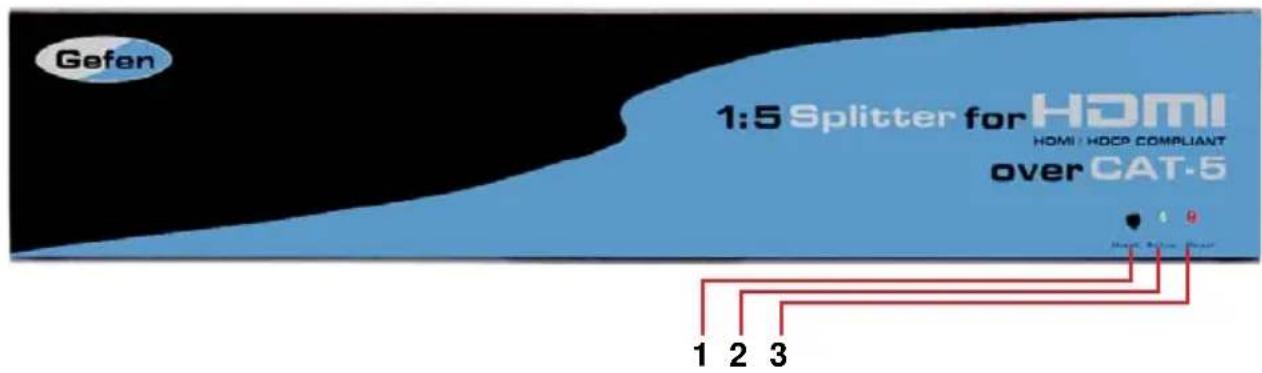
Front Panel
text_image
Gefen 1:5 Splitter for HDMI HDMI / HDCP COMPLIANT over CAT-5 1 2 3Back Panel

text_image
4 5 4 5 4 5 4 5 4 5 6 CAT-5 VDDS-1 DOC-1 HD-1 CAT-6 VDDS-2 DOC-2 HD-2 CAT8 VDDS-3 DOC-3 HD-3 CAT-9 VDDS-4 DOC-4 HD-4 MIV 60 7 8 9 9 9 9 9 DOD C D:1 D:2 D:3 D:4 D:5Reset Button1
Pressing this button will reset the unit and cause the source to re-detect the EDID. This is useful for when the EDID mode on the rear panel is changed.
Active LED Indicator2
This LED will become active when a valid link between the 1:5 Splitter For HDMI Over CAT-5 sender and the source has been established.
Power LED indicator3
This LED will become active once the included 24V DC power supply has been properly connected to the sender unit.
RJ-45 Extension Ports4
There are 2 RJ-45 ports for each of the 4 HDMI extensions to remote locations. There is one port labeled DDC and once port labeled Video. Both ports must be used for HDMI extension.
HDMI Jumper Input Port5
A short jumper cable (included) from the lower HDMI output ports must be connected to these input ports to use the extension feature. There are 4 input ports that can be used by up to 4 of the 5 HDMI output ports.
24V DC Power Input6
Connect the included 24V DC power adapter between this input port and an available wall power socket.
EDID Mode Switch7
This switch will determine which EDID mode is used. The two modes are Internal EDID and External EDID. Please see page 9 for information on how this feature is used.
HDMI Input Port8
Connect the HDMI source device to this input port. The HDMI signal that is connected to this input port will be mirrored to the 5 output ports on the rear panel.
HDMI Output Ports9
There are 5 HDMI output ports that are available for connection to either the extension jumper inputs (up to 4 outputs) or to local HDMI capable displays.
Front Panel

text_image
EQ HDMI Out Power +5 Vdc 1 2 3 4Back Panel

text_image
CAT-5 DDC VIDEO 5 6Equalization Trim Pot1
This Trim Pot is used to equalize the incoming HDMI signal to account for variances in CAT cable skew. By default, the Auto EQ feature is enabled and this Trim Pot does not need to be adjusted. In the event that manual EQ mode is enabled, this Trim Pot will be used to equalize the signal.
HDMI Output Port2
Connect an HDMI capable display to this output port.
Power LED Indicator3
This LED will become active once the included 5V DC power supply has been properly connected to the 1:5 Splitter For HDMI Over CAT-5 receiver unit.
Power LED Indicator4
Connect the included 5V DC power adapter between this input port and an available wall power socket.
RJ-45 DDC Port5
A CAT-5, CAT-5e or CAT-6 cable must be connected between the receiver and sender. This cable carries DDC and HDCP data. Most source devices will not operate properly without this data.
RJ-45 Video Port6
A CAT-5, CAT-5e or CAT-6 cable must be connected between the receiver and sender. This cable carries Video and Audio data.
How to Connect the 1:5 Splitter For HDMI Over CAT-5
Connect the HDMI source device to the 1:5 Splitter For HDMI Over CAT-5 1. sender unit using the supplied HDMI cable.
Connect up to 4 of the HDMI outputs to the HDMI jumper inputs using the 2. supplied short HDMI jumper cables. The fifth port can be used for local HDMI output to a display. Alternately, any or all output ports can be used to route HDMI to local displays, bypassing the HDMI extension feature.
For each HDMI extension, connect a pair of user supplied CAT-5, CAT-5e or 3. CAT6 cables between an open pair of RJ-45 extension ports on the sender and the pair of RJ-45 ports on a receiver.
NOTE: When field terminating CAT cable, please adhere to the TIA/EIA-568-B specification. Please see page 11 for details.
Connect a HDMI capable display to the receiver using a user supplied HDMI 4. cable.
Connect the included 24V DC power adapter to the sending unit and one of 5. the included 5V DC power adapters to each of the receivers.
Power on the displays first and then the source device.6.
NOTE: Video may not immediately appear. If this is the case, please refer to the next section for instructions on how to change EDID modes and adjust equalization.
EDID (Extended Display Identification Data) contains information on the resolution and general capabilities of a display device. This information is used by the source device to output a compatible signal that the display can accept. This information can even be used by some source devices to limit the output of resolutions and features that the display is not capable of accepting. In single source and single device setup, EDID can effectively ensure compatibility with display and source. The 1:5 Splitter For HDMI Over CAT-5 replicates a single HDMI input from a source to up to 5 HDMI capable devices. However, since the source device can only output one type of audio and video signal (resolution, features, number of audio channels, audio format, etc.) based on the EDID it receives, all connected HDMI devices must have common audio and video capabilities for successful replication to occur.
The source of the EDID can be selected using the EDID mode feature. There are two sources from which the EDID can be polled and then transferred back to the source device. The External mode uses the EDID from the display connected to the first HDMI output port. The Internal mode will use and built-in EDID that is stored in the unit. The Internal EDID mode supports resolutions of up to 1080p and includes common audio features.
How to Change EDID Modes
Locate the EDID Mode Switch on the rear panel of the 1:5 Splitter For HDMI 1. Over CAT-5 sender unit.
Note the switch's current position and change the EDID mode to either INT 2. (Internal) or EXT (External) by toggling the switch.
Press the reset button on the front panel to reset the connection to the 3. source device so that it can re-detect the new EDID change.
Each 1:5 Splitter For HDMI Over CAT-5 receiver contains a Dip Switch bank located on the underside of the unit. This bank of 4 Dip Switches are covered with a piece of silver metallic tape. These Dip Switches will modify boost settings and change the equalization mode.
EQUALIZATION MODES
Dip Switch 1 is used to select the equalization mode. There are 2 EQ modes to select from. Auto Equalization (Dip Switch 1 = Off, default) will automatically attempt to equalization the incoming signal and eliminate and digital noise that may occur due to variances in cable skew. Manual Equalization (Dip Switch 1 = ON) will allow the user to manually EQ the signal using the Trim Pot located on the front panel of the receiver. By default, Auto Equalization is set and is effective for CAT cable runs of up to 130 feet. Distances greater than 130 feet should be manually equalized. Use the table below for quick reference of the EQ Dip Switch modes.
| Receiver Auto EQ Dip Switch Settings | ||
| Setting Switch 1 Switch 2 | ||
| Manual EQ ON Not Used | ||
| Auto EQ (Default) OFF Not Used | ||
BOOST MODES
Dip Switches 3 and 4 are used to specify the boost strength of the signal from the 1:5 Splitter For HDMI Over CAT-5 sender. This feature will boost the signal when long distances of cable are used and will also help the signal reach the receiver when low quality cable is used. There are not set distance rules in regards to this setting (due to the variances in cable quality), so it is recommended that the user try all settings, starting with no boost, when troubleshooting issues. Please refer to the table below for the 4 different Dip Switch combinations.
| Receiver Boost Dip Switch Settings | ||
| Setting Switch 3 Switch | tch 4 | |
| No Boost (Default) OFF OFF | ||
| Medium Boost OFF ON | ||
| High Boost ON OFF | ||
| Very Low Boost ON ON | ||
natural_image
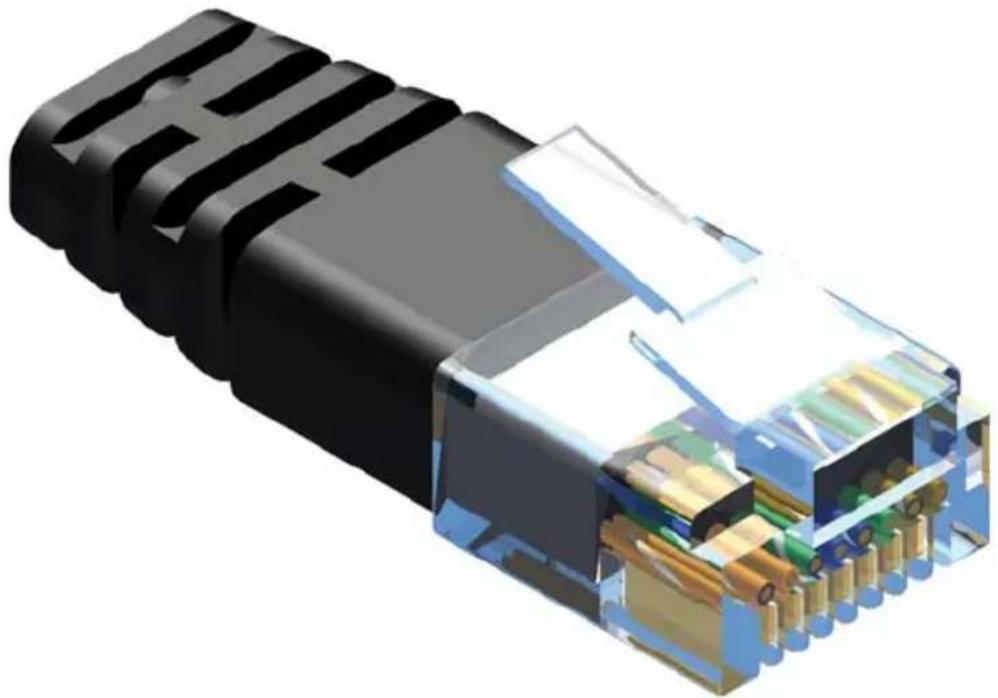
3D cutaway illustration of a black USB connector showing internal components (no text or symbols)Gefen has specifically engineered their products to work with the TIA/EIA-568-B specification. Please adhere to the table below when field terminating cable for use with Gefen products. Failure to do so may produce unexpected results and reduced performance.
| Pin Color |
| 1 Orange / White |
| 2 Orange |
| 3 Green / White |
| 4 Blue |
| 5 Blue / White |
| 6 Green |
| 7 Brown / White |
| 8 Brown |

natural_image
Diagram of an Ethernet cable connector with pin numbering (1–8) and a top connector, no text or symbols present.CAT-5, CAT-5e, and CAT-6 cabling comes in stranded and solid core types. Gefen recommends using solid core cabling. CAT-6 cable is also recommended for best results.
Each cable run must be one continuous run from one end to the other. No splices or use of punch down blocks.
Video Amplifier Bandwidth 165 MHz
Input Video Signal 1.2 Volts p-p
Input DDC Signal 5 Volts p-p (TTL)
Single Link Range 1080p/1920 x 1200
HDMI Video Connector .... Type A, 19 Pin Female
Link Connector RJ-45 Shielded
Power Supply 24V DC
Power Consumption 50 Watts (max)
Dimensions Sender 17.125" W x 3.50" H x 5.375" D
Dimensions Receiver 3.25" W x 1.25" H x 3.4" D
Shipping Weight 12 lbs.

text_image
* M A - H D M I - C A T 5 - 1 4 5 *Rev X1
20600 Nordhoff St., Chatsworth CA 91311
1-800-545-6900 818-772-9100 fax: 818-772-9120
www.gefen.com support@gefen.com