AC-LK0112-S1 - Câble Siig - Free user manual and instructions
Find the device manual for free AC-LK0112-S1 Siig in PDF.


| Product Type | Cable |
| Brand | Siig |
| Model | AC-LK0112-S1 |
| Connector Type | USB 3.0 Type-A Male to USB 3.0 Type-B Male |
| Length | 6 feet (1.8 meters) |
| Data Transfer Speed | Up to 5 Gbps |
| Cable Shielding | Foiled and braided shielding |
| Compatibility | USB 3.0, USB 2.0, USB 1.1 |
| Jacket Material | PVC |
| Color | Black |
| Connector Plating | Gold-plated contacts |
| Operating Temperature | -20°C to 60°C (-4°F to 140°F) |
| Storage Temperature | -30°C to 70°C (-22°F to 158°F) |
| Weight | Approx. 100 g (3.5 oz) |
| Power Supply | Bus-powered (via USB) |
| Warranty | Lifetime limited warranty |
| Application | Connecting external hard drives, printers, scanners, and other USB peripherals |
| Compliant Standards | USB 3.0, USB-IF, RoHS |
| Maintenance | Wipe with dry cloth; avoid sharp bends |
| Safety Note | Do not exceed maximum cable length for USB 3.0 (3 meters recommended) |
| Repairability | Not user-serviceable; replace if damaged |
Frequently Asked Questions - AC-LK0112-S1 Siig
User questions about AC-LK0112-S1 Siig
0 question about this device. Answer the ones you know or ask your own.
Ask a new question about this device
Download the instructions for your Câble in PDF format for free! Find your manual AC-LK0112-S1 - Siig and take your electronic device back in hand. On this page are published all the documents necessary for the use of your device. AC-LK0112-S1 by Siig.
USER MANUAL AC-LK0112-S1 Siig
natural_image
Simple line icon of a circular object with a horizontal bar, no text or symbols present.Key Notebook Lock Quick Installation Guide
Features and Benefits
- 6ft braided steel cable for added cut resistance and flexibility
- Protective coating prevents scratching
Package Contents
• Key Notebook Lock with steel security cable
- 2 Keys
- Quick Installation Guide
Serial Number Sticker
For future product return or exchange, this serial number is required. Please keep it for your reference.

natural_image
Empty rectangular frame with no text, symbols, or content inside
Securing your Notebook
- Wrap the steel cable around a stationary object, then thread the lock head through the loop on the end of the cable.
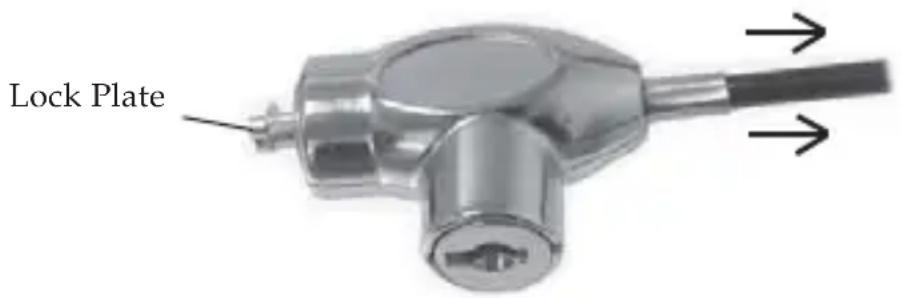
- Unlock the lock. Pull the steel cable away from the lock head until it stops, see Figure 1 below, firmly hold the cable in that position as you insert the lock plate into the security docking hole of the notebook.
text_image
Lock PlateFigure1: Pull in direction of the arrows
- Release the cable then lock the notebook lock to secure the notebook.
Unlocking your Notebook
- Unlock the lock. Pull the cable away from the lock head and firmly hold it as you pull lock away from the notebook.
Technical Support and Warranty
QUESTIONS? SIIG's Online Support has answers! Simply visit our web site at www.siig.com and click Support. Our online support database is updated daily with new drivers and solutions. Answers to your questions could be just a few clicks away. You can also submit questions online and a technical support analysts will promptly respond.
SIIG offers a 2-year manufacturer warranty with this product. Please see our web site for more warranty details. If you encounter any problems with this product, please follow the procedures below.
If it is within the store's return policy period, please return the product to the store where you purchased from. If your purchase has passed the store's return policy period, please follow these steps to have the product repaired or replaced.
Step 1: Submit your RMA request.
Go to www.siig.com, click Support, then RMA to submit a request to SIIG RMA. If the product is determined to be defective, an RMA number will be issued.
Step 2: After obtaining an RMA number, ship the product.
- Properly pack the product for shipping. All accessories that came with the original package must be included.
- Clearly write your RMA number on the top of the returned package. SIIG will refuse to accept any shipping package, and will not be responsible for a product returned without an RMA number posted on the outside of the shipping carton.
- You are responsible for the cost of shipping. Ship the product to the following address:
SIIG, Inc.
6078 Stewart Avenue
Fremont, CA 94538-3152, USA
RMA #: ____
- SIIG will ship the repaired or replaced product via Ground in the U.S. and International Economy outside of the U.S. at no cost to the customer.
Founded in 1985, SIIG, Inc. is a leading computer upgrade manufacturer of I/O connectivity products, including PCI & ISA serial and parallel ports, USB, Serial ATA & UltraATA controllers, FireWire (1394a/b), networking, sound cards, and other accessories. SIIG is the premier one-stop source of upgrades.
SIIG products offer comprehensive user manuals, many user-friendly features, and are backed by an extensive manufacturer warranty. High-quality control standards are evident by the overall ease of installation and compatibility of our products, as well as one of the lowest defective return rates in the industry. SIIG products can be found in computer retail stores, mail order catalogs, through major distributors, system integrators, and VARs in the Americas and the UK, and through e-commerce sites.
PRODUCT NAME
Key Notebook Lock
FCC RULES: TESTED TO COMPLY WITH FCC PART 15, CLASS B OPERATING ENVIRONMENT: FOR HOME OR OFFICE USE
FCC COMPLIANCE STATEMENT:
This device complies with part 15 of the FCC Rules. Operation is subject to the following two conditions: (1) This device may not cause harmful interference, and (2) this device must accept any interference received, including interference that may cause undesired operation.
THE PARTY RESPONSIBLE FOR PRODUCT COMPLIANCE
SIIG, Inc.
6078 Stewart Avenue
Fremont, CA 94538-3152, USA
Ph: 510-657-8688
Key Notebook Lock is a trademark of SIIG, Inc. SIIG and the SIIG logo are registered trademarks of SIIG, Inc. Other names used in this publication are for identification only and may be trademarks of their respective companies.
April, 2009
Copyright © 2009 by SIIG, Inc. All rights reserved.