No433 - Audio player Mark Levinson - Free user manual and instructions
Find the device manual for free No433 Mark Levinson in PDF.


User questions about No433 Mark Levinson
0 question about this device. Answer the ones you know or ask your own.
Ask a new question about this device
Download the instructions for your Audio player in PDF format for free! Find your manual No433 - Mark Levinson and take your electronic device back in hand. On this page are published all the documents necessary for the use of your device. No433 by Mark Levinson.
USER MANUAL No433 Mark Levinson
Important Safety Instructions
WARNING
TO REDUCE THE RISK OF FIRE OR ELECTRIC SHOCK, DO NOT EXPOSE THIS APPLIANCE TO RAIN OR MOISTURE.

CAUTION
RISK OF ELECTRICAL SHOCK DO NOT OPEN

CAUTION: TO REDUCE THE RISK OF ELECTRICAL SHOCK, DO NOT REMOVE COVER. NO USER-SERVICEABLE PARTS INSIDE. REFER SERVICING TO QUALIFIED PERSONNEL.

The lightning flash with arrowhead symbol, within an equilateral triangle, is intended to alert the user to the presence of uninsulated “dangerous voltage” within the product’s enclosure that may be of sufficient magnitude to constitute a risk of electric shock to persons.

The exclamation point within an equilateral triangle is intended to alert the user to the presence of important operating and maintenance (servicing) instructions in the literature accompanying the appliance.

Marking by the “CE” symbol (shown left) indicates compliance of this device with the EMC (Electromagnetic Compatibility) and LVD (Low Voltage Directive) standards of the European Community.
Please read all instructions and precautions carefully and completely before operating your Mark Levinson power amplifier.
- ALWAYS disconnect the entire system from the AC mains before connecting or disconnecting any cables, or when cleaning any component.
- This product must be terminated with a three-conductor AC mains power cord that includes an earth ground connection. To prevent shock hazard, all three connections must ALWAYS be used.
- AC extension cords are not recommended for use with this product.
- NEVER use flammable or combustible chemicals for cleaning audio components.
- NEVER operate this product with any covers removed.
- NEVER wet the inside of this product with any liquid, or pour/spill liquids directly onto this unit.
- NEVER block airflow through ventilation slots or heat sinks.
- NEVER bypass any fuse or replace any fuse with a value or type other than those specified.
Important Safety Instructions
- NEVER attempt to repair this product. If a problem occurs, contact your Mark Levinson retailer.
- NEVER expose this product to extremely high or low temperatures.
- NEVER operate this product in an explosive atmosphere.
- ALWAYS keep electrical equipment out of the reach of children.
- ALWAYS unplug sensitive electronic equipment during lightning storms.
- In CE countries, this amplifier is considered “professional equipment.” In order to comply with CE requirements, the customer is required to obtain permission from the local supply authority before connecting this equipment.
FCC Notice
This equipment has been tested and found to comply with the limits for a Class B digital device, pursuant to part 15 of the FCC Rules. These limits are designed to provide reasonable protection against harmful interference in a residential installation. This equipment generates, uses, and can radiate radio frequency energy and, if not installed and used in accordance with the instructions, may cause harmful interference to radio communications. However, there is no guarantee that interference will not occur in a particular installation. If this equipment does cause harmful interference to radio or television reception, which can be determined by turning the equipment off and on, the user is encouraged to try to correct the interference by one or more of the following measures:
- Reorient or relocate the receiving antenna.
- Increase the separation between the equipment and the receiver.
- Connect the equipment into an outlet on a circuit different from that to which the receiver is connected.
- Consult an authorized Mark Levinson dealer or an experienced radio/TV technician for help.
This digital apparatus does not exceed the Class B limits for radio noise emissions from digital apparatus set out in the Radio Interference Regulations of the Canadian Department of Communications.
Changes or modifications not expressly approved by the party responsible for compliance could void the user's authority to operate the equipment.

text_image
mark evinson®MADRIGAL AUDIO LABORATORIES
3 Oak Park
Bedford, MA 01730-1413 USA
Telephone: 781-280-0300
Fax: 781-280-0490
www.marklevinson.com
Customer Service
Telephone: 781-280-0300
Sales Fax: 781-280-0495
Service Fax: 781-280-0499
Product Shipments
16 Progress Road
Billerica, MA 01821-5730 USA
Part No. 070-630694 | Rev | 09/05
"Mark Levinson" and the Mark Levinson logo are registered trademarks of Harman International Industries. U.S. patent numbers and other worldwide patents issued and pending.
"Madrigal Audio Laboratories" and the Madrigal Audio Laboratories logo are registered trademarks of Harman International Industries. U.S. patent numbers and other worldwide patents issued and pending.
©2005 Harman Specialty Group. All rights reserved.
This document should not be construed as a commitment on the part of Harman Specialty Group. The information it contains is subject to change without notice. Harman Specialty Group assumes no responsibility for errors that may appear within this document.
Table of Contents
Unpacking 6
Product Registration 6
Installation Considerations 7
Placement 7
Ventilation 7
Power Requirements 9
Warm-up & Break-In Period 9
Operating States 10
Special Design Features 11
Massive Power Supply 11
Balanced Design 11
Extensive Protection 12
Front Panel 13
Rear Panel 15
Linking 20
Making Link Connections 20
Constructing Link Communication Cables 21
Creating a Slave Chain 22
Link Controls 25
Troubleshooting 26
Care & Maintenance 29
Specifications 30
Declaration of Conformity 31
Dimensions 32
Rack-Mounting 33
Warning!

Unpacking
DO NOT attempt to lift or move the N°433 without adequate assistance. Failure to follow the procedures included in this section may result in personal injuries and/or product damage.
The N°433 is a massive power amplifier. The N°433 ships at 130.5 pounds (59.2kg). Rear panel handles are provided for safe, convenient lifting and moving. Proper lifting requires at least two people.
Caution!

DO NOT attempt to lift the N°433 from its packing carton alone.
DO NOT attempt to lift the N°433 while bending at the waist. When lifting, stand as straight as possible using the leg muscles to lift.
When unpacking the N°433:
- DO save all packing materials for possible future shipping needs.
- DO inspect the N°433 for signs of damage during shipment. If damage is discovered, contact an authorized Mark Levinson dealer for assistance making appropriate claims.
Product Registration
Please register the N°433 within 15 days of purchase. To do so, register online at www.marklevinson.com or complete and return the included product registration card. Product registration serves no warranty purposes. Retain the original, dated sales receipt as proof of warranty coverage.
Installation Considerations
Placement
The N°433 requires special care during installation to ensure optimal performance. Pay particular attention to the precautions included in this section and to other precautions included throughout this owner's manual.
- DO review "Important Safety Instructions" on page 2 and "Power Requirements" on page 9 before installing the N°433.
- DO place the N°433 on a solid, flat, level surface such as a table, shelf, or floor OR bolt the N°433 into a rack-mounting system. Use a purpose-built rack-mounting system to accommodate the weight of the power amplifier. Refer to “Rack-Mounting” on page 33 for additional information.
- DO position the N°433 close to associated loudspeakers to keep loudspeaker wires as short as possible. Use longer interconnecting cables between the preamplifier and the power amplifier. This is preferable because interconnecting cables pass low-voltage signals, which transmit over distances with greater accuracy than the high-voltage signals required by loudspeakers.
- DO allow at least a six-inch (15cm) clearance behind the N°433 for the power cord and signal cables to bend.
- DO refer to "Dimensions" on page 32 for assistance with custom installations.
- DO NOT position the N°433 near low-level components. This power amplifier is capable of producing massive output currents, which could generate significant magnetic fields and induce noise in some sensitive components.
- DO NOT place the N°433 on a windowsill or in another location in which it will be exposed to direct sunlight.
Caution!
Before moving the N°433, make sure it is powered off with the front panel power button. Then, make sure the power cord is disconnected from the \~ac mains connector and the electrical outlet. Do not attempt to move the N°433 without adequate assistance. Proper lifting requires at least two people.
Ventilation
• DO select a dry, well-ventilated location out of direct sunlight.
- DO allow at least a two to three-inch (5 to 8cm) clearance above the N°433 for proper heat dissipation through air circulation. The N°433 is designed for passive, convection cooling.
- DO NOT obstruct the ventilation holes on the top and bottom of the N°433 or reduce airflow through the N°433.
Note
- DO NOT place the N°433 on a thick rug or carpet or cover the N°433 with a cloth, as this might prevent proper cooling. If the N°433 is placed on the floor, use a thick piece of tempered glass to provide firm support and proper ventilation.
- DO NOT expose the N°433 to high temperatures, humidity, steam, smoke, dampness or excessive dust. Avoid installing the N°433 near radiators or other heat-producing appliances.
In general, better ventilation is required if the top of the N°433 is hot to the touch when the power amplifier is "idle." Open equipment racks provide the best ventilation for power amplifiers. However, if the power amplifier must be placed in a cabinet that restricts airflow, consider drilling holes in the shelf underneath the power amplifier to improve ventilation or using fans to increase air circulation.
Caution!
Power Requirements
When shipped, the N°433 is configured for 100V, 120V, 220V, 230V or 240V AC power operation at 50 or 60Hz based on the country for which it is manufactured. Before operating the N°433, make sure the \~ac mains connector label indicates the correct operating voltage for the current location.
Do not attempt to adjust the operating voltage. Consult an authorized Mark Levinson dealer if the operating voltage is incorrect or if the operating voltage must be changed for relocation purposes.
Be advised that different operating voltages may require the use of different power cords and/or attachment plugs. Contact an authorized Mark Levinson dealer for assistance.
The N°433 is capable of passing remarkable musical signals regardless of signal and loudspeaker demands. On either an instantaneous or continuous basis, this power amplifier can drive exceptional power levels into most all loudspeaker loads. Depending on listening habits, loudspeaker demands, and the number of power amplifiers present in the system – it is possible for the electrical service to become the limiting performance factor.
In this case, contact a licensed electrician to install a dedicated AC circuit for the home entertainment system. If more than one AC circuit is providing power to the system, contact a licensed electrician to ensure that all components are operating with the same solid, low-impedance ground reference.
Important

Warm-up & Break-In Period
Building regulations and electrical codes differ from location to location, making it impossible to anticipate the requirements of high-current AC circuits such as the N°433 is capable of using. Contact a local, licensed electrician for information.
Although the N°433 delivers superior performance from the first time it is powered on, this performance will continue to improve as the power amplifier reaches its normal operating temperature and various components “break in.” The greatest performance improvements will occur within the first 25 to 50 hours of use. Sound quality will continue to improve for approximately 300 hours.
After this initial period, performance will remain consistent unless power is disconnected from the \~ac mains connector. Power is considered disconnected when the N°433 is powered off with the power button, the power cord is disconnected from the \~ac mains connector or the electrical outlet, or an extended power failure or
Operating States
power outage occurs. Power is not disconnected when the N°433 is in standby or sleep mode.
When power returns, the N°433 will require a brief warm-up and break-in period (not the full 300 hours). It is recommended that you allow the N°433 and other audio components to stabilize for a few minutes.
The N°433 has four operating states:
1. Off
Power is disconnected from the \~ac mains connector.
2. Sleep Mode
Power is connected to a small power supply, communication circuits and control circuits. When taken out of sleep mode, the N°433 requires a brief warm-up and break-in period. In sleep mode, the N°433 consumes approximately 10W of power.
3. Standby
Power is connected to the main power supply and voltage gain stages. Power is not connected to the output (current gain) stage. Because voltage gain stages are kept at their normal operating temperatures, the N°433 remains warmed-up to deliver an optimal performance. In standby, the N°433 consumes approximately 100W of power.
4. On
Power is connected to the \~ac mains connector and all power amplifier components.
Massive Power Supply
Balanced Design
Special Design Features
Thank you for purchasing the N°433 Power Amplifier. While this amplifier is straightforward in everyday use, it includes several design features that are responsible for its outstanding performance. In particular, this amplifier defies the accepted wisdom that it is impossible to design a large, powerful amplifier that also has all the finesse of the finest smaller amplifiers. A few of the technical highlights that make this possible are described below.
The N°433 features three large, robust power supplies. Each supply includes a high-capacity, low-noise toroidal transformer, and two large, low ESR (“Equivalent Series Resistance”) capacitors.
Heavy oxygen-free copper bus bars enhance the efficiency of power distribution within the amplifier and eliminate variances introduced by the wiring harnesses that are commonly found in lesser-performance amplifiers. High-frequency power supply bypass is accomplished on individual PC boards by components of several film types. The resulting uniformly low power supply impedance seen by the various circuits within the amplifier lays the foundation for the massive power delivery and extraordinary finesse that characterizes Mark Levinson amplifiers.
A truly balanced input topology eliminates the need for an input buffer amplification stage, allowing the first stage differential amplifier to be driven directly by the source. Matched impedances are presented to the source. Both signals travel through identical circuit paths.
Meticulous attention to the layout of the amplifier, including careful mirror-imaging of circuits to cancel magnetic fields, minimizes magnetic field distortions that can occur with a massive power delivery system. A balanced input signal remains balanced throughout the voltage gain stages. Rejection of common mode noise and distortion is achieved in the final, current gain stage.
Extensive Protection
The N°433 is designed to shut itself down if it senses any of a number of fault conditions that could cause damage to itself or to associated loudspeakers.
These fault conditions include:
- the presence of DC (direct current) at the output
- demand for excessive current at the output, indicating a short-circuit
- over-voltage or under-voltage conditions (+/-10%) at the \~ac mains connector
- unsafe operating temperatures in any of several critical areas within the amplifier
In the case of either significant DC offset or an over-current condition, the amplifier will shut down to protect itself and the associated loudspeakers. The front panel indicator LED will blink rapidly, remaining lit about half of the time. To restore normal operation, power-down the amplifier using the power button, remove the cause of the fault, and wait five minutes before powering the amplifier back on.
If the \~ac mains connector voltage is too high or too low for safe operation, the amplifier will automatically enter sleep mode and the front panel indicator LED will blink rapidly, remaining on most of the time. The amplifier will not come out of sleep mode until the \~ac mains connector voltage is again within the normal operating range. For example, a 120V amplifier will operate between approximately 108-132VAC; a 230V amplifier will operate between approximately 207-253VAC. Outside of these generous limits, the amplifier will enter sleep mode. Once the fault condition is removed, the amplifier can be taken out of sleep mode.
If the amplifier overheats despite its innovative heat sinking and cooling system, it will enter and remain in sleep mode until the temperature at the output heat sinks drops below 85^ C ( 158^ F or 358K). The front panel indicator LED will blink rapidly, remaining unlit most of the time. Once the fault condition is removed, the amplifier can be taken out of sleep mode.
In addition, the AC input to each transformer is fused to protect against excessive current conditions such as driving shorted outputs. Inrush limiting prevents premature aging of power supply components during power-up and switches off-line once the power supply has been charged.
Finally, the amplifier incorporates a controlled clipping circuit that prevents the output devices from saturating. The harsh, high-frequency harmonics generated by hard-clipped output devices are avoided by the wave-shaping action of the controlled clip circuitry.
Front Panel
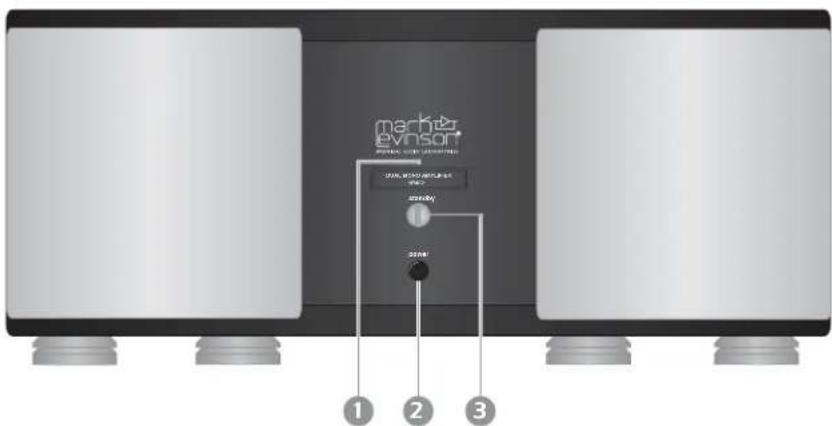
The numbers in the front-panel illustration shown below correspond with the numbered items that appear below.
text_image
mach&evinson MACHINE WITH IMPROVATION 1 2 31. Indicator LED
Indicates the operating state of the N°433 and provides diagnostic information when a fault condition occurs.
| LED Behavior Description | |
| Fully lit | Amplifier is powered “on.” |
| Slowly blinking | Amplifier is in standby. |
| Dimly lit | Amplifier is in sleep mode. |
| Not lit | Amplifier is powered “off.” |
| Rapidly blinking(on most of the time) | A power-related fault has occurred. |
| Rapidly blinking(on half of the time) | A signal-related fault* has occurred. |
| Rapidly blinking(off most of the time) | A thermal-related fault has occurred. |
* Signal-related faults include significant DC offset at the output due to either DC in the input signal, or a failed component within the amplifier, OR excessive current demands due to a short-circuit loudspeaker wire.
Refer to “Extensive Protection” on page 12 for additional information about fault conditions. If the amplifier will not power on at all (even to sleep mode), check the \~ac mains connections or have an authorized Mark Levinson dealer inspect the internal fuses (which are not user-serviceable).
2. Power Button
Powers the N°433 on and off when the power cord is connected to the \~ac mains connector and an electrical outlet. When the N°433 is powered on, pressing and releasing the power button disconnects power from the \~ac mains connector and powers the N°433 off.
When the N°433 is powered off, pressing and releasing the power button connects power to the \~ac mains connector and powers the N°433 on. If the power save mode switch is set to on, the N°433 enters sleep mode. If the power save mode switch is set to off, the N°433 enters standby. See page 18 for more information on the power save mode switch.
Note:
The N°433 must be powered on with the power button to respond to remote trigger commands.
3. Standby Button
Places the N°433 into standby or sleep mode and takes the N°433 out of standby or sleep mode. When the N°433 is powered on, pressing and releasing the standby button places the N°433 into standby or takes the N°433 out of standby, allowing it to remain warmed-up to deliver optimal performance at all times.
Pressing and holding the standby button places the N°433 into sleep mode. When the N°433 is in sleep mode, pressing and releasing the standby button takes the N°433 out of sleep mode. If the power save mode switch is set to on, the N°433 powers on into sleep mode. If the power save mode switch is set to off, the N°433 enters standby.
Rear Panel
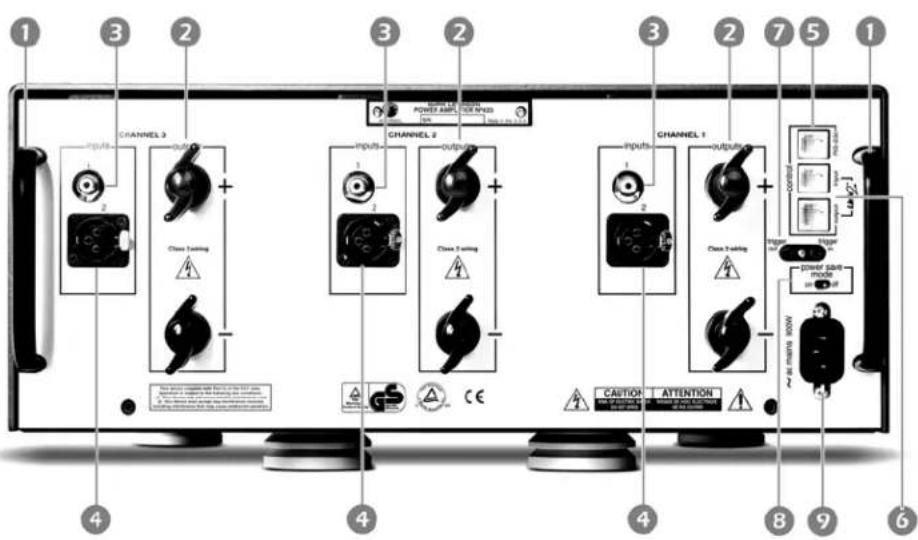
The numbers in the rear-panel illustration shown below correspond with the numbered items that appear in the text below.
text_image
1 2 3 2 3 2 7 5 1 CHANNEL 3 OUTPUT CHANNEL 2 OUTPUT CHANNEL 1 OUTPUT CHANNEL 2 CHANNEL 2 CHANNEL 2 CHANNEL 2 CHANNEL 2 CHANNEL 2 CHANNEL 2 CHANNEL 2 CHANNEL 2 CHANNEL 2 CHANNEL 2 CHANNEL 2 CHANNEL 2 CHANNEL 2 CHANNEL 2 CHANNEL 2 CHANNEL 2 CHANNEL 2 CHANNEL 2 CHANNEL 2 CHANNEL 2 CHANNEL 2 CHANNEL 2 CHANNEL 2 CHANNEL 2 CHANNEL 1 CHANNEL 1 CHANNEL 1 CHANNEL 1 CHANNEL 1 CHANNEL 1 CHANNEL 1 CHANNEL 1 CHANNEL 1 CHANNEL 1 CHANNEL 1 CHANNEL 1 CHANNEL 1 CHANNEL 1 CHANNEL 1 CHANNEL 1 CHANNEL 1 CHANNEL 1 CHANNEL 1 CHANNEL 1 CHANNEL 1 CHANNEL 1 CHANNEL 1 CHANNEL 1 CHANNEL 1 CHANNEL 2 CHANNEL 2 CHANNEL 2 CHANNEL 2 CHANNEL 2 CHANNEL 2 CHANNEL 2 CHANNEL 2 CHANNEL 2 CHANNEL 2 CHANNEL 2 CHANNEL 2 CHANNEL 2 CHANNEL 2 CHANNEL 2 CHANNEL 2 CHANNEL 2 CHANNEL 2 CHANNEL 2 CHANNEL 2 CHANNEL 2 CHANNEL 2 CHANNEL 2 CHANNEL 2 CHANNEL 3 CHANNEL 3 CHANNEL 3 CHANNEL 3 CHANNEL 3 CHANNEL 3 CHANNEL 3 CHANNEL 3 CHANNEL 3 CHANNEL 3 CHANNEL 3 CHANNEL 3 CHANNEL 3 CHANNEL 3 CHANNEL 3 CHANNEL 3 CHANNEL 3 CHANNEL 3 CHANNEL 3 CHANNEL 3 CHANNEL 3 CHANNEL 3 CHANNEL 3 CHANNEL 3 CHANNEL 3 CHANNEL 4Caution!

Never make or break connections to the N°433 unless it and all associated components are powered off and disconnected from electrical outlets. Before making connections to the N°433, make sure the associated preamplifier master volume is set to a reasonable level.
1. Rear Panel Handles
Allow for safe, convenient lifting and moving of the N°433. Refer to "Unpacking" on page 6 for additional information.
Caution!

DO NOT attempt to lift the N°433 from its packing carton alone.
DO NOT attempt to lift the N°433 while bending at the waist. When lifting, stand as straight as possible using the leg muscles to lift.
2. Loudspeaker Binding Posts (Outputs)
Provide left, center and right-channel audio output. Two custom-made, gold-plated, high-current binding posts labeled + (positive) and - (negative) are available for each channel. Positive binding posts are red; negative binding posts are black.
Caution!

NEVER connect power-amplifier outputs to any component other than a loudspeaker.
NEVER short circuit power-amplifier outputs
NEVER connect power-amplifier outputs to another power amplifier's outputs.
For best performance, use high-quality loudspeaker cables. To connect these cables, use a high-quality spade or hook lug soldered or crimped to the cable with extremely high pressure.
- Connect the + (positive) binding posts on the N°433 to positive inputs on the associated loudspeaker.
- Connect the – (negative) binding posts on the N°433 to negative inputs on the associated loudspeaker.

Spade Lug

Hook Lug
Caution!

DO NOT OVERTIGHTEN the N°433 binding posts. The innovative design of these binding posts provides more leverage than more traditional designs. Tight, high-contact pressure connections can be achieved with finger-tightening. Special tools are not needed.
DO NOT FORCE the N°433 binding post "wings" up and over a bent or oversized connector. Doing so may result in binding post damage. If the connector obstructs "wing"-turning, slide it into place when the binding post opening provides a snug fit. Then, use quarter-turns to tighten the connection as needed.
3. Unbalanced Input
Provides left, center and right-channel audio input. One RCA connector per channel is available to accept unbalanced input signals from an associated preamplifier. Unbalanced signals are converted to balanced signals upon receipt, and processed as balanced signals thereafter.
If the associated preamplifier does not support balanced connections, connect the RCA output on the preamplifier to the RCA input on the N°433. To reduce the chance of noise at the (otherwise un-terminated) inverting XLR input, insert the supplied U-shaped shorting-straps between pins 1 and 3. (Shorting-straps are installed when the N°433 is shipped.)
4. Balanced Input
Provides left, center and right-channel audio input. One XLR connector per channel is available to accept balanced input signals from an associated preamplifier.
For best performance, use balanced connections whenever possible. Refer to the illustration below and to the associated preamplifier documentation to ensure that N°433 XLR input pin assignments correspond to the associated preamplifier XLR output pin assignments. If not, wire the cable so that the appropriate input pin connects to the appropriate output pin.
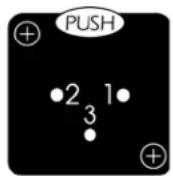
Pin 1: Signal ground
Pin 2: Signal + (non-inverting)
Pin 3: Signal - (inverting)
Connector ground lug: chassis ground
Note
Before making balanced connections, remove the U-shaped shorting-straps between pins 1 and 3 on the N°433 XLR inputs and save them for possible future use. Shorting-straps are installed when the N°433 is shipped.
5. RS-232 Communications Port
Provides serial control, performing flash memory software upgrades and facilitating external control in AMX ^™ and Crestron ^™ systems. One connector labeled RS-232 is available.
6. Link2 Communication Ports
Provide "links" to compatible Mark Levinson preamplifiers and power amplifiers, allowing the N°433 and linked preamplifiers or power amplifiers to share Link controls. Two (one 8-pin RJ-45 and one six-pin RJ-11) modular jacks labeled Input and Link2 output are available.
The input communication port can be connected to a compatible Mark Levinson preamplifier that offers Link or Link2 communication ports. Both the input and output communication ports can be connected to a compatible Mark Levinson power amplifier that offers communication ports.
Note
Refer to "Linking" on page 20, BEFORE linking the N°433 to other Mark Levinson components.
7. trigger in and out connectors
Provide DC trigger control. One 1/8-inch mini-jack labeled trigger in is available to receive 12 or 5V DC signals from a connected component, and one 1/8-inch mini-jack labeled trigger out is available to pass signals to a connected power amplifier. The illustration below shows tip polarity requirements.

Connect the trigger in connector on the N°433 to the trigger out connector on a compatible component. Toggling the connected component between on and standby will toggle the N°433 between on and standby or on and sleep mode (depending on the power save mode switch setting).
Connect the trigger out connector on the N°433 to the trigger in connector on a compatible power amplifier. The N°433 will pass DC signals to the connected power amplifier, creating a “daisy-chain” of trigger control.
8. power save mode switch
Determines the N°433's response to reductions in DC trigger voltage, from "high" (5-12V) to "low" (0V).
DO NOT change the power save mode switch setting when the N°433 is powered on. Make sure power is disconnected from the \~ac mains connector before making adjustments.
When the power save mode switch is set to on, the N°433 powers on in sleep mode. If the N°433 is configured for trigger control, incoming DC signals toggle the N°433 between on and sleep mode.
When the power save mode switch is set to off, the N°433 powers on in standby. If the N°433 is configured for trigger control, incoming DC signals toggle the N°433 between on and standby.
Important!
Note
Warning!

Danger!

9. \~ac mains connector
Provides power to the N°433 through the supplied power cord when the supplied power cord is connected to the \~ac mains connector and the electrical outlet. One IEC-standard AC mains receptacle labeled \~ac mains is available.
Before operating the N°433, make sure the \~ac mains connector label indicates the correct operating voltage for the current location.
The N°433 has been safety-tested and designed for operation with a three-conductor power cord. Do not defeat the "third pin" or "earth ground" of the power cord.
The N°433 includes internal fuses as a final stage of protection. The protection circuitry is designed so that only a catastrophic failure will cause the fuses to blow. If this occurs, disconnect the power cord from the N°433 \~ac mains connector and the electrical outlet. Then, contact an authorized Mark Levinson dealer for assistance. Do not attempt to replace the fuse. There are no user-serviceable parts within the N°433.
Potentially dangerous voltages and current capabilities exist within the N°433, even when power is disconnected from the \~ac mains connector. DO NOT attempt to open the amplifier's cabinet. There are no user-serviceable parts inside the amplifier. Refer all servicing to an authorized Mark Levinson dealer.
Linking
Linking is available for all Mark Levinson components that offer Link or Link2 communication ports, including master, slave in, slave out, Link2, Link2 input and Link2 output communication ports. These communication ports can be used to "link" compatible Mark Levinson components in a slave chain, allowing them to share Link controls.
The N°433 offers two communication ports labeled input and Link output. The Link input communication port can be connected to a compatible Mark Levinson preamplifier that offers Link or communication ports. Both the input and Link output communication ports can be connected to a compatible Mark Levinson power amplifier that offers Link communication ports.
The N°433 can be connected to the following Mark Levinson components:
- N°30 Series preamplifiers, including the N°32, N°38 and N°38S.
- N°300 Series preamplifiers, including the N°320, N°320S, N°380 and N°380S.
- N°300 Series power amplifiers, including the N°331, N°332 N°333, N°334, N°335 and N°336.
- N°400 Series power amplifiers, including the N°431, N°432, N°434 and N°436.
- N°39 and N°390S CD Processors.
- N°40 Media Console with optional Mainstreet Communication Card.
- Refer to the appropriate documentation for Link compatibility information about other Mark Levinson components.
Making Link Connections
- DO use Link or Link2 communication ports, such as master, slave in, slave out, link and control communication ports.
• DO NOT use RS-232 ports or other rear panel connectors. - DO use constructed Link communication cables. Refer to "Constructing Link Communication Cables" on page 21 for additional information.
Caution!
Link connections must be made using Link or communication ports and constructed Link communication cables. Connections made with other connectors or cables may damage the N°433 and
Constructing Link Communication Cables
Note
other linked components, possibly voiding the manufacturer's warranty and/or standard repair policies.
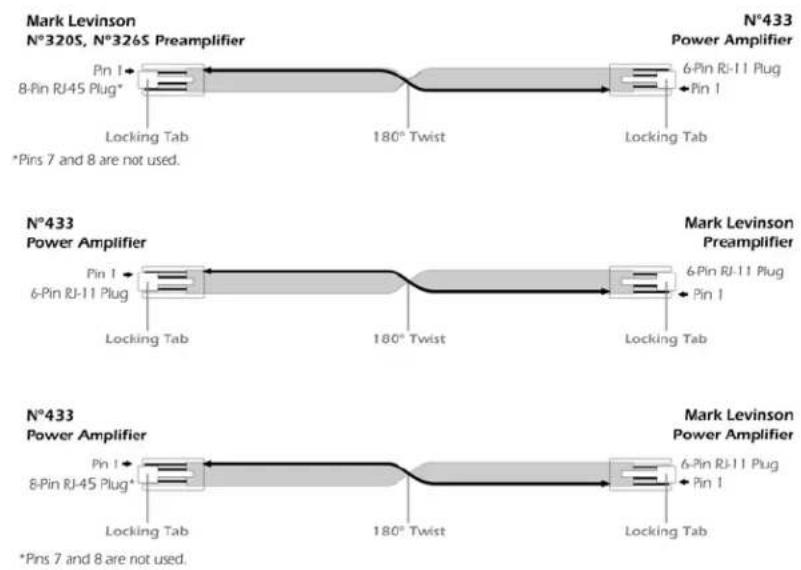
Link communication cables can be constructed using a six-conductor modular Cat. 5 cable with the appropriate plug crimped on each end.
- Use a six-conductor cable (six-pin RJ-11 plug to eight-pin RJ-45 plug) when connecting the N°433 to a N°320S or N°326S preamplifier. (Pins seven and eight are not used on the eight-pin RJ-45 plug.)
- Use a six-conductor cable (six-pin RJ-11 plug to six-pin RJ-11 plug) when connecting the N°433 to other Mark Levinson preamplifiers, including the N°380, N°380S and N°32 Reference.
- Use a six-conductor cable (six-pin RJ-11 plug to eight-pin RJ-45 plug) when connecting the N°433 to other Mark Levinson power amplifiers. (Pins seven and eight are not used on the eight-pin RJ-45 plug.)
BEFORE making Link connections, refer to the appropriate documentation for Link or communication port specifications for other Mark Levinson components.
When linking components with constructed Link communication cables, twist the cable 180^ as shown in the illustration below for a straight-through (pin 1-to-pin 1) connection.
Note
Contact an authorized Mark Levinson dealer or Customer Service at www.marklevinson.com for additional assistance making Link connections.
Creating a Slave Chain
Making Link connections creates a slave chain that facilitates communication among linked components, allowing them to share certain controls.
All slave chains:
- Must include compatible Mark Levinson components. The N°433 is compatible with the components listed on the previous page. Refer to the appropriate documentation for Link compatibility information for other Mark Levinson components.
- Must include components that are connected in a certain order to prevent communication from prematurely terminating. Power amplifiers such as the N°433 must be the last component in a slave chain.
Note
The slave chains in this section include preamplifiers and power amplifiers. However, slave chains can also include digital audio processors and digital transports. Refer to the appropriate documentation for information about including these Mark Levinson components in a slave chain.
The table below indicates slave chain requirements for preamplifiers and power amplifiers.
| Component Requirements and Connections | |
| Preamplifier(e.g., N°320S or N°326S) | No maximum number per slave chain.Connect eight-pin to six-pin Link cable from theLink2or slave outcommunication port on the preamplifier to theLink2inputcommuni-cation port on the first power amplifier. |
| N°32 Preamplifier | Connect six-pin to six-pin Link cable from theamp communicationport on the N°32 pream- plifier to theLink2port on the N°433 power amplifier. |
| N°40 Media Console | Connect six-pin to six-pin Link cable from the amp communication port on the N°40's Main Street option card to the input port on the N°433 power amplifier. |
| Power Amplifier (e.g., N°431, N°432 or N°433) | Maximum of six per slave chain.Connect eight-pin to six-pin Link cable from the Link input communication port on the first power amplifier to the of Slave out communication port on the preamplifier.Connect up to six power amplifiers in a “daisy chain” using Input-to-Output communication port connections. The Link output communication port on the last power amplifier is not connected. |
To create a slave chain that includes the N°433:
- Make sure the N°433 and all associated components are powered off.
- Connect the Link2 input communication port on the first power amplifier to the Slave out communication port on the preamplifier.
If desired, connect the Link2 control communication port on the first power amplifier to the input communication port on another power amplifier. Up to six power amplifiers can be included in a slave chain using "daisy chain" Link2 input to Link2 control communication port connections. The Link2 control communication port on the last power amplifier is not connected.
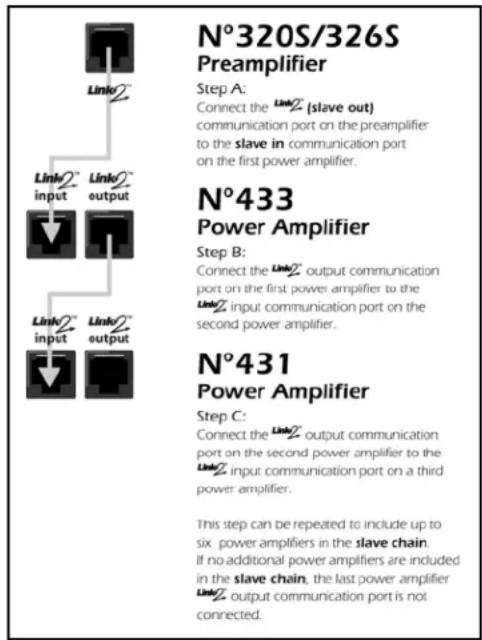
Refer to the table on the previous page and to the illustration below for additional assistance. Refer to pages 20-21 for specific cable uses and instructions.
text_image
N°320S/326S Preamplifier Step A: Connect the LinkZ (slave out) communication port on the preamplifier to the slave in communication port on the first power amplifier. N°433 Power Amplifier Step B: Connect the LinkZ output communication port on the first power amplifier to the LinkZ input communication port on the second power amplifier. N°431 Power Amplifier Step C: Connect the LinkZ output communication port on the second power amplifier to the LinkZ input communication port on a third power amplifier. This step can be repeated to include up to six power amplifiers in the slave chain. If no additional power amplifiers are included in the slave chain, the last power amplifier LinkZ output communication port is not connected.- When Link connections have been made, power on linked components ONE AT A TIME in the order specified below. Allow each component to complete its initialization sequence before proceeding to the next component.
A. Digital Transports
B. Digital Audio Processors
C. Preamplifier
D. Power Amplifiers (begin with the first power amplifier in the slave chain)
At this point, the front panel standby LEDs on all linked components should be blinking in unison.
Note
Linked components must be powered on ONE AT A TIME in the specific order listed in step 3 (above) to ensure proper functioning of Link controls. DO NOT use a power strip switch to power on several components at once. When power is supplied to a power strip, connected components that do not include a power button will automatically power on.
- Take the linked preamplifier out of standby.
- All linked power amplifiers should come out of standby as well. If this does not occur, repeat steps 3 and 4. If problems persist, contact an authorized Mark Levinson dealer or Customer Service at www.marklevinson.com.
Link Controls
Linking Mark Levinson components allows them to share certain controls. The table below provides a general description of controls the N°433 shares with other linked components. Some controls may not be available for certain component combinations. Other Mark Levinson components may share additional controls. Refer to the appropriate documentation for additional information.
Note the following:
- Linked components must be powered on ONE AT A TIME in the specific order listed in step 3 (previous page) to ensure proper functioning of Link controls.
- Link controls must be enabled on the linked digital transport linking menu, which allows activation and deactivation of individual Link controls. Refer to the appropriate digital transport owner's manual for additional information.
- Some Mark Levinson digital transports accommodate a maximum of four front-panel display characters. In these cases, certain input names appear abbreviated on the front-panel display. For example, an input named N°326S will appear as N°32 on the digital transport front-panel display even though the input is associated with the N° 326S.
- The linked preamplifier and power amplifier(s) must be in the same standby state to allow the linked power amplifier(s) to enter standby after a power failure.
| Control | Component | |
| Preamplifier Power Amplifier | ||
| Standby Link | Placing the linked preamplifier intostandbyalsoplaces all other linkedpower amplifiers intostandby. Taking the linked preamplifier out ofstandbyalsotakes all other linked power amplifiers out of standby. | Placing a linked power amplifier intostandbyalso places all other linked power amplifiers into standby. Taking a linked power amplifier out ofstandbyalso takes all other linked power amplifiers out of standby. |
| If a linked power amplifier experiences afault condition, it will report the fault condition to the linked preamplifier. If this occurs, thepower amplifier numberandfault condition codewill appear on the preamplifier's front panel display.The power amplifier number refers to its position in the slave chain. For example,AMP1refers to the first power amplifier in the slave chain. Power amplifier fault condition codes are described in the table to the right. Refer to "Extensive Protection" on page 12 for additional information about fault conditions. | Code DescriptionHOT! lindicates a thermal fault condition.DCO! Indicates an uncorrectable DC offset. | |
Troubleshooting
Incorrect operation is sometimes mistaken for malfunction. If problems occur, refer to this section for troubleshooting information. If problems persist, contact an authorized Mark Levinson dealer or Customer Service at www.marklevinson.com.
1. No audio and the front-panel indicator LED is not lit.
- Examine \~ac mains connections to ensure the power cord is connected to the \~ac mains connector and the electrical outlet.
• Make sure the N°433 is powered on with the power button. - Examine the electrical circuit breaker to ensure that power is supplied to the electrical outlet to which the N°433 is connected.
- A power loss or power outage may have occurred. In this case, power cycle the N°433 with the power button, waiting at least five minutes between powering the N°433 off and on.
- A fuse may be blown inside the N°433. In this case, disconnect the power cord from the \~ac mains connector and the electrical outlet. Then, contact an authorized Mark Levinson dealer. Do not attempt to replace the fuse. There are no user-serviceable parts within the N°433.
Danger!

Potentially dangerous voltages and current capabilities exist within the N°433, even when power is disconnected from the \~ac mains connector. DO NOT attempt to open the amplifier's cabinet. There are no user-serviceable parts inside the amplifier. Refer all servicing to an authorized Mark Levinson dealer.
2. No audio and the front-panel indicator LED is dimly lit.
- The N°433 is in sleep mode. To take it out of sleep mode, press and release the standby button..
- A power loss or power outage may have occurred. In this case, power cycle the N°433 with the power button, waiting at least five minutes between powering the N°433 off and on.
3. No audio and the front-panel indicator LED is blinking slowly.
- The N°433 is in standby. To take it out of standby, press and release the standby button. The N°433 will power on.
-
No audio and the front-panel indicator LED is blinking rapidly, remaining lit most of the time.
-
A power-related fault is present (\~ac mains voltage is too high or too low).
- Power cycle the N°433 with the power button, waiting at least five minutes between powering the N°433 off and on.
-
Contact an authorized Mark Levinson dealer.
-
No audio and the front-panel indicator LED is blinking rapidly, remaining lit about half of the time.
- A signal-related fault condition is present, probably either a DC offset or an over-current condition. If this occurs:
a. Power the N°433 off with the power button.
b. Disconnect the input signal and loudspeaker wires.
c. Wait five minutes.
d. Power the N°433 on with the power button.
e. Bring the unit out of standby by pressing and releasing the standby button.
If the N°433 powers on, repeat these steps; reconnect input signal and loudspeaker wires one at a time to determine what is causing the fault condition. Remember to power the N°433 off with the power button before making or breaking connections. If the N°433 does not power on, there is an internal failure. Contact an authorized Mark Levinson dealer.
- No audio and the front-panel indicator LED is blinking rapidly, remaining unlit most of the time.
- A thermal-related fault condition is present, which causes the N°433 to enter sleep mode. Once the heat sinks have cooled below 85°C (158°F or 358K), the N°433 can be taken out of sleep mode with the standby button.
- No audio and the front-panel indicator LED is lit at full brightness.
- The N°433 is powered on, but is not passing a signal. Examine signal cables to ensure a solid connection between the N°433 and the associated preamplifier and loudspeakers.
8. The amplifier keeps powering off.
- A fault condition may be present at the input (e.g., a DC signal from the preamplifier) or the output (e.g., short-circuited loudspeaker wires). If this occurs:
a. Power the N°433 off with the power button.
b. Disconnect the input signal and loudspeaker wires.
c. Wait five minutes.
d. Power the N°433 on with the power button.
If the N°433 powers on without entering standby or sleep mode, a fault condition is present at the input or the output. To isolate the problem:
a. Power the N°433 off with the power button.
b. Reconnect the loudspeaker wires.
c. Wait five minutes.
d. Power the N°433 on with the power button.
If the N°433 powers on into standby or sleep mode, the fault condition is present at the input. If not, the fault condition is present at the output.
9. If all else fails...
- Power cycle the N°433 with the power button, waiting at least five minutes between powering the N°433 off and on.
- Contact an authorized Mark Levinson dealer.
- Contact Mark Levinson Customer Service at www.marklevinson.com.
Note
Care & Maintenance
The N°433 requires routine care and maintenance to ensure optimal performance. The bulleted items in this section indicate maintenance procedures that should be performed on a regular basis.
Failure to perform the maintenance procedures included in this section may void the manufacturer's warranty and/or standard repair policies.
To remove dust from the cabinets of your N°433, use a feather duster or a lint-free soft cloth. To remove dirt and fingerprints:
- Dampen a soft cloth with isopropyl alcohol, then lightly clean the surface of the unit(s) with the cloth, moving with the "grain" of the anodized, brushed aluminum.
Do not use excessive amounts of alcohol that might drip off the cloth and into the unit.
- Following the cleaning with alcohol, dampen a clean cloth with water and wipe over the surface you just cleaned with alcohol. This removes the alcohol residue.
Caution!

Do not apply liquid directly to the N°433 exterior surface. Doing so may damage electrical components inside the unit.
- Refer to “Installation Considerations” on page 7 for information about preventative maintenance.
Specifications
The correlation between published specifications and performance is unreliable. Measurements of your amplifier yield excellent results by any standards. However, only those specifications that apply to its actual operation are included here. Specifications are subject to change without notice.
Rated power output:
• 200 w/ch rms power @ 8Ω
• 400 w/ch rms power @ 4Ω
All above power ratings from 20 Hz–20 kHz at <0.5% THD (assuming that the AC mains can deliver adequate current, without its own voltage sagging)
Frequency response:
• within 0.2 dB from 20 Hz to 20 kHz
Signal to Noise ratio:
- better than -80 dB (ref. 2.83V)
Input impedance:
• 1 0 0 k Ω (balanced)
• 5 0 k Ω (unbalanced)
Voltage gain:
• 2 6 . 8 d B
Input sensitivity:
• 2.83V output: 130 mV
• Full output: 1.82V
Power consumption:
• 200W in on, 100W in standby, 10W in sleep
Mains voltage:
- determined by the needs of country for which the unit was manufactured; cannot be reset by dealer or user
Overall dimensions:
See "Dimensions" on page 32.
Shipping weight:
• 130.5 lbs. (59.2 kg)
Net weight:
• 114.5 lbs. (51.9 kg)
Connector complement:
- six custom binding posts
- three 3-pin XLR balanced input connectors
- three RCA input connectors
- two 1/8-inch mini-jacks for remote turn-on
• one RS-232 port on RJ-11
- two Mark Levinson communications ports on RJ-11, RJ-45
• one IEC-standard AC receptacle
Output impedance:
• less than 0.05Ω from 20–20,000 Hz
Declaration of Conformity
Application of Council Directive(s):
2004/108/EC and 73/23/EEC, as amended.
Standard(s) to which Conformity is Declared:
EN 55013 : 2001
EN 55020 : 2002
EN 60065 : 1998
EN 61000-3-3:2001
Manufacturer:
Harman Specialty Group
3 Oak Park
Bedford, MA 01730-1413 USA
The equipment identified here conforms to the Directive(s) and Standard(s) specified above.
31
Type of Equipment:
Power Amplifiers
Model:
Mark Levinson N°433
Date:
September 2005
Harman Specialty Group
Vice President of Engineering
3 Oak Park
Bedford, MA 01730-1413 USA
Telephone: 781-280-0300
Fax: 781-280-0490
www.harmanspecialtygroup.com
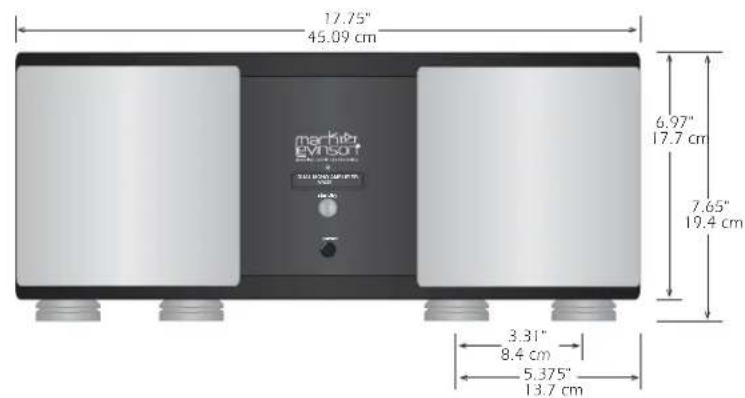
Dimensions
text_image
17.75" 45.09 cm marip EVNSOFT 6.97" 17.7 cm 7.65" 19.4 cm 3.31" 8.4 cm 5.375" 13.7 cm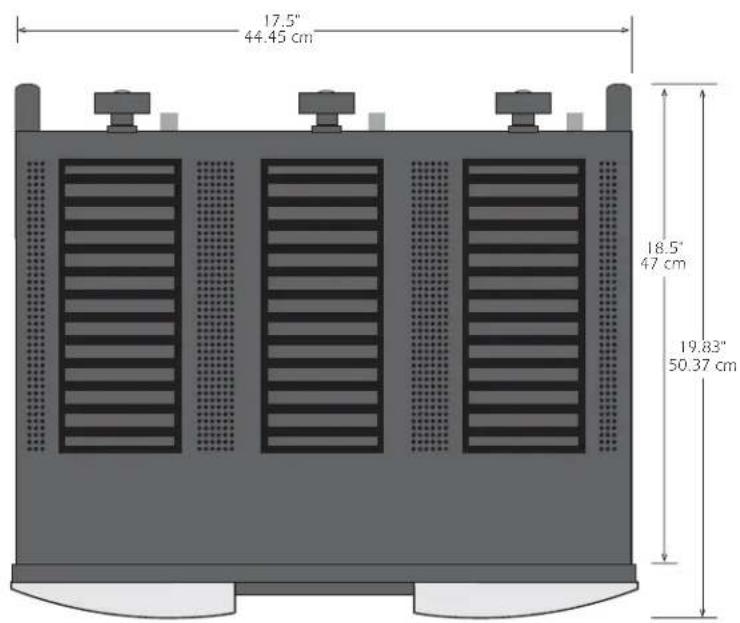
text_image
17,5" 44.45 cm 18,5" 47 cm 19,83" 50.37 cm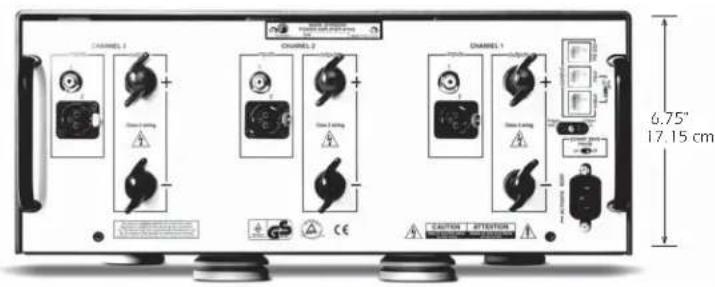
text_image
CHANNEL 1 CHANNEL 2 CHANNEL 3 CHANNEL 4 CHANNEL 5 6.75" 17.15 cm CAUTION >ATTENTIONRack-Mounting
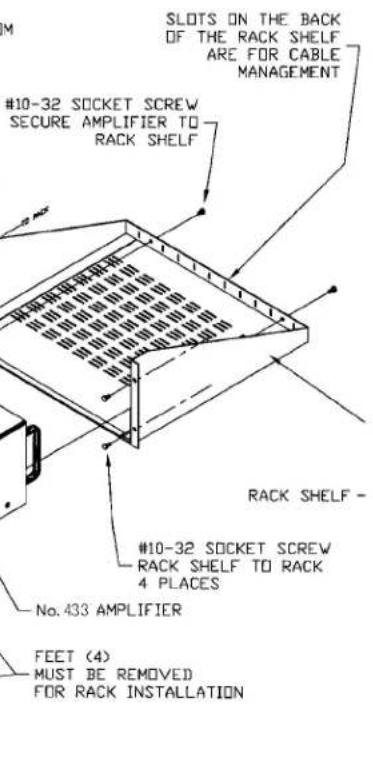
If you need or prefer to rack mount your amplifiers contact your Mark Levinson dealer for information about the optional rack mount kit. This purpose-designed assembly provides the needed ventilation for the heat sink “chimneys” of the amplifier, as well as the support required for this heavy component.
To use the rack mount kit, bolt the shelf securely to the rack, remove the four feet from the bottom of the amplifier, slide the amplifier into place and secure the amplifier to the shelf using the two remaining screws (provided with the kit). Slots on the rear of the shelf may be used for dressing cables or using cable ties.
The drawing below will help you visualize the assembly.
INSTALLATION INSTRUCTIONS:
- SCREW RACK SHELF TO RACK WITH 4 #10 SOCKET CAP SCREWS PROVIDED.
- REMOVE THE FOUR FEET FROM THE BOTTOM OF THE AMPLIFIER.
- CAREFULLY SLIDE THE AMPLIFIER INTO THE RACK SHELF FROM THE FRONT UNTIL IT TOUCHES THE BACK WALL OF THE SHELF.
- SECURE THE AMPLIFIER TO THE RACK SHELF USING THE TWO REMAINING #10 SOCKET CAP SCREWS PROVIDED. SCREWS PASS THROUGH HOLES IN THE BACK OF THE SHELF AND INTO THREADED HOLES IN THE REAR OF THE AMPLIFIER.
4 #10 SOCKET CAP SCREWS PROVIDED. - REMOVE THE FOUR FEET FROM THE BOTTOM OF THE AMPLIFIER.
- CAREFULLY SLIDE THE AMPLIFIER INTO THE RACK SHELF FROM THE FRONT UNTIL IT TOUCHES THE BACK WALL OF THE SHELF.
- SECURE THE AMPLIFIER TO THE RACK SHELF USING THE TWO REMAINING #10 SOCKET CAP SCREWS PROVIDED. SCREWS PASS THROUGH HOLES IN THE BACK OF THE SHELF AND INTO THREADED HOLES IN THE REAR OF THE AMPLIFIER.
text_image
SLOTS ON THE BACK OF THE RACK SHELF ARE FOR CABLE MANAGEMENT #10-32 SOCKET SCREW SECURE AMPLIFIER TO RACK SHELF RACK SHELF - #10-32 SOCKET SCREW RACK SHELF TO RACK 4 PLACES No. 433 AMPLIFIER FEET (4) MUST BE REMOVED FOR RACK INSTALLATIONThe mounted N°433 amplifier and rack mount kit occupies four standard rack units of height.

text_image
mark evinson®MADRIGAL AUDIO LABORATORIES