FTA 5884 - Washing machine Cylinda - Free user manual and instructions
Find the device manual for free FTA 5884 Cylinda in PDF.


User questions about FTA 5884 Cylinda
0 question about this device. Answer the ones you know or ask your own.
Ask a new question about this device
Download the instructions for your Washing machine in PDF format for free! Find your manual FTA 5884 - Cylinda and take your electronic device back in hand. On this page are published all the documents necessary for the use of your device. FTA 5884 by Cylinda.
USER MANUAL FTA 5884 Cylinda
natural_image
Product lineup of kitchen appliances including a washing machine, refrigerator, oven, and washing machine against a solid pink background (no text or symbols visible)FTA 5884
text_image
Safety warning symbols: red triangle with steam and black prohibition sign with hand holding eyenatural_image
Symbol of a trash bin crossed out by diagonal lines, representing waste sorting or disposal (no text or labels)natural_image
Two people inspecting a large washing machine (no text or symbols visible)natural_image
Close-up of a mechanical component with a wrench inserted, showing no visible text or symbols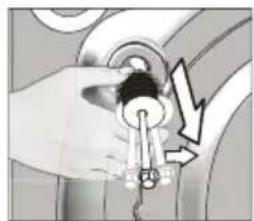
natural_image
Illustration of a hand holding a key with a lightning bolt symbol (no text or labels)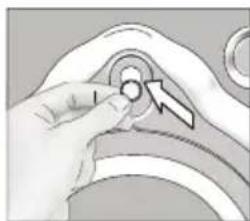
natural_image
Close-up of a hand pressing a button on a curved mechanical component (no text or symbols visible)natural_image
Illustration showing two different hand-punching techniques for a valve or pump mechanism, with no text or symbols present.natural_image
Four-panel diagram showing mechanical assembly with rotating components and directional arrows (no text or symbols)4.1.7 Elektrisk anslutning
natural_image
Close-up of a hand opening a large circular mechanical component (no visible text or symbols)Initial installation:
natural_image
White medical device with a blue cross symbol and a label reading 'Software max 10' (no readable text or symbols on the device itself)text_image
abcdefg 88°C 88:88 h ikjmlnnatural_image
Illustration of hands holding a circular object with a gradient fill, next to a ruler-like frame (no text or symbols)
natural_image
Simple diagram with a black rectangle and a row of six gray rectangular blocks (no text or symbols)4.3.5 Program
- Bomull Eco
text_image
Diagram showing a device with a circular dial and a finger pointing to a labeled panel with 'c' and horizontal lines.
natural_image
Illustration of a hand pressing a button on a device panel (no text or symbols visible)natural_image
Illustration of a hand interacting with a device panel and screen (no text or symbols visible)
natural_image
Illustration of a rotary dial and a digital display with a finger pointing to it (no text or symbols)
natural_image
Illustration of a rotary dial and a digital display with a finger pointing at it (no text or symbols)natural_image
Illustration of a rotary dial and a digital display with a finger pointing to it (no text or symbols)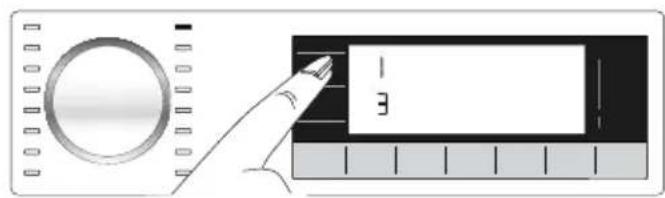
text_image
Diagram showing a hand pointing to a labeled component with the number 3, next to a circular dial and ruler.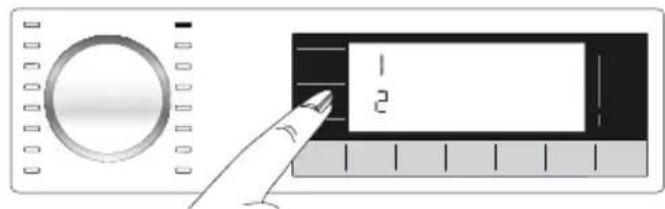
text_image
Diagram showing a hand pointing at a control panel with labeled sections 1 and 2, alongside a circular dial.natural_image
Illustration of a rotary knob and a digital display with a finger pointing at it (no text or symbols)natural_image
Illustration of a digital audio device with a circular dial and playback control panel (no text or symbols)natural_image
Pure diagram of a ruler and a rectangular object with no text or symbolsnatural_image
Pure electrical circuit lines without any symbolsnatural_image
Simple line icon of a lock inside a square frame (no text or symbols)natural_image
Technical diagram of a mechanical device with internal components and an open lid, showing no text or symbols.natural_image
Technical diagram of a mechanical assembly with no visible text or symbolsnatural_image
Illustration of a rotary knob and a digital display with a finger pointing to it (no text or symbols)natural_image
Illustration of a rotary knob and a rectangular device with a cursor pointing at it (no text or symbols)
natural_image
Close-up of a finger pointing at a blue vertical component with icons on both sides (no text or symbols visible)natural_image
Close-up of a white mechanical device with two cylindrical ports and a central handle (no visible text or symbols)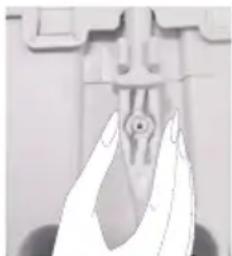
natural_image
Close-up of a hand holding a small mechanical component (no visible text or symbols)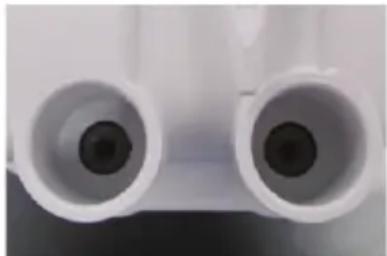
natural_image
Close-up of two white cylindrical objects with black centers, resembling micrometers or lenses (no text or symbols visible)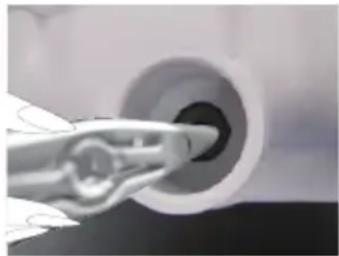
natural_image
Close-up of a hand holding a cylindrical object with a pointed tip, possibly a mechanical component or tool (no visible text or symbols)natural_image
Close-up of a hand inserting a transparent cylindrical component into a large circular device (no text or symbols visible)natural_image
Illustration of various plumbing fixtures including a faucet, pipe fittings, and a valve (no text or symbols present)natural_image
Three-panel illustration showing a washing machine with a hand operating, and a close-up of the bottom-right corner with a circular component (no text or symbols)1 General safety instructions
This section contains safety instructions that will help protect from risk of personal injury or property damage. Failure to follow these instructions shall void any warranty.
1.1 Life and property safety
▶ Never place the product on a carpet-covered floor. Otherwise, lack of airflow beneath the machine will cause electrical parts to overheat. This will cause problems with your product.
▶ Unplug the product if it is not in use.
▶ Always have the installation and repairing procedures carried out by the Authorized Service Agent. The manufacturer shall not be held liable for damages that may arise from procedures carried out by unauthorised persons.
The water supply and draining hoses must be securely fastened and remain undamaged. Otherwise, there is the risk of water leakage.
▶ While there is still water inside the product, never open the loading door or remove the filter. Otherwise, risk of flooding and injury from hot water will occur.
▶ Do not force open the locked loading door. The door will open immediately after the washing cycle has ended. If the door does not open, apply the solutions provided for "Loading door cannot be opened." error in the Troubleshooting section. In case of forcing the loading door to open, the door and the lock mechanism may get damaged.
▶ Use detergents, softeners and supplements suitable for automatic washing machines only.
▶ Follow the instructions on the label of textile products and the detergent package.
1.2 Children's safety
This product can be used by children at and above 8 years old and by persons whose physical, sensory or mental capabilities were not fully developed or who lack experience and knowledge provided that they are supervised or trained on the safe usage of the product and the risks it brings out. Children should not play with the product. Cleaning and maintenance works should not be performed by children unless they are supervised by someone. Children under the age of 3 should be kept away unless continuously supervised.
▶ Packaging materials are dangerous for the children. Keep packaging materials in a safe place away from reach of the children.
Electrical products are dangerous for the children. Keep children away from the product when it is in use. Do not allow them to play with the product. Use child lock to prevent children from intervening with the product.
▶ Do not forget to close the loading door when leaving the room where the product is located.
▶ Store all detergents and additives in a safe place away from the reach of the children by closing the cover of the detergent container or sealing the detergent package.
1.3 Electrical safety
If the product has a failure, it should not be operated unless it is repaired by the Authorized Service Agent! There is the risk of electric shock!
This product is designed to resume operating in the event of powering on after a power interruption. If you wish to cancel the programme, see "Cancelling the programme" section.
▶ Plug the product into a grounded outlet protected by a 16 A fuse. Do not neglect to have the grounding installation made by a qualified electrician. Our company shall not be liable for any damages that will arise when the product is used without grounding in accordance with the local regulations.
▶ Do not wash the product by spraying or pouring water onto it! There is the risk of electric shock!
▶ Never touch the power cable plug with wet hands! Never unplug by pulling on the cable. Always press on the plug with one hand and pull out the plug by grabbing with the other hand.
▶ Product should be unplugged during installation, maintenance, cleaning and repair procedures.
▶ If the power cable is damaged, it must be replaced by the manufacturer, authorized service or a similarly qualified person (preferably an electrician) or someone designated by the importer in order to avoid possible risks.
1.4 Hot surface safety


The glass of the loading door gets too hot while washing at higher temperatures. Therefore, especially do not allow children touch the loading door glass while washing.
2 Important instructions for environment
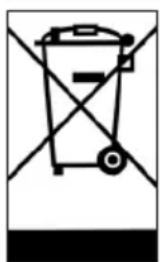
2.1 Compliance with WEEE Directive
natural_image
Simple line drawing of a trash bin with diagonal lines crossing it, no text or symbols present.This product complies with EU WEEE Directive (2012/19/EU). This product bears a classification symbol for waste electrical and electronic equipment (WEEE).
This product has been manufactured with high quality parts and materials which can be reused and are suitable for recycling. Do not dispose of the waste product with normal domestic and other wastes at the end of its service life. Take it to the collection center for the recycling of electrical and electronic equipment. Please consult your local authorities to learn about these collection centers.
Compliance with RoHS Directive:
The product you have purchased complies with EU RoHS Directive (2011/65/EU). It does not contain harmful and prohibited materials specified in the Directive.
2.2 Package information
Packaging materials of the product are manufactured from recyclable materials in accordance with our National Environment Regulations. Do not dispose of the packaging materials together with the domestic or other wastes. Take them to the packaging material collection points designated by the local authorities.
3 Intended use
- This product has been designed for domestic use. It is not for commercial purposes or it should not be used out of its intended use.
- The product must only be used for washing and rinsing of laundry that are marked accordingly.
- The manufacturer waives any responsibility arisen from incorrect usage or transportation.
- The service life of your product is 10 years. During this period, original spare parts will be available to operate the appliance properly.
4 Technical specifications
Complying Commission Delegated Regulation (EU) No 1061/2010
| Supplier name or trademark Cylinda | |
| Model name FTA 5884 | |
| Rated capacity (kg) 8 | |
| Energy efficiency class / Scale from A+++ (Highest Efficiency) to D (Lowest Efficiency) A+++ | |
| Annual Energy Consumption (kWh) (1) | 175 |
| Energy consumption of the standard 60°C cotton programme at full load (kWh) 0,940 | |
| Energy consumption of the standard 60°C cotton programme at partial load (kWh) 0,660 | |
| Energy consumption of the standard 40°C cotton programme at partial load (kWh) 0,650 | |
| Power consumption in ‘off-mode’ (W) 0,440 | |
| Power consumption in ‘left-on mode’ (W) 0,640 | |
| Annual Water Consumption (l) (2) | 10559 |
| Spin-drying efficiency class / Scale from A (Highest Efficiency) to G (Lowest Efficiency) B | |
| Maximum spin speed (rpm) 1400 | |
| Remaining moisture Content (%) 53 | |
| Standard cotton programme (3) | Cotton Eco 60°C and 40°C |
| Programme time of the standard 60°C cotton programme at full load (min) 220 | |
| Programme time of the standard 60°C cotton programme at partial load (min) | 200 |
| Programme time of the standard 40°C cotton programme at partial load (min) | 200 |
| Duration of the left-on mode (min) | N/A |
| Airborne acoustical noise emissions washing/spinning (dB) | 52/74 |
| Built-in | No |
| Height (cm) | 84 |
| Width (cm) | 60 |
| Depth (cm) | 59 |
| Net weight (±4 kg.) | 71 |
| Single Water inlet / Double Water inlet• Available | • / - |
| Electrical input (V/Hz) | 230 V / 50Hz |
| Total current (A) | 10 |
| Total power (W) | 2200 |
| Main model code | 9711 |
(1) Energy Consumption based on 220 standard washing cycles for cotton programmes at 60^ and 40^ at full and partial load, and the consumption of the low-power modes. Actual energy consumption will depend on how the appliance is used.
(2) Water consumption based on 220 standard washing cycles for cotton programmes at 60°C and 40°C at full and partial load. Actual water consumption will depend on how the appliance is used.
(2) "Standard 60°C cotton programme" and the "standard 40°C cotton programme" are the standard washing programmes to which the information in the label and the fiche relates and these programmes are suitable to clean normally soiled cotton laundry and that they are the most efficient programmes in terms of combined energy and water consumption.
Technical specifications may be changed without prior notice to improve the quality of the product.
4.1 Installation
- Apply to the nearest authorised service agent for the installation of your product.
- Preparation of the location and electrical, tap water and waste water installations at the place of installation is under customer's responsibility.
- Make sure that the water inlet and discharge hoses as well as the power cable are not folded, pinched or crushed while pushing the product into its place after installation or cleaning procedures.
- Make sure that the installation and electrical connections of the product are performed by authorised service. Manufacturer shall not be held liable for damages that may arise from procedures carried out by unauthorised persons.
- Prior to installation, visually check if the product has any defects on it. If so, do not have it installed. Damaged products cause risks for your safety.
4.1.1 Appropriate installation location
- Place the product on a hard and level floor. Do not put it onto a carpet with high pile or other similar surfaces.
- When the washing machine and dryer are placed on top of each other, their total weight—when loaded—amounts to 180 kilograms. Place the product on a solid and flat floor that has sufficient load carrying capacity!
- Do not place the product on the power cable.
- Do not install the product in the environments where the temperature falls below 0^ .
• Leaving a gap at the sides of the machine is suggested to reduce vibration and noise - On a graduated floor, do not place the product next to the edge or on a platform.
- Do not place heat sources such as Hobs, Irons, Ovens, etc. on the washing machine and do not use them on the product.
4.1.2 Removing packaging reinforcement
natural_image
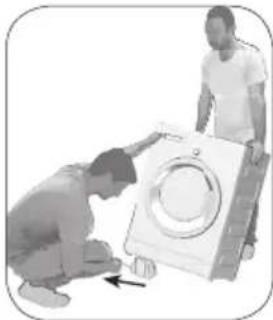
Two people inspecting a washing machine, one kneeling and pointing at it (no text or symbols visible)Tilt the machine backwards to remove the packaging reinforcement. Remove the packaging reinforcement by pulling the ribbon. Do not make this operation alone by yourself.
4.1.3 Removing the transportation locks
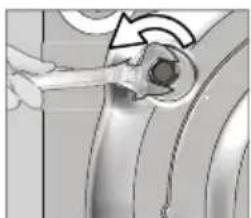
1 Loosen all bolts with an appropriate wrench until they turn freely.
2 Remove the transport safety bolts by turning them slightly.
3 Insert the plastic covers in the bag containing the user manual to the openings on the rear panel.
natural_image
Close-up of a hand holding a small mechanical component, possibly a tool or tool, with no visible text or symbols.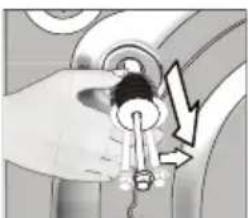
natural_image
Illustration of a hand holding a key inserted into a pipe, with a lightning bolt symbol indicating downward pressure (no text or labels)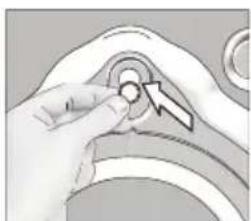
natural_image
Hand holding a small circular object with a directional arrow, no visible text or symbols| CAUTION: Remove the transportation safety bolts before operating the washing machine! Otherwise, the product will be damaged. | |
| Keep the transportation safety bolts in a safe place to reuse when the washing machine needs to be moved again in the future. | |
| Install the transport safety bolts in reverse order of the disassembly procedure. | |
| Never move the product without the transportation safety bolts properly fixed in place! |
4.1.4 Connecting water supply
| The water supply pressure required to run the product is between 1 to 10 bars (0.1 – 1 MPa). It is necessary to have 10 – 80 liters of water flowing from the fully open tap in one minute to have your machine run smoothly. Attach a pressure reducing valve if water pressure is higher. | |
| CAUTION:Models with a single water inlet should not be connected to the hot water tap. In such a case the laundry will get damaged or the product will switch to protection mode and will not operate. | |
| CAUTION:Do not use old or used water inlet hoses on the new product. It may cause stains on your laundry. |
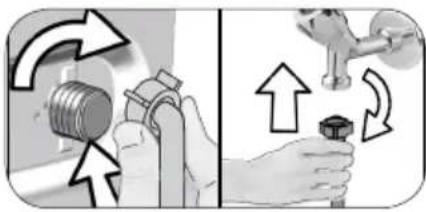
natural_image
Illustration showing two hands performing a valve operation with arrows indicating direction (no text or symbols)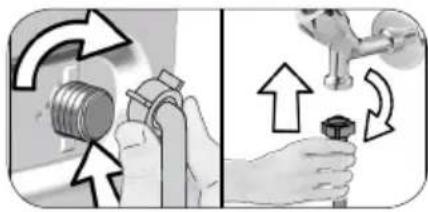
natural_image
Illustration showing two hands performing a valve repair operation, with arrows indicating direction of movement (no text or symbols present)1 Tighten the nuts of the hose by hand. Never use a tool when tightening the nuts.
2 When hose connection is completed, check whether there is leak problems at the connection points by opening the taps fully. If any leaks occur, turn off the tap and remove the nut. Retighten the nut carefully after checking the seal. In order to prevent the water leaks and resultant damages, keep the taps closed when you do not use the product.
4.1.5 Connecting the drain hose to the drain
- Attach the end of the drain hose directly to waste water drain, lavatory or bathtub.
| CAUTION: Your drain house will be flooded if the hose comes out of its housing during water discharge. Moreover, there is risk of scalding due to high washing temperatures! In order to prevent such situations and make sure that the machine performs water intake and discharge processes without any problem, fix the drain hose securely. |
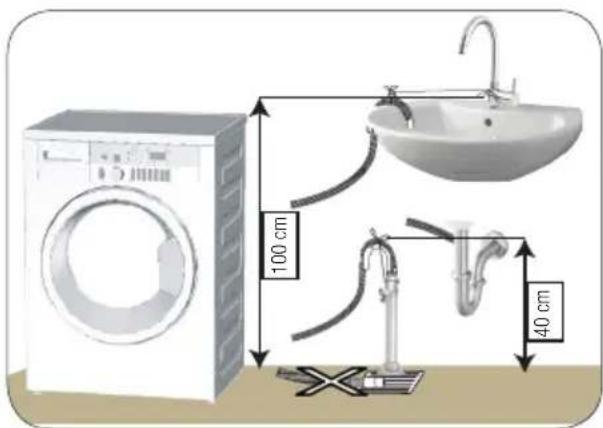
text_image
100 cm 40 cm- To prevent the waste water to go back into the machine again and to ensure easy drainage, do not immerse the end of the hose into the waste water or do not insert it into the drain for more than 15 cm. If it is too long, cut it short.
- The end of the hose should not be bent, it should not be stepped on and the hose must not be pinched between the drain and the machine.
- If the length of the hose is too short, use it by adding an original extension hose. Length of the hose may not be longer than 3.2 m. To avoid water leak failures, the connection between the extension hose and the drain hose of the product must be fitted well with an appropriate clamp as not to come off and leak.
4.1.6 Adjusting the feet

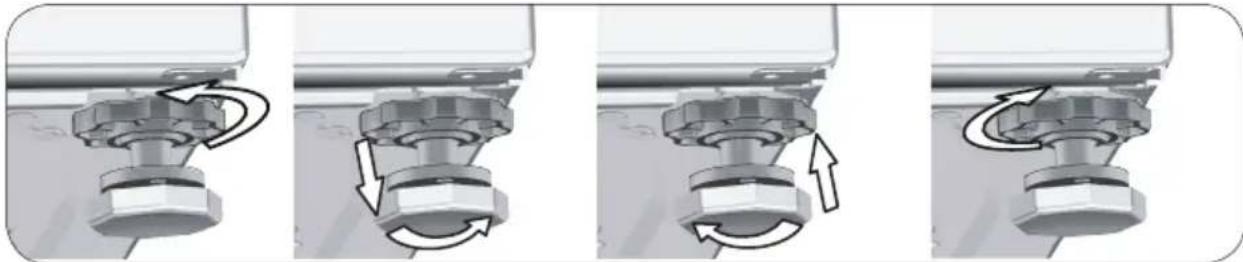
CAUTION: In order to ensure that the product operates more silently and vibration-free, it must stand level and balanced on its feet. Balance the machine by adjusting the feet. Otherwise, the product may move from its place and cause crushing and vibration problems.
CAUTION: Do not use any tools to loosen the lock nuts. Otherwise, they will get damaged.
1 Loosen the lock nuts on the feet by hand.
2 Adjust the feet until the product stands in a stable and balanced way.
3. Tighten all lock nuts by hand again.
natural_image
Mechanical assembly diagram showing four sequential steps of a mechanical component with rotational arrows indicating motion (no text or symbols present)4.1.7 Electrical connection
Connect the product to a grounded outlet protected by a 16 A fuse. Our company shall not be liable for any damages that will arise when the product is used without grounding in accordance with the local regulations.
- Connection must comply with national regulations.
- The wiring for the electrical outlet circuit must be sufficient to meet the appliance requirements. Use of a Groud Fault Circuit Interrupter (GFCI) is recommended.
- Power cable plug must be within easy reach after installation.
- If the current value of the fuse or breaker in the house is less than 16 Amps, have a qualified electrician install a 16 Amp fuse.
- The voltage specified in the "Technical specifications" section must be equal to your mains voltage.
- Do not make connections via extension cables or multi-plugs.

CAUTION: Damaged power cables must be replaced by the Authorised Service Agents.
4.1.8 Initial use
natural_image
Close-up of a hand inserting a transparent ring into a circular device (no text or symbols visible)Before starting to use the product make sure that the preparations are made which are in line with the “Important Safety and Environment Instructions” and the instructions in the “Installation” section.
To prepare the product for washing laundry, perform first operation in Drum Cleaning programme. If this program is not available in your machine, apply the method which is described in the section 4.4.2.

Use an anti-limescale suitable for the washing machines.
Some water might have remained in the product due to the quality control processes in the production. It is not harmful for the product.
4.2 Preparation
4.2.1 Sorting the laundry
* Sort laundry according to type of fabric, color, and degree of soiling and allowable water temperature.
* Always observe the instructions given on the garment care labels.
4.2.2 Preparing laundry for washing
- Laundry items with metal attachments such as, underwiring, belt buckles or metal buttons will damage the product. Remove the metal pieces or wash such clothes by putting them in a laundry bag or pillow case.
- Take out all substances in the pockets such as coins, pens and paper clips, and turn pockets inside out and brush. Such objects may damage the product or cause noise problem.
- Put small size clothes such as infant's socks and nylon stockings in a laundry bag or pillow case.
- Place curtains in without compressing them. Remove curtain attachment items.
- Fasten zippers, sew loose buttons and mend rips and tears.
- Wash "Machine washable" or "Hand washable" labeled products only with an appropriate programme.
- Do not wash colours and whites together. New, dark coloured cottons release a lot of dye. Wash them separately.
- Tough stains must be treated properly before washing. If unsure, check with a dry cleaner.
- Only use the dyes / color changers and descaling agents which are appropriate for machine wash. Always follow the instructions on the package.
- Wash trousers and delicate laundry turned inside out.
- Keep laundry items made of Angora wool in the freezer for a few hours before washing. This will reduce piling.
- Laundry that are subjected to materials such as flour, lime dust, milk powder, etc. intensely must be shaken off before placing into the product. Such dusts and powders on the laundry may build up on the inner parts of the product in time and can cause damage.
4.2.3 Tips for energy saving
Following information will help you use the product in an ecological and energy-efficient manner.
- Operate the product in the highest load capacity allowed for the programme you have selected, but do not overload. See, "4.3.3 Programme and consumption table."
- Observe the temperature instructions on the detergent packaging.
- Wash slightly soiled laundry at low temperatures.
- Use faster programmes for small quantities of lightly soiled laundry.
- Do not use prewash and high temperatures for laundry that is not heavily soiled or stained.
- If you plan to dry your laundry in a dryer, select the highest spin speed recommended during washing process.
- Do not use more detergent than the recommended on the detergent packaging.
4.2.4 Loading the laundry
- Open the loading door.
- Put the laundry items into the product in a loose manner.
3 Push the loading door to close until you hear a locking sound. Ensure that no items are caught in the door. The loading door is locked while a programme is running. The door lock will open immediately after the washing programme has ended. Then you can open the loading door. If the door does not open, apply the solutions provided for "Loading door cannot be opened." error in the Troubleshooting section.
4.2.5 Correct load capacity
The maximum load capacity depends on the type of laundry, the degree of soiling and the desired washing programme.
The product automatically adjusts the water amount according to the weight of the laundry put inside it.

WARNING: Comply with the information in the section "4.3.3 Programme and consumption table". When overloaded, product's washing performance will drop. Moreover, noise and vibration problems may occur.
4.2.6 Using detergent and softener

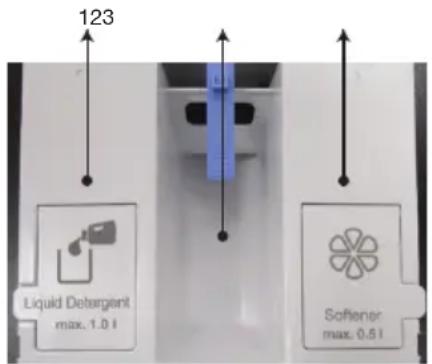
When using detergent, softener, starch, fabric dye, bleach and descaling agents to be added through the detergent container 2, read the manufacturer's instructions written on the package and follow the dosages specified. Use a measuring cup, if any.
For programmes where liquid detergent dosing is selected, do not add any powder detergent.

WARNING: Do not use liquid detergents or other cleaning products other than fabric softeners produced for washing machines to soften the clothes. Only use liquid softeners for washing machines.
Detergent, softener and other cleaning agents
text_image
123 Liquid Detergent max. 1.0 l Softener max. 0.5 l1 - Liquid detergent compartment
2 - Powder detergent compartment
3 - Softener compartment
- Add detergent and softener before starting the washing programme.
- Place the detergent bag or the dispensing ball directly among the laundry in the product.
- There is no pre-wash compartment or pre-wash option.

Washing agents such as viscous jelly detergents cannot be used in detergent drawers or dosing compartments.

WARNING: Close the detergent drawer before starting the washing programme and never open the drawer while the product is running.
4.2.6.1 Auto Dosing
Initial Setup:
Switch on the machine by pressing the on/off button. The dosing symbol ( ) will appear in programmes that permit detergent dosing. If the liquid detergent and softener compartments are empty or the remaining agents in these compartments are below the limits, the dosing symbol will flash in programmes that permit dosing.
Adding Liquid Detergent and Softener
text_image
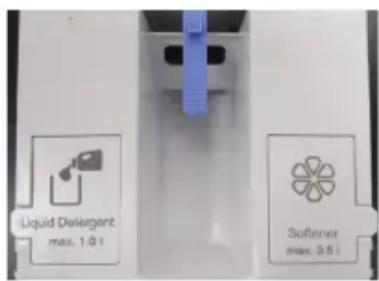
Liquid Delegerant max. 1.0 l Softener max. 0.5 l- Pull the detergent drawer towards yourself to open it.
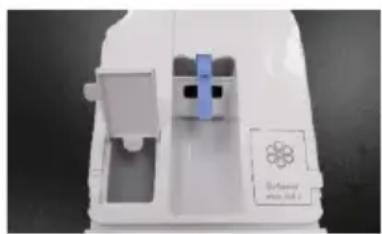
natural_image
White plastic electronic device casing with a blue indicator light and a small symbol on the side (no readable text or symbols)- To add liquid detergent (left) and softener (right), open the lid of the relevant container upwards as shown in the image.
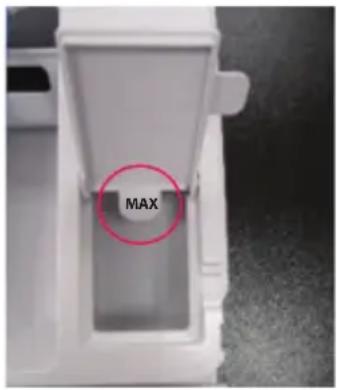
text_image
MAX- When adding liquid detergent or softener, do not exceed the tip of the «Max» label.
- Close the lid.
- Close the detergent drawer by pushing it slowly.
- After closing the detergent drawer, the flashing dosing symbol ( ) will start to light up steadily.
- Indicates that the components are filled and the drawer is closed.

- For coloured and white laundry, it is recommended to fill commonly used liquid detergent in the compartment.
- Despite the fact that the detergent compartments are filled, if 'detergent symbol' continues to flash, the detergent drawer is not fully closed. Ensure that the drawer is seated in place by pushing it.

WARNING: While the detergent drawer is full with detergent and/or softener:
a- Do not pull the machine,
b- Do not change its place,
c- Do not tilt the machine to its side or back,
WARNING: To make these actions, first you should take out the drawer from the machine.
WARNING: If you wish to start the programme when there is no detergent in the detergent drawer, please remember that you must cancel the liquid detergent dosing and wash the laundry with powder detergent.
WARNING: The liquid detergent dosing container must be filled only with liquid detergent, and the softener dosing container only with softener. Filling these compartments with any kind of liquid or powder chemical other than these may harm your laundry or washing machine.
4.2.6.2 Dose Selection and Cancellation or Powder Detergent Use
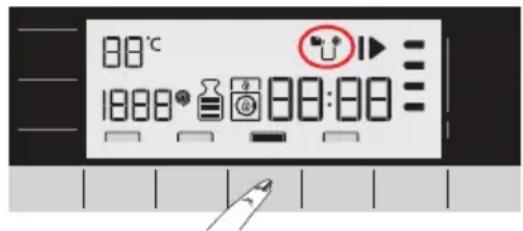
text_image
80°C 1888 80:80
- For some programmes of the machine, liquid detergent could not be selected. In such cases, powder detergent should be used. Please see the Programme Table for details.
- After selecting the temperature, spin speed and auxiliary function, start the programme by pressing the started/pause button.
- The machine will measure the load, and determine the detergent amount depending on the load amount and selected functions. During the washing operation, the detergent intake is not visible, it will be taken in directly with the water.
- If it is requested to use powder detergent in programmes where detergent dosing system activates required amount of powder detergent should be added to the detergent compartment. If you wish to use the detergent compartment in the middle, you need to cancel your liquid detergent selection.
- Programme is started by pressing Start/Pause button. When the machine starts to take in water, the powder detergent will also be taken in.
- If you want to use a liquid detergent whose characteristics are different than that of the detergent in the liquid detergent compartment for once, you must add the different liquid detergent into the middle powder detergent compartment and cancel your liquid detergent selection.
- Softener will be taken in through the detergent dosing system.
Liquid detergent and softener dosing symbols will be active or inactive depending on the programme selected on the display.
- If the liquid detergent symbol is on, this means that liquid detergent dosing is active.
- If the softener symbol is on, this means that softener dosing is active.
- If the liquid detergent symbol is off, this means that you can wash your laundry with powder detergent.
- If the softener symbol is off, this means no softener will be used in the rinsing step.
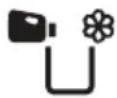
The first position on the display: means liquid detergent is active, softener is on.
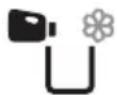
If liquid detergent and softener symbols are active on the display, the liquid detergent will become on and the softener will become off after you press the Auto Dosing key for the first time.

When you press the Auto Dosing key for the second time, powder detergent and softener will become on.

When you press the Auto Dosing key for the third time, powder detergent will become on and softener will become off. Finally, when you press it for the fourth time, it will return to the initial position.
4.2.6.3 When the Detergent and/or Softener Run(s) Out:
- When the detergent or softener in the detergent compartment runs out, the “dosing symbol” on the display will flash. When this symbol flashes, you need to add detergent or softener to the dosing compartment. The product can dose for 2 to 3 cycles as of the moment that the symbol flashes.
4.2.6.4 Adding Detergent or Softener to the Wrong Compartment:
- If the detergent or softener is added to the wrong compartments, see 4.4.1 “Cleaning the detergent drawer”.
4.2.7 Tips for efficient washing
| Clothes | |||||
| Light Colours and Whites | Colours | Black/Dark Colours | Delicates/Woolens/Silks | ||
| (Recommended temperature range based on soiling level: 40-90°C) | (Recommended temperature range based on soiling level: cold -40°C) | (Recommended temperature range based on soiling level: cold -40°C) | (Recommended temperature range based on soiling level: cold -30°C) | ||
| Soiling Level | Heavily Soiled(difficult stains such as grass, coffee, fruits and blood.) | It may be necessary to pre-treat the stains or perform prewash. Powder and liquid detergents recommended for whites can be used at dosages recommended for heavily soiled clothes. It is recommended to use powder detergents to clean clay and soil stains and the stains that are sensitive to bleaches. | Powder and liquid detergents recommended for colors can be used at dosages recommended for heavily soiled clothes. It is recommended to use powder detergents to clean clay and soil stains and the stains that are sensitive to bleaches. Detergents which do not contain bleach should be used. | Liquid detergents suitable for colors and dark colors can be used at dosages recommended for heavily soiled clothes. | Prefer liquid detergents produced for delicate clothes. Woolen and silk clothes must be washed with special woolen detergents. |
| Normally Soiled(For example, stains caused by body on collars and cuffs) | Powder and liquid detergents recommended for whites can be used at dosages recommended for normally soiled clothes. | Powder and liquid detergents recommended for colors can be used at dosages recommended for normally soiled clothes. Detergents which do not contain bleach should be used. | Liquid detergents suitable for colors and dark colors can be used at dosages recommended for normally soiled clothes. | Prefer liquid detergents produced for delicate clothes. Woolen and silk clothes must be washed with special woolen detergents. | |
| Lightly Soiled(No visible stains exist.) | Powder and liquid detergents recommended for whites can be used at dosages recommended for lightly soiled clothes. | Powder and liquid detergents recommended for colors can be used at dosages recommended for lightly soiled clothes. Detergents which do not contain bleach should be used. | Liquid detergents suitable for colors and dark colors can be used at dosages recommended for lightly soiled clothes. | Prefer liquid detergents produced for delicate clothes. Woolen and silk clothes must be washed with special woolen detergents. | |

If a special liquid detergent must be used, you can cancel the liquid detergent dosing and add the special detergent to the powder detergent compartment no 2. In such cases, no time delay function should not be used.
4.3 Operating the product
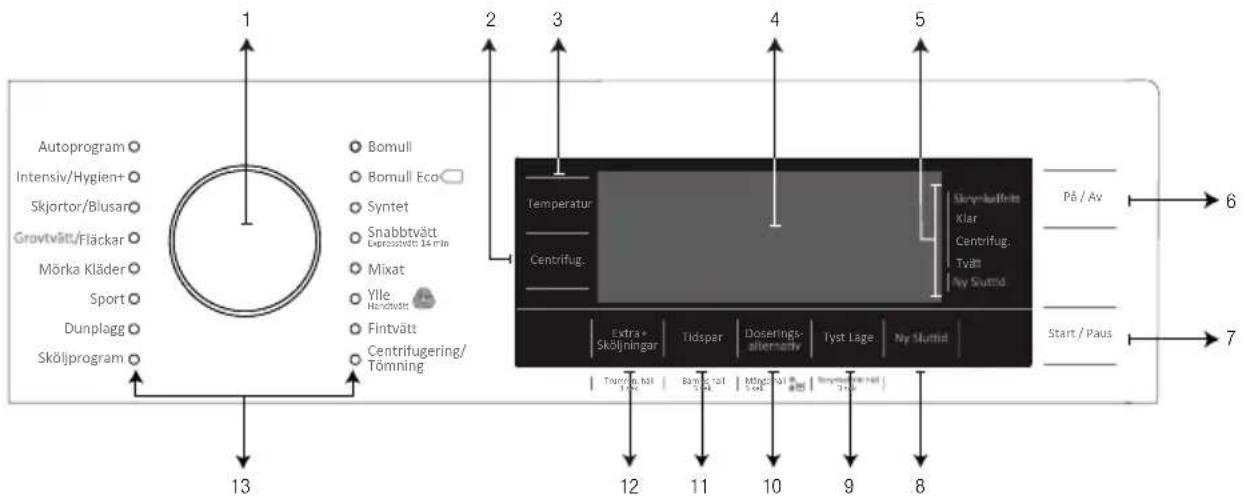
4.3.1 Control panel
flowchart
graph TD
    A["Autoprogram"] --> B["13"]
    B --> C["Bomull"]
    B --> D["Bomull Eco"]
    B --> E["Syntet"]
    B --> F["Snabbtvätt Depressivätt 14 min"]
    B --> G["Mixat"]
    B --> H["Ylle Handchters"]
    B --> I["Fintvätt Centrifugering/Tömning"]
    C --> J["Temperatur"]
    D --> K["Centrifug."]
    J --> L["Extra+ Sköljningar"]
    K --> M["Tidspar"]
    L --> N["Doserings-alternativ"]
    M --> O["Tyst Lage"]
    N --> P["Ny Stuttid"]
    O --> Q["Skyrkullnä Klar Centrifug: Tvått Ny Stuttid"]
    P --> R["På / Av"]
    P --> S["Start / Paus"]
    Q --> T["Træmple, håll Törs"]
    R --> U["Bayt, måst Törs"]
    S --> V["Mingl, mål Törs"]
    T --> W["Tyssplåte håll Törs"]
    U --> X["Tyssplåte håll Törs"]
    V --> Y["Tyssplåte håll Törs"]
- Programme Selection knob
2 - Spin Speed Adjustment button
3 - Temperature Adjustment button
4 - Display
5 - Programme Follow-up indicator
6 - On/Off button
7 - Start/Pause button
8 - End Time Adjustment button
9 - Auxiliary Function button 4
10 - Auxiliary Function button 3
11 - Auxiliary Function button 2
12 - Auxiliary Function button 1
13 - Programme Selection LEDs
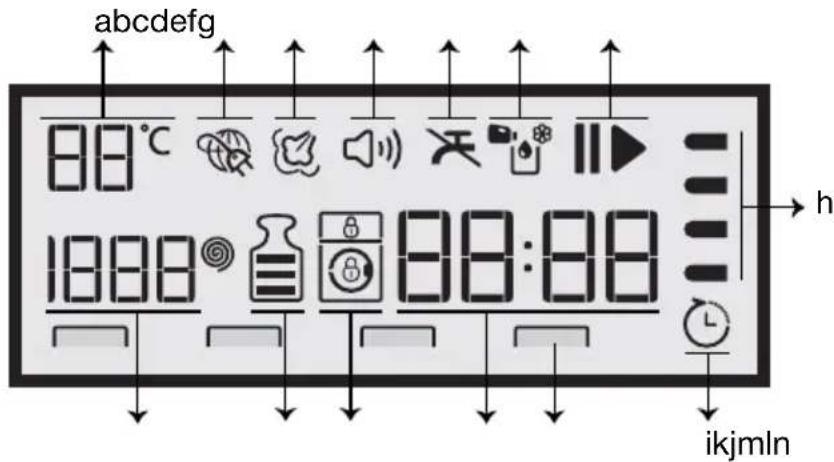
4.3.2 Display symbols
text_image
abcdefg 88°C 1888 88:88 h ikjmlna- Temperature indicator
b- internet Connection indicator
c- Steam indicator
d- Audio Warning indicator
e- No Water indicator
f- Dosing symbols
g- Start/Pause indicator
h- Programme Follow-up indicator
i- Delayed Start Enabled indicator
j- Auxiliary Function indicators
k- Duration Information Line
I- Lock Indicators
m- Load indicator
n- Speed indicator

The visuals used for machine description in this section are schematic and may not match exactly will the features of your machine.
4.3.3 Programme and consumption table
| EN | Auxiliary functions | ||||||||||
| Programme | Max. Load (kg) | Water Consumption (l) | Energy Consumption (kWh) | Max. Speed*** | Tidspar | Extra+ Sköljningar | Tyst Läge | Skrynkelfritt | Doserings-alternativ | Selectable temperature range °C | |
| Bomull | 90 8 | 84,4 2 | ,00 1400 | ● ● ● | ● ● Cold | - 90 | |||||
| 60 8 | 84,2 1 | ,26 1400 | ● ● ● | ● ● Cold | - 90 | ||||||
| 40 8 | 82,3 0 | ,90 1400 | ● ● ● | ● ● Cold | - 90 | ||||||
| Bomull Eco | 60** 8 | 53 0,940 | 1400 | ● | Cold | - 60 | |||||
| 60** 4 | 44,2 | 0,660 | 1400 | ● | Cold | - 60 | |||||
| 40** 4 | 44,2 | 0,650 | 1400 | ● | Cold | - 60 | |||||
| Syntet | 60 3 | 64,8 1 | ,16 1200 | ● ● ● | ● ● Cold | - 60 | |||||
| 40 3 | 6 | 3 0,74 1 | 200 ● ● | ● ● ● Cold | - 60 | ||||||
| Snabbtvätt / Expresstvätt 14 min | 90 8 | 56,7 1 | ,98 1400 | ● ● | ● ● ● Cold | - 90 | |||||
| 60 8 | 59,9 1 | ,04 1400 | ● ● | ● ● ● Cold | - 90 | ||||||
| 30 8 | 65,7 0 | ,16 1400 | ● ● | ● ● ● Cold | - 90 | ||||||
| Snabbtvätt / Expresstvätt 14 min+ Tidspar | 30 | 2 | 35,1 | 0,11 | 1400 | ● | ● | ● | ● | ● | Cold - 90 |
| Ylle / Handtvätt | 40 | 1,5 | 53,1 | 0,40 | 1200 | ● | ● | ● | Cold - 40 | ||
| Fintvätt | 40 | 3,5 | 52,2 | 0,60 | 1200 | ● | ● | ● | Cold - 40 | ||
| Dunplagg | 60 | 2 | 85,5 | 1,26 | 1000 | ● | ● | ● | Cold - 60 | ||
| Sport | 40 3 | 5 54 0 | ,43 1200 | ● | Cold | - 40 | |||||
| Mörka Kläder | 40 | 3 | 52 | 0,80 | 1200 | * | ● | ● | ● | Cold - 40 | |
| Grovtvätt / Fläckar | 60 | 3,5 | 70,2 | 1,55 | 1400 | ● | ● | ● | 30-60 | ||
| Skjortor / Blusar | 60 | 3 | 63 | 1,13 | 800 | ● | ● | ● | ● | Cold - 60 | |
| Intensiv / Hygien+ | 90 | 8 | 90 | 1,71 | 1400 | * | ● | 20-90 | |||
| Mixat | 40 | 4 | 81 | 0,85 | 800 | ● | ● | ● | ● | Cold - 40 | |
| Autoprogram | 60 8 | **** **** 14 | 00 ● ● | ● ● ● Cold | - 60 | ||||||
| Trumrengöring | 70 | - | 79,6 | 1,89 | 700 | * | ● | 70 | |||
- : Selectable.
* : Automatically selected, no canceling.
** : Energy Label programme (EN 60456 Ed.3)
*** : If maximum spin speed of the machine is lower then this value, you can only select up to the maximum spin speed.
****: Programme detects the type and quantity of the laundry to automatically adjust water and energy consumption and programme time. - : See the programme description for maximum load.
** "Cotton eco 40°C and Cotton eco 60°C are standard programmes." These programmes are known as '40°C cotton standard programme' and '60°C cotton standard programme' and indicated with the symbols on the panel.

The auxiliary functions in the table may vary according to the model of your machine.
Water and power consumption may vary subject to the changes in water pressure, water hardness and temperature, ambient temperature, type and amount of laundry, selection of auxiliary functions and spin speed, and changes in electric voltage.
You can see the washing duration on the display of your machine while selecting a programme. Depending on the amount of laundry you have loaded into your machine, there may be a difference of 1-1.5 hours between the duration shown on the display and the actual duration of the wash cycle. Duration will be automatically updated soon after the washing starts.
"Selection patterns for auxiliary functions can be changed by the manufacturer company. New selection patterns can be added or removed." "The spin speed of your machine may vary according to the programme; this spin speed cannot exceed the max. spin speed of your machine."
| Indicative values for Synthetics programmes (EN) | ||||||
| Load (kg) | Water Consumption (l) | Energy Consumption (kWh) | Programme Duration (min) | Remaining Moisture Content (%) ** ≤ 1000 rpm > 1000 rpm | Remaining Moisture Content (%) ** | |
| Synthetics 60 | 3 64,8 | 1,16 115/1 | 50 | 45 40 | ||
| Synthetics 40 | 3 63 0 | 74 115/150 | 45 40 | |||
| * You can see the washing time of the programme you have selected on the display of the machine. It is normal that small differences may occur between the time shown on the display and the real washing time. | ||||||
| ** Remaining moisture content values may differ according to the selected spin speed. | ||||||
4.3.4 Programme selection
1 Determine the programme suitable for the type, quantity and soiling level of the laundry in accordance with "Programme and consumption table".
| Programmes are limited with the highest spin speed appropriate for that particular type of fabric. | |
| When selecting a programme, always consider the type of fabric, colour, degree of soiling and permissible water temperature. | |
| Always select the lowest appropriate temperature. Higher temperature means higher electricity consumption. |
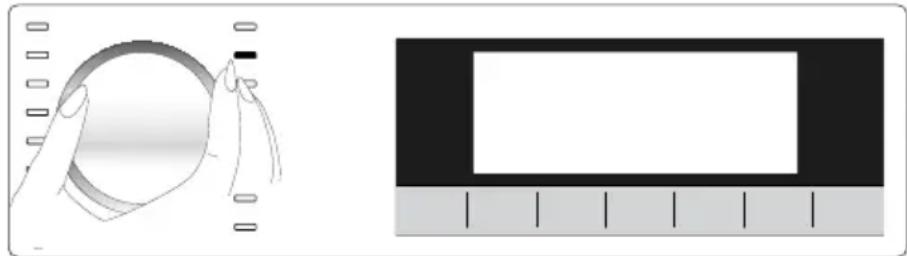
2 Select the desired programme with the Programme Selection knob.
natural_image
Illustration showing a hand holding a circular object and a rectangular frame with tick marks (no text or symbols)4.3.5 Programmes
• Bomull Eco (Cottons Eco)
Use to wash your normally soiled, durable cotton and linen laundry. Although it washes longer than all other programmes, it provides high energy and water savings. Actual water temperature may be different from the stated wash temperature. When you load the machine with less laundry (e.g. 12 capacity or less), periods in programme stages may automatically get shorter. In this case, energy and water consumption will decrease more, providing a more economic wash.
- Bomull (Cottons)
You can wash your durable cotton laundry (sheets, bedlinen, towels, bathrobes, underwear etc.) in this programme. When the quick wash function button is pressed, programme duration becomes notably shorter but effective washing performance is ensured with intense washing movements. If the quick wash function is not selected, superior washing and rinsing performance is ensured for your heavily soiled laundry.
You can wash your laundry (such as shirts, blouses, synthetic/cotton blended fabrics etc.) in this programme. The programme duration gets notable shorter and washing with high performance is ensured. If the quick wash function is not selected, superior washing and rinsing performance is ensured for your heavily soiled laundry.
Use to wash your woolen/delicate laundry. Select the appropriate temperature complying with the tag of your clothes. Your laundry will be washed with a very gentle washing action in order not to damage the clothes.

APPAREL CARE
"Woolens programme of this machine is approved by "The Woolmark Company" for washing machine-washable woolen products provided that the products are washed in accordance with the instructions on the product tag and the instructions published by the manufacturer of this machine. M1325"
In UK, Ireland, Hong Kong and India, the Woolmark trademark is a Certification trademark.
- Intensiv/Hygien+ (Hygiene+)
Use this programme for your laundry (baby clothes, bed sheets, bedlinen, underwear, etc. cotton items) for which you require an anti-allergic and hygienic washing at high temperature with intensive and long washing cycle. The high level of hygiene is ensured thanks to long heating duration and additional rinsing step.
- Programme was tested by the “VDE” institute with the 20°C temperature option selected and it was certified in terms of its efficacy in eliminating bacteria and mould.
- Programme was tested by “The British Allergy Foundation” (Allergy UK) with the 60°C temperature option selected and it was certified in terms of its efficacy in eliminating allergens in addition to bacteria and mould.

Allergy UK, is the brand of the British Allergy Association. Seal of Approval is created to guide people that require recommendation about a product that the related product restricts / reduces / eliminates the allergens or reduces the allergen content significantly in the ambient where allergy patients exist. It aims to provide assurance that the products are tested scientifically or examined in a way to provide measurable results.
• Dunplagg (Down Wear)
Use this programme to wash your coats, vest, jackets etc. containing feathers with a "machine-washable" label on them. Thanks to special spinning profiles, it is ensured that the water reaches the air gaps amongst the feathers.
• Centrifugering/ Tömning (Spin+Drain)
You can use this function to remove the water on the garment of drain the water in the machine.
- Sköljprogram (Rinse)
Use when you want to rinse or starch separately.
- Skjortor/Blusar (Shirts)
This programme is used to wash the shirts made from cotton, synthetic and synthetic blended fabrics altogether. It reduces wrinkles. When the quick wash function is selected, the Pre-treatment algorithm is executed.
- Apply the pre-treatment chemical on your garments directly or add it together with the detergent when the machine starts to take water in the powder detergent compartment. Thus, you can obtain the same performance as you obtain with normal washing in a much shorter period of time. Usage life of your shirts increases.
Use this programme to wash your lightly soiled or unspotted cotton clothes in a short time. The programme duration can be reduced down to 14 minutes when the quick wash function is selected. When the quick wash function is selected, maximum 2 (two) kg of laundry must be washed.
• Mörka Kläder (Dark Care / Jeans)
Use this programme to protect the colour of your dark-coloured garments or jeans. It performs high performance washing with special drum movement even if the temperature is low. It is recommended to use liquid detergent or woolen shampoo for dark coloured laundry. Do not wash your delicate clothes containing wool or etc.
- Mixat (Mix)
Use to wash your cotton and synthetic clothes together without sorting them.
- Autoprogram
Use to wash frequently washable cotton, synthetic or blended (cotton+synthetic) clothes. Programme detects the type and quantity of the laundry to automatically adjust water consumption and programme time.

CAUTION: Do not wash your woolen and delicate clothes in this programme.
Select a suitable temperature if the temperature shown on the temperature display is not compatible with the warnings on the garment label.
The maximum washing temperature in Automatic programme depending on the soiling level and laundry type is 60^ C. Washing performance may not be at the desired level for heavily soiled whites and stubborn stains (collar, sock soil, perspiration stain, etc.). In this case, it is recommended to select Cottons programme with prewash and set the temperature to 50-60^ C.
Many types of clothing are correctly detected and safely washed in Automatic programme.
You can wash your delicate clothes such as cotton/synthetic blended knitwear or hosiery in this programme. It washes with more delicate washing action. Wash your clothes whose colour you want to preserve either at 20 degrees or by selecting the cold wash option.
- Sport (Outdoor / Sports)
You can use this programme to wash sports and outdoors garments that contain cotton/synthetics mix and water repellent covers such as gore-tex etc. It makes sure your garments are washed gently thanks to special rotating movements.
The machine has a special stain programme which enables the removal of different types of stains in the most effective way. Use this programme only for durable colourfast cotton laundry. Do not wash delicate and pigmenting clothes and laundry in this programme. Before washing, garment tags should be checked (recommended for cotton shirts, trousers, shorts, t-shirts, baby clothes, pyjamas, aprons, table clothes, bed sheets, duvet covers, pillowcases, bath-beach towels, towels, socks, cotton underwear that are suitable for washing at high temperature and long time). In the automatic stain programme, you can wash 24 types of stains divided into two different groups according to quick function selection. You can see stain groups based on the selection of the quick function.
You can find stain groups based on quick function below:
| When quick function is selected: | ||
| Blood Tea Red Wine | ||
| Chocolate Coffee Curry | ||
| Pudding Fruit juice Jam | ||
| Egg Ketchup Coal | ||
| When quick function is not selected: | ||
| Butter Sweat Salad Dressing | ||
| Grass Collar Soil Make-up | ||
| Mud | Food | Machine Oil |
| Coke | Mayonnaise | Baby Food |
- Select the stain programme.
- Select the stain you want to clean by locating it in the groups above and selecting the related group with the quick auxiliary function button.
- Read the garment tag carefully and ensure that correct temperature and spin speed are selected.
4.3.6 Temperature selection
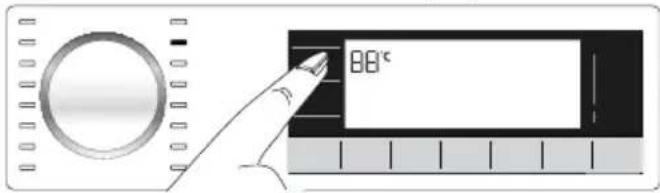
Whenever a new programme is selected, the recommended temperature for the programme appears on the temperature indicator. It is possible that the recommended temperature value is not the maximum temperature that can be selected for the current programme.
text_image
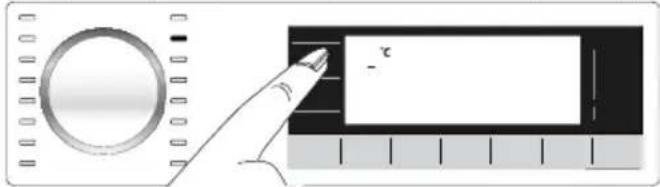
88°CPress the Temperature Adjustment button to change the temperature. Temperature will decrease by steps of 10 °C.
Finally, “-” symbol indicating the cold wash option appears on the display.
text_image
Diagram showing a hand pointing at a labeled rectangular object with the number '2' and a minus sign, next to a circular device.
No change can be made in programmes where temperature adjustment is not allowed.
You can also change the temperature after the washing starts. This change can be made if the washing steps allow it. Changes cannot be made if the steps do not allow it.

If you scroll to cold wash option and press Temperature Adjustment button again, the recommended maximum temperature for the selected programme appears on the display. Press the Temperature Adjustment button again to decrease the temperature.
4.3.7 Spin speed selection
Whenever a new programme is selected, the recommended spin speed of the selected programme is displayed on the Spin Speed indicator.

It is possible that the recommended spin speed value is not the maximum spin speed that can be selected for the current programme.
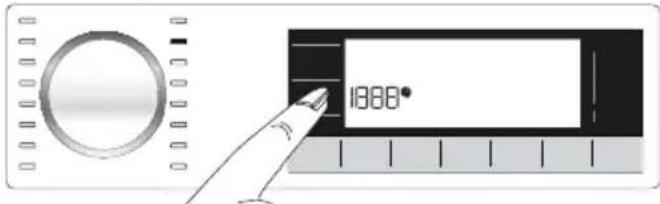
text_image
1888°Press the Spin Speed Adjustment button to change the spin speed. Spin speed decreases gradually. Then, depending on the model of the product, "Rinse Hold" and "No Spin" options appear on the display.

Spin Speed Adjustment button only serves for decreasing the spin speed.
Rinse Hold option is indicated with "I_I" symbol and No Spin option is indicated with "_" symbol.
If you are not going to unload your laundry immediately after the programme completes, you can use Rinse Hold function in order to prevent them from getting wrinkled when there is no water in the machine. This function holds the laundry in the final rinsing water.
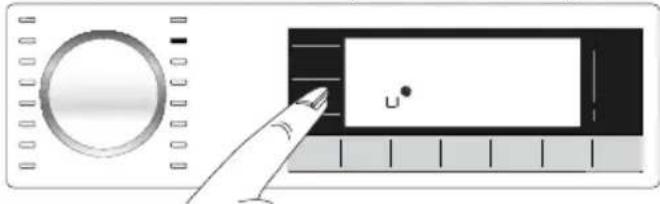
natural_image
Illustration of a hand interacting with a control panel showing a circular dial and a rectangular button labeled 'u' (no text or symbols beyond the label)If you want to spin your laundry after the Rinse Hold function:
- Adjust the Spin Speed.
- Press Start / Pause / Cancel button. The programme will resume. Machine drains the water and spins the laundry.
If you want to drain the water at the end of the programme without spinning, use No Spin function.
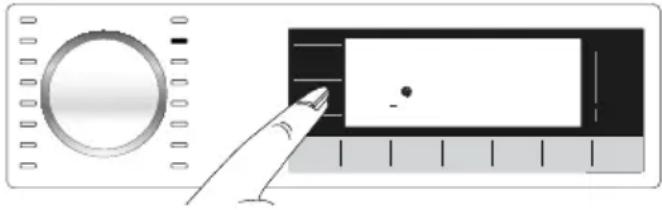
natural_image
Illustration of a hand interacting with a control panel and display screen (no text or symbols visible)
No change can be made in programmes where spin speed adjustment is not allowed.
You can change the spin speed after the washing starts if the washing steps allow it. Changes cannot be made if the steps do not allow it.
Rinse hold
If you are not going to unload your clothes immediately after the programme completes, you can use rinse hold function to keep your laundry in the final rinsing water in order to prevent them from getting wrinkled when there is no water in the machine. Press Start / Pause button after this process if you want to drain the water without spinning your laundry. Programme will resume and complete after draining the water.
If you want to spin the laundry held in water, adjust the Spin Speed and press Start / Pause button.
The programme will resume. Water is drained, laundry is spun and the programme is completed.
4.3.8 Auxiliary function selection
Select the desired auxiliary functions before starting the programme. Whenever a programme is selected, frames of the auxiliary function symbol that can be selected together with it illuminates. And when you select an auxiliary function, the interior area of the auxiliary function symbol also starts to illuminate.
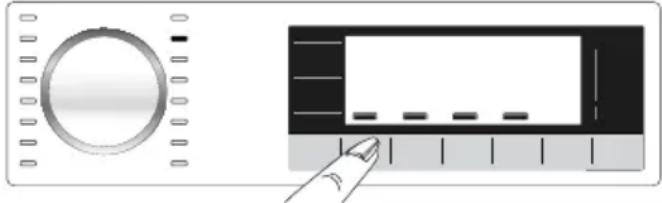
natural_image
Illustration of a rotary dial and a digital display with a finger pointing to it (no text or symbols)
Frame of the auxiliary function symbol that cannot be selected with the current programme does not illuminate.
Also the frames of the auxiliary function suitable for the current programme after the washing has started remains illuminated. You can select or cancel the auxiliary functions whose frames are illuminated. If the wash cycle has reached a point where you cannot select the auxiliary function, the function's frame turns off.

Some functions cannot be selected together. If a second auxiliary function conflicting with the first one is selected before starting the machine, the function selected first will be canceled and the second auxiliary function selection will remain active. For example, if you want to select Quick Wash after you have selected the Additional Water, Additional Water will be canceled and Quick Wash will remain active.
An auxiliary function that is not compatible with the programme cannot be selected. (See, "Programme and consumption table")
Some programmes have auxiliary functions that must be operated simultaneously. Those functions cannot be cancelled. The frame of the auxiliary function will not be illuminated, only inner area will be illuminated.
4.3.8.1 Auxiliary functions
- Tidspar (Fast+)
When this function is selected, the durations of the relevant programmes get shorter by 50%.
Thanks to the optimised washing steps, high mechanic activity and optimum water consumption, high washing performance is achieved in spite of the reduced duration.

When you select this function, load your machine with half of the maximum laundry specified in the programme table.
• Extra+ Sköljningar (Extra Rinse)
This function enables the product to make another rinsing in addition to the one already made after the main wash. Thus, the risk for sensitive skins (babies, allergic skins, etc.) to be effected by the minimal detergent remnants on the laundry can be reduced.
Use to wash the cottons with lesser energy consumption and silently. Spin steps are cancelled for a silent washing and the cycle ends with the Rinse Hold step. After completion of the programme, run Spin cycle to spin the laundry.
- Doserings-alternativ (AutoDosing)
With this auxiliary function key, you can change your detergent and dose preferences. For detailed information, see 4.2.6.2 “Detergent and Softener Dose or Powder Detergent Selection”
4.3.8.2 Functions/Programmes Selected by Pressing the Function Keys for 3 Seconds
- Trumrengöring (Drum Cleaning)

3 sek.
Press and hold the auxiliary function button 1 for 3 seconds to select the programme.
Use regularly (once in every 1-2 months) to clean the drum and provide the required hygiene. Operate the programme while the machine is completely empty. To obtain better results, put powder lime-scale remover for washing machines when the powder detergent function is selected. When the programme is over, leave the loading door ajar so that the inside of the machine gets dry.

This is not a washing programme. It is a maintenance programme.
Do not run the programme when there is something in the machine. If you try to do so, the machine detects that there is load inside and aborts the programme.
- Barnlås (Child lock)
Use Child Lock function to prevent children from tampering with the machine. Thus you can avoid any changes in a running programme.

You can switch on and off the machine with On / Off button when the Child Lock is active. When you switch on the machine again, programme will resume from where it has stopped.
When the Child Lock is enabled, an audio warning will be given if the buttons are pressed. Audio warning will be canceled if the buttons are pressed five times consecutively.
To activate the Child Lock:
Press and hold Auxiliary Function button 2 for 3 seconds. After the countdown as "CL 3-2-1" on the display is over, "CL On" symbol appears on the display. Release Auxiliary Function button 2 when this warning is displayed.
To deactivate the Child Lock:
Press and hold Auxiliary Function button 2 for 3 seconds. After the countdown as "CL 3-2-1" on the display is over, "CL Off" symbol disappears.
• Skrynkelfritt (AntiCrease+) 3 sek.
This function is selected when the 4th auxiliary function is pressed and held for 3 seconds and the programme follow-up light for the relevant step turns on. When the function is selected, the drum rotates for up to 8 hours for preventing the laundry from creasing at the end of the programme. You can cancel the programme and take your laundry out at any time during the 8-hour duration. Press the function selection key or the machine on/off key to cancel the function. The programme follow-up light will remain on until the function is canceled or the step is complete. If the function is not cancelled, it will be active in the subsequent washing cycles as well.
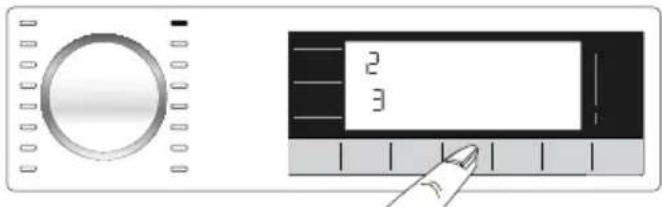
- Mängd (Auto Dosing Setting)
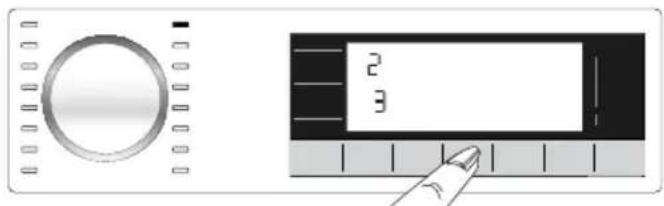
You can enable this function by pressing the auxiliary function key 3 for 3 seconds. With this function, the dosing amounts of the Liquid Detergent and Softener are changed.
natural_image
Illustration of a rotary knob and a digital display with two numbers (2 and 3) and a finger pointing at it (no text or symbols on the device itself)Changing the dosing amounts of Liquid Detergent and Softener:
natural_image
Digital display control interface with rotary knob and numeric keypad (no text or symbols visible)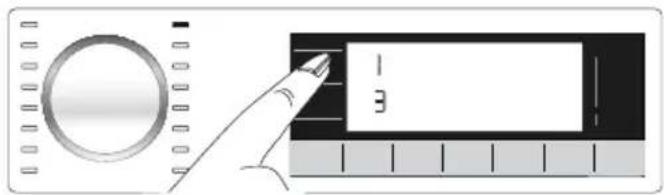
text_image
1 3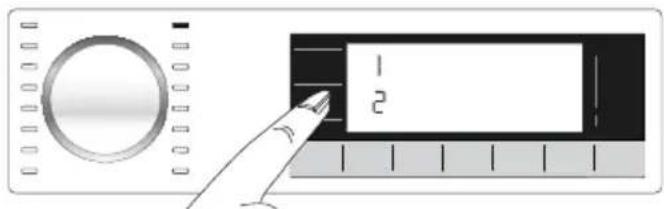
text_image
Diagram showing a hand pressing a button labeled '1' and '2' on a device interface with a circular dial and ruler.- Press and hold Auxiliary Function button 3 for 3 seconds.
- You can press the "Temperature" selection button(☐) to change the liquid detergent dosing levels as below.
1: Low
2: Medium
3: High
- You can press the "Spin" selection button (✿💡) to change the softener dosing levels as below.
1: Low
2: Medium
3: High
- After setting the dosing amounts, you can press the auto dosing key to return to the main menu. For all programmes, dosing will be performed based on the latest settings you have selected until you select a new setting.
4.3.9 End Time
Ending In
Remaining time for the completion of the programme while it is running is displayed as "01:30" in hours and minutes format.

Programme time may differ from the values in section "Programme and consumption table" depending on the water pressure, water hardness and temperature, ambient temperature, amount and the type of laundry, auxiliary functions selected and the changes at the mains voltage.
With the End Time function, the startup of the programme may be delayed up to 24 hours. After pressing End Time button, the programme's estimated ending time is displayed. If the End Time is set, End Time indicator is illuminated.
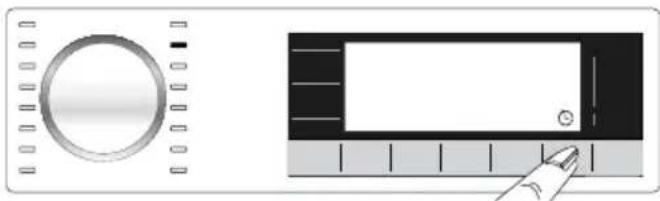
natural_image
Illustration of a rotary dial and a digital display with a finger pointing at it (no text or symbols)In order for the End Time function is activated and the programme is completed at the end of the specified time, you must press Start/Pause button after adjusting the time.
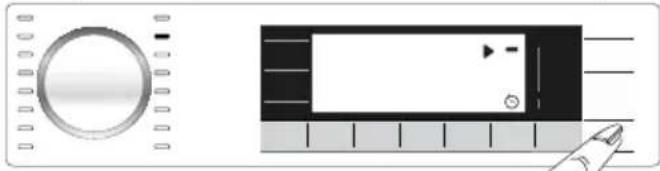
natural_image
Illustration of a control panel with a circular dial and a rectangular device with a play button (no text or symbols)If you want to cancel End Time function, press On/Off button to turn off and on the machine.

When you have activated the End Time function, do not add liquid detergent in the powder detergent compartment no 2. There is the risk of staining of the clothes.
1 Open the loading door, place the laundry and put detergent, etc.
2 Select the washing programme, temperature, spin speed and, if required, the auxiliary functions.
3 Set the end time of your choice by pressing the End Time button. End Time indicator illuminates.
4 Press Start/Pause button. Time countdown starts. ":" sign in the middle of the end time on the display starts flashing.

Additional laundry may be loaded during the End Time countdown period. At the end of the countdown, End Time indicator turns off, washing cycle starts and the time of the selected programme appears on the display.
When the End Time selection is completed, the time appears on the screen consists of end time plus the duration of the selected programme.
4.3.10 Starting the programme
1 Press Start/Pause button to start the programme.
2 The Start/Pause button's light which was off before starts to illuminate steadily now, indicating that the programme has started.
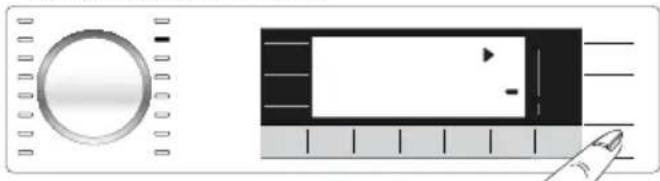
natural_image
Two electronic devices: a circular dial and a rectangular play button with a playhead icon, both without any visible text or symbols.3 Loading door is locked. The door lock symbol appears on the display after the loading door is locked.
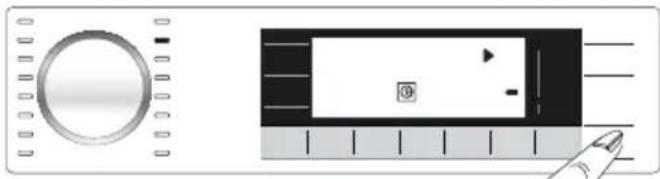
natural_image
Illustration of a control panel and a digital display with icons (no text or symbols)4 Programme follow-up indicator lights on the display will show the current programme step.
There is a locking system on the loading door of the machine that prevents opening of the loading door in cases when the water level is unsuitable.
"Door Locked" symbol appears on the display when the loading door is locked.
natural_image
Simple icon of a lock inside a square frame (no text or symbols)Opening the loading door in case of power failure:

In case of power failure, you can use the loading door emergency handle under the pump filter cap to open the loading door manually.

CAUTION: To avoid any water overflow before opening the loading door, make sure there is no water left inside the machine.
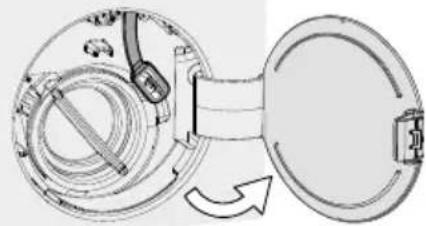
natural_image
Diagram of a mechanical device with internal components and a rotating arrow indicating rotation (no text or symbols)- Open the pump filter cap.
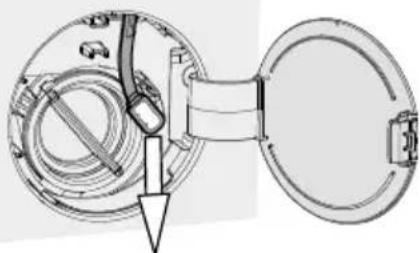
natural_image
Technical diagram of a mechanical assembly with a circular component and a rectangular opening, showing internal components without any text or symbols.- Release the loading door emergency handle located at the rear side of the filter cap.
- Pull down the loading door emergency handle once and open the loading door. After opening the loading door, re-insert the loading door emergency handle.
- f the loading door does not open, try again by pulling down the handle.
4.3.12 Changing the selections after programme has started
Adding laundry after the programme has started

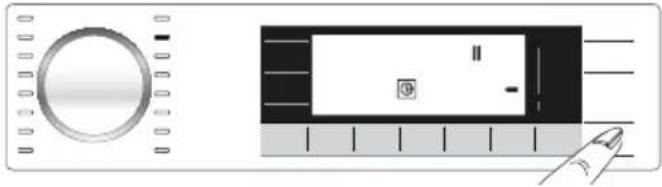
If the water level in the machine is suitable when you press Start/Pause button, the door lock will be deactivated and the door will open, allowing you to add garments. The door lock icon on the display goes off when the door lock is deactivated. After adding garments, close the door and press Start/Pause button once again to resume the washing cycle.
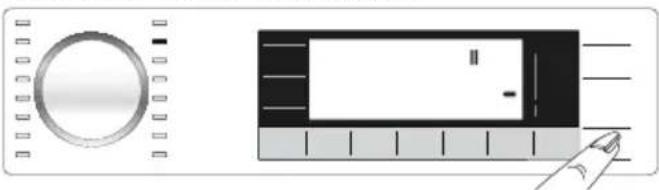
natural_image
Illustration of a rotary knob and a rectangular device with a finger pointing to it (no text or symbols)If the water level in the machine is not suitable when you press Start/Pause button, the door lock cannot be deactivated and the door lock icon on the display remains on.
natural_image
Illustration of a rotary knob and a rectangular device with a cursor pointing at it (no text or symbols)
If the temperature of the water inside the machine is above 50^ C, you cannot deactivate the door lock for safety reasons, even if the water level is suitable.
Switching the machine to pause mode:
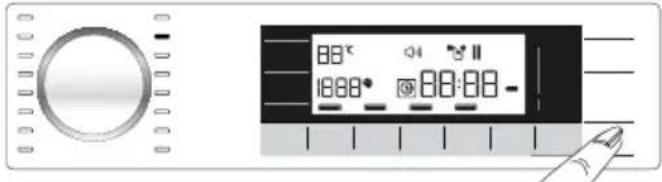
Press the Start/Pause button to switch the machine to pause mode. Pause symbol will flash on the display.
text_image
88°C 1888° 88:88 -Changing the programme selection after programme has started:
The programme change is not allowed when the current programme is running.
You can select the new programme after switching the current programme to pause mode.

The selected program starts anew.
Changing the auxiliary function, speed and temperature
Depending on the step the programme has reached, you can cancel or activate the auxiliary functions. See, "Auxiliary function selection".
You can also change the speed and temperature settings. See, "Spin speed selection" and "Temperature selection".

The loading door will not open if the water temperature in the machine is high or the water level is above the loading door baseline.
4.3.13 Cancelling the programme
The programme is cancelled when the machine is turned off and on again. Press and hold On/Off button for 3 seconds. After the countdown as "3-2-1" on the display is over, the machine turns off.

If you press On/Off button when the Child Lock is enabled, the programme will not be cancelled. You should cancel the Child Lock first.
If you want to open the loading door after you have cancelled the programme but it is not possible to open the loading door since the water level in the machine is above the loading door baseline, then turn the Programme Selection knob to Pump+Spin programme and drain the water in the machine.
4.3.14 End of programme
End symbol appears on the display when the programme is completed.
If you do not press any button for 10 minutes, the machine will switch to OFF mode. Display and all indicators are turned off.
Completed programme steps will be displayed if you press On/Off button.
4.3.15 Adjusting the VOLUME level
Low volume and high volume
Press and hold 1st and 2nd auxiliary function buttons for 3 seconds to adjust the volume level. After the countdown as "3-2-1" on the display is over, the volume level symbol will appear and the new volume level will be displayed.
4.4 Maintenance and cleaning
Service life of product extends and frequently experienced problems will be reduced if it is cleaned at regular intervals.
4.4.1 Cleaning the detergent drawer
When to clean
- If you see hardened, viscous detergent or softener when you open the dosing container lid,
- If you are not satisfied with the washing results (the detergent or softener may not be taken into the washing medium since it is hardened),
- If the liquids in the compartment do not decrease for a long time even though you do not add detergent or softener and dosing is selected,
- If you want to change the washing agents you have added to the compartment (for example, if you are not satisfied with the detergent and do not want to use it) or if you have made a mistake when adding the agents (for example, if you have added detergent to the softener compartment or softener to the detergent compartment),
- If you are going to add a detergent or softener from a different brand than the one you normally use,
- If you are adding a washing agent of a different nature (for example, if you are adding detergent for coloured laundry when there is detergent for white laundry in the compartment),
- If you are adding a washing agent with a different concentration (To not waste the old detergent, you can add it to the powder detergent compartment in the next wash and select «powder detergent active» on the display.)
- If the new softener to be added has the same characteristics but has a different scent (please keep in mind that if you add the new softener without cleaning the remnants of the previous one, this mixture will give a different smell),
- If you are not going to use the product for a long time (for example, when going to the summer house and when returning - 3 months or more) (the washing agent may increasingly thicken and get hardened in the end, and thus the system may not perform dosing even if it shows that the compartments are full.)
Cleaning:
Before cleaning, press the On/Off button to switch of the product and unplug it.

It is recommended for you to wear a glove to avoid contacting the detergent you will take out of the detergent drawer and other washing agents.
natural_image
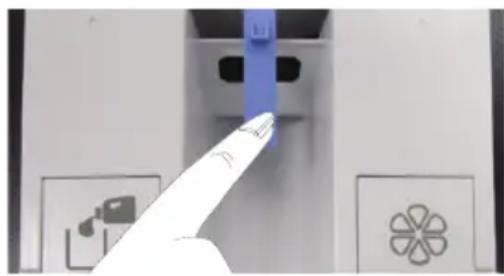
Close-up of a finger pointing at a device panel with icons (no readable text or symbols)- Press the blue part in the middle of the detergent drawer and then pull the drawer towards yourself to take it out.
natural_image
Close-up of a white mechanical component with two cylindrical ports and a central funnel (no visible text or symbols)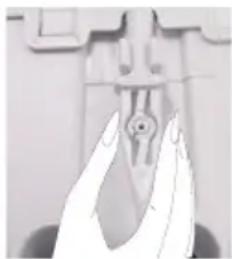
natural_image
Close-up of a hand holding a small mechanical component (no visible text or symbols)
natural_image
Close-up of two white cylindrical objects with black centers, resembling optical or mechanical components (no text or symbols visible)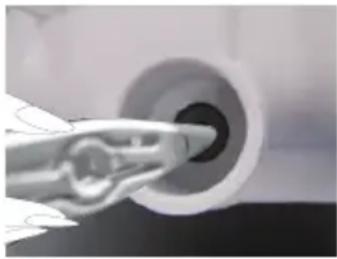
natural_image
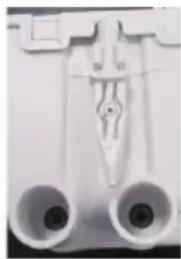
Close-up of a hand holding a tool interacting with a circular mechanical component (no visible text or symbols)• Take out the discharge bar that is located at the back of the drawer.
- The hole behind the detergent compartment that will be emptied is placed over a container.
- Slightly push the discharge bar into the slot at the back of the detergent compartment.
- The detergent starts to flow to the container.
- Repeat the same process for softener.
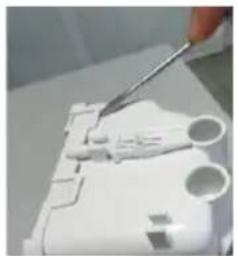
natural_image
Close-up of a hand using tweezers to cut or mark a white plastic component (no visible text or symbols)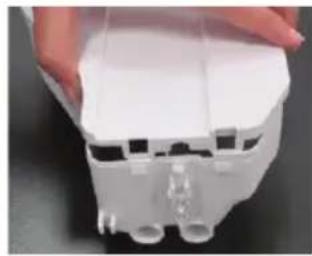
natural_image
Close-up of a white plastic enclosure with internal tubing and connectors (no visible text or symbols)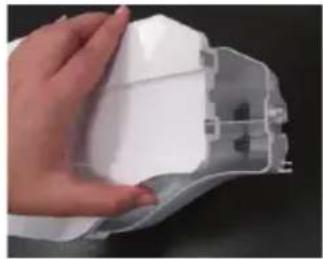
natural_image
Hand holding a white plastic component with visible internal structure (no text or symbols)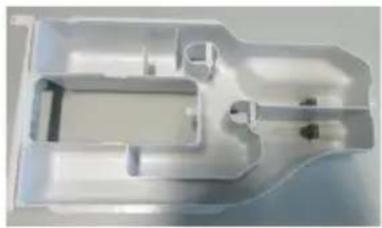
natural_image
White plastic mechanical housing component with internal cavities and mounting holes (no text or symbols visible)- Use a flat screwdriver to remove the tabs holding the upper cover of the detergent drawer (there are 6 tabs in total: two on the right side of the drawer, two on the left and two at the back) and wash the inside of the drawer.
- After washing it, place the cover back to its location. Make sure that all tabs are fitted. If the tabs do not seat properly, liquids may leak or the detergent drawer may get stuck or difficultly move on the drawer slide. For this reason, please ensure that the tabs are fitted in place.
- Fit the discharge bar to its slot at the back of the drawer.
- Paying attention to its slot and slides, fit the drawer back in place and push it to close. After adding detergent and softener, it will be ready to be used in programmes with dosing function.
4.4.2 Cleaning the loading door and the drum
For products with drum cleaning programme, please see Operating the product - Programmes.

Repeat Drum Cleaning process in every 2 months.
Use an anti-limescale suitable for the washing machines.

natural_image
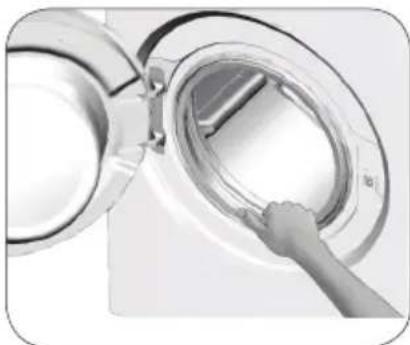
Close-up of a hand inserting a transparent circular component into a metallic housing (no text or symbols visible)After every washing make sure that no foreign substance is left in the product.
If the holes on the bellow shown in the figure is blocked, open the holes using a toothpick.
Foreign metal substances will cause rust stains in the drum. Clean the stains on the drum surface by using cleaning agents for stainless steel.
Never use steel wool or wire wool. These will damage the painted, chromated and plastic surfaces.
4.4.3 Cleaning the body and control panel
Wipe the body of the product with soapy water or non-corrosive mild gel detergents as necessary, and dry with a soft cloth.
Use only a soft and damp cloth to clean the control panel.
4.4.4 Cleaning the water intake filters
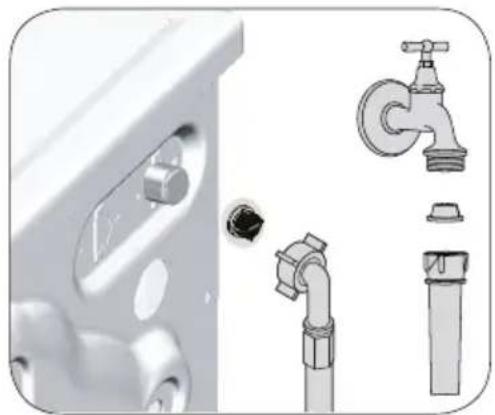
There is a filter at the end of each water intake valve at the rear of the product and also at the end of each water intake hose where they are connected to the tap. These filters prevent foreign substances and dirt in the water to enter the product. Filters should be cleaned if they are dirty.
natural_image
Illustration of a bathroom sink with pipe fittings and a faucet (no text or symbols)-
Close the taps.
-
Remove the nuts of the water intake hoses to access the filters on the water intake valves. Clean them with an appropriate brush. If the filters are too dirty, remove them from their places with a pliers and clean in this way.
-
Take out the filters on the flat ends of the water intake hoses together with the gaskets and clean thoroughly under running water.
-
Replace the gaskets and filters carefully and tighten their nuts by hand.
4.4.5 Draining remaining water and cleaning the pump filter
The filter system in your product prevents solid items such as buttons, coins and fabric fibers clogging the pump impeller during draining of washing water. Thus, the water will be drained without any problem and the service life of the pump will extend.
If the product fails to drain water inside it, the pump filter is clogged. Filter must be cleaned whenever it is clogged or in every 3 months. Water must be drained off first to clean the pump filter.
In addition, prior to transporting the product (e.g., when moving to another house) water should be drained completely.

WARNING: Foreign substances left in the pump filter may damage your product or may cause noise problem.
WARNING: In regions where freezing is possible, the tap must be closed, system hose must be removed and the water inside the product must be drained when the product is not in use.
WARNING: After each use, turn off the tap to which the mains hose is connected.
In order to clean the dirty filter and drain the water:
1 Unplug the product to cut off the supply power.

WARNING: Temperature of the water inside the product may rise up to 90 °C. To avoid the risk of scalding, clean the filter after the water inside the product is cooled down.
2 Open the filter cover.

3 Follow the below procedures in order to drain water.
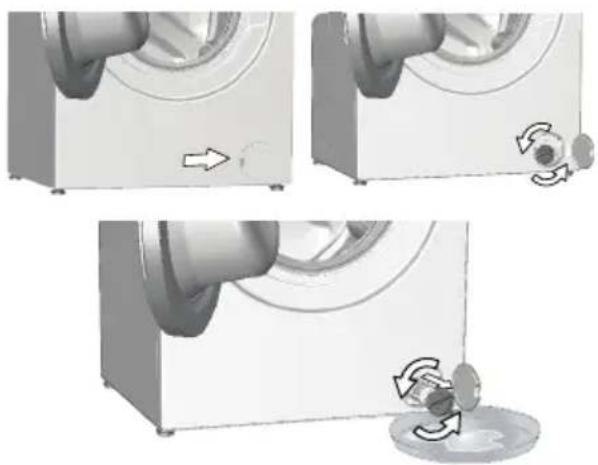
If the product does not have an emergency water drain hose, in order to drain the water:
natural_image
Three-panel illustration showing a washing machine with a hand operating the button, and a close-up of the button being removed (no text or symbols present)a. In order to collect the water to flow out of the filter, place a large vessel in front of the filter.
b. Turn and loosen the pump filter until water starts to flow (counterclockwise). Fill the flowing water into the container you have placed in front of the filter. Always keep a piece of cloth handy to absorb any spilled water.
c When the water inside the product is finished, take out the filter completely by turning it.
4 Clean any residues inside the filter as well as fibers, if any, around the pump impeller region.
-
Replace the filter.
-
If the filter cap is composed of two pieces, close the filter cap by pressing on the tab. If it is one piece, seat the tabs in the lower part into their places first, and then press the upper part to close.
| Problem Cause Solution | |||
| Programs do not start after the loading door is closed. | Start / Pause / Cancel button is not pressed. | • *Press Start / Pause / Cancel button. | |
| It may be difficult to close the loading door in case of excessive loading. | • Reduce the amount of laundry and make sure that the loading door is closed properly. | ||
| Programme cannot be started or selected. | The product has switched to self protection mode due to a supply problem (line voltage, water pressure, etc.). | • Press and hold On/Off button for 3 seconds to reset the product to factory settings. (See "Cancelling the programme") | |
| Water inside the product. Some water has remained in the product due to the quality control processes in the production. | • This is not a failure; water is not harmful to the product. | ||
| The product does not take water in. | Tap is turned off. • Turn on the taps. | ||
| Water inlet hose is bent. • Flatten the hose. | |||
| Water inlet filter is clogged. • Clean the filter. | |||
| Loading door is not closed. • Close the door. | |||
| The product does not drain water. | Water drain hose is clogged or twisted. | • Clean or flatten the hose. | |
| Pump filter is clogged. • Clean the pump filter. | |||
| Product vibrates or makes noise. | Product is standing unbalanced. | • Stable the product by adjusting the feet. | |
| A hard substance has entered into the pump filter. | • Clean the pump filter. | ||
| Transportation safety bolts are not removed. | • Remove the transportation safety bolts. | ||
| Laundry quantity in the product is too little. | • Add more laundry to the product. | ||
| Excessive laundry is loaded in the product. | • Take out some of the laundry from the product or distribute the load by hand to balance it homogeneously in the product. | ||
| Product is leaning on a rigid item. | • Make sure that the product is not leaning on anything. | ||
| There is water leaking from the bottom of the product. | Water drain hose is clogged or twisted. | • Clean or flatten the hose. | |
| Pump filter is clogged. • Clean the pump filter. | |||
| Product stopped shortly after the programme started. | Machine has stopped temporarily due to low voltage. | • Product will resume running when the voltage restores to the normal level. | |
| Product directly drains the water it takes in. | Draining hose is not at adequate height. | • Connect the water draining hose as described in the user manual. | |
| No water can be seen in the product during washing. | Water is inside the invisible part of the product. | • This is not a failure. | |
| Loading door cannot be opened. | Loading door lock is activated because of the water level in the product. | • Drain the water by running the Pump or Spin programme. | |
| Product is heating up the water or it is at the spinning cycle. | • Wait until the programme completes. | ||
| Loading door may be stuck because of the pressure it is subjected to. | • Grab the handle and push and pull the loading door to release and open it. | ||
| If there is no power, loading door of the product will not open. | • To open the loading door, open the pump filter cap and pull down the emergency handle positioned at the rear side of the said cap. See "Loading door lock" | ||
| Washing takes longer than specified in the user manual.(*) | Water pressure is low. | ·Product waits until taking in adequate amount of water to prevent poor washing quality due to the decreased amount of water. Therefore, the washing time extends. | |
| Voltage is low. ·Washing time is prolonged to avoid poor | washing results when the supply voltage is low. | ||
| Input temperature of water is low. | ·Required time to heat up the water extends in cold seasons. Also, washing time can be lengthened to avoid poor washing results. | ||
| Number of rinses and/or amount of rinse water have increased. | ·Product increases the amount of rinse water when good rinsing is needed and adds an extra rinsing step if necessary. | ||
| Excessive foam has occurred and automatic foam absorption system has been activated due to too much detergent usage. | ·Use recommended amount of detergent. | ||
| Programme time does not countdown. (On models with display) (*) | Timer may stop during water intake. | ·Timer indicator will not countdown until the product takes in adequate amount of water. The product will wait until there is sufficient amount of water to avoid poor washing results due to lack of water. Timer indicator will resume countdown after this. | |
| Timer may stop during heating step. | ·Timer indicator will not countdown until the product reaches the selected temperature. | ||
| Timer may stop during spinning step. | ·Automatic unbalanced load detection system is activated due to the unbalanced distribution of the laundry in the product. | ||
| Programme time does not countdown. (*) | There is unbalanced load in the product. | ·Automatic unbalanced load detection system is activated due to the unbalanced distribution of the laundry in the product. | |
| Product does not switch to spinning step. (*) | There is unbalanced load in the product. | ·Automatic unbalanced load detection system is activated due to the unbalanced distribution of the laundry in the product. | |
| The product will not spin if water is not drained completely. | ·Check the filter and the draining hose. | ||
| Excessive foam has occurred and automatic foam absorption system has been activated due to too much detergent usage. | ·Use recommended amount of detergent. | ||
| Washing performance is poor: Laundry turns gray. (**) | Insufficient amount of detergent has been used over a long period of time. | ·Use the recommended amount of detergent appropriate for water hardness and the laundry. | |
| Washing has been made at low temperatures for a long time. | ·Select the proper temperature for the laundry to be washed. | ||
| Insufficient amount of detergent is used with hard water. | ·Using insufficient amount of detergent with hard water causes the soil to stick on the cloth and this turns the cloth into gray in time. It is difficult to eliminate graying once it happens. Use the recommended amount of detergent appropriate for water hardness and the laundry. | ||
| Excessive amount of detergent is used. | ·Use the recommended amount of detergent appropriate for water hardness and the laundry. | ||
| Washing performance is poor: Stains persist or the laundry is not whitened. (**) | Insufficient amount of detergent is used. | ·Use the recommended amount of detergent appropriate for water hardness and the laundry. | |
| Excessive laundry is loaded in. | ·Do not load the product in excess. Load with amounts recommended in the "4.3.3 Programme and consumption table". | ||
| Wrong programme and temperature were selected. | ·Select the proper programme and temperature for the laundry to be washed. | ||
| Wrong type of detergent is used. | ·Use original detergent appropriate for the product. | ||
| Excessive amount of detergent is used. | ·Put the detergent in the correct compartment. Do not mix the bleaching agent and the detergent with each other. | ||
| Washing performance is poor: Oily stains appeared on the laundry. (**) | Regular drum cleaning is not applied. | ·Clean the drum regularly. For this procedure, please see "4.4.2 Cleaning the loading door and the drum". | |
| Washing performance is poor: Clothes smell unpleasantly. (**) | Odours and bacteria layers are formed on the drum as a result of continuous washing at lower temperatures and/or in short programmes. | ·Leave the detergent drawer as well as the loading door of the product ajar after each washing. Thus, a humid environment favorable for bacteria cannot occur in the machine. | |
| Colour of the clothes faded. (**) | Excessive laundry was loaded in. | ·Do not load the product in excess. | |
| Detergent in use is damp. | ·Keep detergents closed in an environment free of humidity and do not expose them to excessive temperatures. | ||
| A higher temperature was selected. | ·Select the proper programme and temperature according to the type and soiling degree of the laundry. | ||
| Washing machine does not rinse well. | The amount, brand and storage conditions of the detergent used are inappropriate. | ·Use a detergent appropriate for the washing machine and your laundry. Keep detergents closed in an environment free of humidity and do not expose them to excessive temperatures. | |
| Detergent was put in the wrong compartment. | ·Add the detergent and the softener to the right compartment. | ||
| Pump filter is clogged. | ·Check the filter. | ||
| Drain hose is folded. | ·Check the drain hose. | ||
| Laundry became stiff after washing. (**) | Insufficient amount of detergent is used. | ·Using insufficient amount of detergent for the water hardness can cause the laundry to become stiff in time. Use appropriate amount of detergent according to the water hardness. | |
| Detergent was put in the wrong compartment. | ·Add the detergent and the softener to the right compartment. | ||
| Detergent was mixed with the softener. | ·Do not mix the softener with detergent. Wash and clean the drawer with hot water. | ||
| Laundry does not smell like the softener. (**) | Detergent was put in the wrong compartment. | ·Add the detergent and the softener to the right compartment. | |
| Detergent was mixed with the softener. | ·Do not mix the softener with detergent. Wash and clean the drawer with hot water. | ||
| Softener dosing setting level is low. | ·Increase the softener dosing amount by one level. See "Auto Dosing Setting" | ||
| Detergent residue in the detergent drawer. (**) | Detergent was put in wet drawer. | Dry the detergent drawer before putting in detergent. | |
| Detergent has gotten damp. | Keep detergents closed in an environment free of humidity and do not expose them to excessive temperatures. | ||
| Water pressure is low. Check the water pressure. | |||
| The detergent in the main wash compartment got wet while taking in the prewash water. Holes of the detergent compartment are blocked. | Check the holes and clean if they are clogged. | ||
| There is a problem with the detergent drawer valves. | Call the Authorised Service Agent. | ||
| Detergent was mixed with the softener. | Do not mix the softener with detergent. Wash and clean the drawer with hot water. | ||
| Regular drum cleaning is not applied. | Clean the drum regularly. For this procedure, please see "4.4.2 Cleaning the loading door and the drum". | ||
| Too much foam forms inside the product. (**) | Improper detergents for the washing machine is used. | Use detergents appropriate for the washing machine. | |
| Excessive amount of detergent is used. | Use only sufficient amount of detergent. | ||
| Detergent was stored under improper conditions. | Store detergent in a closed and dry location. Do not store in excessively hot places. | ||
| Some meshed laundry such as tulle may foam too much because of their texture. | Use smaller amounts of detergent for this type of item. | ||
| Detergent was put in the wrong compartment. | Put the detergent in the correct compartment. | ||
| Foam is overflowing from the detergent drawer. | Too much detergent is used. | Mix 1 tablespoonful softener and 1⁄2 l water and pour into the main wash compartment of the detergent drawer. | |
| Put detergent into the product suitable for the programmes and maximum loads indicated in the "4.3.3 Programme and consumption table". When you use additional chemicals (stain removers, bleaches and etc), reduce the amount of detergent. | |||
| Laundry remains wet at the end of the programme. (*) | Excessive foam has occurred and automatic foam absorption system has been activated due to too much detergent usage. | Use recommended amount of detergent. | |
| (*) The product does not switch to spinning step when the laundry is not evenly distributed in the drum to prevent any damage to the product and to its surrounding environment. Laundry should be rearranged and re-spun. | |||
| (**) Regular drum cleaning is not applied. Clean the drum regularly. See 4.4.2 | |||
 | WARNING: If you cannot eliminate the problem although you follow the instructions in this section, consult your dealer or the Authorised Service Agent. Never try to repair a nonfunctional product yourself. | ||
?
service
• Vi har service ihela landet / Nationwide service
• Gå in på www.cylinda.se / Visit www.cylinda.se
• Ring0771-252500 (endast lokaltaxa) / Call 0771-252500
uppge
- Maskintyp / Model code
• Serienummer / Serial number
• Inköpsdatum / Purchase date