11005 - Washing machine Cylinda - Free user manual and instructions
Find the device manual for free 11005 Cylinda in PDF.


Pick your language and provide your email: we'll send you a specifically translated version.
| Product Type | Freestanding Washing Machine |
| Brand | Cylinda |
| Model | 11005 |
| Capacity | 7 kg |
| Maximum Spin Speed | 1200 rpm |
| Energy Efficiency Class | A+++ |
| Dimensions (H x W x D) | 85 cm x 60 cm x 55 cm |
| Weight | 65 kg |
| Power Supply | 220-240 V, 50 Hz, 10 A |
| Water Connection | Cold water only |
| Programs | Cotton, Synthetics, Delicates, Wool, Quick 30 min, Eco 40-60, Rinse & Spin, Spin Only |
| Temperature Settings | Cold, 20°C, 30°C, 40°C, 60°C, 90°C |
| Additional Functions | Delay Start (up to 24h), Child Lock, Extra Rinse, Pre-Wash, Speed Control |
| Display | LED digital display with program status |
| Drum Material | Stainless steel |
| Noise Level (Wash/Spin) | 52 dB / 76 dB |
| Annual Energy Consumption | 160 kWh |
| Water Consumption per Cycle | 45 L |
| Maintenance | Clean detergent drawer and door seal regularly; clean pump filter every 3 months |
| Safety Features | Overflow protection, unbalanced load detection, child lock, anti-flood system |
| Spare Parts Availability | Parts such as door seal, filters, belts, and control boards are available from authorized service centers |
| Reparability Index | 7.5 / 10 |
| Warranty | 2 years |
| Included Accessories | Water inlet hose, user manual, quick start guide |
Frequently Asked Questions - 11005 Cylinda
How do I start a wash cycle on Cylinda 11005?
Load the laundry, add detergent, select a program using the rotary knob, adjust temperature and spin speed if needed, then press the Start/Pause button. The machine will begin after a short delay.
What does the 'Child Lock' function do and how to activate it?
The Child Lock prevents accidental button presses during a cycle. To activate, press and hold the 'Extra Rinse' and 'Pre-Wash' buttons simultaneously for 3 seconds until the lock icon appears on the display.
Why is my washing machine not draining water?
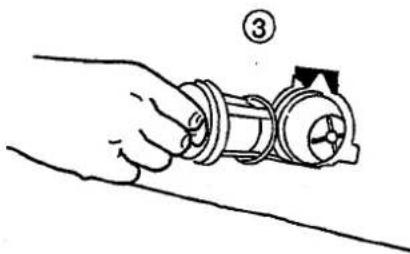
This could be due to a clogged pump filter or kinked drain hose. First, unplug the machine, then open the filter cover at the bottom front, drain any water, and clean the filter. Ensure the drain hose is not blocked or bent.
How can I clean the detergent drawer?
Remove the drawer by pulling it out fully and pressing the release lever. Wash it under warm running water with a soft brush. Dry it thoroughly before reinserting. Clean the drawer compartment with a damp cloth.
What is the maximum load capacity for cotton programs?
The maximum load for cotton programs is 7 kg. Overloading may result in poor wash performance and increased wear on the machine.
How do I reset the Cylinda 11005?
Turn the program selector knob to the 'Off' position, unplug the machine, wait 1 minute, then plug it back in and select a program. This can resolve minor electronic glitches.
Can I use liquid detergent with this model?
Yes, liquid detergent can be used. Pour it into the main wash compartment (usually marked with 'II' or 'Main Wash'). For pre-wash, use compartment 'I'. Avoid overfilling above the 'MAX' line.
What should I do if the door does not open after a cycle?
After a cycle, the door remains locked for safety until the water drains and the drum stops. Wait 2 minutes after the program ends. If still locked, ensure the machine is turned off and unplugged, then manually drain water using the emergency drain hose near the filter.
How often should I run a maintenance wash?
It is recommended to run a maintenance wash (e.g., a cotton 90°C cycle with an empty drum and some descaling agent) every 2-3 months to prevent mold and limescale buildup.
Why is my washing machine vibrating excessively during spin?
Check that the machine is level by adjusting the front feet. Ensure the transport bolts have been removed (if new). Also, redistribute laundry inside the drum to avoid unbalanced loads and avoid overloading.
User questions about 11005 Cylinda
0 question about this device. Answer the ones you know or ask your own.
Ask a new question about this device
No questions yet. Be the first to ask one.
Download the instructions for your Washing machine in PDF format for free! Find your manual 11005 - Cylinda and take your electronic device back in hand. On this page are published all the documents necessary for the use of your device. 11005 by Cylinda.
USER MANUAL 11005 Cylinda
natural_image
Line drawing of a kitchen appliance with front panel and side door (no text or symbols)C ∈
ASEA SKANDIA
natural_image
Line drawing of a washing machine with a hand washing it, showing the blade and handle (no text or symbols)natural_image
Line drawing of a hand inserting a circular component into a washing machine (no text or symbols)Sortera tvätten!
natural_image
Line drawing of a washing machine with hand adjusting handle (no text or symbols)natural_image
Line drawing of a hand using a tool to clean or inspect a small object inside a container (no text or symbols)natural_image
Cross-sectional diagram of a mechanical component or housing (no text or symbols visible)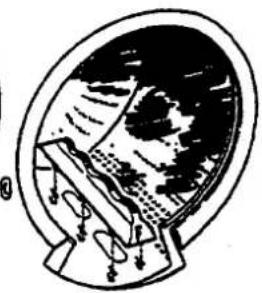
natural_image
Illustration of a stylized globe inside an oval frame, showing continents and oceans (no text or symbols)text_image
Diagram showing a mechanical or electrical setup with labeled component ①, likely illustrating a lever mechanism or tool path.
Stängt
④
natural_image
Hand holding a mechanical component with a numbered label (3), no visible text or symbols on the main subject.natural_image
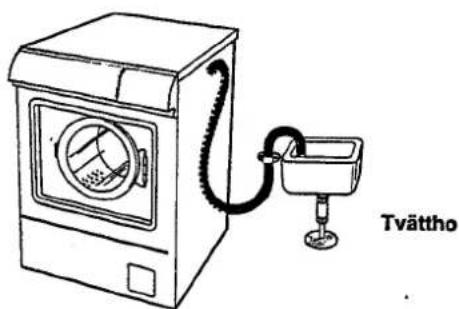
Simple line drawing of a mechanical device connected to a box, with no text or symbols present.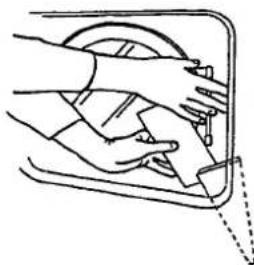
natural_image
Line drawing of hands cleaning a window with a tool, no text or symbols presentJustera fötterna
natural_image
Line drawing of a washing machine with a stand and hose, labeled 500–900 mm (no text or symbols on the device itself)