EHGL30CN - Built-in oven AEG-ELECTROLUX - Free user manual and instructions
Find the device manual for free EHGL30CN AEG-ELECTROLUX in PDF.


| Product type | Built-in oven |
| Brand | AEG-ELECTROLUX |
| Model | EHGL30CN |
| Dimensions (W x H x D) | 596 x 594 x 568 mm |
| Net weight | 35 kg |
| Power supply | 230 V / 50 Hz |
| Maximum power | 3650 W |
| Oven capacity | 71 litres |
| Number of functions | 9 cooking modes |
| Cooking modes | Fan-forced, Natural convection, Grill, Ventilated grill, Bottom heat, Top heat, Defrost, Gentle cooking, Keep warm |
| Cleaning type | Pyrolytic |
| Removable door | Yes, removable for cleaning |
| Interior lighting | Halogen lamp |
| Child safety | Button lock |
| Automatic shut-off | Yes, after 12 hours |
| Repairability index | 7.0/10 |
| Availability of spare parts | Yes, via after-sales service |
| Warranty | 2 years |
| Energy class | A+ |
Frequently Asked Questions - EHGL30CN AEG-ELECTROLUX
User questions about EHGL30CN AEG-ELECTROLUX
0 question about this device. Answer the ones you know or ask your own.
Ask a new question about this device
Download the instructions for your Built-in oven in PDF format for free! Find your manual EHGL30CN - AEG-ELECTROLUX and take your electronic device back in hand. On this page are published all the documents necessary for the use of your device. EHGL30CN by AEG-ELECTROLUX.
USER MANUAL EHGL30CN AEG-ELECTROLUX
natural_image
Abstract geometric composition with three overlapping white circles on a gray background (no text or symbols)SAFETY INFORMATION
Before the installation and use of the appliance, carefully read the supplied instructions. The manufacturer is not responsible if an incorrect installation and use causes injuries and damages. Always keep the instructions with the appliance for future reference.
CHILDREN AND VULNERABLE PEOPLE SAFETY

WARNING!
Risk of suffocation, injury or permanent disability.
- This appliance can be used by children aged from 8 years and above and persons with reduced physical, sensory or mental capabilities or lack of experience and knowledge if they are supervised by an adult or a person who is responsible for their safety.
- Do not let children play with the appliance.
- Keep all packaging away from children.
- Keep children and pets away from the appliance when it operates or when it cools down. Accessible parts are hot.
- If the appliance has a child safety device, we recommend that you activate it.
- Cleaning and user maintenance shall not be made by children without supervision.
GENERAL SAFETY
- Internally the appliance becomes hot when in operation. Do not touch the heating elements that are in the appliance. Always use oven gloves to remove or put in accessories or ovenware.
- Do not use a steam cleaner to clean the appliance.
-
Before maintenance cut the power supply.
-
Do not use harsh abrasive cleaners or sharp metal scrapers to clean the glass door since they can scratch the surface, which may result in shattering of the glass.
- To remove the shelf supports first pull the front of the shelf support and then the rear end away from the side walls. Install the shelf supports in the opposite sequence.

SAFETY INSTRUCTIONS
INSTALLATION

WARNING!
Only a qualified person must install this appliance.
- Remove all the packaging.
- Do not install or use a damaged appliance.
- Obey the installation instruction supplied with the appliance.
- Always be careful when you move the appliance because it is heavy. Always wear safety gloves.
- Do not pull the appliance by the handle.
- The kitchen cabinet and the recess must have suitable dimensions.
- Keep the minimum distance from the other appliances and units.
- Make sure that the appliance is installed below and adjacent safe structures.
- Parts of the appliance carry current. Close the appliance with furniture to prevent touching the dangerous parts.
- The sides of the appliance must stay adjacent to appliances or to units with the same height.
Electrical connection

WARNING!
Risk of fire and electrical shock.
- All electrical connections should be made by a qualified electrician.
- The appliance must be earthed.
- Make sure that the electrical information on the rating plate agrees with the power supply. If not, contact an electrician.
-
Always use a correctly installed shock-proof socket.
-
Do not use multi-plug adapters and extension cables.
- Make sure not to cause damage to the mains plug and to the mains cable. Contact the Service or an electrician to change a damaged mains cable.
- Do not let mains cables to come in touch with the appliance door, specially when the door is hot.
- The shock protection of live and insulated parts must be fastened in such a way that it cannot be removed without tools.
- Connect the mains plug to the mains socket only at the end of the installation. Make sure that there is access to the mains plug after the installation.
- If the mains socket is loose, do not connect the mains plug.
- Do not pull the mains cable to disconnect the appliance. Always pull the mains plug.
- Use only correct isolation devices: line protecting cut-outs, fuses (screw type fuses removed from the holder), earth leakage trips and contactors.
- The electrical installation must have an isolation device which lets you disconnect the appliance from the mains at all poles. The isolation device must have a contact opening width of minimum 3 mm.
USE

WARNING!
Risk of injury, burns or electric shock or explosion.
- Use this appliance in a household environment.
- Do not change the specification of this appliance.
- Make sure that the ventilation openings are not blocked.
- Do not let the appliance stay unattended during operation.
- Deactivate the appliance after each use.
- Be careful, when you open the appliance door while the appliance is in operation. Hot air can release.
- Do not operate the appliance with wet hands or when it has contact with water.
- Do not apply pressure on the open door.
- Do not use the appliance as a work surface or as a storage surface.
- Always keep the appliance door closed when the appliance is in operation.
- Open the appliance door carefully. The use of ingredients with alcohol can cause a mixture of alcohol and air.
- Do not let sparks or open flames to come in contact with the appliance when you open the door.
- Do not put flammable products or items that are wet with flammable products in, near or on the appliance.

WARNING!
Risk of damage to the appliance.
- To prevent damage or discoloration to the enamel:
- do not put ovenware or other objects in the appliance directly on the bottom.
– do not put aluminium foil directly on the bottom of the appliance.
– do not put water directly into the hot appliance.
– do not keep moist dishes and food in the appliance after you finish the cooking.
– be careful when you remove or install the accessories. - Discoloration of the enamel has no effect on the performance of the appliance. It is not a defect in the sense of the warranty law.
- Use a deep pan for moist cakes. Fruit juices cause stains that can be permanent.
CARE AND CLEANING

WARNING!
Risk of injury, fire or damage to the appliance.
- Before maintenance, deactivate the appliance and disconnect the mains plug from the mains socket.
- Make sure the appliance is cold. There is the risk that the glass panels can break.
- Replace immediately the door glass panels when they are damaged. Contact the Service.
- Be careful when you remove the door from the appliance. The door is heavy!
- Clean regularly the appliance to prevent the deterioration of the surface material.
- Remaining fat or food in the appliance can cause fire.
- Clean the appliance with a moist soft cloth. Only use neutral detergents. Do not use abrasive products, abrasive cleaning pads, solvents or metal objects.
- If you use an oven spray, obey the safety instructions on the packaging.
- Do not clean the catalytic enamel (if applicable) with any kind of detergent.
INTERNAL LIGHT
- The type of light bulb or halogen lamp used for this appliance, is only for household appliances. Do not use it for house lighting.

WARNING!
Risk of electrical shock.
- Before replacing the lamp, disconnect the appliance from the power supply.
- Only use lamps with the same specifications.
DISPOSAL

WARNING!
Risk of injury or suffocation.
- Disconnect the appliance from the mains supply.
- Cut off the mains cable and discard it.
- Remove the door catch to prevent children and pets to get closed in the appliance.
- Dispose of the appliance at any shop that sells new appliances or at the official SENS collection point. You can find the
list of the official SENS collection points at www.sens.ch.
PRODUCT DESCRIPTION
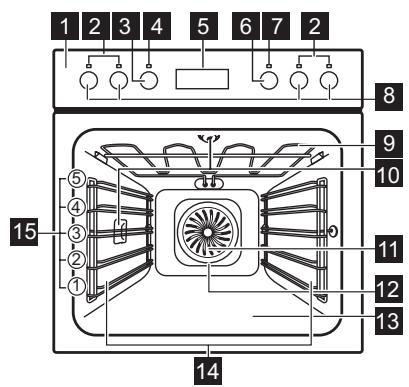
1 Control panel
2 Lamps / symbols of the cooking zones
3 Knob for the oven functions
4 Power lamp / symbol
5 Electronic programmer
6 Knob for the temperature
7 Temperature lamp / symbol / indicator
8 Knobs for the cooking zones
9 Heating element
10 Lamp
11 Fan
12 Rear wall heating element
13 Bottom heat
14 Shelf support, removable
15 Shelf positions
ACCESSORIES
natural_image
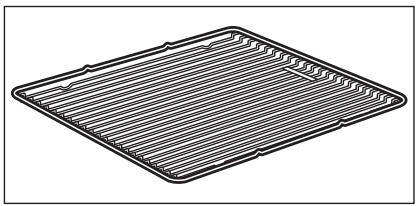
Line drawing of a rectangular tray with horizontal ribbed pattern (no text or symbols)Wire shelf
For cookware, cake tins, roasts.
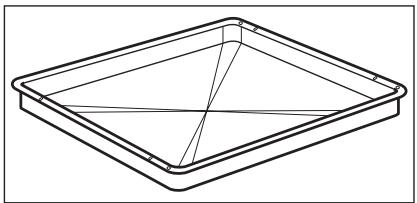
natural_image
Line drawing of a square tray with internal grid lines (no text or symbols)Baking tray
For cakes and biscuits.
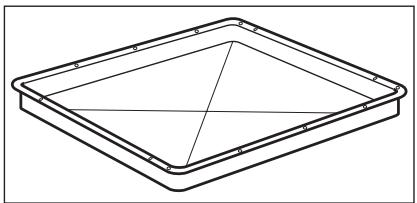
natural_image
Line drawing of a square tray with internal grid lines (no text or symbols)Grill- / Roasting pan
To bake and roast or as a pan to collect fat.
BEFORE FIRST USE

WARNING!
Refer to the Safety chapters.
INITIAL CLEANING
- Remove all parts from the appliance.
- Clean the appliance before first use.

Refer to chapter "Care and Cleaning".
SETTING THE TIME

You must set the time before you operate the appliance.
When you connect the appliance to the electrical supply the indicator for the Time of Day function flashes.
Press the + or - button to set the correct time.
DAILY USE

WARNING!
Refer to the Safety chapters.
To use the appliance, press the control knob. The control knob comes out.
ACTIVATING AND DEACTIVATING THE APPLIANCE
- Turn the control knob for the oven functions to select an oven function.
- Turn the control knob for the temperature to select a temperature.
After approximately five seconds, the flashing stops and the display shows the time of day you set.

Useful information:
- To change the time, press the Selection button again and again until the indicator for the Time of Day function flashes. You must not set the Duration I→I or End →|) function at the same time.
- In case of a power cut up to 1 hour, the time of day is shown and the indicator for the Time of Day function flashes. Make sure that the time is correct and press the Selection button to stop the flashing.
-
In case of a power cut longer than 1 hour, you must set the time again.
-
To deactivate the appliance turn the control knobs for the oven functions and temperature to off position.

Knob symbol, indicator or lamp (depends on the model - refer to the appliance overview):
- The indicator comes on when the oven heats up.
- The lamp comes on when the appliance operates.
- The symbol shows whether the knob controls one of the cooking zones, the oven functions or the temperature.
OVEN FUNCTIONS
| Oven function | Application | |
 | Light | To activate the lamp without a cooking function. |
 | True Fan Cooking | To bake on up to 3 oven levels at the same time and to dry food. Set the oven temperatures 20 - 40 °C lower than when using Conventional Cook-ing. |
| Oven function | Application | |
 | Pizza Setting | To bake food on one shelf position for a more in-tensive browning and a crispy bottom. Set the temperature 20 - 40 °C lower than for Convention-al Cooking. |
 | Conventional Cooking | To bake and roast food on one shelf position. |
 | Bottom Heat | To bake cakes with crispy bottom and to preserve food. |
 | Defrost | To defrost frozen food. |
 | Grilling | To grill flat food and to toast bread. |
 | Fast Grilling | To grill flat food in large quantities and to toast bread. |
 | Turbo Grilling | To roast larger meat joints or poultry with bones on one shelf position. Also to make gratins and to brown. |
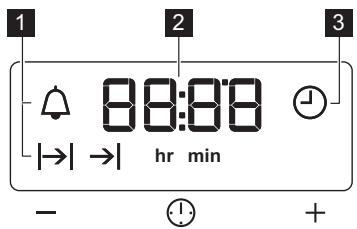
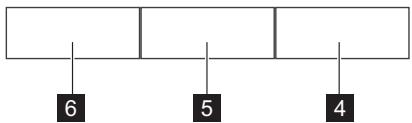
ELECTRONIC PROGRAMMER
flowchart
graph TD
    A[" "] --> B["6"]
    A --> C["5"]
    A --> D["4"]
1 Function indicators
2 Time display
3 Function indicator
4 Button +
5 Selection button
6 Button -

If you do not use the appliance for 3 minutes, the brightness of the display decreases to lower the power consumption. When you press a button, the display goes back to the active mode.
COOKING ZONES

You can operate the hob with the control knobs for the cooking zones. Refer to the user manual for hob.
HOB COOKING ZONES

The cooking zone lamps (refer to the chapter "Product description") show which zone you set.
| Control knob | Function |
| 0 | Off position |
| Keep warm setting | |
| 1 - 9 | Heat settings(1 = lowest heat setting, 9 = highest heat setting) |
| ◎ | Double zone switch |
Operating the hob:
- Turn the knob to a necessary heat setting.
- To complete the cooking process, turn the knob to the off position.
USING THE DOUBLE ZONE

CAUTION!
To activate the double zone, turn the knob clockwise. Do not turn it through the stop position.
- Turn the knob clockwise to position 9.
- Turn the knob slowly to the symbol Ⓞ until you can hear a click.
The two cooking zones are on. - To set the necessary heat setting refer to "Heat settings".
CLOCK FUNCTIONS
| Clock function | Application | |
| I | Duration | To set how long the appliance must operate. |
| I | End | To set when the appliance must be deactivated. |
| Minute Minder | To set a countdown time. An acoustic signal sounds after the time period is completed.This function has no effect on the operation of the appliance. | |
| Time of day | To set, change or check the time of day. | |

You can use Duration I→I and End →I at the same time to set the time when the appliance must be activated and then deactivated. First set Duration I→I, then End →I.
SETTING THE CLOCK FUNCTIONS
- For Duration | | and End | , set an oven function and temperature. This is not necessary for the Minute Minder ☐.
- Press the Selection button again and again until the indicator for the necessary clock function flashes.
- Press + or - to set the time for the necessary clock function.
The display shows the indicator for the clock function you set. When the set
time ends, the indicator flashes and an acoustic signal sounds for two minutes.

With the Duration and End functions, the appliance deactivates automatically.
-
Press a button to stop the signal.
-
Turn the knob for the oven functions and the knob for the temperature to the off position.
CANCELLING THE CLOCK FUNCTIONS
- Press the Selection button again and again until the necessary function indicator flashes.
- Press and hold the button -. The clock function goes out after some seconds.
USING THE ACCESSORIES

WARNING!
Refer to the Safety chapters.
INSERTING THE ACCESSORIES
natural_image
Technical line drawing of a mechanical bracket assembly (no text or symbols)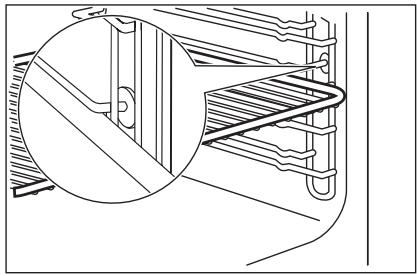
natural_image
Technical line drawing of a mechanical assembly with a magnified inset showing detail (no text or symbols)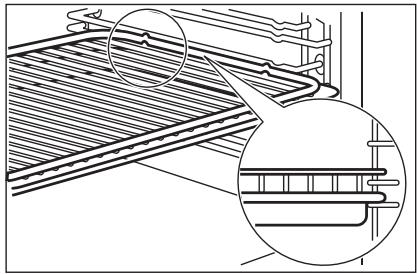
natural_image
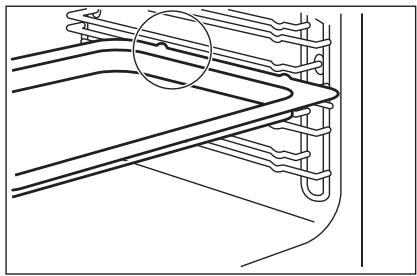
Technical line drawing of a structural panel assembly with two magnified views (no text or symbols)- All accessories have small indentations at the top of the right and left side to increase safety. The indentations are also anti-tip devices.
Baking tray:
Push the baking tray between the guide bars of the shelf support.
Wire shelf:
Push the shelf between the guide bars of the shelf support and make sure that the feet point down.
Wire shelf and baking tray together:
Push the baking try between the guide bars of the shelf support and the wire shelf on the guide bars above.
- The high rim around the shelf is a device which prevents cookware from slipping.
ADDITIONAL FUNCTIONS
COOLING FAN
When the appliance operates, the cooling fan activates automatically to keep the sur-
faces of the appliance cool. If you deactivate the appliance, the cooling fan can continue to operate until the appliance cools down.
HELPFUL HINTS AND TIPS
For build - under ovens:
EXAMPLES OF COOKING
APPLICATIONS FOR HOB
The data in the table is for guidance only.
| Heat setting | Use to: | Time (min) | Hints |
| 1 - 2 | Hollandaise sauce, melt: butter, chocolate, gelatine | 5 - 25 | Mix occasionally |
| 1 - 2 | Solidify: fluffy omelettes, baked eggs | 10 - 40 | Cook with a lid on |
| 2 - 3 | Simmer rice and milkbased dishes, heating up ready-cooked meals | 25 - 50 | Add at least twice as much liquid as rice, stir milk dishes part way through |
| 3 - 4 | Steam vegetables, fish, meat | 20 - 45 | Add a few tablespoons of liquid |
| 4 - 5 | Steam potatoes | 20 - 60 | Use max. 1 / 4 l water for 750 g of potatoes |
| 4 - 5 | Cook larger quantities of food, stews and soups | 60 - 150 | Up to 3 l liquid plus ingredients |
| 6 - 7 | Gentle fry: escalope, veal cordon bleu, cutlets, rissoles, sausages, liver, roux, eggs, pancakes, doughnuts | as required | Turn halfway through |
| 7 - 8 | Heavy fry, hash browns, loin steaks, steaks | 5 - 15 | Turn halfway through |
| 9 | Boil large quantities of water, cook pasta, sear meat (goulash, pot roast), deep fry chips |

The temperature and baking times in the tables are guidelines only.
They depend on the recipes, quality and quantity of the ingredients used.
BAKING
General instructions
- Your new appliance may bake or roast differently to the appliance you had before. Adapt your usual settings (temperature, cooking times) and shelf positions to the values in the tables.
- With longer baking times, the appliance can be switched off about 10 minutes
before the end of baking time, to use the residual heat.
When you use frozen food, the trays in the appliance can twist during baking. When the trays get cold again, the distortion will be gone.
How to use the Baking Tables
- We recommend to use the lower temperature the first time.
- If you cannot find the settings for a special recipe, look for the one that is almost the same.
- Baking time can be extended by 10 - 15 minutes, if you bake cakes on more than one level.
- Cakes and pastries at different heights do not always brown equally at first. If this occurs, do not change the temperature setting. The differences equalize during the baking procedure.
- Unless otherwise stated, the values in the tables assume that the appliance is cold when the cooking starts.
TIPS ON BAKING
| Baking results | Possible cause | Remedy |
| The bottom of the cake is not browned sufficiently. | The shelf position is incorrect. | Put the cake on a lower shelf. |
| The cake sinks and becomes soggy, lumpy or streaky. | The oven temperature is too high. | The next time you bake, set a slightly lower oven temperature. |
| The cake sinks and becomes soggy, lumpy or streaky. | The baking time is too short. | Set a longer baking time. You cannot decrease baking times by setting higher temperatures. |
| The cake sinks and becomes soggy, lumpy or streaky. | There is too much liquid in the mixture. | Use less liquid. Be careful with mixing times, especially if you use a mixing machine. |
| The cake is too dry. | The oven temperature is too low. | The next time you bake, set a higher oven temperature. |
| The cake is too dry. | The baking time is too long. | The next time you bake, set a shorter baking time. |
| The cake browns unevenly. | The oven temperature is too high and the baking time is too short. | Set a lower oven temperature and a longer baking time. |
| The cake browns unevenly. | The mixture is unevenly distributed. | Spread the mixture evenly on the baking tray. |
| The cake is not ready in the baking time given. | The oven temperature is too low. | The next time you bake, set a slightly higher oven temperature. |
BAKING ON ONE LEVEL:
1) Preheat the oven.
Baking in tins
| Type of baking | Oven function | Shelf position | Temperature (°C) | Time (min) |
| Ring cake or brio-che | True Fan Cooking | 1 | 150 - 160 | 50 - 70 |
| Madeira cake / fruit cakes | True Fan Cooking | 1 | 140 - 160 | 70 - 90 |
| Fatless sponge cake / Fatless sponge cake | True Fan Cooking | 2 | 140 - 150 | 35 - 50 |
| Fatless sponge cake / Fatless sponge cake | Conventional Cooking | 2 | 160 | 35 - 50 |
| Flan base - short pastry | True Fan Cooking | 2 | 170 - 180 1) | 10 - 25 |
| Flan base - sponge mixture | True Fan Cooking | 2 | 150 - 170 | 20 - 25 |
| Apple pie / Apple pie (2 tins ∅20 cm, diagonally off set) | True Fan Cooking | 2 | 160 | 60 - 90 |
| Apple pie / Apple pie (2 tins ∅20 cm, diagonally off set) | Conventional Cooking | 1 | 180 | 70 - 90 |
| Cheesecake | Conventional Cooking | 1 | 170 - 190 | 60 - 90 |
1) Preheat the oven.
Cakes / pastries / breads on baking trays
2) Use a deep pan.
| Type of baking | Oven function | Shelf position | Temperature (°C) | Time (min) |
| Plaited bread / bread crown | Conventional Cooking | 3 | 170 - 190 | 30 - 40 |
| Christmas stolen | Conventional Cooking | 2 | 160 - 180 1) | 50 - 70 |
| Bread (rye bread):1. First part of baking process.2. Second part of baking process. | Conventional Cooking | 1 | 1. 230 1)2. 160 - 180 | 1. 202. 30 - 60 |
| Cream puffs / eclairs | Conventional Cooking | 3 | 190 - 210 1) | 20 - 35 |
| Swiss roll | Conventional Cooking | 3 | 180 - 200 1) | 10 - 20 |
| Cake with crumble topping (dry) | True Fan Cooking | 3 | 150 - 160 | 20 - 40 |
| Buttered almond cake / sugar cakes | Conventional Cooking | 3 | 190 - 210 1) | 20 - 30 |
| Fruit flans (made with yeast dough / sponge mixture) 2) | True Fan Cooking | 3 | 150 | 35 - 55 |
| Fruit flans (made with yeast dough / sponge mixture) 2) | Conventional Cooking | 3 | 170 | 35 - 55 |
| Fruit flans made with short pastry | True Fan Cooking | 3 | 160 - 170 | 40 - 80 |
| Yeast cakes with delicate toppings (e.g, quark, cream, custard) | Conventional Cooking | 3 | 160 - 180 1) | 40 - 80 |
Biscuits
| Type of baking | Oven function | Shelf position | Temperature (°C) | Time (min) |
| Short pastry biscuits | True Fan Cooking | 3 | 150 - 160 | 10 - 20 |
| Short bread / Short bread / Pastry Stripes | True Fan Cooking | 3 | 140 | 20 - 35 |
| Short bread / Short bread / Pastry Stripes | Conventional Cooking | 3 | 160 1) | 20 - 30 |
| Biscuits made with sponge mixture | True Fan Cooking | 3 | 150 - 160 | 15 - 20 |
| Pastries made with egg white, merun-gues | True Fan Cooking | 3 | 80 - 100 | 120 - 150 |
| Macaroons | True Fan Cooking | 3 | 100 - 120 | 30 - 50 |
| Biscuits made with yeast dough | True Fan Cooking | 3 | 150 - 160 | 20 - 40 |
| Puff pastries | True Fan Cooking | 3 | 170 - 180 1) | 20 - 30 |
| Rolls | True Fan Cooking | 3 | 160 1) | 10 - 25 |
| Rolls | Conventional Cooking | 3 | 190 - 210 1) | 10 - 25 |
| Small cakes / Small cakes (20 per tray) | True Fan Cooking | 3 | 150 1) | 20 - 35 |
| Small cakes / Small cakes (20 per tray) | Conventional Cooking | 3 | 170 1) | 20 - 30 |
1) Preheat the oven.
Bakes and gratins
| Dish | Oven function | Shelf position | Temperature (°C) | Time (min) |
| Pasta bake | Conventional Cooking | 1 | 180 - 200 | 45 - 60 |
| Lasagne | Conventional Cooking | 1 | 180 - 200 | 25 - 40 |
| Vegetables au gratin 1) | Turbo Grilling or True Fan Cooking | 1 | 160 - 170 | 15 - 30 |
| Baguettes topped with melted cheese | Turbo Grilling or True Fan Cooking | 1 | 160 - 170 | 15 - 30 |
| Sweet bakes | Conventional Cooking | 1 | 180 - 200 | 40 - 60 |
| Fish bakes | Conventional Cooking | 1 | 180 - 200 | 30 - 60 |
| Stuffed vegetables | Turbo Grilling or True Fan Cooking | 1 | 160 - 170 | 30 - 60 |
1) Preheat the oven
MULTILEVELED BAKING
Cakes / pastries / breads on baking trays
| Type of baking | True Fan Cooking | Temperature (°C) | Time (min) | |
| Shelf position | ||||
| 2 levels | 3 levels | |||
| Cream puffs / Eclairs | 1 / 4 | --- | 160 - 180 1) | 25 - 45 |
| Dry streusel cake | 1 / 4 | --- | 150 - 160 | 30 - 45 |
1) Preheat the oven.
1) Preheat the oven.
Biscuits / small cakes / small cakes / pastries / rolls
| Type of baking | True Fan Cooking | Temperature (°C) | Time (min) | |
| Shelf position | ||||
| 2 levels | 3 levels | |||
| Short pastry biscuits | 1 / 4 | 1 / 3 / 5 | 150 - 160 | 20 - 40 |
| Short bread / Short bread / Pastry Stripes | 1 / 4 | 1 / 3 / 5 | 140 | 25 - 50 |
| Biscuits made with sponge mix-ture | 1 / 4 | --- | 160 - 170 | 25 - 40 |
| Biscuits made with egg white,meringues | 1 / 4 | --- | 80 - 100 | 130 - 170 |
| Macaroons | 1 / 4 | --- | 100 - 120 | 40 - 80 |
| Biscuits made with yeast dough | 1 / 4 | --- | 160 - 170 | 30 - 60 |
| Puff pastries | 1 / 4 | --- | 170 - 180 1) | 30 - 50 |
| Rolls | 1 / 4 | --- | 180 | 30 - 55 |
| Small cakes / Small cakes (20 per tray) | 1 / 4 | --- | 150 1) | 25 - 40 |
PIZZA SETTING
| Type of baking | Shelf position | Temperature (°C) | Time (min) |
| Pizza (thin crust) | 2 | 200 - 2301) 2) | 15 - 20 |
| Pizza (with a lot of topping) | 2 | 180 - 200 | 20 - 30 |
| Tarts | 1 | 180 - 200 | 40 - 55 |
| Spinach flan | 1 | 160 - 180 | 45 - 60 |
| Quiche Lorraine | 1 | 170 - 190 | 45 - 55 |
| Swiss Flan | 1 | 170 - 190 | 45 - 55 |
| Apple cake, covered | 1 | 150 - 170 | 50 - 60 |
| Vegetable pie | 1 | 160 - 180 | 50 - 60 |
| Unleavened bread | 2 | 230 - 2501) | 10 - 20 |
| Puff pastry flan | 2 | 160 - 1801) | 45 - 55 |
| Flammekuchen (Pizza-like dish from Alsace) | 2 | 230 - 2501) | 12 - 20 |
| Piroggen (Russian version of calzone) | 2 | 180 - 2001) | 15 - 25 |
1) Preheat the oven.
2) Use a deep pan.
ROASTING
Roasting dishes
- Use heat-resistant ovenware to roast (refer to the instructions of the manufacturer).
- You can roast large roasting joints directly in the deep pan (if present) or on the wire shelf above the deep pan.
- Roast lean meats in the roasting tin with the lid. This keeps the meat more succulent.
-
All types of meat that can be browned or have crackling can be roasted in the roasting tin without the lid.
-
We recommend that you cook meat and fish weighing 1 kg and above in the appliance.
- To prevent the meat juices or fat from burning onto the pan, put some liquid into the deep pan.
- If necessary, turn the roast (after 1 / 2 - 2 / 3 of the cooking time).
- Baste large roasts and poultry with their juices several times during roasting. This gives better roasting results.
- You can deactivate the appliance approximately 10 minutes before the end of the roasting time, and use the residual heat.
ROASTING WITH TURBO GRILLING
Beef
| Type of meat | Quantity | Oven function | Shelf position | Temperature (°C) | Time (min) |
| Pot roast | 1 - 1.5 kg | Conventional Cooking | 1 | 230 | 120 - 150 |
| Roast beef or fillet: rare | per cm of thickness | Turbo Grilling | 1 | 190 - 200 1) | 5 - 6 |
| Roast beef or fillet: medium | per cm of thickness | Turbo Grilling | 1 | 180 - 190 1) | 6 - 8 |
| Roast beef or fillet: well done | per cm of thickness | Turbo Grilling | 1 | 170 - 180 1) | 8 - 10 |
1) Preheat the oven
Pork
| Type of meat | Quantity | Oven function | Shelf position | Temperature (°C) | Time (min) |
| Shoulder, neck, ham joint | 1 - 1.5 kg | Turbo Grill-ing | 1 | 160 - 180 | 90 - 120 |
| Chop, spare rib | 1 - 1.5 kg | Turbo Grill-ing | 1 | 170 - 180 | 60 - 90 |
| Meat loaf | 750 g - 1 kg | Turbo Grill-ing | 1 | 160 - 170 | 50 - 60 |
| Porkknuckle (precooked) | 750 g - 1 kg | Turbo Grill-ing | 1 | 150 - 170 | 90 - 120 |
Veal
| Type of meat | Quantity | Oven function | Shelf position | Temperature (°C) | Time (min) |
| Roast veal | 1 kg | Turbo Grilling | 1 | 160 - 180 | 90 - 120 |
| Knuckle of veal | 1.5 - 2 kg | Turbo Grilling | 1 | 160 - 180 | 120 - 150 |
Lamb
| Type of meat | Quantity | Oven function | Shelf position | Temperature (°C) | Time (min) |
| Leg of lamb, roast lamb | 1 - 1.5 kg | Turbo Grill-ing | 1 | 150 - 170 | 100 - 120 |
| Saddle of lamb | 1 - 1.5 kg | Turbo Grill-ing | 1 | 160 - 180 | 40 - 60 |
Game
| Type of meat | Quantity | Oven function | Shelf position | Temperature (°C) | Time (min) |
| Saddle of hare, leg of hare | up to 1 kg | Conventional Cooking | 1 | 230 1) | 30 - 40 |
| Saddle of venison | 1.5 - 2 kg | Conventional Cooking | 1 | 210 - 220 | 35 - 40 |
| Haunch of venison | 1.5 - 2 kg | Conventional Cooking | 1 | 180 - 200 | 60 - 90 |
1) Preheat the oven
Poultry
| Type of meat | Quantity | Oven function | Shelf position | Temperature (°C) | Time (min) |
| Poultry portions | 200 - 250 g each | Turbo Grill-ing | 1 | 200 - 220 | 30 - 50 |
| Half chicken | 400 - 500 g each | Turbo Grill-ing | 1 | 190 - 210 | 35 - 50 |
| Chicken, poulard | 1 - 1.5 kg | Turbo Grill-ing | 1 | 190 - 210 | 50 - 70 |
| Duck | 1.5 - 2 kg | Turbo Grill-ing | 1 | 180 - 200 | 80 - 100 |
| Goose | 3.5 - 5 kg | Turbo Grill-ing | 1 | 160 - 180 | 120 - 180 |
| Turkey | 2.5 - 3.5 kg | Turbo Grilling | 1 | 160 - 180 | 120 - 150 |
| Turkey | 4 - 6 kg | Turbo Grilling | 1 | 140 - 160 | 150 - 240 |
Fish (steamed)
| Type of meat | Quantity | Oven function | Shelf position | Temperature (°C) | Time (min) |
| Whole fish | 1 - 1.5 kg | Conventional Cooking | 1 | 210 - 220 | 40 - 60 |
GRILLING
- Always grill with the maximum temperature setting.
- Set the shelf in the shelf position as recommended in the grilling table.
-
Always set the pan to collect the fat into the first shelf position.
-
Grill only flat pieces of meat or fish.
- Always preheat the empty oven with the grill functions for 5 minutes.

CAUTION!
Always grill with the oven door closed.
Grilling
| Food to be grilled | Shelf position | Temperature (°C) | Time (min) | |
| 1st side | 2nd side | |||
| Roast beef | 2 | 210 - 230 | 30 - 40 | 30 - 40 |
| Filet of beef | 3 | 230 | 20 - 30 | 20 - 30 |
| Back of pork | 2 | 210 - 230 | 30 - 40 | 30 - 40 |
| Back of veal | 2 | 210 - 230 | 30 - 40 | 30 - 40 |
| Back of lamb | 3 | 210 - 230 | 25 - 35 | 20 - 25 |
| Whole Fish, 500 - 1000g | 3 / 4 | 210 - 230 | 15 - 30 | 15 - 30 |
Fast Grilling
| Food to be grilled | Shelf position | Time (min) | |
| 1st side | 2nd side | ||
| Burgers / Burgers | 4 | 8 - 10 | 6 - 8 |
| Pork fillet | 4 | 10 - 12 | 6 - 10 |
| Sausages | 4 | 10 - 12 | 6 - 8 |
| Fillet steaks, veal steaks | 4 | 7 - 10 | 6 - 8 |
| Toast / Toast 1) | 5 | 1 - 3 | 1 - 3 |
| Toast with topping | 4 | 6 - 8 | --- |
1) Preheat the oven
CONVENIENCE FOOD
True Fan Cooking
| Convenience food | Shelf position | Temperature (°C) | Time (min) |
| Pizza, frozen | 2 | 200 - 220 | 15 - 25 |
| Pizza American, frozen | 2 | 190 - 210 | 20 - 25 |
| Pizza, chilled | 2 | 210 - 230 | 13 - 25 |
| Pizza Snacks, frozen | 2 | 180 - 200 | 15 - 30 |
| French Fries, thin | 3 | 200 - 220 | 20 - 30 |
| French Fries, thick | 3 | 200 - 220 | 25 - 35 |
| Wedges / Croquettes | 3 | 220 - 230 | 20 - 35 |
| Hash Browns | 3 | 210 - 230 | 20 - 30 |
| Lasagne / Cannello-ni, fresh | 2 | 170 - 190 | 35 - 45 |
| Lasagne / Cannello-ni, frozen | 2 | 160 - 180 | 40 - 60 |
| Oven baked cheese | 3 | 170 - 190 | 20 - 30 |
| Chicken Wings | 2 | 190 - 210 | 20 - 30 |
Frozen Ready Meals
| Food to be cooked | Oven functions | Shelf position | Temperature (°C) | Time (min) |
| Frozen pizza | Conventional Cooking | 3 | as per manufacturer's instructions | as per manufacturer's instructions |
| Chips 1)(300 - 600 g) | Conventional Cooking or Turbo Grilling | 3 | 200 - 220 | as per manufacturer's instructions |
| Baguettes | Conventional Cooking | 3 | as per manufacturer's instructions | as per manufacturer's instructions |
| Fruit flans | Conventional Cooking | 3 | as per manufacturer's instructions | as per manufacturer's instructions |
1) Turn chips 2 or 3 times during cooking
DEFROSTING
Remove the food packaging. Put the food on a plate.
Do not cover it with a bowl or a plate. This can extend the defrost time.
Use the first oven shelf position. The one on the bottom.
| Dish | Weight (g) | Defrosting time (min) | Further de-frosting time (min) | Comment |
| Chicken | 1000 | 100 - 140 | 20 - 30 | Place the chicken on an upturned saucer placed on a large plate Turn halfway through |
| Meat | 1000 | 100 - 140 | 20 - 30 | Turn halfway through |
| Meat | 500 | 90 - 120 | 20 - 30 | Turn halfway through |
| Trout | 150 | 25 - 35 | 10 - 15 | --- |
| Strawberries | 300 | 30 - 40 | 10 - 20 | --- |
| Butter | 250 | 30 - 40 | 10 - 15 | --- |
| Cream | 2 x 200 | 80 - 100 | 10 - 15 | Cream can also be whipped when still slightly frozen in places |
| Gateau | 1400 | 60 | 60 | --- |
| PRESERVING - BOTTOM HEATThings to note:Use only preserve jars of the same dimensions available on the market.Do not use jars with twist-off and bayo-net type lids, or metal tins.Use the first shelf from the bottom for this function.Put no more than six one-litre preserve jars on the baking tray. | Fill the jars up to the same level and close with a clamp.The jars cannot touch each other.Put approximately 1 / 2 litre of water into the baking tray to give sufficient moisture in the oven.When the liquid in the jars starts to simmer (after approx. 35 - 60 minutes with one-litre jars), stop the oven or decrease the temperature to 100 °C (see the table). | |||
Soft fruit
| Preserve | Temperature (°C) | Cooking time un-til simmering (min) | Continue to cook at 100 °C (min) |
| Strawberries, blue-berries, raspberries, ripe gooseberries | 160 - 170 | 35 - 45 | --- |
Stone fruit
| Preserve | Temperature (°C) | Cooking time un-til simmering (min) | Continue to cook at 100 °C (min) |
| Pears, guinces, plums | 160 - 170 | 35 - 45 | 10 - 15 |
Vegetables
| Preserve | Temperature (°C) | Cooking time un-til simmering (min) | Continue to cook at 100 °C (min) |
| Carrots 1) | 160 - 170 | 50 - 60 | 5 - 10 |
| Cucumbers | 160 - 170 | 50 - 60 | --- |
| Mixed pickels | 160 - 170 | 50 - 60 | 5 - 10 |
| Kohlrabi, peas, as-paragus | 160 - 170 | 50 - 60 | 15 - 20 |
1) Leave standing in oven when switched off DRYING - TRUE FAN COOKING
Cover the oven shelves with baking parchment.
For best results: deactivate the appliance after half the time required. Open the appliance door and let the appliance cool down. After that finish the drying process.
Vegetables
| Food to be dried | Shelf position | Temperature (°C) | Time (h) | |
| 1 level | 2 levels | |||
| Beans | 3 | 1 / 4 | 60 - 70 | 6 - 8 |
| Peppers | 3 | 1 / 4 | 60 - 70 | 5 - 6 |
| Vegetables for sour | 3 | 1 / 4 | 60 - 70 | 5 - 6 |
| Mushrooms | 3 | 1 / 4 | 50 - 60 | 6 - 8 |
| Herbs | 3 | 1 / 4 | 40 - 50 | 2 - 3 |
Fruit
| Food to be dried | Shelf position | Temperature (°C) | Time (h) | |
| 1 level | 2 levels | |||
| Plums | 3 | 1 / 4 | 60 - 70 | 8 - 10 |
| Apricots | 3 | 1 / 4 | 60 - 70 | 8 - 10 |
| Apple slices | 3 | 1 / 4 | 60 - 70 | 6 - 8 |
| Pears | 3 | 1 / 4 | 60 - 70 | 6 - 9 |
CARE AND CLEANING

WARNING!
Refer to the Safety chapters.
Notes on cleaning:
- Clean the front of the appliance with a soft cloth with warm water and a cleaning agent.
-
To clean metal surfaces, use a usual cleaning agent.
-
Clean the oven interior after each use. Then you can remove dirt more easily and it does not burn on.
- Clean all oven accessories after each use and let them dry.
- If you have nonstick accessories, do not clean them using aggressive agents, sharp-edged objects or a dishwasher. It
can cause a damage to the nonstick coating.
SHELF SUPPORTS
Removing the shelf supports

natural_image
Line drawing of a hand adjusting a ladder inside a vehicle cabin (no text or symbols)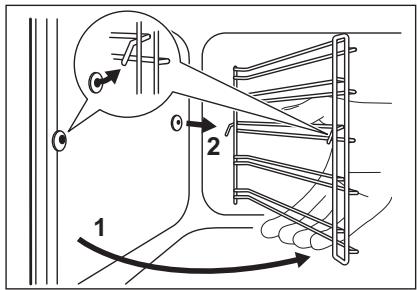
You can remove the shelf supports to clean the side walls.
-
Pull the front of the shelf support away from the side wall.
-
Pull the rear end of the shelf support away from the side wall and remove it.
Installing the shelf supports
Install the shelf supports in the opposite sequence.
OVEN CEILING
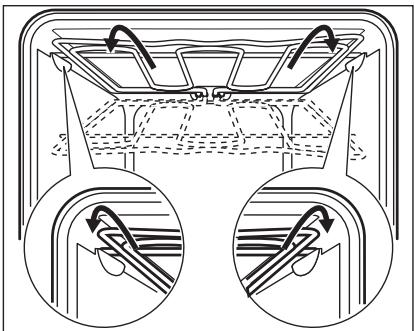
You can fold down the heating element on the oven ceiling to clean the oven ceiling easily.

WARNING!
Deactivate the appliance before you fold down the heating element. Make sure that the appliance is cold. There is a risk of burns.
Folding down the heating element
- Remove the shelf supports.
natural_image
Diagram showing two views of a mechanical component with arrows indicating direction (no text or symbols)- Hold the heating element with two hands at the front.
- Pull it forwards against the spring pressure and out along the supports on the two sides.
- The heating element folds down. You can clean the oven ceiling.
Installing the heating element
- Install the heating element in the opposite sequence.

Install the heating element correctly above the supports on the inner walls of the appliance.
- Install the shelf supports.
REMOVING / INSERTING THE DOOR
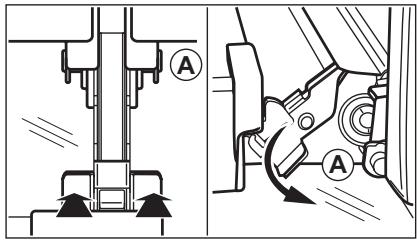
To clean the door remove it.

CAUTION!
Be careful when you remove the door from the appliance. The door is heavy. There is a risk of injury or damage to the appliance.
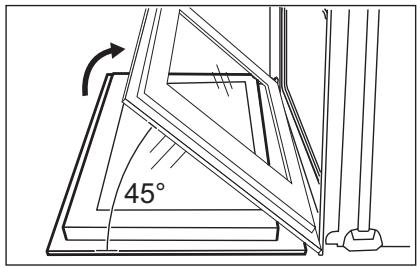
Removing the door
- Open the door as far as it goes.
- Press down the clamping levers (A) on the two door hinges.
- Close the door until it is at an angle of approximately 45^ .
- Hold the door with one hand on each side and pull it away from the appliance at an upwards angle.

Put the door with the outer side down on a soft and level surface to prevent scratches.
Inserting the door
To insert the door do the above steps in the opposite sequence.
LAMP

WARNING!
Danger of electrocution! Disconnect the fuse before you replace the lamp.
The lamp and the lamp glass cover can be hot.
Before you change the lamp:
- Deactivate the appliance.
- Remove the fuses from the fuse box or deactivate the circuit breaker.

CAUTION!
Put a cloth on the bottom of the interior of the appliance. It prevents damage to the lamp glass cover and the cavity.
Always use the same lamp type.
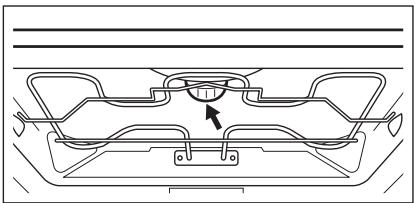
Replacing the top lamp:
- Turn the lamp glass cover counterclockwise to remove it.
natural_image
Technical line drawing of a mechanical component with no visible text or symbols- Clean the glass cover.
- Replace the lamp with a halogen, 230 V, 40 W, 300 °C heat resistant oven lamp.
- Install the glass cover.
Replacing the side lamp:
- Remove the left shelf support to get access to the lamp.
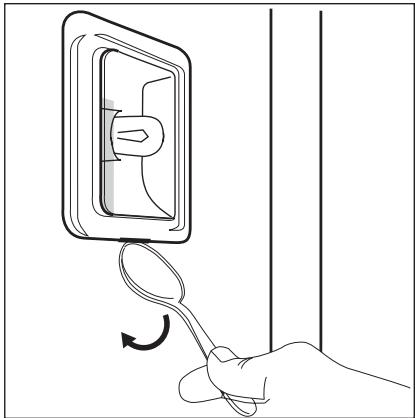
- Use a narrow, blunt object (e.g. a teaspoon) to remove the glass cover. Clean the glass cover.
natural_image
Line drawing of a hand holding a spoon with an arrow indicating rotation (no text or symbols)- Replace the lamp with a halogen, 230 V, 25 W, 300 °C heat resistant oven lamp.
- Install the glass cover.
- Install the shelf support.
WHAT TO DO IF...

WARNING!
Refer to the Safety chapters.
| Problem | Possible cause | Remedy |
| The cooking zone do not operate. | Refer to the user manual for the hob. | |
| The appliance does not heat up. | The appliance is not activated. | Activate the appliance.Refer to the chapter "Daily use". |
| The appliance does not heat up. | The clock is not set. | Set the clock. Refer to "Setting the time". |
| The appliance does not heat up. | The necessary settings are not set. | Make sure that the settings are correct. |
| The appliance does not heat up. | The fuse in the fuse box is released. | Do a check of the fuse. If the fuse is released more than one time, contact a qualified electrician. |
| The lamp does not operate. | The lamp is defective. | Replace the lamp. |
| The display shows 12.00. | There was a power cut. | Set the clock. |
| Steam and condensation settle on the food and in the appliance. | You left the dish in the appliance for too long. | Do not keep the dishes in the appliance for longer than 15 - 20 minutes after the cooking ends. |
| If you cannot find a solution to the problem yourself, contact your dealer or the service centre. | The necessary data for the service centre is on the rating plate. The rating plate is on the front frame of the appliance cavity. | |
We recommend that you write the data here:
Model (Mod.)
Product number (PNC)
INSTALLATION

WARNING!
Refer to the Safety chapters.

The handle profile can be replaced to match the décor of your kitchen. The change must be done by an authorized person. Use only genuine replacement parts.
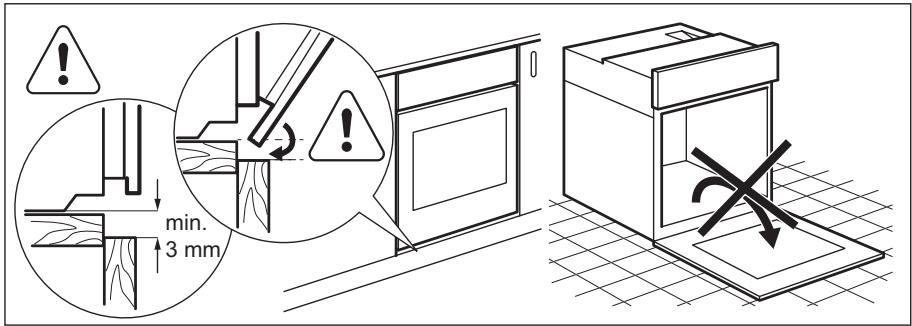

To lift the appliance, do not use the door handle.
INSTALLING THE OVEN UNDER A WORK SURFACE
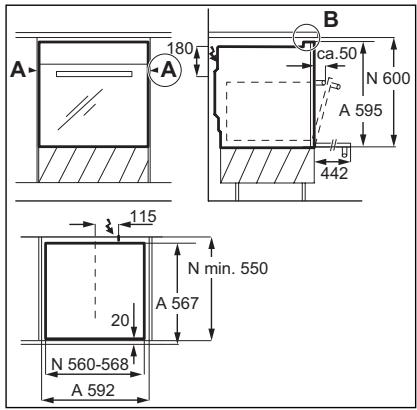

WARNING!
Installation into flammable material must agree with NIN SEV 1000 (Association of Cantonal Fire Insurers) fire protection guidelines and regulations.
A = appliance
N = recess
- Install the hob according to the installation instruction number 374307900/374307901.
-
Before insert the cooker into cabinet's recess make sure to carry out the hot-plate socket and use the correct socket connections. There is no need to use a separate earthing.
-
Use the side handles to hold the oven and slide it flush into the recess.

CAUTION!
Make sure the cable is free when you move the appliance.
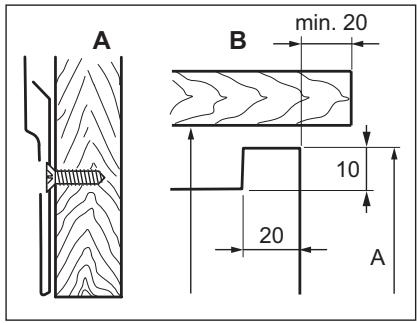
- Use at least 2 screws to fix the oven on both sides (Detail A).

WARNING!
When installing next to a wood-fuelled boiler, a heatproof and heat-insulating plate must be mounted at the height of the appliance and at least 30 cm deep.
ELECTRICAL CONNECTION
Use a power cable of H05VV-F or higher. Connect the appliance to a socket supply line. If there is no socket supply line, the electrical installation must have an isolation device which lets you disconnect the appliance from the power supply. The isolation
device must have a contact opening width of minimum 3 mm (in reference to NIN SEV 1000). The customer must have a socket for the electrical connection that is accessible and outside the coordination room. The length of the connection cable must be approximately 120 cm with lines connected directly to the power supply.


Only a qualified person can connect the appliance to the electricity supply.
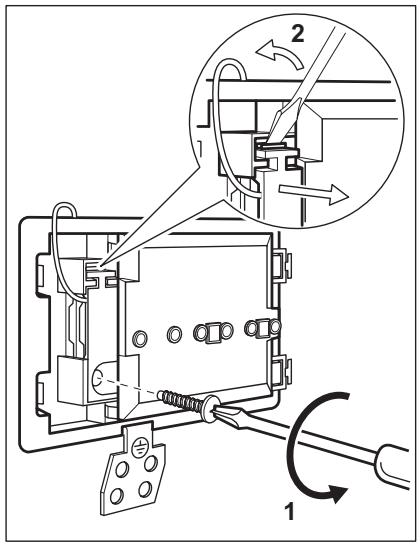
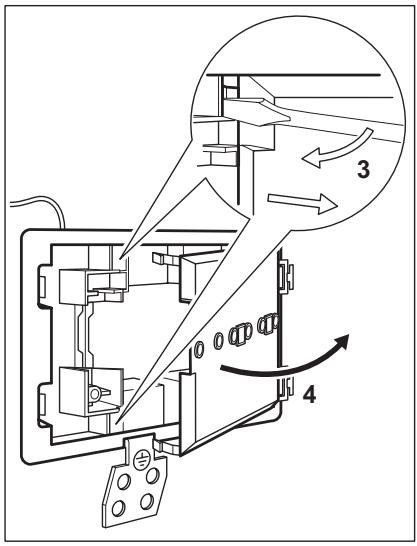
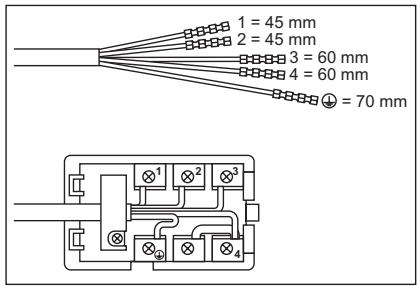
- Do the electrical connections as in the connection illustration.
Connection diagram
Phase definitions: L1, L2, L3 (or R, S, T).
- Secure the cable grip.

WARNING!
If service is required always disconnect the appliance from the power supply.
CH GARANTIE, GARANZIA, GUARANTEE
KUNDENDIENST, SERVICE-CLIENTÈLE, SERVIZIO CLIENTI, CUSTOMER SERVICE CENTRES
| Servicestellen | Points de Service | Servizio dopo vendita | Point of Service |
| 5506 Mägenwil/Zürich Industriestrasse 10 | 3018 Bern Mor-genstrasse 131 | 1028 Prévereng-es Le Trési 6 | 6928 Manno Via Violino 11 |
| 9000 St. Gallen Zürcher-strasse 204e |  | ||
| 4052 Basel St. Jakob-Turm Birsstrasse 320B | |||
| 6020 Emmenbrücke See-talstrasse 11 | |||
| 7000 Chur Comercial-strasse 19 | |||
Ersatzteilverkauf/Points de vente de rechange/Vendita pezzi di ricambio/spare parts service:
5506 Mägenwil, Industriestrasse 10, Tel. 0848 848 111
Fachberatung/Verkauf/Demonstration/Vente/Consulente (cucina)/Vendita
8048 Zürich, Badenerstrasse 587, Tel. 044 405 81 11
Warranty For each product we provide a two-year guarantee from the date of purchase or delivery to the consumer (with a guarantee certificate, invoice or sales receipt serving as proof). The guarantee covers the costs of materials, labour and travel. The guarantee will lapse if the operating instructions and conditions of use are not adhered to, if the product is incorrectly installed, or in the event of damage caused by external influences, force majeure, intervention by third parties or the use of non-genuine components.

natural_image
Abstract geometric composition with three overlapping white circles on a gray background (no text or symbols)- SAFETY INFORMATION
- CHILDREN AND VULNERABLE PEOPLE SAFETY
- WARNING!
- GENERAL SAFETY
- SAFETY INSTRUCTIONS
- INSTALLATION
- Electrical connection
- USE
- CARE AND CLEANING
- INTERNAL LIGHT
- DISPOSAL
- PRODUCT DESCRIPTION
- Wire shelf
- Baking tray
- Grill- / Roasting pan
- BEFORE FIRST USE
- INITIAL CLEANING
- SETTING THE TIME
- DAILY USE
- ACTIVATING AND DEACTIVATING THE APPLIANCE
- Useful information:
- Knob symbol, indicator or lamp (depends on the model - refer to the appliance overview):
- ELECTRONIC PROGRAMMER
- COOKING ZONES
- HOB COOKING ZONES
- Operating the hob:
- USING THE DOUBLE ZONE
- CAUTION!
- SETTING THE CLOCK FUNCTIONS
- CANCELLING THE CLOCK FUNCTIONS
- USING THE ACCESSORIES
- INSERTING THE ACCESSORIES
- Baking tray:
- Wire shelf:
- Wire shelf and baking tray together:
- ADDITIONAL FUNCTIONS
- COOLING FAN
- HELPFUL HINTS AND TIPS
- EXAMPLES OF COOKING
- APPLICATIONS FOR HOB
- BAKING
- General instructions
- How to use the Baking Tables
- BAKING ON ONE LEVEL:
- MULTILEVELED BAKING
- ROASTING
- Roasting dishes
- ROASTING WITH TURBO GRILLING
- GRILLING
- CONVENIENCE FOOD
- DEFROSTING
- Notes on cleaning:
- SHELF SUPPORTS
- Removing the shelf supports
- Installing the shelf supports
- OVEN CEILING
- Folding down the heating element
- Installing the heating element
- REMOVING / INSERTING THE DOOR
- Removing the door
- Inserting the door
- LAMP
- Before you change the lamp:
- Replacing the top lamp:
- Replacing the side lamp:
- WHAT TO DO IF...
- INSTALLING THE OVEN UNDER A WORK SURFACE
- Connection diagram
- CH GARANTIE, GARANZIA, GUARANTEE
- Ersatzteilverkauf/Points de vente de rechange/Vendita pezzi di ricambio/spare parts service:
- Fachberatung/Verkauf/Demonstration/Vente/Consulente (cucina)/Vendita
Brand : AEG-ELECTROLUX
Model : EHGL30CN
Category : Built-in oven