AWS9600GM - Washing machine AEG-ELECTROLUX - Free user manual and instructions
Find the device manual for free AWS9600GM AEG-ELECTROLUX in PDF.


| Brand | AEG-ELECTROLUX |
| Model | AWS9600GM |
| Product type | Front-load washing machine |
| Washing capacity | 9 kg |
| Maximum spin speed | 1600 rpm |
| Energy class | A |
| Water consumption per cycle | 52 L |
| Energy consumption per cycle | 0.8 kWh |
| Noise level (spin) | 75 dB |
| Dimensions (W x D x H) | 600 x 660 x 850 mm |
| Net weight | 75 kg |
| Power supply | 230 V / 50 Hz |
| Wash programs | Cotton, Synthetics, Delicates, Wool, Quick 30 min, Rinse, Spin, Drain |
| Main features | Delayed start, Child lock, Load detection, Anti-crease option |
| Maintenance and cleaning | Regular cleaning of the drain filter and detergent drawer |
| Safety | Automatic stop when door open, spin balancing, anti-overflow protection |
| Spare parts and repairability | Original parts available on the AEG website, 15 years of availability |
| General information | User manual available online, AEG after-sales service |
Frequently Asked Questions - AWS9600GM AEG-ELECTROLUX
User questions about AWS9600GM AEG-ELECTROLUX
0 question about this device. Answer the ones you know or ask your own.
Ask a new question about this device
Download the instructions for your Washing machine in PDF format for free! Find your manual AWS9600GM - AEG-ELECTROLUX and take your electronic device back in hand. On this page are published all the documents necessary for the use of your device. AWS9600GM by AEG-ELECTROLUX.
USER MANUAL AWS9600GM AEG-ELECTROLUX
natural_image
Top-down view of a chocolate slice with orange garnish on a glossy black dessert, no text or symbols visible.IT LIBRETTO DI USO 3
EN USER MANUAL 6
natural_image
Five icon buttons representing shopping, washing machine, gear, recycling bin, and shopping cart (no text or symbols)natural_image
Illustration of a hand holding a small object over a tablet screen with 'Z' label (no text or symbols on the diagram itself) |  |  |  |  |  |  | [100K] |
| A | B | C | D | E | F | G | H |
natural_image
Illustration of hands installing or adjusting a circular component inside a device (no text or symbols visible)
natural_image
Pure electrical circuit lines without any symbolsFOR PERFECT RESULTS
Thank you for choosing this AEG product. We have created it to give you impeccable performance for many years, with innovative technologies that help make life simpler – features you might not find on ordinary appliances. Please spend a few minutes reading to get the very best from it.
ACCESSORIES AND CONSUMABLES
In the AEG webshop, you'll find everything you need to keep all your AEG appliances looking spotless and working perfectly. Along with a wide range of accessories designed and built to the high quality standards you would expect, from specialist cookware to cutlery baskets, from bottle holders to delicate laundry bags...

natural_image
Five icon buttons representing shopping, washing machine, gear, food delivery, and shopping cart (no text or symbols)Visit the webshop at: www.aeg.com/shop
ENVIRONMENT CONCERNS
Recycle the materials with the symbol ☑ Put the packaging in applicable containersto recycle it.
Help protect the environment and human health and to recycle waste of electrical and electronic appliances. Do not dispose appliances marked with the symbol ☒ with the household waste. Return the product to your local recycling facility or contact your municipal office.
CUSTOMER CARE AND SERVICE
We recommend the use of original spare parts.
When contacting Service, ensure that you have the following data available. The information can be found on the rating plate.
Model ____
PNC ____
Serial Number ____
RECOMMENDATIONS AND SUGGESTIONS
- The Instructions for Use apply to several versions of this appliance. Accordingly, you may find descriptions of individual features that do not apply to your specific appliance.
- The manufacturer will not be held liable for any damages resulting from incorrect or improper installation.
- The minimum safety distance between the cooker top and the extractor hood is 650 mm (some models can be installed at a lower height, please refer to the paragraphs on working dimensions and installation).
- Check that the mains voltage corresponds to that indicated on the rating plate fixed to the inside of the hood.
- For Class I appliances, check that the domestic power supply guarantees adequate earthing.
- Connect the extractor to the exhaust flue through a pipe of minimum diameter 120 mm. The route of the flue must be as short as possible.
- Do not connect the extractor hood to exhaust ducts carrying combustion fumes (boilers, fireplaces, etc.).
- If the extractor is used in conjunction with non-electrical appliances (e.g. gas burning appliances), a sufficient degree of aeration must be guaranteed in the room in order to prevent the backflow of exhaust gas. The kitchen must have an opening communicating directly with the open air in order to guarantee the entry of clean air. When the cooker hood is used in conjunction with appliances supplied with energy other than electric, the negative pressure in the room must not exceed 0,04 mbar to prevent fumes being drawn back into the room by the cooker hood.
- If the supply cord is damaged, it must be replaced from the manufacturer or its service agent.
USE
- The extractor hood has been designed exclusively for domestic use to eliminate kitchen smells.
- Never use the hood for purposes other than for which it has been designed.
- Never leave high naked flames under the hood when it is in operation.
- Adjust the flame intensity to direct it onto the
bottom of the pan only, making sure that it does not engulf the sides.
- Deep fat fryers must be continuously monitored during use: overheated oil can burst into flames.
- Do not flambè under the range hood; risk of fire.
- This appliance is not intended for use by persons (including children) with reduced physical, sensory or mental capabilities, or lack of experience and knowledge, unless they have been given supervision or instruction concerning use of the appliance by a person responsible for their safety.
- Children should be supervised to ensure that they do not play with the appliance.
- “CAUTION: Accessible parts may become hot when used with cooking ap-pliances”.
MAINTENANCE
- Switch off or unplug the appliance from the mains supply before carrying out any maintenance work.
- Clean and/or replace the Filters after the specified time period (Fire hazard).
- Activated charcoal filter W These filters are not washable and cannot be regenerated, and must be replaced approximately every 4 months of operation, or more frequently with heavy usage.

- Grease filters Z The filters must be cleaned every 2 months of operation, or more frequently for particularly heavy usage, and can be washed in a dishwasher.

natural_image
Illustration of a hand holding a small object over a flat surface, with the letter 'Z' visible (no text or symbols on the object itself)- Control lights, if present.
- Clean the hood using a damp cloth and a neutral liquid detergent.
CONTROLS
 |  |  |  |  | [H4S5] | [YCSB] | [9641] |
| [A420] | [4782] | [1815] | [2649] | [1809] | [7182] | [8320] | [1079] |
| A | B | C | D | E | F | G | H |
A
B
C
D
E
F
G
H
| BU [SHXX] |  |  |
| A | Turns the Lighting System on and off.If pressed and held for 5 seconds with the hood turned off and no alarm, do:Enables the Activated Charcoal Filter Alarm.Disables the Activated Charcoal Filter Alarm. | On or Off2 Flashes Led buttom H1 Flash Led buttom H |
| [14-46] | Turns the Motor on and off.Enables Keyboard Lock mode if pressed and held for 5 seconds.It is disabled by pressing the button for 5 seconds. | On or OffAll the Leds flash twice and during Keyboard Lock the Leds light up in sequence.All the Leds flash once. |
| [24-47] | Activates speed one. | On. |
| D | Activates speed two. | On. |
| [14-58] | Activates speed three. | On. |
| F | Activates intensive speed from any other speed, including motor off. This speed is timed to run for 5 minutes, after which the system will return to the speed that was previously set. Suitable to deal with se-vere cooking fumes.It is deactivated by pressing the button or turning the motor off. | On. |
| [19-59] | Activates delayed automatic shutdown of the motor and the lighting system after 15 minutes. Suitable to complete the elimination of residual odours, it is deactivated by press-ing the button of turning the motor off.If pressed and held for 5 seconds with the hood and lightturned off and no alarm, do:Enables the Remote control.Disables the Remote control. | On.2 Flashes Led buttom C + B1 Flash Led buttom C + B |
| [19-60] | Performs a Reset of the Filter saturation alarm when the button is pressed for ap-proximately 2 seconds with the hood turned off. | After 100 hours operation the Led lights up continuously to indicate saturation of the Metal Grease Filters. After 200 hours operation the Led flashes to indicate saturation of the Activated Charcoal Filters. |
A
F
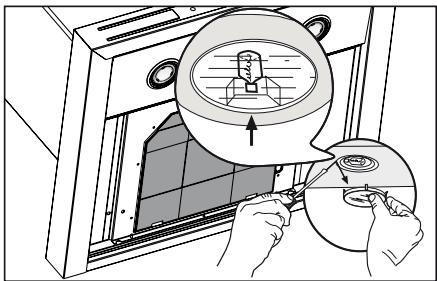
LIGHTING
natural_image
Illustration of hands installing or adjusting a circular component inside a device (no text or symbols visible)
natural_image
Two diagrams showing a hand holding a plug and a crossed-out plug, no text or symbols present.natural_image
Five icon-based shopping and cleaning symbols: shopping cart, washing machine, gear, shopping bag, and shopping cart (no text or labels)natural_image
Illustration of a hand holding a small object over a tablet screen, with 'Z' label visible (no text or symbols on the diagram itself) |  | [HPF] | [SEER] | [HEE] |  |  | [SHW] |
| A | B | C | D | E | F | G | H |
natural_image
Illustration of hands installing or adjusting a circular component inside a device (no text or symbols visible)
natural_image
Diagram showing two types of electrical plug connectors: one with a hinged handle and the other with a crossed-out pin (no text or symbols present)POUR DES RÉSULTATS PARFAITS
natural_image
Five icon buttons representing shopping, washing machine, gear, eco-friendly shopping, and shopping cart (no text or symbols)natural_image
Illustration of a hand holding a small object over a tablet screen with 'Z' label (no text or symbols on the diagram itself)natural_image
Illustration of hands using a tool to adjust or install a component inside a device (no text or symbols visible)
natural_image
Diagram showing two types of electrical plug symbols: one with a triangular connector and the other with a crossed-out black symbol (no text or labels)CE
Brand : AEG-ELECTROLUX
Model : AWS9600GM
Category : Washing machine