Attitude PH8245X1 - Watch PULSAR - Free user manual and instructions
Find the device manual for free Attitude PH8245X1 PULSAR in PDF.


| Product Type | Watch |
| Brand | Pulsar |
| Model | Attitude PH8245X1 |
| Movement Type | Quartz (Analog) |
| Case Material | Stainless Steel |
| Strap Material | Stainless Steel |
| Glass Material | Mineral Crystal |
| Case Diameter | Approx. 40 mm |
| Case Thickness | Approx. 10 mm |
| Strap Width | 20 mm |
| Weight | Approx. 150 g |
| Water Resistance | 10 ATM (100 meters) |
| Power Source | Battery (SR626SW or equivalent) |
| Battery Life | Approx. 3 years |
| Functions | Time, Date |
| Date Display | At 3 o'clock position |
| Crown | Push/Pull crown for time and date setting |
| Clasp | Deployment clasp with push-button release |
| Care Instructions | Clean with a soft cloth; avoid extreme temperatures and magnetic fields. |
| Safety Precautions | Do not expose to strong magnetic fields; avoid severe shocks. |
| Spare Parts & Repairability | Replacement batteries and straps available; service by authorized watchmaker recommended. |
Frequently Asked Questions - Attitude PH8245X1 PULSAR
User questions about Attitude PH8245X1 PULSAR
0 question about this device. Answer the ones you know or ask your own.
Ask a new question about this device
Download the instructions for your Watch in PDF format for free! Find your manual Attitude PH8245X1 - PULSAR and take your electronic device back in hand. On this page are published all the documents necessary for the use of your device. Attitude PH8245X1 by PULSAR.
USER MANUAL Attitude PH8245X1 PULSAR
HOW TO USE THE WATCH
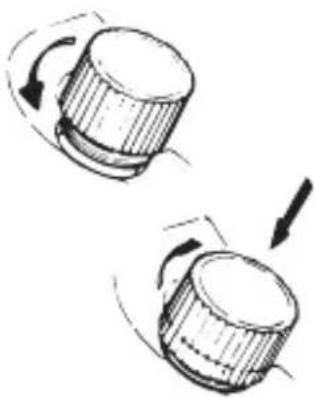
■SCREW DOWN CROWN [for models with screw down crown]
Unlocking the crown
1 Turn Crown counterclockwise until you no longer feel the threads turning.
2 Crown can be pulled out.
Locking the crown
1 Push Crown back in to normal position.
2 Turn Crown clockwise while pressing it lightly until tight.
natural_image
Two mechanical components with rotating arrows indicating motion (no text or symbols)* When using the watch in water: Before using the watch in water, be sure the crown is screwed in completely. Do not operate the crown when the watch is wet or in water.
■ HOW TO START THE MECHANICAL WATCH (Cal. Y621)
To initially start your watch, swing it from side to side in a horizontal arc for about 30 seconds.
* If the watch is worn daily, PULSAR's automatic mechanism will wind the mainspring automatically through normal wrist movement.
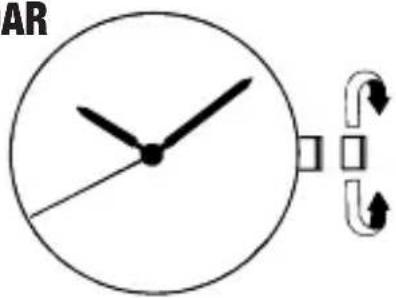
■ TIME SETTING FOR MODELS WITHOUT CALENDAR
CROWN
1 Pull out.
2 Turn to set the time.
3 Push back.
text_image
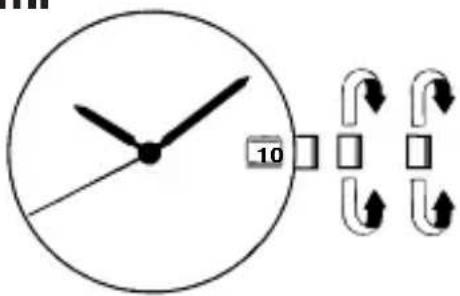
AR■ TIME/CALENDAR SETTING FOR MODELS WITH DATE CALENDAR
CROWN
1 Pull out to the first click.
2 Turn to show the previous day's date.
3 Pull out to the second click.
text_image
104 Turn until the desired date appears.
* Turn Crown to advance Hour and Minute hands.
5 Turn to set the time.
6 Push back in to normal position.
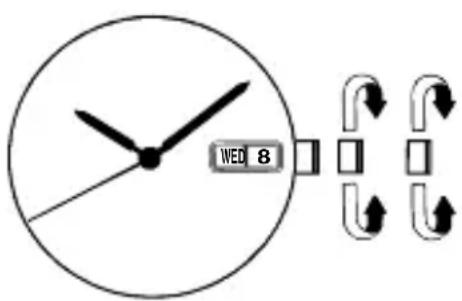
■ TIME/CALENDAR SETTING FOR MODELS WITH DAY AND DATE CALENDAR
CROWN
1 Pull out to the first click.
2 Turn to show the previous day's date.
3 Turn in the opposite direction to show the previous day of the week.
For Cal. PC33, turn clockwise to set the date only.
4 Pull out to the second click.
5 Turn until the desired date and day appears.
* Turn Crown to advance Hour and Minute hands.
6 Turn to set the time.
7 Push back in to normal position.
text_image
WED 8Notes on time setting:
1 When setting Minute hand of a quartz watch, advance it a few minutes ahead and then turn it back to the exact time.
2 If your watch has three hands, pull out Crown all the way when Second hand points at 12 o'clock. After adjusting the time, push Crown back in to normal position in accordance with a time signal for "00" seconds.
Notes on calendar setting:
1 The date will change gradually between 9:00 P.M. and 4:00 A.M. Therefore, do not change the calendar during this time period. Otherwise, it may not change properly. If it is necessary to set the calendar during that time period, first change the time to any time outside it, set the calendar and then reset the correct time.
2 If your watch has a bilingual day calendar, choose the desired language. When the day shifts automatically to the next day, the other language will appear temporarily.
3 When setting the hour hand, check that AM/PM is correctly set.
The watch is so designed that the calendar changes once in 24 hours.
Turn the hands past the 12 o'clock marker to determine whether the time is set for the A.M. or P.M. period. If the calendar changes, the time is set for the A.M. period. If it does not change, the time is set for the P.M. period.
Day setting for Cal. PC33
At the second click position, turn the hands clockwise and counter - clockwise repeatedly between 11:15 p.m. and 3:45 a.m. to select the desired day and language.
BATTERY CHANGE OF ANALOGUE QUARTZ WATCH
● As the battery is inserted at the factory to check the function and performance of the watch, its actual life once in your possession may be less than the specified period.
- When the battery expires, be sure to replace it as soon as possible to prevent any malfunction.
- We recommend that you contact an AUTHORIZED PULSAR DEALER for battery replacement.

WARNING
● Do not remove the battery from the watch.
- If it is necessary to take out the battery, keep it out of the reach of children. If a child swallows it, consult a doctor immediately.
● Never short-circuit, tamper with or heat the battery, and never expose it to fire. The battery may burst, become very hot or catch fire.

CAUTION
● The battery is not rechargeable. Never attempt to recharge it, as this may cause battery leakage or damage to the battery.
LOSS / GAIN OF ANALOGUE QUARTZ WATCH
- Loss/gain (monthly rate) is less than 15 seconds (20 seconds for some calibres) at normal temperature range (5°C \~ 35°C)(41°F \~ 95°F).
TO PRESERVE THE QUALITY OF YOUR WATCH
WATER RESISTANCE
● Non-water resistant

If "WATER RESISTANT" is not inscribed on the case back, your watch is not water resistant, and care should be taken not to get it wet as water may damage the movement. If the watch becomes wet, we suggest that you have it checked by an AUTHORIZED PULSAR DEALER or SERVICE CENTER.
● Water resistance (3 bar)

If "WATER RESISTANT" is inscribed on the case back, your watch is designed and manufactured to withstand up to 3 bar, such as acci denta contact with splashes of water or rain, but it is not designed for swimming or diving.
● Water resistance (5 bar)\*

If "WATER RESISTANT 5 BAR" is inscribed on the case back, your watch is designed and manufactured to withstand up to 5 bar and is suitable for swimming, yachting and taking a shower.
● Water resistance (10 bar/15 bar/20 bar)\*

I f “ WATER RESISTANT 10 BAR”, “WATER RESISTANT 15 BAR” or “WATER RESISTANT 20 BAR” is inscribed on the case back, your watch is designed and manufactured to withstand up to 10 bar/15 bar/20 bar and is suitable for taking a bath, shallow diving, but not for scuba diving.
We recommend that you wear a PULSAR Diver's watch for scuba diving.
* Before using the water resistance 5, 10, 15 or 20 bar watch in water, be sure the crown is pushed in completely.
Do not operate the crown when the watch is wet or in water. If used in sea water, rinse the watch in fresh water and dry it completely.
* When taking a shower with the water resistance 5 bar watch, or taking a bath with the water resistance 10, 15 or 20 bar watch, be sure to observe the following:
- Do not operate the crown when the watch is wet.
- If the watch is left in warm water, a slight time loss or gain may be caused. This condition, however, will be corrected when the watch returns to normal temperature.
NOTE:
Pressure in bar is a test pressure and should not be considered as corresponding to actual diving depth since swimming movement tends to increase the pressure at a given depth. Care should also be taken on diving into water.
TEMPERATURES

[for analogue quartz watch only]
Your watch works with stable accuracy within a temperature range of 5^ C and 35^ C ( 41^ F and 95^ F).
Temperatures over 60°C or 140°F (50°C or 122°F for some calibres) may cause battery leakage or shorten the battery life.
Do not leave your watch in very low temperatures below -10^ C ( +14^ F) for a long time since the cold may cause a slight time loss or gain.
However, the above conditions will be corrected when the watch returns to normal temperature.
CARE OF CASE AND BRACELET

To prevent possible rusting of the case and bracelet caused by dust, moisture and perspiration, wipe them periodically with a soft dry cloth.
SHOCKS & VIBRATION

Light activities will not affect your watch, but be careful not to drop your watch or hit it against hard surfaces, as this may cause damage.
CHEMICALS

Be careful not to expose the watch to solvents, mercury, cosmetic spray, detergents, adhesives or paints.
Otherwise, the case, bracelet,
etc. may become discolored, deteriorated or damaged.
MAGNETISM

The watch will be adversely affected by strong magnetism. Keep it away from close contact with magnetic objects. (In the case of a quartz watch, normal accuracy will return if the watch is moved away from the magnetic field)
PERIODIC CHECK

It is recommended that the watch be checked once every 2 to 3 years. Have your watch checked by an AUTHORIZED PULSAR DEALER or SER VICE CENTER to ensure that the case, crown, buttons, gasket and crystal seal remain intact.
PRECAUTION REGARDING CASE BACK PROTECTIVE FILM
If your watch has a protective film and/or a sticker on the case back, be sure to peel them off before using your watch.