CT-2108APF - TV AKAI - Free user manual and instructions
Find the device manual for free CT-2108APF AKAI in PDF.


User questions about CT-2108APF AKAI
0 question about this device. Answer the ones you know or ask your own.
Ask a new question about this device
Download the instructions for your TV in PDF format for free! Find your manual CT-2108APF - AKAI and take your electronic device back in hand. On this page are published all the documents necessary for the use of your device. CT-2108APF by AKAI.
USER MANUAL CT-2108APF AKAI
Congratulations! You have purchased one of the finest Color TV's on the market!
This manual will help you use many exciting and useful features to make your TV viewing more enjoyable than ever before.
Before operating your TV set, please read all these safety and operating instructions completely and then retain for future reference.
Customer's Record
You will find the model number and chassis number on the back of your TV set.
Record these numbers in the spaces provided below.
Refer to them whenever you call upon your dealer regarding this product.
Model Number: ____ Chassis Number: ____
Safety Precautions
WARNING: TO REDUCE THE RISK OF FIRE OR ELECTRIC SHOCK, DO NOT EXPOSE THIS APPLIANCE TO RAIN OR MOISTURE.
CAUTION

RISK OF ELECTRIC SHOCK DO NOT OPEN

CAUTION: TO REDUCE THE RISK OF ELECTRIC SHOCK, DO NOT REMOVE COVER (OR BACK). NO USER SERVICEABLE PARTS INSIDE. REFER SERVICING TO QUALIFIED SERVICE PERSONNEL.

The lightning symbol in the triangle tells you that the voltage inside this product may be strong enough to cause an electric shock. DO NOT TRY TO SERVICE OR CHANGE THIS PRODUCT YOURSELF.

The exclamation point in the triangle tells you that important operating and maintenance instructions follow this symbol.
CAUTIONS:
TO PREVENT ELECTRIC SHOCK, DO NOT USE THIS POLARIZED PLUG WITH AN EXTENSION CORD RECEPTACLE OR OTHER OUTLET UNLESS THE PRONGS CAN BE FULLY INSERTED INTO THE OUTLET TO PREVENT ANY EXPOSURE OF THE PRONGS ON THE POLARIZED PLUG.
Avoid displaying stationary images on your TV screen for extended periods of time. Stationary patterns generated by computer displays, video games, stock market reports, etc .can become permanently engrained on the picture tube. This damage is not protected by your warranty as it is the result of misuse. Should you wish to use your Television to display still images, it is always advisable to reduce brightness and contrast settings. Never leave a video game or computer display unattended.
NOTE TO CABLE INSTALLER:
The cable ground shall be connected to the grounding system of the building, as close to the point of cable entry as practical.
Important Safety instructions
CAUTION
PLEASE READ THESE INSTRUCTIONS, KEEP THESE INSTRUCTIONS AND HEED ALL WARNINGS. FOLLOW ALL INSTRUCTIONS.
Electrical energy can perform many useful functions. This TV set has been engineered and manufactured to assure your personal safety. However improper use can result in potential electrical shock or fire hazards. In order not to defeat the safe guards incorporated in this TV set, observe the following basic rules for antenna/TV installation, use and servicing. All operating and use instructions should be followed.
Do not remove the cabinet cover. This may expose you to dangerous voltages. Refer all servicing to qualified service personnel.
Mains plug is used as disconnect device and it shall remain readily operable.
BEFORE OPERATION
Precautions (continued)
Power Sources-The TV set should be operated only from the type of power source indicated on the TV set or as indicated in the Operation Manual. If you are not sure of the type of power supply in your home, consult your sales person or your local power company. For TV sets designed to operate from battery power, or other sources, refer to the operating instructions.
Grounding or Polarization - Do not defeat the safety purpose of the polarized or grounding-type plug. A polarized plug has two blades with one wider than the other. A grounding-type plug has two blades and a third grounding prong. The wide blade or the third prong is provided for your safety. If the provided plug does not fit into your outlet, consult an electrician for replacement of the obsolete outlet.
Alternate Warnings-This plug will only fit into a grounding-type power outlet. This is a safety feature. If you are unable to insert the plug into the outlet, contact your electrician to have a suitable outlet installed. Do not defeat the safety purpose of the grounding plug.
Water and Moisture Warnings-Do not use the TV set near water-for example, near a bath tub, wash bowl, kitchen sink, or laundry tub; in a wet basement; or near a swimming pool; and the like. The TV set shall not be exposed to dripping or splashing and no objects filled with liquids, such as vases, shall be placed on the TV set.
Ventilation-Slots and openings in the cabinet are provided for ventilation and to ensure reliable operation of the TV set and to protect it from overheating, and these openings must not be blocked or covered. The openings should never be blocked by placing the TV set on a bed, sofa, rug, or other similar surface. This TV set should not be placed in a built-in installation such as a bookcase or rack unless proper ventilation is provided or the manufacturer's instructions have been adhered to.
Heat - Do not install near any heat sources such as radiators, heat registers, stoves, or other apparatus (including amplifiers) that produce heat.
Power-Cord Protection-Protect the power cord from being walked on or pinched particularly at plugs, convenience receptacles, and the point where they exit from the apparatus.
Accessories-Do not place the TV set on an unstable cart, stand, tripod, bracket, or table. The TV set may fall, causing serious injury to a child or adult, and serious damage to the TV set. Use only with a cart, stand, tripod, bracket, or table recommended by the manufacturer, or accessory recommended by the manufacturer, or sold with the TV set, and should use a mounting accessory recommended by the manufacturer.
A product and cart combination should be moved with care. Quick stops, excessive force, and uneven surfaces may cause the TV set and cart combination to overturn.
Overloading- Do not overload wall outlets, extension cords or integral convenience receptacles as this can result in fire or electric shock.
Lightning-For added protection for this TV set during a lightning storm, or when it is left unattended and unused for long periods of time, unplug it from the wall outlet and disconnect the antenna or cable system. This will prevent damage to the product due to lightning and power-line surges.
Object and Liquid Entry-Never push objects of any kind into the TV set through openings as they may touch dangerous voltage points or short-out parts that could result in a fire or electric shock. Never spill liquid of any kind on the TV set.
Cleaning-Unplug the TV set from the wall outlet before cleaning or polishing it. Do not use liquid cleaners or aerosol cleaners. Use a dry cloth for cleaning the exterior of the TV set.
BEFORE OPERATION (continued)
Precautions (continued)
Attachments-Do not use attachments not recommended by the product manufacturer as they may cause hazards or electric shock.
If a snapping or popping sound from a TV set is heard continuously or frequently while the TV set is operated, unplug the TV set and consult your dealer or service technician. It is normal for some TV sets to make occasional snapping or popping sounds, particularly when being turned on or off.
Damage Requiring Service-Unplug the TV set from the wall outlet and refer servicing to qualified service personnel under the following conditions:
a. If the power cord or plug is damaged or frayed.
b. If liquid has been spilled or objects have fallen into the TV set.
c. If the TV set has been exposed to rain or water.
d. If the TV set has been subject to excessive shock by being dropped, or the cabinet has been damaged.
e. If the TV set does not operate normally by following the operating instructions. Adjust only those controls that are covered by the operating instructions as an improper adjustment of other controls may result in damage and will often require extensive work by a qualified technician to restore the TV set to its normal operation.
f. When the TV set exhibits a distinct change in performance—this indicates a need for service.
Warning: This unit should only be serviced by an authorized and properly trained technician. Opening the cover or other attempts by the user to service this unit may result in serious injury or death from electrical shock, and may increase the risk of fire.
Servicing-Do not attempt to service the TV set yourself as opening or removing covers may expose you to dangerous voltage or other hazards. Refer all servicing to qualified service personnel.
Replacement Parts-When replacement parts are required, be sure the service technician has used replacement parts specified by the manufacturer or have the same characteristics as the original parts. Unauthorized substitutions may result in fire, electric shock, or other hazards.
Safety Check-Upon completion of any service or repairs to the TV set, ask the service technician to perform routine safety checks to determine that the TV set is in proper operating condition.
When the TV set reaches the end of its useful life, improper disposal could result in a picture tube implosion. Ask a qualified service technician to dispose of the TV set.
ANTENNA
Outdoor Antenna Grounding-if an outdoor antenna is installed, follow the precautions below. An outdoor antenna system should not be located in the vicinity of overhead power lines or other electric light or power circuits, or where it can come in contact with such power lines or circuits.
WHEN INSTALLING AN OUTDOOR ANTENNA SYSTEM, EXTREME CARE SHOULD BE TAKEN TO KEEP FROM CONTACTING SUCH POWER LINES OR CIRCUITS AS CONTACT WITH THEM IS ALMOST INVARIABLY FATAL
Be sure the antenna system is grounded so as to provide some protection against voltage surges and built-up static charges.

This symbol indicates that this product incorporates double insulation between Hazardous mains voltage and user accessible parts. When servicing use only Identical replacement parts.
CONTENTS
INTRODUCTION
Remote Control Keys ....1
INSTALLATION
To Connect the Antenna 2
Installing the Remote Control Batteries 2
To Connect External Equipment 3
GENERAL OPERATION
Power On/Off 4
MENUS OPERATION
Menus 5
Tune Menu 5
Picture Menu 7
Sound Menu 7
Setup Menu 8
Timer Menu 9
TROUBLESHOOTING GUIDE 10
Note:
1、Designs are subject to change without notice.
2、All the pictures used in this operation manual are just used for reference, and may be different with practicality.
INTRODUCTION
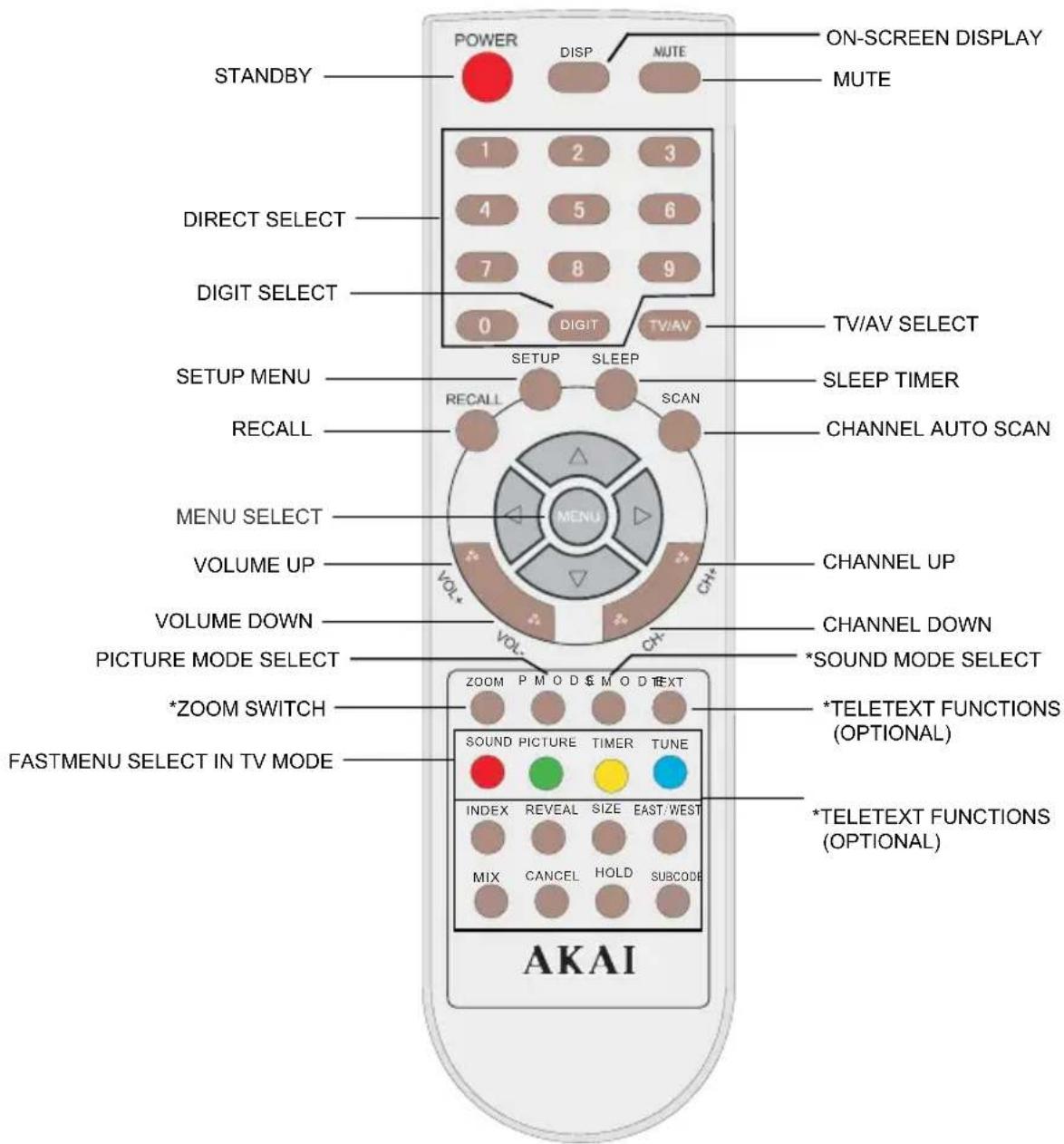
Remote Control Keys
text_image
STANDBY POWER DISP NUTE ON-SCREEN DISPLAY MUTE 1 2 3 4 5 6 7 8 9 0 DIGIT TV/AV TV/AV SELECT SETUP MENU SETUP SLEEP SLEEP TIMER RECALL SCAN CHANNEL AUTO SCAN MENU SELECT VOLUME UP CHANNEL UP VOLUME DOWN CH- VOLUME DOWN CHANNEL DOWN PICTURE MODE SELECT *SOND MODE SELECT *ZOOM SWITCH *TELETEXT FUNCTIONS (OPTIONAL) FASTMENU SELECT IN TV MODE SOUND PICTURE TIMER TUNE INDEX REVEAL SIZE EAST/WEST MIX CANCEL HOLD SUBCODE AKAINotes:
1: When in operation, please point your remote control directly to the infrared sensor.
2: Do not expose the remote control to impacts, water or disassemble it.
3: The function buttons which marked with * may not be available due to the chassis functions.
INSTALLATION
Please read the safety instructions in this manual completely before installation.
Install your TV in an area where direct sunlight will not fall upon the screen.
Soft, indirect light is best for television viewing.
Allow enough space (at least 4 in.) between the TV and any walls or enclosures for proper ventilation.
Optimum television viewing distance is 3-5 times the screen's size.
Auto-Degaussing
Color television can be easily affected by magnetism, which shows as color distortion on the screen. If your TV is affected by nearby magnetic components or appliances, turn it off for a few minutes. The built-in auto-degaussing circuit will eliminate the magnetic interference.
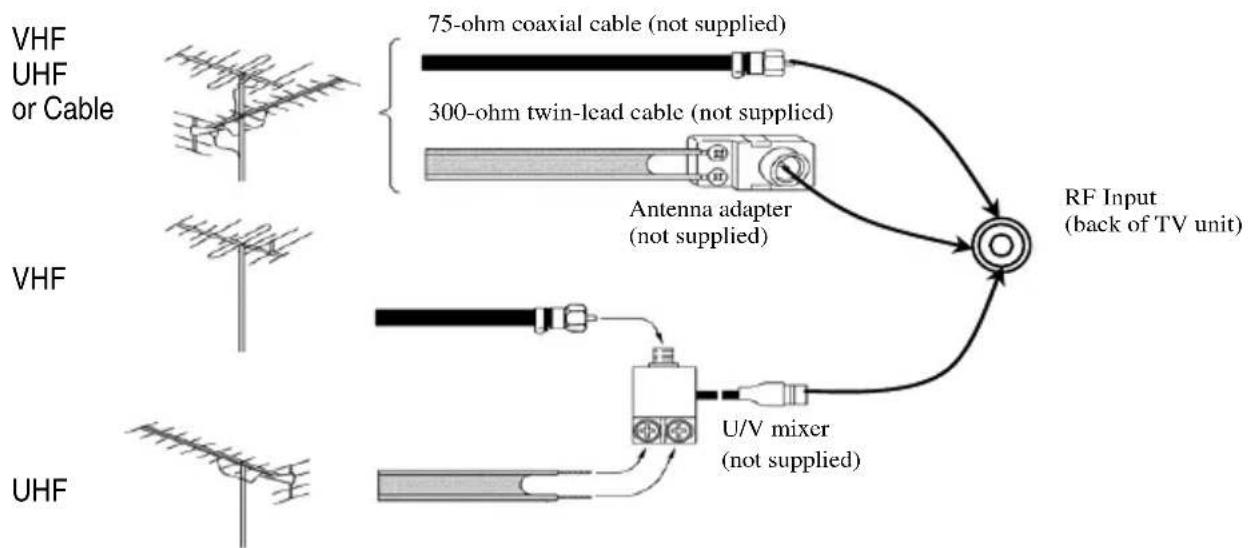
To Connect the Antenna
flowchart
graph TD
    A["VHF"] --> B["75-ohm coaxial cable (not supplied)"]
    C["UHF or Cable"] --> D["300-ohm twin-lead cable (not supplied)"]
    E["VHF"] --> F["Antenna adapter (not supplied)"]
    G["UHF"] --> H["U/V mixer (not supplied)"]
    I["RF Input (back of TV unit)"] --> J["Central node"]
    J --> K["Output"]
Notes:
- It is recommended that a 75 ohm coaxial cable be used in order to eliminate interference and noise which may occur due to nearby radio transmissions.
- The antenna cable should not be tied together with other wiring.
- Set up a lightning rod and check it regularly when an outdoor antenna is used.
Installing the Remote Control Batteries
- Remove the battery compartment lid.
- Insert two AAA batteries (included). Make sure the positive (+) and negative (-) polarities are correctly aligned.
- Reattach the battery lid.
Notes:
- Alkaline batteries are recommended for longer life.
- Always replace both batteries at the same time.
- Do not expose batteries to fire or break them open.
- To avoid battery leakage, remove batteries from the remote control when it is not being used for a long period of time.

INSTALLATION (continued)
To Connect External Equipment
The followings are diagrams showing basic instructions for attaching external equipment, like a VCR or DVD player, to your TV set. Please refer to operation manuals of external audio/video equipment that will be connected to your set for additional instructions. PLEASE TURN OFF ALL POWER BEFORE CONNECTING DEVICES TOGETHER.

Notes:
- Please turn off the power supply of the TV set and the external equipment before connection.
- The side terminals may be easier to use with a camcorder.
- AV terminals on the side panel can not be used together with the SCART terminal on the rear panel at the same time.
GENERAL OPERATION
1、POWER[On/Off]
Plug in the supply socket, and press the MAIN POWER SWITCH key on the TV. You may press any of the STANDBY, Program Number (0-9) and CH-/+ keys on the remote control to turn on the TV.
To switch back to the Standby mode, press STANDBY key. You can also power off the TV directly by pressing the MAIN POWER SWITCH key. Part of circuit on the TV remains active in the STANDBY mode. To cut off the power off completely, please press the MAIN POWER SWITCH.
Auto off without signal received
When there is no signal received (for example, the program of a certain channel is over), the TV will switch to the Standby mode if no key is pressed within 5 minutes. If you have set "Off Time" and the remaining time is less than 5 minutes, Off Time will be carried out prior to AUTO OFF. At the last 5 minutes, it will hint per-min; and at the last 1 minute, it will hint per-sec on the screen.
2、Num Keys
a. To select channels;
b. Press any number button to reset TV when it is standby, and the TV will turn to the right channel as the number.
c. Press the number button to change AV mode to TV mode.
d. Input the page of sub code in txt mode.
e. Input the channel frequency in tune menu.
f. Input the password of the Hotel mode.
3、[CH+/-]&[VOL+/-]
Press CH[+/-] to switch channels; Press the VOL-or VOL+ button to decrease or increase the volume. Adjustable range: 0-63
During normal play, press the MUTE button and the sound is eliminated. The TV will display a picture 📋 on the screen. To cancel MUTE, you may press the MUTE button again or the VOL+ button.
4、TV/AV Selection
In the TV mode, press the TV/AV button to enter the AV mode. In the AV mode, the TV receives AV signals from external equipment. To resume broadcast viewing, press the TV/AV button, CH-/CH+ buttons or Num keys. To receive signals from external equipment, please select the relevant AV mode. In the hotel mode, if "AV lock" is ON, there will be "locked" displayed on the screen when switch to AV mode.
Pressing the CH-/CH+ buttons can select another lower-numbered or upper-numbered channel.
Direct selection:
To select a one-digit channel number
Press the DIGIT button to choose "-" firstly, then press one of 0-9 buttons.
To select a two-digit channel number
Press the DIGIT button to choose "--" firstly, then enter a first-digit and second-digit. If only one digit is entered, the channel will automatically shift to the digit related channel in three seconds.
To select a three-digit channel number
Press the DIGIT button to choose "---" firstly, then enter a first-digit, second-digit and third-digit. If only one or two digits are entered, the channel will automatically shift to the digit (digits) related channel in three seconds.
Note: If you enter a number over 235, the channel will remain the current one.
6、MUTE
Press the MUTE button to switch MUTE ON/OFF modes. The "MUTE ON" mode will display 📂 on the screen. When there is no signal received in TV mode, the TV will be in MUTE ON mode and there will be no sound output.
7、PICTURE MODE
There are 4 picture modes to select. Press this button to switch user→soft→nature→rich.
And the user mode can be regulated in the PICTURE MENU.
8、DISPLAY
The displayed parts include the Signal Source; Color Sys; Sound Sys and so on.
9、MENU
Press the MENU key and the main menu will display on the screen. To stop searching, you can press the MENU key.
10、RECALL
Press the RECALL button and the TV will directly skip back to the former program channel.
11、SLEEP
This button is used to set fast off time, the adjustale range is 0,5,10,15,....120,0 minutes,press this button repeatedly,and you can select what time you want to set.
12、SCAN
Press the SCAN button to scan programs from the current channel. To stop scanning and start the corresponding operation, please press SCAN button again or any other buttons.
*13、ZOOM(If the button does not function, it means this TV does not support this function.)
Press the zoom button, and the TV will switch between 4:3, 16:9 and zoom.
*14、SOUND MODE (If the button does not function, it means this TV does not support this function.)
There are 4 sound modes to select such as user→news→music→theatre.
And the user mode can be regulated in the SOUND MENU.
MENUS OPERATION
Menus
Press the MENU button when watching TV programs, Press ◀/▶ buttons to select and press ▲/▼ buttons to enter, then press the ◀/▶ buttons to adjust.
Menu display disappears 15 seconds after last selection.
Note: In the AV mode, TUNE menu is not available.
Tune Menu
This section gives descriptions about adjustment of items in the TUNE menu. This menu will display Channel/Colour Sys/Sound Sys/Skip/Frequency/Fine Tune/Auto Search and Swap.

text_image
TUNE Channel9 ColourSysAuto SoundSysDK SkipOff Frequency Fine Tune Auto Search Swap 066.75MHZ SELECT ADJUST1. Channel
Press buttons to change the channels one by one.
2. Colour Sys
Press ◀/▶ buttons to choose the Colour Sys, It is very important to set the correct colour system, suggest to set it "Auto".
3. Sound Sys
Press ◀/▶ buttons to choose the Sound Sys. It is very important to set the correct sound system, otherwise much boring noise will be heard.
4. Skip On/Off
After Auto Search, there may be some repeated program or inferior signals received. Skipping the undesired program position can dramatically quicken channel selection.
After selecting "Skip" in the TUNE menu, press the ◀/▶ buttons to set "Skip On". When the TUNE menu has disappeared, press the CH-/CH+ buttons and you will find the channel number skipped.
5. Search

text_image
Search VHF-H Channel 11 $7.6745MHz. ←: DOWN:DOWN →: UP: UPIn case the desired channel cannot be preset with the Auto Program function, or you would like to set the desired channels to specific channel numbers, please use the Search function.
After selecting "Frequency" in the TUNE menu, press the ◀/▶ buttons. The TV searches another lower/upper channel. To stop search, press the MENU button. You can also select the channel frequency directly by using the Num buttons.
If the selected channel is not the one you want, press the buttons again until the desired channel is selected. If the TV does not stop searching when finding a channel, please use the Fine Tune function.
6. Frequency Fine-tuning
After selecting "Fine Tune" in the TUNE menu, press the ◀/▶ buttons until you get the best sound and picture effect. Press the DISP button to check up the fine-tuned channel, and you will find that the position number turns to yellow.
7. Auto Search

text_image
AutoSearch VHF-H Channel 11 67.75MHz MENU: StopBefore performing Auto Search, please affirm that the Sound System is correct. After selecting "Auto Search" in the TUNE menu, press the ▶ button. The TV will search automatically in sequence. After auto searching, the TV will store receivable channels and returns to POS1.
Unused position number is automatically set to Skip On. During Auto Search, press the MENU button to stop searching.
8. Swap

text_image
Swap Channel A 9 ChannelB 7 Swap ↑↓ SELECT ←→ ADJUSTUse the SWAP function to resort program position. For example, you want to change Channel 9 to Channel 7.
a. Press the TUNE menu button to select the SWAP menu in the TV mode.
b. Press the ▲/▼buttons to highlight "Channel A". Press the Numeric buttons to set it to 9. Then set channel B to 7 in the way mentioned above.
c. Select the SWAP menu, and press the ▶ button. The current channel No. is changed to Channel 7 and the content of Channel 7 is exchanged with that of Channel 9.
The current channel No. is Channel 7.
Repeat the operations mentioned above to sort other searched channel position as desired.
Picture Menu
1. Picture Mode Selection
text_image
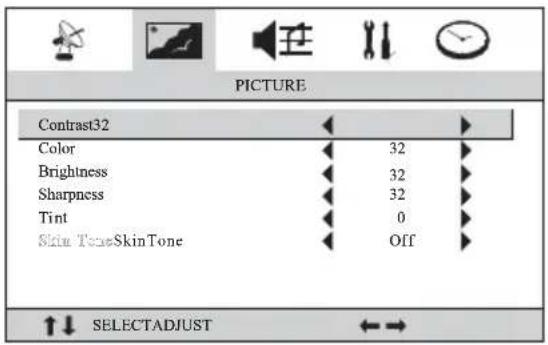
PICTURE Contrast32 Color Brightness Sharpness Tint Skin ToneSkinTone 32 32 32 0 Off SELECTADJUSTBefore shipment, the TV was given three preset picture modes: Soft, Nature and Rich. Press the P. MODE button to select one of the three preset modes or the User mode.
Refer to the following table about each picture mode.
| Mode | Picture | Quality |
| Soft | The contrast is low, suitable for watching TV in mild surrounding light. | |
| Nature | Standard status, suitable for watching ordinary programs. | |
| Rich The contrast is high, suitable for watching TV in bright environment. | ||
| User Picture quality user sets | ||
The adjustable "Tint" range is -31 - + 31 , "0" is the normal value. Under DVD mode, "Tint" function is not available for NTSC DVD discs.
Note: There is no "Tint" function under PAL or SECAM system for some chassis.
2. To adjust picture quality
To perform the following operation, press the MENU button or the picture menu button directly to select the PICTURE menu. Press the ▲/▼ buttons to choose and Press the ◀/▶ buttons to adjust the digital level of the selected adjustment as desired.
The adjusted picture level is automatically stored in the User position.
Sound Menu
text_image
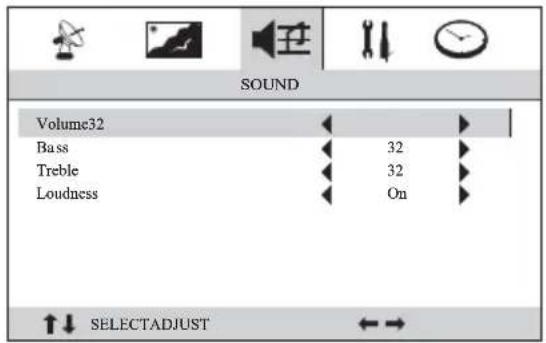
SOUND Volume32 Bass Treble Loudness 32 32 On SELECTADJUSTOn the Sound Menu mode, press the ▲/▼ buttons to choose the parts you want to change, then press the ◀/▶ buttons to change.
NOTE: If there is no BASS, TREBLE or LOUDNESS selection on the menu, it means this TV does not support those functions.
Setup Menu
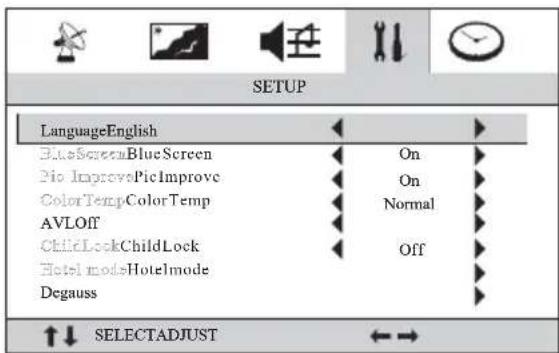
To perform the following operation, press the MENU button or the SETUP button directly to select the SETUP menu.
text_image
SETUP LanguageEnglish BlueScreenBlueScreen Pio ImprovePicImprove ColorTempColorTemp AVLOff ChildLockChildLock Hotel modesHotelmode Degauss SelectADJUSTNOTE: If there is no AVL or DEGAUSS selection on the menu, it means this TV does not support those functions.
1. Language
Press ◀ buttons to select languages.
2. Blue Background
With this function on, the screen will display a mild blue background and mute automatically in TV mode when no signal is received.
3. Picture Improve
It is recommended to select "picture improve on" to acquire better picture effect.
4. Color temperature adjustment
You may select one of color of background as preferred among normal, Cool and Warm mode. The adjusted Color Temp mode is automatically stored and remains unchanged until next adjustment.
5. Child lock
The keyboard will be locked when Child lock is "ON", and it will be cancelled by keeping on pressing the MENU (on the keyboard) button for 10 seconds.
If the Child Lock is ON under standby mode, you can turn on the TV by pressing the menu button on the TV set for 10 seconds. The Child Lock will remain "ON" after TV turned on.
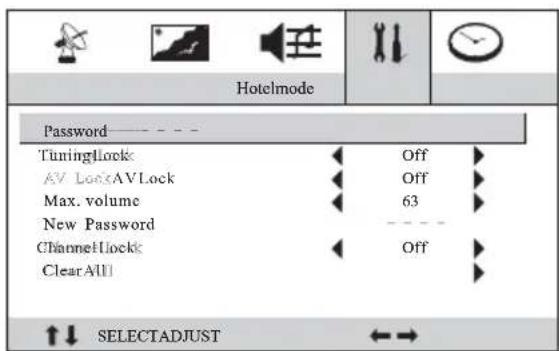
6. Hotel mode
text_image
Hotelmode Password — — — — TuningLock Off AV LockAVLock Off Max. volume 63 New Password ChannelLock Off Clear All SELECTADJUSTOnly after entering the correct password by pressing Numeric buttons, you can adjust the following items.
(Each time you power on the TV or quit the menu, you need entering the password) Initial password: 0000 (preset before outgoing)
Universal password: 8888
Tuning lock: To allow/prohibit program (searching program). With Channel Lock ON, the item is also set to ON. AV Lock: To prohibit watching AV program; there is a "locked" displayed on the screen.
Maximum Volume: To adjust volume to maximum.
New Password: Enter new password twice and you may change original password, “----” changes into green means your new password has been set successfully.
Channel Lock: To lock current channel. Generally the Hotel TV does not allowed guests to change setting. With Tuning Lock ON, the TUNE and SWAP menus are not available.
Clear All: All the lock setting will be cancelled except "AV Lock".
To press the MENU button to return the up-menu.
Timer Menu
text_image
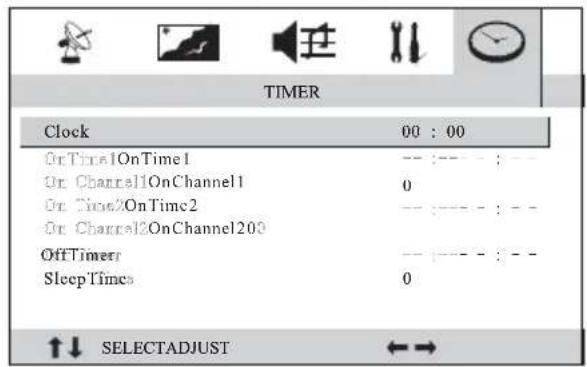
TIMER Clock 00 : 00 OnTime1OnTime1 -- :--- :--- On Channel1OnChannel1 0 On Time2OnTime2 -- :--- :--- On Channel2OnChannel203 OffTimer -- :--- :--- Sleep Times 0 ↑↓ SELECTADJUST ←→In the STANDBY or TURN ON mode, the TV can automatically complete some functions such as turn-on, channel preset and turn-off as desired.
To perform the following operation, press the MENU button or the TIMER button directly to select the TIMER menu.
1. On/Off timer
Clock: You can enter the current exact time or relative time; Hour entering range is "00 to 23". Minute entering range is 00 to 59;
On time 1: one kind of on time. After on timer is performed, the on timer is cleared.
On channel 1: one kind of on channel, press ◀/▶ to select channel.
On time 2: the other kind of on time. After on timer is performed, the on timer is cleared.
On channel 2: another kind of on channel, press ◀/▶ to select channel.
Off timer: You can set the time of off time. After off timer is performed, the off timer is cleared.
You may preset two kinds of On Time and On Channels.
2. Sleep timer
After selecting "Sleep Time", press the ◀/▶ buttons to set Sleep time to 5, 10, 15, 20...... 120 minutes or 0.
Notes:
If both the SLEEP TIMER and OFF TIMER are set, the TV will perform the setting with less remaining time prior to another. The SLEEP function is cancelled at the same time when the OFF TIMER is performed.
TELETEXT OPERATION (selectable)
(If the following described buttons do not function, it means this TV does not support those functions)
The TV can receive various TELETEXT signals, including news, weather forecast and stock market quotation, which is convenient for your operation.
1. TELETEXT on/off
Press the TEXT button firstly to enter the TEXT mode. Press the button again to quit from the TEXT mode and resume broadcasting view.
2. Check up TELETEXT
1) Page selection Press the Numeric buttons to enter first-digit, second-digit and third-digit page No. in turn. If a wrong number is entered, reenter the correct number after finishing the wrong numbers.
2) Press the ▲/▼ buttons to select the next or previous page.
3) Fast page selection
Every Color button on the remote control is corresponding to the same color page number appearing at the bottom of the current screen. Press the Color buttons to select pages quickly as shown below:
Red button - To read the link page or next page
Green button - To read the link page or next second page
Yellow button - To read the link page or next third page
Blue button - To read the link page or previous page
4) Other functions
INDEX- To return to Index Page
REVEAL- To check up the concealed information on the current page
SIZE - To enlarge the current page size
EAST/WEST- To select the TELETEXT language
MIX- To turn on/off TELETEXT background
CANCEL - Note that when a newsflash or subtitle page arrives for the first time after being requested, or is updated, Cancel display is automatically cancelled in favor of TEXT display
HOLD - To still the current TELETEXT page display
SUBCODE- To check the current page for appendix (To display "txt clock" when not in TXT mode)
TROUBLESHOOTING
| Symptoms | ||
| Check the following items Picture | Sound | |
| No picture No | sound | 1. Make sure the power cord is plugged in.2. Check if the MAIN POWER SWITCH is pressed or not.3. Check if the levels of Contrast, Brightness and Volume are set to minimum. |
| Normal | No sound | Check if the TV is in the MUTE mode or the volume is minimum.Try pressing the VOL+ button. |
| No color | Normal Check if the chroma is set to minimum. | |
| With noise | Check if the sound/color system is correct. | |
| With stripes With noise | The TV set is interfered by electric waves from automobiles, motors, neon lights, etc. | |
| With snow With noise | 1. Check if the antenna cable is broken or disconnected.2. Check if the antenna direction has changed. | |
| Ghost picture | Normal | Check if the antenna direction has changed. |
| Unclear picture | Normal or weak | Preset channels again. |
| With spots Normal | 1. The TV is moved with power on.2. Check if magnetic objects are put near the set. | |
| The remote control doesn't work. | The batteries are exhausted or improperly installed. | |
TELEVIZOR COLOR
CT-2108APF
MANUAL DE INSTRUCTIUNI
INAINTEA INSTALARII
Draga Utilizator:
text_image
Hand-drawn sketch of a trash bin with a 'X' symbol crossed out, indicating a restriction or exclusion.INSTALAREA (continuare)
Conectarea echipamentelor externe
natural_image
Symbol of a trash bin with crossed diagonals and a blank rectangular base (no text or labels)Reciclarea echipamentelor electrice si electronice uzate