ComPoint ISH1 - Intercom Russound - Free user manual and instructions
Find the device manual for free ComPoint ISH1 Russound in PDF.


User questions about ComPoint ISH1 Russound
0 question about this device. Answer the ones you know or ask your own.
Ask a new question about this device
Download the instructions for your Intercom in PDF format for free! Find your manual ComPoint ISH1 - Russound and take your electronic device back in hand. On this page are published all the documents necessary for the use of your device. ComPoint ISH1 by Russound.
USER MANUAL ComPoint ISH1 Russound
The music lover's intercom solution
Instruction Manual
SAFETY PRECAUTIONS
For your safety, please read and follow these precautions before installing or using this product:
▶ Read instructions. Read and understand all the applicable instructions before installing or operating the product.
▶ Retain documents. Keep this manual in a convenient place for reference.
▶ Heed warnings. Be aware of all warnings on the product and in the instructions.
Follow instructions. Install and use this product only as described in the instructions. Don't try to use this product in ways it wasn't designed for.
▶ Use indoors only. Don't expose this product to the weather or harsh environmental conditions such as continuous sunlight, excessive humidity, or rain.
Keep product dry. Don't use the product near water; for example, near a bathtub, washbowl, kitchen sink, laundry tub, in a wet basement, or near a swimming pool. Also, do not handle the product when your hands are wet or damp.
- Avoid heat. Locate the product away from heat sources such as radiators, heat registers, stoves, or other appliances (including amplifiers) that produce heat.
- Use the right power. Don't connect the product directly to electrical line voltage. Use only the power adapter provided with the product, described in the product specifications or installation instructions, or as marked on the product.
▶ Ground product properly. Make sure the product's means of grounding or polarization is not defeated.
Keep product clean. From time to time, wipe off the product with a clean soft cloth. Don't use abrasive materials, thinners, alcohol, or other chemical solvents or materials.
- Avoid spills and foreign objects. Make sure liquids and objects don't get into the product through any openings.
▶ Get professional service. Have the product serviced only by qualified service personnel when:
- Liquids have spilled or objects have fallen into the product
• The product has been exposed to rain - The product doesn't appear to operate normally
• The product is damaged
Don't attempt to service the product yourself. Doing so will void the warranty.
If you have any questions, please call Russound at 1.800.638.8055 or 603.659.5170.

FCC €
PRODUCT FEATURES
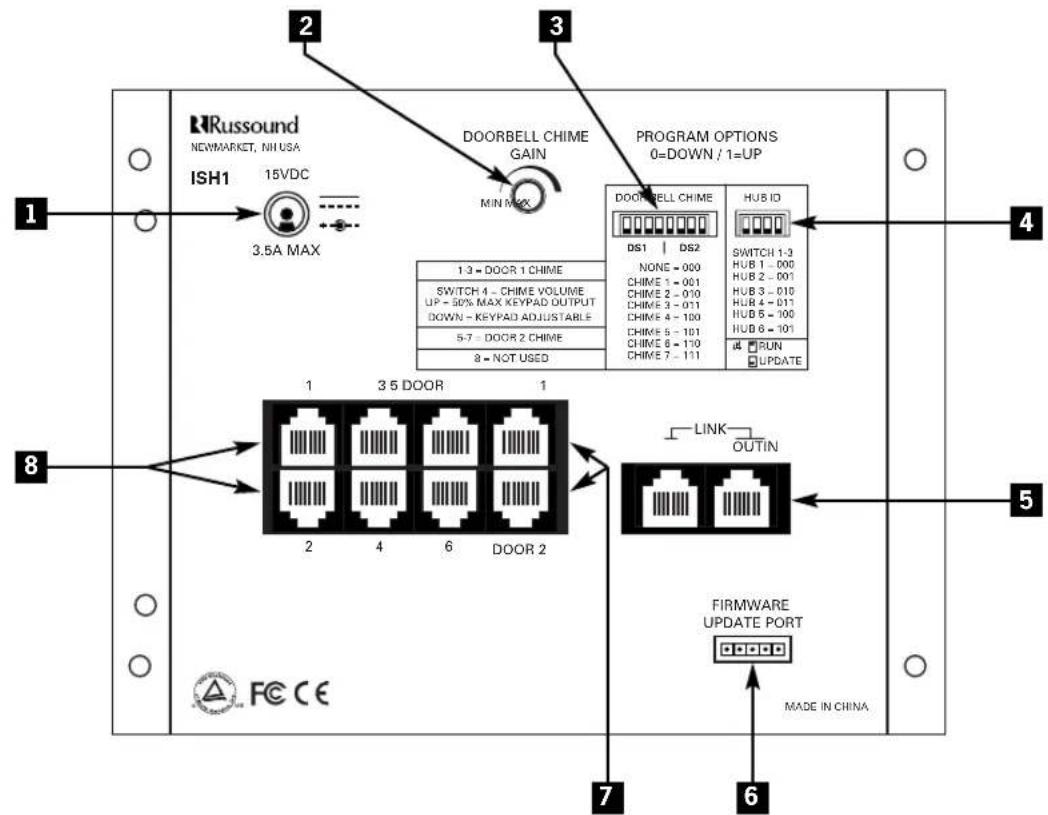
1 POWER INPUT – For connecting model ISPS power adapter
2 DOORBELL CHIME GAIN CONTROL – For adjusting overall chime volume
3 DOORBELL CHIME SWITCHES – For assigning chimes to door 1 and door 2
4 HUB ID SWITCHES – For assigning hub ID number
5 LINK PORTS – For connecting multiple ISH1 hubs
6 FIRMWARE UPDATE PORT – For updating device firmware from a connected computer
7 DOOR STATION PORTS – For connecting ISK3 door stations
8 ZONE PORTS – For connecting ISK1 or ISK2 zone keypads
INSTALLATION
Product summary
As the central controller for the ComPoint™ system, the ISH1 Hub performs all communications routing. It addresses the keypads and door stations according to the ports they're connected to.
The hub has ports for 6 zone keypads. Up to 6 ISH1 Hubs can be linked together for a maximum of 36 zones. With multiple hubs, each hub must be assigned a unique ID number during installation.
The hub also has ports for 2 door stations. In a system with multiple linked hubs, only the hub with ID number 1 supports the door stations.
A separate doorbell chime tone can be selected on hub 1 for each door. These chime selections take effect for the entire system and play through all the zone keypads.
The hub's firmware contains lists of zone and door labels for display on the ISK2 Advanced Keypads. These labels are assigned by the installer using a connected ISK2 keypad. (See the ComPoint system manual for instructions on assigning labels.)
Designed for surface mounting or installation in a structured wiring panel, the ISH1 Hub uses an external model ISPS power supply to conserve chassis space. It should be located near an electrical outlet.
The hub includes a port for updating its firmware from a computer.
Wiring and connections
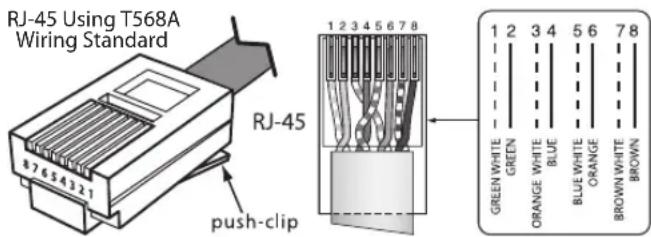
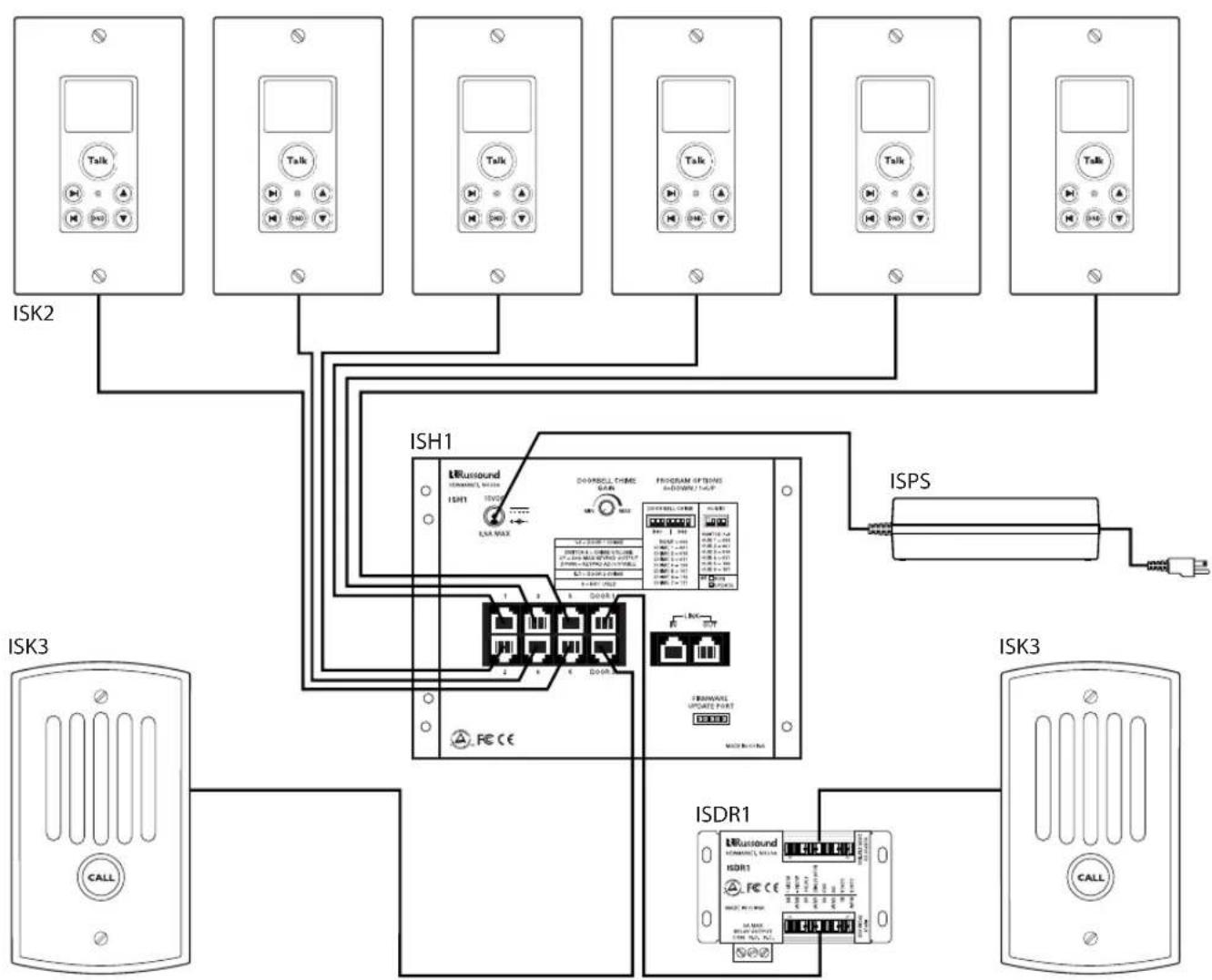
The ISH1 Hub connects to the keypads and door stations with CAT-5 cable. The length limit for the CAT-5 cable is 250 feet (76 m).
Run CAT-5 from the hub location to every keypad and door station location. If you are installing optional ISDR1 modules, loop the door station cables through the module locations.
When running CAT-5 and speaker cables, avoid AC power wiring. If you have to run the cables parallel to electrical wiring, space the cables at least two feet (0.6 m) from the AC power lines.
The hub has 8-pole modular jacks for keypad and door station connections. These connections must be made according to the T568A standard as shown in the diagram below.
The hub also uses modular jacks for the link ports. Use a short 8-pole, 4-twisted-pair straight-through RJ-45 patch cable to link hubs together.
INSTALLATION
flowchart
graph TD
    ISK2["ISK2"] --> ISH1["ISH1"]
    ISH1 --> ISPS["ISPS"]
    ISPS --> ISDR1["ISDR1"]
    ISDR1 --> ISK3["ISK3"]
    ISK3 --> CALL["CALL"]
    ISH1 -->|ISH1| RUSound["RUSound"]
    ISH1 -->|ISH1| ISRD1["ISRD1"]
    ISPS -->|ISPS| RUSound
    ISPS -->|ISPS| ISDR1
    ISH1 -->|ISH1| RUSound
    ISH1 -->|ISH1| ISRD1
    ISPS -->|ISPS| RUSound
    ISPS -->|ISPS| ISRD1
    ISH1 -->|ISH1| RUSound
    ISH1 -->|ISH1| ISRD1
    ISPS -->|ISPS| RUSound
    ISPS -->|ISPS| ISRD1
    ISDR1 -->|ISDR1| RUSound
    ISDR1 -->|ISDR1| ISRD1
Six-zone ComPoint system with Advanced Keypads and an optional Door Strike Release Module
INSTALLATION
Programming
All system programming resides in the ISH1 Hub. For a six-zone system with ISK1 Basic Keypads, programming consists only of setting the doorbell chimes. For a system with ISK2 Advanced Keypads, programming includes assigning zone and door station labels. For a system with more than six zones, programming includes setting hub ID numbers.
When multiple hubs are used, the zone and door label settings are initially stored in the hub to which the keypad is connected. Upon exiting the programming procedure, the settings are copied to the other hubs.
Hub 1 serves as the master hub for storing all zone and door label settings. Whenever the system power is cycled, the settings are copied from hub 1 to the other hubs.
Hub ID numbers
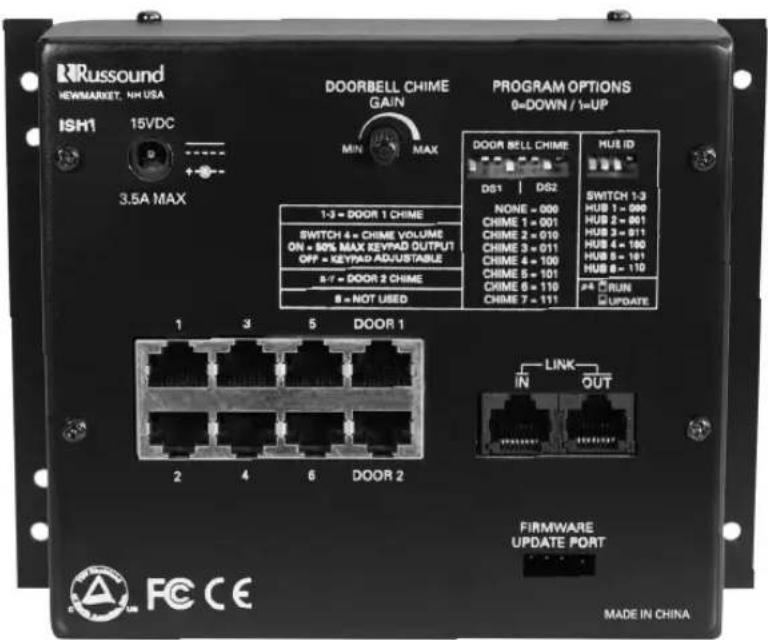
In a system with multiple ISH1 Hubs, each hub must have a unique ID number. This is manually assigned on the 4-switch HUB ID DIP before the system is powered up. To assign the ID number, set switches 1 through 3 as shown in table 1.
Switch 4 enables a programming mode for updating the system firmware. Leave this switch in the up position for system operation.
| Hub ID Switch Settings (0 = Down, 1 = Up) | ||||
| Switches | Hub ID FW* | |||
| 1 2 | 3 4 | |||
| Hub 1 0 0 0 | 1 | |||
| Hub 2 0 0 1 | 1 | |||
| Hub 3 0 1 0 | 1 | |||
| Hub 4 0 1 1 | 1 | |||
| Hub 5 1 0 0 | 1 | |||
| Hub 6 1 0 1 | 1 | |||
| *Switch 4 is for firmware updates(0 = Update Mode, 1 = User Mode) | ||||
Table 1. Hub ID switch settings
Doorbell chimes
A single 8-switch DIP assigns doorbell chimes for both door stations. Switches 1 through 3 select the chime for door 1 and switches 5 through 7 select the chime for door 2. There are 7 chime options, with a setting for no chime when a separate doorbell system is used. To select the chimes, set the switches as shown in table 2.
Switch 4 selects how the chime volume level is managed. Setting the switch to 1 (up) sets the chime volume level to a fixed level at 50% of the maximum keypad output in all zones. This causes the chime to play at the same level in all zones. Setting the switch to 0 (down) allows the chime volume to be determined by the keypad volume level setting in each zone independently.
| Doorbell Chime Switch Settings (0 = Down, 1 = Up) | |||||||||
| Switches | Door 1 CV* | Door 2 | |||||||
| 1 | 2 | 3 | 4 | 5 | 6 | 7 | 8 | ||
| None 0 0 | 0 | 0/1 | 0 | 0 | 0 | - | |||
| Chime 1 0 | 0 | 1 | 0/ | 1 | 0 | 0 | 1 | - | |
| Chime 2 0 | 1 | 0 | 0/ | 1 | 0 | 1 | 0 | - | |
| Chime 3 0 | 1 | 1 | 0/ | 1 | 0 | 1 | 1 | - | |
| Chime 4 1 | 0 | 0 | 0/ | 1 | 1 | 0 | 0 | - | |
| Chime 5 1 | 0 | 1 | 0/ | 1 | 1 | 0 | 1 | - | |
| Chime 6 1 | 1 | 0 | 0/ | 1 | 1 | 1 | 0 | - | |
| Chime 7 1 | 1 | 1 | 0/ | 1 | 1 | 1 | 1 | - | |
| *Switch 4 is for chime volume(0 = Keypad Adjustable, 1 = 50% Keypad Maximum) | |||||||||
Table 2. Doorbell chime switch settings
Switch 8 is currently not used.
The ISH1 Hub also has a trim potentiometer for setting the overall volume of the doorbell chime throughout the system. This can be used to adjust the chime level relative to the communication level.
Note: In a system with multiple linked hubs, only the settings on hub 1 affect the doorbell chime assignments and volume level, since the door stations connect only to hub 1. Because the settings take effect immediately, the doorbell chimes can be set at any time. There is no need to cycle the power after setting them.
Technical Specifications
System
Maximum zones: 36 (up to 6 hubs)
Door stations: 2 maximum
Communications cable: CAT-5/CAT-5e
Maximum cable length: 250 feet (76 m)
ISH1 Hub
Keypad ports: (6) 8-pole modular RJ-45
Door station ports: (2) 8-pole modular RJ-45
Link ports: (2) 8-pole modular RJ-45
Firmware update port: 4-pole port for Programming Cable, Russound part #2500-521065
Switches: 4-switch DIP for hub ID setting 8-switch DIP for 2 doorbell settings Potentiometer for doorbell volume
Doorbell options: 7 chime patterns plus no chime
Power requirement: 15 VDC 3.5 A (Use model ISPS power adapter)
Mounting method: Surface or structured wiring panel
Dimensions: 6.438" W x 5.125" H x 1.813" D (16.4 x 13.0 x 4.6 cm)
Weight: 25.6 oz (0.73 kg)
RRussound®
ComPoint™ ISH1 Hub
The music lover's intercom solution
Instruction Manual
Warranty
The Russound ComPoint ISH1 Hub is fully guaranteed for two (2) years from the date of purchase against all defects in materials and workmanship. For this warranty to apply, the unit must be installed and used according to its written instructions. During this period, Russound will replace any defective parts and correct any defect in workmanship without charge for either parts or labor. Accidental damage and shipping damage are not considered defects under the terms of this warranty. Russound assumes no responsibility for defects resulting from abuse or servicing performed by an agency or person not specifically authorized in writing by Russound. If service is necessary, it must be performed by Russound. Damage to or destruction of components due to excessive power voids the warranty. In these cases, the repair will be made at the owner's expense. To return for repairs, the unit must be shipped to Russound at the owner's expense, along with a note explaining the nature of the service required. Be sure to pack in a corrugated container with at least 3 inches of resilient material to protect the unit from damage in transit.
Before returning a unit for repair, call Russound at 603.659.5170 for a Return Authorization number. Write the RA number on the shipping label and ship to: Russound, 5 Forbes Road, Newmarket NH 03857.
Russound sells product only through authorized dealers and distributors to ensure that customers obtain proper support and service. Any Russound product purchased from an unauthorized dealer or other source, including retailers, mail order sellers and online sellers will not be honored or serviced under existing Russound warranty policy. Any sale of products by an unauthorized source or other manner not authorized by Russound shall void the warranty on the applicable product.
Russound
5 Forbes Road, Newmarket NH 03857 USA
Tel 603.659.5170 • Fax 603.659.5388
www.russound.com
Technical Support: tech@russound.com
28-1216 Revision 1 04/13/06
Copyright © 2006 Russound. All rights reserved. All trademarks are the property of their respective owners. Specifications are subject to change without notice. Russound is not responsible for typographical errors or omissions.