
ISDR1 - Intercom Russound - Free user manual and instructions
Find the device manual for free ISDR1 Russound in PDF.


| Product Type | Wired Intercom System |
| Brand | Russound |
| Model | ISDR1 |
| Dimensions (approx.) | 4 x 6 x 2 inches (102 x 152 x 51 mm) |
| Weight (approx.) | 0.5 lb (227 g) |
| Power Supply | 12V DC, 500 mA (via included transformer) |
| Communication Type | Two-way full-duplex audio |
| Door Release Capability | Yes, supports electric strike activation |
| Number of Stations Supported | 1 indoor station, 1 outdoor station (expandable with additional modules) |
| Mounting Type | Flush mount or surface mount (bracket included) |
| Audio Quality | Clear, hands-free operation with volume control |
| Calling Method | Push-to-talk or automatic answer |
| Indoor Station Display | LED status indicators |
| Outdoor Station Features | Weather-resistant, vandal-resistant metal housing |
| Wiring | 2-conductor shielded cable (recommended: 18-22 AWG) |
| Privacy Mode | Yes, disables external microphone |
| Maintenance | Clean with a soft, dry cloth. Do not use liquids or abrasives. |
| Safety | Low voltage (<24V) – safe for indoor/outdoor use |
| Spare Parts Availability | Contact Russound support for replacement parts and accessories |
| General Information | Designed for residential or small business intercom applications. Requires professional installation for optimal performance. |
Frequently Asked Questions - ISDR1 Russound
User questions about ISDR1 Russound
0 question about this device. Answer the ones you know or ask your own.
Ask a new question about this device
Download the instructions for your Intercom in PDF format for free! Find your manual ISDR1 - Russound and take your electronic device back in hand. On this page are published all the documents necessary for the use of your device. ISDR1 by Russound.
USER MANUAL ISDR1 Russound
For your safety, please read and follow these precautions before installing or using this product:
Read instructions. Read and understand all the applicable instructions before installing or operating the product.
▶ Retain documents. Keep this manual in a convenient place for reference.
▶ Heed warnings. Be aware of all warnings on the product and in the instructions.
▶ Follow instructions. Install and use this product only as described in the instructions. Don't try to use this product in ways it wasn't designed for.
Use indoors only. Don't expose this product to the weather or harsh environmental conditions such as continuous sunlight, excessive humidity, or rain.
Keep product dry. Don't use the product near water; for example, near a bathtub, washbowl, kitchen sink, laundry tub, in a wet basement, or near a swimming pool. Also, do not handle the product when your hands are wet or damp.
- Avoid heat. Locate the product away from heat sources such as radiators, heat registers, stoves or other appliances that produce heat.
▶ Use the right power. Don't connect the product directly to electrical line voltage. Use only the power adapter provided with the product, described in the product specifications or installation instructions, or as marked on the product.
▶ Ground product properly. Make sure the product's means of grounding or polarization is not defeated.
- Keep product clean. From time to time, wipe off the product with a clean soft cloth. Don't use abrasive materials, thinners, alcohol or other chemical solvents or materials.
- Avoid spills and foreign objects. Make sure liquids and objects don't get into the product through any openings.
▶ Get professional service. Have the product serviced only by qualified service personnel when:
- Liquids have spilled or objects have fallen into the product
• The product has been exposed to rain
- The product doesn't appear to operate normally
• The product is damaged
Don't attempt to service the product yourself. Doing so will void the warranty.
If you have any questions, call Russound at 1-800-638-8055 or 603-659-5170.

FCC €
Technical Specifications
CAT-5 connectors: (2) 110 punch-down blocks
CAT-5 cable length: 250 ft (76 m) maximum from hub
Strike release relay: 1-pole double-throw (NC/NO)
Relay connector: Removable 3-pole screw terminal
Relay wire size: Up to 14 AWG (1.63 mm)
Relay contact rating: 5 A @ 12 VDC
Mounting method: Surface
Dimensions: 3" W x 1.875" H x 1" D
(7.6 × 4.8 × 2.5 cm)
Weight: 4.8 oz (136 g)
Available Accessories
AWCAT5 4-pair, 24-gauge solid copper CAT-5e cable, 1000' (305 m)
AW2260AB 2-pair, 22-gauge shielded control cable, 500' (152 m)
Warranty
The Russound ISDR1 Door Strike Release Module is fully guaranteed for two (2) years from the date of purchase against all defects in materials and workmanship. For this warranty to apply, the unit must be installed and used according to its written instructions. During this period, Russound will replace any defective parts and correct any defect in workmanship without charge for either parts or labor. Accidental damage and shipping damage are not considered defects under the terms of this warranty. Russound assumes no responsibility for defects resulting from abuse or servicing performed by an agency or person not specifically authorized in writing by Russound. If service is necessary, it must be performed by Russound. Damage to or destruction of components due to excessive power voids the warranty. In these cases, the repair will be made at the owner's expense. To return for repairs, the unit must be shipped to Russound at the owner's expense, along with a note explaining the nature of the service required. Be sure to pack in a corrugated container with at least 3 inches of resilient material to protect the unit from damage in transit.
Before returning a unit for repair, call Russound at 603.659.5170 for a Return Authorization number. Write the RA number on the shipping label and ship to: Russound, 5 Forbes Road, Newmarket NH 03857.
Russound sells product only through authorized dealers and distributors to ensure that customers obtain proper support and service. Any Russound product purchased from an unauthorized dealer or other source, including retailers, mail order sellers and online sellers will not be honored or serviced under existing Russound warranty policy. Any sale of products by an unauthorized source or other manner not authorized by Russound shall void the warranty on the applicable product.
RRussound®
5 Forbes Road, Newmarket NH 03857 USA
Tel 603.659.5170 • Fax 603.659.5388
www.russound.com
Copyright © 2006 Russound. All rights reserved. All trademarks are the property of their respective owners. Specifications are subject to change without notice. Russound is not responsible for typographical errors or omissions.
28-1215 04/03/06
ISDR1 Door Strike Release Module Instruction Manual
Product Overview
The ISDR1 Door Strike Release Module allows a user to open a door or gate from any ComPoint™ keypad. The module connects in the CAT-5 line between the ISH1 hub and an ISK3 door station and provides relay contacts for activating a separate door strike release or gate actuator.
By providing both normally open and normally closed relay contacts, the ISDR1 can be used for other applications where a versatile relay is needed for control from a CornPoint keypad.
The ISDR1 is designed for surface mounting. To facilitate connection to a door strike release unit, it should be located in an accessible area near the door, such as an attic, basement, or closet space between the door station and the hub.
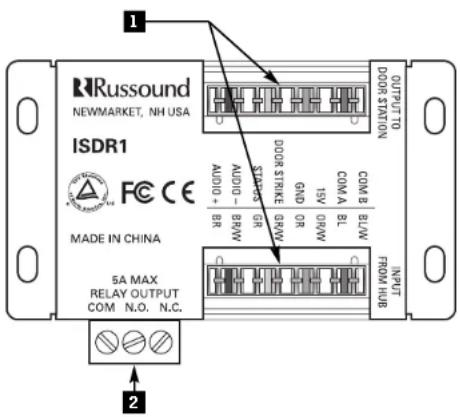
1 INPUT AND OUTPUT CONNECTORS – 110 punch-down connectors for CAT-5 cables from door station and hub
2 RELAY OUTPUT CONNECTOR – Removable screw terminal connector for door strike release, gate actuator, or other device
Installation
The ISDR1 Door Strike Release Module mounts on any flat surface. Generally, if the module is used to activate a door strike release, install it in an accessible location close to the door, such as an attic, basement, or closet space. If the module is used with a central security controller, locate it near the controller or the ComPoint hub.
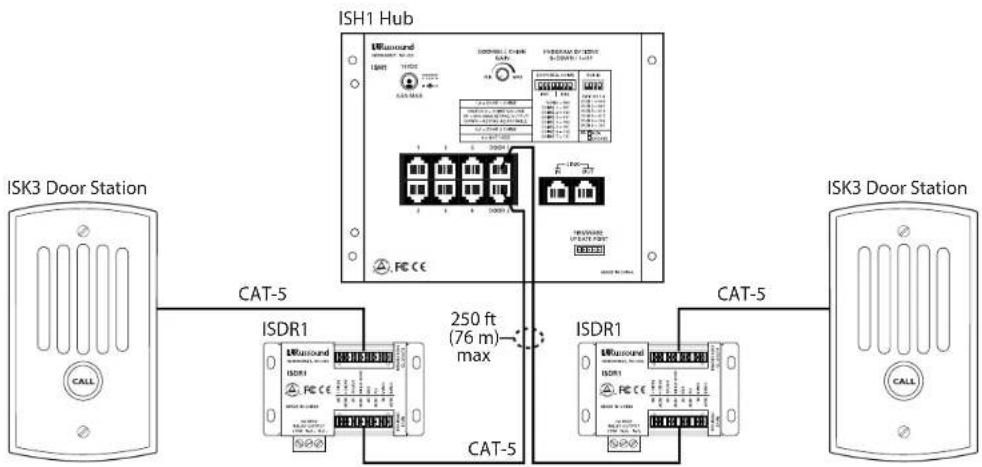
The ISDR1 can be located up to 250 feet (76 m) from the hub. The cable distance between the ISDR1 and the separate door strike release or gate actuator is determined by the release or actuator manufacturer.
Wiring
ComPoint system components interconnect with CAT-5 cable. When running the door station CAT-5 cables, loop them through the ISDR1 module locations.
For the connection with the separate door strike release or other device, run two-conductor control cable between the ISDR1 and the device being controlled.
When running CAT-5 and control cables, avoid running them near AC power wiring. If you have to run the cables parallel to electrical wiring, space the cables at least 2 feet (0.6 m) from the AC power lines.
Connections
The ISDR1 provides 110 punch-down connectors for the CAT-5 cables. Use a punch-down tool to connect the wires according to the color code shown on the module.
The relay output terminals provide access to normally open (NO) and normally closed (NC) contacts. Typically a door strike release connects between the COM and NO terminals. The NC terminal is available to provide an interruptible signal path for other applications.
Operation
The ISDR1 obtains its operational power from the ComPoint hub. It passes signals to and from the door station on all leads of the CAT-5 cable except one, which is used to activate the module from the hub upon receiving a command from a keypad. When activated this way, the ISDR1's relay remains active for 3 seconds.
The ISDR1 can also be activated by providing 15 VDC between the orange/white (+) and green/white (−) terminals in the input connector.
Note: The ISDR1 does not power the separate door strike release or gate actuator. Any external device connected to the ISDR1 must receive power from its own source.
flowchart
graph TD
    A["ISH1 Hub"] -->|CAT-5| B["ISDR1"]
    A -->|CAT-5| C["ISDR1"]
    B -->|250 ft (76 m) max| D["ISDR1"]
    C -->|250 ft (76 m) max| E["ISDR1"]
    style A fill:#f9f,stroke:#333
    style B fill:#ccf,stroke:#333
    style C fill:#ccf,stroke:#333
Cabling for ISDR1 modules in a CornPoint system
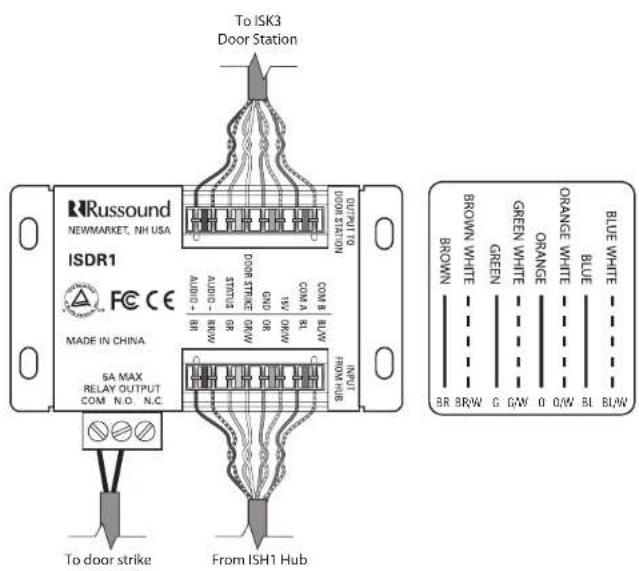
ISDR1 connections
Brand : Russound
Model : ISDR1
Category : Intercom