
ISK3 - Intercom Russound - Free user manual and instructions
Find the device manual for free ISK3 Russound in PDF.


| Product Type | Intercom Door Station |
| Brand | Russound |
| Model | ISK3 |
| Dimensions (W x H x D) | 3" x 5.125" x 3.25" (7.6 x 13.0 x 8.3 cm) |
| Weight | 8 oz (227 g) |
| Power Consumption | 15 VDC, 220 mA max |
| Audio Amplifier Power | 2 watts (monaural) |
| Microphone | Built-in with automatic gain control |
| Speaker | Built-in amplifier |
| Call Key | Amber-backlit |
| Volume Control | Installer-adjustable potentiometer |
| CAT-5 Connection | 110 punch-down block |
| Doorbell Contact | 2-pole screw terminal, 1 A @ 12 VDC |
| Weatherproof | Yes, with gasketed cover plate (resists salt water spray and UV) |
| Wall Box Required | Single-gang deep, 22 cu in (360 cm³) minimum |
| Finish Options | Three available (not specified) |
| Warranty | 2 years (defects in materials and workmanship) |
| FCC Compliance | Yes |
| Operation | Press Call key to ring doorbell; speak to answer within 7 seconds |
| Safety | Follow included precautions; professional service advised if damaged |
| Maintenance | Clean with soft cloth; avoid abrasives, thinners, alcohol |
Frequently Asked Questions - ISK3 Russound
User questions about ISK3 Russound
0 question about this device. Answer the ones you know or ask your own.
Ask a new question about this device
Download the instructions for your Intercom in PDF format for free! Find your manual ISK3 - Russound and take your electronic device back in hand. On this page are published all the documents necessary for the use of your device. ISK3 by Russound.
USER MANUAL ISK3 Russound
For your safety, please read and follow these precautions before installing or using this product:
Read instructions. Read and understand all the applicable instructions before installing or operating the product.
- Retain documents. Keep this manual in a convenient place for reference.
▶ Heed warnings. Be aware of all warnings on the product and in the instructions.
- Follow instructions. Install and use this product only as described in the instructions. Don't try to use this product in ways it wasn't designed for.
- Avoid heat. Locate the product away from heat sources such as radiators, heat registers, stoves or other appliances that produce heat.
Use the right power. Don't connect the product directly to electrical line voltage. Use only the power adapter provided with the product, described in the product specifications or installation instructions, or as marked on the product.
▶ Ground product properly. Make sure the product's means of grounding or polarization is not defeated.
- Keep product clean. From time to time, wipe off the product with a clean soft cloth. Don't use abrasive materials, thinners, alcohol or other chemical solvents or materials.
- Avoid spills and foreign objects. Make sure liquids and objects don't get into the product through any openings.
▶ Get professional service. Have the product serviced only by qualified service personnel when:
- Liquids have spilled or objects have fallen into the product
• The product doesn't appear to operate normally
• The product is damaged
Don't attempt to service the product yourself. Doing so will void the warranty.
If you have any questions, call Russound at 1-800-638-8055 or 603-659-5170.

FCC €
Technical Specifications
User control: Call key with amber backlight
Audio input: Built-in microphone with automatic gain control
Amplifier: Monaural (for system functions only)
Amplifier power: 2 watts
Volume control: Installer-adjustable potentiometer
Audio output: Built-in speaker
Cover plate: Weatherproof plated die-cast zinc
CAT-5 connector: 110 punch-down block
Doorbell connector: 2-pole screw terminal
Doorbell wire size: Up to 18 AWG (1.024 mm)
Doorbell contact: 1 A @ 12 VDC
Power consumption: 15 VDC 220 mA maximum
Dimensions: 3" W x 5.125" H x 3.25" D
(7.6 x 13.0 x 8.3 cm)
Wall box required: Single-gang, 22 cu in (360 cm ^2 ) min
Weight: 8 oz (227 g)
Warranty
The Russound ISK3 Door Station is fully guaranteed for two (2) years from the date of purchase against all defects in materials and workmanship. For this warranty to apply, the unit must be installed and used according to its written instructions. During this period, Russound will replace any defective parts and correct any defect in workmanship without charge for either parts or labor. Accidental damage and shipping damage are not considered defects under the terms of this warranty. Russound assumes no responsibility for defects resulting from abuse or servicing performed by an agency or person not specifically authorized in writing by Russound. If service is necessary, it must be performed by Russound. Damage to or destruction of components due to excessive power voids the warranty. In these cases, the repair will be made at the owner's expense. To return for repairs, the unit must be shipped to Russound at the owner's expense, along with a note explaining the nature of the service required. Be sure to pack in a corrugated container with at least 3 inches of resilient material to protect the unit from damage in transit.
Before returning a unit for repair, call Russound at 603.659.5170 for a Return Authorization number. Write the RA number on the shipping label and ship to: Russound, 5 Forbes Road, Newmarket NH 03857.
Russound sells product only through authorized dealers and distributors to ensure that customers obtain proper support and service. Any Russound product purchased from an unauthorized dealer or other source, including retailers, mail order sellers and online sellers will not be honored or serviced under existing Russound warranty policy. Any sale of products by an unauthorized source or other manner not authorized by Russound shall void the warranty on the applicable product.
RRussound®
5 Forbes Road, Newmarket NH 03857 USA
Tel 603.659.5170 • Fax 603.659.5388
www.russound.com
Copyright © 2006 Russound. All rights reserved. All trademarks are the property of their respective owners. Specifications are subject to change without notice. Russound is not responsible for typographical errors or omissions.
28-1214 03/31/06
ISK3 Door Station Instruction Manual
Product Overview
The ISK3 Door Station is a flush-mounted weatherproof call station for the ComPoint™ intercom system. It features an amber-backlighted Call key and a solid metal cover plate available in three finish options.
The Door Station includes an internal microphone with automatic gain control along with a built-in amplifier and speaker for reliable, high-quality two-way communication with ComPoint keypads inside the house.
The device fits a single-gang deep wall box and features doorbell contacts and an installer-adjustable control for the speaker volume level.
The ISK3 is environmentally tested for resistance to salt water spray and ultraviolet light.
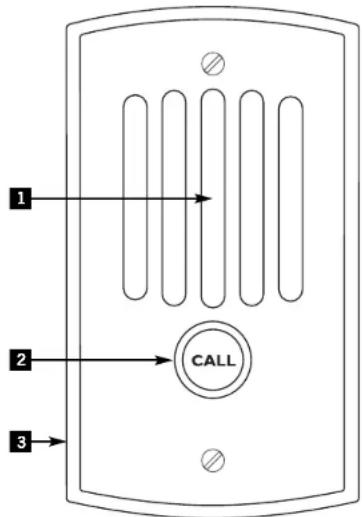
1 MICROPHONE AND SPEAKER – Support two-way communication with interior keypads
2 CALL KEY – Rings doorbell and initiates communication
3 WEATHERPROOF COVER PLATE – Protects internal circuits and components
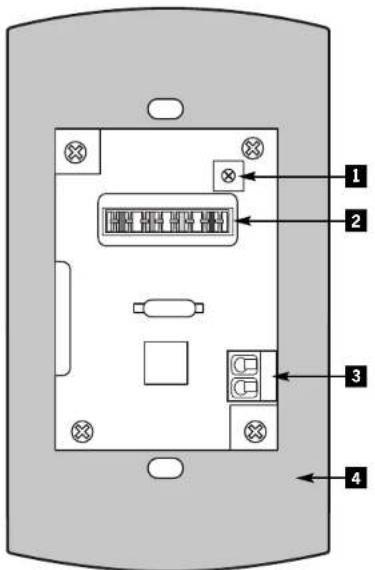
ISK3 Door Station rear
1 POTENTIOMETER – Adjusts speaker volume
2 110 PUNCH-DOWN BLOCK - For CAT-5 connection
3 SCREW TERMINALS – For external doorbell connection
4 WEATHERPROOF GASKET – Seals out moisture
Installation and Trim
The ISK3 Door Station installs in a standard single-gang US electrical deep plastic wall box with an internal volume of at least 22 cubic inches (360 cm ^3 ). With its own gasketed weather-resistant front plate, it needs no other protection.
Wiring
ComPoint system components interconnect with CAT-5 cable. Run CAT-5 from the hub location to each door station location. If you are installing optional ISDR1 Door Strike Release Modules, loop the door station cables through the module locations.
To use a separate doorbell system instead of the doorbell built into the ComPoint system, run 2-conductor cable from each door station to the doorbell system.
When running CAT-5 and control cables, avoid running them near AC power wiring as much as possible. If you have to run the cables parallel to electrical wiring, space the cables at least two feet (0.6 m) from the AC power lines.
Connections
The door station provides a 110 punch-down connector for the CAT-5 cable. Use a punch-down tool to connect the wires according to the connector color code as shown below.
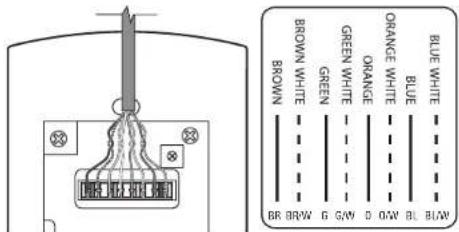
CAT-5 connection
To connect a separate doorbell system, connect the 2-conductor cable to the doorbell terminals on the back of the door station as shown in the example below. The terminals provide access to normally open switch contacts that close for a minimum of 4 seconds when the Call key is pressed. Connect the cable from the ISK3 to the doorbell according to the doorbell system instructions.
Speaker Volume Adjustment
Use the potentiometer to adjust the speaker volume. Turn it clockwise to raise the volume or counterclockwise to lower it. This does not affect the microphone sensitivity.
Operation
Press and release the Call key to ring the doorbell. When a person inside replies from a keypad, you will hear a single beep when they begin the reply and again when they're done speaking. You then can answer the reply within 7 seconds by just speaking. At the end of the 7 seconds, you will hear a double beep, after which you can no longer answer the reply.
Note: Pressing and releasing the Call key always rings the doorbell. To answer a reply, just speak without pressing the Call key.
You will hear a buzz tone from the door station when the person inside activates the door strike release.
Available Accessories
AWCAT5 4-pair, 24-gauge solid copper CAT-5e cable, 1000' (305 m)
S1-22-R Single-gang deep plastic wall box with captive mounting nails, 22 cu in (360 cm²)
ISDR1 Door Strike Release Module
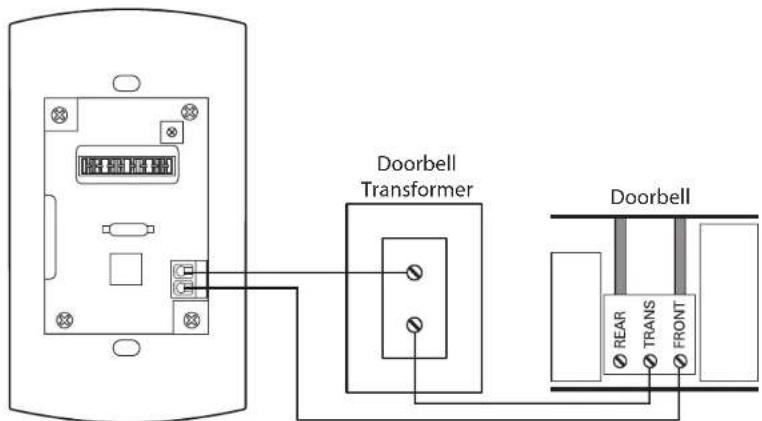
Connection to typical doorbell system
Brand : Russound
Model : ISK3
Category : Intercom