SD-MV-0401 - Uncategorized SEADA - Free user manual and instructions
Find the device manual for free SD-MV-0401 SEADA in PDF.


User questions about SD-MV-0401 SEADA
0 question about this device. Answer the ones you know or ask your own.
Ask a new question about this device
Download the instructions for your Uncategorized in PDF format for free! Find your manual SD-MV-0401 - SEADA and take your electronic device back in hand. On this page are published all the documents necessary for the use of your device. SD-MV-0401 by SEADA.
USER MANUAL SD-MV-0401 SEADA
Thank you for purchasing this product
For optimum performance and safety, please read these instructions carefully before connecting, operating or adjusting this product. Please keep this manual for future reference.
Surge protection device recommended
This product contains sensitive electrical components that may be damaged by electrical spikes, surges, electric shock, lighting strikes, etc. Use of surge protection systems is highly recommended in order to protect and extend the life of your equipment.
Table of Contents
- Introduction......1
- Features....1
- Package Contents......1
- Specifications.... 2
- Operation Controls and Functions....3
5.1 Front Panel.... 3
5.2 Rear Panel....3 - Display Modes......4
- Remote Control....5
- Application Example......6
1. Introduction
The high performance 4×1 quad multi-viewer supports four routes HDMI high definition input contents be displayed on one HDMI screen and one VGA screen simultaneously. It supports analog audio output that can be selected different input source. Supports five multi-view display modes. Output resolution can be adjusted and supports the maximum up to 4K30Hz. The product can be controlled via the front panel button and remote control.
2. Features
☆ HDMI 1.4b, HDCP 1.4 compliant
☆ Input resolution can automate recognition.
(480p\~4K30Hz, 800x600\~4K30Hz)
☆ Output resolution can be selected by on-panel button and remote control.
- HDMI supports resolution the maximum up to 4K30Hz. (3840x2160@30Hz, 1920x1080@50/60Hz, 1280x720@50/60Hz, 1920x1200@60Hz, 1024x768@60Hz)
- VGA supports resolution the maximum up to 1920x1200@60Hz. (1920x1080@50/60Hz, 1280x720@50/60Hz, 1920x1200@60Hz, 1024x768@60Hz)
Note: If output resolution selects the 4K30Hz, the VGA port will not support.
☆ Audio supports LPCM 2CH.
☆ Supports 1/2/4 windows multi-view modes.
☆ Control is via on-panel button and remote control.
3. Package Contents
① 1× 4K HDMI 4×1 Quad Multi-Viewer
② 1× 12V/1A DC Power Adapter
③ 1× Remote Control
④ 2× Mounting Ears
⑤ 1× User Manual
4. Specifications
| Technical | |
| HDMI Compliance HDMI 1.4b | |
| HDCP Compliance HDCP 1.4 | |
| Video Bandwidth 10.2 Gbps | |
| Video Resolutions | 3840x2160@30Hz,1920x1080@50/60Hz,1280x720@50/60Hz,1920x1200@60Hz,1024x768@60Hz |
| Color Depth 8-bit | |
| Color Space RGB, YCbCr 4:4:4, YCbCr 4:2:2 | |
| Analog Audio Formats | LPCM2.0 44.1KHz 48KHz |
| ESD Protection | Human-body Model:±8kV (Air-gap discharge), ±4kV (Contact discharge) |
| Connections | |
| Inputs ports | 4x HDMI Type A [19-pin female]1x SEVICER [Micro USB, Update port] |
| Outputs ports | 1x HDMI Type A [19-pin female]1x VGA [VGA-D]1x Audio [3.5mm Stereo Mini-jack] |
| Mechanical | |
| Housing | Metal Enclosure |
| Color Black | |
| Dimensions | 185mm (W)×128mm (D)×20mm (H) |
| Weight | 595g |
| Power Supply | Input: AC100~240V 50/60Hz, Output: DC12V/1A (US/EU standards, CE/FCC/UL certified) |
| Power Consumption | 7.68W (max) |
| Operating Temperature | 0°C ~ 40°C / 32°F ~ 104°F |
| Storage Temperature | -20°C ~ 60°C / -4°F ~ 140°F |
| Relative Humidity | 20~90% RH (non-condensing) |
5. Operation Controls and Functions
5.1 Front Panel

text_image
CH 1 CH 2 CH 3 CH 4 MODE RESO SERVICE ① ② ③ ④ ⑤ ⑥| Number | Name Function | description |
| 1 POWER LED | The LED will illuminate green when the unit is working, red when the unit is in standby mode. | |
| 2 | IR | IR receiver window. It accepts the remote control signal of this device only. |
| 3 | CH1/CH2/CH3/CH4 button | Selects input channel button (Please see “6. Display Modes” detail description). |
| 4 MODE button | Press this button to cyclical selection display mode output (Please see “6. Display Modes” detail description). Press this button up to 5s, the output screen is full screen and equal proportion display. | |
| 5 RESO | Cycling select different output resolution. Press this button up to 5s to opening or closing window display frame. | |
| 6 SERVICE port Fireware update used. (Manufacture use only.) | ||
5.2 Rear Panel

text_image
INPUT IN 1 IN 2 IN 3 IN 4 OUTPUT HDMI VGA AUDIO DC 1 2V ① ② ③ ④ ⑤| Number | Name | Function description |
| 1 | HDMI INPUT | Connect to HDMI source device such as DVD player or PS4 with a HDMI cable. |
| 2 | HDMI OUTPUT | Connect to HDMI display device such as TV or projector with a HDMI cable. |
| 3 VGA OUTPUT | VGA output port, this port output signal is the same as the HDMI output port. |
| 4 AUDIO OUTPUT | Analog audio output port. (Note: If the HDMI output is MODE 1, the audio output follows the video content. If the HDMI output is MODE 2/3/4/5, press CH1/CH2/CH3/CH4 up to 5s to selecting audio output or using remote control to cyclical selection audio output. The default status is CH1 screen audio output.) |
| 5 DC 12V | Plug the 12V/1A DC power supply into the unit and connected the adapter to an AC outlet. |
6. Display Modes
The quad multi-viewer has 5 display modes. Please see the below detail description.

text_image
CH1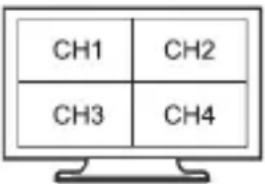
text_image
CH1 CH2 CH3 CH4
text_image
CH1 CH2 CH4 CH3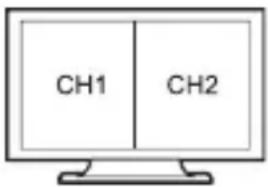
text_image
CH1 CH2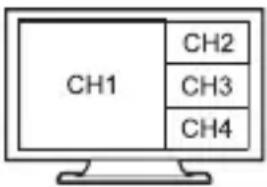
text_image
CH1 CH2 CH3 CH4MODE 1: The quad multi-viewer will display separately four HDMI inputs. Press the CH1/CH2/CH3/CH4 buttons on-panel or using IR remote control the Source 1/2/3/4 buttons to selecting input source, corresponding on-panel light is on. MODE 2: The quad multi-viewer divides four HD inputs with same size and display on a screen. The on-panel four lights is on. In the CH1 window, you can press the CH1 button on-panel or using IR remote control the Source 1 button to cyclical selection four inputs source. In the CH2 window, you can press the CH2 button on-panel or using IR remote control the Source 2 button to cyclical selection four inputs source...etc.
The rest can be done in the same manner.
MODE 3: The quad multi-viewer divides four HD inputs and display on a screen. The on-panel four lights is on. Operation method is the same as MODE 2.
MODE 4: The quad multi-viewer divides two HD inputs with same size and display on a screen. The on-panel CH1/CH2 lights is on. In the CH1 window, you can press the CH1 button on-panel or using IR remote control the Source 1 button to cyclical selection four inputs source. On the CH2 window, you can press the CH2 button on-panel or using IR remote control the Source 2 button to cyclical selection four inputs source.
MODE 5: The quad multi-viewer divides four HD inputs and display on a screen. The on-panel four lights is on. Operation method is the same as MODE 2.
7. Remote Control
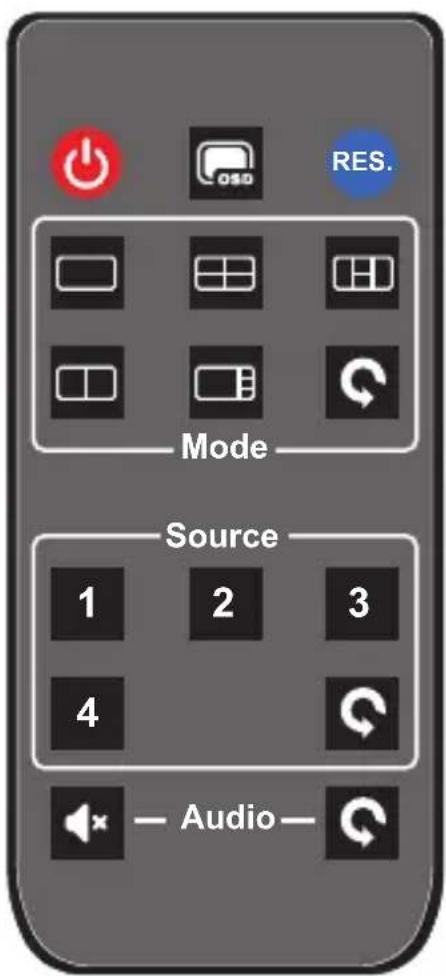
text_image
Mode Source 1 2 3 4 Audio: Press this button to setting standby mode, press this button again to power on the unit.
: Press this button to opening or closing display window frame.
RES.: Press this button to cyclical selection output resolution.
Mode:
☐ ☐ ☐ ☐ ☐ ☐ : Press these buttons to selecting output display mode
Press this button to cyclical selection output display mode.
Source:
1/2/3/4: Press these buttons to selecting input source.
Press this button to cyclical selection input source (This button can be used only at the MODE 1).
Audio:
: Mute button.
C: Press this button to cyclical selection audio output.
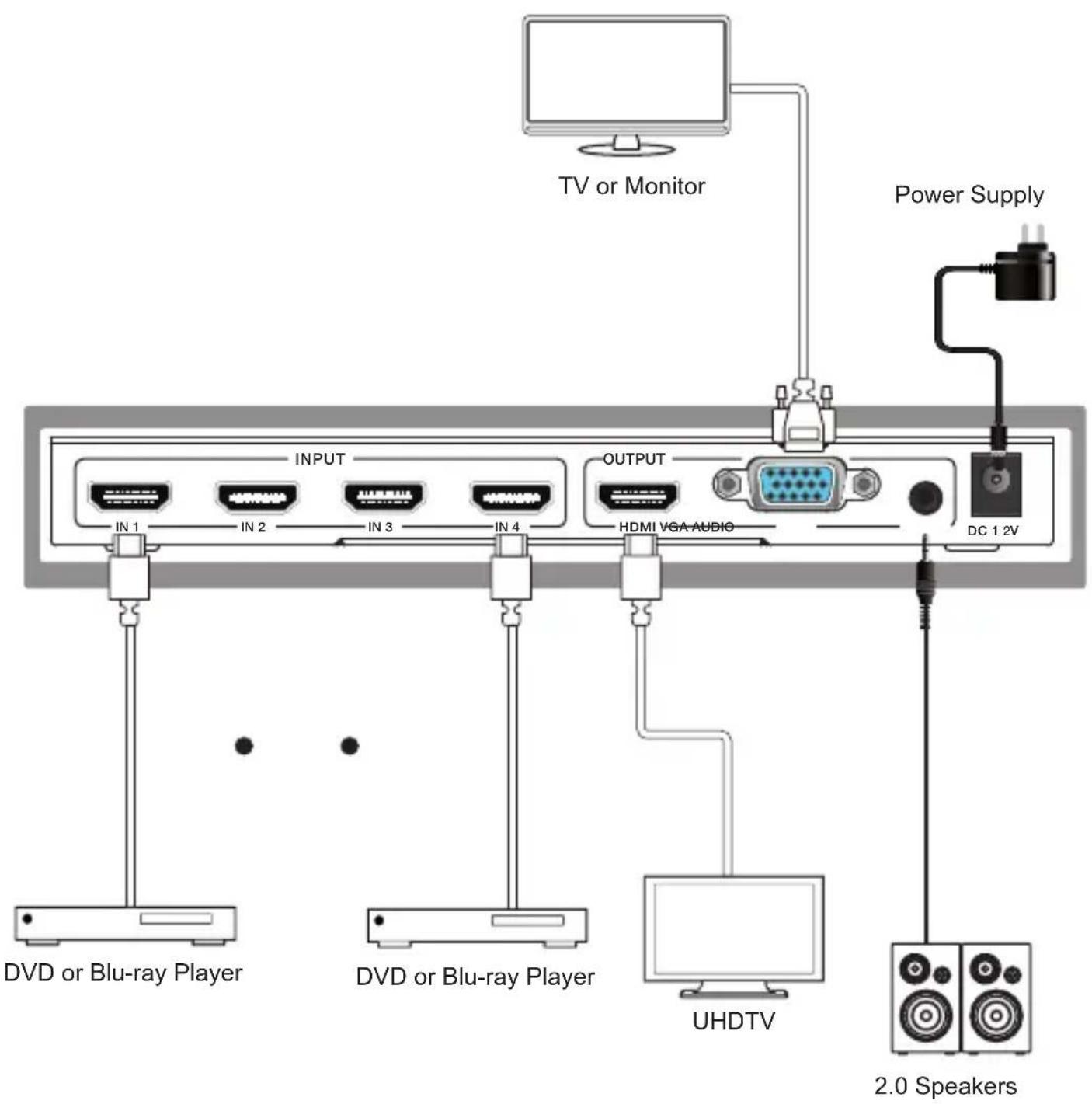
8. Application Example