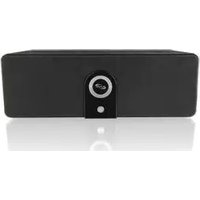
ISB563B - Docking Station iLive - Free user manual and instructions
Find the device manual for free ISB563B iLive in PDF.


| Type de produit | Wireless Bluetooth Speaker / Docking Station |
| Marque | iLive |
| Modèle | ISB563B |
| Alimentation | AC/DC power adapter (included) |
| Bluetooth Version | Not specified (typical for similar devices) |
| Ports | DC Power Input, USB Port (5V / 1A for charging), Line In (3.5mm) |
| Fonctions principales | Wireless audio streaming, speakerphone, auxiliary input, USB device charging |
| Contrôles | Power, Volume +/- , Pair button, Speakerphone button |
| Indicateurs LED | Pair indicator (blue, flashing/solid), Line In mode (red) |
| Portée Bluetooth | Approximately 33 feet (10 meters) typical, recommended within 3 feet for pairing |
| Code par défaut | 0000 |
| Compatibilité | Most Bluetooth enabled devices |
| Chargement de périphériques | USB port provides up to 5V/1A output |
| Entretien | Clean with a soft dry cloth; avoid liquids and abrasives |
| Sécurité | Do not expose to rain or moisture; use only with specified accessories; refer to manual for full precautions |
| Accessoires inclus | AC/DC power adapter, User manual |
| Réparabilité | No user-serviceable parts; refer to qualified service personnel |
| Certifications | FCC Part 15 compliant |
Frequently Asked Questions - ISB563B iLive
User questions about ISB563B iLive
0 question about this device. Answer the ones you know or ask your own.
Ask a new question about this device
Download the instructions for your Docking Station in PDF format for free! Find your manual ISB563B - iLive and take your electronic device back in hand. On this page are published all the documents necessary for the use of your device. ISB563B by iLive.
USER MANUAL ISB563B iLive
ISB563B Bluephoria Wireless Bluetooth Speaker
IMPORTANT SAFETY INSTRUCTIONS
- Read these instructions.
- Keep these instructions.
- Head all Warnings
- Follow all instructions
- Do not use this apparatus near water.
- Company with sales split
- Do we block any convolution operations [install in
- Debita Stuck any Canadian supercapable in accordance with the manufacturer's instructions
- "Do you get" are any health sources such as physicians
heat registers, moves, or other apparatus including
amplifiers that produce heat. - Do not defeat the safety purpose of the polarized or grounding - type plug. A polarized plug has two blades with one wide than the other. A grounding type plug has two blades and a third grounding plug. The wide blade or the third plug are provided for your safety. When the provided plug does not sit into your outlet, consist an electrician fix replacement of the resultant inlet.
III. Protect the power cord from being walked on or
principal particularly at plays, convenience aspects.
and the point where they exit from the apparatus.
- Only use attachment/accessories specified by the
monation
-
Use only with a cart, stand, impact, bracket, or table specified by the manufacturer, or said with the apparatus. When a cart is used, use custom when moving the car-appanus combination to avoid injury from tip over. Upon this apparatus during lighting duration when unused for long periods of time.
-
Refer all servicing to qualified service personnel. Servicing is required when the apparatus has been castaged in any way, such as power supply cord or plug is thumped liquid has been spilled or injects have fallen into the apparatus, the apparatus has been exposed to rain or moisture, does not operate normally, or has been dropped.

FCC Warnings
Warning: Changes in modifications to this unit not expressly approved by the party responsible for compliance could void the user's authority to operate the equipment.
NUTI: This equipment has been tested and found to comply with the limits for a Class II digital device, purchase to Part 13 of the ICC Rules. These limits are designed to provide reasonable protection against harmful interference in a residential installation. This equipment generates, uses and carries radiate mode frequency energy and, if not installed and used in accordance with the instructions, may cause harmful interference to main communications. However, there is no guarantee that interference will not occur in a particular instance. If this equipment does cause harmful interference to mode or television reception, which can be determined by using the equipment off and on, the user is encouraged to try to correct the interference by one or more of the following measures.
- Reactant to reiterate the receiving amount.
• Increase the separation between the equipment and receiver.
- Connect the equipment into an outlet on a circuit different from that to which the receiver is connected.
• Counain the dealer or an experienced radio TV technician for help.
Additional Warnings
WARNINGS AND PRECAUTIONS
• CAUTION: TO PREVENT ELECTRIC SHOCK, MATCH WIDE BLADE OF PLOG TO WIDE SLOT, FULLY INSERT.
+ WARNING: To reduce the risk of fire or electric shock, do not expose this apparatus to rain or moisture.
CAUTION: Use of controls or adjustments or performance of procedures other than those specified may result in hazardous radiation exposure.
WARNING: Changes or modifications to this unit not expressly approved by the party responsible for compliance rule void the user's authority to operate the equipment.
WARNING: Do not please this unit directly onto furniture surfaces with any type of soft, porous, or sensitive finish. As with any rubber compound made with oils, the feet could cause marks or staining where the foot reside. We recommend using a protective barrier such as a cloth or a pocket of glass between the unit and the surface to reduce the risk of damage and/or staining.
- WARNING: Use of the unit near fluorescent lighting may cause interference regarding use of the remote. If the unit is displaying erratic behavior move away from any fluorescent lighting, as it may be the cause.
- CAUTION: Danger of explosion of battery is incorrectly replaced. Replace only with the same or equivalent type.
- WARNING: There is a danger of explosion if you attempt to ensure standard Alkaline batteries in the unit. Only use rechargeable NMH batteries.
- WARNING: The native control's buffer rail battery contains memory. Do not put in the track, instead recycle or dispose of as hazardous waste
- WARNING: Lithium batteries, like all rechangable batteries are recyclable and should be recycled or disposed of in normal household waste. Contact your local government for disposal or recycling practices in your area. They should never be incinerated since they might explode.
+ WARNING: Shock hazard - Do Not Open.
AVIS-RESQUE DE CHOC ELECTRIQUE - NE PAS OUVIR Maine plug is used as discenter device and should remain readily accessible during intended use. In order to disconnect the apparate from the maine completely, the maine plug should be disconnected from the maine socket outlet completely.
Do not mix old and new batteries.
Do not mix alkaline, standard (carbon zinc), is rectargzable (ni acid, ni ink, etc.) batteries. No antrude latoxin cation y manos.
No accretive laborator, alcalicas, calender (exclustionine) or revascular (mucoid, air-ash, etc.).

WARNING: TO REDUCE THE RISK OF ELECTRIC SHOCK, DO NOT REMOVE COVER OR BACK! NU USER SERVICEABLE PARTS INSIDE. REFER SERVICING TO QUALIFIED SERVICE PERSONNEL.

The lightning flash with a nanowireal symbol, within an equilateral triangle, is intended to alert the user to the presence of uninsulated "dangerous voltage" within the product's enclosure that may be of sufficient magnitude to constitute a risk of electric shock to persons.

The examination point within an equilateral triangle is intended to alert the user to the presence of appropriate operating and maintenance (servicing) intersections in the literature accompanying the appliance.

The symbol indicates that this product incorporates double insulation between lacrourous mains voltage and user accessible parts.
Introduction and Setup
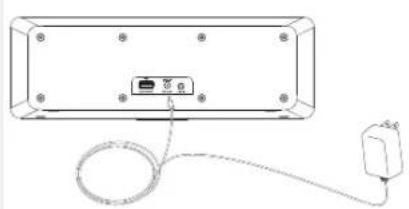
Power
Plug the included AC/DC power adapter into the DC POWER INPUT on the unit and an AC power outlet to power the unit.
natural_image
Diagram of a device rear panel with cable and connector, no text or symbols presentSpeakerphone
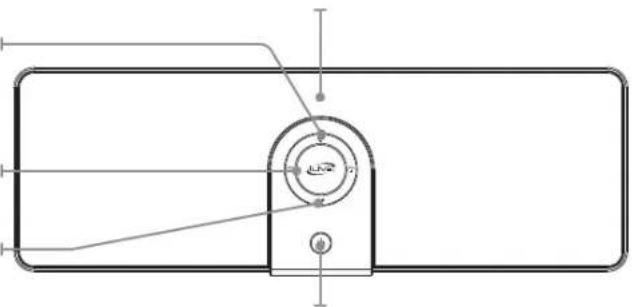
Press to answer or end a call.
Volume
Press to adjust the volume.
Pair
Press to begin pairing.
Pair Indicator
natural_image
Technical line drawing of a mechanical component with no visible text or symbolsPower
Press to turn the unit on or off.
USB Port
Use to charge external
connected devices. (Rating : Max. 5V 1A)
Line In

Bluetooth Setup
Pairing a Bluetooth Device for the First Time
- Power on the unit by pressing the Power button.
The Pairing Indicator will flash blue quickly.
When pairing, remain within 3 feet of the unit.
- Using the native controls on your Bluetooth device, select the "ISB563" in your Bluetooth settings to pair.
If your device requests a password, enter the default password "0 0 0 0".
Refer to the user's manual for your specific device for instructions on pairing and connecting Bluetooth devices.
- When successfully paired and connected, the Pairing Indicator will display a solid blue light.
After initial pairing, the unit will stay paired unless unpaired manually by the user or erased due to a reset of the device.
If your device should become unpaired or you find it is unable to connect, repeat the above steps or press the Pair button to start the pairing process pairing again.
Using Bluetooth
Playing Audio Wirelessly
- Follow the instructions for Pairing a Bluetooth Device.
- Use the native controls on the connected Bluetooth Device to select a track.
- To play or pause the selected track, use the native controls on the connected Bluetooth Device.
- Audio played through the connected Bluetooth device will now be heard through the speakers.
Using the Speakerphone
- Follow the instructions in Pairing a Bluetooth Device.
- When a call is received, a ringtone will sound through the speakers.
- Press the Speakerphone button to accept the call or accept the call with the native controls on the connected device.
- The incoming call received through the device will now be heard through the speakers.
- To end the call, press the Speakerphone button or end the call using the native controls on the connected device.
Line In
Using the Line In
Requires a 3.5mm audio cable (not included)
- Connect a 3.5mm audio cable to the Line In on the unit and an audio output on an MP3 player or other audio source.
- Use the native controls on the connected MP3 player or other audio source to play and control audio played through the clock radio.
Charging
Charging a Device
- Make sure the unit is plugged into the wall.
- Using the appropriate USB charging cable (not included), connect one end to the device and the other to the USB Port on the unit.
Refer to the user's manual for your specific device for manufacturers required charging amperage as well as determining the appropriate cable for your device before charging.
- The device will now charge.
Power and Pairing Indicator Lights
| Status Pairing Indicator | |
| Power Off No light | |
| Power On Slowly flashing blue light | |
| Ready to Pair Quickly flashing blue light | |
| Bluetooth Connected Solid blue light | |
| Line In Mode Red light |

International Support
To download this User's Guide in English, Spanish, or French, or to get answers to frequently asked questions, visit the support section at: www.iLiveElectronics.com
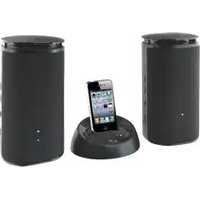

Brand : iLive
Model : ISB563B
Category : Docking Station