KFDW 6753 W - Dishwasher Kernau - Free user manual and instructions
Find the device manual for free KFDW 6753 W Kernau in PDF.


User questions about KFDW 6753 W Kernau
0 question about this device. Answer the ones you know or ask your own.
Ask a new question about this device
Download the instructions for your Dishwasher in PDF format for free! Find your manual KFDW 6753 W - Kernau and take your electronic device back in hand. On this page are published all the documents necessary for the use of your device. KFDW 6753 W by Kernau.
USER MANUAL KFDW 6753 W Kernau
natural_image
Illustration of a hand holding a faucet with a valve, showing a curved arrow indicating rotation (no text or symbols)
OSTRZEŻENIE
natural_image
Simple line drawing of a faucet with a valve and base (no text or symbols)
RYZYKO PORAŻENIA PRĄDEM
text_image
Labeled diagram of a multi-level kitchen appliance with numbered parts for identification
natural_image
Close-up of a mechanical component with two circular features and a numbered arrow pointing to the number 12 (no text or symbols on the main subject)OGÓLNY WYGLĄD PRODUKTU
text_image
Four-step diagram illustrating a chemical experiment with labeled steps: stirring, heating, drying, and boiling.WYKORZYSTANIE DETERGENTU
natural_image
Illustration of a hand pressing down on a blue liquid in a container (no text or symbols)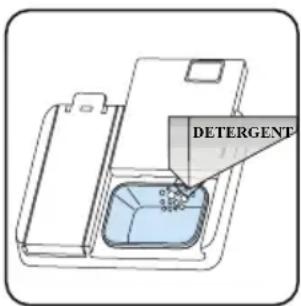
text_image
DETERGENTSTOSOWANIE POŁĄCZONYCH DETERGENTÓW
natural_image
Illustration of a hand using a tool to press or install a device into a rectangular container (no text or symbols visible)
natural_image
Line drawing of a hand inserting a lock into a device (no text or symbols)natural_image
Isometric view of a car chassis frame with red arrows indicating motion or movement, no text or symbols present.Kosz górny
Regulacja wysokości
natural_image
3D architectural or engineering diagram showing structural framework with red arrows indicating upward motion (no text or symbols present)
natural_image
3D rendering of a red and gray mechanical component with green wheels, enclosed within a steel cage structure (no text or symbols visible)
natural_image
3D rendering of a red and gray mechanical component with green wheels, mounted on a metal frame structure (no text or symbols visible)natural_image
3D wireframe diagram of a structural grid with red arrows indicating force or movement (no text or symbols)natural_image
Interior view of a kitchen appliance showing open drawer, plate, and sink (no text or symbols visible)
OSTRZEŻENIE:
natural_image
Two 3D-rendered kitchen utensils arranged in a grid, one with a lid and the other with a pan (no text or symbols visible)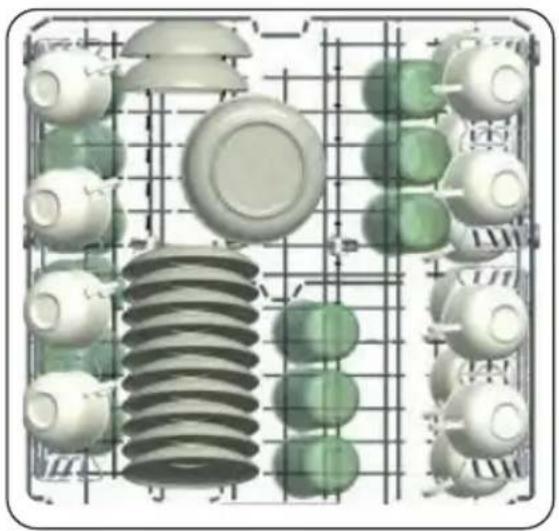
natural_image
3D rendering of industrial components including insulators, gears, and a central coil (no text or symbols)natural_image
Technical diagram of a mechanical assembly with internal components and a grid structure (no text or labels)
natural_image
3D structural model of a grid with embedded spheres and a black X mark, no visible text or symbols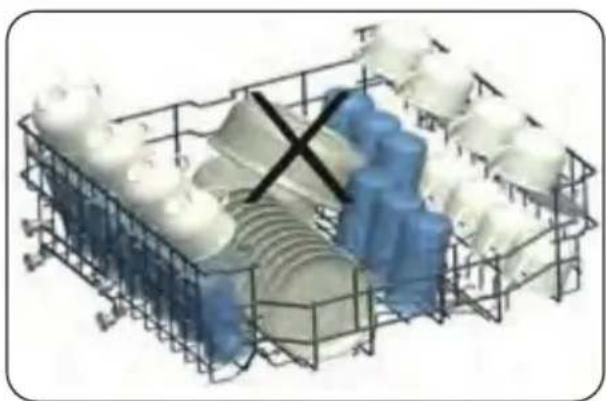
natural_image
3D wireframe model of a mechanical assembly with blue and white components, no visible text or symbolsROZDZIAŁ 6. TABELA PROGRAMÓW
natural_image
Diagram of a mechanical component with a central rotating knob and a base plate (no text or symbols)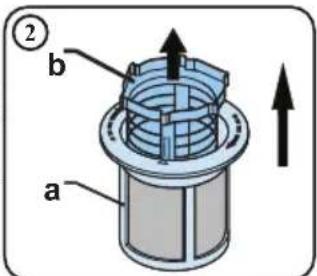
text_image
② b a
text_image
Diagram of a car hood with labeled parts and directional arrow indicating motion or movement
natural_image
Technical line drawing of a mechanical component with a central hub and base plate (no text or symbols)natural_image
Technical line drawing of a mechanical assembly with gears and shafts (no text or symbols)POMPA ODPLYWOWA
Thank you for choosing this product.
This User Manual contains important safety information and instructions on the operation and maintenance of your appliance. Please take the time to read this User Manual before using your appliance and keep this book for future reference.
| Icon Caption Description | ||
 | Warning Serious injury or death risk | |
 | Risk of electric shock Dangerous voltage risk | |
 | Fire | Warning; Risk of fire / flammable materials |
 | Caution Injury or property damage risk | |
 | Important/Note Operating the system correctly | |
CONTENTS
CHAPTER 1. Safety instructions....39
General safety warnings....39
During Usage....41
CHAPTER 2. Installation ....43
Machine Positioning....43
Water Connection 43
Water Inlet Hose 43
Drain Hose (Model Depending)....44
Electrical Connection 45
Fitting The Machine Undercounter 45
CHAPTER 3. Technical specifications....47
General Appearance....47
Technical Specifications....47
Recycling....48
Packing and the environment 48
CHAPTER 4. Before using the appliance....49
Preparing Your Dishwasher For First Use....49
Salt Usage (if available) 49
Fill The Salt (if available)....49
Water Hardness Table....50
Test Strip....50
Water Softener System 51
Setting....51
Detergent usage....51
Filling the detergent....51
Using combined detergents 52
Rinse-aid usage....52
Filling the rinse-aid and setting....52
CHAPTER 5. Loading your dishwasher ....53
Recommendations ....53
Alternative basket loads 56
CHAPTER 6. Programme table....57
CHAPTER 7. The control panel....58
Changing a programme ....60
Cancelling a programme....60
Switching the Machine Of....61
Buzzer Sound Control ....61
Save Power Mode ....61
CHAPTER 8. Cleaning and maintenance ....62
Filters....62
Spray Arms....63
Drain Pump....63
CHAPTER 9. Troubleshooting....64
Automatic fault warnings and what to do....66
CHAPTER 10. Disposal of used equipment....67
CHAPTER 1. SAFETY INSTRUCTIONS
GENERAL SAFETY WARNINGS
- Read these instructions carefully before using your appliance and keep this manual for future reference.

CAUTION
Please check the packaging of your machine before installation and the outer surface of the machine once the packaging has been removed.
Do not operate the machine if it appears damaged or if the packaging has been opened.
- Packaging materials protect your machine from any damage that might occur during transportation. The packaging materials are environmentally friendly as they are recyclable. Use of recycled material reduces raw material consumption and decreases waste production.

CAUTION
This appliance can be used by children aged from 8 years and above, and by persons with reduced physical, sensory or mental capabilities or lack of experience and knowledge if they have been given supervision or instruction concerning the use of the appliance in a safe way and understand hazards involved. Children should not be allowed to play with the appliance.

WARNING
Remove packaging and keep it out of reach of children.

CAUTION
Keep children away from detergents and rinse aids.

CAUTION
There may be some residue left in the machine after washing. Keep children away from the machine when it is open.

INSTALLATION WARNINGS
- Choose a suitable and safe place to install your machine.
- Only original spare parts should be used with the machine.

RISK OD ELECTRIC SHOCK / CAUTION
Unplug the machine before installation.

CAUTION
Your machine must only be installed by an authorised service agent. Installation by anyone other than an authorised agent may cause your warranty to be void.

CAUTION
Check that the indoor electrical fuse system is connected in line with safety regulations.

CAUTION
All electrical connections must match the values on the plate.

RISK OD ELECTRIC SHOCK / CAUTION
Ensure the machine does not stand on the electrical supply cable.

FIRE
Never use an extension cord or a multiple socket connection.

CAUTION
The plug should be accessible after the machine is installed.
• After installation, run your machine unloaded for the first time.

RISK OD ELECTRIC SHOCK / CAUTION
The machine must not be plugged in during positioning.

CAUTION
Always use the coated plug supplied with your machine.

RISK OD ELECTRIC SHOCK / CAUTION
If the electrical cable is damaged, it should only be replaced by a qualified electrician.
- Connect the hose directly to the water inlet tap. The pressure supplied
by the tap should be a minimum of 0.03 MPa and a maximum of 1 MPa. If the pressure exceeds 1 MPa, a pressure relief valve must be fitted between the connection.
DURING USAGE
- This machine is for domestic use only; do not use it for other purposes. Commercial use will void the guarantee.

CAUTION
Do not stand, sit or place loads on the open door the dishwasher.

CAUTION
Only use detergents and rinse aids produced specifically for dishwashers. Our company is not responsible for any damage that may occur due to misuse.

CAUTION
Do not drink water from the machine.

WARNING
Due to the danger of explosion, do not place any chemical dissolving agents into the machine's washing section.
- Check the heat-resistance of plastic items before washing them in the machine.

CAUTION
Only put items in the machine which are suitable for dishwashing, and take care not to overfill the baskets.

CAUTION
Do not open the door while the machine is in operation, hot water may spill out. Safety devices ensure the machine stops if the door is opened.

CAUTION
The machine door should not be left open. It may cause accidents.

CAUTION
Place knives and other sharp objects in the cutlery basket in a blade-down position.

RISK OD ELECTRIC SHOCK / CAUTION
For models with the automatic door-opening system, when the EnergySave option is active, the door will open at the end of a program. To prevent damage to your dishwasher, do not attempt to close the door for one minute after it has opened. For effective drying, keep the door open for 30 minutes after a programme has ended. Do not stand in front of the door after the auto-open signal sounds.

CAUTION
In the case of a malfunction, repair should only be performed by an authorised service company, otherwise the warranty will be void.

RISK OD ELECTRIC SHOCK / CAUTION
Before repair work, the machine should be disconnected from the mains. Do not pull the cable to unplug the machine. Switch off the water tap.

IMPORTANT
Operation at a low voltage will cause a decline in performance levels.

CAUTION
For safety, disconnect the plug once a program has finished.

RISK OD ELECTRIC SHOCK
To avoid an electric shock, do not unplug the machine with wet hands.

FIRE / CAUTION
Pull the plug to disconnect the machine from the mains, never pull on the cord.
CHAPTER 2. INSTALLATION
MACHINE POSITIONING
When positioning the machine, place it in an area where dishes can be easily loaded and unloaded. Do not put the machine in an area where the ambient temperature falls below 0^ C. Read all warnings located on the packaging before removing the packaging and positioning the machine. Place the machine close to a water tap and drain. Take into consideration that the connections will not be altered once the machine is in position. Do not hold the machine by its door or panel. Leave an adequate distance around the machine to allow ease of movement when cleaning.

RISK OD ELECTRIC SHOCK
Ensure the water inlet and outlet hoses are not squeezed or trapped and that the machine does not stand on the electrical cable while positioning. Adjust the feet so the machine is level and balanced. The machine should be placed on flat ground otherwise it will be unstable and the door of the machine will not close properly.
WATER CONNECTION
We recommend fitting a filter to your water inlet supply in order to prevent damage to your machine due to contamination (sand, rust, etc.) from indoor plumbing. This will also help prevent yellowing and deposit formation after washing. Note printing on the water inlet hose! If models are marked with 25^ , the water temperature may be max. 25^ C (cold water).
For all other models: Cold water preferred; hot water max. temperature 60 °C.
WATER INLET HOSE

natural_image
Illustration of a hand holding a faucet with a valve, showing a right-hand rule for valve adjustment (no text or symbols)
WARNING
Use the new water inlet hose supplied with your machine, do not use an old machine's hose.

WARNING
Run water through the new hose before connecting.

WARNING
Connect the hose directly to the water inlet tap. The pressure supplied by the tap should be a minimum of 0.03 MPa and a maximum of 1 MPa. If the pressure exceeds 1 MPa, a pressure relief valve must be fitted between the connection.

WARNING
After the connections are made, turn the tap on fully and check for water leaks. Always turn off the water inlet tap after a wash program has finished.

natural_image
Diagram of a pipe valve with a valve and base, showing fluid flow (no text or symbols)
RISK OD ELECTRIC SHOCK
An Aquastop water spout is available with some models. Do not damage it or allow it to become kinked or twisted.
DRAIN HOSE (MODEL DEPENDING)
text_image
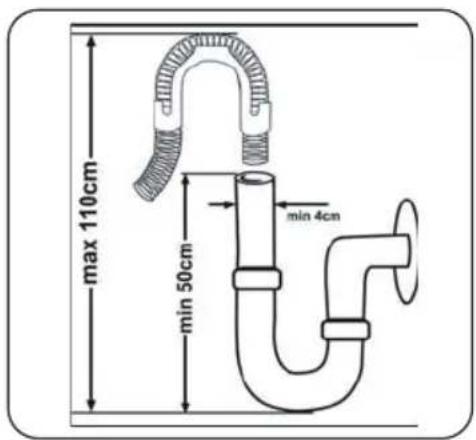
max 110cm min 50cm min 4cmConnect the water drain hose directly to water drain hole or to the sink outlet spigot. This connection should be minimum 50 cm and maximum 110 cm from floor that dishwasher is placed.

IMPORTANT
Items will not wash properly if a drain hose longer than 4 m is used.

text_image
0.5-1.1 mELECTRICAL CONNECTION

WARNING
Your machine is set to operate at 220-240 V. If the mains voltage supply to your machine is 110V, connect a transformer of 110/220 V and 3000 W between the electrical connection.

RISK OD ELECTRIC SHOCK / CAUTION
Connect the product to a grounded outlet protected by a fuse complying with the values in the "Technical Specifications" table".

RISK OD ELECTRIC SHOCK / CAUTION
The earthed plug of the machine must be connected to an earthed outlet supplied by suitable voltage and current.

RISK OD ELECTRIC SHOCK / CAUTION
In the absence of earthing installation, an authorised electrician should carry out an earthing installation. In the case of use without earthing installed, we will not be responsible for any loss of use that may occur.

RISK OD ELECTRIC SHOCK / CAUTION
The plug on this appliance may incorporate 13A fuse depending on the target country. (For Example UK, Saudi Arabia).
FITTING THE MACHINE UNDERCOUNTER
If you wish to fit your machine undercounter, there must be sufficient space to do so and the wiring-plumbing must be suitable to do so (1). If the space under the countertop is suitable for fitting your machine, remove the worktop as shown in the illustration (2).

WARNING:
The countertop, which the machine will be placed under, must be stable in order to prevent imbalance. The top panel of the dishwasher must be removed to fit the machine under the countertop.
To remove the top panel, remove the screws that hold it on, located at the rear of the machine. Then, push the panel 1 cm from the front towards the rear and lift it. Adjust the machine feet according to the slope of the floor (3). Fit your machine by pushing it under the counter taking care not to crush or bend the hoses (4).

WARNING:
After removing the top panel of your dishwasher, the machine should be placed in a space of the dimensions shown in the figure below.

text_image
Min 570 min 820 Min 600 598 H 4 570 H1: min A H2: min B1 H3: min B2| 60cm | A B | ||
| All Products | B_1 | B_2 | |
| Product's Height (±2 mm) | 820 mm 830 mm | 835 mm | |
A: If there is no felt on the top of the product; you should take into account this product's height.
B1: If there is felt on the top of the product with 2nd basket; you should take into account this product's height.
B2: If there is felt on the top of the product with 3rd basket; you should take into account this product's height.
CHAPTER 3. TECHNICAL SPECIFICATIONS

text_image
Labeled diagram of a multi-level kitchen appliance with numbered components for identification.
natural_image
Close-up of a mechanical component with a numbered arrow pointing to a circular component (no text or symbols visible)GENERAL APPEARANCE
- Worktop
- Upper basket with racks
- Upper spray arm
- Lower basket
- Lower spray arm
- Filters
-
Rating plate
-
Control panel
- Detergent and rinse-aid dispenser
- Salt dispenser
- Upper basket track latch
- Upper Cutlery Basket
- Turbo Drying Unit: This system enhances the drying performance of your dishes.
TECHNICAL SPECIFICATIONS
| Capacity 15 place settings | |
| Dimensions | |
| Height | 850(mm) |
| Width | 598(mm) |
| Depth | 598(mm) |
| Net weight 41,5 kg | |
| Operating voltage / frequency 220–240 V / 50 Hz | |
| Total current 10 (A) | |
| Total power 1900 (W) | |
| Water supply pressure | Maximum:1 (Mpa)Minimum:0.03 (Mpa) |
RECYCLING
- Some machine components and packaging consist of recyclable materials.
- Plastics are marked with the international abbreviations: (>PE < , > PP < , etc.)
- The cardboard parts consist of recycled paper. They can be put into waste paper containers for recycling.
- Material unsuitable for domestic waste must be disposed of at recycling centres.
- Contact a relevant recycling centre to obtain information about disposal of different materials.
PACKING AND THE ENVIRONMENT
- Packaging materials protect your machine from damage that may occur during transportation. The packaging materials are environmentally friendly as they are recyclable. The use of recycled material reduces raw material consumption and therefore decreases waste production.
CE Declaration of Conformity
We declare that our products meet the applicable European Directives, Decisions and Regulations and the requirements listed in the standards referenced.
Disposal of Your Old Machine
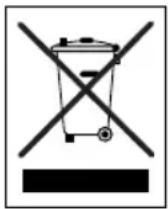
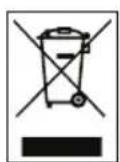
The symbol on the product or on its packaging indicates that this product may not be treated as household waste. Instead, it shall be taken to the applicable collection point for the recycling of electrical and electronic equipment. By ensuring this product is disposed of correctly, you will help prevent potential negative consequences for the environment and human health, which could otherwise be caused by inappropriate waste handling of this product. For more detailed information about recycling this product, please contact your local city office, your household waste disposal service or the shop where the product was purchased.
CHAPTER 4. BEFORE USING THE APPLIANCE
PREPARING YOUR DISHWASHER FOR FIRST USE
• Make sure the electricity and supply water specifications match the values indicated in the installation instructions for the machine.
- Remove all packaging material inside the machine.
- Set the water softener level.
• Fill the rinse aid compartment
SALT USAGE (IF AVAILABLE)
For a good washing function, the dishwasher needs soft, i.e. less calcareous water. Otherwise, White lime residues will remain on the dishes and the interior equipment. This will negatively affect your machine's washing, drying and shining performance. When water flows through the softener system, the ions forming the hardness are removed from the water and the water reaches the softness required to obtain the best washing result. Depending on the level of hardness of the inflowing water, these ions that harden the water accumulate rapidly inside the softener system. Therefore, the softener system has to be refreshed so that it operates with the same performance also during the next wash. For this purpose, dishwasher salt is used. Machine can only be used by special dishwasher salt to soften the water. Do not use any small grained or powdered type of salts which can easily soluble. Using any other type of salt can damage your machine.
FILL THE SALT (IF AVAILABLE)
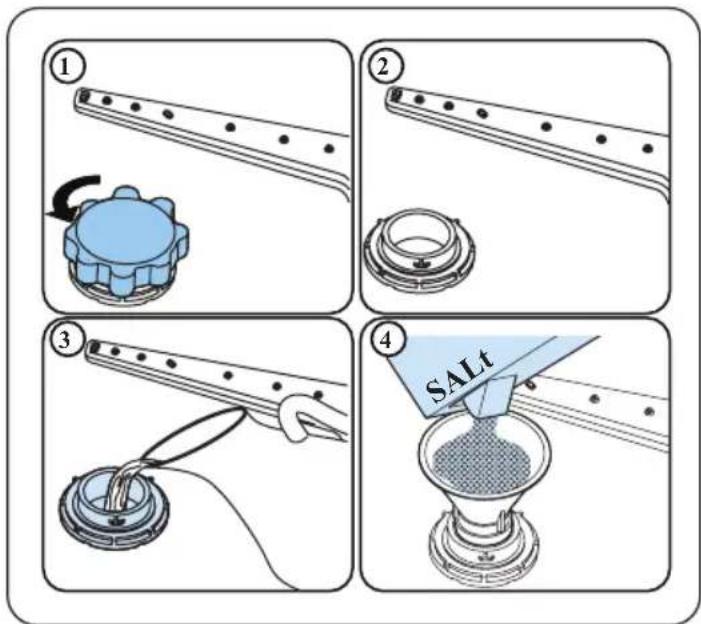
To add softener salt, open the salt compartment cap by turning it counter clockwise. (1) (2) At first use, fill the compartment with 1 kg salt and water (3) until it is almost overflowing. If available, using a funnel (4) will make filling easier. Replace the cap and close it. After every 20-30 Cycles add salt into your machine until it fills up (approx. 1 kg).
text_image
Four-step diagram illustrating a chemical experiment with labeled steps: stirring, heating, and drying using a SALT method.Only add water to the salt compartment on first use.
Use softener salt specifically produced for use in dishwashers. When you start your dishwasher, the salt compartment is filled with water, therefore put the softener salt in prior to starting your machine. If the softener salt has overflowed and you do not start the machine immediately, run a short washing program to protect your machine against corrosion.
TEST STRIP
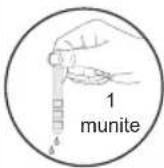
| Run water through the tap (1min.) | Keep the strip in the water (1sec) | Shake the strip | Wait (1min.) | Set the hardness level of your machine |
 |  |  |  |  |

NOTE
The level is set to 3 as default. If the water is well water or has a hardness level above 90 dF, we recommend that you use filter and refinement devices.
WATER HARDNESS TABLE
| Level G | German dH French dF British dE Indicator | ||
| 1 0–5 | 0–9 0–6 L1 is shown on the display. | ||
| 2 6–11 | 10–20 7–14 L2 is shown on the display. | ||
| 3 12–17 | 21–30 15–21 L3 is shown on the display. | ||
| 4 18–22 | 31–40 22–28 L4 is shown on the display. | ||
| 5 23–31 | 41–55 29–39 L5 is shown on the display. | ||
| 6 32–50 | 56–90 40–63 L6 is shown on the display. |
WATER SOFTENER SYSTEM
The dishwasher is equipped with a water softener which reduces the hardness in the mains water supply. To find out the hardness level of your tap water, contact your water company or use a test strip (if available).
SETTING
- Turn on the machine by pressing the On/Off button.
- Press the Program button for at least 3 seconds immediately after the machine is turned on.
- Release the Program button when "SL" is shown. Next, the last setting level is displayed.
- Press the program button to set the desired level. Each press of the program button increases the level. Once level 6 has been reached, the next press returns the level to 1.
- The last selected water hardness level is stored in the memory by turning the machine off with the On/Off button.
DETERGENT USAGE
Only use detergents specifically designed for domestic dishwashers. Keep your detergents in cool, dry places out of reach of children. Add the proper detergent for the selected program to ensure the best performance. The amount of detergent needed depends on the cycle, load size, and soil level of dishes.
Do not fill detergent into the detergent compartment more than required; otherwise you can see whitish streaks or bluish layers on glass and dishes and may cause glass corrosion. Continued use of too much detergent may cause machine damage. Using little detergent can result in poor cleaning and you can see whitish streaksin hard water. See the detergent manufacturer's instructions for a further information.
FILLING THE DETERGENT
Push the latch to open the dispenser and pour in the detergent. Close the lid and press it until it locks in place. The dispenser should be refilled just before the start of each programme. If the dishes are heavily soiled, place additional detergent in the pre-wash detergent chamber.

text_image
DETERGENTUSING COMBINED DETERGENTS
These products should be used according to the manufacturer's instructions. Never put combined detergents into the interior section or the cutlery basket. Combined detergents contain not only the detergent but also rinse-aid, salt replacement substances and additional components depending on the combination. We recommend you do not use combined detergents in short programmes. Please use powder detergents in such programmes. If you encounter problems when using combined detergents, please contact the detergent manufacturer. When you stop using combined detergents, make sure that water hardness and rinse aid settings are set to the correct level.
RINSE-AID USAGE
The rinse aid helps to dry the dishes without streaks and stains. Rinse-aid is required for stain-free utensils and clear glasses. The rinse aid is automatically released during the hot rinse phase. If rinse aid dosage setting set too low, whitish stains remains on dishes and dishes do not dry and washed clean. If rinse aid dosage setting set too height, you can see bluish layers on glass and dishes.
FILLING THE RINSE-AID AND SETTING
To fill the rinse aid compartment, open the rinse-aid compartment cap. Fill the compartment with rinse aid to the MAX level and then close the cap. Be careful not to overfill the rinse aid compartment and wipe up any spills.
In order to change the rinse aid level, follow the below steps before turning on the machine:
- Push the programme button and hold it down.
- Turn the machine on.
- The machine will display the last setting.
- Set the level by pushing the programme button.
- Switch off the machine to save the setting.
- The factory setting is "4".
- Hold down the programme button until “rA” disappears from the display. Rinse aid setting follows water hardness setting.
If the dishes are not drying properly or are spotted, increase the level. If blue stains form on your dishes, decrease the level.

natural_image
Illustration of a hand using a tool to press or adjust a device on a flat surface (no text or symbols visible)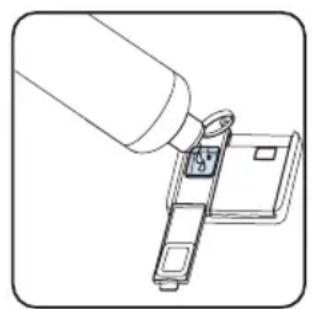
natural_image
Line drawing of a hand inserting a small component into a device (no text or symbols)| Level Brightener Dose Indicator | |
| 1 Rinse-aid not dispensed | r1 is shown on the display. |
| 2 1 dose is dispensed | r2 is shown on the display. |
| 3 2 doses are dispensed | r3 is shown on the display. |
| 4 3 doses are dispensed | r4 is shown on the display. |
| 5 4 doses are dispensed | r5 is shown on the display. |
CHAPTER 5. LOADING YOUR DISHWASHER
For best results, follow these loading guidelines. Loading the household dishwasher up to the capacity indicated by the manufacturer will contribute to energy and water savings. Manual pre-rinsing of tableware items leads to increased water and energy consumption and is not recommended You can place cups, glasses, stemware, small plates, bowls, etc. in upper basket. Do not lean long glasses against one another or they cannot remain steady and may receive damage. When placing long stem glasses and goblets, lean them against the basket edge or rack and not against other items. Place all containers such as cups, glasses and pots into the dishwasher with the opening facing downwards otherwise water can collect on items. If there is cutlery basket in machine, you are recommended to use the cutlery grid in order to obtain the best result. Place all large (pots, pans, lids, plates, bowls etc.) and very dirty items in the lower rack. Dishes and cutlery should not be placed above each other.

WARNING
Take care not to obstruct the rotation of spray arms.

WARNING
Make sure after loading the dishes do not prevent opening the detergent dispenser.
RECOMMENDATIONS
Remove any coarse residue on dishes before placing the dishes in the machine. Start the machine with full load.

IMPORTANT
Do not overload the drawers or place dishes in the wrong basket.

WARNING
To avoid any possible injuries, place long-handle and sharppointed knives with their sharp points facing down or horizontally on the baskets.
Height Adjustment
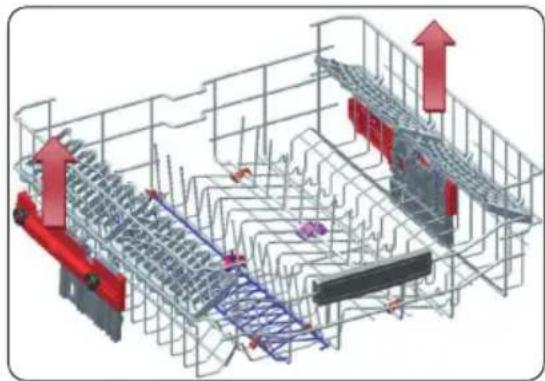
The upper basket includes a mechanism which enables the height of the basket to be adjusted up (1) or down (2) without having to remove the basket. Hold the basket on both sides and pull it up or push it down, ensuring both sides of the upper basket are in the same position.
natural_image
3D architectural or engineering diagram showing structural framework with red arrows indicating upward movement (no text or symbols present)
natural_image
3D rendering of a red and gray mechanical device with wheels, mounted on a metal frame structure (no text or symbols visible)
natural_image
3D mechanical assembly diagram showing red and gray components with green wheels, no visible text or symbolsFour Folding Racks (15 pc)
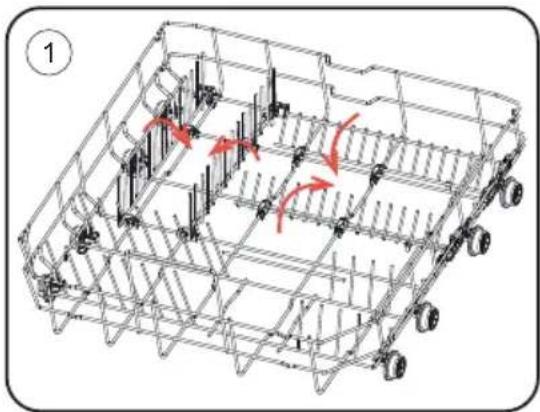
The folding racks allow easier placement of larger items, such as pots and pans. Each section can be folded separately. The racks can be raised up, or folded down, as shown in the images.
natural_image
3D wireframe model of a modular vehicle chassis with red arrows indicating motion or movement paths (no text or symbols)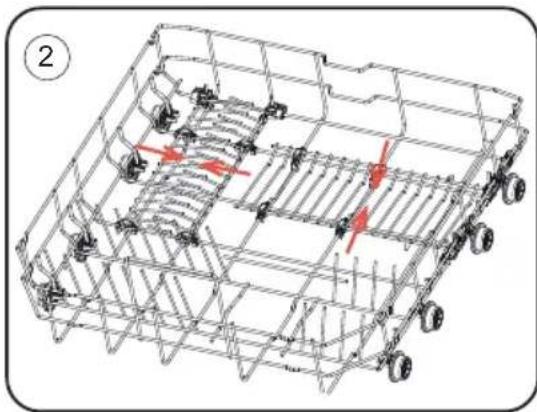
natural_image
Technical line drawing of a multi-wheeled vehicle chassis with visible structural components and red directional arrows indicating movement or force (no text or symbols)Height Adjustable Rack (peg type)
The foldable racks in the upper basket enable the placement of large items such as pots and pans. Each section can be folded separately. The foldable racks can be either raised up or folded down

natural_image
3D wireframe diagram of a structural grid with red arrows indicating force or movement (no text or symbols)Upper Cutlery Basket
The upper cutlery basket is designed for the placement of large and small cutlery and utensils.

natural_image
Interior view of a modern kitchen appliance showing open door, white rack, and multiple white plates (no text or symbols visible)
WARNING:
Knives and other sharp objects must be placed horizontally in the cutlery basket.
ALTERNATIVE BASKET LOADS
Lower Basket Top Basket

natural_image
Two 3D-rendered kitchen utensils in a grid, one open showing interior components and the other filled with cooking panes (no text or symbols visible)
natural_image
3D rendering of industrial components including insulators, gears, and housing (no text or symbols)Incorrect Loads
Incorrect loading can cause poor washing and drying performance. Please follow the manufacturer's recommendations for a good performans result.

natural_image
3D rendered diagram of a grid with blue and white spherical objects, featuring a black 'X' symbol overlay (no text or labels)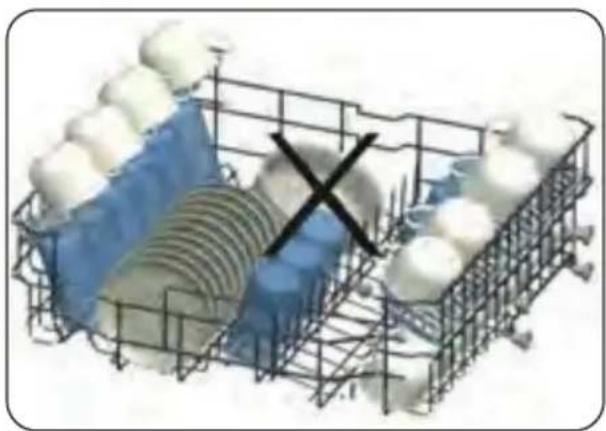
natural_image
3D diagram of a grid structure with embedded spheres and a black X mark, no text or symbols present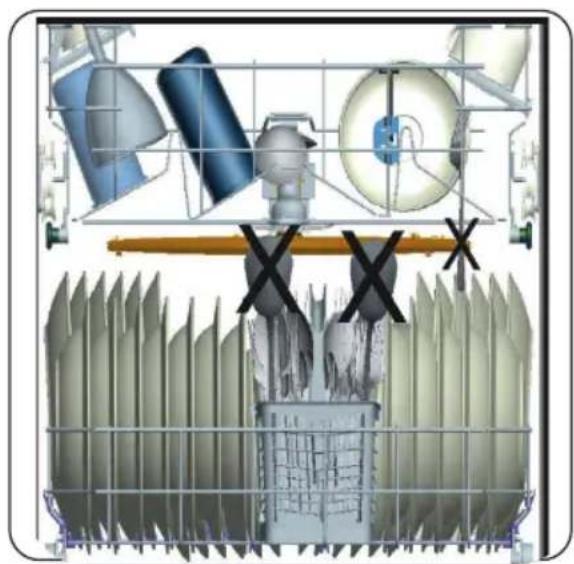
natural_image
Technical diagram of a mechanical assembly with components and cross symbols (no readable text or labels)
natural_image
3D wireframe model of a mechanical assembly with blue and white components, no visible text or symbolsCHAPTER 6. PROGRAMME TABLE
| Programme | Duration (min) | Description |
| Mini 14' 14 Fastest program for lightly soiled and recently. | ||
| Quick 30' 30 Suitable for lightly soiled dishes and quick wash. | ||
| Eco 221 | Standard program for normally soiled daily using dishes with reduced energy and water consumptions. | |
| Super 50' 50 | Suitable for normally soiled daily dishes with faster program. | |
| Intensive 65°C 117 | Suitable for heavily soiled dishes. | |
| Hygiene 70°C 127 | Suitable for heavily soiled dishes requiring hygienic washing. | |
| Steam Wash 161 | Suitable for heavily soiled dishes with effective cleaning by steam. |

NOTE:
PROGRAMME DURATION MAY CHANGE ACCORDING TO THE AMOUNT OF DISHES, TAP WATER, AMBIENT TEMPERATURE AND SELECTED ADDITIONAL FUNCTIONS.
- Only use powder detergent in short programmes.
- Short programmes do not include a drying step.
- To assist drying, we recommend partially opening the door after the programme has finished.
CHAPTER 7. THE CONTROL PANEL
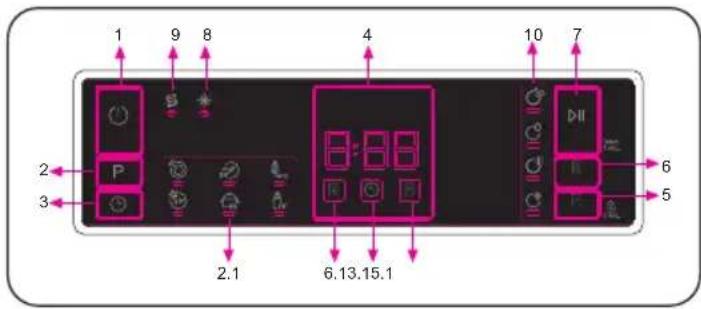
text_image
1 9 8 4 10 7 2 P 6.13.15.1 2.1 3 5 6- On/Off Button
- Program Selection Button
2.1. Program Indicators - Delay Button
3.1. Delay Indicator - Remaining Time Indicator
- Energy Save Button
5.1. Energy Save Indicator - Half Load Button
6.1. Half Load Indicator
7. Start/Pause Button
8. Rinse Aid Indicator
9. Salt Indicator
10. Washing Step Indicators
a- Washing Step Indicator
b- Rinse Step Indicator
c- Drying Step Indicator
d- End Step Indicator
1. On/Off Button
Switch the machine on by pressing the On/Off button.
2. Program Selection Button
Select a suitable programme by pressing Program Selection button. The selected program indicator (2.1) will be on. For the details of the programs refer to section Program Table.
3. Delay Button
You can delay the start time of the programme for 1-2...24 hours by pressing the Delay button before the programme starts. To activate the delay time, press Start/Pause button (7). The delay indicator (3.1) will be on. If you want to change the delay time, first press the Start/Pause button (7) and then the delay button to select a new delay time. To activate the new delay time, press the Start/Pause button (7) again. To cancel the delay, you need to switch to 0 hour by pressing the Delay button.
If you switch off the machine after selecting and activating the delay time, the delayed time is cancelled.
4. Remaining Time Indicator
Programme flow can be monitored via the Wash, Rinse, Dry, End indicators (10) and Remaining Time Indicator.
5. Energy Save Button
Press the Energy Save button to activate the Energy Save option. Energy Save indicator (5.1) will be on. Select the Energy Save option to enable the door of the machine to open at the end of the programme to increase drying efficiency. This function also saves energy by operating at a lower temperature.
6. Half Load Button
Thanks to the half load function in your machine, you can shorten the durations of the programmes that you have selected and reduce the energy and water consumption by using half load electricity and water. Half Load indicator (6.1) will be on.
7. Start/Pause Button
Press the Start/Pause button to start the selected programme. The wash led turns on and the Remaining Time Indicator shows the programme duration. It also indicates the remaining time during the programme flow. If you open the door of your machine when the programme is running the duration of the programme pauses, and related washing step indicator blinks.
8. Rinse Aid Indicator
When the rinse aid level is low, the rinse aid lack warning indicator turns on and you should fill the rinse aid chamber.
9. Salt Indicator
When there is insufficient softening salt, the salt lack warning indicator turns on and you should fill up the salt chamber.
10. Washing Step Indicators
You can monitor the programme flow with the Washing Step Indicators on the control panel. While the Dry indicator is on, the machine remains silent for about 15-50 minutes with respect to the flow of the program you have selected.
- Wash
- Rinse
• Dry
• End

NOTE:
Child lock is activated/deactivated by pressing the Energy Save button (5) for about 3 seconds. When it is activated, all leds blink and "CL" is shown on the Remaining Time Indicator (4) once. When it is deactivated, all leds and "CL" blink twice.

NOTE:
To save any program as favou- rite program, press Program (2) and Delay (3) buttons at the same time. To select favourite program, press Program (2) but- ton for 3 seconds.

NOTE:
If an extra option has been used on the latest washing programme, this option will remain active on the newly selected programme until the machine turns off. To cancel this option on the newly selected wash programme, press the related option button
CHANGING A PROGRAMME
If you would like to change the programme when the machine is already running.
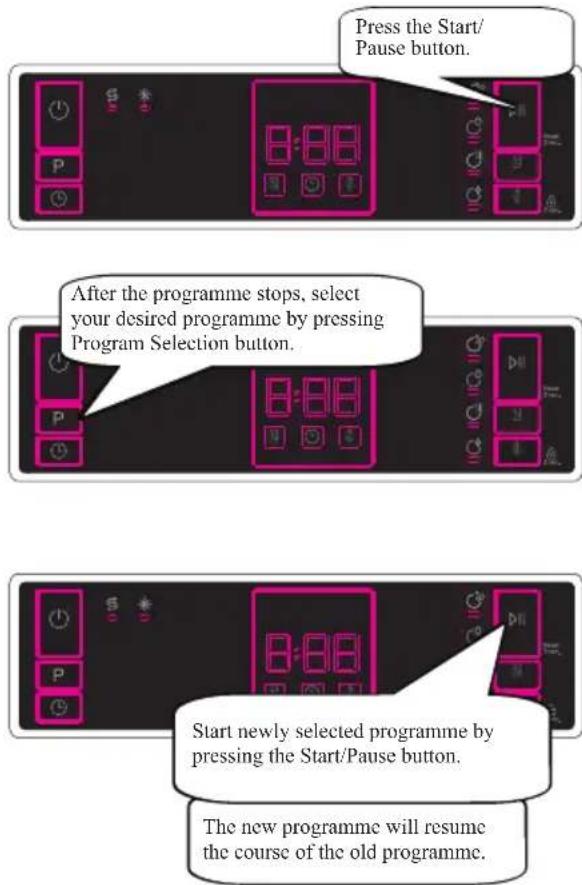
text_image
Press the Start/ Pause button. After the programme stops, select your desired programme by pressing Program Selection button. Start newly selected programme by pressing the Start/Pause button. The new programme will resume the course of the old programme.CANCELLING A PROGRAMME
If you would like to cancel a programme when it is running.

text_image
Press the Start/Pause button for 3 seconds. During cancellation, the Dry led is on. The machine discharges the water inside it in about 30 seconds. When the End led turns on, switch your machine off by pressing the On/Off button.SWITCHING THE MACHINE OF

text_image
Switch your machine off with On/Off button after the programme has ended and the End led turns on. Pull the plug out of the outlet. Turn off the water tap.
NOTE:
Do not open the door before the programme ends.

NOTE:
At the end of the washing programme, you can leave the door of your machine ajar to hasten the drying.

NOTE:
If the door of the machine is opened or power is cut off during washing, the programme will continue when the door is closed or the power is restored.
To change the buzzer sound level, follow the below steps:
- Open the door and press Half Load (6) and Energy Save (5) buttons at the same time for 3 seconds.
- When sound setting is recognized, buzzer gives a long sound and machine will display last set level, from "S0" to "S3".
- To decrease sound level press Energy Save button (5). To increase sound level, press Half Load button (6).
- To save the selected sound level, turn off the machine. "S0" level means all voices are off. Factory setting is "S3".
SAVE POWER MODE
To activate or deactivate save power mode, follow the below steps:
- Open the door and press Program (2) and Half Load (6) buttons at the same time for 3 seconds.
- After 3 seconds, the machine will display last Setting, "IL1" or "IL0".
- When Save Power Mode is activated, "IL1" will be displayed. On this mode, interior lights (if available) will turn off 2 minutes after the door is opened, and the machine will turn off automatically 15 minutes after any intervention in order to save energy.
- When Save Power Mode is deactivated "IL0" will be displayed. If Save Power Mode is deactive, interior lights will be on as long as the door is open, and the machine will always be on unless it is turned off by user.
- To save the selected setting, turn off the machine. In factory setting, Save Power Mode is active.
CHAPTER 8. CLEANING AND MAINTENANCE
Cleaning your dishwasher is important to maintain the machine's service life Make sure that the water softening setting (If available) is done correctly and correct amount of detergent is used to prevent limescale accumulation. Refill the salt compartment when the salt sensor light comes on.Oil and limescale may build up in your Dishwasher over time. If this occurs:
• Fill the detergent compartment but do not load any dishes. Select a programme which runs at high temperature and run the Dishwasher empty. If this does not clean your Dishwasher sufficiently, use a cleaning agent designed for use with dishwashers.
• To extend the life of your dishwasher, clean the appliance regularly on each month
- Wipe the door seals regularly with a damp cloth to remove any accumulated residue or foreign objects.
FILTERS
Clean the filters and spray arms at least once a week. If any food waste remains or foreign objects on the coarse and fine filters, remove them and clean them thoroughly with water.
a) Micro Filter
b) Coarse Filter
c) Metal Filter
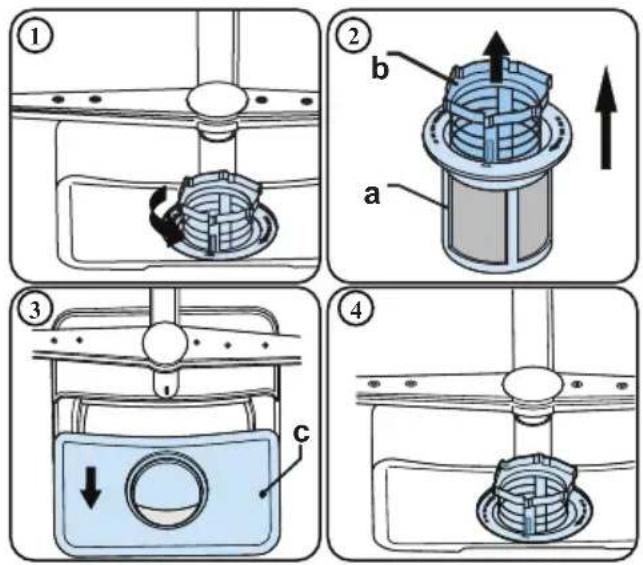
To remove and clean the filter combination, turn it counter clockwise and remove it by lifting it upwards (1). Pull the coarse filter out of the micro filter (2). Then pull and remove the metal filter (3). Rinse the filter with lots of water until it is free of residue. Reassemble the filters. Replace the filter insert, and rotate it clockwise (4).
- Never use your dishwasher without afilter.
- Incorrect fitting of the filter will reduce the washing effectiveness.
- Clean filters are necessary for proper running of the machine.
SPRAY ARMS
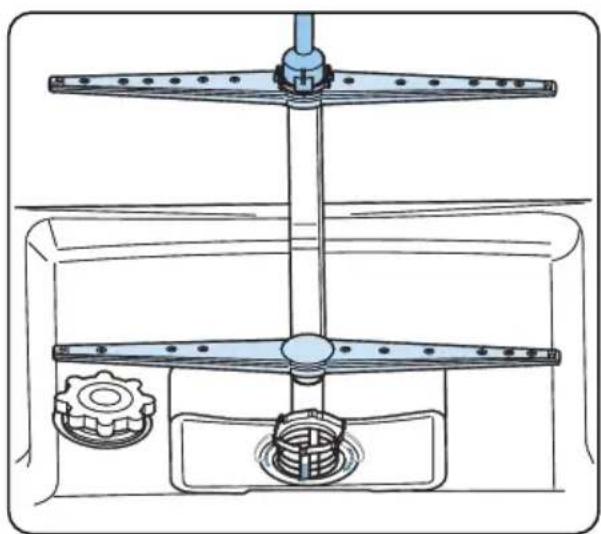
Make sure that the spray holes are not clogged and that no food waste or foreign object is stuck to the spray arms. If there is any clogging, remove the spray arms and clean them under water. To remove the upper spray arm undo the nut holding it in position by turning it clockwise and pulling it downwards. Make sure that the nut is properly tightened when refitting the upper spray arm.
natural_image
Technical line drawing of a mechanical assembly with gears and shafts (no text or symbols)DRAIN PUMP
Large food residues or foreign objects which were not captured by the filters may block the waste water pump. The rinsing water will then be above the filter.

WARNING RISK OF CUTS!
When cleaning the waste water pump, ensure that you do not injure yourself on pieces of broken glass or pointed implements.
In this case:
- First always disconnect the appliance from the power supply.
- Take out baskets.
- Remove the filters.
- Scoop out water, use a sponge if required.
- Check the area and remove any foreign objects.
- Install filters.
- Re-insert baskets.
CHAPTER 9. TROUBLESHOOTING
| FAULT POSSIBLE | CAUSE TROUBLESHOOTING | |
| The programme does not start | Your Dishwasher is not plugged in | Plug your Dishwasher in |
| Your Dishwasher is not switched on | Switch your Dishwasher on by pressing the On/Off button | |
| Fuse blown Check your indoor fuses | ||
| Water inlet tap is closed Turn | on the water inlet tap | |
| Your Dishwasher door is open Close | the Dishwasher door | |
| Water inlet hose and machine filters are clogged | Check the water inlet hose and machine filters and make sure they are not clogged | |
| Water remains inside the machine | Water drain hose is clogged or twisted | Check the drain hose, then either clean or untwist it |
| The filters are clogged Clean | the filters | |
| The programme is not finished yet | Wait until the programme is finished | |
| Machine stops during washing | Power failure Check mains power | |
| Water inlet failure Check water tap | ||
| Shaking and hitting noises are heard during a wash operation | The spray arm is hitting the dishes in the lower basket | Move or remove items blocking the spray arm |
| Partial food wastes remain on the dishes | Dishes placed incorrectly, sprayed water not reaching affected dishes | Do not overload baskets |
| Dishes leaning each another | Place dishes as instructed in the section on loading your dishwasher | |
| Not enough detergent used | Use the correct amount of detergent, as instructed in the programme table | |
| Wrong wash programme selected | Use the information in the programme table to select the most appropriate programme | |
| Spray arms clogged with food waste | Clean the holes in the spray arms with thin objects | |
| Filters or water drain pump clogged or filter misplaced | Check the drain hose and filters are correctly fitted | |
| Whitish stains remains on dishes | Not enough detergent used | Use the correct amount of detergent, as instructed in the programme table |
| Rinse aid dosage and/or water softener setting set too low | Increase rinse aid and/or water softener level | |
| High water hardness level | Increase water softerner level and add salt | |
| Salt compartment cap not closed properly | Check that the salt compartment cap is closed properly | |
| Dishes do not dry | Drying option is not selected | Select a programme with a drying option |
| Rinse aid dosage set too low Increase rinse aid dosage setting | ||
| Rust stains form on the dishes | Stainless-steel quality of the dishes is insufficient | Use only dishwasher-proof sets |
| High level of salt in wash water | Adjust the water hardness level using water hardness table | |
| Salt compartment cap not closed properly | Check that the salt compartment cap is closed properly | |
| Too much salt spilled in the Dishwasher while filling it with salt | Use funnel while filling salt to the compartment to avoid spillage | |
| A poor mains grounding | Consult a qualified electrician immediately | |
| Detergent remains in the detergent compartment | Detergent was added when the detergent compartment was wet | Make sure detergent compartment is dry before use |
AUTOMATIC FAULT WARNINGS AND WHAT TO DO
| TROUBLE CODE | POSSIBLE FAULT POSSIBLE FAULT | |
| FF | Water inlet system failure. | Make sure the water inlet tap is open and water is flowing. |
| Separate the inlet hose from the tap and clean the filter of the hose. | ||
| Contact for service if the error continues. | ||
| F5 Pressure system failure. Contact for service. | ||
| F3 Continuous water input Close the tap and contact for service. | ||
| F2 Inability to discharge water. | Water discharge hose and filters may be clogged. | |
| Cancel the program. | ||
| If the error continues, contact for service. | ||
| F8 Heater error. Contact for service. | ||
| F1 Overflow. | Unplug the machine and close the tap. | |
| Contact for service. | ||
| F7 Overheating. Contact for service. | ||
| F6 | Faulty heater sensor. | Contact for service. |
| HI | High voltage failure. | Contact for service. |
| LO | Low voltage failure. | Contact for service. |
The installation and repairing procedures should always carried out by the Authorised
Service Agent in order to avoid possible risks. The manufacturer shall not be held liable for damages that may arise from procedures carried out by unauthorised persons. Repairs may be carried out by technicians only. If a component has to be replaced, ensure that only original spare parts are used.
Improper repairs or use of non-original spare parts may cause considerable damage and put the user at considerable risk.
Contact information for your customer service can be found on the back of this document.
Function-relevant genuine spare parts according to the corresponding Ecodesign order can be obtained from Customer Service for a period of at least 10 years from the date on which your appliance was placed on the market within the European Economic Area.
CHAPTER 10. DISPOSAL OF USED EQUIPMENT
This device has been designed and manufactured of high-quality reusable materials and components. The symbol of the crossed waste container placed on the product (Fig. A) means that the product is subject to selective collection in accordance with the provisions of Directive 2012/19/EU of the European Parliament and of the Council. a crossed-out wheelie bin symbol (Fig. B) placed on the product means that the product contains batteries that are subject to separate collection in accordance with the provisions of Directive 2006/66/EC of the European Parliament and of the Council. Such marking informs that electrical and electronic equipment and batteries (if any) must not be disposed of with other household waste after the period of use.
The user is obliged to return waste equipment and batteries (if any) to collection points for waste electrical and electronic equipment and batteries (if any). Collectors of such waste, including waste equipment collectors, treatment plants, distributors (shops), municipal waste separate collection points (municipal units), and other entities specified by law form an appropriate system to return this kind of equipment.
Correct disposal of waste equipment and batteries (if any) allows avoiding consequences that may be harmful to health and the environment, caused by the possible presence of hazardous components in the equipment and batteries, and inappropriate storage and processing of such equipment and batteries. Households play an important role in contributing to the reuse and recovery, including recycling, of waste equipment. At this stage, attitudes are formed, affecting the common good, which is a clean natural environment.
Moreover, households are one of the largest users of small equipment and the rational management thereof at this stage affects the recovery of secondary raw materials. Penalties may be imposed in accordance with national legislation for improper disposal of this product. If the device has a lock, please remove it for the safety of all persons who may later come into contact with the device. Some refrigerators and freezers contain insulation material and CFC refrigerant. Therefore, be careful not to pollute the environment when you dispose of your old refrigerator.
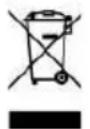
Fig. A
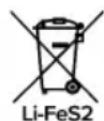
Fig. B

KERNAU
Serwis Kernau
PL: +48 22 243 70 00
Pn 8:00 - 17:00
Wt-Pt 9:00 - 17:00
serwis@kernau.com