Cineline 70 - Tripod Miller - Free user manual and instructions
Find the device manual for free Cineline 70 Miller in PDF.


| Product Type | Professional Video Tripod |
| Model | Miller Cineline 70 |
| Brand | Miller |
| Load Capacity | Up to 70 kg (154 lbs) |
| Weight | Approximately 12 kg (26.5 lbs) |
| Material | Carbon fiber legs |
| Leg Sections | 3 |
| Bowl Size | 100 mm |
| Spreader | Mid-level spreader |
| Fluid Head Compatible | Miller ArrowX or similar (not included) |
| Height Range | Approximately 40 cm to 170 cm (15.7 in to 66.9 in) |
| Payload Capacity | 70 kg (154 lbs) |
| Warranty | 5 years (manufacturer) |
| Maintenance | Clean with dry cloth; avoid solvents |
| Safety | Use on stable ground; secure legs |
Frequently Asked Questions - Cineline 70 Miller
User questions about Cineline 70 Miller
0 question about this device. Answer the ones you know or ask your own.
Ask a new question about this device
Download the instructions for your Tripod in PDF format for free! Find your manual Cineline 70 - Miller and take your electronic device back in hand. On this page are published all the documents necessary for the use of your device. Cineline 70 by Miller.
USER MANUAL Cineline 70 Miller
natural_image
Close-up of a black cineline 70 camera mounted on a tripod, showing no visible text or symbols on the device body.Features and Controls
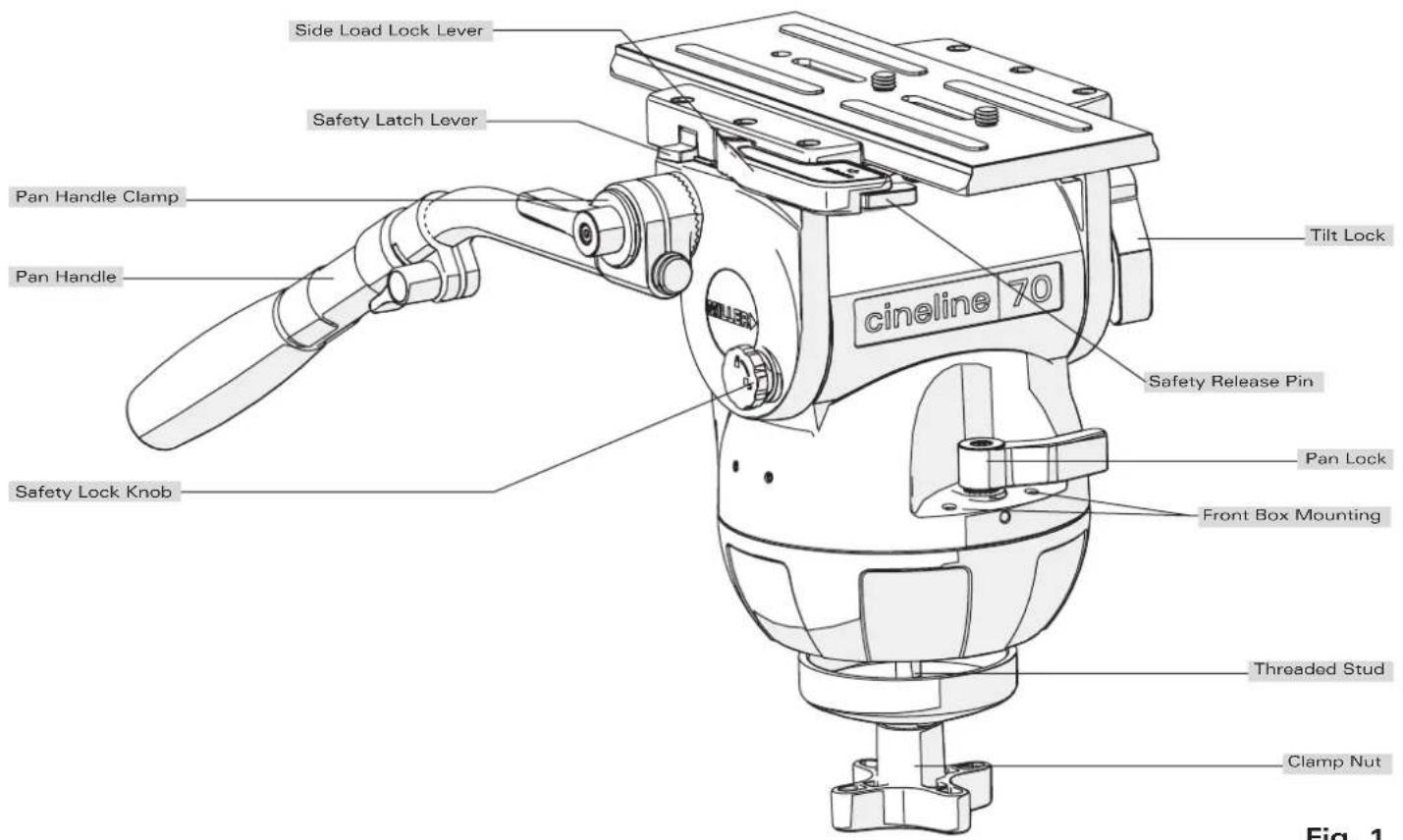
Fig. 1
Features and Controls
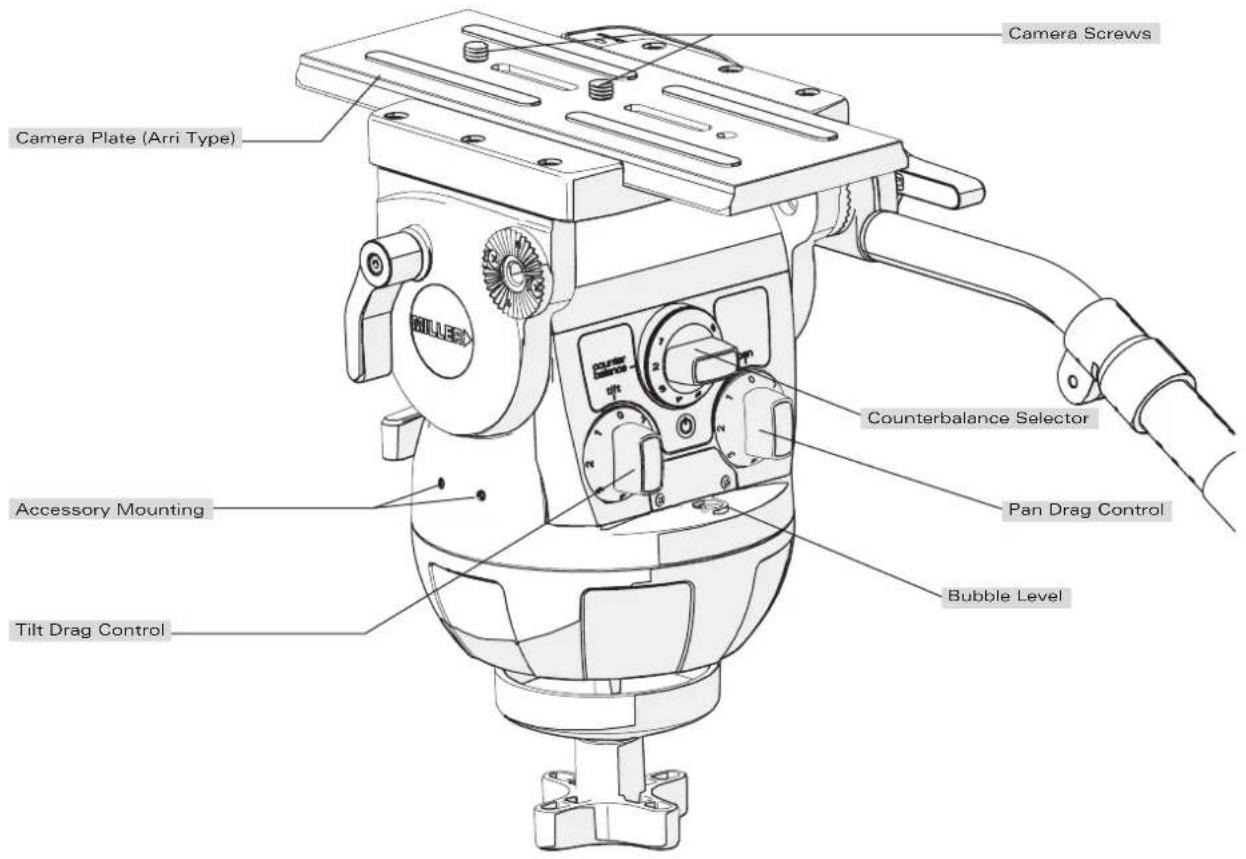
Fig. 2
Introduction
Thank you for purchasing the Cineline 70 Fluid Head. The Cineline 70 Fluid Head is purpose-built for film/digital production cinematographers who want a new dimension in professional camera support.
The robust design and construction of the Cineline 70 Fluid Head is ideal for use on feature films, documentaries and high-end television commercial productions that require heavy payload, frequent re-rigging and a diverse range of lenses and camera accessories. It is set to accommodate industry-leading cameras, including Arri, Sony, RED, and Canon.
The Cineline 70 features an Arri-compatible side-loading camera platform, along with an easy-to-fit 1225 Mitchell Base Adaptor to suit traditional Mitchell Base tripods. Side and front mounting locations are also provided to accommodate a wide range of accessories such as the view finder and the front box.
The Fluid Drag and Counterbalance system was designed to provide excellent ergonomics and control by offering progressive and equal increments of drag and torque to give ultra-soft starts / stops and perfect diagonal drag transition. The controls are located on a single backlit panel and allow the users a highly functional means of controlling all aspects of the camera motion.
The Cineline 70 will give best performance when used on a Miller ∅150 HD Tripod or the Miller HD Mitchell Base Tripod. This will ensure maximum system stability to suit any professional set-up.
Safety Instructions
Please use this manual to familiarise yourself with the operation of the Cineline 70 Fluid Head and observe these instructions to prevent any damage to your equipment. Ensure that all equipment is operating correctly and free from defects and damage, also please ensure that the tripod is steady, secure and that the bowl is approximately horizontal when attaching the camera. The operator is responsible for the safe operation of this piece of equipment.
- Do not exceed the maximum payload capacity of the Fluid Head.
- Do not leave the camera unattended on the Fluid Head.
- Do not release the SIDE LOAD LOCK LEVER whilst the camera is at an angle.
- Do not adjust the tripod whilst the camera is attached to the Fluid Head.
- Ensure PAN HANDLE CLAMP and CLAMP NUT is securely tightened.
- Apply TILT LOCK when adding/removing equipment from the camera or when attaching/removing the camera from the Fluid Head.
- Hold camera securely whilst changing Counterbalance, Pan Drag or Tilt Drag settings.
- Hold camera securely whilst adjusting the CLAMP NUT to level the Fluid Head.
Technical Data
Weight 5.7 kg (12.7 lbs)
Payload Range 4.5 - 37.5 kg (9.9 - 82.5 lbs)
Maximum Capacity 45 kg (99 lbs)
Tilt Drag 7 Selectable fluid drag positions + 0
Tilt Range + 90° / -75°
Tilt Lock Positive lock caliper brake system plus Safety Lock.
Pan Drag 7 Selectable fluid drag positions + 0
Pan Range 360°
Pan Lock Positive lock caliper brake system
Counterbalance 8 Selectable positions (see System performance graph)
Camera Platform Quick release side loading camera plate (Arri type) with 150 mm (5.90") travel and 2 x 3/8" camera screws.
Mounting Base ∅150 (5.9") mm ball levelling with 3 x M5 holes for Mitchell Base Adaptor.
Ball Level Range 15°
Handle 2 x HD telescopic pan handles
Temperature range -40°C to +65°C
| Construction | Lightweight diecast aluminium alloy, moulded reinforced plastics |
| Sealing | Water & dust resistant |
| Finish | Matt black (low sheen) durable powder coated with anti-corrosive pre treatment |
Warranty 3 Years.
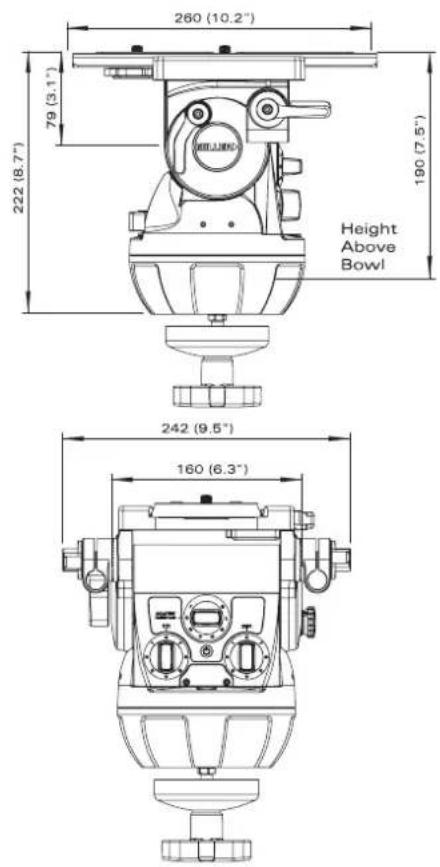
Fig. 3
Operating Instructions
The operating instructions are described in six steps. Please read and understand these instructions before using this equipment. Do not omit any steps.
The Cineline 70 Fluid Head can be mounted on a 150mm TRIPOD BOWL or on a MITCHELL BASE.
1. Fluid Head Set-up (Mitchell Base)
1.1 Loosen the PAN HANDLE CLAMP fully then rotate the PAN HANDLE until it is approximately perpendicular to the THREADED STUD (fig. 1) and tighten the PAN HANDLE CLAMP - avoid contact wear between the serrations on the Fluid Head and the PAN HANDLE CLAMP, if this occurs then unwind the PAN HANDLE CLAMP further.
1.2 Attach the MITCHELL BASE ADAPTOR (#1225) to the CLAW BALL, as shown, and tighten the three M5 screws using a 4mm Hex Key (fig. 5).
1.3 Ensure that the TRIPOD is level, adjust the TRIPOD if necessary, such that the bubble is inside the black circle (fig. 5).
1.4 Place the LOCATION BOSS into one of the three LOCATION SLOTS and tighten the CLAMP NUT.
1.5 Set the initial control settings as follows - see Figure 1 & 2:
- Select Counterbalance to position 8 (top setting).
- Select Pan & Tilt Drag to position 0.
- Tighten the PAN LOCK and TILT LOCK.
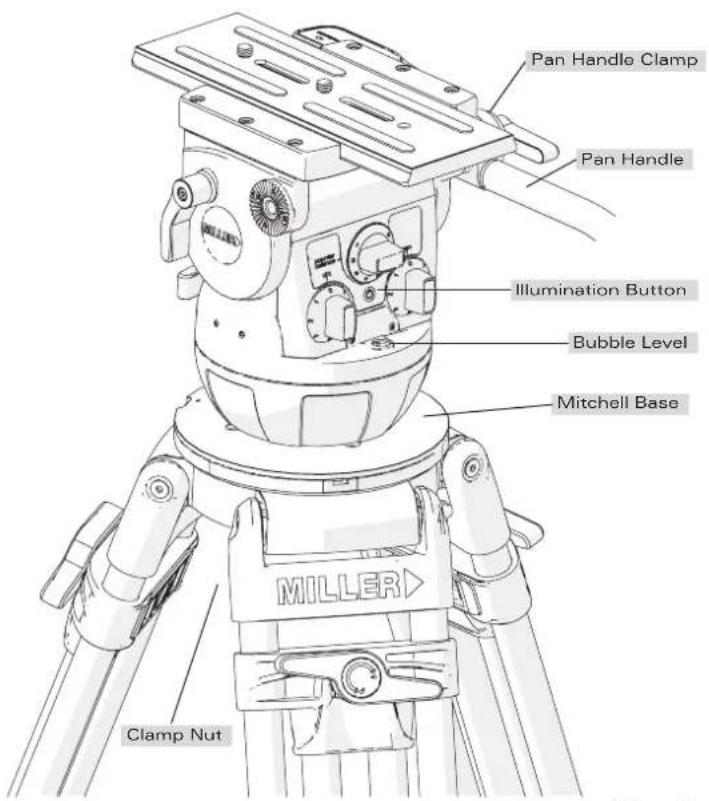
Fig. 4
Operating Instructions
2. Fluid Head Set-up (Tripod Bowl)
2.1 Ensure that the TRIPOD BOWL is approximately horizontal. Place the Fluid Head into the TRIPOD BOWL, adjust the BUBBLE LEVEL such that the bubble is inside the black circle and tighten the CLAMP NUT.
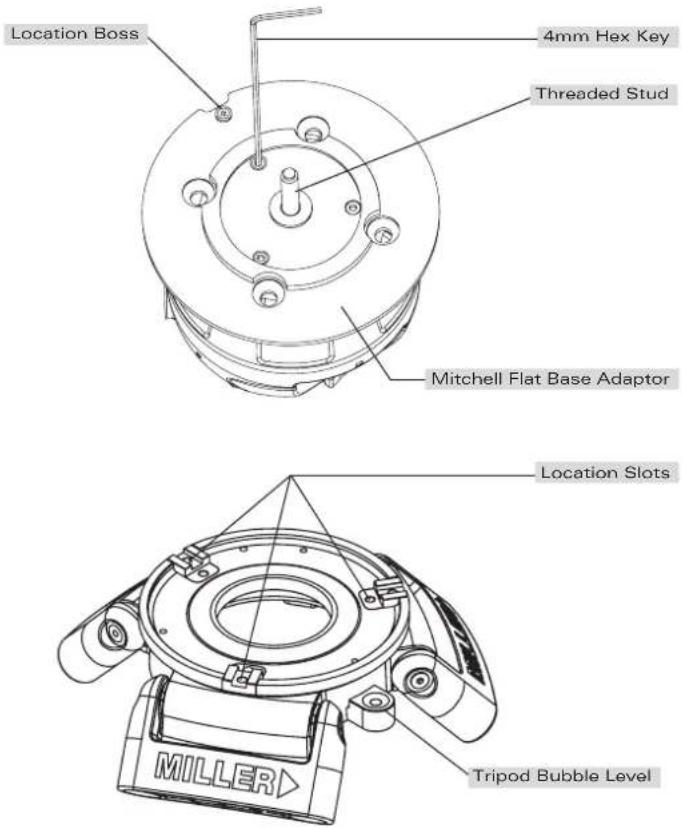
Fig. 5
Operating Instructions
3. Camera Set-up
3.1 Remove the CAMERA PLATE by pressing and holding the SAFETY RELEASE PIN then pulling the SIDE LOAD LOCK LEVER outwards. Lift the SAFETY LATCH LEVER and remove the CAMERA PLATE from the BASE PLATE (Fig. 6).
3.2 Attach the CAMERA PLATE to the camera and securely tighten the screws. Refer to the Camera's owner's manual for correct method of attachment to the CAMERA PLATE.
3.3 Attach camera accessories and the battery to the camera, it is recommended to estimate the camera's Centre of Gravity (C o G) for the purpose of correctly positioning the camera on the CAMERA PLATE. The camera's C o G can be estimated by placing the camera on to a round rod and then shifting it backwards or forwards until a balance point - C o G - is achieved. It is recommended to identify this point on the CAMERA PLATE as it will be useful in step 3.5.
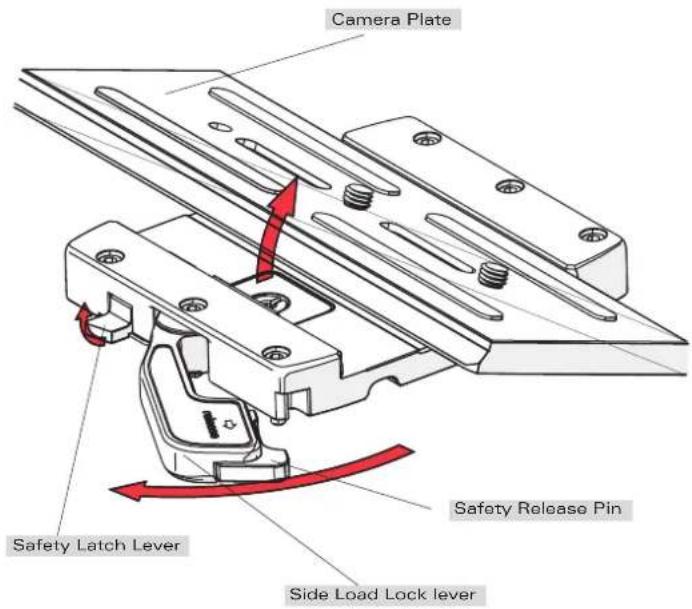
Fig. 6
Operating Instructions
3.4 Align the edge of the CAMERA PLATE with the BASE PLATE, and then side load the CAMERA PLATE into the BASE PLATE. Once the CAMERA PLATE is in position an audible sound will be heard. At this point, the CAMERA PLATE can slide forward / backward only.
3.5 Position the CAMERA PLATE such that the camera's C o G is directly above the centre axis of the Fluid Head, then push the SIDE LOAD LOCK LEVER into the locked position. Check that the CAMERA PLATE is secure.
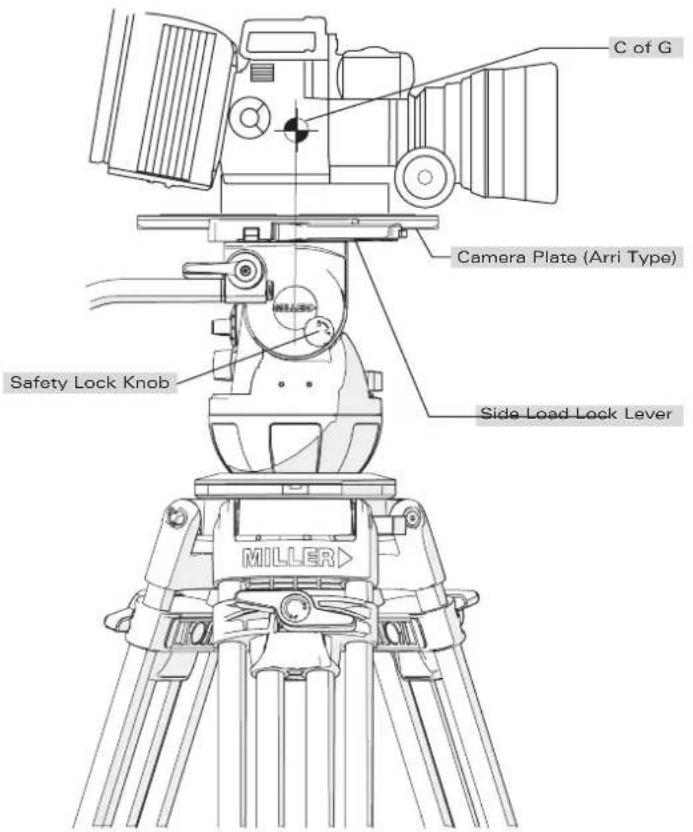
Fig. 7
Operating Instructions
4. Camera Plate Lock Adjustment
The Camera Plate Lock is designed to secure the CAMERA PLATE in a set position. The Cineline 70 BASE PLATE can accept a third party (Arri type) CAMERA PLATE, however, the Camera Plate Lock may need to be adjusted to account for small dimensional variations in third party CAMERA PLATES that can significantly affect the locking function.
4.1 Press and hold the SAFETY RELEASE KNOB then pull the SIDE LOAD LOCK LEVER outwards.
4.2 With the CAMERA PLATE in place, gently push the SIDE LOAD LOCK LEVER towards the BASE PLATE until resistance is felt - this is the start of the locking action. Check the position of the SIDE LOAD LOCK LEVER as shown in figure 9.
4.3 Adjustment is necessary if the SIDE LOAD LOCK LEVER position is outside the recommended range. Follow figure 9 to determine the correct method of adjustment.
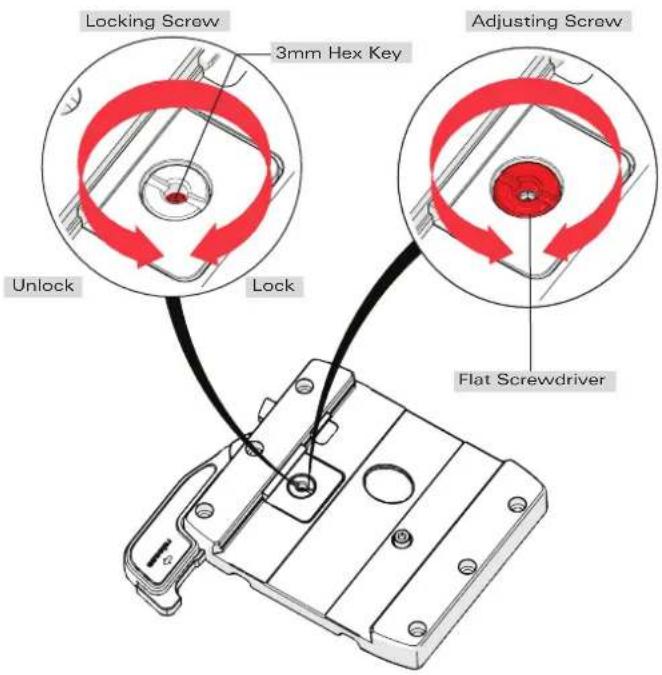
Fig. 8
Operating Instructions
4.4 Using a 3 mm Hex key unlock the LOCK SCREW (fig. 8), then using a broad flat screw driver turn the ADJUSTING SCREW (fig. 8) in the direction shown by 1/8 of a turn and re-check step 4.2, repeat 4.4 if necessary. When adjusted correctly, the SIDE LOAD LOCK LEVER will be smooth to operate and require modest effort to lock the CAMERA PLATE (fig. 9).
4.5 Once the correct adjustment is achieved, remove the CAMERA PLATE and lock the LOCK SCREW.
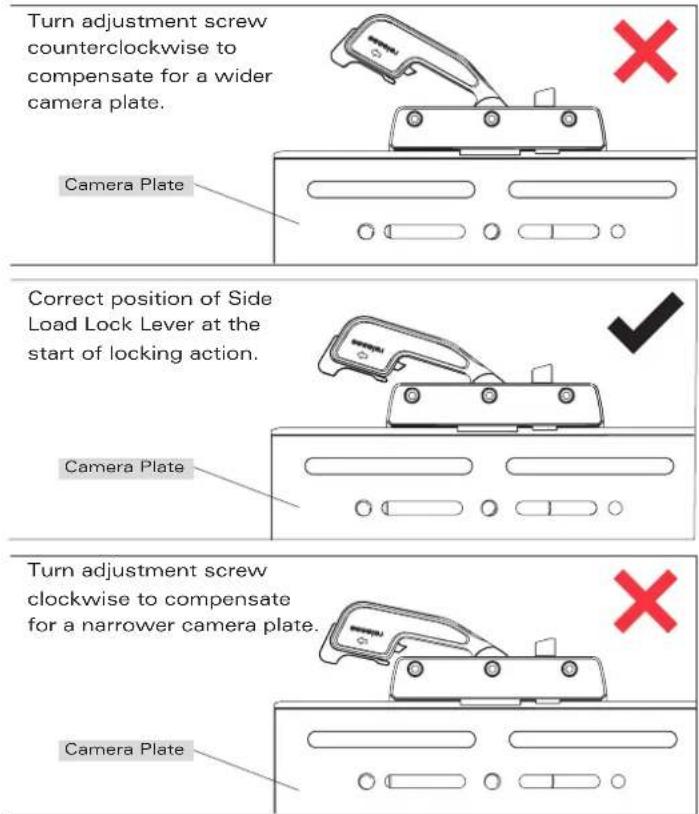
Fig. 9
Operating Instructions
5. Counterbalance Control
The counterbalance system was designed to neutralise the effect of the camera weight when it is tilted. The Cineline 70 Fluid Head offers an 8 position counterbalance system which can be operated via the COUNTERBALANCE SELECTOR (fig. 2). The COUNTERBALANCE SELECTOR must be operated when the CAMERA PLATE is in a horizontal position. After changing the Counterbalance setting it may be necessary to tilt the camera back and forth to ensure that the CB spring has engaged. The camera must be held securely while changing the Counterbalance setting.
5.1 For safety ensure that Counterbalance position 8 is selected.
5.2 Hold the camera and release the TILT LOCK, then gently tilt the camera from a horizontal position forward then backward and observe its response. If the Camera 'Springs Back' to the horizontal position then a lower Counterbalance setting is required, select Counterbalance position 7 and recheck, select lower setting again if necessary. Correct counterbalance setting has been achieved when minimum effort is required to move the camera over the entire tilt range.
TIP: Fine tuning can be achieved by adjusting the CAMERA PLATE - see step 3.5.
Counterbalance Performance
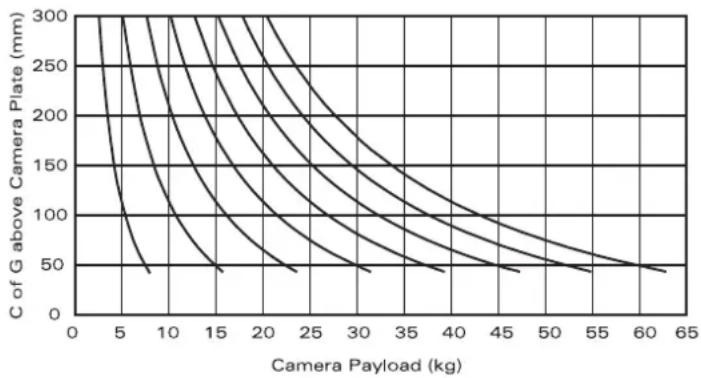
line
| Camera Payload (kg) | C of G above Camera Plate (mm) | | ------------------- | ------------------------------ | | 0 | 300 | | 5 | 250 | | 10 | 200 | | 15 | 150 | | 20 | 100 | | 25 | 75 | | 30 | 50 | | 35 | 25 | | 40 | 10 | | 45 | 5 | | 50 | 2.5 | | 55 | 1 | | 60 | 0.5 | | 65 | 0.25 |Payload Capacity kg (lbs)
C of G* Min Max
100 (4") 5.4 (11.9) 43 (94.6)
125 (5") 4.7 (10.3) 37.8 (83.2)
150 (6") 4.2 (9.2) 33.7 (74.1)
175 (7") 3.8 (8.4) 30.4 (66.9)
200 (8") 3.5 (7.7) 27.7 (60.9)
^* C of G: Centre of Gravity for camera height above camera plate
Fig. 10
Operating Instructions
6. Pan / Tilt Drag Control
The Cineline 70 Fluid Head offers 7 selectable positions of fluid drag + zero setting in the Pan and Tilt. The settings are equally stepped from light drag in position 1 up to heavy drag in position 7, the drag plates are completely disengaged in position zero.
- Do not Pan or Tilt the Fluid Head whilst adjusting PAN or TILT DRAG CONTROL or whilst the PAN & TIL DRAG CONTROL is between settings.
- The drag setting can be changed at any tilt or pan angle.
7. Pan / Tilt Lock Control
The Cineline 70 Fluid Head offers high capacity caliper disc brake system to hold the Fluid Head in a fixed pan and/or tilt position. Camera position will not change when applying or releasing the Pan / Tilt locks.
- Do not pan or tilt the Fluid Head whilst the PAN or the TILT LOCK is partially applied.
8. Illumination
The Cineline 70 Fluid Head offers illumination of the PAN, TILT, COUNTERBALANCE CONTROLS AND BUBBLE LEVEL when the low ambient light conditions exist. Illumination can be achieved by pressing the ILLUMINATION BUTTON once. The light will switch off after 10 seconds.
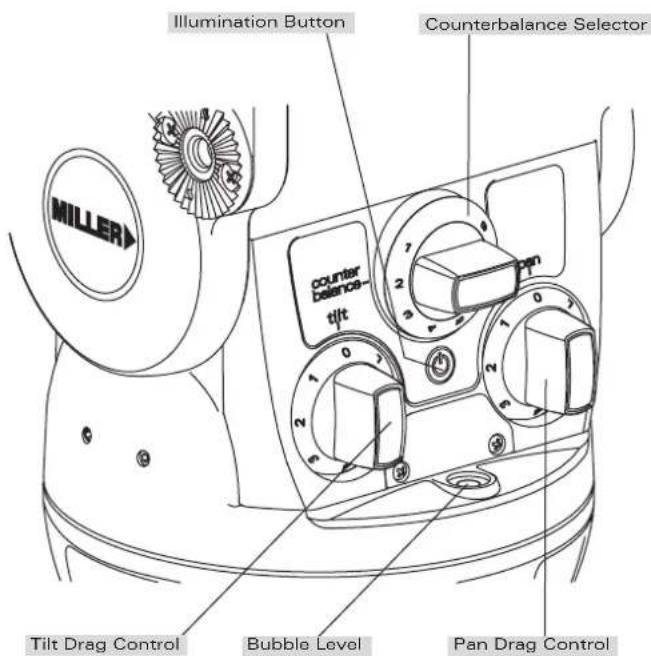
Fig. 11
Maintenance
The Cineline 70 Fluid Head offers high quality surface coatings. Miller recommends keeping the Fluid Head clean at all times by using soft brushes and lint free cloth to wipe over the surfaces.
- Do not immerse the Fluid Head in any liquid.
- Do not use stiff brushes, abrasives, harsh detergents and solvents.
Battery Replacement
The Cineline 70 Fluid Head uses a single GP23A type - 12 Volt battery for Illumination. Miller recommends the following batteries to provide long life performance - GP23A, Duracell MN21/23 or Vinnic L1028.
- Using a Phillips Head #1 screw driver, remove the RETAINING SCREWS and the BATTERY DOOR.
- Using a small flat screw driver remove the battery.
- Align the new battery as shown on the back of the BATTERY DOOR and place into the BATTERY HOUSING, then push down the battery into place. A small flat screw driver may be used to push down the battery into the BATTERY HOUSING.
- Align the BATTERY DOOR into the body then tighten the screws lightly.
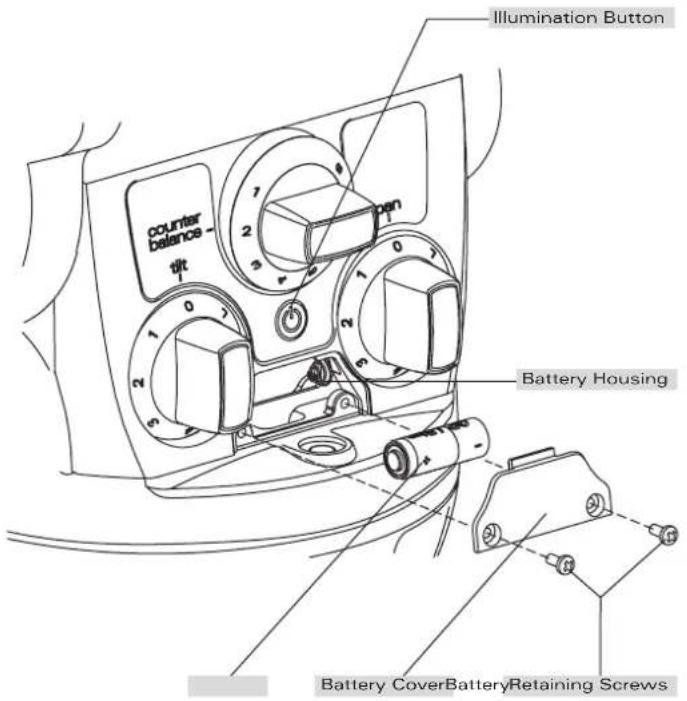
Fig. 12
Storage Service, Sales and Support
The Cineline 70 Fluid Head can be stored for extended periods; Miller recommends storage in a Miller Soft Case and the following:
- Remove battery.
- Clean the external surfaces.
- Keep in a dry place away from direct sunlight.
- Loosen off PAN & TILT LOCK.
Spare Parts and Accessories
ITEM ITEM NO.
Battery 12V P3798
Camera screw 3/8" P0037
Camera screw 1/4" P0036
HD pan handle telescopic 698
Accessory mounting block 1265
Mitchell base adaptor 1225
Accessory front box adaptor 1223
Camera plate (ARRI) 1065
Warranty
Please refer to warranty card for complete details.
Miller Authorised Service Agents must carry out all service and repair work. Failure to observe this requirement may void warranty.
It is advisable to notify Miller or a Miller Authorised Service Agent if a change of performance is observed as a result of dropping or rough usage. For information regarding sales and service of Miller products or for your nearest Miller representative please contact us via our website or at the following:
MILLER CAMERA SUPPORT EQUIPMENT
30 Hotham Parade, Artarmon, Sydney,
NSW 2064 Australia
Tel: +61 2 9439 6377 Fax: +61 2 9438 2819
Email: sales@miller.com.au
MILLER Camera Support (LLC) USA
216 Little Falls Road (Unit 15 & 16), Cedar Grove, New Jersey 07009-1231 USA
Tel: (973) 857 8300 Fax: (973) 857 8188
Email: sales@millertripods.us
MILLER FLUID HEADS (EUROPE) LTD.
Unit 12A, Shepperton Business Park
Govett Avenue, Shepperton, Middlesex TW17 8BA
United Kingdom
Tel: +44 (0)1932 222 888 Fax: +44 (0)11932 222 211
Email: sales@millertripods-europe.com
millertripods.com
MILLER
millertripods.com
MILLER CAMERA SUPPORT EQUIPMENT
30 Hotham Parade
Artarmon, Sydney
NSW, 2064, Australia
Tel: +61 2 9439 6377
Fax: +61 2 9438 2819
Email: sales@miller.com.au

Quality
ISO 9001

D8774-3