
CNSD-200FM - Browser PIONEER - Free user manual and instructions
Find the device manual for free CNSD-200FM PIONEER in PDF.


| Product Type | Car Navigation System |
| Brand | Pioneer |
| Model | CNSD-200FM |
| Category | Browser (Navigator) |
| Display Size | 5.8 inches touchscreen |
| Dimensions | 178 x 100 x 150 mm (approx.) |
| Weight | 1.2 kg (approx.) |
| Power Supply | 12V DC (car battery) |
| Power Consumption | 15W (max) |
| GPS Receiver | Built-in, 32-channel |
| Map Data | Pre-loaded regional maps with POI |
| Route Guidance | Turn-by-turn voice and visual |
| Audio Features | MP3/WMA playback, FM transmitter |
| Bluetooth | Hands-free calling and music streaming |
| Memory Card Slot | SD/MMC for map updates |
| USB Port | For firmware updates and media |
| Maintenance | Clean with soft dry cloth; avoid liquids |
| Safety | Do not use while driving; mount securely |
| Spare Parts and Repairability | Contact Pioneer service center for parts |
| Warranty | 1 year (check local regulations) |
| Operating Temperature | -10°C to 60°C |
Frequently Asked Questions - CNSD-200FM PIONEER
User questions about CNSD-200FM PIONEER
0 question about this device. Answer the ones you know or ask your own.
Ask a new question about this device
Download the instructions for your Browser in PDF format for free! Find your manual CNSD-200FM - PIONEER and take your electronic device back in hand. On this page are published all the documents necessary for the use of your device. CNSD-200FM by PIONEER.
USER MANUAL CNSD-200FM PIONEER
UpgradeInstructionsand OperationManualAddendum
2010F-seriesNAVIGATIONUPGRADESD-CARD
CNSD-250FM CNSD-200FM
Thissoftwareupgradewillresultinchangestocertain featuresandavailabilityofinformation.Whilethe changesareintendedtoimprovetheoveralluser experienceformostusers,Pioneeranditslicensors disclaimanywarrantyorliabilityfordamagesin connectionwithsuchchanges.
ThankyouforbuyingthisPioneerproduct.
Pleasereadthroughtheseoperatinginstructionssoyouwillknowhowtooperate yourmodelproperly.

Important
- Thescreensshownintheexamplesmay differfromactualscreens.
- Actualscreensmaybechangedwithout noticeforperformanceandfunctionimprovements.

Precaution
Incaseoftrouble3
Visitourwebsite3
SDmemorycard3
Manualoverview3
Conventionsusedinthismanual3
Modelstobeupgraded4
-Tocustomerswhohavepurchasedthe CNSD-250FM4
-Tocustomerswhohavepurchasedthe CNSD-200FM4
Renewedpointsthroughthisupgrade4
-Forcustomersupgradingthehardware forthefirsttime4
-Forcustomerswhohavepreviously upgradedthehardware4
Settingitemstobedeletedandinitialisedby upgrade6

Licenceagreement
PIONEERCNSD-250FM,CNSD-200FM7
TERMSANDCONDITIONSFORTELEATLAS DATA9
-EndUserLicensingTerms9
Licenses14

Aboutthedatabase
Aboutthedataforthemapdatabase19

Instructionsforupgrading
Thenavigationsystemupgradeprocess20
Preparationforupgrade20
-Checkingthedevicenumber20
-Checkingthecurrentversion20
-Gettingthepasswordfor authentication21
Upgradeprocedures21
-Upgradingthesoftwareprogramme andthemapdatabase21
-Checkingwhethertheupgradewas doneproperly22
-UpdatingtheBluetoothwireless technologysoftware23

Changesontheupgradedprogramme
Navigationfunctions24
-Signpostandrecommendedlane24
-Switchingthemapmode24
-Hidingcontrolsfortiltandrotation angle25
-SearchingforPOIsaroundthe address25
AVfunctions26
-Selectingatrackfromthelist26
SettingsMenu26
-TexturedPolygons26
-POISettings26
-DisplayedInfo27
-ManageTrackLogs27
-Changesofdefaultvalue27
RestoreFactorySettings28
-Settingitemstobedeleted29

Troubleshooting
Problemsintheproceduresforupdating31
Messagesintheproceduresfor updating31
- Readtheentiremanualbeforeupgrading theprogrammeofyournavigationsystem.
- Thispackageisunique,andcannotbeinstalledonmorethanoneunit.
Incaseoftrouble
- Shouldthenavigationsystemfailtooperateproperly,contactyourdealerornearest authorisedPioneerServiceStation.
- DonotlosethesuppliedMediaNumber Card(MEDIANUMBERCARD).If the MediaNumberCardislost,reissueofthe MediaNumber(MEDIANUMBER)isnot possible.AlsoyoumustsubmittheMedia NumberCardwhenrepairsareneeded. Thecardisnecessaryasproofofauthenticityifserviceisrequired(includingrecovery).
Visitourwebsite
Visitusatthefollowingsite:
http://www.pioneer.eu
- Registryyourproduct.Wewillkeepthedetailsofyourpurchaseonfiletohelpyou refertothisinformationintheeventofan insuranceclaimsuchaslossortheft.
- Weofferthelatestinformationabout PioneerCorporationonourwebsite.
SDmemorycard
□KeeptheSDmemorycardoutofthereach ofsmallchildrentopreventthemfromaccidentallyswallowingit.
□DonotstoretheSDmemorycardinhigh temperaturesordirectsunlight.
□DonotsubjecttheSDmemorycardto shockorimpact.
☐DonotallowtheSDmemorycardtocome intocontactwithliquids.Damagetothe SDmemorycardandyourproductscould resultfromcontactwithliquids.
☐Becarefulnottotouchterminalsonthe SDmemorycard.Doingsomaycauseconnectionfailures.Ifanyterminalsaredirty, wipethemwithacleandrycloth.

□SDLogoisattrademarkofSD-3C,LLC.

Manualoverview
Thismanualdescribeshowtogetthepasswordandactivatetheupgrade.Italsoprovides anoverviewofhowfunctionschangeafterthe upgrade.
Conventionsusedinthis manual
Beforemovingon, takeafewminutestoread the following information about the conventions used in this manual. Familiarity with these conventions will help you greatly as you learn how to use your new equipment.
- ButtonsonyournavigationsystemaredescribedinALLCAPITAL,BOLDlettering: e.g.) Withthemapdisplayed,presstheMENU button.
- Itemsindifferentmenus, screentitles, and functionalcomponentsaredescribedin boldwithdoublequotationmarks“”: e.g.) Displayingthe“SystemSettings”screen
- Touchpanelkeysthatareavailableonthe screenaredescribedinboldinbrackets#: e.g.) Touch[Settings].
- Extrainformation, alternatives and other notes are represented in the following format: e.g.) □If the homelocation has not been stored yet, set the location first.
• Referencesareindicatedlikethis:
e.g.)
→ Fordetailsoftheoperation, referto Checkingthedevicenumberonpage 20.
Modelstobeupgraded
Tocustomerswhohave purchasedtheCNSD-250FM
Thispackagecanupgradethesoftwareprogrammeanddatabaseofthefollowingmodels:
AVIC-F500BT
ThispackagecomeswithupgradeSDmemory cardsAandB.
ThetypeoftheupgradeSDmemorycardyou needtousedependsonthestateofyournavigationsystem.
Check the following before using the upgrade SDmemorycard.
Customersupgradingthehardwarefor thefirsttime
UsetheupgradeSDmemorycardA.
Customersusethehardwareupgraded byCNSD-150FM
UsetheupgradeSDmemorycardB.
Tocustomerswhohave purchasedtheCNSD-200FM
Thispackagecanupgradethesoftwareprogrammeanddatabaseofthefollowingmodels:
AVIC-F9110BT, AVIC-F910BT, AVIC-F900BT, AVIC-F710BT, AVIC-F700BT
ThispackagecomeswithupgradeSDmemory cardsAandB.
ThetypeoftheupgradeSDmemorycardyou needtousedependsonthestateofyournavigationsystem.
Check the following before using the upgrade SDmemorycard.
CustomersusingAVIC-F900BTorAVIC-F700BT,andcustomersupgradingtheirhardwareforthefirsttime
UsetheupgradeSDmemorycardA.
CustomersusingAVIC-F900BTorAVIC-F700BT,andcustomersupgradedthehardwarewiththeCNSD-100FM
UsetheupgradeSDmemorycardB.
CustomersusingAVIC-F9110BT,AVIC-F910BT,AVIC-F710BT
UsetheupgradeSDmemorycardB.

Renewedpointsthrough thisupgrade
Forcustomersupgradingthe hardwareforthefirsttime
ForcustomersusingAVIC-F500BT, AVIC-F900BTorAVIC-F700BT
Byupgradingthenavigationsystemwiththis product, thepointsdescribedinthismanual arechanged.
ForcustomersusingAVIC-F9110BT, AVIC-F910BTorAVIC-F710BT
Byupgradingthenavigationsystemwiththis product,followingpointsarechanged.
- Mapdatabase(includingPOI)isrenewed.
- DeviceNumberisdisplayedonthe"ServiceInformation"screen.
Theotheroperationsareessentiallythesame asthoseatthetimeyoupurchasedthehardware. Use theOperationManualincludedin thehardwarepackageasyourprimaryreference.
Forcustomerswhohave previouslyupgradedthehardware
Byupgradingthenavigationsystemwiththis product,followingpointsarechanged.
- Mapdatabase(includingPOI)isrenewed.
Precaution
- DeviceNumberisdisplayedonthe"ServiceInformation"screen.
Theotheroperationsareessentiallythesame asthoseatthetimeyoupurchasedthehardware. Use theOperationManualincludedin thehardwarepackageasyourprimaryreference.
Settingitemstobedeletedandinitialisedbyupgrade
The following data and settings will be cleared and reset to default values. Other items will be retained. However, some items are not listed because the setting can be easily recovered by users, such as the last map scale, the last status of AV operations screen, etc.
Navigationfunctions
| DestinationMenu | Allsettingson"TMCControlCentre" |
| "History"on"Address" | |
| History | |
| Favourites | |
| "SavedCriteria"on"POI" | |
| NaviSettingsAllsettings | |
| SystemSettingsAllsettings | |
| Others | Pinicondata |
| Speedcameradata | |
| Anti-theftpassword | |
Audiofunctions
| AVSettingsAllsettings |
| SD,USBAllsettings(*1) |
| VolumesettingforAVsources,EQsettings(*2) |
(*1) All settings including the setting on the "Function" menu are deleted.
(*2)ThesesettingsareclearedonlyifyouuseAVIC-F500BT.
The userdatastored in the internal memory of the unit may be erased if an unexpected error occurs during software installation. Pioneer is not responsible for any datal assor unavailability of user data.

PIONEERCNSD-250FM, CNSD-200FM
THISISALEGALAGREEMENTBETWEEN YOU, ASTHEENDUSER, ANDPIONEER CORP. (JAPAN) ("PIONEER"). PLEASEREAD THETERMSANDCONDITIONS OF THIS AGREEMENT CAREFULLY BEFORE USING THESOFTWARE INSTALLED ON THE PIONEER PRODUCTS. BY USING THESOFT-WARE INSTALLED ON THE PIONEER PRO- DUCTS, YOU AGREETOBEBOUND BY THE TERMS OF THIS AGREEMENT. THESOFT-WARE INCLUDES ADATABASE LICENSED BY THIRD PARTYSUPPLIER(S) ("SUPPLIERS"), AND YOUR USE OF THE DATABASE ISCOVERED BY THESUPPLIERS' SEPARATE TERMS, WHICH ARE ATTACHED TO THIS AGREEMENT (refertopage 9). IF YOUDONOT AGREE WITH ALLOF THE SETERMS, PLEASE RETURN THE PIONEER PRODUCTS (INCLUDING THESOFTWARE, AND ANY WRITTEN MA-TERIALS) WITH INFIVE (5) DAYSOFRECEIPT OF THE PRODUCTS, TOTHE AUTHORISED PIONEER DEALER FROM WHICH YOUPURCHASEDTHEM.
1GRANTOFLICENCE
Pioneergrantstoyouanon-transferable, non-exclusivelicencetousethesoftwareinstalled onthePioneerproducts(the"Software")and therelateddocumentationsolelyforyourown personaluseorforinternalusebyyourbusiness,onlyonsuchPioneerproducts. Youshallnotcopy,reverseengineer,translate, port,modifyormakederivativeworksofthe Software.Youshallnotloan,rent,disclose, publish,sell,assign,lease,sublicence,market orotherwisetransfertheSoftwareoruseitin anymannernotexpresslyauthorisedbythis agreement.Youshallnotderiveorattemptto derivethesourcecodeorstructureofallor anyportionoftheSoftwarebyreverseengineering,disassembly,decompilation,orany othermeans.YoushallnotusetheSoftwareto operateaservicebureauorforanyotheruse
involving the processing of data for other persons' entities.
Pioneeranditslicensor(s) shall retain all copyright, trades secret, patent and other proprietary ownership rights in the Software. The Software is copyrighted and may not be copied, even if modified or merged with other products. You shall not alter or remove any copyright notice or proprietary legend contained in or on the Software.
Youmaytransferallofyourlicencerightsin theSoftware,therelateddocumentationanda copyofthisLicenceAgreementtoanother party,providedthatthepartyreadsandagrees toacceptthetermsandconditionsofthisLicenceAgreement.
2DISCLAIMEROFWARRANTY
TheSoftwareandrelateddocumentationare providedtoyou“ASIS”.PIONEERANDITSLICENSOR(S)(forthepurposeofprovisions2 and3,Pioneeranditslicensor(s)shallbecollectivelyreferredtoas“Pioneer”)MAKESAND YOURECEIVENOWARRANTY,WHETHEREX-PRESSORIMPLIED,ANDALLWARRANTIES OFMERCHANTABILITYANDFITNESSFOR ANYPARTICULARPURPOSEAREEX-PRESSLYEXCLUDED.SOME COUNTRIESDO NOTALLOWEXCLUSIONOFIMPLIEDWARRANTIES,SOTHEABOVEEXCLUSIONMAY NOTAPPLYTOYOU.TheSoftwareiscomplex andmaycontainsomenon-conformities,defectsorerrors.Pioneerdoesnotwarrantthat theSoftwarewillmeetyourneedsorexpectations,thatoperationoftheSoftwarewillbe errorfreeoruninterrupted,orthatallnon-conformitiescanorwillbecorrected.Furthermore,Pioneerdoesnotmakeany representationsorwarrantiesregardingthe useorresultsoftheuseoftheSoftwarein termsofitsaccuracy,reliabilityorotherwise.
3LIMITATIONOFLIABILITY
INNOEVENTSHALLPIONEERBELIABLE FORANYDAMAGES,CLAIMORLOSSINCURREDBYYOU(INCLUDING,WITHOUTLIMITATION,COMPENSATORY,INCIDENTAL,INDIRECT,SPECIAL,CONSEQUENTIAL,OREXEMPLARYDAMAGES,LOSTPROFITS,LOSTSALESORBUSINESS,EXPENDITURES,INVESTMENTS,ORCOMMITMENTSINCONNECTIONWITHANYBUSINESS,LOSSOF ANYGOODWILL,ORDAMAGES)RESULTING FROMTHEUSEOFORINABILITYTOUSE THESOFTWARE,EVENIFPIONEERHAS BEENINFORMEDOF,KNEWOF,ORSHOULD HAVEKNOWNOFTHELIKELIHOODOF SUCHDAMAGES.THISLIMITATIONAPPLIES TOALLCAUSESOFACTIONINTHEAGGREGATE,INCLUDINGWITHOUTLIMITATION BREACHOFCONTRACT,BREACHOFWARRANTY,NEGLIGENCE,STRICTLIABILITY,MIS-REPRESENTATION,ANDOTHERTORTS.IF PIONEER'SWARRANTYDISCLAIMEROR LIMITATIONOFLIABILITYSETFORTHINTHIS AGREEMENTSHALLORFORANYREASON WHATSOEVERBEHELDUNENFORCEABLE ORINAPPLICABLE,YOUAGREETHAT PIONEER'SLIABILITYSHALLNOTEXCEED FIFTYPERCENT(50%)OFTHEPRICEPAIDBY YOUFORTHEENCLOSEDPIONEERPRODUCT.
Some countries donotallow the exclusion or limitation of incidental or consequential damages, so the above limitation or exclusion may not apply to you. This warranty disclaimer and limitation of liability shall not be applicable to the extent that any provision of this warranty is prohibited by any country or local law which cannot be pre-empted.
4EXPORTLAWASSURANCES
You agree and certify that neither the Software nor any other technical data are received from Pioneer, nor the direct product thereof, will be exported outside the country or district (the "Country") governed by the government having jurisdiction over you (the "Government") except as authorised and permitted by the
lawsandregulationsoftheGovernment.Ifthe Softwarehasbeenrightfullyobtainedbyyou outsideoftheCountry,youagreethatyouwill notre-exporttheSoftwarenoranyothertechnicaldatareceivedfromPioneer,northedirectproductthereof,exceptaspermittedby thelawsandregulationsoftheGovernment andthelawsandregulationsofthejurisdictioninwhichyouobtainedtheSoftware.
5TERMINATION
This Agreement is effective until terminated. You may terminate at any time by destroying the Software. The Agreement also will terminate if you donot comply with any terms or condition so this Agreement. Upon such termination, you agree to destroy the Software.
6MISCELLANEOUS
ThisistheentireAgreementbetweenPioneer andyouregardingitssubjectmatter.No changeinthisAgreementshallbeeffective unlessagreedtoinwritingbyPioneer.Ifany provisionofthisAgreementsisdeclaredinvalid orunenforceable,theremainingprovisionsof thisAgreementshallremaininfullforceand effect.
TERMSANDCONDITIONS FORTELEATLASDATA
EndUserLicensingTerms
THISISALEGALAGREEMENT(THE"AGREEMENT")BETWEENYOU,THEENDUSER,AND PIONEERanditslicensorsofDataproduct (sometimescollectively"Licensors").BY USINGYOURCOPYOFTHELICENSEDDATA, YOUAGREETOTHETERMSANDCONDITIONSOFTHISAGREEMENT.
1GrantofLicense.
Licensorsgrantyouanon-transferable, nonexclusivelicensetousethemapdataandbusinesspointsofinterestinformation(the "POIs"), ownedbyTeleAtlas, (together, the "Data") containedonthesediscs, solely for personal, non-commercial use and not to operate as service bureau or for any other use involving the processing of data of other persons' entities. You may make one (1) copy of the Data for archival or backup purposes only but you may not otherwise copy, reproduce, modify, makes derivativeworks, derive the structure of reverse engine the Data. The Data is restricted for use with the PIONEER Product(s). The Data contains confidential and proprietary information and materials, and may contain trades secrets, so you agree to hold the Data in confidence and trust and not to disclose the Data or any portions in any form, including by renting, leasing, publishing, leasing, sublicensing or transferring the Data to any third party. You are explicitly prohibited from downloading the digital maps and programmes contained in the Data from transferring these to another data carrier or computer. You are prohibited from removing or obscuring any copyright, trademark notice or restricted legend.
2Ownership.
TheDataiscopyrightedbyTeleAtlasanditsLicensorsandtheyretainallownershiprightsin theData.Youagreenottoalter,remove,obliterate,orobscureanycopyrightnoticeorpro-
prietarylegendcontainedinorontheData. ThecurrentcopyrightsaretobereferredSection12below.
3LimitationofLiability.
NEITHERTELEATLASNORITSSUPPLIERS SHALLBELIABLETOTHEUNDERSIGNED FORANYINCIDENTAL,CONSEQUENTIAL, SPECIAL,INDIRECTOREXEMPLARYDA- MAGESARISINGOUTOFTHISAGREEMENT, INCLUDINGLOSTPROFITSORCOSTSOF COVER,LOSSOFUSEORBUSINESSINTER- RUPTIONORTHELIKE,REGARDLESSOF WHETHERTHEPARTYWASADVISEDOFTHE POSSIBILITYOFSUCHDAMAGES. NOTWITHSTANDINGANYTHINGTOTHECON- TRARYCONTAINEDHEREIN,TELEATLAS SHALLHAVENOMONETARYLIABILITYTO THEUNDERSIGNEDFORANYCAUSE(REG- GARDLESSOFTHEFORMOFACTION) UNDERORRELATINGTOTHISAGREEMENT.
4 Warranty Disclaimer.
THEDATAISPROVIDEDONAN"ASIS"AND "WITHALLFAULTSBASIS"ANDPIONEER, ITSLICENSORS, ANDITSLICENSEDDISTRIBUTORSANDSUPPLIERS(COLLECTIVELY, "SUPPLIERS") EXPRESSLYDISCLAIMALL OTHERWARRANTIES, EXPRESSORIM-PLIED, INCLUDING BUT NOT LIMITED TO, THE IMPLIEDWARRANTIESOFNON-INFRIN-GEMENT, MERCHANTABILITY, EFFECTIVE-NESS, COMPLETENESS, ACCURACY, TITLE AND FITNESS FOR APARTICULAR PURPOSE. PIONEER, ITSLICENSORSANDSUPPLIERS DONOTWARRANTTHAT THEDATAWILL MEETYOURREQUIREMENTSORTHAT THE OPERATION OF THEDATAWILL BE UNINTER-RUPTEDORERRORFREE. NOORALOR WRITTENADVICEGIVEN BY PIONEER, ITSLICENSORS, SUPPLIERSORANY OF THEIRRESPECTIVE EMPLOYEES CREATESA WARRANTY ORIN ANY WAY INCREASES PIONEER', ITSLICENSORSOPPLIERS LIABILITY AND YOU MAY NOT RELY ON ANY SUCH INFORMATION OR ADVICE. THIS DIS-CLAIMERIS ANESSENTIAL CONDITION OF THIS AGREEMENT AND YOU ACCEPT THE DATA ON THIS BASIS.
5Termination.
This Agreement will terminate immediately and automatically, without notice, if you breach any term of this Agreement. You agree that in the event to termination of the Agreement, you shall return the Data (including all documentation and all copies) to PIONEER and its suppliers.
6Indemnity.
Youagreetoindemnify,defendandhold PIONEER,itsLicensors,anditssuppliers(includingtheirrespectivelicensors,suppliers, assignees,subsidiaries,affiliatedcompanies, andtherespectiveofficers,directors,employees,shareholders,agentsandrepresentatives) freeandharmlessfromandagainstanyliability,loss,injury(includinginjuriesresultingin death),demand,action,cost,expense,or
claimofanykindorcharacter,includingbut notlimitedtoattorney'sfees,arisingoutofor inconnectionwithanyuseorpossessionby youoftheData.
7AdditionalProvisionswithrespectto theGreatBritainDataandNorthernIrelanddataonly.
1EndUsershallbeprohibitedfromremoving orobscuringanycopyright,trademarkorrestrictivelegendbelongingtoOrdnanceSurvey. 2DisclaimallwarrantiesofOrdnanceSurvey, whetherexpressorimplied,includingbut notlimitedto,theimpliedwarrantiesof non-infringement,merchantability,completeness,accuracy,andfitnessforaparticularpurpose.EndUsershallacknowledge thatOrdnanceSurveymakesnowarranty andgivesnorepresentationthattheTele Atlas® MultiNet® dataoftheUnitedKingdomiscomplete,accurateand/orupto dateanditisanessentialconditionofthe TermsofUsethatEndUseracceptstheTele Atlas® MultiNet® dataoftheUnitedKingdomonthatbasis.TheDatamayinclude thedataoflicensors,includingOrdnance Survey.
3DisclaimII liability of Ordnance Survey with respect to the Tele Atlas ^ MultiNet ^ data of the United Kingdom.
4ProhibittheuseoftheTeleAtlas ^® MultiNet ^® dataoftheUnitedKingdominanyprinted, publishedformthatresultsinValueAdded Producttobedistributedfreelyorsoldto thepublicwithoutthepriorpermissionof OrdnanceSurvey.
5IndemnifyOrdnanceSurveyfromand againstclaims,demandSORactions,irrespectiveofthenatureofthecauseofthe claim,demandoractionallegingloss, costs,expenses,damagesorinjuries(in- cludinginjuriesresultingfromdeath)aris- ingoutoftheuseoftheTeleAtlas ® MultiNet® dataoftheUnitedKingdom.
6EndUseracceptstheobligationto,onrequest,provideOrdnanceSurveywithininformationonwhatproductsand/orservices containingand/orderedfromtheLicensedTeleAtlasProductstheyproduce.
7EndUserisliabletoOrdnanceSurveyin theeventofdiscoveryofbreachofthe aforementionedcontractualterms. EndUseracceptstheobligationto,onrequest,provideOrdnanceSurveywithinformationonwhatproductsand/orservices containingand/orderedfromtheLicensedProductstheyproduce.
Regardingaudits
TherightsofTeleAtlasasdefinedinthis AgreementapplyaswellforOrdnanceSurvey'sauditors'and/ortheNationalAuditOfficeincaseofdeliveryofUKdata.Anysum payableshallbesubjecttointerestattwopercent(2%)overthebaseratefromtimetotime ofNationalWestminsterBankplcfromthe datethissumwasoriginallydueuptothe dateofpayment(whetherbeforeorafterjudgment).
OrdnanceSurveyand/ortheNationalAudit OfficeshallhavetherighttoauditEndUsers booksoraccountsdirectlyonexactlythe sametermsasLicenseeissoobligedinthis AgreementsothatOrdnanceSurveyhasthis rightofauditinrespectofanyproviderofpro- ductsand/orservicescontainingand/orde- rivedfromLicensedTeleAtlasProducts. Licenseeherebyagreesthatintheeventofdis- coveryofbreach,therelevantEndUsersin breachandLicenseeeshallbejointlyandsever- allyliabletoOrdnanceSurvey.
8AdditionalProvisionswithrespect to theNorwayDataonly.
EndUserisprohibitedfromusingtheTele Atlas® MultiNet® dataofNorwaytocreate commercialgeneralpurposeprintedordigital maps,whicharesimilartothebasicnational productsoftheNorwegianMappingAuthority.
9AdditionalprovisionsforTeleAtlas® PremiumPointsofInterest(the"POIs"). WithrespecttothePOILicensedTeleAtlas Products:
(The following provisions only referto the products which contain TeleAtlas ^ Premium Pointsof Interest.)
EndUserspecificallyagreesthatitshallnot: (a)exceptasotherwisespecificallysetforth herein,licenseorotherwiseprovidethePOILicensedTeleAtlasProductstoanythirdparty forthepurposesofresale,sublicensing,redistributionorforthepurposeofcompiling,enhancing,verifying,supplementing,addingto ordeletingfromanymailinglist,geographic ortradedirectories,businessdirectories,classifieddirectories,classifiedadvertisingwhich issold,rented,published,furnishedorinany mannerprovidedtoathirdparty;
(b) makethePOILicensedTeleAtlasProducts available in an anon-line environment unless properly secured and orencrypted to prevent unauthorized access to the POILicensedTele AtlasProducts; and
(c) usethe POILicensedTeleAtlasProducts, eitherinwholeorinpart, asafactorin(i) establishinganindividual'seligibilityforcredit orinsurance; (ii) connectionwithunderwriting individualinsurance; (iii) evaluatinganindividualforemploymentorpromotions,reassignmentoretentionasanemployee; (iv) in connectionwithadeterminationofanindividual'seligibilityforalicenseorotherbenefit grantedbyagovernmentalauthority; or(v) for solicitingsurvivorsofdeceasedpersons. (d) createmailingortelemarketinglistsunless authorizedinthisAgreement.
(e)EndUserwillhousethePOILicensedTeleAtlasProductsonthelInternetbehindfirewalls andwillimplementasystemofcontrolthat will(i)protecttheintegrityofthePOILicensedTeleAtlasProducts;(ii)controlaccesstothe POILicensedTeleAtlasProductsand(iii)preventunauthorizedusageorcopyingofthePOI LicensedTeleAtlasProducts.
10AdditionalprovisionsforTeleAtlas® BrandIconLicensedTeleAtlasProduct(the "BrandIconLicensedTeleAtlasProduct"):
(The following provisions only referto the products which contain TeleAtlas ^® BrandIcon Licensed TeleAtlas Product.)
aEndUser'suseoftheBrandIconLicensed TeleAtlasProductandanyportionthereof, islimitedtousesolelyforthepurposeofenhancingthevalueand/oruseofthespatial vectordatafurnishedormadebyTeleAtlas. Notwithstandinganythingtothecontrary herein,orinanyattachmentorexhibithere- to,innoeventshallEndUserusethe BrandIconLicensedTeleAtlasProduct anyportionthereofinconnectionwithorin conjunctionwithspatialstreetvectordata furnishedormadebyapartyotherthan TeleAtlas.EndUsermayonlyusethe icons,brandnames,logos,trademarksor otherfeatureswithin(andnotseparate from)themapdata.Inaddition,EndUser shallnotmodifyoralterthecolor,shape, size,andorientationoftheBrandIconLic- ensedTeleAtlasProductasprovidedto EndUserwithoutTeleAtlas'spriorwritten approval.
bLicenseeagreesthattheuseofBrandIcon LicensedTeleAtlasProductsubjecttothe termsandconditionssetforthinthisAgree- mentandthattheremaybeadditionalthird partyterms,conditionsandrestrictionsto whichtheuseoftheBrandIconLicensed TeleAtlasProductwillbesubjectprovided totheEndUserfromtimetotimebyLicen- seeinthereleasenotesapplicabletothe ValueAddedProduct.
cShouldEndUserenterintoanycommercial arrangementforadvertising, pay-for-placement, promotionoranysimilarpaidbrand marketingexposurewithanyowners(or theirrepresentatives)ofanyofthebrand iconssuppliedwiththeBrandIconLicensedTeleAtlasProduct, TeleAtlasshall receivenolessthanttwentyfivepercent (25%)ofanyrevenuescollectedinthecontextofanysuchcommercialarrangement,
unless otherwise agreed to in advance and in writing by both parties.
11AdditionalProvisionswithrespectto TeleAtlas® 3DLandmarksLicensedTele AtlasProduct(the"3DLandmarks"):
(The following provisions only referto the product which contain TeleAtlas ^ 3D Landmarks LicensedTeleAtlasProduct.) Licenseeagreestoincludeassoonaspractically possible, but nolaterthanthefirstnew release of the Value Added Product following Licensee's receipt of any 3D Landmarks, any copyright notices related to the display of such landmarks every Value Added Product and in the "about box" of the Value Added Product. Notwithstanding the aforementioned, TeleAtlashasterighttodecide, at its solediscretion, to removes specific 3D Landmarks insubsequent releases of the Licensed TeleAtlas Products. Insuch case, Licensee will remove those 3D Landmarks from the Value Added Product as soon as practically possible, but not later than the first new release of the Value Added Product following Licensee's receipt of the Updateto the Licensed TeleAtlas Product. TeleAtlasshall not beheld responsible for any possible damages, costsorexpenses incurred by Licensee related to such removal of a 3D Landmark by TeleAtlas from the Licensed Tele Atlas Product or failure to remove a 3D Landmark by Licensee from the Value Added Product.
12CopyrightNotices.
Licenseeshallconspicuouslydisplayeachapplicablethencurrentcopyrightnoticeforthe LicensedTeleAtlasProductsontheinitial splashscreen,inthecode,onthestorage medium,onthepackaging,inthe"Help/About"section,intheoperator'smanual,and inanydisplayedorprintedmapimage,for eachValueAddedProductthatisbasedupon: 1TeleAtlas®MultiNet®Europe.AsoftheEffectiveDate,thecopyrightnoticeis:"Data Source©2009TeleAtlasB.V.";and,inaddition,"basedon":
aTeleAtlas® MultiNet® dataofAustria. A s oftheEffectiveDate, thecopyrightnoticeis: "©BEV, GZ1368/2003."
b TeleAtlas® MultiNet® dataofDenmark. AsoftheEffectiveDate, thecopyright notice is: "©DAV, violationofthese copyrightsshallcauselegalproceedings."
c TeleAtlas® MultiNet® dataofFrance. A s oftheEffectiveDate, thecopyright notice is: "© IGN France.", "Michelin data ©Michelin2009"
d TeleAtlas® MultiNet® dataoftheUnited Kingdom(excludingNorthernIreland). A s oftheEffectiveDate, the following applies: Thisproductincludesmapping datalicensedfromOrdnanceSurvey withthepermissionoftheControllerof HerMajesty'sStationeryOffice.© Crowncopyrightand/ordatabaseright 2009.Allrightsreserved.Licencenumber100026920.
e TeleAtlas® MultiNet® dataofNorthern Ireland.AsoftheEffectiveDate,the copyrightnoticeis:“OrdnanceSurveyof Northern Ireland.”
f TeleAtlas® MultiNet® dataofNorway. A s oftheEffectiveDate, thecopyrightnoticeis: "©NorwegianMappingAuthority, PublicRoadsAdministration/© Mapsolutions."
9 TeleAtlas® MultiNet® dataofRussia:As oftheEffectiveDate,thecopyrightnoticeis:"©Roskartographia"
h TeleAtlas® MultiNet® dataofSwitzerland. AsoftheEffectiveDate, thecopyright notice is: "©Swisstopo."
i TeleAtlas® MultiNet® dataofTheNetherlands.AsoftheEffectiveDate,thecopyrightnoticeis:"Topografische ondergroundCopyright©dienstvoor hetkadasterendeopenbareregisters, Apeldoorn2006."
13Miscellaneous.
ThisistheexclusiveandcompleteAgreement betweentheLicensorsandyouregardingits subjectmatter.NothinginthisAgreement shallcreateajointventure,partnershipor principal-agentrelationshipbetweentheLicensorsandyou.Sections2,5and7-12shall survivetheexpirationorterminationofthis Agreement.ThisAgreementmaybeamended, altered,ormodifiedonlybyPIONEER.You maynotassignanypartofthisAgreement withoutPIONEER'priorwrittenconsent.You acknowledgeandunderstandthattheData maybesubjecttorestrictionsonexportation andagreetocomplywithanyapplicableexportlaws.Intheeventthatanyprovisionor partofaprovisionofthisAgreementisdeterminedtobeinvalid,illegal,orunenforceable, suchprovisionorpartthereofshallbestricken fromthisAgreementandtheremainderofthis Agreementshallbevalid,legal,andenforceabletothemaximumextentpossible.AnynoticeunderthisAgreementshallbedelivered bycouriertoPIONEER,AttentionLegal Department.
Licenses
7-Zip
License for use and distribution
7-Zip Copyright (C) 1999-2007 Igor Pavlov.
Licenses for files are:
1) 7z.dll: GNU LGPL + unRAR restriction
2) All other files: GNU LGPL
The GNU LGPL + unRAR restriction means that you must follow both GNU LGPL rules and unRAR restriction rules.
Note:
You can use 7-Zip on any computer, including a computer in a commercial organization. You don't need to register or pay for 7-Zip.
GNU LGPL information
This library is free software; you can redistribute it and/or modify it under the terms of the GNU Lesser General Public License as published by the Free Software Foundation; either version 2.1 of the License, or (at your option) any later version.
This library is distributed in the hope that it will be useful, but WITHOUT ANY WARRANTY; without even the implied warranty of MERCHANTABILITY or FITNESS FOR A PARTICULAR PURPOSE. See the GNU Lesser General Public License for more details.
You should have received a copy of the GNU Lesser General Public License along with this library; if not, write to the Free Software Foundation, Inc., 59 Temple Place, Suite 330, Boston, MA 02111-1307 USA
unRAR restriction
The decompression engine for RAR archives was developed using source code of unRAR program. All copyrights to original unRAR code are owned by Alexander Roshal.
The license for original unRAR code has the following restriction:
The unRAR sources cannot be used to re-create the RAR compression algorithm, which is proprietary. Distribution of modified unRAR sources in separate form or as a part of other software is permitted, provided that it is clearly stated in the documentation and source comments that the code may not be used to develop a RAR (WinRAR) compatible archiver.
GNU LESSER GENERAL PUBLIC LICENSE
Version 2.1, February 1999
Copyright (C) 1991, 1999 Free Software Foundation, Inc. 59 Temple Place, Suite 330, Boston, MA 02111-1307 USA Everyone is permitted to copy and distribute verbatim copies of this license document, but changing it is not allowed.
[This is the first released version of the Lesser GPL. It also counts as the successor of the GNU Library Public License, version 2, hence the version number 2.1.]
Preamble
The licenses for most software are designed to take away your freedom to share and change it. By contrast, the GNU General Public Licenses are intended to guarantee your freedom to share and change free software--to make sure the software is free for all its users.
This license, the Lesser General Public License, applies to some specially designated software packages--typically libraries--of the Free Software Foundation and other authors who decide to use it. You can use it too, but we suggest you first think carefully about whether this license or the ordinary General Public License is the better strategy to use in any particular case, based on the explanations below.
When we speak of free software, we are referring to freedom of use, not price. Our General Public Licenses are designed to make sure that you have the freedom to distribute copies of free software (and charge for this service if you wish); that you receive source code or can get it if you want it; that you can change the software and use pieces of it in new free programs; and that you are informed that you can do these things.
To protect your rights, we need to make restrictions that forbid distributors to deny you these rights or to ask you to surrender these rights. These restrictions translate to certain responsibilities for you if you distribute copies of the library or if you modify it.
For example, if you distribute copies of the library, whether gratis or for a fee, you must give the recipients all the rights that we gave you. You must make sure that they, too, receive or can get the source code. If you link other code with the library, you must provide complete object files to the recipients, so that they can relink them with the library after making changes to the library and recompiling it. And you must show them these terms so they know their rights.
We protect your rights with a two-step method: (1) we copyright the library, and (2) we offer you this license, which gives you legal permission to copy, distribute and/or modify the library.
To protect each distributor, we want to make it very clear that there is no warranty for the free library. Also, if the library is modified by someone else and passed on, the recipients should know that what they have is not the original version, so that the original author's reputation will not be affected by problems that might be introduced by others.
Finally, software patents pose a constant threat to the existence of any free program. We wish to make sure that a company cannot effectively restrict the users of a free
program by obtaining a restrictive license from a patent holder. Therefore, we insist that any patent license obtained for a version of the library must be consistent with the full freedom of use specified in this license.
Most GNU software, including some libraries, is covered by the ordinary GNU General Public License. This license, the GNU Lesser General Public License, applies to certain designated libraries, and is quite different from the ordinary General Public License. We use this license for certain libraries in order to permit linking those libraries into non-free programs.
When a program is linked with a library, whether statically or using a shared library, the combination of the two is legally speaking a combined work, a derivative of the original library. The ordinary General Public License therefore permits such linking only if the entire combination fits its criteria of freedom. The Lesser General Public License permits more lax criteria for linking other code with the library.
We call this license the "Lesser" General Public License because it does Less to protect the user's freedom than the ordinary General Public License. It also provides other free software developers Less of an advantage over competing non-free programs. These disadvantages are the reason we use the ordinary General Public License for many libraries. However, the Lesser license provides advantages in certain special circumstances.
For example, on rare occasions, there may be a special need to encourage the widest possible use of a certain library, so that it becomes a de-facto standard. To achieve this, non-free programs must be allowed to use the library. A more frequent case is that a free library does the same job as widely used non-free libraries. In this case, there is little to gain by limiting the free library to free software only, so we use the Lesser General Public License.
In other cases, permission to use a particular library in non-free programs enables a greater number of people to use a large body of free software. For example, permission to use the GNU C Library in non-free programs enables many more people to use the whole GNU operating system, as well as its variant, the GNU/Linux operating system.
Although the Lesser General Public License is Less protective of the users' freedom, it does ensure that the user of a program that is linked with the Library has the freedom and the wherewithal to run that program using a modified version of the Library.
The precise terms and conditions for copying, distribution and modification follow. Pay close attention to the difference between a "work based on the library" and a "work that uses the library". The former contains code derived from the library, whereas the latter must be combined with the library in order to run.
GNU LESSER GENERAL PUBLIC LICENSE
TERMS AND CONDITIONS FOR COPYING, DISTRIBUTION AND MODIFICATION
- This License Agreement applies to any software library or other program which contains a notice placed by the copyright holder or other authorized party saying it may be distributed under the terms of this Lesser General Public License (also called "this License"). Each licensee is addressed as "you".
A "library" means a collection of software functions and/or data prepared so as to be conveniently linked with application programs (which use some of those functions and data) to form executables.
The "Library", below, refers to any such software library or work which has been distributed under these terms. A "work based on the Library" means either the Library or any derivative work under copyright law: that is to say, a work containing the Library or a portion of it, either verbatim or with modifications and/or translated straightforwardly into another language. (Hereinafter, translation is included without limitation in the term "modification".)
"Source code" for a work means the preferred form of the work for making modifications to it. For a library, complete source code means all the source code for all modules it contains, plus any associated interface definition files, plus the scripts used to control compilation and installation of the library.
Activities other than copying, distribution and modification are not covered by this License; they are outside its scope. The act of running a program using the Library is not restricted, and output from such a program is covered only if its contents constitute a work based on the Library (independent of the use of the Library in a tool for writing it). Whether that is true depends on what the Library does and what the program that uses the Library does.
- You may copy and distribute verbatim copies of the Library's complete source code as you receive it, in any medium, provided that you conspicuously and appropriately publish on each copy an appropriate copyright notice and disclaimer of warranty; keep intact all the notices that refer to this License and to the absence of any warranty; and distribute a copy of this License along with the Library.
You may charge a fee for the physical act of transferring a copy, and you may at your option offer warranty protection in exchange for a fee.
- You may modify your copy or copies of the Library or any portion of it, thus forming a work based on the Library, and copy and distribute such modifications or work under the terms of Section 1 above, provided that you also meet all of these conditions:
a) The modified work must itself be a software library.
b) You must cause the files modified to carry prominent notices stating that you changed the files and the date of any change.
c) You must cause the whole of the work to be licensed at no charge to all third parties under the terms of this License.
d) If a facility in the modified Library refers to a function or a table of data to be supplied by an application program that uses the facility, other than as an argument passed when the facility is invoked, then you must make a good faith effort to ensure that, in the event an application does not supply such function or table, the facility still operates, and performs whatever part of its purpose remains meaningful.
(For example, a function in a library to compute square roots has a purpose that is entirely well-defined independent of the application. Therefore, Subsection 2d requires that any application-supplied function or table used by this function must be optional: if the application does not supply it, the square root function must still compute square roots.)
These requirements apply to the modified work as a whole. If identifiable sections of that work are not derived from the Library, and can be reasonably considered independent and separate works in themselves, then this License, and its terms, do not apply to those sections when you distribute them as separate works. But when you distribute the same sections as part of a whole which is a work based on the Library, the distribution of the whole must be on the terms of this License, whose permissions for other licensees extend to the entire whole, and thus to each and every part regardless of who wrote it.
Thus, it is not the intent of this section to claim rights or contest your rights to work written entirely by you; rather, the intent is to exercise the right to control the distribution of derivative or collective works based on the Library.
In addition, mere aggregation of another work not based on the Library with the Library (or with a work based on the Library) on a volume of a storage or distribution medium does not bring the other work under the scope of this License.
- You may opt to apply the terms of the ordinary GNU General Public License instead of this License to a given copy of the Library. To do this, you must alter all the notices that refer to this License, so that they refer to the ordinary GNU General Public License, version 2, instead of to this License. (If a newer version than version 2 of the ordinary GNU General Public License has appeared, then you can specify that version instead if you wish.) Do not make any other change in these notices.
Once this change is made in a given copy, it is irreversible for that copy, so the ordinary GNU General Public License applies to all subsequent copies and derivative works made from that copy.
This option is useful when you wish to copy part of the code of the Library into a program that is not a library.
- You may copy and distribute the Library (or a portion or derivative of it, under Section 2) in object code or executable form under the terms of Sections 1 and 2 above provided that you accompany it with the complete corresponding machine-readable source code, which must be distributed under the terms of Sections 1 and 2 above on a medium customarily used for software interchange.
If distribution of object code is made by offering access to copy from a designated place, then offering equivalent access to copy the source code from the same place satisfies the requirement to distribute the source code, even though third parties are not compelled to copy the source along with the object code.
- A program that contains no derivative of any portion of the Library, but is designed to work with the Library by being compiled or linked with it, is called a "work that uses the Library". Such a work, in isolation, is not a derivative
work of the Library, and therefore falls outside the scope of this License.
However, linking a "work that uses the Library" with the Library creates an executable that is a derivative of the Library (because it contains portions of the Library), rather than a "work that uses the library". The executable is therefore covered by this License.
Section 6 states terms for distribution of such executables.
When a "work that uses the Library" uses material from a header file that is part of the Library, the object code for the work may be a derivative work of the Library even though the source code is not.
Whether this is true is especially significant if the work can be linked without the Library, or if the work is itself a library. The threshold for this to be true is not precisely defined by law.
If such an object file uses only numerical parameters, data structure layouts and accessors, and small macros and small inline functions (ten lines or less in length), then the use of the object file is unrestricted, regardless of whether it is legally a derivative work. (Executables containing this object code plus portions of the Library will still fall under Section 6.)
Otherwise, if the work is a derivative of the Library, you may distribute the object code for the work under the terms of Section 6.
Any executables containing that work also fall under Section 6, whether or not they are linked directly with the Library itself.
- As an exception to the Sections above, you may also combine or link a "work that uses the Library" with the Library to produce a work containing portions of the Library, and distribute that work under terms of your choice, provided that the terms permit modification of the work for the customer's own use and reverse engineering for debugging such modifications.
You must give prominent notice with each copy of the work that the Library is used in it and that the Library and its use are covered by this License. You must supply a copy of this License. If the work during execution displays copyright notices, you must include the copyright notice for the Library among them, as well as a reference directing the user to the copy of this License. Also, you must do one of these things:
a) Accompany the work with the complete corresponding machine-readable source code for the Library including whatever changes were used in the work (which must be distributed under Sections 1 and 2 above); and, if the work is an executable linked with the Library, with the complete machine-readable "work that uses the Library", as object code and/or source code, so that the user can modify the Library and then relink to produce a modified executable containing the modified Library. (It is understood that the user who changes the contents of definitions files in the Library will not necessarily be able to recompile the application to use the modified definitions.)
b) Use a suitable shared library mechanism for linking with the Library. A suitable mechanism is one that (1) uses at run time a copy of the library already present on the user's computer system, rather than copying library functions into the executable, and (2) will oper-
ate properly with a modified version of the library, if the user installs one, as long as the modified version is interface-compatible with the version that the work was made with.
c) Accompany the work with a written offer, valid for at least three years, to give the same user the materials specified in Subsection 6a, above, for a charge no more than the cost of performing this distribution.
d) If distribution of the work is made by offering access to copy from a designated place, offer equivalent access to copy the above specified materials from the same place.
e) Verify that the user has already received a copy of these materials or that you have already sent this user a copy.
For an executable, the required form of the "work that uses the Library" must include any data and utility programs needed for reproducing the executable from it. However, as a special exception, the materials to be distributed need not include anything that is normally distributed (in either source or binary form) with the major components (compiler, kernel, and so on) of the operating system on which the executable runs, unless that component itself accompanies the executable.
It may happen that this requirement contradicts the license restrictions of other proprietary libraries that do not normally accompany the operating system. Such a contradiction means you cannot use both them and the Library together in an executable that you distribute.
- You may place library facilities that are a work based on the Library side-by-side in a single library together with other library facilities not covered by this License, and distribute such a combined library, provided that the separate distribution of the work based on the Library and of the other library facilities is otherwise permitted, and provided that you do these two things:
a) Accompany the combined library with a copy of the same work based on the Library, uncombined with any other library facilities. This must be distributed under the terms of the Sections above.
b) Give prominent notice with the combined library of the fact that part of it is a work based on the Library, and explaining where to find the accompanying uncombined form of the same work.
- You may not copy, modify, sublicense, link with, or distribute the Library except as expressly provided under this License. Any attempt otherwise to copy, modify, sublicense, link with, or distribute the Library is void, and will automatically terminate your rights under this License. However, parties who have received copies, or rights, from you under this License will not have their licenses terminated so long as such parties remain in full compliance.
- You are not required to accept this License, since you have not signed it. However, nothing else grants you permission to modify or distribute the Library or its derivative works. These actions are prohibited by law if you do not accept this License. Therefore, by modifying or distributing the Library (or any work based on the Library), you indicate your acceptance of this License to do so, and all its terms
and conditions for copying, distributing or modifying the Library or works based on it.
- Each time you redistribute the Library (or any work based on the Library), the recipient automatically receives a license from the original licensor to copy, distribute, link with or modify the Library subject to these terms and conditions. You may not impose any further restrictions on the recipients' exercise of the rights granted herein. You are not responsible for enforcing compliance by third parties with this License.
- If, as a consequence of a court judgment or allegation of patent infringement or for any other reason (not limited to patent issues), conditions are imposed on you (whether by court order, agreement or otherwise) that contradict the conditions of this License, they do not excuse you from the conditions of this License. If you cannot distribute so as to satisfy simultaneously your obligations under this License and any other pertinent obligations, then as a consequence you may not distribute the Library at all. For example, if a patent license would not permit royalty-free redistribution of the Library by all those who receive copies directly or indirectly through you, then the only way you could satisfy both it and this License would be to refrain entirely from distribution of the Library.
If any portion of this section is held invalid or unenforceable under any particular circumstance, the balance of the section is intended to apply, and the section as a whole is intended to apply in other circumstances.
It is not the purpose of this section to induce you to infringe any patents or other property right claims or to contest validity of any such claims; this section has the sole purpose of protecting the integrity of the free software distribution system which is implemented by public license practices. Many people have made generous contributions to the wide range of software distributed through that system in reliance on consistent application of that system; it is up to the author/donor to decide if he or she is willing to distribute software through any other system and a licensee cannot impose that choice.
This section is intended to make thoroughly clear what is believed to be a consequence of the rest of this License.
- If the distribution and/or use of the Library is restricted in certain countries either by patents or by copyrighted interfaces, the original copyright holder who places the Library under this License may add an explicit geographical distribution limitation excluding those countries, so that distribution is permitted only in or among countries not thus excluded. In such case, this License incorporates the limitation as if written in the body of this License.
- The Free Software Foundation may publish revised and/or new versions of the Lesser General Public License from time to time. Such new versions will be similar in spirit to the present version, but may differ in detail to address new problems or concerns.
Each version is given a distinguishing version number. If the Library specifies a version number of this License which applies to it and "any later version", you have the option of following the terms and conditions either of that version or of any later version published by the Free Software Foundation. If the Library does not specify a license version number, you may choose any version ever published by the Free
Software Foundation.
- If you wish to incorporate parts of the Library into other free programs whose distribution conditions are incompatible with these, write to the author to ask for permission. For software which is copyrighted by the Free Software Foundation, write to the Free Software Foundation; we sometimes make exceptions for this. Our decision will be guided by the two goals of preserving the free status of all derivatives of our free software and of promoting the sharing and reuse of software generally.
NO WARRANTY
-
BECAUSE THE LIBRARY IS LICENSED FREE OF CHARGE, THERE IS NO WARRANTY FOR THE LIBRARY, TO THE EXTENT PERMITTED BY APPLICABLE LAW. EXCEPT WHEN OTHERWISE STATED IN WRITING THE COPYRIGHT HOLDERS AND/OR OTHER PARTIES PROVIDE THE LIBRARY "AS IS" WITHOUT WARRANTY OF ANY KIND, EITHER EXPRESSED OR IMPLIED, INCLUDING, BUT NOT LIMITED TO, THE IMPLIED WARRANTIES OF MERCHANTABILITY AND FITNESS FOR A PARTICULAR PURPOSE. THE ENTIRE RISK AS TO THE QUALITY AND PERFORMANCE OF THE LIBRARY IS WITH YOU. SHOULD THE LIBRARY PROVE DEFECTIVE, YOU ASSUME THE COST OF ALL NECESSARY SERVICING, REPAIR OR CORRECTION.
-
IN NO EVENT UNLESS REQUIRED BY APPLICABLE LAW OR AGREED TO IN WRITING WILL ANY COPYRIGHT HOLDER, OR ANY OTHER PARTY WHO MAY MODIFY AND/OR REDISTRIBUTE THE LIBRARY AS PERMITTED ABOVE, BE LIABLE TO YOU FOR DAMAGES, INCLUDING ANY GENERAL, SPECIAL, INCIDENTAL OR CONSEQUENTIAL DAMAGES ARISING OUT OF THE USE OR INABILITY TO USE THE LIBRARY (INCLUDING BUT NOT LIMITED TO LOSS OF DATA OR DATA BEING RENDERED INACCURATE OR LOSSES SUSTAINED BY YOU OR THIRD PARTIES OR A FAILURE OF THE LIBRARY TO OPERATE WITH ANY OTHER SOFTWARE), EVEN IF SUCH HOLDER OR OTHER PARTY HAS BEEN ADVISED OF THE POSSIBILITY OF SUCH DAMAGES.
END OF TERMS AND CONDITIONS
How to Apply These Terms to Your New Libraries
If you develop a new library, and you want it to be of the greatest possible use to the public, we recommend making it free software that everyone can redistribute and change. You can do so by permitting redistribution under these terms (or, alternatively, under the terms of the ordinary General Public License).
To apply these terms, attach the following notices to the library. It is safest to attach them to the start of each source file to most effectively convey the exclusion of warranty; and each file should have at least the "copyright" line and a pointer to where the full notice is found.
Copyright (C)
This library is free software; you can redistribute it and/or modify it under the terms of the GNU Lesser General Public License as published by the Free Software Foundation; either version 2.1 of the License, or (at your option) any
later version.
This library is distributed in the hope that it will be useful, but WITHOUT ANY WARRANTY; without even the implied warranty of MERCHANTABILITY or FITNESS FOR A PARTICULAR PURPOSE. See the GNU Lesser General Public License for more details.
You should have received a copy of the GNU Lesser General Public License along with this library; if not, write to the Free Software Foundation, Inc., 59 Temple Place, Suite 330, Boston, MA 02111-1307 USA
Also add information on how to contact you by electronic and paper mail.
You should also get your employer (if you work as a programmer) or your school, if any, to sign a "copyright disclaimer" for the library, if necessary. Here is a sample; alter the names:
Yoyodyne, Inc., hereby disclaims all copyright interest in the library 'Frob' (a library for tweaking knobs) written by James Random Hacker.
That's all there is to it!
7-Zip Source Notice
The software program used in this product contains 7-Zip library. 7-Zip contains the software granted permission for the usage under the terms of the GNU Lesser General Public License. A copy of appropriate source code is available at customer necessary expense for the distribution.
Please contact our Customer Support Center to obtain a copy. For more information on the GNU Lesser General Public License, visit the GNU's website at http://www.gnu.org.
Aboutthedataforthemap database
- Modificationsrelatedtoroads, streets/highways, terrain, constructionandotherthings before/duringthe development period may not be reflected in this database. Inevitably, those modifications after that period are not reflected in this database.
- Regardlessofexistingandnewly-built things,thedatamaybedifferentfromthe actualcondition.
- Fordetailsaboutthemapcoverageofthis navigationsystem,refertotheinformation onourwebsite.
- Itisstrictlyprohibitedtoreproduceanduse anypartorthewholeofthismapinany formwithoutpermissionfromthecopyright owner.
- If the local traffic regulations or conditions deviate from this data, follow the local traffic regulations (such as signs, indications, etc.) and conditions (such as construction, weather, etc.).
- Thetrafficregulationdatausedinthemap databaseappliesonlytostandardsized passengervehicles. Notethatregulations forlargervehicles,motorbikes,andother non-standardvehiclesarenotincluded in thedatabase.
• MapVersion, TeleAtlas. Rel. 06/2009. - PoweredbyNNG
Thenavigationsystem upgradeprocess
1 Checkthedevicenumberofyournavigationsystem.
- Fordetailsoftheoperation,referto Checkingthedevicenumberonthis page.

2 Checktheversioninformation.
Fordetails, referto Checking the current version on this page.

3 Getthepasswordforauthentication.
Fordetails, refertoGettingthepassword forauthenticationonthenextpage.

4 Upgradethesoftwareprogrammeofyour navigationsystem.
- Fordetailsoftheoperation,refertoUpgradingthesoftwareprogrammeandthemapdatabaseonthenextpage.

5 Checkwhethertheupgradewasdoneproperly.
Fordetails, referto Checking whether the upgradewas done properly on page 22.

6 UpdatetheBluetoothfirmware.
Fordetails, refertoUpdatingtheBluetoothwirelesstechnologysoftwareonpage23.

Preparationforupgrade Checkingthedevicenumber
First, check your device number (DEVICENUMBER, displayed such as DeviceNumber or Device#) of your navigation system for later procedures. Todisplay the device number, do the following.
1 Park your vehicle in as a safe place and apply the hand brake.
2InserttheupgradeSDmemorycard intotheSDcardslot.
3TurntheignitionswitchOFFandback ONtorebootthenavigationsystem.
Afterashortpause, the device number will appear.
4 Writedownyourdevicenumber (Device#) onto the supplied Media Number Card (MEDIANUMBERCARD) to avoid mistakes.
5Touch[Cancel].
Thenavigationsystemrestarts.
6Turnoffthevehicleenginetoterminatethesystem.
Thenavigationsystemisalsoturnedoff.
7EjecttheupgradeSDmemorycard.
Checking the current version
Youmayneedtheversioninformationtoconfirmcompletionofupgrade.Checktheversioninformationusingthefollowingprocedure.
1PresstheMENUbuttontodisplaythe "TopMenu", andthentouch[Settings].
2Touch[SystemSettings].
The "SystemSettings" menuappears.
3Touch[ServiceInformation]onthe "SystemSettings"menu.
4 Writedowntheversiondisplayedin "Map Version" and "Version".
Getting the password for authentication
Web-connectedcomputerisrequiredforonlineissuanceofpassword.
Forupgrade, an unique password issued on-line is necessary. Access the website with your PC and your password. The following information is required.
• MediaNumber(MEDIANUMBER)printed onsuppliedMediaNumberCard (MEDIANUMBERCARD)
- DeviceNumber(DEVICENUMBER) of your navigation system
1Accessonthefollowingwebsiteto issueyourpassword. http://www.pioneer.eu/UnlockNavigate Forissuingthepassword,followtheinstructiononthewebsite.
2Record the password that you received. You need to input this password accurately. Writedown your password to avoid mistakes.
Upgradeprocedures Upgradingthesoftware programmeandthemapdatabase
Thissectiondescribestheupgradeproceduresforyournavigationsystem.
☐Theupgradetakesapproximately40minutesintotal.
□IfyouuseAVIC-F500BT,besuretofollow theinstructionsgivenbelow.
- Turnthenavigationunit'spowercompletelyoffbypassingandholdingthe Powerbutton.
- Neverstartupgradingwhenthenavigationunitrunswiththebattery.Otherwise,theupgradecannotcomplete becausethebatteryrunsout.
1 Park your vehicle in as a safe place and apply the hand brake.
2InserttheupgradeSDmemorycard intotheSDcardslot.
3TurntheignitionswitchOFFandback ONtorebootthenavigationsystem.
Afterashortpause, the device number will appear.
4Touch[OK].
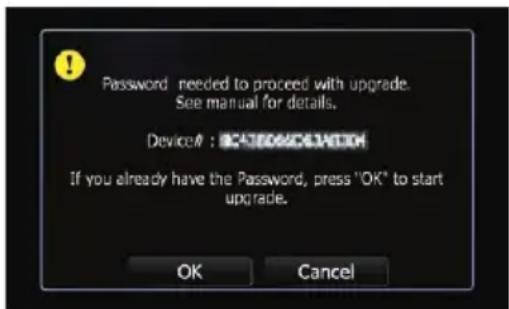
Afterashortpause, thekeyboardforentering thepasswordwillappear.
☐Tocanceltheupgrade,touch[Cancel].
5Enterthepasswordforauthentication thatyouobtained, thentouch[Done].
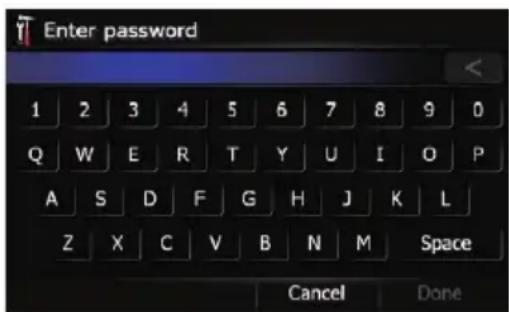
Afteryoutouch[Done], thesystemstartsthe authentication. Whentheauthenticationisfinishedproperly, amessageforconfirmation willappear.
6Touch[Yes]tostarttheupgrade.
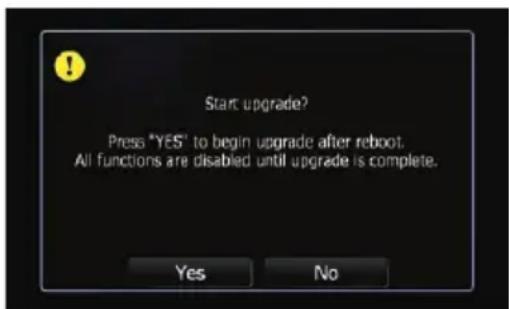
Thenavigationsystemrestartsandthentheinstallationbegins.
□Tocanceltheupgrade,touch[No].
Whentheprogrammeupgradeiscomplete,a confirmationmessageappears.
7Touch[OK].
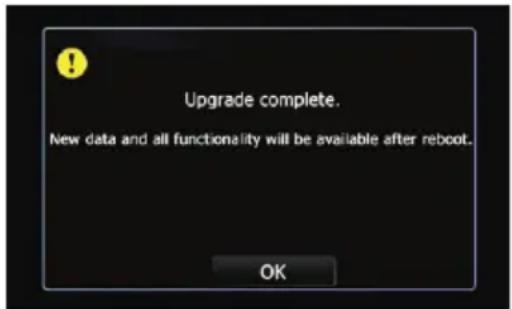
Themessageconfirmingwhetheryouwantto keepthecurrentsplashscreenappears.
8Touchthekeythatyouwanttoselect.
Thenavigationsystemrestartsandthentheinstallationbegins.
9Waituntiltheupgradeprocessiscomplete.

CAUTION
While this screen is visible, NEVER switch the ignition key position or turn off the power of navigation system.
![Update APL: ------- => 4.000000 DATA: ------- => 3.500000 MAP: ------- => 63.500000 CEMAGE:6.1.7.0 => 6.2.2.8 Updating APL---------Used Time: 00:00:18 Copying: [Storage Card]/PUT000\API [7dModel.dV] 21%](/content/2026/06/1168945/images/c14cacfabb12736541d098001b285713c6fa32fd4e3e043e3f7caed7f8485f54.jpg)
Aftertheinstallationiscomplete,thenavigationsystemrestarts.
10Touchthelanguagethatyouwantto useonthescreen.
11Touchthelanguagethatyouwantto useforthevoiceguidance.
The "Top Menu" screen appears.
12EjecttheupgradeSDmemorycard.
Checkingwhethertheupgrade wasdoneproperly
Display"ServiceInformation"screentocomparethecurrentversionnumberwiththepreviousone.
- Fordetails, referto Checking the current version on page 20.
Instructionsforupgrading
UpdatingtheBluetooth wirelesstechnologysoftware
AccessthePioneerwebsitetocheckyour phone'scompatibility.Ifyourphoneisonthe listandyouwishtoupdate,manuallyupdate theBluetoothfirmwareaftertheautomaticupgradeisfinished.
http://www.pioneer.eu
☐Registeredphonesthatarelistedonthe "Connection" screenareclearedbythe softwareupdate.
1 Park your vehicle in as a safe place and apply the hand brake.
2InserttheupgradeSDmemorycard intotheSDcardslot.
3PresstheMENUbuttontodisplaythe "TopMenu".
4Touch[Phone].
The "PhoneMenu" screenappears.
5Touch[PhoneSettings].
The "PhoneSettings" screenappears.
6Touch[BluetoothSoftwareUpdate].
The current version is displayed.
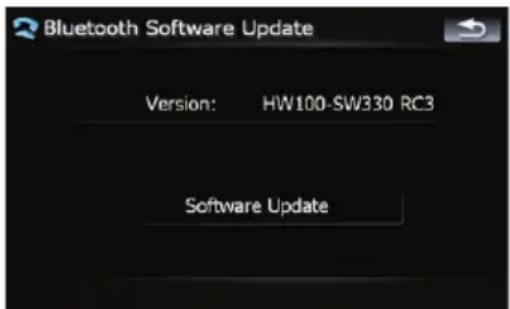
7Touch[SoftwareUpdate].
Updatestarts.
8Waituntiltheupdateprocessiscomplete.
Amessagewillappearaftertheupdateis complete.
9Touch[OK].
10EjecttheupgradeSDmemorycard.
Updateiscompleted.
Changesontheupgradedprogramme
If you upgrade your navigations system using this SD memory card, the system will have the following changes.
Navigationfunctions
Signpostandrecommendedlane
Signpostswillappeartogetherwiththerecommendedlanewheremulti-laneroadsexist whenyouaredrivingonyourroute.Thehigh-lightedlaneindicatestherecommendedlane.
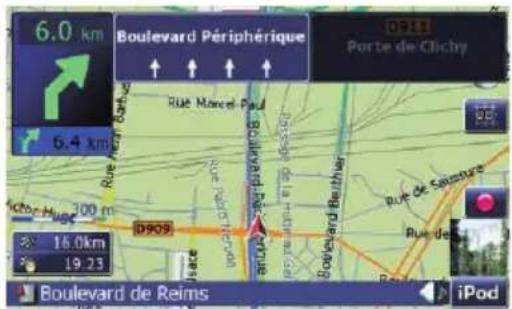
When "Headingup" modeisselected, displayed.

2Dmapscreen(Northupmode)
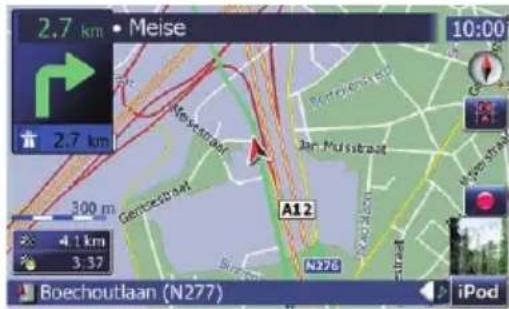
Themapdisplayalwayshasnorthatthetopof thescreen.
When "Northup" modeisselected, played.

3Dmapscreen
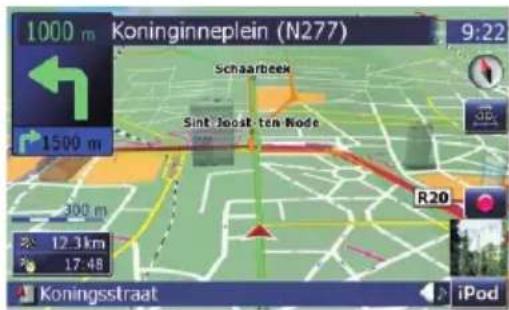
Whenthe3Dmapscreenisselected, is displayed.

1PresstheMAPbuttontodisplaythenavigationmapscreen.
Changesontheupgradedprogramme
2Touchthemapmodeselectortoswitch themapdisplay.
Eachtouchofthemapmodeselectorchanges themapdisplayasfollows:
2Dmapscreen(Headingupmode)—2Dmap screen(Northupmode)—3Dmapscreen
Hidingcontrolsfortiltand rotationangle
Touching hidesthetilt controls and rotation angle.
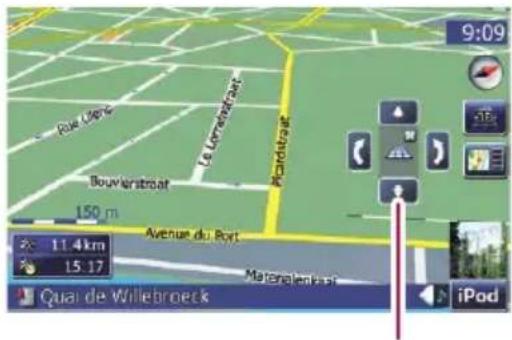
Controlsfortiltandrotationangle
SearchingforPOIsaroundthe address
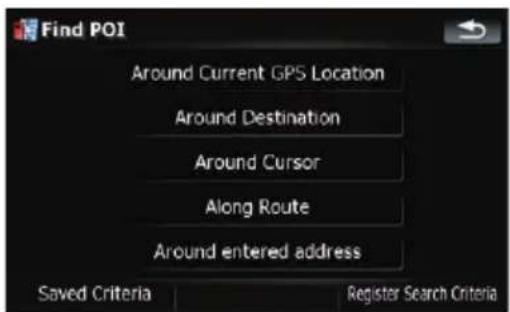
1Touch[Destination]onthe"TopMenu", andthentouch[POI].
2Touch[Aroundenteredaddress].
3Entertheaddressyouwant.
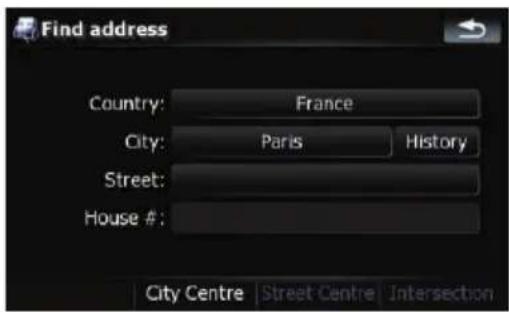
□Ifthehousenumberyouhaveenteredis notfound, amessageappears. In that case, ahousenumbernearenteredoneisselectedaftertouching [OK].
4Touchthecategoryyouwant.
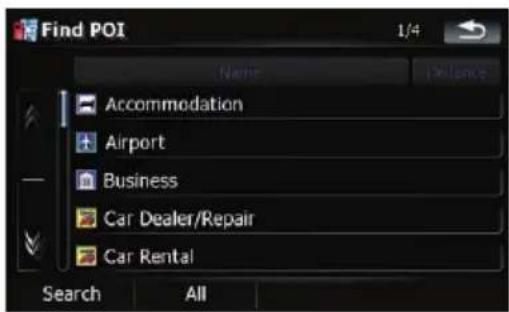
If there are more detailed categories within the selected category, repeat this step as many times as necessary.
Touch[Search]tosearchforaPOIbyentering thePOInameintheselectedcategory.
Touching[All]listsallIPOlsthatareincluded inthecategoriescurrentlydisplayed.
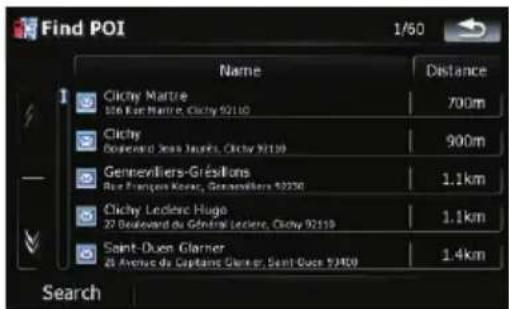
5TouchthePOIyouwant.
Changesontheupgradedprogramme
□Touchingthe[Name]tabsortstheoptions
inthelistinalalphabeticalorder.
□Touchingthe[Distance]tabsortstheoptionsinthelistinorderbydistance.
6Touchoneoftheoptionsatthebottom oftheMapconfirmationscreentoselect thenextoperation.
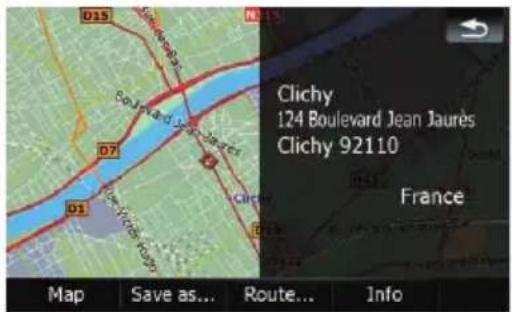
Touch[Route...] then[GoHereNow] toset yourselected position as your destination and calculate etherouteup that point.
FordetailsofotheroperationsontheMap confirmationscreen, refertotheOperation Manualofyournavigationsystem.
AVfunctions
Selectingatrackfromthelist
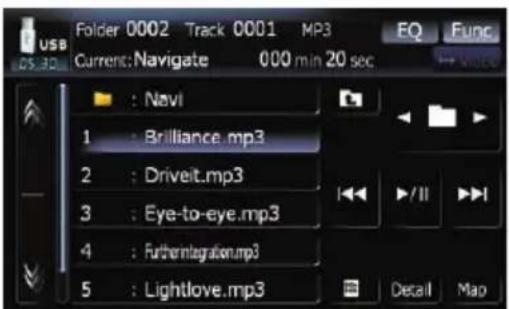
Thelistletsyouseethelistoftracktitles, file namesorfoldernamesonadiscandselect oneofthemtoplay.
1Touch[List].
2Touchthetrackyouwanttoplay.
(e.g.USB)
Thetrackcurrentlyplayingishhighlighted. Touching 📋 or switchestheselectiontothe nextorpreviouspageinthelist.
□Adash(−)isdisplayedifthereisnocorrespondinginformation.
3Toreturntothepreviousscreen,touch [Detail].
SettingsMenu
TexturedPolygons
Thesettinghasbeenchangedsothatthesystemalwayscandrawthemapgraphically.
POISettings
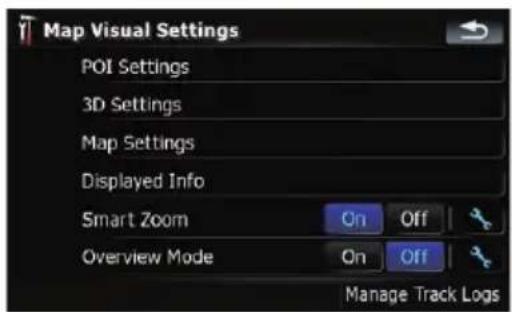
"Manage POI" changes to "POI Settings" and thepositionofkeyhasbeenmoved.
1Touch[MapVisual]onthe"NaviSettings"menu.
The "MapVisualSettings" screenappears.
2Touch[POISettings].
Changesontheupgradedprogramme
DisplayedInfo
The characters on the Multi-Infowindowware enlarged.
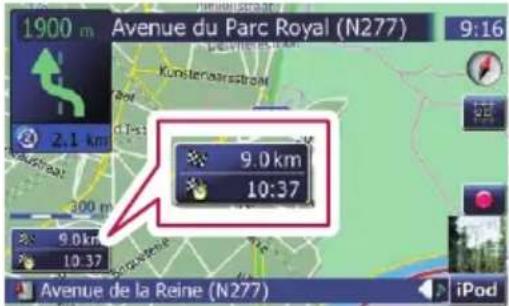
1Touch[MapVisual]onthe"NaviSettings"menu.
The"MapVisualSettings" screenappears.
2Touch[DisplayedInfo].
The "DisplayedInfo" screenappears.
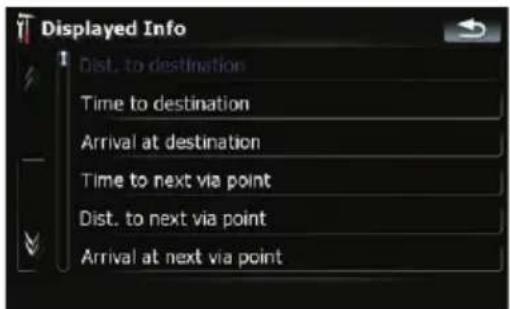
3Touchthekeyontherightof"Top field:"todisplaytheoptions.
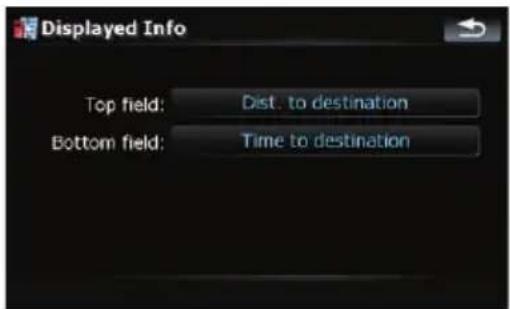
4Touchyourdesiredoption.
ManageTrackLogs
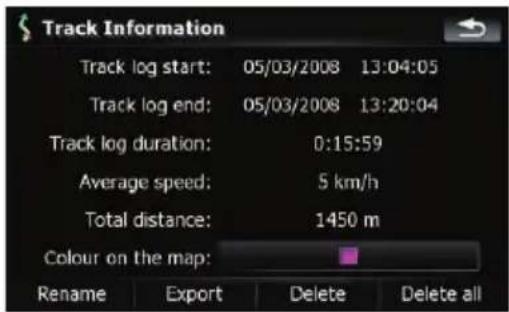
[Exportall] and [Deleteall] keys are added.
1Touch[MapVisual]onthe"NaviSettings"menu.
The "MapVisualSettings" screenappears.
2Touch[ManageTrackLogs].
Alistoftracklogsalreadyrecordedappears.
3Touchthedesiredtracklogonthelist.
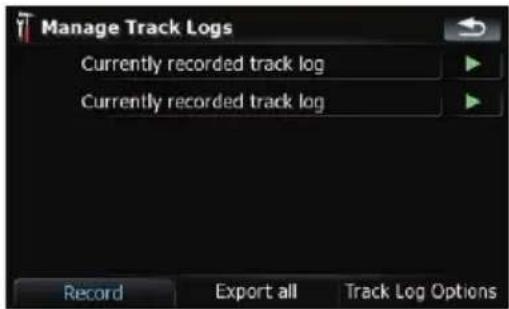
Moredetailsaboutthetracklogappears.
Touching[Exportall]exportsalltracklogs currentlystoredtotheexternalstoragedevice(USBorSD)atonce.
4Touchthedesiredkeytooperateit.
Deleteall:
Touchingthiskeydeletesalltracklogs.
Changesofdefaultvalue
SettingsMenu
| Menuitems | Beforeup-grade | Afterup-grade |
| BackCameraOffOn | ||
| AV1InputOffiPod | ||
| WarnWhenSpeed-ing | OnOff |
MUTEInput/GUIDEMUTEATT

RestoreFactorySettings
Resetsvarioussettingsregisteredtothenavigationsystemandrestoresthemtothedefault orfactorysettings.
☐ Somedataremains.BesuretoreadSetting itemstobedeletedfirst.
Fordetailedinformationabouttheitems whichwouldbeerased,refertoSetting itemstobedeletedonthenextpage.
1Touch[Restore/Delete]onthe"System Settings"menu.
2Touch[RestoreFactorySettings]or[Deleteuserinformation].
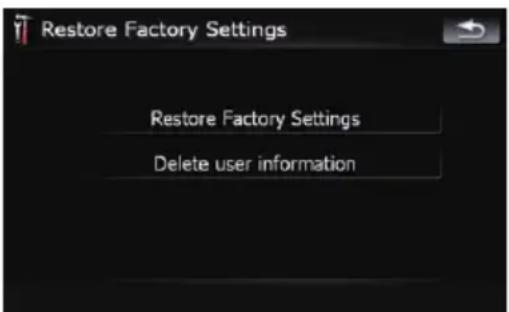
☐Becauseleteddatacannotberestored, takeextracarenottomistakenlydelete items.
3Touch[OK].
Thenavigationsystemwillnowrestart.
Changes on the upgraded programme
Settingitemstobedeleted
The items to be deleted vary depending on the reset method. The items listed in the following table return to the default orfactorysettings.
Almost all items not listed below will be retained. However, some of the items to be returned to their default values are not listed if the setting value can be easily recovered by user, such as the last map scale, the last status of AV operation screen, etc.
—:Thesettingwillberetained.
√:Thesettingwillbeclearedandreturnedtothedefaultorfactorysettings.
Method1: PresstheRESETbutton.
Method2:RestoreFactorySettings
Method3: Deleteuserinformation
NavigationfunctionsMethod1Method2Method3
| DestinationMenu | All settings on “TMC Control Centre” | — | √ | √ | ||
| “History” on “Address” | — | — | √ | |||
| History— | — | √ | ||||
| Favourites— | — | √ | ||||
| “Saved Criteria” on “POI” | — | — | √ | |||
| NaviSettings | SetHome— | — | √ | |||
| GPS&TimeSettings,MapVisual,Route,Warnings,RegionalSettings | —√ | √ | ||||
| Soundsettings“Voice”, “Keys”, “Dynamic Volume (On/Off)” | —√ | √ | ||||
| Soundsettings“Master”, “Dynamic Volume (Maximum speed:, Minimumspeed:)” | — | — | √ | |||
| SystemSettings | Language—√ | √ | ||||
| Othersettings | — | — | √ | |||
| Others | Pinicondata | — | — | √ | ||
| Speedcameradata (+createdbyuser) | —√ | √ | ||||
| Speedcameradata(*1)(importedfromSD/USB) | —√ | √ | ||||
| Anti-theftpassword | — | — | √ | |||
(*1)Theimporteddataisnotdeleted.Onlytheoncedeleteddataisrestored.
| Audiofunctions | Method1 | Method2 | Method3 | |
| AVSettings | WideMode | — | — | √ |
| Other settings | √ | — | — | |
| AV Sound | All settings | √ | — | — |
| CD,ROM,DivX,FM,AM | All settings (*2) | √ | — | — |
| AudiofunctionsMethod1Method2Method3 | ||||
| DVD-V, DVD-VR | All settings | √ | — | — |
| SD, USB | All settings (*2) | √ | — | √ |
| VolumesettingforAVsources,TAvolume√— | — | |||
(*2) All settings including the setting on the "Function" menu are deleted.
| PhonefunctionsMethod1Method2Method3 | |||||
| PhoneMenu(*3) | PhoneVolume— | — | √ | ||
| ReceivedCalls | — | — | √ | ||
| DialedNumbers | — | — | √ | ||
| MissedCalls | — | — | √ | ||
| PhoneSettings | — | — | √ | ||
| Contacts (*3) | All entries | — | — | √ | |
(*3)Allstoreddataof3usersisdeleted.

Troubleshooting
Problemsintheproceduresforupdating
SymptomCauseAction
| Theupgradeprocessdoesn't startandthenavigationsystem bootsupasusual. | ThewrongupgradeSDmemory cardisinserted. | EjecttheupgradeSDmemorycard,andthen insertthecorrectupgradeSDmemorycard. |
| UpgradeSDmemorycardhasbeen insertedwhilethenavigationsystem areturnedon. | TurntheignitionswitchOFFandbackONto rebootthenavigationsystem. | |
| Thescreenthatcannotbeginthe upgradeprocessisdisplayed. | EjecttheupgradeSDmemorycard,anddis-playthemapofyourcurrentposition,and thenreinsertthecard. |

Messagesintheproceduresforupdating
MessageWhenWhattodo
| Anerrorhasoccurredandupdatehasfailed.Consultyour dealerorPioneerservicecentre. | Failedtoupgradethedataforsome reason. | ConsultyourauthorisedPioneerdealer. |

http://www.pioneer.eu
Visit www.pioneer.co.uk (or www.pioneer.eu) to register your product.
PublishedbyPioneerCorporation.
Copyright©2010byPioneerCorporation.
Allrightsreserved.
- UpgradeInstructionsand OperationManualAddendum
- CNSD-250FM CNSD-200FM
- ThankyouforbuyingthisPioneerproduct.
- Important
- Precaution
- Licenceagreement
- Aboutthedatabase
- Instructionsforupgrading
- Changesontheupgradedprogramme
- Troubleshooting
- Incaseoftrouble
- Visitourwebsite
- http://www.pioneer.eu
- SDmemorycard
- Manualoverview
- Conventionsusedinthis manual
- Modelstobeupgraded
- Tocustomerswhohave purchasedtheCNSD-250FM
- AVIC-F500BT
- Customersupgradingthehardwarefor thefirsttime
- Customersusethehardwareupgraded byCNSD-150FM
- Tocustomerswhohave purchasedtheCNSD-200FM
- AVIC-F9110BT, AVIC-F910BT, AVIC-F900BT, AVIC-F710BT, AVIC-F700BT
- CustomersusingAVIC-F900BTorAVIC-F700BT,andcustomersupgradingtheirhardwareforthefirsttime
- CustomersusingAVIC-F900BTorAVIC-F700BT,andcustomersupgradedthehardwarewiththeCNSD-100FM
- CustomersusingAVIC-F9110BT,AVIC-F910BT,AVIC-F710BT
- Renewedpointsthrough thisupgrade
- Forcustomersupgradingthe hardwareforthefirsttime
- ForcustomersusingAVIC-F500BT, AVIC-F900BTorAVIC-F700BT
- ForcustomersusingAVIC-F9110BT, AVIC-F910BTorAVIC-F710BT
- Forcustomerswhohave previouslyupgradedthehardware
- Settingitemstobedeletedandinitialisedbyupgrade
- PIONEERCNSD-250FM, CNSD-200FM
- 1GRANTOFLICENCE
- 2DISCLAIMEROFWARRANTY
- 3LIMITATIONOFLIABILITY
- 4EXPORTLAWASSURANCES
- 5TERMINATION
- 6MISCELLANEOUS
- TERMSANDCONDITIONS FORTELEATLASDATA
- EndUserLicensingTerms
- 1GrantofLicense.
- 2Ownership.
- 3LimitationofLiability.
- Warranty Disclaimer.
- 5Termination.
- 6Indemnity.
- 7AdditionalProvisionswithrespectto theGreatBritainDataandNorthernIrelanddataonly.
- Regardingaudits
- 8AdditionalProvisionswithrespect to theNorwayDataonly.
- 9AdditionalprovisionsforTeleAtlas® PremiumPointsofInterest(the"POIs"). WithrespecttothePOILicensedTeleAtlas Products:
- 10AdditionalprovisionsforTeleAtlas® BrandIconLicensedTeleAtlasProduct(the "BrandIconLicensedTeleAtlasProduct"):
- 11AdditionalProvisionswithrespectto TeleAtlas® 3DLandmarksLicensedTele AtlasProduct(the"3DLandmarks"):
- 12CopyrightNotices.
- 13Miscellaneous.
- Licenses
- 7-Zip
- License for use and distribution
- Note:
- GNU LGPL information
- unRAR restriction
- GNU LESSER GENERAL PUBLIC LICENSE
- Preamble
- TERMS AND CONDITIONS FOR COPYING, DISTRIBUTION AND MODIFICATION
- NO WARRANTY
- END OF TERMS AND CONDITIONS
- How to Apply These Terms to Your New Libraries
- 7-Zip Source Notice
- Aboutthedataforthemap database
- Thenavigationsystem upgradeprocess
- Preparationforupgrade Checkingthedevicenumber
- Checking the current version
- Getting the password for authentication
- Upgradeprocedures Upgradingthesoftware programmeandthemapdatabase
- 3TurntheignitionswitchOFFandback ONtorebootthenavigationsystem.
- 4Touch[OK].
- 5Enterthepasswordforauthentication thatyouobtained, thentouch[Done].
- 6Touch[Yes]tostarttheupgrade.
- 7Touch[OK].
- 8Touchthekeythatyouwanttoselect.
- 9Waituntiltheupgradeprocessiscomplete.
- CAUTION
- 10Touchthelanguagethatyouwantto useonthescreen.
- 11Touchthelanguagethatyouwantto useforthevoiceguidance.
- 12EjecttheupgradeSDmemorycard.
- Checkingwhethertheupgrade wasdoneproperly
- UpdatingtheBluetooth wirelesstechnologysoftware
- Navigationfunctions
- Signpostandrecommendedlane
- 2Touchthemapmodeselectortoswitch themapdisplay.
- Hidingcontrolsfortiltand rotationangle
- SearchingforPOIsaroundthe address
- 3Entertheaddressyouwant.
- 4Touchthecategoryyouwant.
- 5TouchthePOIyouwant.
- 6Touchoneoftheoptionsatthebottom oftheMapconfirmationscreentoselect thenextoperation.
- AVfunctions
- Selectingatrackfromthelist
- SettingsMenu
- TexturedPolygons
- POISettings
- DisplayedInfo
- 1Touch[MapVisual]onthe"NaviSettings"menu.
- 2Touch[DisplayedInfo].
- 3Touchthekeyontherightof"Top field:"todisplaytheoptions.
- 4Touchyourdesiredoption.
- ManageTrackLogs
- 2Touch[ManageTrackLogs].
- 3Touchthedesiredtracklogonthelist.
- Moredetailsaboutthetracklogappears.
- 4Touchthedesiredkeytooperateit.
- Deleteall:
- Changesofdefaultvalue
- RestoreFactorySettings
- Changes on the upgraded programme
- Settingitemstobedeleted
- Problemsintheproceduresforupdating
- Messagesintheproceduresforupdating
Brand : PIONEER
Model : CNSD-200FM
Category : Browser