S580 - Shredder Wallner - Free user manual and instructions
Find the device manual for free S580 Wallner in PDF.


User questions about S580 Wallner
0 question about this device. Answer the ones you know or ask your own.
Ask a new question about this device
Download the instructions for your Shredder in PDF format for free! Find your manual S580 - Wallner and take your electronic device back in hand. On this page are published all the documents necessary for the use of your device. S580 by Wallner.
USER MANUAL S580 Wallner
natural_image
Exterior view of a black and silver paper or paper shaver with a lid (no visible text or symbols)NISZCZARKA S580

UWAGA!
• read the manual carefully before starting to work
- check whether the voltage and frequency given in the table at the bottom of the equipment are the same as in your socket
• do not use the machine if the waste basket is not installed
• do not use the machine if the waste basket is full
• pull the plug from the socket:
a) before emptying the waste basket
b) before any servicing or preservation actions are taken
c) before opening the equipment in case of repair
• take note of the warning plate on the top of the machine to avoid serious injury when your jewellery, tie or hand are too close to the machine
• the machine may not be operated by children
IMPORTANT SAFETY NOTES
| The machine can not be operated by more than one person at any given time! The machine was designed for safe operation by „one person only”. | |
| During the shredding process no other work may be performed on the machine (for example cleaning, etc). | |
| Keep children away from the machine. This machine's design and safety concept are based on adult dimensions to ensure that it can be operated safely by adults only. | |
| Repairs must be executed by a qualified service personnel. | |
| Keep all loose articles of clothing, ties, jewelry, long hair or other loose objects away from opening, injury may result! | |
| Never insert fingers into opening. Serious injury may result! | |
| In case of danger unplug the machine. | |
| Always unplug the machine from the main power supply before opening the machine. | |
| When the machine is equipped with a plug with grounding, then it has to be connected to a socket with grounding! | |
| This machine shreds only paper. The shredding of any other materials may result with serious damages. |

Do not use canned air on shredder. Never use aerosol, petroleum based or other flammable products on or near shredder.

Do not insert staples into opening. Shredding staples may result with serious damages.
INSTALLATION:
• Unpack and set machine upright.
• Take the machine by the holdings on each side and put it onto the horizontal surface.
- Plug in the machine. See „TECHNICAL DATA“ for necessary precautions.
- The socket-outlet shall be installed near the equipment and shall be easily accessible.
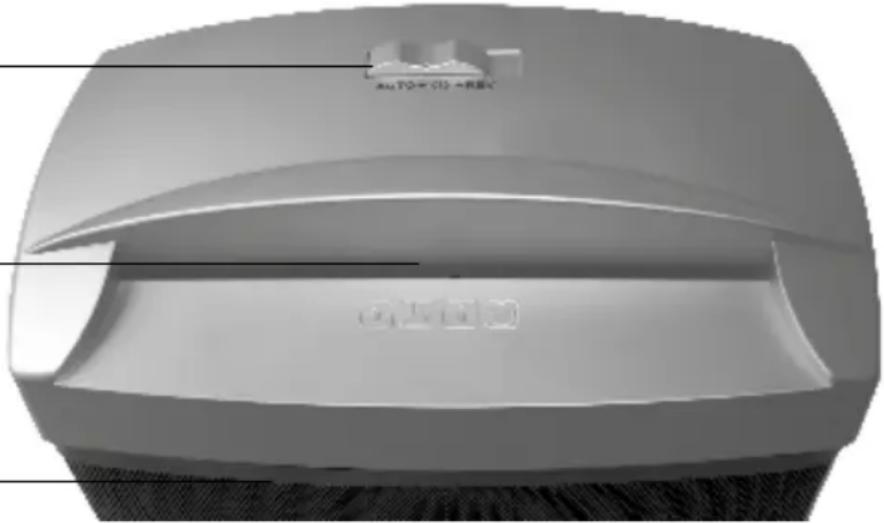
PARTS AND FUNCTION
Operation button:
Reverse (Rev),
OFF
AUTO
Paper entry
Bin
natural_image
3D rendered image of a gray plastic container with a small inset showing a labeled component (no text or symbols on the object itself)OPERATION
FEEDING THE PAPER
- Please check the voltage of your shredders carefully before using and then plug in.
- Set to (AUTO), the shredder is going to standby.
- Feed the paper into the paper entry and the machine will start automatically.
- The machine switches off automatically after shredding

CAUTION:
It is forbidden to place more sheets of paper then the maximum amount indicated by the producer. If the machine will be overloaded, then please proceed according to the information given in the "paper jam" section.
It is forbidden to shred copy paper for needle printers, soft PCV foil, glossy paper and cardboard - it may cause severe damage to the cutting mechanism.
MOTOR PROTECTION
The shredder is equipped with a motor overload device.
After 2 minutes of continuous use allow the unit to cool for 60 minutes before reuse. If:
a) the shredder is operated continuously for too long
b) excess paper is fed in or the paper is not fed squarely into the shredder the overload device may shut off the motor.
If any of this happens:
• unplug the shredder and leave 15 minutes to cool
- plug the shredder in, put the switch in (Rev), pull the excess paper from the cutters and ensure the feed slot is clear
• normal shredding may now be resumed.
BASIC EXPLOITATION RULES
It is not advised to cut as many sheets as indicated as the maximum capacity of the shredder. By exploiting the machine at its top capacity we significantly reduce its vitality. Therefore, to maintain a durable and faultless work of the shredder, it is advised to place no more than 70% of the maximum amount of sheets to be shred at one time indicated for each model by the producer. The maximum amount of sheet should be used only occasionally.
It is forbidden to shred more sheets then the maximum amount of sheets to be shred at one time indicated by the producer. It may cause the blockade of the machine and massive engine overloading, which will diminish shredder's durability or even damage it. Also you should not shred soft objects such as foil, paper towels, toilet paper or fabrics. Nor paper with self-adhesive tape should be placed into the shredder. Those materials wrap around and jam the knives.

IMPORTANT RECOMMENDATIONS / WARNINGS
For your own safety please maintain particular care while installing and using the machine.
GENERAL
Keep hands, long hair, loose articles of clothing, jewellery and ties away from shredder's opening to avoid serious injury. Unstable surfaces may cause the fall of the shredder, which can result in body injuries. Please avoid fast stopping, use of additional force or surface unevenness while transporting the shredder on trolley, casters or table. Do not remove mechanical and electrical securities such as locks, covers or others. It is forbidden to use objects not dedicated to do so or liquids.
ELECTRICAL
The machine should be plugged to the electric circuit only as presented in the manual. The socket must be in close vicinity with easy access to the shredder. While moving the machine, pull the plug from the socket. Do not use the machine when the wire or plug are damaged or after noticing symptoms of machine's damage. Please contact seller to obtain help.
SERVICE
Proceed only with routine actions according to the manual. Do not repair or service machines on your own. Unplug the machine from the circuit and contact seller when one or more of the following faults occur:
• liquid gets into the machine
• machine malfunctions as a result of improper use
• machine does not work accordingly to the manual
PROBLEM SOLVING
| problems checklists solutions | ||
| No operation The power plug is properly inserted to main supply? | Fully put the power plug to the outlet. | |
| Switch is set at „AUTO" position? Set switch to „AUTO" position for operation. | ||
| Switch at „AUTO" position but power light off. | Check basket is out of stand.Put basket back to stand. | |
| Basket at stand but power light off. | Basket should be put into stand to trigger the safety interlock switch for operation. | |
| No operation when insert paper? Paper should be inserted to trigger the sensor at center. | ||
| Checked above but no operation and no power light. | Send back to your local service for repair. | |
| No operation after long time operation | Power lamp is on? Unplug the machine from main supply. Allow to cool down to room temperature and resuming operation. | |
| Stop at shredding Machine is continuously shredding for a long time? | Unplug the machine from main supply. Allow to cool down to room temperature and resuming operation. | |
| Excess squeaking and rubbing noise | Without oiling to the cutting system periodically.- Squeaking and rubbing noise at shredding. | Perform the cutter oiling instruction to lubricate the cutting system. |
| Paper jam - Exceeding the shredding capacity- The paper is not fed squarely into the feed opening. | Set switch to „REV" for reverse running and frees excess paper. Then set to „AUTO" for cutting the remainder of paper left in the cutting system. If serious jim occurred, send back to local service for repair. | |
If any faults should appear, please pass the machine along with the warranty card to the seller or closest authorised dealer. The machine might be passed further, thus the user should maintain the original and complete packaging. In cases when the machine is passed for repair in a not original or incomplete package, the risks of further damages that might arise in transportation are on the user's side. Thus, in such a case, it is in the user's best interest to make the best possible replacement packaging.
TECHNICAL DATA
| model S580 | |
| Shred type shreds | |
| Shred size (mm) 6 | |
| Security level DIN 32757 2 | |
| Security level DIN 66399 P-2 | |
| Entry Width (mm) 220 | |
| Shred Capacity Paper 70g 8 | |
| Accepts CDs - | |
| Accepts credit cards - | |
| Accepts staples/clips -/- | |
| Automatic on/off + | |
| Reverse function + | |
| Basket Volume (l) | 15 |
| Machine Size (mm) | 320x185x393 |
| Power (V) | 230-240 V ~50 Hz |
NOTE ON ENVIRONMENTAL PROTECTION
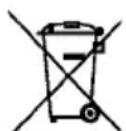
After the implementation of the European Directive 2002/96/EU in the national legal system, the following applies: Electrical and electronic devices may not be disposed of with domestic waste.
Consumers are obliged by law to return electrical and electronic devices at the end of their service lives to the public collecting points set up for this purpose or point of sale. Details to this are defined by the national law of the respective country. This symbol on the product, the instruction manual or the package indicates that a product is subject to these regulations. By recycling, reusing the materials or other forms of utilising old devices, you are making an important contribution to protecting our environment.