CE-D20111-S1 - Séparateur Siig - Free user manual and instructions
Find the device manual for free CE-D20111-S1 Siig in PDF.


User questions about CE-D20111-S1 Siig
0 question about this device. Answer the ones you know or ask your own.
Ask a new question about this device
Download the instructions for your Séparateur in PDF format for free! Find your manual CE-D20111-S1 - Siig and take your electronic device back in hand. On this page are published all the documents necessary for the use of your device. CE-D20111-S1 by Siig.
USER MANUAL CE-D20111-S1 Siig
Introducing the DVI over CAT5e Extender
The DVI over CAT5e Extender allows you to efficiently extend the distance to any DVI enabled display using inexpensive CAT5e cabling. This cost effective solution provides, to the PC user, transmitting high quality digital video to greater distances at minimal cost.
Features and Benefits
• DVI v1.1 compliant, single-link DVI
- Extends video transmission from a DVI source to a DVI display over an economical CAT5e/6 cable
- Adjustable 8-level EQ control to maximize video quality
• Supports 1080i & 1080p HDTV resolutions & VESA standards
• Video bandwidth: 1.65 Gbps
• Built-in EDID feature support on the receiver
- Extends transmission distances up to 60m/200 ft @ XGA (1024x768 @ 60Hz) or 30m/100 ft @ UXGA (1600x1200 @ 60Hz)
Package Contents
• DVI transmitter (TX)
• DVI receiver (RX)
• Power adapter (5V, 4A)
- Quick Installation Guide
Layout
Transmitter

text_image
DVI In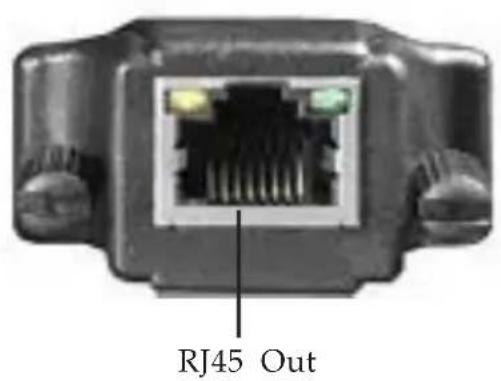
text_image
RJ45 OutFigure 1: Transmitter
• DVI In: plug into the DVI video card of your computer
- RJ45-Out: plug in your CAT5e/6 cable, to be linked to the RJ-45 In connector of the receiver (cable not included)
Receiver

text_image
SIIC +V DC RJ45 IN Power Jack RJ45 InFigure 2: Receiver (front)
- RJ45 In: plug in your CAT5e/6 cable, to be linked to the RJ-45 Out of the transmitter (cable not included)
• Power Jack: connect to the 5V DC power supply
text_image
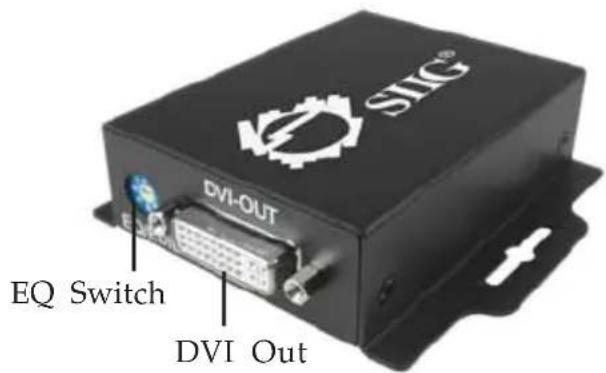
SHG® DVI-OUT EQ Switch DVI OutFigure 3: Receiver (back)
• DVI Out: connects to your DVI display
- EQ switch: adjusts the equilization of the received signal from 0 (strongest) to 7 (weakest). It is recommended to try each setting, from 0 to 7, to find the optimal visual experience.
Hardware Installation
- Connect your DVI source to the transmitter.
- Connect your DVI display to the receiver.
- Connect your CAT5e/6 cable between the transmitter and receiver. Make sure the cable is securely connected and not lose.
- Plug the power adapter into the receiver, then plug the power adapter into a reliable power source.
- Power on all devices.
- If the displayed image flickers or blinks, try to improve the cable skew by adjusting the equilization (EQ Switch) from 0 - 7 (strongest - weakest) to find the optimal visual experience.
Blank Page
Blank Page
Blank Page
Technical Support and Warranty
QUESTIONS? SIIG's Online Support has answers! Simply visit our web site at www.siig.com and click Support. Our online support database is updated daily with new drivers and solutions. Answers to your questions could be just a few clicks away. You can also submit questions online and a technical support analysts will promptly respond.
SIIG offers a 2-year manufacturer warranty with this product. Please see our web site for more warranty details. If you encounter any problems with this product, please follow the procedures below.
A) If it is within the store's return policy period, please return the product to the store where you purchased from.
B) If your purchase has passed the store's return policy period, please follow these steps to have the product repaired or replaced.
Step 1: Submit your RMA request.
Go to www.siig.com, click Support, then RMA to submit a request to SIIG RMA. If the product is determined to be defective, an RMA number will be issued.
Step 2: After obtaining an RMA number, ship the product.
- Properly pack the product for shipping. All software, cable(s) and any other accessories that came with the original package must be included.
- Clearly write your RMA number on the top of the returned package. SIIG will refuse to accept any shipping package, and will not be responsible for a product returned without an RMA number posted on the outside of the shipping carton.
- You are responsible for the cost of shipping. Ship the product to the following address:
SIIG, Inc.
6078 Stewart Avenue
Fremont, CA 94538-3152, USA
RMA #:
- SIIG will ship the repaired or replaced product via Ground in the U.S. and International Economy outside of the U.S. at no cost to the customer.
About SIIG, Inc.
Founded in 1985, SIIG, Inc. is a leading computer upgrade manufacturer of I/O connectivity products, including PCIe, PCI & ISA serial and parallel ports, USB, Serial ATA & UltraATA controllers, FireWire (1394a/b), networking, sound cards, and other accessories. SIIG is the premier one-stop source of upgrades.
SIIG products offer comprehensive user manuals, many user-friendly features, and are backed by an extensive manufacturer warranty. High-quality control standards are evident by the overall ease of installation and compatibility of our products, as well as one of the lowest defective return rates in the industry. SIIG products can be found in computer retail stores, mail order catalogs, through major distributors, system integrators, and VARs in the Americas and the UK, and through e-commerce sites.
PRODUCT NAME
DVI over CAT5e Extender
FCC RULES: TESTED TO COMPLY WITH FCC PART 15, CLASS B OPERATING ENVIRONMENT: FOR HOME OR OFFICE USE
FCC COMPLIANCE STATEMENT:
This device complies with part 15 of the FCC Rules. Operation is subject to the following two conditions: (1) This device may not cause harmful interference, and (2) this device must accept any interference received, including interference that may cause undesired operation.
THE PARTY RESPONSIBLE FOR PRODUCT COMPLIANCE
SIIG, Inc.
6078 Stewart Avenue
Fremont, CA 94538-3152, USA
Ph: 510-657-8688
DVI over CAT5e Extender is a trademark of SIIG, Inc. SIIG and the SIIG logo are registered trademarks of SIIG, Inc. Other names used in this publication are for identification only and may be trademarks of their respective companies.