VEXO115A - Pregnant Audac - Free user manual and instructions
Find the device manual for free VEXO115A Audac in PDF.


User questions about VEXO115A Audac
0 question about this device. Answer the ones you know or ask your own.
Ask a new question about this device
Download the instructions for your Pregnant in PDF format for free! Find your manual VEXO115A - Audac and take your electronic device back in hand. On this page are published all the documents necessary for the use of your device. VEXO115A by Audac.
USER MANUAL VEXO115A Audac
natural_image
Line drawing of a rectangular industrial cabinet or enclosure with mounting holes and a circular logo on the front panel (no text or symbols)ADDITIONAL INFORMATION
This manual is put together with much care, and is as complete as could be on the publication date. However, updates on the specifications, functionality or software may have occurred since publication. To obtain the latest version of both manual and software, please visit the Audac website @ www.audac.eu.

text_image
QR code image containing encoded data, no visible human-readable textREV-1.7
Introduction 04
Active high performance loudspeaker 04
Precautions 05
Chapter 1 07
Connections and connectors 07
Chapter 2 08
Overview VEXO1xxA: Back 08
Chapter 3 010
Block diagram DSP structure 010
DSP functions....011
Adjustable DSP functions: 011
Chapter 4 013
Connecting VEXO1xxA 013
Updating VEXO1xxA 012
Chapter 5 014
Horizontal mounting - rotate the horn 014
Technical specifications 015
Factory defaults settings 016
Active high performance loudspeaker
The VEXO1xxAisahigh output,activeloudspeaker,providingpowerfulanddetailedsoundinacompactcabine...
Their eegan enclosure allows them to be used in modern and trenoy installation applications such as bars and nightclubs, while their functional features make them perfect for use as compact mobile systems. The integrated amplifier can deliver an impressive amount of power, and the built-in powerful DSP allows diverse processing and convenient connection with any kind of audio source. Compression driver overload protection is provided through an internal limiting circuit. Mounting in both horizontal and vertical directions is possible with the optional wall bracket and the rotatable horn. A standard 35mm pole adapter can be installed when used in mobile applications. The VFXOxxA loudspeaker is available in Black (/B) or White (/W).
READ FOLLOWING INSTRUCTIONS FOR YOUR OWN SAFETY
ALWAYS KEEP THESE INSTRUCTIONS NEVER THROW THEM AWAY
ALWAYS HANDLE = THIS UNI WITH CARE
HEFD ALL WARNINGS
FOLLOWALLINSTRUCTIONS
NEVER EXPOSE THIS EQUIPMENT TO RAIN, MOISTURE, ANY DRIPPING OR SPLASHING LIQUID, AND NEVER PLACE AN OBJECT FILLED WITH LIQUID ON TOP OF THIS DEVICE
NO NAXFD - AMF SOURCES, SUCH AS LIGHTED CAND ES, SHOULD BE PLACED ON THE APPARATUS
DO NOT PLACE THIS UNIT IN AN ENCLOSED ENVIRONMENT SUCH AS A BOOKSHELF ORC. LOSET, ENSURE THERE IS ADEQUATE VENTILATION TO COOL THE UNIT. DO NOT BLOCK THE VENTILATION OPENINGS.
DO NOT STICK ANY OBJECTS TO ROUCH THE VENTILATION OPEN NCS.
DO NOT INSTAL TI IS UNI NEAR ANYI EAT SOURCES SUCH AS RAD ATORS OR OTHER APPARATUS TI AT PRODUCE HEAT
DO NOT PLACET IS UNIT IN ENVIRONMENTS WHICH CONTAIN HIGH LEVELS OF DUST, LEAT, MOISTURE OR VIGRATION
THIS UNIT IS DEVELOPED FOR INDOOR USE ONLY. DO NOT USE IT OUTDOORS
PLACETI EUNTON A STABLE BASE OR MOUNTIT IN A STABLE RACK
ONLY JSE ATTAC IMENTS & ACCESSORIES SPECIFIED BY THE MANUFACTURER
UNPLUG THIS APPARATUS DURING LIGHTNING STORMS OR WHEN UNUSED FOR LONG PERIODS OF TIME
ONLY CONNECT THIS UNIT TO A MAINS SOCKET OUTF WITH PROTECTIVE FARTHING CONNECTION
THE MAINS PLUG OR APPLIANCE COUPLER IS USED AS THE DISCONNECT DEVICE, SO THE DISCONNECT DEVICE SHALL BE READLY OPERABLE
USE THE APPARATUS ONLY IN MODERATE CLIMATES
CAUTION
The symbo s shown are internation a y recognized symbols that warn about potentia. Hazards of electrical products. The lightning flash with arrow point in an equilateral triangle means that the unit contains dangerous voltages. The exclamation point in an equilateral triangle indicates that it is necessary for the user to refer to the users manual.

CAUTION RISK OF ELECTRIC SHOCK DO NOT OPEN

Those symbols warn that there are no user service parts inside the unit. Do not open the unit. Do not attempt to service the unit yourself. Refer all servicing to qualified personnel. Opening the chassis for any reason will void the manufacturer's warranty. Do not get the unit wet. If liquid is spilled on the unit, shut it off immediately and take it to a dealer for service. Disconnect the unit during storms to prevent damage.

text_image
! CECAUTION - SERVICING
This product contains no user serviceable parts. Refer all servicing to qualified service personnel. Do not perform any servicing (unless you are qualified to)
EC DECLARATION OF CONFORMITY
This product conforms to all the essential requirements and further relevant specifications described in following directives: 2014/30/EU (EMC) & 2014/35/EU (LVD).
WASTE ELECTRICAL AND ELECTRONIC EQUIPMENT (WEEE)
The WEEE marking indicates that this product should not be disposed with regular household waste at the end of its life cycle. This regulation is created to prevent any possible harm to the environment or human health.
This product is developed and manufactured with high quality materials and components which can be recycled and/or reused. Please dispose this product at your local collection point or recycling centre for electrical and electronic waste. This will make sure that it will be recycled in an environmentally friendly manner, and will help to protect the environment in which we all live.
Connections and connectors
CONNECTION STANDARDS
The input and output connections for AUDAC audio equipment are performed according to international wiring standards for professional audio equipment.
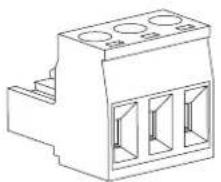
3-Pin Terminal block:
For balanced signal input and output connections
natural_image
Technical line drawing of a mechanical component with three circular holes (no text or symbols)Left: Signal -
Center: Signal
Right: Ground
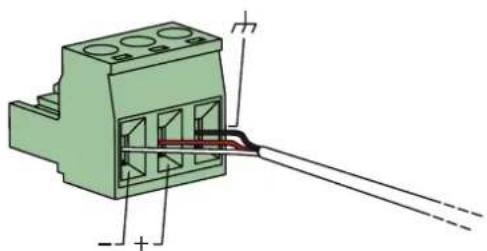
For balanced signal input and output connections. For unbalanced signal input and output connections
text_image
Technical diagram of a green electrical connector with labeled terminals and internal structure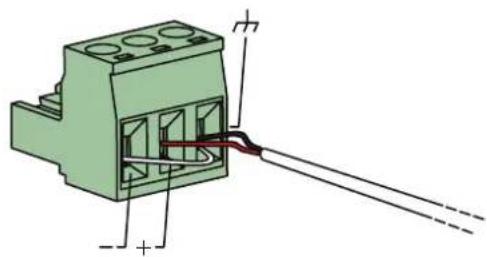
natural_image
Technical diagram of a green electrical connector with terminal blocks and wiring (no text or symbols)6.3 mm Jack (AUX):
For balanced line input connections
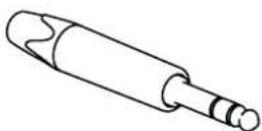
Tip: Sig +
Ring: Sig
Sleeve: Ground
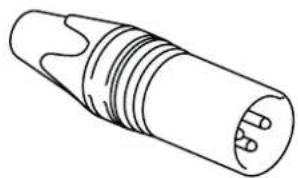
XLR
For balanced line input connections
natural_image
Line drawing of a cylindrical connector with multiple leads (no text or symbols)PIN 1: Ground
PIN 2: Sig +
PIN 3: Sig-
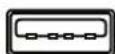
USB
USB-A: I or firmware updates and loading custom WaveDynamics™ settings
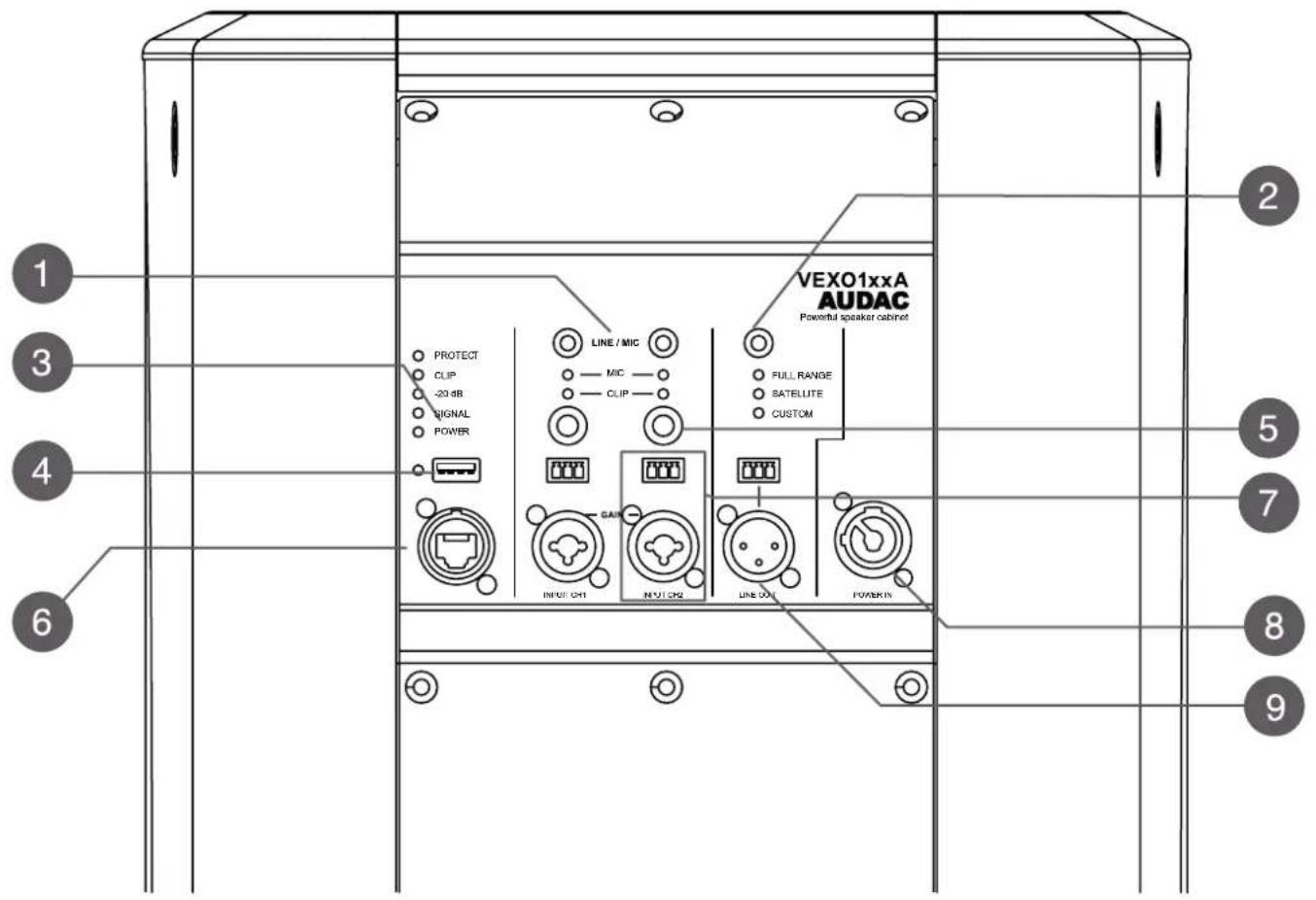
Overview VEXO1xxA: Back
text_image
VEXO1xxA AUDAC Powerful speaker cabinet PROTECT CLIP -20 dB SIGNAL POWER LINE / MIC MIC CLIP FULL RANGE SATELLITE CUSTOM CAI INPUT CH1 MOTCH2 LINE OUT POWER IN 1 2 3 4 5 6 7 8 91) Mic / line switch
The VEXO is designed to accept both mic and line level inputs. The switch changes the input level between Mic to Line levels. For safety reasons, press and hold for three seconds to change the input.
CAUTION: line-level source to a mic-level input will cause the sound to be loud and distorted. The line-level signal is stronger (123dB) than what the mic level input can accept.
2) Mode selection:
The VEXO has three frequency modes for various applications. A dedicated switch changes the VEXO's frequency response between Full Range, Satellite, and Custom modes.
In full range, the speaker covers the entire frequency range as standard. In satellite, the low frequencies are cut away for an external subwoofer cabinet reinforcement.
In custom mode WaveDynamics™ can be configured live thanks to the AN144X1 module or can be uploaded thanks to the provided USB port.
3) Status LED:
PROTEC: The Amplifier Protection Mode is a shutdown state that amplifiers can enter in critical situations. The purpose of the shutdown state is to prevent damage to the amplifier or other system components.
CLIP: The Clip IFD illuminates when the corresponding channel is working at maximum level. To ensure the best signal to noise ratio, the Clip IFD may only illuminate at peak levels.
-20 dB: the -20dB LED illuminates when the input signal reaches the -20oBV level.
SIGNAL: The Signal LED illuminates whenever a signal is detected.
POWTR: When the VFXO is on, the I FD is blue. By default, the VEXO will go into standby mode after 20 minutes of nacitively. This is indicated by the I FD turning orange. Disabling and changing time period for activating standby can be adjusted in the AUDAC Touch2™ app.4
4) USB port for custom WaveTune™ settings
WaveTune provides installers and end users with an intuitive tool for adjusting audio processing. The powerful DSP processor built in the amplifiers, can deliver control over the most advanced acoustic configurations. Custom WaveTune™ can be made in the AUDAC Touch2™ app under WaveDynamics™ and imported true this USB port.
5) Gain control:
The gain for the inputs is adjustable within a range of -∞ dB to -7 dB which can accept either microphone or line level signals.
6) Optional Dante network audio
The VEXO has the option to be equipped with a AN14XT Dante™ audio network. The installation of this optional module allows these amplifiers to be integrated into any DANTE enabled AV network and transfer digital audio with any compatible product on the market, ranging from music sources to microphone systems, mixers, and many more.
When the optional AN 44XT module is installed, the VEXO1xxA can be connected to the network via this port, using a CAT cable.
7) Input connections
The combination in/out of XLR/6.3mm Jack and the 3-pin terminal clock accepts both XLR or TRS balanceo connections (such as microphones or other professional audio signals) and unbalanced 6.3mm Jack connections (such as laptops, phones, CD players,...).
8) PowerCON mains input connection:
For power supply, the VEXO model is equipped with a compatible PowerCON TRUE1 connector. The powerCON TRUE1 is a locking 3 conductor equipment AC connector.
9) Line output connections:
This XLR or 3-pin terminal block output connection should be used to carry line level output to another active VEXO loudspeaker. It is possible to assign INPUT C11, INPUT C12 or MONO MIX for LINF OUTPUT connection.
In factory default, LINE OUTPUT signal will be set to 'full range'. The full factory default settings are available at the end of this user manual.
10) Integrated 35 mm pole adapter at the bottom of the device:
The pole adapter makes it possible to install the VFXO quickly and conveniently on speaker stands with a tube diameter of 35 mm.
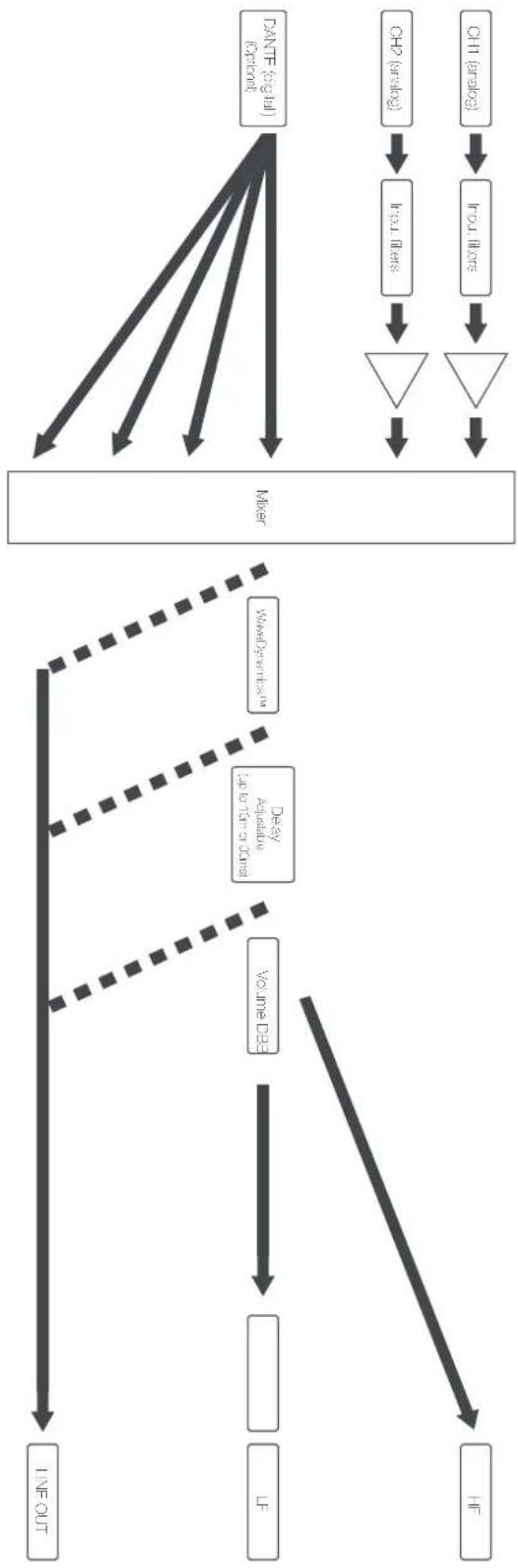
Block diagram DSP structure
The VEXO1xxA features a digital signal processor specially designed for delivering outstanding performance from inputs to outputs. In this block diagram, an overview of the processor's operation is shown.
flowchart
graph TD
    A["DANTE (avg Iul) (optional)"] --> B["Mixer"]
    C["CHP (brack) "] --> D["Irrullers"]
    E["CH1 (brack) "] --> F["Irrullers"]
    D --> G["△"]
    F --> H["▽"]
    G --> I["△"]
    H --> J["△"]
    I --> K["△"]
    J --> L["△"]
    K --> M["△"]
    L --> N["△"]
    M --> O["△"]
    N --> P["△"]
    O --> Q["△"]
    P --> R["△"]
    Q --> S["△"]
    R --> T["△"]
    S --> U["△"]
    T --> V["△"]
    U --> W["△"]
    V --> X["△"]
    W --> Y["△"]
    X --> Z["△"]
    Y --> AA["△"]
    Z --> AB["△"]
    AA --> AC["△"]
    AB --> AD["△"]
    AC --> AE["△"]
    AD --> AF["△"]
    AE --> AG["△"]
    AF --> AH["△"]
    AG --> AI["△"]
    AH --> AJ["△"]
    AI --> AK["△"]
    AJ --> AL["△"]
    AK --> AM["△"]
    AL --> AN["△"]
    AM --> AO["△"]
    AN --> AP["△"]
    AO --> AQ["△"]
    AP --> AR["△"]
    AQ --> AS["△"]
    AR --> AT["△"]
    AS --> AU["△"]
    AT --> AV["△"]
    AU --> AW["△"]
    AV --> AX["△"]
    AW --> AY["△"]
DSP functions
DSP functions can be adjusted via AUDAC Touch2™ app when the ANI4IXT module is installed. The ALUDAC Touch™2 app can be downloaded for free from the AUDAC website, Google play or Apple App store. The default administrator password (access to all functions) is "VFXO" and the default user password (access to basic functions) is "user". If you want to make changes to the settings, you must log in with the administrator password.
After adjustment, DSP adjustments can be exported into a USB and loaded to other VEXO1xxAs using the USB port.
How to save a settings file from a VEXO1xxA to a USB drive (as backup, or to duplicate to another cabinet)
- Save a SEL file to a USB (in a box format like in the email)
- Make a folder AUDAC in the root of the USB drive
- Create SaveSET.txt in this audac folder
- Place the USB drive into the USB port VEXO1xxA
The USB LTD will blink shortly. - The SET file can be found in the AUDAC folder
How to load a settings file into VEXO1xxA:
- Upload a SE file to the VEXO1xxA (in a box format like in the email)
- Copy a VEXO1xxA SET file into AJDAC folder in the root of the USB drive (eg: myVexoSettings.SET)
- Place the USB drive into the USB port VEXO1xxA
The USB I FD will blink shortly - Settings are now copied to the VFXO1xxA
Adjustable DSP functions:
Line out selectable: In order to link two or more VEXOXXAs, the output signal can be routed either through XI R or terminal block.
Talkover: The Talkover functionality ducks other music sources to a certain level so spoken messages can be hoared.
Maximum volume: This function allows you to manually set a maximum level on the output of the VEX-OIXXA. This limitation is useful to prevent accidentally playing too loud sound or damaging the speaker.
Delay: A maximum of 51 milliseconds of delay can be set on all outputs, to compensate for a maximum distance of 10.54 meters between audio sources. For convenience, distance information is shared under the delay time.
WaveTune™: WaveTune provides installers and end users with an intuitive tool for adjusting audio processing. At the moment it replaces the equalizer functionality. We aim to include all types of filters for management with WaveTune.
Auto mute: The auto mute will automatically mute the amplifier when the level of the input signal is below a certain predefined level. This eliminates unwanted noise caused by an unused input on the output. This works separately for both output channels.
Antiphase: Anti-phase feature inverts the output signal phase to avoid any phase cancellations due to oudspeaker placing.
Standby: When standby mode is enabled a default standby time is 20 minutes and can be adjustable via AUDAC Touch™ 2 app.
Dynamic bass boost: Dynamic bass boost applies a correction filter on the low frequencies depending on the low frequency level of the content. This correction makes the reproduction warm and detailed at low volumes. The same correction filter reduces the low-frequency levels at the higher volumes, allowing the loudspeaker to handle higher sound pressure levels with less distortion.
TouchLink™: TouchLink™ is a system that can be used for creating virtual zones by linking multiple compatible devices with each other. In AUDAC Touch™ 2 you can select multiple devices or outputs that should react to the user as one zone.
Connecting VEXO1xxA
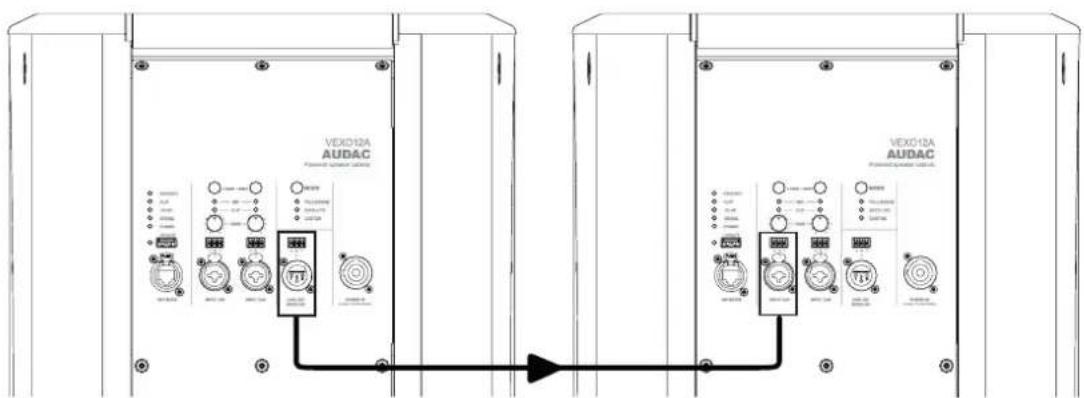
Linking two or more VEXO1xxA:
Insert an XLR cable or terminal block into the 'LINE OUT' output of the first VEXO1xxA. The other end of this cable can be connected to the next VFXO1xxA's 'NPUTCII' or 'INPUTCII'. Make sure to set or load the same DSP settings on all of the speakers to avoid unpleasant listening experience. You can repeat those steps for as many speakers as you desire.
text_image
VEX012A AUDAC Power system module VEX012A AUDAC Power system moduleUpdating VEXO1xxA
The USB slot can also be used for firmware updates to the cabinet. The VEXO1xxA firmware is constantly being improved for better performance. The new firmware files (*img files) will be available for download from the VEXO1xxA product page on the AUDAC website. Please check www.audac.eu for updates.
Loading firmware updates:
Firmware updates can be performed by copying the firmware files to an USB drive and placing the USB drive into the USB port of VEXO1xxA. These updates are only required for servicing and/or when implementing new functionalities to the system. They are not required to be performed by the user. Please contact your distributor/seller/technical service for further assistance.
Make sure the files are stored inside the root of the USB drive and the filename is 'VEXOIXXA1MC'. (The complete file path should be ...\VTXOIXXA1MC')
For loading the firmware update, simply insert the USB memory drive into the USB port of the VEXO1xxA. The firmware update files will be automatically discovered and loaded when stored in the correct path.
The POWER LED will blink when the data transfer is active. Make sure the data transfer is complete (if TD stopped blinking) before the USB drive is removed. During the firmware update process, the first MIC light will turn green. Loading the firmware update can take several minutes before complete. When the update is completed the POWER LED will turn blue.
Horizontal mounting - rotate the horn
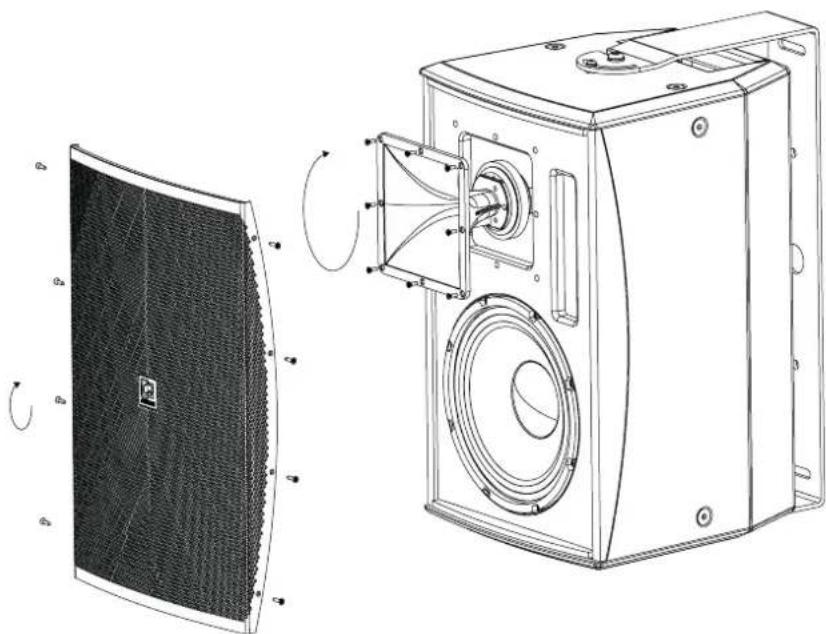
If the VEXO1xxA is mounted horizontally, the horn must be rotated 90°. This is needed to maintain the correct coverage pattern (90° x 70°).
natural_image
Technical line drawing of a speaker chamber with fan array and external components (no text or symbols)To rotate the VFXO1xxA's horn, the grille must be removed first. To do this, the eight screws on the sides must be unscrewed.
Once the grille is removed, the eight screws that no os the horn must be unscrewed. Once these are unscrewes, the horn can be rotated 90°
After the horn is rotated, the horn and the grill can be reattached using the same screws respectively.
The AUDAC logo can be also rotated. No tools are required for this. Simply, pull the logo out slightly and rotate it.

natural_image
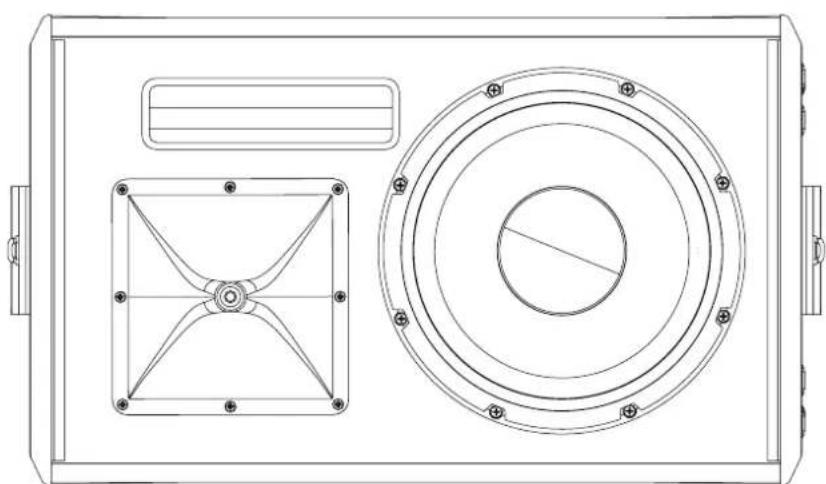
Technical line drawing of a mechanical device with circular components and mounting holes (no text or symbols)In case of uncertainty, check the rotation of the horn to ensure the best sound experience.
Compare the position of the horn with the corresponding drawings.
natural_image
Technical line drawing of a rectangular device with two circular components and a central hub (no text or symbols)| VEXO110A VEXO112A VEXO115A | |||
| Peak Power handling 1200 Watt 1600 Watt 2000 Watts | |||
| Program Power handling 450 Watt 600 Watt 750 Watts | |||
| RMS/A±S power handling 300 Watt 400 Watt 500 Watts | |||
| Nominal impedance 8 Ohm 8 Ohm 8 Ohm | |||
| Sensitivity IW/Im | 96 dB | 99 dB | 100 dB |
| Sound pressure Max W/Im | 121 dB | 125 dB | 127 dB |
| Frequency response 3dB | 65 Hz 20 kHz | 58 Hz 20 kHz | 50 Hz 20 kHz |
| Drivers | 1.7" IIF compression horn tweeter | ||
| "0" MF/LF woofer | 12" MF/LF woofer | 15" MF/LF woofer | |
| Coverage | 90° x'0° (rotatable) | ||
| Connectors | nput | Balanced 3.81mm 3-pin Terminal block | |
| Combo Balanced XI R/6.3 mm Jack | |||
| Remote control RJ45 (Optional with ANI4/XT module) | |||
| Output(linkthrough) | XLR/M connector | ||
| 3.81 mm 3 pin Terminal block connector | |||
| Power consumption | Standby | 3.3W | |
| Idle | 22W | ||
| /8 ratedoutputpower | 90W | ||
| /3 ratedoutputpower | 190W | ||
| Construction | Plywood with Polyurethane coating | ||
| Front finish | Powder coated steel grl w lch acouslical foam | ||
| Rigging points | 10 x M10 (2 x top, 3 x bottom, 2 x each side, 1 x rear) | ||
| Polo socket | 35 mm polo adaptor on bottom | ||
| Handle | 1 x on top | ||
| Mounting pattern | 108 x 50.8 mm | 127 x 70 mm | 127 x 70 mm |
| Colour | White (RAL9003) | ||
| Blac < (RAL9004) | |||
| Dimensions (w x h x d) | 329 x 40 x 345 mm | 369 x 610 x 390 mm | 428 x 690 x 450 mm |
| Weight | 17.7 Kg | 23.3 Kg | 28.9 Kg |
| Optional accessories | ANI44X® Dante module | ||
Wall & ceiling mounting bracket (MBK series)
| Input Gain Line | ||
| Wavetune Disadded | ||
| Gain 0 dB | ||
| Frequencies | 60,150,400,100,2600,6800,15000 | |
| Q-factor 0.7 | ||
| Boost 0 dB | ||
| Output Talk over Disabled | ||
| Threshold 50 dB | ||
| Matrix level 60 dB | ||
| Talk over level 0 dB | ||
| Attack 500 ms | ||
| I o d 500 ms | ||
| Decay 500 ms | ||
| Max volume | 0 dB | |
| Wavetune Disadded | ||
| Gain 0 dB | ||
| Frequencies | 60,150,400,100,2600,6800,15000 | |
| Q factor 0.7 | ||
| Boost 0 dB | ||
| Auto mute | Enabled | |
| Threshold -100 dB | ||
| I o d lime | 1500 ms | |
| Output settings | Anti phase | Disabled |
| Standby timeout | Enableo | |
| 1200 s | ||
| Dynamic bass boost | Disableo | |
| Mode | Full range | |
| Signal | Sigma -FQ+De ay | |