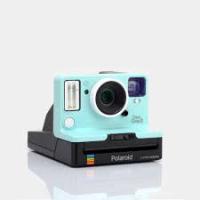
MiniPortrait 206 - Instant Camera POLAROID - Free user manual and instructions
Find the device manual for free MiniPortrait 206 POLAROID in PDF.


User questions about MiniPortrait 206 POLAROID
0 question about this device. Answer the ones you know or ask your own.
Ask a new question about this device
Download the instructions for your Instant Camera in PDF format for free! Find your manual MiniPortrait 206 - POLAROID and take your electronic device back in hand. On this page are published all the documents necessary for the use of your device. MiniPortrait 206 by POLAROID.
USER MANUAL MiniPortrait 206 POLAROID
Setting up the camera
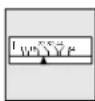
1 Ensure that the camera is set to the correct aperture for the film you are using.
Film Speed Aperture
ASA 80 f11-1/2
ASA 100 f11-1/2
ASA 125 f16
ASA 3000 f64
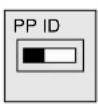
2 Set the aiming light switch to "PP" for passport photos or "ID" for ID photos.
3 Load film into the camera.
4 Plug the small end of the AC power cord into the socket on the back of the camera. Plug the other end into a grounded AC outlet. After about ten seconds, the green Ready light will come on in the LED display.
Taking a picture
1 Load film into the camera.
2 Place your subject approximately 40 inches (1 meter) in front of the camera.
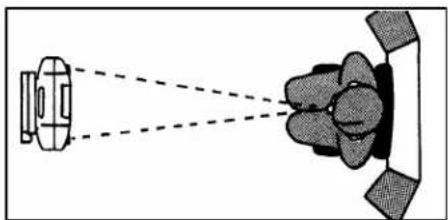
3 Press the Aiming Button and aim the lights at your subject. The lights blink while you aim the camera. Adjust the camera so that the lights converge on the subject's chin. See the opposite page for aiming tips.
4 If your subject has a dark complexion, press the Face Brightener (Boost) button. The Boost light will come on in the LED display. The Face Brightener function turns off after you take the picture. To turn the face Brightener off before you take the picture, press the Boost button again.
5 To take a picture, press the Shutter button. After you press the button, the Pull Film light comes on in the LED display, or if the camera is set to take another picture on this film, it shows Ready. If it says Ready, take another picture.
Note: If nothing happens when you press the Shutter Button, the Aiming Lights probably went out. When this happens, press the Aiming button and take the picture again – before the Aiming Lights go out.
6 To begin processing the film, pull the white film tab. Then pull the yellow tab.
7 Develop the film. Refer to the film instructions for the recommended development time.
8 You can lighten or darken your picture by adjusting the aperture lever and/or the flash exposure setting (in the LED display). To lighten the picture, move the aperture switch to the left; or increase the flash exposure from the LED display. To darken the picture, move the aperture switch to the right; or decrease the flash exposure.


Aiming tips
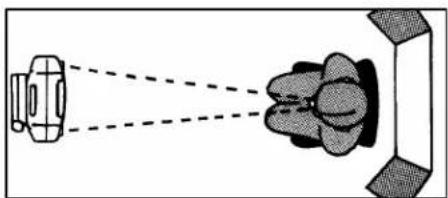
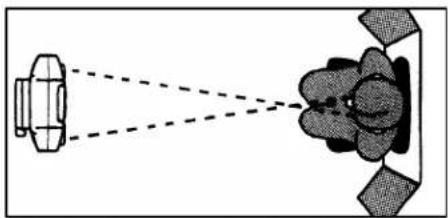
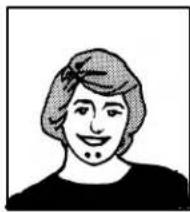
With the MiniPortrait 206 Camera, there is no need for a viewfinder. The aiming lights ensure that your subject's face will appear exactly where you want it in the picture. Just be sure that the subject is at the appropriate distance from the lens as shown below.
Note: ID Images are not to scale.
correct distance
natural_image
Diagram showing a vehicle and a meeting room with dashed lines indicating perspective or perspective (no text or symbols)Aiming lights meet in the center of the chin

natural_image
Simple line drawing of a person's head and shoulders (no text or symbols)Head is proper size
subject too near
natural_image
Diagram showing a vehicle and a vehicle with dashed lines indicating perspective or perspective (no text or symbols)Aiming lights do not meet, but are too far apart
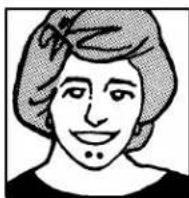
Head is too big
subject too far
natural_image
Diagram showing two objects with dashed lines projecting onto a flower-shaped object (no text or symbols)Aiming lights do not meet, but cross over
natural_image
Simple line drawing of a person's head and shoulders (no text or symbols)Head is too small
For technical assistance, call toll-free from within the U.S.A. at 800-343-5000, Mon.-Fri., 8AM to 8PM Eastern Time.
Caution: This process uses a caustic paste. Do not allow the paste to contact skin, eyes, or mouth; keep it away from children and animals. If you get some paste on your skin, wipe it off immediately and wash the area with water to avoid an alkali burn. If eye or mouth contact occurs, quickly wash the area with plenty of water and see a doctor. Keep discarded materials away from children, animals, clothing and furniture.
Warranty
Polaroid Corporation warrants the MiniPortrait 206 Camera against defects in manufacture or workmanship for a period of two years from the date of purchase. To verify the warranty period, you should keep the invoice, sales receipt, or other proof of the purchase date. Should this product or any component or accessory included with it, except software, prove to be defective at any time during the warranty period, Polaroid Corporation will, at its discretion, either replace or repair this item, without charge. This warranty does not cover damage caused by accident, incorrect installation, unauthorized modification, and misuse or abuse. A charge will be made for repair of such damage.
This warranty excludes all consequential damages and does not affect your statutory rights. Some jurisdictions do not allow the limitation or exclusion of consequential damages, so the foregoing may not apply to you.
Radio interference
United States
This equipment has been tested and found to comply with the limits for a Class A digital device, pursuant to Part 15 of the FCC Rules. These limits are designed to provide reasonable protection against harmful interference when the equipment is operated in a commercial environment. This equipment generates, uses, and can radiate radio-frequency energy and, if not installed and used in accordance with this instruction manual, may cause harmful interference to radio communications. Operation of this equipment in a residential area is likely to cause harmful interference, which must be corrected at the user's expense.
Canada
This digital apparatus does not exceed the Class A limits for radio noise emissions from digital apparatus as set out in the Radio Interference Regulations of the Canadian Department of Communications.
EMC
Polaroid Corporation certifies that this device complies with the RFI emission requirements of EMC Standard EN55022 Class A.
Polaroid"and MiniPortrait"are registered trademarks of Polaroid Corporation, Cambridge, MA 02139, U.S.A. PW20306Q-0 Printed in the U.S.A. 06/98